
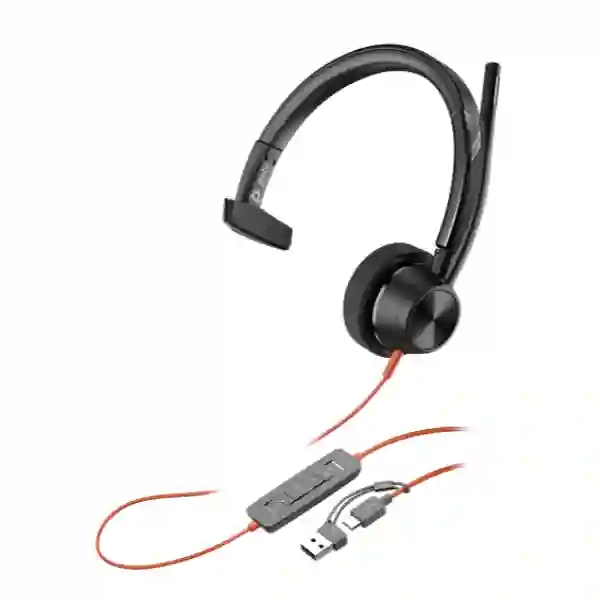
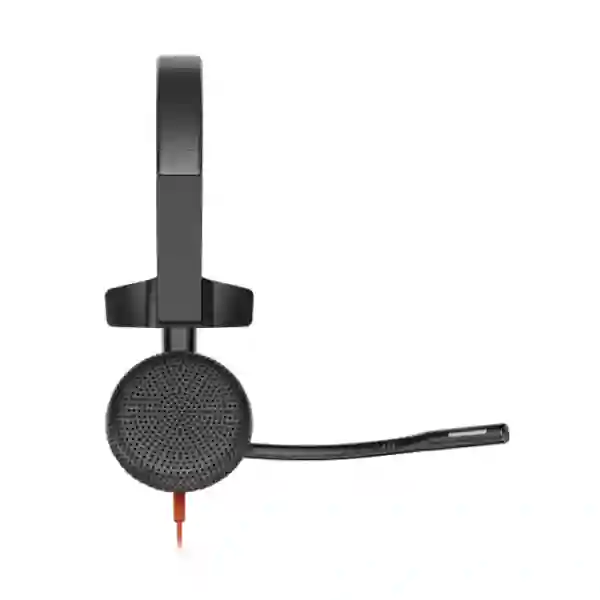
Wired communication | Single-ear design
HP Poly Blackwire 3315 Mono USB Headset with 3.5 mm Connector
Choose the HP Poly Blackwire 3315 headset for practical wired voice calls, single-ear awareness and an adjustable noise-cancelling boom microphone. It is intended for compatible office computers and offers a 3.5 mm audio option for suitable devices. Confirm the exact USB and collaboration-software variant before ordering.
At a glance: key buying facts
On-ear, monaural: one ear covered, one ear free.
Flexible boom with noise-cancelling microphone design.
Wired USB; exact USB-A or USB-C version must be confirmed.
3.5 mm analog headset connection for compatible devices.
Buyer note: HP documents both standard UC and Microsoft Teams editions. The title alone does not verify certification, included adapter, local SKU, price or stock for the specific unit on offer.
Fast choice guide
| Need | What to check |
|---|---|
| Hear nearby colleagues | The 3315 mono design leaves one ear uncovered. |
| Use a PC softphone | Match the USB connector and test the application. |
| Connect an analog device | Verify a microphone-capable 3.5 mm headset socket. |
| Use Microsoft Teams controls | Confirm the exact Teams-certified variant. |
| Equip several employees | Test fit, ports, software and the quoted part number. |
A straightforward headset for the way business calls really happen
The HP Poly Blackwire 3315 headset is designed for people who speak to customers, colleagues or project partners throughout the working day and need a practical wired audio device. Its single on-ear speaker keeps one ear available for nearby conversations, while the adjustable microphone boom lets the wearer place the microphone close to the mouth. For an office that wants familiar controls rather than a new charging routine, this combination makes sense. It also helps buyers compare the headset on the factors that matter: where it will connect, how it will be worn, and how calls are managed.
The 3315 belongs to the Blackwire 3300 family, and the 3.5 mm connection distinguishes it from some USB-only models in that range. That extra connection can be useful when a compatible phone or tablet still has an analog headset jack. However, not every 3315 package has the same USB termination or collaboration-platform certification. A careful purchase therefore starts with the intended computer ports and the exact manufacturer variant, rather than assuming that every product name ending in 3315 includes identical adapters and software buttons.
What the mono design offers in a shared workspace
Monaural means that one ear receives the headset audio while the other is uncovered. This is useful at a reception counter where a colleague may need a quick answer, at a dispatch desk where room announcements matter, or at a customer-service workstation where staff must remain aware of the surrounding team. It can also appeal to people who do not like enclosing both ears for routine voice conversations. The benefit is awareness, not sound isolation: nearby noise will remain audible, and the exposed ear may make concentrated listening harder in a very busy room.
A single-ear layout is a deliberate tradeoff. Employees handling detailed audio editing, music, or frequent conversations in loud open-plan spaces may prefer a stereo or more isolating headset. For a typical voice-focused desk, a lightweight mono headset can make switching between a call and a brief in-person exchange feel natural. Ask the user how often they need to hear colleagues, whether the office is consistently noisy, and whether stereo listening is important. Those answers are more useful than selecting a model based only on its appearance.
A microphone built to focus on speech
HP describes the Blackwire 3315 as having a noise-cancelling microphone and flexible boom. In ordinary use, that means the microphone is designed to reduce some distracting background sound in the outgoing voice signal. It does not mean the ear speaker actively cancels surrounding sound for the person wearing it. The distinction is important for buyers comparing business headsets: microphone noise reduction helps the people listening to the call, while active noise cancellation in the headphones would address what the wearer hears.
Positioning still matters. Put the boom near the corner of the mouth, avoid directing it into a stream of breath, and make a short test recording before the first customer call. A headset cannot correct an extremely noisy room, poor internet connection, or a conferencing application with the wrong input selected. For busy customer-care environments, combine the microphone with reasonable desk spacing, clear audio settings, and a quiet place for sensitive conversations. This gives staff a repeatable process instead of relying on a single hardware feature to solve every audio problem.
USB and 3.5 mm are two useful connection paths
The Blackwire 3315 family supports wired USB connectivity for computers and a 3.5 mm audio connection for compatible devices. Manufacturer documentation includes USB-A versions as well as USB-C versions, with certain USB-C packages including a USB-A adapter. This is why the words USB headset alone do not identify the precise plug in the box. The safer purchasing approach is to match the exact part number and package description to the ports available on the destination laptops and desktops.
The 3.5 mm option is especially relevant to a buyer with a tablet, mobile device, or other approved audio endpoint that has a compatible combined headset socket. It is not a promise that every phone can use the headset. Many newer phones lack an analog jack, some require a compatible external adapter, and some audio sockets are output-only. Confirm that the jack supports microphone input as well as audio output, then verify the application to be used. A physical connector fit is necessary but does not guarantee every software feature will work.
Why USB may be the better daily connection
For office computers, a direct USB connection is often the simplest way to make the headset available as a distinct audio device in meeting or calling software. It avoids dependence on an analog headset port and provides access to USB call controls where the operating system and application support them. HP documents call answer and end, mute, and volume adjustment controls for the Blackwire 3315 family. These controls help users manage routine conversations without repeatedly reaching for controls on a computer screen.
Nevertheless, a button may behave differently in different applications or when the headset is connected through the analog jack. Before deploying a fleet, test the actual calling program and connection method used by the organization. Select the headset for both microphone and speaker in the application’s audio settings. Place a test call, confirm that mute operates as expected, check volume at a comfortable level, and verify whether call answer and end controls are recognized. That short test gives a more reliable outcome than relying on a generic compatibility statement.
The role of the 3.5 mm plug
A 3.5 mm audio connection can be convenient when work moves between a computer and a compatible mobile or tablet endpoint. It offers a familiar wired connection without requiring a wireless pairing sequence. This is useful for an employee who occasionally takes a voice call on an approved device away from a main workstation. The important question is whether the specific device has a headset-capable analog socket. A microphone-enabled four-contact headset jack is not interchangeable with every socket bearing a similar circular shape.
Buyers should also consider which functions are exposed in analog mode. USB inline electronics, platform buttons, and certain device-management features may not be available in the same way through a simple 3.5 mm connection. Do not purchase the 3315 solely on the assumption that all USB functionality transfers to a phone. Verify the basic functions that matter most: listening, speaking, incoming-call handling, and the way the selected phone treats its microphone input. When uncertainty remains, check a sample with the intended endpoint before ordering multiple units.
How the headset can support routine online meetings
Video meetings are more effective when participants can hear one another without repeated requests to adjust a microphone. A consistent wired headset gives the user a dedicated microphone position and a predictable place for call audio. On the 3315, the flexible boom helps users retain a familiar mouth-to-microphone distance when they move between meetings. The mono speaker is particularly useful when a person must monitor both an online discussion and occasional activity around the desk.
For a successful setup, choose the headset as the input and output device in the meeting application, not merely in the computer’s general preferences. Review the application’s own audio-processing settings and carry out a test meeting. If an employee often works beside loud colleagues, set expectations about what a mono headset can and cannot block. The 3315 may be a sensible choice for regular voice and video meetings, but buyers should not confuse general meeting usability with a certification for a specific application or edition.
Standard UC and Microsoft Teams versions are not identical
HP lists standard unified-communications versions and Microsoft Teams-certified versions within the Blackwire 3315 range. A Teams-specific variant may include a dedicated Teams button and relevant certification, while a standard version should not automatically be described as Teams certified. Both may be useful for business conversations, but the precise software behavior can depend on the manufacturer’s part number, host device, and application. The title of this listing does not establish which certification variant is being supplied.
Organizations standardized on Teams should ask for the exact HP or Poly part number before purchasing and match it against the official model description. The same applies to companies using other collaboration platforms or a browser-based calling system. A headset may pass audio perfectly while its application-specific buttons remain unsupported. Clarifying this point in procurement reduces surprises during deployment, keeps quotations comparable, and prevents staff from being promised functions that may belong to a different package.
Practical comfort through a working day
A headset used for occasional calls has different comfort requirements from one worn through many consecutive conversations. The Blackwire 3315 uses an on-ear monaural design, an adjustable headband, and a cushioned ear contact surface. HP’s specifications for a documented USB-C package describe an artificial-leather cushion surface. The relatively simple structure helps users adjust the headset without learning a complicated fitting system. For a purchasing team, the real question is whether the headset remains acceptable across the length and pattern of each person’s calls.
Comfort varies between individuals. Before a large purchase, let representative staff wear a sample during their usual call schedule and check the pressure on the ear, the stability of the headband, and the microphone’s reach. Encourage users to adjust the band rather than forcing the cup firmly against the ear. If staff wear glasses or move frequently around a workstation, test those conditions too. A practical trial often reveals more about fit than a dimension or weight alone, especially when teams have different working habits.
Wired reliability without battery management
The HP Poly Blackwire 3315 is a corded headset, so it does not require the battery charging routine associated with wireless headsets. That can simplify a workstation where the employee normally sits at a computer and wants the device ready for an unexpected incoming call. It also removes questions about pairing, charging cases, and Bluetooth connection switching during the day. For IT teams managing shared desks, predictable wired accessories can make equipment handover easier.
A cable introduces its own planning considerations. The user should have enough reach to sit comfortably, turn toward a screen, and access frequently used desk items without pulling on the headset or connector. Keep cables clear of chair wheels and walking areas, and avoid repeated sharp bends near plugs. Wired does not mean universally more suitable: a worker who frequently moves far from a desk may benefit from a wireless alternative. Choose according to the task rather than assuming one connection method is superior for every employee.
Call controls that employees can learn quickly
The documented 3315 controls include call answer and end, microphone mute, and volume adjustment. These are the everyday actions most business-call users need. A readily accessible mute control can be helpful when a colleague approaches during a meeting, while volume controls let staff respond to different callers without digging through menus. Their usefulness depends on an intentional setup: employees should know which control changes their microphone, which affects listening volume, and how their calling software indicates that mute is active.
Call-control behavior is subject to the supported USB configuration and software integration. Treat the buttons as part of the headset’s documented design, not as a guarantee that every browser, desk phone, softphone, or 3.5 mm endpoint will map them identically. In user orientation, demonstrate a test call and show where mute status appears on screen. For contact centers, add that step to the onboarding checklist. Small differences between software settings are often responsible for confusing experiences that otherwise look like hardware faults.
Clear communication starts with the whole setup
A business headset is one component in a communication chain that also includes the computer, network, calling software, remote caller, and room environment. HP identifies speech-oriented audio processing within the Blackwire 3300 family, including dynamic equalization for voice use. These design features support the headset’s intended role, but do not guarantee perfect speech under every condition. When a caller reports robotic audio or interruptions, the cause may be network quality or application settings rather than the ear speaker or microphone.
Establish a baseline before staff begin live calling. Check the device connection, microphone selection, headset volume, and operating-system permissions. Test from the normal desk location using the real platform. If a problem occurs, compare a local voice recording with an online call: clear local audio alongside poor transmitted audio suggests that the network or application also needs attention. This troubleshooting method helps businesses make better use of the hardware they already have and avoids unnecessary replacement purchases.
A useful option for customer-service teams
For staff who answer incoming enquiries, a one-ear headset can support the mix of telephone conversation and nearby coordination found at many service desks. The user can listen through the headset while staying aware that a supervisor or colleague has approached. The microphone boom provides a consistent speech position, and the corded connection means the workstation does not depend on a charged wireless battery. These are practical advantages in routine voice work, not evidence that one headset can overcome excessive room noise.
A purchasing manager should first establish how calls are delivered. A desktop softphone normally offers different connection options from a dedicated desk phone, and a computer’s audio interface may differ from an agent terminal. Verify whether the actual endpoint accepts the relevant USB or 3.5 mm headset connection and what call controls it supports. Where agents speak for long periods, trial the fit and build in sensible listening levels. For a multi-user team, document the approved connection and platform configuration.
Reception, administration and front-office desks
At a reception or administrative counter, employees often answer calls while speaking briefly with visitors or colleagues. The Blackwire 3315’s monaural arrangement suits people who prefer to keep one ear available for those nearby interactions. A wired headset also remains at the workstation, making it easier to maintain a defined device for a shared task. When employees alternate between calls and keyboard work, the boom microphone leaves their hands free for notes and routine record updates.
Before selecting this headset for a front desk, check the user’s actual calling workflow. If the desk relies on a proprietary telephone socket, a USB computer headset may not connect directly. If staff need to hear callers in both ears because the reception is extremely noisy, mono may be the wrong wearing style. Think about the distance between the PC and the employee’s normal seat, cable placement around visitors, and the location of any shared equipment. The correct headset should fit the physical desk as well as the audio requirement.
Remote and hybrid workstations
A person moving between office and home may prefer a familiar wired headset that does not need pairing with a different computer each time. The 3315 provides a consistent over-the-head wearing style, and models with the appropriate USB connection are suited to compatible laptops and desktops. Its 3.5 mm option can provide a secondary path for an analog-capable device. That flexibility is valuable when the employee knows which ports are present at both work locations.
Remote-work procurement should include a simple port survey. Record the USB type on each laptop, whether the employer supplies docking stations, and whether any phone or tablet genuinely has an appropriate headset jack. Employees who often walk during calls will need to consider the limits of a corded design. Those working around children, traffic, or construction noise should understand that a noise-reducing microphone is not a substitute for finding a quieter location. A small pre-deployment checklist prevents many common usability problems.
Training, education and internal communication
Training coordinators, administrative educators, and team leaders often use voice calls for instruction, interviews, and short online sessions. A dedicated headset can make microphone placement easier to repeat than using the computer’s built-in microphone from varying distances. The single-ear 3315 is a possible fit when the wearer needs to hear activity in the room as well as a remote participant. For a learner in a busy shared space, however, a stereo headset may help with focused listening.
Check whether the training platform recognizes the selected USB variant and test audio before an important session. If devices are shared, define a simple process for cleaning contact surfaces and keeping the correct headset with the assigned computer. Avoid promising a particular platform certification simply because the device can transmit and receive audio through the platform. The objective is dependable speech and a comfortable fit, with the chosen software and physical environment considered as part of the system.
Selecting the exact USB version
When comparing quotations, ask whether the offered Blackwire 3315 ends in USB-A, USB-C, or a USB-C package with a USB-A adapter. HP documentation confirms that such variants exist, so the name of the series alone is insufficient. USB-A is common on many desktops, while USB-C may be present on newer laptops and compact workstations. A supported adapter can help bridge those differences, but it should be part of the confirmed package, not an accessory assumed to be included.
A procurement form can include four simple fields: manufacturer part number, USB plug type, presence of a USB-A adapter, and UC or Microsoft Teams certification designation. Add the 3.5 mm requirement as a separate check. Compare those fields against the computer fleet and the application used for calls. A buyer ordering for multiple offices should keep the same variant specification on the purchase request rather than allowing substitutions based only on the words Blackwire 3315. This avoids mixing functionally different packages.
Understanding device and operating-system compatibility
HP lists support for Windows and macOS computers across the relevant Blackwire 3315 documentation and identifies mobile operating systems in specifications for certain packages. This is a useful starting point, but operating-system support is not the same as universal compatibility with every port, application, dock, or telephone. A tablet might require a working headset jack, while a laptop might need the correct USB connector. System security settings may also prevent a calling application from using a microphone until permission is granted.
For managed business computers, test the exact hardware configuration with any approved docking station and the current software image. Confirm that the headset appears as an audio input and output device, then verify call handling in the organization’s chosen softphone. For mobile devices, test the physical audio path and microphone function rather than assuming that a listed operating system means every handset is suitable. Document confirmed combinations for your users, and revisit the test when significant software or device changes occur.
What to check before using the analog connection
The 3.5 mm feature is an advantage only when the destination device has a compatible headset interface. Some laptops use one combined audio-and-microphone socket, while others have separate connections or no analog port. Many mobile devices have moved to digital connectors. Even when an adapter is physically available, its microphone support and compatibility need checking. A buyer should identify the actual device model and connection type instead of treating all round audio jacks as functionally equivalent.
Perform a simple check with the target device: connect the headset as intended, play a sound, make a short recording, and complete a test call. If audio works but microphone input does not, inspect the connector capability and software input selection before blaming the microphone. If an organization depends on analog connectivity for a critical workflow, ask its IT team to approve the exact combination. An inexpensive sample test can prevent the cost and disruption of issuing an accessory that cannot be used as expected.
Sound protection and appropriate listening levels
HP identifies SoundGuard acoustic protection technology on documented 3315 variants. This is relevant to voice-headset design, but different official records use slightly different feature terminology depending on the exact package. It should not be used as a substitute for safe listening practices or turned into an unsupported guarantee about all acoustic environments. The best policy is to select comfortable volume levels, reduce prolonged exposure to loud audio where possible, and follow applicable workplace hearing guidance.
During setup, start at a moderate listening volume and increase only enough to understand the caller. If people repeatedly raise the volume to overcome a noisy room, consider improving the work area or choosing a more suitable wearing style. Ensure staff know that microphone mute is different from reducing playback volume. Teams operating many headsets should provide basic audio-use guidance and invite employees to report discomfort. These sensible habits matter regardless of whether the user chooses this model or another wired business headset.
Daily handling and care
A headset used at an active desk is often unplugged, moved, stored, and shared. Handle the Blackwire 3315 by its plug rather than pulling on the cable, and avoid sharply folding the lead when putting it away. Keep the microphone boom in a comfortable position without forcing it beyond its intended movement. Store the headset where the cushion is not compressed by heavy objects and where the cable will not snag on drawers or chair mechanisms.
If employees share equipment, establish a suitable cleaning process based on the manufacturer’s care guidance and the workplace’s hygiene policy. Do not immerse the headset, spray liquids into controls, or assume that strong cleaning chemicals are suitable for ear-cushion materials. A workstation label or storage hook can help prevent accidental damage, and a routine visual check can catch worn connectors before an important call. Treat cushions and cables as working components that deserve ordinary care, not as indestructible accessories.
Simple first-use setup for USB computers
Begin by checking that the headset package matches the computer’s available USB port. Connect the correct plug directly or through the specified compatible adapter. Allow the operating system to recognize the audio device, then open the meeting or calling application and select the headset for both microphone and speaker. Speak at a normal level during the audio test. If the application has separate input and output volume settings, review both before starting a live conversation.
Next, test the microphone mute control and any supported call-answer function. If one button does not respond, confirm application integration rather than immediately assuming that the headset is defective. Review microphone permissions if input is missing, and try another approved USB port when troubleshooting an unexpected connection problem. Where docking stations are used, repeat the test through the normal desk configuration. Once the headset works correctly, provide staff with a short internal setup note so that subsequent users can reproduce the result.
A practical troubleshooting sequence
If the user cannot hear a caller, first check the application’s speaker selection and playback volume. Then confirm that the headset is connected to the intended port and is recognized by the operating system. If the remote caller cannot hear the user, check microphone mute, application microphone permissions, and input device selection. Try a local recording to separate microphone issues from network or conferencing problems. This ordered sequence is faster than changing several settings at once without identifying the actual fault.
For analog use, verify that the 3.5 mm socket supports a headset microphone and that the plug is fully seated. If the audio is distorted or intermittently lost, inspect the cable and connector for visible stress and compare with a known-working device where available. If audio works but software call controls do not, review whether that function is supported for the connection and program in use. Record recurring issues and the tested configuration so IT support can recognize patterns and avoid unnecessary replacements.
How it compares with other Blackwire choices
Within HP’s Blackwire 3300 range, the 3310 is a mono model positioned around USB connectivity, while the 3315 adds a 3.5 mm option. The 3320 offers a stereo wearing style with USB connectivity, and the 3325 combines stereo wearing with the 3.5 mm option. These differences offer a helpful selection framework: decide first whether one or two ears should be covered, and then whether the analog connection is genuinely needed. Confirm exact part numbers before comparing adapters or collaboration certifications.
Choose mono when room awareness is part of the job, stereo when listening through both ears is more important, and 3.5 mm when a verified endpoint requires it. USB-only designs can be sufficient for staff who never leave a computer-based calling workflow. Do not assume that a higher-numbered model automatically sounds better or fits every person more comfortably. Wearer preference, device ports, usage duration, application controls, and the local work environment should drive the final choice.
Planning a small-team deployment
For a small office, start by listing who will use a headset and which devices deliver their calls. Group people by work pattern, such as front-office enquiries, internal administration, or extended customer-service sessions. Decide whether one-ear awareness or two-ear listening is more useful for each group. Then identify the USB ports and any genuine need for 3.5 mm audio. This sequence stops the purchasing decision from being based only on the number of headsets required.
Obtain the exact model variant for evaluation and test it in the real calling application. Invite feedback from a few representative users on fit, microphone position, cable reach, and control behavior. Document any needed adapter separately so that the final quotation is complete. If the deployment is in Tanzania, confirm commercial details for the intended order rather than assuming a regional price, delivery promise, or stock position. A brief pilot is usually easier to manage than troubleshooting many incompatible desks after purchase.
Buying for a larger managed fleet
Larger organizations should pay attention to repeatability. A consistent headset specification makes staff training, spare-device handling, and support documentation more straightforward. Record the offered HP part number, USB connector, Teams or standard UC designation, included adapter, and the specific 3.5 mm requirement. Keep those details in purchase approvals and device-assignment records. Without them, two cartons marked Blackwire 3315 could turn out to have differences that matter in daily use.
Plan around a representative test group rather than treating the headset name as a complete compatibility guarantee. Include users on each computer model, docking station, and approved calling application that is important to the business. Confirm whether IT staff need any Poly management or update tools, and verify software support for the actual variant. Maintain reasonable spares based on organizational practice, but do not assume that replacement cushions, cases, or adapters are included unless specified in the order.
Questions to raise when requesting a Tanzania quotation
A useful purchase enquiry should specify the quantity, intended computer connections, application used for calls, and whether the organization needs a mono headset specifically. Ask for the exact Poly part number so you can distinguish USB-A, USB-C, adapter bundles, and any Microsoft Teams-certified edition. If the 3.5 mm connection is essential, identify the device that will use it. This information helps the seller prepare a relevant quotation rather than merely matching a broad product-family description.
Pricing, tax treatment, stock, lead times, delivery coverage, local warranty handling, and after-sales arrangements must be confirmed for the actual Tanzania transaction. They cannot be inferred from an international HP specification sheet or another country’s retail listing. Buyers comparing offers should request those commercial terms in writing and check that the part numbers match. For a deployment across several departments, include the destination device types and rollout priorities so the scope is clear from the start.
What the product name does not tell you
The phrase HP Poly Blackwire 3315 Mono USB Headset with 3.5 mm Connector identifies a useful headset family, but does not by itself identify a unique seller SKU, USB-A or USB-C termination, Microsoft Teams certification, package accessory list, or local commercial offer. Those details can differ between documented variants. In a well-managed purchase, the manufacturer part number and the seller’s exact quotation settle the ambiguity. The headset should not be advertised with a particular bundle merely because that bundle appears on a manufacturer page for another variation.
The same caution applies to warranty, certificates, regional availability, and operating-system functions. A manufacturer’s published specification is valuable evidence about the named model, but it is not a substitute for verifying the unit the buyer will receive. Ask for the exact configuration when a feature is essential to your workflow. This approach protects buyers from unnecessary compatibility risks while allowing them to evaluate the genuine benefits of the 3315: single-ear wearing, wired calling, a boom microphone, and an analog option.
Choosing this headset for the right reason
The strongest reason to consider a 3315 is a practical combination: hands-free business calls, one-ear awareness, wired operation, and the possibility of an analog headset connection on compatible devices. It suits buyers who value straightforward use and who can verify the USB type before purchase. A noise-cancelling microphone supports clearer outgoing speech in ordinary conditions, while the adjustable fit and call controls make everyday communication manageable. These are meaningful features when they align with actual tasks.
It is less suitable for someone who needs wireless movement, strong isolation from surrounding noise, or a guarantee that every mobile device will support the analog plug. A stereo model may fit intensive listening better, and another interface may be required for a proprietary telephone. Review those tradeoffs openly. A headset is most successful when users know exactly where it will connect, what it can do, and what is outside its intended purpose. That knowledge leads to fewer surprises than a list of features alone.
Final pre-purchase checklist
Before approval, confirm the manufacturer family and the precise Blackwire 3315 variant. Verify whether the offer is USB-A, USB-C, or USB-C with an included adapter; check that the 3.5 mm function is part of the quoted item; and distinguish a standard UC version from a Microsoft Teams-certified version. Check the computer or mobile ports, the calling application, and whether staff prefer a monaural wearing style. For an organization-wide purchase, schedule a short sample test before finalizing the deployment.
Complete the decision by confirming what is included in the package and requesting the current local commercial terms. Make sure the quote identifies the correct quantity, product identifier, warranty arrangement for the exact order, and any separately needed accessories. Do not depend on assumed local stock or unspecified delivery times. Once the basic questions are settled, the 3315 can be assessed on its real merits as a practical wired mono communication headset rather than on features that may belong to a different version.
Frequently asked buying questions
Is the Blackwire 3315 a single-ear or two-ear headset?
It is a monaural, single-ear headset. The design leaves one ear uncovered, which may help employees remain aware of colleagues or visitors while using the headset. People who need to concentrate on audio in both ears should compare stereo options such as the Blackwire 3325. The best wearing style depends on work tasks, surrounding noise, and individual comfort.
Does the headset support a 3.5 mm audio connection?
Yes. The 3315 family includes a 3.5 mm headset connection for compatible devices. Confirm that the particular phone, tablet, or computer has a jack supporting both headset audio and microphone input. A physically matching socket or third-party adapter does not automatically guarantee full functionality. Make a test call with the intended device where analog connection is important.
Is the USB connection USB-A or USB-C?
The answer depends on the specific 3315 variant and package. HP documents USB-A models as well as USB-C packages, some with a USB-A adapter. Ask the seller for the exact manufacturer part number and an explicit connector description before ordering. For a managed fleet, compare that information with the actual laptop and desktop port inventory rather than assuming all 3315 headsets are packaged identically.
Will the inline controls work with every calling application?
HP documents call answer and end, mute, and volume controls for the headset family. Support for an individual action depends on the connection and the calling application. In particular, analog 3.5 mm use should not be assumed to offer the same behavior as USB. Test the intended software, check its selected audio devices, and verify button operation before rollout.
Is every Blackwire 3315 Microsoft Teams certified?
No. HP lists both standard UC and Microsoft Teams-certified versions of the Blackwire 3315. A Teams-certified package may have additional application-specific behavior, but the generic product name does not establish which version is being sold. Confirm the variant against the exact manufacturer part number if certification or a dedicated Teams control is an important requirement.
Does noise cancelling mean outside sounds disappear for the wearer?
No. The documented noise-cancelling feature refers to the boom microphone and its handling of background noise in outgoing speech. It should not be mistaken for active noise cancellation in the ear speaker. Because this is a mono headset, the uncovered ear will continue to hear the surrounding room. For a very noisy work area, consider whether a different headset style or a quieter calling space is preferable.
Can I use this headset with a smartphone?
A compatible phone or mobile device with the right 3.5 mm headset connection may work with the 3315. Many current phones lack that socket or require a suitable digital adapter. Compatibility depends on the phone’s actual audio input support, connector arrangement, and calling software. Check microphone and listening functions with the intended handset before treating mobile use as confirmed.
Is the 3315 suitable for long work calls?
The headset is designed for business communication, with an adjustable headband, a cushioned on-ear contact area, and a flexible microphone boom. Comfort still varies with head shape, glasses, workload, and the length of wear. A representative user trial is the best way to judge suitability for repeated or extended calls, particularly before buying for a team.
Will it work with a desk phone or PBX?
It depends on how the call is delivered. A PC softphone using a compatible USB connection is different from a proprietary desk-phone headset socket. The existence of USB and 3.5 mm connectors does not mean the unit can be connected to any telephone or PBX terminal. Identify the exact endpoint and verify supported headset interfaces before ordering.
Does a wired headset require charging?
No charging routine is needed for this corded headset. The user connects it to a supported audio endpoint for operation. The tradeoff is that the cable limits movement and needs appropriate desk routing. If staff frequently walk away from their workstation during calls, compare wireless alternatives before committing to a wired model.
What is the difference between Blackwire 3310, 3315, 3320 and 3325?
The 3310 and 3315 are mono models, while the 3320 and 3325 are stereo models in the Blackwire 3300 family. The 3315 and 3325 provide the 3.5 mm option, unlike their USB-focused counterparts. Exact USB plug formats, adapters, and software editions still vary. Decide first on wearing style and analog-device requirements, then select the correct part number.
What information should be included in a quotation request?
Specify the quantity, expected USB connector, any need for a USB-A adapter, the device that will use the 3.5 mm connection, and the collaboration application. Request the exact part number, included accessories, commercial terms, and warranty arrangement for the quoted unit. For Tanzania purchases, ask the seller to confirm current price, stock, taxes, delivery and support details rather than assuming those facts from foreign product listings.
Request the correct HP Poly Blackwire 3315 configuration
Ask FourTeck Tanzania for a quotation showing the exact manufacturer variant, USB connector, 3.5 mm compatibility requirement, included accessories and commercial terms. Share your quantity and the computers, phones or calling applications involved so the proposed unit can be checked against your use case.
Request a product quotation and compatibility confirmation before purchase.




Reviews
There are no reviews yet.