
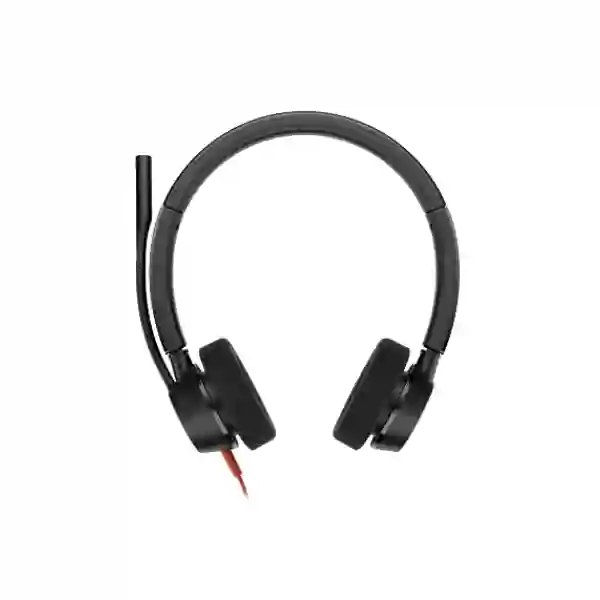
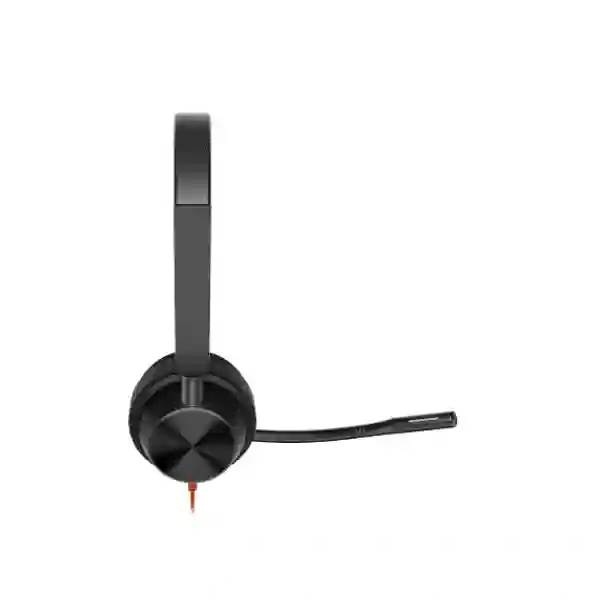
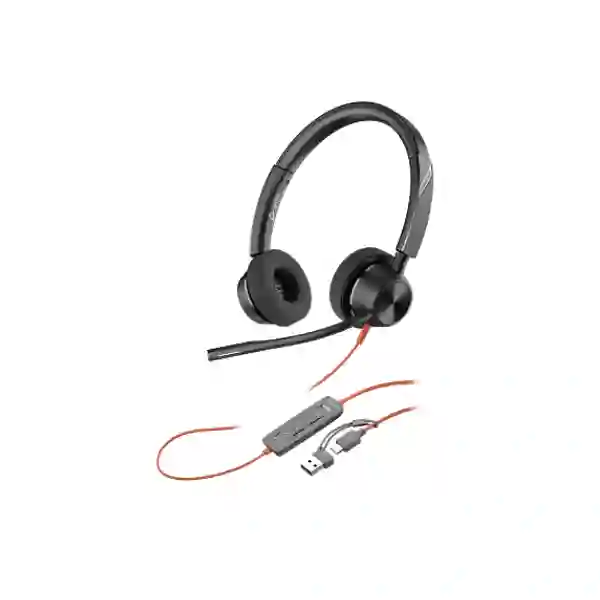
Wired stereo collaboration headset
HP Poly Blackwire 3320 Microsoft Teams USB-C Headset
For people who spend the working day in meetings or taking computer-based calls, the HP Poly Blackwire 3320 Microsoft Teams USB-C Headset offers a straightforward wired stereo design, an adjustable noise-cancelling boom microphone, and everyday inline call controls. It is worth considering for fixed office desks, hybrid work, customer-facing teams, and training sessions where a reliable USB audio connection matters. Ask for confirmation of the exact Teams-certified configuration before purchasing for your Tanzania workplace.
At a glance: verify the essentials
- Wearing style: on-ear stereo with two 32 mm speakers.
- Microphone: adjustable boom with noise-cancelling pickup.
- Connection: wired USB-C; HP documents a USB-C to USB-A adapter for the 8X220AA package.
- Controls: inline call answer/end, mute, and volume; Teams functionality depends on the Teams edition and supported software.
- Fit: padded headband and adjustable microphone boom; approximately 131 g for the documented model.
- Important limitation: this is not a wireless headset or a documented active noise-cancelling listening model.
Who this headset is designed for
The HP Poly Blackwire 3320 Microsoft Teams USB-C Headset is a practical choice for people whose working day involves conversations rather than occasional entertainment listening. It pairs a wired, two-ear design with a noise-cancelling boom microphone and straightforward call controls. A typical user might join Microsoft Teams meetings from a laptop, take customer calls from a desktop computer, listen to training recordings, and move between shared desks. The key buying question is not whether the headset promises every premium feature; it is whether dependable USB audio, a comfortable on-ear fit, and a Teams-oriented control experience match the actual workplace.
For an office in Tanzania, that question often starts with the existing computers and communication software. Identify whether staff use USB-C laptop ports, USB-A desktop ports, or a mixture. Establish whether Microsoft Teams is the primary communications environment and whether employees need two-ear listening. Check where headsets will be used: a dedicated desk, reception area, support station, classroom, or home workspace. Those simple checks make a more useful buying decision than comparing appearance alone. This is a wired USB headset, so it is intended for users who can remain within reach of the cable while working.
What makes the Microsoft Teams version different
The Teams-certified edition of the Blackwire 3320 is intended for Microsoft Teams users rather than buyers who simply need an ordinary computer headset. HP identifies a Microsoft Teams-certified stereo USB-C configuration under manufacturer part number 8X220AA and describes dedicated Teams functionality in its documentation. This is an HP manufacturer reference, not a FourTeck product SKU. Because similar Blackwire 3320 products exist in non-Teams and other connector variations, buyers should match the actual packaging or quoted manufacturer identifier to the Teams edition before authorising a purchase.
Teams integration does not mean the headset includes a Microsoft Teams subscription or independently connects to a meeting. It is an audio accessory attached to a supported host computer running the relevant application. The exact action of the Teams control depends on the app, its state, and the installed software. A buyer who needs a button to behave consistently across a large deployment should test it with the organisation’s approved Teams client and desktop management configuration. General call audio can also be used with other compatible communication apps, but the presence of a Teams-specific control should not be interpreted as certification for every softphone.
Stereo listening without switching to a speakerphone
The Blackwire 3320 has two on-ear speakers, providing stereo listening for calls, training content, and general computer audio. HP specifies 32 mm speakers and describes a listening design suited to everyday business communication. Stereo can be useful when a worker needs to hear a remote speaker clearly while avoiding the privacy limitations of a laptop’s open loudspeakers. It also gives users a familiar listening format for training videos and recorded briefings between calls. The headset is not designed as a home-theatre system, and its principal value in a business is its integrated microphone and communications-oriented ergonomics.
Consider the tradeoff before selecting a stereo headset for every employee. Wearing both earpieces can help a person concentrate, but it also reduces how much of the nearby office they hear. Reception staff who must respond to visitors or colleagues may prefer a one-ear option. Staff conducting online meetings, reviewing audio, or working at a fixed desk may appreciate stereo coverage. On-ear cushions rest against the ears rather than enclosing them completely. Fit and background noise perception vary by individual, so a brief wearing trial is sensible for teams that spend many hours each day on calls.
A microphone built for the person on the other end
The flexible boom microphone is an important feature because remote participants need intelligible speech more than dramatic marketing claims. HP lists a noise-cancelling microphone with a frequency range of 100 Hz to 10 kHz. Noise cancellation at the microphone is designed to reduce unwanted environmental sound entering the transmitted call, but it does not remove every conversation, fan sound, or sudden interruption. Microphone placement still matters. Position the boom near the mouth without placing it directly in the path of breathing, then make a test recording in the same room where the employee normally works.
HP lists a boom length of 135 mm and rotation of 280 degrees for the documented Teams-certified configuration. That adjustability lets the wearer place the microphone sensibly without twisting the headband. A call that sounds poor may be caused by the meeting app choosing the laptop’s built-in microphone rather than the Poly headset. Check the input device before replacing equipment or changing meeting settings. In busy support environments, users should also mute during side conversations and avoid assuming a noise-cancelling microphone provides the same effect as acoustic treatment or a private calling room.
USB-C connection and the USB-A adapter question
The core connection is wired USB-C, which is appropriate for many modern laptops and compatible desktop computers. HP’s documented Teams-certified 8X220AA package includes a USB Type-C to USB Type-A adapter. This matters to buyers equipping an office where older desktop PCs and newer laptops must share the same headset model. Nevertheless, purchase documents should confirm the exact supplied package, particularly if the quotation uses a different manufacturer part number. Do not infer that every similarly named Blackwire 3320 item includes identical accessories or that a generic USB adapter provides all headset control functions.
A USB-C-shaped port does not, by itself, guarantee full call-control integration on every device. The computer must support USB audio, and the operating system and communication application must recognise the connected headset. In a desktop workstation, plug directly into a reliable port where possible. If employees connect through a monitor, dock, or hub, test that route as well because individual USB configurations can behave differently. For mixed fleets, identify the intended port type on each machine, count any necessary adapters, and keep cable paths away from chair mechanisms and foot traffic.
Inline controls that keep routine calls simple
Call answer and end, microphone mute, and volume adjustment are the principal inline controls identified in HP’s specifications. Keeping these functions on the cable can save the user from reaching for a keyboard or finding a small application button during a live conversation. A headset control is especially helpful for employees who alternate between typing and speaking, or whose monitor arrangement makes the Teams interface less visible. Team members should learn which control mutes the microphone and how to recognise an active call before using the device with customers.
Not every application offers exactly the same hardware-button behaviour. HP notes that some softphones may require supported desktop software for call-control features, and a compatible host application is part of a successful installation. An organisation should check the specific versions of Microsoft Teams and any secondary softphone it uses. A useful acceptance test includes answering a call, muting and unmuting, changing listening volume, ending a call, and checking the application microphone indicator. This avoids a common problem in which basic audio works but the user reasonably expects an unavailable shortcut to control an unrelated meeting application.
Getting started at a Windows or Mac workstation
An initial setup should be deliberate but uncomplicated. Connect the headset using the suitable USB port, let the operating system detect the audio device, and open the sound settings. Select the Poly headset as both the speaker and microphone when it is not selected automatically. Next, open Microsoft Teams, review the app’s device settings, and place a test call. Listen for clear playback, make a short microphone recording, and check that the selected input is the boom microphone rather than the laptop microphone. Confirm the mute control works as expected before an important customer conversation.
HP lists Windows 10, Windows 11, and macOS among the supported operating systems for the referenced configuration. Actual performance can depend on operating-system updates, security permissions, port availability, and the version of the communications software. On managed computers, security policy may limit which applications or updates users can install. If the organisation uses a desktop headset-management utility, have the IT team approve and deploy it rather than asking staff to install unreviewed software. A small pilot on representative laptop and desktop models gives administrators a reliable starting point for a wider deployment.
Microsoft Teams meetings, training and everyday calls
The Blackwire 3320 makes sense for a worker who participates in recurring Teams meetings and needs predictable audio at a fixed desk. It is suitable for ordinary activities such as joining a scheduled team discussion, attending virtual training, listening to a presentation, speaking with colleagues, and taking a computer-based customer call. A headset can also help prevent meeting audio from spilling into a shared office through external speakers. Those benefits come from having personal speakers and a dedicated microphone rather than from a promise that the device will eliminate distractions.
Before a high-stakes meeting, employees should check the Teams audio device selection and verify that the headset has not been replaced by a dock, external monitor, or Bluetooth speaker in the application’s settings. Meeting organisers should still maintain good conferencing practice: avoid overlapping speech, mute unused microphones, and provide stable internet access. The headset manages the local audio path; it does not improve the quality of an unreliable network connection or repair problems with meeting permissions, remote microphones, or overloaded computers. Clear responsibilities between the IT team and the headset user reduce unnecessary support calls.
Practical value in shared offices and customer service
In a customer-service setting, communication quality is an operational consideration. A caller’s impression may depend on whether the agent’s voice is understandable, whether the agent can mute quickly to consult a colleague, and whether the audio device is comfortable enough for recurring calls. The noise-cancelling boom and inline mute button address parts of that workflow. Using a consistent wired headset model can also simplify orientation for new staff because the controls and connection method are similar at each equipped desk. Teams should test the headset against their actual call application before standardising on it.
Shared workspaces require attention to hygiene, fit, and desk allocation. A headset that moves between users should not be left on a dusty desk or in contact with liquids, and workplaces should decide whether personal issue or shared-pool use is appropriate. Some offices will prefer assigning a headset to each employee even if computers are shared. Where visitors and walk-in customers regularly approach a desk, the two-ear design can be a disadvantage if the employee must monitor the room. Match the listening style to the job rather than assuming one headset fits every reception, sales, or support function.
Home offices and hybrid work arrangements
Employees moving between office and home often benefit from equipment that does not require charging or pairing before every session. A wired USB headset provides a straightforward connection point for a work laptop and does not depend on its own wireless battery. For a home workspace, the Blackwire 3320 can support scheduled video conferences, online lessons, coaching sessions, and regular calls. The main requirements are a compatible computer, a working meeting application, a suitable port, and a workspace where the cable can reach safely from the laptop to the seated user.
The limits are equally important. Users cannot walk around a room while remaining connected in the way they can with a wireless headset. The boom microphone is designed to reduce unwanted sound, not guarantee silence in a noisy home. If a person shares a room, they should arrange a sensible call location and use the microphone mute function when necessary. Remote workers should also know how to choose the correct input and output device after reconnecting a laptop to a docking station. A short written setup guide with screenshots from the organisation’s own software is often more valuable than an overly complex equipment policy.
Fit, adjustment and wearing comfort
HP describes a padded headband, soft ear cushions, pivoting speakers, and a flexible microphone boom in the Blackwire 3300 Series. For the documented configuration, the headset weighs approximately 131 grams. These design choices aim to make business calls more comfortable without adding the bulk of a large over-ear headset. Users should adjust the headband until each on-ear speaker sits evenly, then place the boom where their speaking voice sounds natural. A properly adjusted headset is less likely to shift during typing or when the wearer turns toward a second monitor.
No published weight or cushion specification can predict comfort for every person. Glasses, hairstyle, head size, sensitivity to on-ear pressure, and the length of uninterrupted calls affect the experience. Users who take lengthy calls should take appropriate breaks and adjust the fit if the headset begins to feel uncomfortable. A purchasing team evaluating dozens of units may find that an employee trial provides better evidence than a specification sheet alone. Staff who need strong passive isolation or a fully enclosing earcup should consider a different headset class, because the Blackwire 3320 is an on-ear stereo design.
Understanding the cable and desk layout
HP’s specification for the verified 8X220AA configuration lists approximately 217.93 cm of total cable between the USB connection and headset, with the inline module partway along the lead. This gives a useful starting point for a standard seated workstation, but the practical reach depends on where the computer’s port is located. A tower under a desk, a dock behind a monitor, and a laptop beside the keyboard create different cable routes. Before placing a bulk order, measure one representative workspace and verify that the inline controls remain comfortably reachable when the employee is seated.
A wired headset should not be fitted where its cable is routinely pulled tight, dragged under a chair, or routed across a public walkway. Keep the connector free of sideways tension, especially where employees regularly disconnect laptops. If a desk uses a docking station, test the actual dock and its available USB port rather than assuming every dock behaves identically. A worker who needs to leave the workstation frequently while speaking may be better served by a wireless model. These simple ergonomics and workflow checks are essential to a satisfactory wired headset installation.
What the audio specifications actually tell you
HP lists 32 mm speakers, 32-ohm impedance, a nominal sound pressure level of 94 dB SPL, a microphone bandwidth of 100 Hz to 10 kHz, and a speaker bandwidth reaching 20 Hz to 20 kHz for the documented Teams model. These are manufacturer specifications, not measurements of how every meeting will sound in a real office. They describe aspects of the device hardware and audio capabilities, but voice clarity still depends on microphone positioning, communications software, host configuration, the remote participant’s equipment, and the network connection supporting the call.
Buyers should therefore evaluate sound using ordinary spoken sentences, a typical Teams meeting, and the softphone or training material staff actually use. Check whether audio is clear at a comfortable listening level, whether the far-end listener can understand the wearer in a normal office environment, and whether changes to microphone input alter the result. Avoid treating the largest published frequency range as a direct indicator of call quality. If the organisation has special requirements for hearing accessibility, acoustic isolation, monitored calls, or transcription accuracy, test those workflows separately rather than inferring their results from basic hardware specifications.
Noise reduction, SoundGuard Digital and sensible listening
The phrase ‘noise cancelling’ in this headset’s basic specifications refers to the microphone, which helps manage unwanted sound picked up during speech. It should not be confused with active noise cancellation that electronically reduces noise heard by the wearer. The Blackwire 3320 listing should not be described as an active noise-cancelling listening headset. This distinction matters when workers ask whether the product will block air-conditioning noise, nearby conversations, traffic, or other sounds around them. A microphone feature intended to help callers hear speech is a different capability from personal noise isolation.
HP identifies SoundGuard Digital acoustic protection for the documented headset and notes that a supported Poly desktop application is needed to enable its related features. Administrators should check current software requirements for the operating system in use before relying on a specific configurable protection setting. General safe-listening practices still apply: begin at a moderate volume, avoid unnecessarily loud playback, and report unexpected audio spikes or discomfort. No headset should be described as eliminating every acoustic risk. Organisations with formal workplace hearing policies should evaluate the product in the context of those policies and their approved software configuration.
Checking application compatibility beyond Teams
The manufacturer positions the Blackwire 3300 Series for business communications and documents compatibility with a range of computer-based softphone environments. For the Teams-certified configuration, Microsoft Teams is the most natural starting point because certification is an explicit reason to select this edition. General USB audio may work in other meeting and voice applications, but business buyers should distinguish playing sound from fully integrated call control. A headset may deliver clear speaker and microphone audio while its physical call button remains application-dependent, especially when multiple communications tools are open.
HP Poly’s current desktop-support documentation lists the Blackwire 3300 Series among supported or compatible devices for several unified-communications clients, with differences by application and desktop operating system. That matrix can change as software evolves. Before deployment, record the exact client name and version, operating system, and approved device-management software. Test mute synchronisation and call answering separately in every application that matters. A help desk working across Teams and another contact-centre client should not assume the two apps will respond identically to a single cable control. The correct specification is the one demonstrated in the actual environment.
Phones, tablets and USB-C compatibility limits
HP’s wider compatibility information references Android and iOS and supported devices with USB-C, but that is not a guarantee that every phone or tablet will support this particular headset, every audio function, or every Teams shortcut. Mobile devices vary in their USB audio implementations, operating-system permissions, connector behaviour, and application support. Some mobile devices also require adapters or have restrictions on external accessories. Buyers should confirm the exact phone or tablet model and test audio input and output before making a mobile-use promise to staff.
The Blackwire 3320 should also not be confused with the Blackwire 3325, which has a separate 3.5 mm connector option in the relevant HP configurations. The documented 3320 USB-C package is not the right choice when the sole requirement is to plug into a traditional analogue 3.5 mm audio jack. Where an organisation needs one headset for several device types, it should list the real connectors in use and choose a model accordingly. Cross-device convenience is only useful when the physical connection and the necessary call-control features have been verified in advance.
Blackwire 3320 versus related Blackwire models
Product names in the Blackwire range are similar enough to make purchasing mistakes easy. The 3320 is the stereo option discussed here. HP also lists 3310 models with a mono, or one-ear, wearing style and 3325 stereo configurations that add a 3.5 mm audio connection. The related Blackwire 3220 belongs to a different series and may appeal to buyers with different preferences. Teams-certified variants and general UC variants are separate purchasing decisions, and connector bundles can differ. Match the model name, Microsoft Teams designation, physical plug, and manufacturer part number on the quotation.
For a support agent who must hear colleagues nearby, mono listening may be more appropriate than the stereo 3320. For someone who needs an analogue headset connection to particular equipment, a verified 3.5 mm model may be more useful. For users who need to move around the office during a conversation, evaluate a wireless alternative instead. These comparisons do not establish that one product is universally better. They show how to narrow the choice using workflow, device ports, application integration, expected call duration, and user comfort. Keeping these distinctions clear also helps procurement prevent unintended substitutions.
Why choose wired instead of wireless
Wired and wireless headsets solve different problems. A wired USB headset such as the Blackwire 3320 connects through its cable and is not managed as a separate Bluetooth pairing relationship during ordinary use. For a fixed-seat employee, this can make the daily routine simple: sit down, connect the approved headset, verify the application’s audio device, and begin working. The user does not need to monitor a headset battery throughout a long shift. This can be attractive for dedicated office desktops, staff training rooms, fixed service desks, and locations where movement during calls is not a primary requirement.
A wireless headset can be more suitable for a supervisor who walks between desks, an employee who frequently leaves the workstation, or a role that depends on movement. It may also reduce cable clutter, although it introduces its own charging, radio, pairing, and endpoint-management considerations. The right choice should follow the job. For cost comparisons, assess the actual quotation and deployment needs rather than assuming that wired always means cheaper or that wireless always means more productive. The best headset is one that supports the employee’s normal day with few avoidable interruptions.
A useful pilot before a bulk headset purchase
Before purchasing headsets for an entire department, choose a small representative group of employees. Include a user with a modern USB-C laptop, one with a USB-A workstation, and anyone who uses a docking station or more than one communications application. Allow each participant to test an ordinary working session rather than an artificial demonstration only. Record whether the headset is comfortable, whether the microphone is understandable in the real office, whether Teams recognises it correctly, whether mute behaves as expected, and whether the cable reaches safely.
Pilot testing also gives IT a chance to discover differences between computers. A laptop may need its Teams device settings adjusted after docking; a legacy desktop might need the included adapter; a locked-down system might need approved headset software; an employee might prefer mono listening. Create a brief acceptance checklist and address those findings before repeating the same issue across dozens of desks. An evaluation does not need to become a complex formal project. A few tested workstations, consistent questions, and a clear decision owner can prevent far more disruption than trying to correct avoidable incompatibility after purchase.
IT deployment and software management
IT teams need more than a box of headsets. They need confidence that each unit connects to the approved computer environment and that its controls behave as expected. Begin with an inventory of desktop and laptop models, USB connection types, operating systems, Teams versions, and any other communications clients. Check whether the organisation uses Poly Lens Desktop, HP Poly Studio Desktop, or another approved management approach. HP Poly’s supported-device documentation lists the Blackwire 3300 Series, but software support and integration details should be checked against the current release deployed in the organisation.
Administrators should decide who is permitted to install management utilities, how firmware or configuration updates will be controlled, and how troubleshooting information will be shared with staff. A common configuration guide should explain selecting microphone and speaker devices, recognising mute status, and handling disconnections when laptops move between desks. For customer-facing teams, schedule upgrades and tests so they do not interrupt important calls. Never assume that a headset will automatically satisfy contact-centre recording, compliance, security, or remote-management requirements merely because it has USB connectivity. Validate those needs with the full software environment.
Staff orientation and daily use
An effective rollout includes five minutes of practical orientation. Show employees how to put on the headset comfortably, adjust the microphone, identify the inline volume and mute buttons, and confirm the active device in Microsoft Teams. Ask them to make a short call with a colleague and check the far-end sound. Explain when to mute, how to prevent the boom from rubbing against clothing, and how to place the headset safely after a meeting. These habits are straightforward, but they directly influence the user’s experience and the experience of everyone listening on the call.
Employees should also understand what the headset cannot fix. If colleagues hear robotic speech or delays, investigate the internet connection, application performance, and remote participant’s equipment rather than assuming the local speaker hardware is defective. If a button works in Teams but not another application, check integration support. If sound comes from the laptop instead of the headset, inspect the selected output. An easy-to-follow workplace guide can include who to contact for help and what details to report, such as computer type, application, and the action that failed.
Troubleshooting sound, microphone and call controls
If the headset produces no sound, start with the simplest checks: confirm the plug is seated, verify the selected playback device, examine the application volume, and test another known working USB port if permitted. If colleagues cannot hear the user, review the microphone selection, software mute state, inline mute state, and application microphone permissions. A short local recording helps separate microphone-input issues from a remote meeting problem. For intermittent sound, look for loose connections, damaged cables, or docking-station behaviour before replacing the headset.
When a call-control button does not behave as expected, test basic audio first. The headset may be connected correctly while the app lacks the integration needed for physical answer and end actions. Verify the Teams variant, application compatibility, and approved Poly management software. If only one employee is affected, compare that person’s setup with a working colleague’s workstation. If several people report the same issue after a software update, have IT evaluate the common configuration. Avoid promising that one driver or utility change will resolve every case, because device settings and application integrations differ.
Care, storage and everyday handling
Routine handling can extend the useful life of workplace equipment even when no specific service-life promise is made. Encourage employees to pick up the headset by its headband rather than pulling on the USB cable or microphone boom. Keep the wire away from chair wheels, sharp desk edges, and frequently closed drawers. Place the headset on a clean desk surface or suitable stand when it is not in use. Avoid exposing it to liquids or leaving it where visitors may accidentally pull the cable while passing a workstation.
For cleaning, follow the manufacturer’s current device-care guidance and the organisation’s hygiene policy; do not assume that any household cleaning product or soaking method is suitable. In shared environments, decide whether each employee should be assigned a personal headset and how contact surfaces are maintained. When a device has a persistent fault, document the symptoms and confirm the appropriate service route rather than attempting unauthorised repairs. A small amount of preventive care, sensible cable routing, and consistent user guidance is useful for both individual home workers and organisations managing multiple headsets.
How Tanzania buyers can evaluate the right configuration
For buyers researching a Microsoft Teams headset in Tanzania, the central task is to match the product to the existing work environment and verify the exact commercial offer. Start with the model and intended user, then check how the headset connects to the PCs already deployed. Confirm whether the quote is for the Microsoft Teams edition and whether the included USB-C-to-USB-A adapter matches the documented configuration. If the organisation uses a second communications platform, test the audio and hardware controls rather than assuming complete integration based on the Teams certification alone.
Commercial details should be checked individually with the seller. Ask for the quoted manufacturer part number, the quantity available for the intended order, the applicable local price and currency, estimated fulfilment, any taxes or delivery terms, and the actual warranty and support process for the items supplied. No local stock, price, delivery date, or warranty entitlement is claimed in this description. Where several departments are purchasing together, ask for one consolidated specification and a clear response about substitutions. That approach helps avoid mixing Teams and non-Teams versions or receiving a different connector bundle from the one the IT team approved.
Questions to include in a procurement request
A strong request for quotation is more useful than a message asking only for the cheapest headset. Identify the product as the HP Poly Blackwire 3320 Microsoft Teams USB-C model, describe the required stereo on-ear wearing style, and note that the manufacturer documents an 8X220AA Teams-certified USB-C configuration with an adapter. State whether the intended computers need USB-C only or a mixed USB-C and USB-A setup. Include quantity, preferred purchasing schedule, destination within Tanzania when appropriate, and any mandatory internal IT or procurement requirement that must be checked.
Ask the supplier to identify the exact proposed manufacturer product number and list any difference from the requested variant. Confirm whether the quoted accessories match the description and whether the quotation specifies support, warranty handling, and commercial terms. If a department is standardising on Teams integration, require confirmation that a generic UC alternative will not be substituted without approval. Do not include a confidential asset number, account password, or private Teams login in an ordinary product enquiry. Clear requirements allow the procurement team to compare like-for-like offers and simplify the technical review.
Decision checklist: is the Blackwire 3320 a fit?
Choose this headset when the user needs a wired stereo, on-ear USB audio device for a supported computer; when clear speech is important; and when Microsoft Teams is part of the normal calling workflow. Its inline controls and adjustable boom are designed around everyday calls. The documented Teams version includes a USB-C connection and an adapter for USB-A, providing flexibility for common office computer ports. The product is particularly worth assessing for fixed desks, hybrid work laptops, online meetings, training activities, and staff who prefer listening through both earpieces.
Consider another product when the role requires freedom to walk away from the desk during calls, when users need a one-ear design to monitor visitors, when a legacy 3.5 mm analogue jack is mandatory, or when the business specifically requires active noise cancellation for the listener. Also reconsider if the computer environment cannot support the necessary USB audio or application control features. There is no benefit in buying more functionality than employees need, and no benefit in overlooking a basic connector or comfort limitation. The final decision should follow a workstation trial, confirmation of exact model, and a verified quotation.
Request the right headset for your organisation
If your team is comparing business headsets for Microsoft Teams calls, begin with a precise product request rather than a general search for USB headphones. Specify the HP Poly Blackwire 3320 Microsoft Teams USB-C Headset, tell the supplier how many users need it, and identify the USB ports available on their computers. Ask for the exact manufacturer configuration to be confirmed before purchase. This gives the buying team an opportunity to check the adapter, the Teams designation, and any deployment-specific requirement rather than assuming that all Blackwire 3320 bundles are identical.
The next step is to request a product quotation with verified commercial terms for Tanzania and to have IT validate the proposed unit against the real Teams and workstation environment. Do not treat this description as a current stock statement, a local warranty guarantee, or a confirmed offer. A well-matched wired headset can make daily calls easier to manage, but the most valuable purchase is the one that fits the user’s role, connects reliably to the assigned device, and arrives under terms the organisation understands. Request confirmation of the exact model and configuration before placing an order.
Frequently asked questions
Is the HP Poly Blackwire 3320 Microsoft Teams USB-C Headset wired or wireless?
It is wired. The headset connects through a USB-C cable to a compatible computer. HP documents a USB-C-to-USB-A adapter with its 8X220AA Teams-certified package. It does not provide independent Bluetooth roaming or a wireless battery. If staff need to walk away from the desk during a call, compare suitable wireless business headsets.
Is this headset certified for Microsoft Teams?
HP identifies its Blackwire 3320 stereo Microsoft Teams USB-C configuration, manufacturer part number 8X220AA, as Microsoft Teams certified. Because there are similar UC and connector variants, ensure the particular product offered matches the intended Teams-certified configuration. Teams software and a suitable computer are still required; certification is not a bundled Teams subscription.
Does the Blackwire 3320 come with a USB-A adapter?
HP lists a USB Type-C to USB Type-A adapter in the box for the documented 8X220AA Teams configuration. The precise bundle should nevertheless be reconfirmed on a Tanzania quotation, particularly if a different manufacturer part number or regional package is offered. Do not assume an accessory is included solely because another listing uses the Blackwire 3320 name.
Can it be used for Zoom or another calling application?
The headset can serve as a computer USB audio device where supported, and HP Poly publishes software compatibility information for the Blackwire 3300 Series. Hardware call controls can depend on the particular app, operating system, and approved desktop integration. Test the important functions in the actual communication software instead of assuming identical button behaviour across all platforms.
Does its noise cancelling stop office noise from reaching my ears?
No such claim should be made for this model. The documented noise-cancelling feature concerns the microphone and is intended to reduce unwanted sound transmitted to callers. That is different from active noise cancellation for listening. An on-ear headset also does not provide the isolation of a fully enclosed headset, so a noisy workplace still benefits from appropriate room arrangements.
Can I plug it into a phone with a 3.5 mm audio socket?
The documented Blackwire 3320 USB-C headset is not a standard 3.5 mm analogue headset. HP lists a separate 3.5 mm option for relevant Blackwire 3315 and 3325 variants. If an organisation needs an analogue jack, it should request a correctly specified model and test compatibility with the exact phone or device.
Does the headset work on a Mac?
HP includes macOS in the compatible operating systems for its referenced model. Confirm that the Mac recognises the headset as an audio input and output device, then test the chosen conferencing application. Feature availability, controls, and desktop utilities may vary with the operating system and current software. An IT pilot is recommended for managed Mac fleets.
What should I do if colleagues cannot hear me?
Check that the computer or Teams application is using the Poly microphone, not an internal microphone. Verify both the inline mute control and the application’s mute setting, then test a local recording. Check that the boom is positioned properly and the USB connector is secure. If the problem persists, follow your organisation’s approved IT troubleshooting process.
Is this a mono or stereo headset?
The Blackwire 3320 configuration covered here is stereo, with two on-ear speakers. It may suit users who want to hear calls and training audio through both ears. Employees who need to hear room activity continuously may prefer a mono option, such as a suitably specified Blackwire 3310. Select the wearing style based on the job rather than assuming stereo is always preferable.
Does it need to be charged?
The Blackwire 3320 is a wired USB headset, so it does not have the normal charging routine associated with a standalone wireless headset. It must remain connected to a compatible host while in use. That simple routine may suit fixed workstations but limits movement compared with wireless products. Protect the cable from unnecessary pulling or damage.
What are the main microphone and speaker specifications?
HP lists a noise-cancelling boom microphone with 100 Hz to 10 kHz bandwidth and stereo speakers measuring 32 mm. It also specifies 32-ohm impedance for the documented Teams configuration. These numbers describe the hardware, not guaranteed results in every meeting. The application, device settings, room conditions, and remote network connection all influence actual communication quality.
What is SoundGuard Digital?
SoundGuard Digital is an HP Poly acoustic protection technology referenced in the manufacturer’s headset specifications. HP notes that supported Poly desktop software is needed to enable related features. Organisations should review current software prerequisites and their own safe-listening practices rather than assuming every optional protection feature is automatically active on any connected computer.
Is local stock or Tanzania pricing confirmed?
No. This description does not assert current Tanzanian stock, a local selling price, delivery times, taxes, or a local warranty commitment. Those details must be confirmed for the exact quoted unit and order quantity. If your procurement team needs an offer, request a quote that identifies the specific manufacturer part number and all applicable commercial terms.
How do I avoid ordering the wrong Blackwire 3320?
Check the full model name, Teams designation, USB connector, accessory bundle, and manufacturer part number on the quote. HP identifies 8X220AA as a Teams-certified stereo USB-C configuration with an adapter; it also lists similar non-Teams variants separately. For a larger purchase, have IT approve one sample or a documented configuration before the order is finalised.
Request a configuration-checked Tanzania quote
Ask for the HP Poly Blackwire 3320 Teams-certified stereo USB-C headset, state the quantity required and the computers it must connect to, and request written confirmation of the manufacturer part number, adapter bundle, price, stock, applicable warranty terms, and delivery details. The exact commercial offer and local availability must be confirmed before ordering. Contact FourTeck Tanzania through its verified enquiry or quotation channel.




Reviews
There are no reviews yet.