
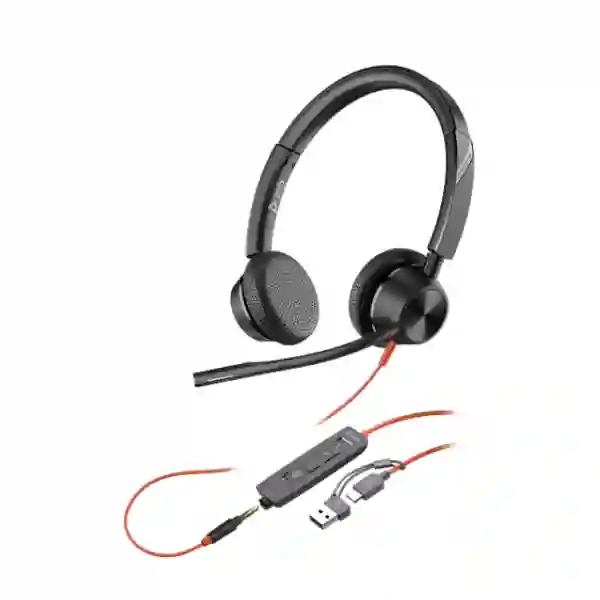
HP Poly • Blackwire 3300 series
HP Poly Blackwire 3325 Stereo USB Headset with 3.5 mm Connector
A corded, stereo on-ear headset for clear business conversations, online meetings and the option to connect to a compatible 3.5 mm headset socket.
Request the exact USB configuration and certification before ordering. USB-A, USB-C and Teams-specific versions must not be assumed from the family name alone.
At a glance
Two-ear, on-ear stereo
Flexible noise-cancelling boom
USB variant plus 3.5 mm analogue
Answer/end, mute, volume; app-dependent
The Poly Blackwire 3325 stereo USB headset is intended for employees who need a straightforward wired audio connection and personal listening. Confirm the particular version rather than assuming that every packaging combination is identical.
Configuration and compatibility decision table
| Buyer requirement | What to verify |
|---|---|
| Desktop or laptop audio | Exact USB-A or USB-C variant and available computer port |
| Phone or tablet calls | 3.5 mm headset socket with microphone support, or tested compatible adapter |
| Teams certification | Specifically identified Teams-certified configuration |
| Physical call buttons | Supported functions on the exact application and USB connection |
| Comfort | On-ear stereo fit for the intended wearer and session length |
| Office procurement | Quoted variant, included accessories and commercial terms |
A practical business headset for calls and daily work
The Poly Blackwire 3325 stereo USB headset is designed for people who need reliable computer audio and a microphone without the charging routines of a wireless device. It brings together two on-ear speakers, a flexible boom microphone, USB connectivity and an additional 3.5 mm audio option. That combination is particularly useful when work moves between a laptop-based meeting and a phone or tablet that has a compatible analogue headset socket. The main purchasing question is not simply whether it has a microphone, but whether its particular plug, software variant and wearing style fit the way the user actually works.
For organisations buying several headsets, a clear configuration decision saves time. Check the USB port on each computer, identify the main meeting application, and verify which employees genuinely need the separate 3.5 mm connection. Use those answers when requesting the exact product variant. The 3325 is a corded headset, so buyers should also account for cable placement and desk layout rather than expecting wireless range or a battery.
What the Blackwire 3325 includes
This model is part of the HP Poly Blackwire 3300 corded headset family. It has a stereo, over-the-head wearing style with on-ear cushions and a flexible microphone boom. HP’s product information describes a noise-cancelling microphone, 32 mm speakers, and a form factor intended for communication as well as multimedia listening. The design is not a standalone speakerphone, a wireless headset or an active noise-cancelling pair of headphones. Its primary role is personal audio at a workstation or connected mobile device.
The 3325 differs from some other Blackwire 3300 family members because its 3.5 mm connector supports a broader range of suitable equipment. That additional path is valuable, but it does not override the need to verify plug compatibility. A laptop may offer USB-A, USB-C, both, or neither in a convenient location. A phone may have no analogue headset socket at all. Use the precise product configuration and host device specifications, not an assumed universal connection.
Stereo sound for work, training and media
The dual-ear arrangement lets the wearer hear both channels of stereo content. That makes the headset useful for video training, webinars, online demonstrations and everyday multimedia playback between calls. Compared with a single-ear headset, two earcups can also help the wearer concentrate on audio from a meeting, although the amount of room noise reduced will vary with ear shape, fit and surroundings. It is not designed to make an open office completely quiet.
HP lists a 32 mm speaker size for Blackwire 3325 variants and publishes separate speech and multimedia response information. These are technical reference points, not promises that every application or recording will sound the same. A poor connection, an overly loud source, or low-quality audio from the other participant can still influence the experience. For most business buyers, consistent fit, clear speech and suitable input connections are more important than an isolated frequency specification.
Voice pickup and the flexible boom microphone
A boom microphone positions the voice pickup nearer to the mouth than a laptop’s built-in microphone usually can. The Blackwire 3325 uses microphone noise-cancelling technology intended to reduce unwanted ambient pickup during conversation. This can be helpful for colleagues working near other people, in a shared office, or with ordinary indoor background activity. The microphone is not a guarantee of intelligibility under every noise condition, and strong wind, loud conversations and incorrect placement can still interfere with a call.
Position the boom according to the headset guidance and run a short voice test before important meetings. If colleagues report that speech is faint, check the operating system’s selected input, the application’s microphone level and whether mute is engaged. Moving the boom slightly and speaking at a natural volume often provides a more useful starting point than increasing every software gain setting. For teams, a simple consistent setup instruction can avoid many first-day support requests.
USB connection: choose the correct version
Blackwire 3325 products are offered in USB-A and USB-C configurations. USB-A is the familiar larger rectangular connector on many business desktop computers and older laptops; USB-C is the smaller reversible connector commonly used on newer devices. Some named USB-C versions include a USB-C-to-USB-A adapter, but an adapter must never be assumed to be part of every Blackwire 3325 package. The user-supplied title identifies a stereo USB model with a 3.5 mm connector, not one exact bundled accessory configuration.
Before ordering, record the actual physical ports on the devices involved. If a workstation has only USB-C ports, a USB-A-only product may need an additional suitable adapter. If a shared desktop has only USB-A, a USB-C variant needs a compatible connection route. Avoid making this choice based only on the age or brand of the computer; check a real port or the hardware specification. Ask the supplier for the exact variant name and included accessories.
Understanding the 3.5 mm connector
The additional 3.5 mm audio connector is one of the defining reasons to consider this headset rather than a USB-only model. It can support compatible phones, tablets and other equipment with a suitable analogue headset socket. That matters to staff who alternate between a computer meeting and a device that accepts a combined headset plug. It can also reduce the number of separate personal listening accessories an employee needs to carry, provided both devices use compatible connections.
A physical 3.5 mm socket does not always mean full headset support. Some equipment exposes headphone output only, while another socket may use different microphone wiring or provide no microphone input. Phones and tablets without a 3.5 mm headset jack cannot accept the plug directly. A suitable external adapter might help in a particular setup, but its support must be checked with the device manufacturer. The analogue path should be tested with both playback and microphone recording before larger deployment.
USB and analogue audio are not identical
USB and 3.5 mm are two different connection methods. With USB, the headset works as a digital audio device through the computer and may expose supported call-management functions to compatible communications software. With an analogue 3.5 mm plug, the host device handles the microphone and playback through its own headset circuitry. Audio output may be available on either path, but software-visible features, control integration and volume behaviour can differ between them.
Do not purchase this model on the assumption that its USB inline call-answer button will remotely control every smartphone application when using the 3.5 mm cable. Treat analogue phone compatibility as a distinct requirement and test it on the specific model of phone or tablet. If staff must answer calls from a desk phone, determine whether that phone accepts the same connector type and whether headset operation is supported. A 3.5 mm port is not the same thing as an RJ9 desk-phone headset port.
Call controls that reduce desk interruptions
Manufacturer specifications for the relevant Blackwire 3325 family include user controls for call answer or end, microphone mute, and volume up or down. On a suitable USB-connected workstation, these controls can give employees a convenient way to manage calls without hunting for a volume slider or moving focus between numerous windows. This is especially useful during routine online appointments, internal stand-ups and customer-facing conversations where speed and consistency matter.
The actual response of a call button depends on the USB variant, application integration and device settings. A successful audio connection by itself does not prove that every app’s answer, end or hold function is mapped to a headset button. Verify the required features with the intended communications platform, and train users to confirm mute status in the application as well as on the headset. For sensitive discussions, always check the software’s actual microphone state before speaking privately.
Standard UC versus Microsoft Teams versions
There are standard unified-communications configurations and separately named Microsoft Teams-certified configurations within the Blackwire 3325 range. These are not interchangeable claims. A headset can carry audio for a Teams meeting without being the exact Teams-certified product variant. For businesses that specify certified peripherals in their procurement policy, the exact model and its certification need to appear on the quotation or supplier confirmation.
Consider the employee’s principal call environment. If the organisation mainly uses Microsoft Teams and depends on a particular certified workflow, specify the corresponding Teams version and verify any dedicated button behaviour. If employees move between different meeting applications, the standard UC configuration may be appropriate, subject to the software and device requirements. Avoid assuming that any Blackwire 3325 has a dedicated Teams button merely because the model name is shared across the range.
Meeting software and headset selection
USB audio headsets are commonly selected for conferencing and computer calling because they offer a direct input and output device. The Blackwire 3300 family is designed for unified communications use, but each organisation should still confirm application-level functions on its own approved software. Being able to hear and speak through a meeting platform is a simpler requirement than having integrated call-answer buttons, status indicators or specialist enterprise management features.
A sensible evaluation covers the meeting application, desktop operating system, user access permissions and any organisational device-control policies. For a sample user, confirm that the headset can be selected as both microphone and speaker, that mute works as expected, and that calls can be joined and ended using the preferred workflow. Repeat the test on the computer types that staff actually use, rather than judging compatibility from a single demonstration laptop.
Comfort over several working sessions
The Blackwire 3325 uses an adjustable over-the-head frame and cushioned on-ear contact points. HP describes a padded headband and soft cushions for long sessions. This can be an important consideration for customer-service employees, administrative teams and staff who join consecutive meetings. Nevertheless, comfort is personal: clamping pressure, glasses, hair, headset height and room temperature can change how a wearer feels after prolonged use.
Users who are sensitive to ear pressure should try the headset for a realistic interval, not only for a few seconds. On-ear cushions rest against the ears; they are not the same as larger over-ear cups that surround the ears. Encourage sensible breaks during the day and allow small fit adjustments. An ergonomic assessment may also need to consider monitor height, chair posture and where the cable hangs, because headset comfort is part of the wider workstation setup.
What microphone noise cancellation does and does not do
Two phrases are often confused in headset shopping: a noise-cancelling microphone and active noise cancellation for the listener. The Blackwire 3325’s noise-cancelling boom is concerned primarily with reducing background sound transmitted from the wearer’s side of a call. The stereo earcups may offer some passive physical separation from nearby sounds, but that is not the same as powered active noise cancellation in the headphones.
This distinction matters in bustling workplaces. People expecting electronic suppression of nearby voices in their own ears may need to assess a different headset category. People mainly concerned about how their voice reaches colleagues may find the boom microphone and wired USB arrangement more relevant. Even with a noise-reducing microphone, staff should seek a reasonably quiet location for confidential or high-stakes calls. Software noise suppression and room treatment may also influence the final result.
SoundGuard and responsible listening
HP identifies SoundGuard acoustic protection technology for the Blackwire 3325 family. Such technology is intended to address certain loud audio events, but it should not be treated as a promise that every audio level or listening duration is safe. The sound delivered to a user also depends on the host device, volume settings, audio source and listening habits. Buyers should distinguish a named acoustic feature from a complete occupational noise assessment.
Set a comfortable listening volume, particularly when moving between applications that have different gain levels. Remind staff not to respond to a quiet recording by leaving system volume at an excessive setting when the next call arrives. If hearing conservation requirements apply to a particular workplace, assess the environment and applicable policies separately. A headset specification alone does not establish that an organisation has met its occupational safety obligations.
The benefit of a wired design
A wired headset has a straightforward operational advantage: it does not require the worker to charge an internal battery between calls. For permanent desks and regular computer use, this simplifies planning and reduces one source of avoidable interruptions. There is no pairing sequence to remember for basic USB use, although the computer must still recognise the audio device and the correct input and output must be selected in software.
There are trade-offs. The wearer must remain within practical cable reach, and movement around the room is more restricted than with a wireless headset. The cable needs routing that avoids chair wheels, sharp bends and repeated tension at the plug. If employees routinely walk between rooms during calls, a wireless design may suit them better. For workers who remain at a computer most of the day, the predictable corded connection may be a more important benefit.
Office workstations and shared desks
For a fixed office workstation, the first implementation task is simple: determine which USB port is free and convenient. A device that physically fits but connects behind a desk may create cable tension or encourage staff to unplug it by pulling the wire. Where the computer is under a desk, consider how the headset cable will reach the normal sitting position. The setup should not obstruct the keyboard, mouse or movement around the chair.
In shared-desk environments, assign a clear procedure for choosing the headset as the default input and output. Employees may otherwise leave audio routed to laptop speakers or another person’s device. Headsets are personal wear items, so an organisation should also decide how units are assigned, stored and cleaned. If headsets are shared, review hygiene instructions and consumable replacement options through appropriate channels rather than assuming accessories for a different model will fit.
Remote and hybrid workers
A remote employee may use a laptop for video meetings while also receiving calls on a personal or company phone. The Blackwire 3325’s combination of USB and a suitable analogue connector gives some flexibility in that pattern, but it is not a wireless multipoint device and should not be described as simultaneously connected to several independent call sources. Switching connection method or devices may be necessary.
Before buying for home-based staff, ask what equipment they have rather than relying on a single standard kit for everyone. A USB-C-only laptop, a USB-A desktop and a phone without a headset jack create different needs. Good onboarding instructions should explain how to select the device in the operating system, how to find mute and volume, and where to report a damaged cable or failed microphone. This makes the headset useful as part of a repeatable hybrid-work setup.
Customer service and contact-centre tasks
Employees who make and receive many calls often need a microphone close to the mouth, controls that can be found by touch and a headset that is easy to wear at a familiar workstation. Those are sensible reasons to evaluate a corded stereo model. The two-ear arrangement may help some agents concentrate on the caller; others prefer to keep one ear free for supervisors or nearby colleagues. Team preference and operating conditions should guide that choice.
A Blackwire 3325 can handle audio at the computer, but it does not independently provide a call-centre platform, routing, recording, agent analytics or integration with a particular business telephony system. Those functions belong to the chosen calling application and surrounding infrastructure. During a procurement pilot, test the intended softphone, dialling workflow, privacy controls and headset buttons together. If the organisation uses physical desk phones, check the required handset or headset interface separately.
Teaching, training and virtual classrooms
Instructors, learners and staff attending remote courses can benefit from a dedicated headset when microphones built into laptops pick up room echo or nearby conversation. Stereo playback can make instructional videos and recorded demonstrations easier to follow. The boom helps a presenter keep voice pickup near the mouth while looking at a camera, slides or notes. It remains important to check that the chosen course platform sees the headset as the active microphone.
For training teams purchasing several units, a quick setup guide is more useful than a long technical feature list. Include the correct USB port, the application audio test, how to identify microphone mute, and how to handle basic comfort adjustments. If students use their own phones or tablets, confirm 3.5 mm headset support device by device. Do not assume that all educational tablets accept an analogue microphone through a headphone socket.
Administrative and professional services
Reception teams, administrators, finance staff and professionals often move between voice calls, dictation, training clips and web meetings. A stereo wired headset can provide one personal audio device for those desk activities. The value comes from a consistent microphone and comfortable listening rather than from a claim that it transforms the software itself. For many roles, the headset is a simple peripheral that supports the existing workflow.
When calls include private information, consider the room and the organisation’s privacy procedures. A headset directs incoming audio to the wearer rather than an external desk speaker, but voices can still be overheard nearby and recorded content can still be exposed by software settings. Users should know how to check actual microphone selection and mute state before discussing sensitive material. A stereo headset is helpful equipment, not a replacement for access controls or a private meeting space.
Tanzania buying considerations
For organisations purchasing business headsets in Tanzania, a specification-led quotation helps avoid incompatible stock and unplanned accessory costs. State the number of users, the main laptop or desktop models, whether USB-A or USB-C is required, and whether staff must also connect to phones through 3.5 mm. If Microsoft Teams certification is a formal requirement, say so clearly rather than describing every headset as a Teams model.
Ask FourTeck Tanzania to confirm the precise variant, current quotation, inclusions and applicable after-sales terms. This description does not claim current inventory, local delivery coverage, a fixed Tanzanian-shilling price or a particular warranty arrangement. Those are commercial details for the quote and the actual supplied item. Businesses procuring at scale may also want to check whether all units can follow one standard setup procedure and whether a small sample is available for compatibility evaluation.
Operating-system audio setup
On a supported desktop operating system, connect the headset through the appropriate USB interface and open the device audio settings. Select the Poly headset for sound output and microphone input where it appears. Then check the meeting application’s own device settings, because applications can retain a previously chosen microphone or speaker even after the operating system changes. A quick test recording and playback test are more informative than assuming that a USB connection has selected the correct audio route.
If the headset works in one application and not another, compare permissions and device choices before replacing equipment. Browser-based meetings may need microphone permission; corporate endpoint policies may restrict device access. Different USB ports or adapters can also affect detection. For a team deployment, document the normal process and provide screenshots or guidance appropriate to the actual operating systems rather than issuing universal instructions that might not match employees’ screens.
Checking microphone levels and echo
A common first-use problem is that colleagues can hear sound from the wrong microphone. A laptop’s internal microphone may remain selected while the employee wears the headset, making the call sound distant or noisy. Choose the Blackwire microphone within the intended application, position the boom correctly and make a short test call. Check that the other party can hear natural speech without clipping or abrupt loudness changes.
Echo can have several causes unrelated to the headset itself, including a second device joining the same meeting with its speakers active. If a room produces feedback, check for duplicate audio connections, external speakers and a separate active microphone. Avoid increasing input gain to maximum as a first response. A controlled test on one computer and then on the affected application helps separate hardware configuration from network or collaboration-software issues.
A repeatable procurement checklist
Before approving a purchase, confirm four essential facts in writing: the exact Blackwire 3325 configuration, the primary computer USB connection, the 3.5 mm device requirement and any certified application requirement. Then check the included accessories and requested quantity. The product family name alone is not a substitute for a quotation identifying precisely what will be delivered. Ask whether the proposed configuration matches the enterprise image or operating system used by the intended staff.
Next, plan a practical fit and audio test for one or more representative users. Include someone with a typical desk setup, someone who joins long meetings and someone who needs the analogue phone connection. Record whether speech is clear, the cable reaches comfortably, the controls behave as needed and the ear cushions are acceptable after real use. Only after that pilot should a team assume the same model will work consistently across a diverse fleet.
Deploying multiple headsets consistently
Large purchases benefit from standardisation, but only when the selected standard reflects the actual device fleet. An IT team can divide users into a small number of hardware groups: USB-A computers, USB-C computers and staff who also require an analogue headset interface. This often reveals whether a single variant will serve everyone or whether two configurations are more efficient. It is easier to document a deliberate choice than to manage unplanned adapter exceptions later.
A useful handover card can name the correct physical connection, show the expected audio-device name, explain mute, and identify the internal support channel. Where the organisation uses meeting software that supports integrated controls, test those controls before training staff to rely on them. Track returned or faulty units by the organisation’s asset process; do not infer that a manufacturer’s product number is the organisation’s inventory SKU.
Cable care and workstation organisation
A corded headset is straightforward to use but still benefits from careful handling. Route the cable so it cannot be trapped by chair casters, caught under equipment or stretched each time the wearer stands. Disconnect by holding the plug instead of yanking the cable. When moving between locations, coil the cable loosely and protect the USB and analogue connectors from repeated bending. These are general peripheral-care practices, not statements about an unverified durability test.
If the headset appears intermittent, check the connection with a known working port and look for obvious cable damage before assuming that the microphone or speakers have failed. Do not attempt unsafe repairs to a damaged lead. Keep the work area clean and use manufacturer-appropriate surface-cleaning methods for the cushions and headband. Procurement teams should separately verify any replacement parts, cleaning restrictions or service arrangements that matter to their policy.
Storage and personal hygiene
Headsets worn against the face and ears should be handled as personal workplace equipment wherever practical. A labelled storage location can prevent tangles and reduce the chance of a headset being dropped from a desk edge. The 3325 is intended for regular business use, but each organisation should decide how many users share equipment and what routine cleaning is appropriate. A team should not assume every household cleaner or disinfectant is safe on electronic parts.
For shared training rooms or hot-desking, the administrative process matters as much as the hardware. Decide who checks the unit in and out, who examines a fraying cable, and how staff report hygiene concerns. Where cushions need replacing, confirm exact compatibility before ordering. A generic cushion that fits another Blackwire series member may not be the correct match. Clear procedures protect usability and reduce avoidable support work.
When the stereo design is the right fit
Choose the stereo version when the wearer values hearing from both ears, regularly watches or listens to training content, and is happy with an on-ear style. This may be a good fit for an individual who spends much of the day at a computer and occasionally uses a compatible 3.5 mm mobile device. A stereo headset can also make voices easier to attend to for some people in a shared space, without promising a measured level of noise isolation.
A single-ear headset may suit someone who must remain aware of nearby colleagues or front-desk activity. An over-ear model or a headset with active noise cancellation might better address a worker who needs a different type of isolation. For heavy movement, wireless freedom can be more important than corded convenience. The choice should follow role requirements and a realistic wearing trial, not only the belief that a higher number in a product family is always better.
Blackwire 3325 versus Blackwire 3320 and 3315
The HP Poly Blackwire 3300 family includes distinct choices. The Blackwire 3320 is a stereo corded model commonly selected for USB-focused computer use, while the 3325 adds the 3.5 mm connection option. The Blackwire 3315 offers a mono, single-ear style with an analogue connection option. These differences are a practical way to narrow a shortlist before comparing specific USB connectors and any platform-specific versions.
For an employee who never connects to a phone or tablet through an analogue socket, the added 3.5 mm feature may have little value. For someone who needs both ears free from room interruptions during a computer meeting, stereo may be preferable to mono. Conversely, reception work may favour one uncovered ear. Compare wearing style, physical interface, software variant and device fleet together. Product availability and quote terms should be confirmed for each separate model, not presumed from the family description.
Comparing corded and wireless alternatives
The Blackwire 3325 is a corded choice. Its main operational appeal is a consistent physical connection and no headset-battery charging step. This suits fixed desks, meeting stations and predictable computer-based call patterns. A wireless headset may allow more movement, but it adds its own selection questions, such as range, power management, pairing behaviour and the number of devices it can connect to. Neither approach is automatically the better answer for every business.
An employer assessing both categories should ask where calls take place and how often staff move away from the workstation. If employees routinely leave their desks mid-call, the 3325’s cable may be limiting. If calls are usually taken at a desk and employees value easy setup, the wired option deserves consideration. Also compare replacement processes, storage habits and how quickly a new employee can begin using the headset correctly.
What the technical specifications mean to a buyer
A technical sheet can include speaker diameter, microphone bandwidth, impedance and audio-frequency response. These values help identify the manufacturer’s design but do not independently determine call quality in a particular office. HP identifies 32 mm speakers and a 32 ohm impedance on documented Blackwire 3325 configurations. Its USB-A support listing also differentiates speech-mode response from broader multimedia playback response. These characteristics describe the product, not a guarantee against poor internet or low-grade call audio.
When comparing published numbers, make sure they belong to the exact same hardware version. Product-family documents and older datasheets may use different labelling, bundles or testing conventions. For ordinary business procurement, use the technical sheet to confirm baseline suitability and follow it with a practical device and application test. A correct USB connector and understandable microphone output can be far more decisive than a specification that is unlikely to change daily user experience.
Accessibility and individual working preferences
Employees can differ substantially in how they hear, wear and operate headsets. Some prefer stereo playback; others need to hear nearby activity or find an on-ear cup uncomfortable. A well-run procurement process should allow representative users to try the fit and confirm that buttons can be reached and identified. Users with hearing or mobility requirements may need a different listening solution, and no product specification should replace an individual accessibility assessment.
Also consider which controls the person must operate quickly. A headset can offer physical mute and volume adjustment, while meeting applications have keyboard shortcuts or on-screen controls. Confirm that the preferred combination is workable for the user. An organisation may standardise its most common headset without forcing the same solution on every role. Where special accommodations apply, record those needs separately from ordinary IT asset allocation.
A sensible pilot before bulk ordering
A short pilot can resolve uncertainties that a product title cannot. Select representative hardware: one older desktop, one newer USB-C laptop, the approved softphone and any phone or tablet for analogue use. Ask employees to join a real meeting, speak at ordinary volume, mute and unmute, check stereo playback, and assess comfort after a realistic session. Record port compatibility and any adapter used rather than relying on memory.
Then evaluate a simple checklist: did the computer recognise the device, did the application select the right input, could participants understand the speaker, did the call controls work as required, and was the cable practical at the desk? Distinguish a preference issue from an actual compatibility fault. The goal is not to make the headset pass every imaginable device test; it is to establish whether the chosen configuration fits the organisation’s intended use.
Common mistakes to avoid before buying
A frequent mistake is treating ‘USB headset’ as a single universal connector type. Another is assuming that the presence of 3.5 mm means a modern phone can accept the plug without an adapter. A third is confusing microphone noise cancellation with listener-side active noise cancellation. These can produce disappointment even when the product itself is functioning exactly as designed. The model and host devices should be described precisely in the purchase request.
Other preventable errors include assuming the standard UC model has a Teams-specific control, assuming an adapter is included because another bundle contains one, or expecting the headset to connect directly to a desk phone with a different socket. Do not rely solely on an image of a similar Blackwire model. Ask for the exact manufacturer configuration and confirm accessories in writing. This provides a better basis for cost comparison and deployment planning.
Troubleshooting: no sound or no detected microphone
Start with the connection and the chosen audio route. Check that the headset is fully seated in the intended USB port. Open the operating system audio panel and look for the headset in both playback and recording devices. In the meeting application, select it explicitly instead of relying on an old default selection. If the software reports microphone access denied, check its permission settings according to organisational policy.
If a USB connection fails through an adapter, test a supported direct port where possible. Try a second approved computer to see whether the symptom follows the headset or stays with the workstation. For 3.5 mm use, verify that the jack supports headset microphone input, not headphone output alone. If a call button does nothing but speech works, investigate app control integration separately from audio capture. Document repeatable failures and use the appropriate support process rather than attempting internal repairs.
Troubleshooting: poor voice quality on a call
Check the boom position, input selection and recording level before changing unrelated network settings. A microphone several centimetres too far away, an accidental switch to the laptop microphone, or muted application input may be the whole issue. Make a local recording when permitted, then compare that recording with the voice heard over a live call. If the local voice is clear but the remote party hears breaks, network or application conditions could be involved.
Background sound still matters even with a noise-cancelling microphone. Move away from strong fans, loud speakers and active conversations when practical. Ensure that only one microphone is transmitting into a meeting, and avoid joining the same call on two nearby devices with loudspeakers active. For a recurring team issue, record the affected computer model, application, headset variant and connection type so IT can reproduce the problem methodically.
Managing mixed computer fleets
Organisations often have a mixture of docking stations, older tower PCs, thin laptops and shared meeting equipment. A single headset family can be appealing, but uniform deployment still requires attention to ports. In some workstations a USB-A connector may be convenient; in others USB-C is the normal route. Some docks contain ports that are inconveniently placed, and a desktop’s front connector may be the most practical location for everyday use.
Keep a simple device matrix showing the required USB style and whether analogue phone connectivity is necessary. Use the matrix to distinguish configurations that are truly equivalent in function from those that only share a marketing family name. The procurement document should name the selected variant and any required adapter, while the setup instructions should identify the expected physical port. This reduces surprises during onboarding and simplifies help-desk diagnosis.
Budgeting beyond the headset itself
A price comparison should reflect the entire usable deployment, not just the device headline. Check whether any cable adapter is needed, whether the quoted package includes it, what service or warranty terms apply to the actual sale, and whether IT must spend time configuring unusual endpoints. A headset that matches existing devices cleanly may be a better purchase than a superficially cheaper option requiring separate accessories for a large share of employees.
This page does not provide a local price, shipping commitment, stock figure or currency conversion because the supplied brief contains none of those verified commercial details. For an accurate Tanzania quotation, give the supplier the number of units, preferred configuration and business contact requirements. Ask for itemised confirmation of any accessory and for the terms that will apply to the actual transaction. Avoid using overseas marketplace prices as evidence of what a Tanzania customer will pay.
Questions to send with a quote request
An effective quote request identifies the product as the HP Poly Blackwire 3325 stereo headset with 3.5 mm connector and then asks the supplier to state whether the offered version uses USB-A, USB-C, or a confirmed adapter bundle. It should ask whether the configuration is a standard UC or specifically Microsoft Teams-certified version, and which accessories are supplied. Where practical, include the make and model of the computers and the phone or tablet expected to use the analogue plug.
For group orders, state the expected quantity and whether the headsets are for permanent workstations, hot desks, training stations or remote staff. Ask the supplier to identify any limitations relevant to the proposed equipment and verify the applicable commercial terms. This focused approach reduces follow-up questions and helps compare like with like, without presuming local availability or a fixed delivery schedule.
Final fit decision
Choose this headset when the intended user wants a corded, two-ear business headset with a dedicated microphone, computer USB audio and the option of a 3.5 mm connection on compatible devices. Its value is strongest when that combination matches the real equipment and software already in use. If your team needs wireless movement, a different level of acoustic isolation or a phone interface other than USB or the supported analogue plug, investigate alternatives before ordering.
The next step is to confirm the exact Blackwire 3325 configuration. Tell FourTeck Tanzania the computer port type, the intended call software, whether the mobile device has a working analogue headset input, and the number of units required. Request confirmation of the selected variant, included accessories and quotation. A clear compatibility conversation now is more useful than discovering a port mismatch after installation.
Frequently asked questions
Is the Blackwire 3325 a stereo headset?
Yes. The Blackwire 3325 has two on-ear speakers for stereo listening. It is suited to voice calls and media playback, although the usefulness of stereo and the comfort of the on-ear design depend on the wearer’s preferences and environment.
Does it have a microphone that reduces background noise?
HP describes a noise-cancelling boom microphone for this product family. Its purpose is to improve voice pickup by reducing some unwanted surrounding sound. It does not guarantee complete background-noise removal, and it is not the same as active noise cancellation in the listener’s earcups.
Can I connect it to a phone with a 3.5 mm port?
It can connect to compatible devices with the correct 3.5 mm headset socket. Check that the socket supports both audio output and microphone input. A headphone-only socket may not support calls, and a device without an analogue jack requires a separately compatible connection solution.
Can I connect it to a phone that has only USB-C?
Not with the analogue 3.5 mm plug alone. A suitable adapter or another supported connection method may be necessary, and microphone support should be confirmed for that phone. A USB-C headset version does not automatically mean every mobile USB-C implementation will support the same controls.
Is the USB connector USB-A or USB-C?
Different Blackwire 3325 variants exist. The supplied product name does not identify one exact connector. Ask the supplier to confirm the offered USB version and any included USB-C-to-USB-A adapter before purchasing, particularly for fleets with different laptop and desktop generations.
Is every Blackwire 3325 Microsoft Teams certified?
No. Standard UC and separately identified Teams-certified versions exist. General ability to handle meeting audio is different from purchasing a specific certified version. If certification or a dedicated Teams control is required by company policy, it must be confirmed for the exact quoted model.
Will the headset work with my video-meeting application?
The Blackwire family is intended for computer communications, but audio routing and call-control integration need checking with the actual operating system, software version and headset configuration. Test microphone selection, speaker playback, mute and any desired call buttons on the planned platform before bulk deployment.
Do the inline controls work through the 3.5 mm plug?
Do not assume that all USB inline control functions carry over to analogue operation. Their behaviour depends on connection method, host device and communication software. Test how volume, mute and answer functions behave on the specific mobile device or analogue equipment you intend to use.
Does the headset use active noise cancellation?
The documented Blackwire 3325 design has a noise-cancelling boom microphone and on-ear stereo speakers. It should not be presented as a headset with powered active noise cancellation for the listener. Buyers needing active noise cancellation should evaluate models explicitly specified for that feature.
Is the Blackwire 3325 wireless?
No. It is a wired headset. This avoids headset charging and Bluetooth pairing in ordinary wired use, but also limits movement to the usable cable reach. Employees who need to walk around during calls should compare it with a suitable wireless headset.
Can this connect directly to every office desk phone?
No. Desk phones use different headset interfaces, and some use connectors other than USB or 3.5 mm. Confirm the exact desk-phone model and the type of headset port before buying. Having a 3.5 mm plug alone does not prove RJ9 or proprietary desk-phone compatibility.
What is the difference between the Blackwire 3325 and 3320?
Both are stereo models in the same family, but the 3325 adds a 3.5 mm connection option for suitable mobile devices. If the user only needs computer USB audio, another configuration may be adequate. Compare the exact product variants and ports rather than assuming all family models have the same connections.
What should I check before buying several units?
Confirm the precise USB variant, actual computer ports, phone or tablet headset-jack compatibility, required application certification, included accessories and fit. A small trial across representative devices and employees is advisable when the intended fleet contains different hardware models.
Are price and availability confirmed for Tanzania?
No price, stock or delivery promise is stated on this page. Ask FourTeck Tanzania to confirm current quotation, the specific product configuration, inclusions and applicable purchase terms for the required quantity before placing an order.
Request a FourTeck Tanzania quotation
Ask for the exact HP Poly Blackwire 3325 stereo USB headset variant, the required USB connector, the status of any Teams certification, and the included accessories. Share the intended devices, user count and application requirements so compatibility can be checked before ordering. Quotation, availability, delivery and warranty terms require separate confirmation for the proposed supply.
Contact FourTeck Tanzania to confirm the right configuration for your business.




Reviews
There are no reviews yet.