
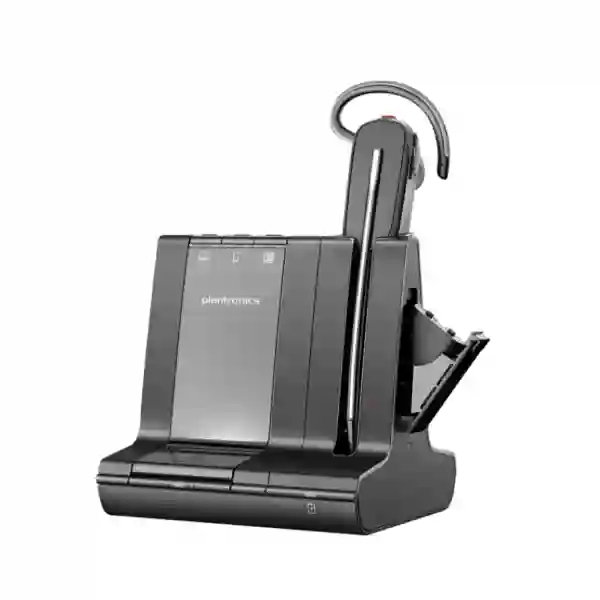
Business calling | Convertible DECT headset
HP Poly Savi 8245 Office Convertible DECT Headset
Keep workplace conversations moving between a desk phone, a computer and a mobile phone without changing headsets. The HP Poly Savi 8245 Office Convertible DECT Headset is designed for business users who handle frequent calls and want a lightweight, flexible wearing option backed by a dedicated office base.
The Savi 8245 Office combines DECT wireless communication between headset and base with an office base that can connect to supported desk-phone, computer and mobile calling paths. Its convertible design can be assembled for over-the-ear, over-the-head or behind-the-head wearing. A noise-cancelling boom microphone with close conversation limiting helps reduce nearby speech picked up during calls.
Its distinctive battery system supports changing the headset battery when a charged spare is available. That is the basis of the manufacturer’s ‘unlimited talk time’ description; it does not mean any single small battery lasts indefinitely. For a purchasing decision in Tanzania, ask FourTeck to verify the exact regional product configuration, phone-system compatibility, included accessories and current quotation.
Key features at a glance
Use this summary to compare the headset against your calling environment. Values are manufacturer descriptions for the Savi 8245 Office family; included components and regional radio specifications must be confirmed for the precise quoted model.
| Headset format | Convertible, single-ear professional communications headset |
|---|---|
| Wearing choices | Over-the-ear, over-the-head and behind-the-head fit |
| Office calling sources | Compatible desk phone, computer and mobile phone via office base |
| Wireless connection | DECT between headset and base; mobile Bluetooth through base |
| Published wireless reach | Up to 180 m open line of sight; up to 55 m typical office |
| Microphone | Noise-cancelling microphone with close conversation limiting |
| Battery approach | Replaceable rechargeable battery; charged spare supports extended use |
| Charging time | About three hours, per manufacturer documents |
| Call controls | Answer/end, mute and volume; app-dependent integration |
| Software and protection | Poly device-management support and SoundGuard Digital features |
| Critical configuration checks | Exact regional part number, phone integration, accessories, package contents |
A practical fit check before you order
Desk phone first
Identify the exact phone model and whether remote answer requires a compatible accessory.
PC calling next
Confirm your named softphone, PC interface, operating system and call-control software.
Battery and comfort
Verify the spare battery count, charging arrangement and best wearing style for each user.
Regional readiness
Request the complete product code and appropriate local commercial and technical checks.
Who this headset is designed for
Many office professionals no longer take calls from a single device. A service agent may answer a desk phone, join a computer-based meeting, and return a customer’s mobile call within the same working period. The Savi 8245 Office is intended to make that mixed calling arrangement easier to manage without constantly removing one headset and putting on another. The emphasis is professional speech, movement around the workstation and an adaptable single-ear listening experience, not immersive stereo music playback.
Typical users include reception teams, account managers, dispatch coordinators, IT service desks, salespeople and supervisors who split their attention between computer and telephone tasks. A suitable deployment still depends on the individual’s calling applications and desk phone. The fact that a product supports three connection categories does not establish that every desk telephone, PBX, application or phone feature will work automatically. Compatibility checks before purchase are especially valuable when equipping several employees.
Three calling paths, one office base
The Office version uses a dedicated base as the hub for compatible desk-phone, PC and mobile connectivity. The PC path uses a USB connection, a supported desk phone uses its relevant telephone interface, and the mobile path is paired using Bluetooth at the base. The headset communicates wirelessly through DECT with that base. This division matters: the ability to pair a mobile phone with the office base is not the same as assuming the headset itself will behave like a direct-pair consumer Bluetooth earbud away from the base.
For users, the practical benefit is a familiar headset while they switch between work calling sources. Base controls and supported software can help users select or manage the active line. Some combinations may support bringing two calls together, subject to the specific configuration and call state. Before rollout, identify which device normally receives incoming calls, how calls must transfer, and whether a receptionist needs desk-phone remote answering. These details determine whether the standard cabling is sufficient or an optional accessory is required.
The right DECT range expectation
HP and Poly describe a wireless reach of up to 180 metres in open line-of-sight conditions and up to roughly 55 metres in a typical office environment. These are manufacturer reference figures, not a site survey or a guarantee that the headset will cover every room. Concrete walls, steel shelving, enclosed stairwells, reflective glass, base placement and nearby wireless equipment can all make real-world results different from a laboratory or open-area figure.
Plan around the actual work area rather than the maximum number. A supervisor who needs to walk from a desk to nearby filing shelves may have a very different range requirement from a warehouse operator crossing multiple rooms. For multi-floor use, do not assume one base can cover a whole building. Test the intended path with the target floor plan, and place the office base away from dense cable clusters and large metal obstructions wherever practical. The headset is a personal communications endpoint, not a replacement for building-wide telephony coverage design.
Why the convertible fit matters
The Savi 8245 is a single-ear convertible headset. Its fit-kit approach allows over-the-ear, over-the-head and behind-the-head assembly using suitable supplied components. That flexibility is useful when users have different preferences for pressure, stability or the way other equipment fits around the ear. Someone who takes shorter calls may prefer an earloop; an agent working through longer sessions may prefer the distribution of support offered by a headband.
Comfort depends on more than the word ‘lightweight.’ The ear tip size, microphone position, glasses, hair, head movement and whether the user removes the headset during breaks can affect day-to-day satisfaction. A short individual fit trial is sensible before standardising a whole team. The three wearing choices change how the same compatible headset is supported; they do not make it a two-ear stereo model. Buyers who need both ears covered for listening privacy should compare a different model category.
Noise-cancelling microphone and call clarity
Busy offices produce several competing sounds: the colleague speaking a metre away, the printer, keyboard activity and conversations arriving from neighbouring desks. The Savi 8245 Office uses a noise-cancelling boom microphone with close conversation limiting. The purpose is to prioritise the user’s speech and lessen surrounding sounds transmitted to a caller, improving the conversation for people on the far end of the line.
Microphone noise reduction must not be confused with active noise cancellation in the listener’s ear. The Savi 8200 Office series literature singles out the Savi 8220 stereo model for receive-side active noise cancellation. Accordingly, this product description does not promise ANC listening on the Savi 8245. Users in unusually loud environments should test speech intelligibility and consider whether the single-ear form factor is appropriate. The headset can improve how the other person hears you, but it cannot make a noisy room physically quiet.
Hot-swappable battery: what unlimited talk time means
The 8245’s signature convenience is a rechargeable and replaceable headset battery that can be changed when needed. Poly markets the resulting workflow as unlimited talk and standby time. In normal language, this means the user can keep a long call schedule going by exchanging a depleted battery for a charged compatible spare; the headset is not powered indefinitely from a single charge. A charging position for a spare battery is part of the Savi 8245 system concept.
Make the operating plan explicit. Check the number of batteries supplied in the exact regional kit, keep the spare charged, and show users how to replace a battery correctly. Arrange a convenient moment to swap where call continuity matters, following the model’s user instructions. If a team shares equipment, establish battery ownership and charging routines. HP lists a charge time under three hours on its current product support information, while the series documentation rounds to about three hours. Charging time may vary with conditions and the actual battery.
Understanding battery availability in a busy shift
Battery logistics matter more in continuous-call roles than in a meeting room where a headset is used sporadically. Agents who begin a shift with an uncharged spare may not benefit from the hot-swappable design when their first battery runs down. A supervisor should consider whether each operator receives a dedicated battery set, how spare charging is handled and what happens at shift handover. These mundane arrangements can influence service quality as much as the headline specification.
Do not interpret the Savi 8245’s ‘unlimited’ label as an electrical guarantee, a particular duration on one charge or permission to use third-party batteries of unknown provenance. Batteries are consumables that age, and the correct replacement part matters for fit, charging and safety. For procurement, ask whether the quoted configuration includes the spare battery and charger provision expected by the team. Maintain a simple replacement plan instead of assuming the original battery set will perform identically forever.
Switching between desk phone, PC and mobile calls
For a user who works across multiple communication channels, the key operational question is which device owns the active call. The Office base provides separate source selection for supported connected devices. Depending on the setup, a user can answer a desk-phone call, use a PC softphone, or take a paired mobile call through the system without changing wearing accessories. The controls make the most sense when the user understands which source is selected before dialling or answering.
Certain Savi 8200 Office configurations permit conferencing across sources, but do not assume every app, phone network and device permits the same mixing behaviour. Call hold, line release, automatic answer and switching may depend on software and phone integration. Test a representative daily sequence: an inbound phone call, an outbound softphone call, a mobile interruption and a return to the first source. Document the verified sequence in staff training instead of relying on an attractive but ambiguous ‘connects to everything’ headline.
Desk-phone compatibility should be checked first
Desk phones are not interchangeable simply because they have similar-looking ports. A compatible phone might connect through a headset socket, a handset interface or a telephone-specific electronic hook switch arrangement. Features such as remote answer and end can depend on an approved EHS cable or a handset lifter, which may be optional rather than included. A working audio connection and fully integrated remote call control are two separate compatibility questions.
Before buying, gather the desk-phone manufacturer, exact model number, phone-system platform and how the current handset is connected. Ask whether the user needs to lift a handset manually, answer from several metres away, see call indicators, or switch lines without touching the phone. The installation should be validated against the current Poly compatibility guidance and the actual telephone firmware. This is especially relevant when a Tanzanian office uses a mix of older analogue phones and newer IP desk phones at the same site.
Computer softphones and USB operation
Computer calling usually begins by linking the Savi Office base to a supported computer with the appropriate USB connection. The operating system must recognise the audio endpoint, and the chosen softphone must use it for speaker and microphone functions. For integrated call buttons, however, supporting software and the softphone’s compatibility are additional considerations. HP’s quick-start guidance explicitly distinguishes computer call control from basic audio connectivity.
Before deployment, ask which applications employees actually use: a browser contact centre, an installed desktop softphone, a video meeting application or a phone-system client. Test incoming alerts, microphone mute, answer and end controls, default audio device, and transfer of sound when the app starts or closes. On shared computers, document which settings belong to each profile. If staff connect through remote desktop or virtual machines, test that specific environment rather than assuming that normal local USB operation guarantees equivalent call control.
Mobile phone pairing is through the base
The Savi Office system’s Bluetooth connection is designed to bring a compatible mobile phone into the office calling arrangement. Pair the phone with the base according to HP and Poly instructions, then select the mobile source when needed. This can be convenient for a staff member whose customer communication happens partly on a company mobile and partly on desk telephony. Bluetooth version and feature availability depend on the exact regional product configuration.
There is an important physical limitation. Because the Office system is arranged around its base, do not treat this as a tiny travel headset that can always be carried off-site and used without the office equipment. The proper decision question is whether the employee needs office-wide hands-free mobility or truly independent commuting and travel use. If mobile-only operation away from an office base is central to the role, compare a purpose-built portable Bluetooth headset rather than buying the 8245 solely because its base supports phone pairing.
Call controls, mute and audio awareness
During calls, basic headset controls for answering or ending calls, muting and adjusting volume help users stay focused on the customer or colleague. Voice prompts can communicate events such as mute status, connection state or a low battery. These are operational aids, not substitutes for confirming that the chosen software application reflects the same call state. A headset may be muted locally while an application shows something different if integration is incomplete.
Training should include an explicit mute check before sensitive conversations and a simple test call when staff begin using the headset. Users should know the difference between adjusting headset listening volume and changing the desk phone or computer output level. Very high receive volume is unnecessary for most normal conversations; a comfortable level is a better starting point. In a shared workspace, explain what colleagues can and cannot hear from a single-ear headset and how to handle confidential calls appropriately.
SoundGuard Digital and listening safety
The Savi 8200 Office series documentation describes SoundGuard Digital features intended to manage excessive incoming sound levels and startling audio peaks. These are hearing-protection technologies within the device and software ecosystem, not a promise that exposure risk disappears under every condition. Poly’s series documentation notes that enabling the full SoundGuard Digital features requires the relevant Poly desktop software. A buyer should verify the current application and configuration instructions for the supplied variant.
Health-conscious headset deployment also involves sensible listening levels, rest breaks and an appropriate workplace noise assessment. A single-ear device can help a receptionist remain aware of the surroundings, but may not suit a role requiring stronger isolation from background sound. Equally, software-based sound management should not be presented as medical protection or an official local certification. Organisations with specific occupational hearing requirements should seek separate professional guidance and confirm the features enabled in their managed environment.
Software management and future upkeep
HP and Poly provide software and support resources for configuring and maintaining Savi devices, including Poly Lens within the relevant supported setup. Management functions can help with settings, firmware maintenance and device troubleshooting. The exact software capabilities available to a particular 8245 variant should be checked against current manufacturer guidance rather than assumed from a different headset in the same brand family.
IT teams can make headset rollout smoother by documenting a standard firmware baseline, approved software version and a tested softphone configuration. Consider who is authorised to change device settings and whether updates will be tested before wider release. A firmware update should not be scheduled casually during customer-facing shifts. Keep a record of any model-specific accessories, especially electronic hook switch cables, batteries and fitting components. These details make replacement and support more predictable if personnel move between departments.
What the headset is, and what it is not
The Poly Savi 8245 Office is a professional communications headset system with an office base, not an ordinary wired USB headphone and not a standalone IP telephone. The USB and telephone cables connect the base to compatible calling equipment; the user wears the wireless headset. The one-ear convertible design is also different from a stereo headset that covers both ears. Understanding those distinctions helps buyers compare alternatives on a fair basis.
It is not a universal compatibility promise, a PBX subscription, a replacement for a failing telephone network or a way to extend cellular signal throughout a building. It will not by itself correct internet latency, call-server issues or microphone problems caused by an incompatible application. Businesses primarily seeking travel headphones, stereo entertainment listening or heavy-duty ear protection should assess other categories. Businesses seeking desk-based professional calling with flexible wear and battery continuity are closer to the intended use.
Regional configuration and Tanzania procurement
HP lists regional versions of the Savi 8245 Office family, including a DECT 1880–1900 MHz Office configuration in its international product documentation. Different markets may have different product codes and wireless-band variants, and the name alone is not sufficient to identify the unit inside the box. The exact frequency, power adapter and supplied accessories should be checked against the manufacturer’s part number on the quotation before purchase.
For Tanzania, the responsible next step is to confirm that the proposed configuration is suitable for the intended local deployment and any applicable radio requirements. This page does not assert a Tanzanian product approval, a local stock position, an import status or an authorised channel arrangement. Those details require separate verification for the specific item being offered. A procurement team should also request a written description of what is included, the support route, the manufacturer’s terms applicable to the supplied unit and the total quoted commercial terms.
What may be included in the package
HP’s product documentation for the Savi 8245 Office family identifies components such as the wireless headset, office base, charging cradle, power adapter, telephone cable, computer connection cable and wearing accessories. The fit components commonly cover a headband, neckband and earloop or ear-tip options. Lists can differ by exact part number and region. For a business quote, package contents should be verified against the specific variant rather than copied unquestioningly from a different regional kit.
Pay particular attention to the battery system. The hot-swap workflow assumes an appropriately charged compatible spare battery, but a general marketing description should not substitute for a packing list. Ask the seller to specify how many batteries come with the quoted package and whether a second charging position is provided. Also check whether the computer cable matches the available port and whether desk-phone remote-call-control accessories are included or separately ordered. This reduces last-minute surprises at installation.
A simple pre-purchase compatibility checklist
Begin with the three devices that the intended user will actually connect. Record the desk-phone model, operating system and softphone name, and the mobile phone that should pair with the base. Identify the location of the base, whether the existing desk phone exposes a usable headset interface and whether remote answering is mandatory. On the computer, confirm the USB port arrangement and whether device-management software can be installed under company policy.
Next, verify the exact regional part number, the accessory package, spare batteries, expected wearing style and the level of call-control integration. If staff work through a virtual desktop, ask for a working test in that architecture. If several headsets operate in one room, plan a pilot for coverage, density and user comfort. Finally, collect the written quote and applicable service details. The checklist makes procurement more specific without promising that one model will fit every combination of desk phone and software.
Step-by-step office setup planning
Start by unpacking and checking the exact supplied components against the packing list. Assemble the preferred wearing style using the model’s fit instructions, then install and charge the appropriate battery. Position the base on a stable desk surface with access to power and the selected calling devices. Make the computer USB and desk-phone connections according to the official Savi 8240/8245 Office setup guide; do not substitute a similar-looking cable without verifying the connector purpose.
Next, pair any mobile phone at the base using the manufacturer’s Bluetooth pairing procedure. Configure the computer’s microphone and speaker selection, and set up any supported call-control software. For a desk phone, verify the audio path before attempting optional EHS or lifter integration. Place a test call from each source, confirm the mute function and check how the default line is selected. Finish by walking the intended work area while listening for any loss of coverage. A brief documented acceptance test prevents many avoidable support tickets.
Desk placement, radio planning and office density
Where the base sits matters. A base buried behind monitors, equipment racks or metal cabinets can behave differently from a base on an open desk. When an office contains many users, the number of simultaneously active wireless headsets and the physical arrangement of desks can also affect planning. The published range value is not a guarantee of how many headsets can be installed in one room or how they will perform through multiple thick walls.
For a team rollout, test one representative area first and record both coverage and voice quality. Include normal working conditions rather than an empty building: people moving, doors closing and the usual electronic equipment powered on. If an organisation has strict wireless policies or sensitive voice communications, involve its IT or communications team in the review. Do not infer a specific user-density capacity, site-wide coverage map or government radio approval solely from general Savi 8200 family marketing language.
Helpdesk and contact-centre scenarios
A helpdesk operator may need to troubleshoot on the computer while remaining on a telephone conversation. The 8245’s headset format can free both hands for notes, ticket updates and quick reference checks. If the department uses a PC contact-centre client, the buyer should confirm not just audio quality but whether that particular application can signal answer, mute and disconnect states correctly through the selected headset software.
A contact centre may also value consistent wearing comfort and spare battery availability across longer shifts. However, headsets do not fix poor routing rules, agent desktop performance or unreliable connectivity to cloud voice services. Run an operational pilot that matches real call volume and the actual business applications. Ask users to report fit, comfort, battery change workflow and whether switching between a desk-phone and computer source is intuitive. These observations are more useful than choosing solely by maximum range.
Reception, administration and customer-facing teams
A receptionist often needs to remain aware of someone arriving at the front desk while continuing a call. A single-ear convertible headset can be appealing for that kind of shared attention, especially when the preferred wearing style leaves one ear uncovered. The practical workflow can include taking a desk-phone call, consulting information on the computer and occasionally dealing with a paired mobile phone.
Before purchase, check whether the receptionist must answer calls remotely, place customers on hold, transfer calls between extensions or share line status with other operators. Some of those functions belong to the telephone or PBX rather than to the headset. Determine whether the selected telephone supports the needed accessory integration. Also provide guidance for conversations involving personal information; a noise-reducing microphone is not a soundproof booth, and a headset does not prevent nearby people from overhearing the user.
Field coordination, dispatch and supervisory work
An office-based dispatcher may move between a workstation, a wall schedule, filing cabinets and nearby colleagues while handling frequent calls. Within a suitably tested coverage area, a DECT office headset can reduce the need to stay physically beside the telephone. The Savi 8245 is a potential fit where the operator benefits from one-ear awareness and a lightweight fit rather than a full-size stereo cup.
Managers sometimes assume the stated open-area range will follow a user into warehouses, outside spaces or adjacent floors. Instead, establish the normal walking route and test coverage with doors closed and the usual machinery operating. Also check where the base’s computer and telephone connections will remain; moving the headset does not move those connections. If the job requires independent outdoor calling far beyond the office, a separate mobile-first solution may be more appropriate.
Comparing Office, UC and Microsoft Teams variants
The model family contains differently equipped and certified versions. ‘Office’ generally points to the base arrangement intended for desk phone, computer and mobile connection. A ‘UC’ configuration may be oriented mainly to computer calling, and a Microsoft Teams-designated variant may have different certification or control requirements. Exact naming, regional part number and bundle details matter because an accessory list from one version should not be assumed to apply unchanged to another.
When requesting a quotation, give the full required configuration rather than saying only ‘Savi 8245.’ Specify whether desk-phone connectivity is essential, which USB port is available and whether a particular collaboration platform requires a certified variant. Avoid assuming that a non-Teams-labelled headset carries Microsoft Teams certification. If the company plans to migrate from desk phones to a PC-only voice platform, compare total cost and capabilities of the Office and UC approaches before buying.
Comparing Savi 8245 with nearby headset styles
Within the Savi 8200 family, an over-the-head mono headset can offer a fixed, familiar fit, while a stereo model covers both ears and may be preferred by users seeking a more enclosed listening experience. The 8245’s differentiators are three wearing arrangements and its spare-battery workflow. The Savi 8220 is the model specifically associated with receive-side active noise cancellation in the older Savi 8200 Office family datasheet; do not transfer that feature claim to the 8245.
Another important distinction is between the Savi 8240 and 8245 convertible approach. The 8245 is marketed for hot-swappable battery continuity, while the 8240 does not carry the same unlimited-talk-time description. Choose according to how calls are managed during a typical shift, not just a model number. For some roles, a lighter in-ear configuration is the priority; for others, the ability to isolate from nearby sound, or to wear a headset during long travel, will outweigh the 8245’s specific strengths.
Common deployment mistakes to avoid
One mistake is ordering by brand and model family without confirming the exact regional configuration. Another is treating ‘Bluetooth’ as evidence that the headset will independently connect to a phone without its office base. A third is reading the maximum DECT distance as guaranteed indoor coverage. The marketing phrase ‘unlimited talk time’ can also be misunderstood unless procurement verifies the spare battery and charging arrangement.
Technical mistakes tend to involve call-control compatibility. A headset may play and record computer audio normally but not answer a softphone using a button because the supported integration is missing. A desk phone may transmit audio but need a separate EHS solution for remote call control. An employee may report low volume because the wrong device or line is selected. Address these risks with a written model check, compatibility test and simple user instructions, not with assumptions.
Troubleshooting when audio or calls do not behave as expected
If a caller cannot hear the headset wearer, first check whether the headset microphone is muted, whether the correct calling source is selected and whether the calling application has chosen the proper microphone. If the wearer cannot hear a caller, check receive volume at both the headset and the connected phone or computer. On a PC, operating-system device settings and application-specific audio settings may disagree, so test each independently.
If wireless audio becomes intermittent, check distance from the office base, obstacles and base placement. For a mobile connection, confirm that the phone remains paired with the base. For a desk phone, verify the interface connection and any required EHS configuration. If a button fails to answer a computer call while audio otherwise works, check softphone integration rather than assuming the headset hardware is defective. Record the exact part number and firmware version before seeking model-specific support.
Maintaining hygiene, comfort and accessories
Frequently used headsets benefit from a consistent hygiene routine and gentle handling of the fitting pieces. Follow the official cleaning guidance for the actual product and avoid liquids or solvents that could damage its electronics or ear components. On shared workstations, consider whether employees should have personally assigned compatible ear tips or other removable fit pieces. Do not assume that an accessory from another headset family will attach securely.
Store the headset so the charging contacts remain clean and the microphone boom is not repeatedly bent in the wrong direction. Check the fit-kit parts and cables periodically for wear. Where different staff share a base, provide an easy way to identify which headset or battery belongs to which user. Before buying consumables, confirm the exact replacement part and compatibility with the 8245. These habits support reliability without making an unsupported claim about service life.
Selecting a quotation that can be implemented
A useful quotation should name the complete Savi 8245 Office configuration and the manufacturer’s part number, not only the Savi family. It should tell the buyer which office base is included, how the headset connects to a computer, how many batteries are in the proposed kit and which wearing components are supplied. If the desk phone requires EHS or a lifter, list that separately so a purchase order does not leave the installation incomplete.
Ask the supplier to document any deployment assumptions. The intended desk-phone make, the named softphone, the preferred operating system and the required connection sources should appear in the compatibility review. Also request applicable after-sales and warranty terms for the exact supplied unit, rather than importing terms from another market’s product page. Stock, delivery timelines, service coverage and pricing must be confirmed in the quotation; none is represented as verified by this page.
A practical buyer decision framework
Start with the primary purpose. If employees need a comfortable one-ear business headset that works around a stable office base, the Savi 8245 is worth considering. If the desk phone is the main source, compatibility and remote answer requirements should lead the decision. If the computer softphone is the main source, test its controls and compare whether an Office base is necessary. If mobile-only roaming outside the office dominates the job, the choice may be less suitable.
Then consider real-world priorities in order: microphone intelligibility for customers, stable wireless coverage in the actual workplace, wearing comfort during the working day, and battery continuity at busy times. Confirm the accessory package and exact product code last, not first, so the selected bundle matches the requirement. This framework helps avoid choosing a product because its headline features look impressive while a critical connection or daily workflow is overlooked.
Frequently requested technical details
The Savi 8245 Office belongs to the Poly Savi 8200 professional headset family. It is a wireless DECT solution with a compatible office base for supported desk phones, PCs and mobile phones. The wearing style is convertible, and the unit is commonly presented in black. HP and Poly list a noise-cancelling microphone, SoundGuard Digital support, a rechargeable lithium-ion polymer battery and selectable call controls. Where the exact configuration is known, the broader family documentation also describes Bluetooth at the base.
Published technical numbers should be read alongside their conditions. The quoted wireless range is up to 180 metres in open line of sight and up to 55 metres in a typical office, not an all-building guarantee. Charging is listed at about three hours. Features like a specific DECT radio band, software integration, certification, supplied spare batteries and the mix of cables are configuration-dependent and should be checked against the precise part number being offered to a buyer in Tanzania.
Why a pilot can be valuable before a team rollout
One properly configured headset can demonstrate basic calling, but a pilot with representative staff reveals issues that a specifications table cannot. Include employees who wear glasses, different preferred fit options and different lengths of calling sessions. If the organisation supports both desk phones and softphones, choose pilot users who depend on each path. Keep test criteria simple: clear calls, successful answer and end, correct microphone selection, stable walking range and a workable spare-battery routine.
Record problems separately as headset, connection, software, office-radio or training issues. An interrupted call caused by a PBX or internet problem should not automatically be attributed to the headset. Similarly, uncomfortable fit may be solved by another included wearing component rather than by a replacement device. A small factual deployment report provides stronger evidence for a bulk buying decision than claims based on a single day’s demonstration or an unrelated organisation’s review.
Next step: request a configuration-specific quote
FourTeck Tanzania can be asked for a quotation for the HP Poly Savi 8245 Office Convertible DECT Headset with the required connection paths and wearing kit clearly specified. Send the desk-phone brand and model, the computer operating system, the main calling application and whether mobile pairing is required. State whether staff must answer desk-phone calls remotely and whether a spare battery is essential to the shift pattern.
Ask for confirmation of the proposed regional product code, package contents, any optional compatibility accessories, the applicable local terms and the final quoted price. No online stock level, Tanzanian regulatory approval, local warranty entitlement, delivery promise or price is implied here. A model-specific confirmation is the most reliable way to turn the headset’s useful design into a deployment that works in the actual office.
FAQs: HP Poly Savi 8245 Office
Does the Savi 8245 Office work with desk phones?
It is intended for compatible desk phones through its office base, but compatibility must be checked against the exact phone make, model and connection arrangement. Audio may work with a standard interface while remote answering requires a separately compatible electronic hook switch cable or handset lifter. Always verify the full calling workflow before ordering.
Can I use it for PC softphone calls?
Yes, the Office system supports a computer connection through the compatible base. Basic speaker and microphone operation and integrated softphone answer or end controls are different requirements. Software support and application compatibility determine which controls work. Test the specific softphone, operating system and any virtual desktop environment used by the organisation.
Does the headset pair directly with a smartphone?
The Savi 8245 Office system supports mobile calls through Bluetooth pairing at its office base. Do not assume the headset itself is a standalone, direct-pair travel Bluetooth product. For mobile use well away from the powered office base, compare a headset specifically intended for independent mobile operation.
Is the stated 180-metre wireless range available indoors?
The 180-metre figure is an up-to value for open line-of-sight conditions. HP and Poly also give a typical office reference of about 55 metres. Walls, floor layout, radio conditions and base placement influence actual coverage. Test the work path where the headset will be used rather than treating the headline figure as guaranteed coverage.
What does unlimited talk time mean?
It describes the ability to keep using the Savi 8245 battery system by replacing a depleted battery with a charged compatible spare. It is not unlimited runtime from one cell. The number of supplied batteries and the charging accessories should be verified in the exact package before purchase.
Which wearing styles are supported?
The convertible system supports over-the-ear, over-the-head and behind-the-head arrangements using the appropriate fitting accessories. The result is still a single-ear communications headset. Individual comfort depends on fitting and preference, so a user trial is recommended for teams with long calling sessions.
Does Savi 8245 have active noise cancellation?
The verified Savi 8200 Office family literature associates receive-side active noise cancellation with the Savi 8220 stereo headset. The Savi 8245 has a noise-cancelling microphone and close conversation limiting for transmitted speech, but this page does not claim active noise cancellation for the listener’s ear. These are different audio features.
Does it support Microsoft Teams?
The wider 8245 family includes variants and certifications with differing descriptions. Ordinary computer audio may work with a compatible calling application, but specific Teams certification and dedicated controls should not be assumed for an unspecified Office configuration. Request the exact part number and verify the required certified variant if certification matters.
Is it appropriate for a Tanzania call centre?
It may be useful for agents who need flexible wearing, office-base connectivity and a battery-swap routine. Confirm the exact local product configuration, softphone integration, radio suitability, spare batteries and service conditions. A short real-world pilot is the best way to establish fit for a particular call-centre environment.
What do I need to request a quote?
Provide the desk-phone make and model, PC operating system, softphone name, need for mobile pairing, expected user count, preferred wearing option and any remote-answer requirement. Ask for the precise manufacturer part number, listed accessories and battery quantity, plus the applicable local price and after-sales terms.
Will the headset solve poor VoIP call quality?
It can improve the local microphone and listening interface, but it cannot resolve every cause of poor calls. Network packet loss, high latency, unsuitable computer audio settings, misconfigured applications and phone-system problems can still affect service quality. Evaluate the complete calling chain if users report persistent issues.
Can staff share one headset system across shifts?
Shared use is possible to evaluate where business policy permits, but comfort pieces, hygiene, battery charging and any user-specific software settings need a clear operating routine. Verify replacement accessories for the exact unit and consider individually assigned fit components. Do not assume one battery set will suit continuous shift coverage without charging time.
Does this listing confirm price, stock or local approval?
No. This content does not assert current Tanzania stock, a local selling price, an import or radio approval, a specific delivery time or support entitlement. Request a quotation and the exact regional specification from FourTeck Tanzania before placing an order.
Request your Savi 8245 Office quotation
Ask FourTeck Tanzania for a configuration-specific quotation. Share your desk-phone model, computer calling software, expected number of users and need for mobile connection. Confirm the exact regional part number, supplied batteries, required EHS accessories and applicable local commercial terms before purchase.
No stock position, Tanzania approval, price or delivery commitment is stated on this information page.




Reviews
There are no reviews yet.