
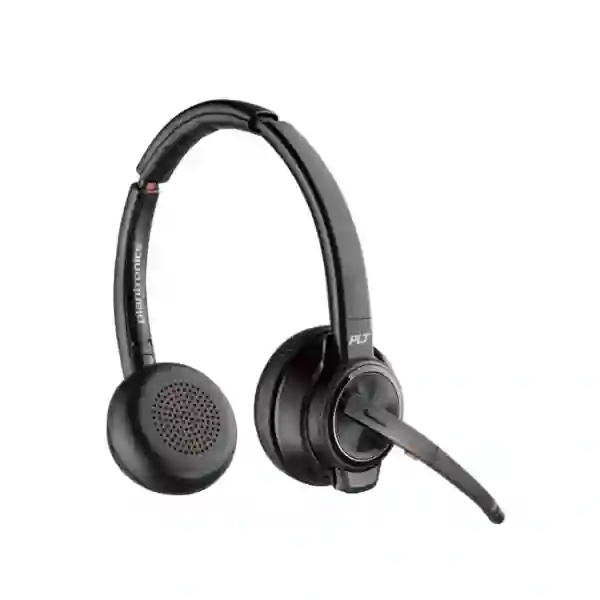
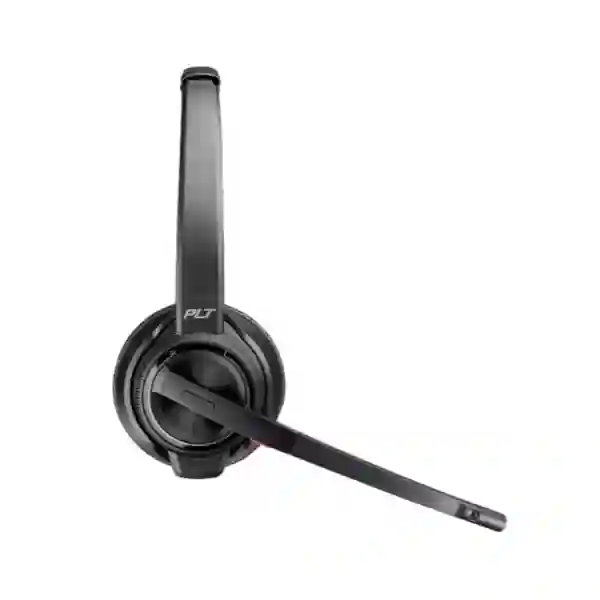
HP Poly Savi 8220 Office Stereo DECT Headset
Choose a headset for the calls your team really handles. The HP Poly Savi 8220 Office Stereo DECT Headset is a stereo DECT system intended for a workstation that uses a desk phone, computer and mobile phone. It combines dual-ear active noise cancellation with a noise-cancelling boom microphone and the convenience of an Office base. The right purchase depends on the precise variant and how it connects to your existing devices.
At a glance
Wearing style
On-ear, stereo, over-the-head
Connection design
DECT headset plus multi-source Office base
Calling sources
Compatible desk phone, PC and mobile
Noise control
ANC listening and noise-cancelling boom mic
Talk time
Up to 13 hours per HP
Wireless range
Up to 55 m typical office; 180 m open
Why choose a multi-device Office headset?
This model is intended for a professional whose workday alternates between telephone conversations, computer collaboration and mobile calls. Rather than treating these as three unrelated audio systems, the Savi 8220 Office provides a base with source connections and a dedicated wireless headset. Employees can work without holding a handset, consult customer records and move around their immediate work area while remaining on a supported call. This setup is especially relevant when a company continues to operate physical desk phones while expanding its use of software-based calling.
The product is not a phone system or internet service in its own right. Its value depends on how well it works with the devices already installed. A buyer should establish which lines are essential, what kind of call controls are needed and whether staff need to hear colleagues around them. These requirements determine whether the stereo Office configuration is a good fit or whether a different headset and base arrangement should be evaluated.
The Savi 8220 Office in brief
The HP Poly Savi 8220 Office Stereo DECT Headset uses a dual-ear, on-ear wearing style and a boom microphone. HP documents active noise cancellation for listening and microphone noise reduction with close-conversation limiting for transmission. The associated Office base offers access to desk phone, computer and mobile calling sources. Its controls cover basic actions such as answering or ending supported calls, muting, changing volume and managing the ANC setting. The headset is designed around a rechargeable battery and a base-based charging arrangement.
HP specifies up to 13 hours of talk time. Published reach is up to 180 metres in open conditions and up to 55 metres in a typical office. These are reference figures rather than guarantees for a particular building. Actual performance and call control depend on the connected equipment. When a purchase is being planned, confirm the full manufacturer part number, region, included accessories and selected telephone or softphone integration before making an assumption based on the Savi 8220 family name.
Understand the three-source Office base
The Office base is central to the product architecture. The headset communicates wirelessly with that base using DECT. The base connects to a computer through its supported USB interface, to a compatible desk telephone through the telephone interface, and to a mobile handset using Bluetooth. This is why the Office model can serve someone who operates more than one type of calling device at the same workstation. The arrangement is different from a portable Bluetooth headset that pairs independently with several devices during travel.
Three available sources do not mean that three active conversations are automatically joined together. The user must understand source selection and the supported conferencing workflow. HP describes two-device conferencing scenarios within the Office family, but actual behaviour can depend on the telephone and software in use. A practical pilot should test incoming calls, transfers, source switching and whether audio returns to the intended device after a conversation ends. Clear training avoids accidental mistakes during busy periods.
Computer calling and meeting applications
Connecting the Office base to a computer can provide microphone and speaker audio for supported softphones and meeting applications. The computer’s sound configuration and the application’s own settings need to select the correct devices. When an employee regularly works with a customer database, booking system or support console, hands-free computer calls can make it easier to type, look up information and collaborate. The stereo design also provides listening for training material and other computer audio where the configuration allows it.
Not every application provides the same integration. Hearing sound through a headset is different from controlling call answer, mute status or presence indicators through that headset. Teams should test the exact application and version they use. Include a call after computer restart, a call when the laptop is docked, and a call after switching between other audio devices. Keep a simple record of the tested setup so users can restore audio settings without guessing when they move desks.
Desk-phone compatibility is a purchasing decision
The Office version is particularly relevant when employees still rely on desk telephones. Its base provides a telephone connection, but the exact telephone interface and remote call handling depend on the phone and any compatible accessories. A physical cable that transmits audio does not prove that an employee can answer a desk-phone call from the headset while away from the handset. Some telephone models need an electronic hookswitch cable or a handset lifter, and requirements differ by manufacturer.
Before buying, provide the exact make and model of each desk telephone and identify whether remote answer and end are mandatory. A sample installation should check dial tone, incoming calls, outgoing calls, transfer handling and volume. If a company uses more than one phone model, do not assume the same accessory suits every desk. Standardising a headset without standardising the interface details can introduce avoidable support work and unexpected accessory costs.
Mobile-phone calling through the base
Many employees receive business-related calls on mobile phones while seated at a fixed office desk. The Savi Office architecture allows a compatible phone to connect by Bluetooth to the base, with the headset acting as the listening and speaking device through its DECT connection. This can reduce repeated switching between a mobile handset and a separate desk-phone or computer headset. It is a useful pattern for supervisors, administration teams and customer-facing roles with more than one number.
The mobile connection is still centred on the powered Office base. It should not be confused with a headset designed for direct Bluetooth pairing while travelling. The phone and base must remain connected, and the headset must be within useful wireless range of the base. Test the mobile models used by the team, especially call alerts, microphone selection and transitions between a mobile call and another source. Employees who mostly work away from a fixed desk may need a portable alternative.
Active noise cancellation for the wearer
The Savi 8220 stereo headset includes active noise cancellation, or ANC. The practical objective is to make surrounding sound less distracting to the person listening through the earcups. This can be valuable in shared offices, administrative rooms and customer-service spaces where colleagues may be talking nearby. ANC is a listening feature; it does not automatically remove every sound from the call or substitute for an appropriate workplace layout.
A sensible evaluation uses the real environment rather than a silent demonstration room. Allow a user to participate in a normal call near everyday conversations and equipment noise. Ask whether speech remains clear at comfortable volume and whether the wearer can still notice essential workplace signals. Employees who need continuous awareness of colleagues, visitors or audible alerts may prefer a mono headset. The preferred noise setting and wearing style should be selected based on role and user experience.
Microphone noise control for the caller
The boom microphone has its own noise-management purpose. HP describes noise cancellation with close-conversation limiting, intended to prioritise the wearer’s voice over nearby conversation. This is distinct from active noise cancellation on the earcups. The person speaking through the headset may hear less room sound because of ANC, while the remote caller benefits from microphone processing and sensible microphone placement. These two effects should be evaluated separately.
Place a test call from the working location and ask the person receiving it to report what they hear. Include ordinary background speech rather than an artificially quiet room. If voices remain distracting, check the boom position and any supported device settings before assuming the microphone has failed. The headset can improve a calling experience, but it cannot guarantee complete isolation from loud surroundings. Workspace arrangement and an agreed approach to sensitive conversations remain important.
Wireless range: plan for the building, not a headline number
HP gives the Savi 8220 Office a range of up to 180 metres in open areas and up to 55 metres in a typical office. The longer measurement represents favourable conditions. Real indoor coverage can be reduced by walls, concrete, partitions, equipment rooms and interference. A company should not assume the headset will remain reliable across several floors simply because the maximum open-area range is substantial.
During a trial, walk the routes staff actually use while handling calls. Check nearby printers, storage areas, supervisor desks and short corridors, and record where audio quality changes. Position the base sensibly rather than behind heavy equipment or inside crowded metal cabinets. If a team needs dependable calls throughout a large premises, evaluate that requirement separately. One workstation headset base is not a building-wide wireless communications network, and no range figure should be treated as a promise for every office layout.
Talk time and daily charging habits
HP specifies up to 13 hours of talk time for the product. That is a useful planning benchmark for many working patterns but does not establish exactly how long every user will operate before recharging. Battery condition, age, configuration and use all affect a rechargeable headset. Users should become familiar with battery indications and the charging location as part of normal onboarding rather than discovering them during a critical customer conversation.
A practical operational policy is to return the device to its charging position whenever it is not in use. For back-to-back call roles, test the headset over a complete representative shift and consider the contingency if a unit runs out of power. Shared equipment may require different charging arrangements from individually assigned headsets. If a business promises uninterrupted phone coverage, it should have an alternate working telephone or spare equipment procedure independent of the quoted headset battery life.
Stereo comfort and workplace awareness
The Savi 8220 covers both ears and may suit someone whose primary job is sustained listening and speaking. Two earcups can support focus when users spend long periods in computer meetings, customer conversations or training sessions. The on-ear wearing style and headband should be adjusted correctly so the microphone is positioned for speech and the earcups sit comfortably. A headset that feels satisfactory during a five-minute demonstration may feel different after several hours.
Stereo listening also has a tradeoff. Someone welcoming visitors or watching over a shared office may need to hear colleagues and nearby events more easily than a dual-ear configuration allows. This does not make the 8220 unsuitable, but it means the user should assess fit against the job. Ask several employees to wear the unit during an ordinary shift and note comfort, awareness of surroundings and ease of adjusting the controls. Personal comfort is a genuine deployment requirement, not a minor cosmetic detail.
Headset buttons and voice indications
HP lists on-headset controls for call answer and end, mute, volume, power and ANC. Voice indications can inform the wearer of conditions such as mute or remaining operating status. These controls may reduce the need to reach for a keyboard or telephone in the middle of a conversation. They are particularly useful in call-intensive roles where a user must consult information on screen while keeping attention on the caller.
The exact response can vary by connected source and supported software integration. Teach users to recognise the difference between muting the headset and muting inside a meeting application. Also practise switching between computer, mobile and desk-phone sources so a user does not accidentally answer on the wrong device. A small instruction guide based on the tested office configuration is often more valuable than a long generic manual that includes features not available in the particular installation.
Conferencing and supervised calls
The Savi 8200 Office family supports headset conferencing arrangements that can help with coaching and assistance. Depending on the exact hardware and supported procedure, another compatible headset can join for a shared listening or conversation scenario. HP also describes supported conferencing across two sources on the Office base. These features can be relevant to supervisors, training sessions and colleagues who need to resolve an issue together without passing a physical handset around.
There are several different concepts to keep separate: joining an additional headset to a base, joining a second communication source, and creating a conference inside a calling platform. They are not necessarily the same operation. Verify the approved process for the specific base and connected service. A company should also set rules for when another person may join a customer conversation, how any required disclosure is handled and when the guest connection must be ended.
Security and the wider privacy picture
DECT provides the wireless link between headset and base, and HP describes security features in the Savi Office family. This may be relevant to organisations considering professional wireless headsets, but it should not be interpreted as a blanket guarantee that every conversation or device is secure. Security also depends on account access, network management, connected phone systems and the physical surroundings in which calls are made.
For confidential conversations, provide suitable seating and train employees to confirm the identity of callers before sharing protected information. Keep the connected computers and applications under normal organisational management. When a headset changes hands or a desk is reassigned, review its paired mobile phones and configuration rather than treating it as a passive audio cable. Any applicable legal and privacy duties should be assessed separately. A manufacturer’s wireless security statement does not establish compliance with a particular Tanzanian rule or organisational security standard.
Standard Office, Teams Office and UC are different choices
The Savi 8220 name can appear on several manufacturer configurations. Standard Office kits, Teams-oriented Office variants and computer-focused UC options may look similar but differ in connection equipment, certification or control features. A seller’s use of the words compatible with Teams does not necessarily establish full Teams certification for the exact item offered. That distinction matters if a procurement specification requires a dedicated Teams button or validated software call control.
Always request the complete manufacturer product number and check its current documentation. Ask whether the expected application is merely able to use the headset for audio or whether advanced device controls are specifically supported. Where a team uses multiple collaboration platforms, test each one on the organisation’s actual operating-system image. The correct selection follows the required workflow rather than choosing a model simply because it belongs to the Savi 8200 series.
How this headset compares with portable Bluetooth models
A mobile-oriented Bluetooth headset is often designed to travel with the wearer and pair directly to a laptop or phone. The Savi 8220 Office uses a base-centred system with DECT between headset and base, enabling a different kind of multi-device environment. This is a useful distinction for buyers who see wireless listed on many products and assume the daily experience is identical. A stationary office setup can offer a dedicated connection point for a desk telephone that some portable headsets do not provide.
However, the Office base requires appropriate power and space and works best where the user repeatedly returns to the same workstation. For employees who spend the day in vehicles, work from several unrelated locations or rarely touch a desk phone, a compact portable headset may be more logical. Evaluate the source devices, wearing preferences and connection accessories before relying on headline wireless specifications. The more suitable design is the one that supports the user’s real calling environment.
Savi 8210 mono or Savi 8220 stereo?
The family includes mono and stereo wearing styles. The Savi 8210 is the single-ear choice, while the Savi 8220 is the two-ear option. The main question is how much attention the person needs to give to conversations compared with activity in the room. A service agent in a noisy area might appreciate a stereo headset; a front-desk employee who welcomes visitors might prefer keeping one ear unobstructed.
These are examples rather than rigid rules. Individual preference, working noise and headset fit can change the answer. It is also important to compare like with like: a Savi 8210 UC kit and a Savi 8220 Office kit may differ in base connectivity as well as wearing style. When the requirement includes a desk phone, ensure the mono option being compared offers the corresponding Office architecture. An employee trial should be used to settle the wearing-style decision where possible.
Who may benefit in Tanzania?
A mixed-call headset can be considered by businesses in Tanzania that retain desk phones while using computer-based meetings and mobile communications. Potential user groups include customer-service desks, commercial teams, administrative staff, internal help desks and operations supervisors. These examples explain possible use cases; they do not claim that FourTeck currently has stock or a deployment in any specific Tanzanian city or institution.
The local procurement challenge is to match an international product family to the exact equipment being installed. The regional headset variant, connected telephone, power arrangement, accessory requirements and supplier terms all deserve confirmation. A headset cannot compensate for poor network coverage or unstable power affecting the connected telephone or base. If continuity is important, plan a calling fallback separately. The final choice should take into account operational needs and a verified Tanzania quotation rather than assumptions drawn from foreign retail listings.
How to request an accurate quotation
Start with the number of employees, their desk-phone makes and models, the computer operating systems and the principal calling applications. State whether mobile integration is required for each workstation. If staff must answer desk-phone calls remotely, ask specifically about electronic hookswitch compatibility and any additional cable or lifting device. For a Teams-focused installation, specify whether certified hardware is a mandatory purchasing condition.
A useful supplier response should identify the full manufacturer part number, the Office base configuration and the cables or accessories actually included. Ask for confirmed price, availability, service details and applicable commercial terms for that specific Tanzania offer. Do not assume that a product description or an international part number implies current local stock. For multiple workstations, ask whether a compatibility trial can be arranged before a quantity purchase is approved. This helps prevent unsuitable or incomplete kit selection.
Desk setup and connection checklist
Set the base on a stable surface with convenient access to its controls and charging position. Follow the correct HP Poly installation guide for the exact kit when connecting power, the computer, the telephone interface and any optional accessory. Avoid guessing which port is appropriate from its physical shape. Pair a compatible mobile phone to the base when that source is required. Make sure the headset is charged and properly subscribed to the intended base.
Once connected, select the correct sound devices on the computer and in the calling application. Place an outgoing test call from each intended source and receive a call on each as well. Confirm microphone volume, sound clarity, mute, call handling and source switching. Test remote desk-phone answer only if the configured phone and accessory support it. Keep a record of the setup and the headset’s location so future users can recover from accidental changes.
A practical acceptance test before rollout
A short demonstration is not always representative of a real office shift. Choose pilot users who perform different kinds of work: one who uses a desk telephone, one who relies on PC calling, and one who handles mobile and computer conversations. Give each person a defined test period with normal calls, ordinary background noise, desk movements and changes between sources. Ask them to record issues immediately so the support team can reproduce them.
Check the wireless route, comfort after extended wear, battery behaviour and whether users correctly understand mute and answer controls. Test computer audio after a restart or docking change. Verify any electronic hookswitch function using the specific desk phone. For a larger team, use the findings to create an approved configuration by workstation type. This can reduce repeated troubleshooting and help procurement establish which optional accessories are needed for each desk.
Audio quality and speech intelligibility
The headset is intended for professional voice communication and can also reproduce computer audio where properly configured. HP specifications identify stereo speakers and sound processing features, but telephone and meeting audio quality involves more than the headset. The network, communications service, selected microphone, application settings and remote caller’s equipment can all influence how natural speech sounds in practice.
For evaluation, make test calls from several sources using the same voice samples. Ask remote participants whether speech is easy to understand and whether background conversations are distracting. The wearer should listen at a comfortable volume rather than attempting to overcome poor sound with very high output. If computer audio differs from desk-phone audio, isolate the source settings before changing the headset. Clear speech and reliable call routing matter more for a business purchase than assuming that a single technical bandwidth figure guarantees exceptional calling quality.
Maintaining a fleet of headsets
Wireless headsets are shared workplace assets even when assigned to individual users. A practical maintenance routine includes cleaning suitable surfaces according to the manufacturer’s guidance, protecting charging contacts, inspecting cables and recording asset identifiers. Ear cushions and rechargeable batteries can change over time. It is useful to know which compatible replacement accessories are available for the exact model and regional configuration before standardising a large number of units.
HP identifies Poly Lens for compatible device settings and software-related tasks. IT teams should check supported releases and test critical calling applications before wider changes. Keep configuration notes for the base, telephone, computer and calling application. If a user reports a fault, identify whether it affects all sources or just one. For example, successful mobile audio alongside failed computer audio can indicate a routing or application issue. This source-by-source approach prevents unnecessary replacement of otherwise working headsets.
Troubleshooting audio or call-control problems
When there is no sound, first check power, headset charge, selected source and the audio settings of the connected device. Computer meetings often provide their own input and output selections separate from operating-system settings. Desk telephones may have a specific headset mode and optional electronic hookswitch accessory. Mobile calls depend on successful pairing with the base and selection of the correct source. Testing one source at a time is more reliable than randomly changing several settings.
For poor microphone quality, check boom placement and compare a call made from a quiet area with one made from a busy room. For range issues, repeat the test close to the base before blaming the battery. If a problem started after a software or firmware update, document version details and retest using an approved support process. Keep clear records of the exact symptoms, connected phone model and application so support can establish which part of the system is responsible.
Limitations and operational tradeoffs
This is not a complete phone system, a mobile network device or a guarantee of calling availability. It relies on the connected telephone, computer, phone service, base and appropriate electrical power. Its range depends on the building. Its answer and mute controls can vary with the software and phone involved. Some desk-phone functions may require an accessory that is not included in every kit. A similar product name is not enough to establish regional compatibility or collaboration-platform certification.
The stereo listening design also changes how users perceive activity around them. That can help concentration but may be less suitable when somebody must frequently respond to people in the room. An organisation should confirm current lifecycle, support and replacement options for the exact variant before planning a long-term fleet. These checks are normal parts of responsible procurement, not reasons to dismiss the headset. They help ensure that the chosen device performs as expected in its actual workplace.
Training employees on mixed-source calling
Employees often know how to answer a single phone but can become confused when a desk telephone, computer app and mobile phone are all connected to one system. During onboarding, demonstrate how to select the correct source, answer or end a call, mute reliably and return audio to the intended application. Practise with a real incoming call on each source instead of relying only on labels printed on the base. Discuss how conference or second-call handling should work in the organisation’s environment.
A short, illustrated desk guide prepared from the pilot configuration can make daily use simpler. Include what to do if an application is muted but the headset appears active, and where the device should be placed to charge. Staff should also know when to contact IT rather than repeatedly disconnecting cables. Consistent training can reduce avoidable call-handling mistakes and makes it easier to use the multi-device capability productively.
Managing headset procurement across departments
Different departments often have different requirements even when the same headset family is proposed. Customer-service users may need predictable remote desk-phone control; office managers may value mobile integration; internal teams may rely almost entirely on computer meetings. Collect these needs before selecting accessories. A single catalogue description should not replace a device and workflow inventory, especially where existing desk-phone models differ between locations or business units.
Divide the proposed deployment into compatible groups. Confirm a standard kit and cable set for each, document tested applications and provide a clear replacement path. Include the potential cost of optional accessories, staff training, hygiene provisions and technical support in the purchasing assessment. The right measure of value is whether workers can use their normal communication channels with fewer interruptions, not simply whether the headset has a long technical feature list. An organised pilot supplies that evidence.
Why a regional variant check is important
The Savi 8220 name covers configurations that may be sold with different regional identifiers and radio specifications. Buyers should not derive a local product number from a foreign retailer’s listing or assume that the same package is intended for every market. The full HP Poly product identification is the basis for matching the exact model to official documentation, compatible accessories and the proposed supply arrangement.
For Tanzania, request confirmation of the specific regional item being quoted and any applicable local requirements rather than asserting regulatory approval from a general family datasheet. Also verify the power supply, included connection cables and product service terms for that kit. The manufacturer part number should be recorded separately from the retailer’s own stock-keeping unit. No target-listing SKU has been supplied for this page, so none should be invented. This distinction helps avoid ordering an unintended variation.
Choosing between a pilot, replacement and expansion
An organisation replacing a failed headset may have a different purchasing objective from one planning a new twenty-person call team. A replacement buyer should prioritise compatibility with the existing base, telephone and software. A new deployment should compare the complete Office architecture against other current options, especially if the business expects to phase out physical desk phones. An expanding team should consider whether all additional seats use the same telephone hardware and application configuration.
Before committing, ask whether the exact unit is obtainable under suitable current support and commercial terms. If not, request an alternative matched to the same calling requirements and validate that alternative independently. A careful decision considers the entire workstation and its operational life. This prevents an attractive headset feature from obscuring a missing cable, unsupported call-control integration or a change in the company’s communications strategy.
What happens after a compatibility review?
A productive review should result in a definite equipment specification rather than a vague promise that the headset works with everything. The outcome should identify the required regional model, connection sources, compatible desk phones, any electronic hookswitch accessory and the level of software integration that has been verified. If a particular feature cannot be confirmed, it should be labelled as a point for pilot testing rather than described as standard capability.
Procurement can then compare the complete quote, including supplied equipment and any optional parts, against the operating requirements. The organisation should preserve the configuration notes for installation and support. Staff will benefit from a clear explanation of expected behaviour, especially when calls arrive on different lines. This approach helps a Tanzania buyer turn a general headset specification into a practical decision with fewer deployment surprises.
Frequently asked questions
Can it work with a desk phone, computer and mobile?
Yes, that is the purpose of the Office base. The headset communicates by DECT with the base, which supplies the connections to a compatible desk telephone, computer and mobile phone. Supported source switching and conference behaviour must be tested with the actual devices. Do not assume that all sources are simultaneously mixed or that every desk telephone supports remote call control without accessories.
What is the wireless range?
HP specifies up to 180 metres in open areas and up to 55 metres in a typical office. Walls, equipment, interference and base placement can reduce those figures. A building may have areas with weaker coverage even when they are close to the base. Walk the intended routes during a trial to assess whether the actual roaming area suits the employee’s work.
How long can it operate on one charge?
HP lists up to 13 hours of talk time. Real use may differ with battery age, settings and operating conditions. Returning the headset to its charging arrangement when not in use is a sensible routine. Teams with continuous or shared-shift operation should test a normal usage cycle and plan an alternate calling method if equipment needs charging.
Is the microphone also noise cancelling?
Yes. Microphone noise cancellation and close-conversation limiting aim to reduce the surrounding sound transmitted to the caller. Active noise cancellation in the earcups serves a different purpose: it helps the wearer hear with fewer distractions. Neither system guarantees complete silence. Test both the remote caller’s experience and the wearer’s listening comfort in the intended office.
Does the standard unit have Microsoft Teams certification?
Certification should be verified by exact part number. The Savi family includes variants with different platform-related features and controls. A headset can provide usable PC audio without meeting every requirement for a certified Teams device. If Teams certification, a dedicated button or synchronised call controls are mandatory, ask for manufacturer confirmation against the quoted model.
Is an electronic hookswitch cable required?
It depends on the desk-phone make and model and whether remote answer or end is needed. A basic telephone audio connection may work while remote call-control functionality requires an additional compatible cable or a handset-lifting accessory. Share the exact phone model with the supplier and test the complete workflow before purchasing multiple headsets.
Can I use it away from the Office base?
The headset is designed to communicate wirelessly with its Office base, not to function as a standalone mobile Bluetooth travel headset. A phone pairs with the base and the headset operates within the base’s effective DECT range. If users regularly work beyond their fixed workstation or travel throughout the day, a portable alternative may suit them better.
Can a supervisor join a training call?
The Savi Office family supports compatible guest-headset conferencing workflows. The specific base, headset compatibility and joining procedure should be confirmed from the relevant guide. Adding a guest headset differs from creating a meeting-platform conference. Organisations must apply their own rules for customer notification, confidentiality and authorised supervisory listening.
Should I choose the mono Savi 8210 instead?
Choose based on the employee’s job and environment. The 8210 is mono, leaving one ear less obstructed; the 8220 is stereo and may suit sustained listening in a shared office. Test fit and awareness during actual work. Also compare equivalent Office or UC configurations, because base connectivity can differ in addition to the headset wearing style.
Can a headset solve internet or electricity problems?
No. The headset does not provide phone service, internet access or emergency power. A call depends on the connected telephone or application and its underlying network and electricity. Businesses that require continuity should document backup arrangements separately. The headset can improve the audio interface, but it cannot keep an unavailable calling service operating.
What if PC calls work but desk-phone calls fail?
That is an indication to test the sources separately. Check telephone-interface cabling, phone headset mode, any electronic hookswitch accessory and the base’s selected source. A working PC audio path does not establish a working desk-phone integration. Record the desk-phone model and configuration before contacting support so the issue can be reproduced accurately.
What should a Tanzania quotation include?
Provide the quantity, telephone model, computer system, calling applications and mobile requirements. Request the full manufacturer regional identifier, included cables, any optional hookswitch accessory and confirmation of required platform certification. Ask for current local price, availability, support and purchasing terms. A pilot is advisable when several desks or different telephone models are involved.
Request a compatibility review and quotation
Tell FourTeck Tanzania which desk phones, computers and calling applications you use, how many headsets you need and whether remote answer or Microsoft Teams certification is essential. Request the exact regional configuration, included accessories and current commercial terms before deciding.
Next step: ask for a product compatibility check and quotation.




Reviews
There are no reviews yet.