
OFFICE COMMUNICATIONS · WIRELESS DECT
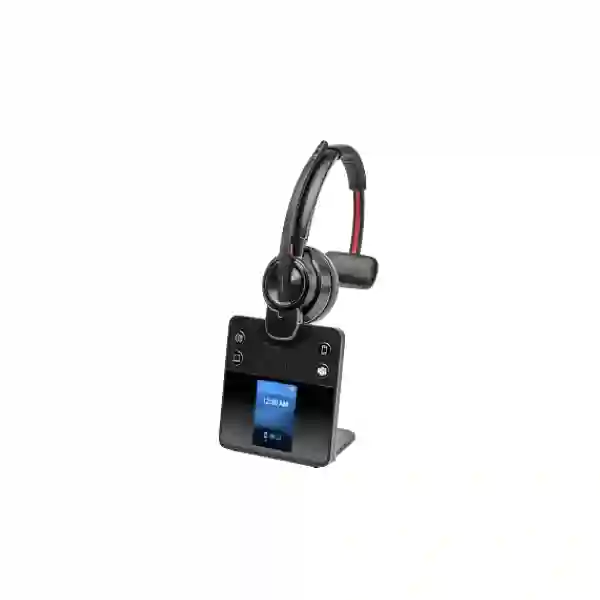
HP Poly Savi 8410 Office Monaural DECT Headset
An office-ready, single-ear headset for employees who handle computer, desk-phone and mobile calls. The Savi 8410 Office combines a DECT wireless headset, three-source base and noise-cancelling boom microphone. Verify the intended regional model and desk-phone compatibility before buying for your workplace in Tanzania.
The buying decision in one minute
Choose the Savi 8410 Office when one employee needs a convenient headset for more than one call source and wants to remain aware of nearby activity. Check the phone model, primary softphone, required call controls, Teams certification requirement and regional variant. A suitable unit is one that works reliably with the actual desk setup, not merely one that meets a published maximum range.
Key specifications at a glance
The following HP-derived characteristics describe the Savi 8410 Office product family. Confirm each technical detail against the actual regional version quoted. Range and battery values are published maximums, and compatibility depends on the connected devices and software.
| Feature | Details |
|---|---|
| Wearing style | Monaural, on-ear |
| Headset wireless link | DECT to Office base |
| Additional connection | Bluetooth 5.2 for mobile via base |
| Call source types | Compatible desk phone, computer, mobile |
| Microphone | Noise cancelling with close-conversation limiting |
| Maximum stated talk time | Up to 13 hours |
| Maximum stated standby | Up to 50 hours |
| Charging | Less than 3 hours |
| Wireless coverage | Up to 180 m open line-of-sight / 55 m typical office |
| Headset weight | Approximately 115 g |
| Speaker driver | 32 mm |
| Controls | Answer/end, volume, mute, power |
| Listed package items | Office base, charging cradle, USB-A and USB-C cables, telephone interface cable, AC adapter and headset |
Who this headset is designed for
The Savi 8410 Office is a practical option for employees whose working day includes conversations on a computer, an office desk phone and a mobile phone. This describes many reception, customer coordination, scheduling, sales support and administrative roles. Instead of changing the headset whenever a different call source becomes active, the user works through an office base designed to bring those sources together. That multi-source workflow is the principal reason to consider the product. A buyer should begin with the communication channels that staff actually use, not with an assumption that a wireless headset will solve every telephone-system problem.
The single-ear wearing style also suits a workplace where the employee must continue hearing colleagues or visitors. An office coordinator might need to take an external enquiry while recognising that someone has approached the desk. The uncovered ear makes this easier than a completely enclosed listening arrangement. The trade-off is less separation from surrounding noise for the person wearing the headset. In a highly noisy environment, or when the job involves continuous long calls, a dual-ear headset may be more appropriate. The right solution depends on real working conditions and the preferences of the people using it.
For a workplace in Tanzania, a useful first step is to record the exact desk-phone models, computer operating systems, mobile devices and calling applications. Identify whether staff merely need clear audio or expect to answer and end desk-phone calls remotely. Note whether training sessions, multiple headsets or a certified meeting-platform variant are required. This information helps the supplier establish whether the intended configuration is appropriate, and it helps the purchaser avoid ordering accessories or versions that are not required.
How the three-source office base works
The HP Poly Savi 8410 Office system uses DECT for the wireless connection between the headset and its office base. The base is the central point for the computer connection, compatible desk-phone connection and Bluetooth connection with a mobile phone. The person wearing the headset can select the intended communication source using the controls provided on the base. In an office where calls arrive through different systems, this arrangement can reduce the inconvenience of disconnecting and reconnecting audio devices. It also creates one consistent headset experience across several sources.
Three-way connectivity does not mean that every device can be used in every possible combination without checking compatibility. The desk telephone must have an appropriate connection and configuration. The PC must be able to use the headset system as an audio device, and software-dependent call controls may require a supported application. The mobile handset pairs by Bluetooth to the base, not directly to an independently roaming Bluetooth headset. These distinctions are useful when planning where the base will sit, where the employee can move, and which device should handle incoming-call alerts.
During a product trial, test a call from each source separately and then in a normal working sequence. Make a softphone call, end it, receive a call on the desk phone, and then test the mobile connection. Check that the employee can identify the active line, adjust volume, mute speech and return to the expected default source. Where the business needs call transfers or holds, test those tasks in the actual telephone or software system. Headset operation is only one part of a complete calling workflow.
DECT coverage and realistic mobility
HP lists a wireless range of up to 180 metres in an open line-of-sight environment and up to 55 metres in a typical office for the Savi 8410 Office. These figures describe potential operating conditions rather than a promise that every room or floor will have the same coverage. Walls, floors, metal shelving, busy wireless environments, partitions and the position of the base can affect the usable range. Employees should understand that the headset communicates with the desk base, so the base location matters even when the original phone call is coming from a mobile device.
The strongest reason to choose a cordless headset is freedom to perform normal tasks while staying in conversation. Staff can stand during a call, retrieve a nearby document, reach the printer or move around their immediate workspace without a cable pulling across the desk. This freedom is especially relevant when a job requires quick access to papers and equipment. It can also support more natural working posture, although personal comfort and movement preferences will vary. Employees who never move away from their computer might find a simpler USB headset sufficient.
Before an office places a multi-unit order, use a representative unit to walk the routes staff actually use. Test at the reception counter, near a storage cabinet, beside the printer, through a corridor and around any heavily built internal walls. Listen for interruptions and check whether calls continue reliably in the areas that matter. An open-area maximum should never be used as the sole basis for a deployment decision. Record the practical coverage found at the site and adjust base placement if necessary.
Noise-cancelling microphone and speech quality
The Savi 8410 Office features a noise-cancelling boom microphone with close-conversation limiting. Its purpose is to help transmit the wearer’s voice while reducing unwanted sounds from the workplace, such as people speaking at nearby desks. This matters for customer-facing staff because the listener on the other end of the line needs to hear clear speech without excessive distraction. Microphone placement remains important: a high-quality system can still sound poor if the boom is badly positioned, the microphone is obstructed or the wrong audio device is selected in the computer application.
Microphone noise cancellation is different from active noise cancellation intended to reduce what the wearer hears. HP identifies active noise cancellation for the Savi 8420 Office stereo model, not as the principal selling point of the 8410 monaural headset. A single-ear model intentionally leaves one ear exposed to nearby activity. Buyers should not assume that its microphone technology will isolate the person wearing it from a busy office. If the employee needs listening isolation, evaluate dual-ear alternatives separately and test how much room noise remains audible.
A meaningful audio test should involve the real working environment rather than a silent demonstration room. Ask the headset wearer to speak while a colleague talks nearby, then have the caller comment on speech clarity and distracting background sounds. Repeat the test from the desk, from a typical moving position and through the actual calling application. Check microphone level, mute operation and any changes in audio quality across the three available sources. This gives useful evidence about suitability without relying on broad claims of flawless calling.
Single-ear design, awareness and fit
The monaural design places one earpiece against the ear while the other ear remains free. For reception personnel, administrative staff and team coordinators, this can be helpful because a conversation with a caller does not completely remove awareness of the office. The person can notice a visitor, hear an announcement or respond to a colleague when appropriate. The design is also useful where a staff member alternates between telephone work and face-to-face interaction. It is not intended to replace workplace rules for concentration, courtesy or confidential calls.
The trade-off is that the user continues hearing nearby sounds. Someone working in a loud open-plan room may prefer a headset that covers both ears. An employee taking back-to-back calls may also have different comfort preferences from a colleague who uses the telephone occasionally. The Savi 8410 is listed by HP at approximately 115 grams, but weight alone is not enough to predict comfort. Ear-cushion contact, headband adjustment, glasses and the length of the working shift should all be considered in a real user trial.
Allow prospective users to wear the headset through a realistic period of work before approving a large purchase. Check whether the headband stays in place during ordinary head movements and whether the earpiece applies comfortable pressure. Ask employees whether they can hear callers easily without raising the volume excessively. The right headset should help the user communicate while making normal tasks manageable. A technically compatible headset can still be a poor workplace choice if the people who must wear it dislike the fit.
Battery capacity, talk time and charging
HP specifies up to 13 hours of talk time, up to 50 hours of standby time and a charging period of less than three hours for the Savi 8410 Office. These are published maximum figures, not guaranteed results in every installation. Actual operation depends on use patterns, battery age, environmental conditions and the selected configuration. For many typical office jobs, the specifications support the expectation of extended calling through a working day, but organisations with unusually heavy or continuous call loads should evaluate battery performance in their own conditions.
The supplied charging cradle makes it practical to return the headset to a familiar place after a call or at the end of a shift. Position the cradle where users will naturally place the headset, rather than behind a monitor or under paperwork. For shared workstations, make clear who is responsible for checking the charge state. A depleted headset at the start of a busy morning is usually a preventable operational problem. A short charging routine can be more valuable than relying on the advertised maximum runtime.
Plan a fallback for times when the headset is unavailable or charging. Employees may be able to use an approved desk-phone handset or another supported audio device according to company policy. Do not assume a battery or cradle from another headset model is interchangeable. If a business uses extended operating hours, assess battery replacement and service requirements for the exact supplied model. Good purchasing decisions include basic lifecycle considerations, not just performance when the unit is new.
Computer connection and softphone checks
The manufacturer lists USB Type-A and USB Type-C cables with the Office system. These enable the base to connect to compatible computer ports while the employee uses the headset wirelessly. In Windows or macOS, the appropriate audio input and output device must be selected. The same selection may need to be made within a softphone or meeting application. If the software continues using the computer’s internal microphone, the employee may think the headset is defective even though the connection is working.
Testing should cover more than simply hearing sound. Make inbound and outbound calls through the exact application used in the workplace. Confirm mute synchronisation, answer and end controls, microphone volume, ring notification and behaviour after an application restart. Some advanced call-control functions depend on supported software integrations or Poly software. A generic statement that the product works with computers should not be interpreted as a promise that every feature functions identically in every app.
IT administrators should check whether endpoint policies allow the necessary software and settings. In managed environments, device permissions, application versions and automatic audio-device switching can affect user experience. Establish an approved baseline and document it before fitting multiple desks. A pilot involving a representative employee is especially useful where the business uses a custom calling application, a hosted contact-centre platform or several computer operating-system versions.
Desk-phone compatibility comes first
The Savi 8410 Office is designed to work with compatible business desk phones, and HP lists a telephone interface cable in the package. However, desk phones are not identical. They differ in headset ports, call-control interfaces, firmware and the way they support remote answering. Some environments require a compatible electronic hook switch adapter or another handset-lifter arrangement for functions beyond basic audio. The existence of a telephone cable in the box does not prove that every desired telephone control is immediately available.
Ask the supplier to check the full make and model of the phone before confirming an order. It is also important to specify what the employee needs to do: answer an incoming call remotely, hear a ring alert, mute a conversation, place a caller on hold, switch lines or transfer a caller. Different tasks can involve the telephone itself, the PBX or a separate supported accessory. A headset provides audio and appropriate controls; it does not create a telephone service or replace the functions of the business phone system.
When installing a trial unit, verify dial tone, outgoing calls, incoming ring behaviour and sound in both directions. If the employee needs remote answering, test that feature separately and record the compatible configuration. A voice administrator should note the telephone firmware and any required configuration-switch settings. This small amount of preparation can prevent a confusing situation in which the headset transmits audio correctly but the user cannot answer the phone without reaching for the handset.
Connecting a mobile phone via the base
The Savi 8410 Office includes mobile-phone connectivity through Bluetooth on the office base. HP lists Bluetooth Core 5.2 and standard audio profiles among the technical specifications. This can be useful when an employee has a business mobile phone alongside a desk telephone and a PC calling application. Instead of wearing one headset for office calls and switching to another device for mobile calls, the employee can use a consistent headset and choose the desired source on the base.
It is important to understand the topology of the connection. The mobile phone pairs with the office base, while the Savi headset uses DECT to communicate with that base. The headset is therefore intended to operate as part of the desk-based system, not as a standalone Bluetooth travel headset that pairs independently with any phone on the move. Bluetooth reconnect behaviour and software features can differ according to the specific handset, so a real mobile-call test is recommended.
Test incoming-call alerts, voice quality, selecting the mobile source, ending calls and returning to the preferred work line. If a role involves personal and business calls, agree how notifications should be managed and whether the employee is expected to answer all sources at the same desk. The convenience of switching does not remove the need for appropriate phone-use policies. Check how the system behaves when two call sources demand attention close together.
Standard versus Teams-certified versions
Manufacturer documentation identifies different Savi 8410 Office ordering variants, including a standard monaural model and a Microsoft Teams-certified monaural version. The user-provided product name does not specify which variant will be listed or sold. It would therefore be inaccurate to advertise a Teams certification as an unconditional attribute of every unit under the generic product name. If the organisation relies heavily on Microsoft Teams, request written confirmation that the proposed part number is the intended Teams-certified version.
The certified version has platform-specific control considerations, including the Teams-oriented base control shown in HP documentation for that version. Other calling platforms can have different levels of support for their call controls. A buyer should specify the primary application, confirm whether its required functions are supported and test those functions in a pilot. The relevant choice is not merely whether audio works, but whether the software and hardware workflow matches the employee’s daily use.
Regional manufacturer references can also differ by DECT frequency allocation. HP presents variants for different markets, so a part number or radio-band detail copied from a foreign listing should not automatically be applied to a Tanzanian order. Request the exact supplied manufacturer reference and the configuration intended for the destination market. No SKU has been provided for this Tanzania listing, so the page avoids assigning an unverified retailer SKU or claiming local regulatory approval.
The office-base controls in daily use
The Office base provides a central control surface for selecting connected communication sources. HP describes controls for the computer softphone line, Bluetooth or mobile line and telephone interface, together with on-base navigation. This can be convenient where employees otherwise spend time changing audio settings on the computer or finding a phone when a different type of call arrives. A well-positioned base should be visible and within easy reach without taking over valuable desk space.
User training should include recognising the active source, beginning and ending a call, adjusting volume and checking mute status. Different applications may display microphone state differently, so test the physical headset controls and any on-screen status in the actual software. Staff should learn what to do if they answer on the wrong source or if a new application selects an unexpected audio output. A simple desk reference can reduce support requests more effectively than an extensive technical manual that employees rarely open.
At shared desks, label the computer and telephone connections clearly so that cables are not accidentally exchanged. Keep the power adapter positioned safely and the charging cradle unobstructed. Where multiple identical headsets are deployed, identify which headset belongs with which base. Consistency helps a new employee understand a workstation quickly, and it makes it easier for technical staff to investigate problems without reconstructing how the equipment was originally installed.
Using guest headsets for coaching
HP describes a conferencing capability that can bring up to four compatible headsets onto the Savi 8400 Office base. A supervisor might use this arrangement to coach a new employee through a customer conversation or to allow another authorised colleague to participate. This is useful when training takes place at a working desk and everyone needs to hear the conversation through a headset rather than a loudspeaker. It is a product-family capability that should be checked for the exact headsets being connected.
Not every Savi headset is automatically a compatible guest model. HP materials explicitly note a compatibility exclusion concerning the Savi 7200 headset. Before purchasing additional headsets for coaching, identify their models and verify the supported pairing and conferencing procedure. Avoid assuming that matching brand names or similar charging connectors guarantee interoperability. Testing the intended guest arrangement ahead of rollout is safer than relying on general marketing descriptions.
Any organisation using listening or call-monitoring workflows should also consider its customer-privacy and internal authorisation policies. Headset conferencing is a technical function, not permission to monitor calls without appropriate procedures. Define who may join, how callers are informed where necessary and how the guest is removed when training ends. Protecting customer trust and reducing mistakes are part of a successful coaching programme, even where the technology makes participation easy.
Using Poly Lens in managed environments
HP describes Poly Lens as a software environment for managing supported Poly devices and related configuration. This can be useful to an IT team responsible for headsets across several workstations. Potential objectives include maintaining consistent settings, understanding connected equipment and supporting software maintenance. The functions actually available must be checked for the exact headset, firmware, application and organisation setup; not every management feature described for the wider Poly family applies automatically to every model.
Begin by confirming which Poly components and software versions are supported in the intended environment. Some organisations restrict software installation or USB-device management through endpoint security policies. The calling application may also require its own device permissions. Document the authorised configuration before deployment, including the preferred audio input and output, source selection and who can change device settings. These steps are particularly useful in contact-facing teams where interruptions affect customer response.
For larger deployments, maintain a simple record of the exact model and variant assigned to each desk. Include the computer platform, desk-phone model, relevant accessories and support contact. If a user reports a problem, these details help distinguish hardware faults from application configuration or telephone-interface issues. Managing headsets as ordinary business endpoints can make support more predictable, even when the equipment itself is simple to operate.
A recommended installation sequence
Start by choosing a stable location for the office base near the computer and the relevant desk phone. Leave the cradle accessible and make sure cables do not interfere with the keyboard, monitor or walking areas. Connect the supplied power arrangement and the appropriate included USB cable according to the manufacturer’s instructions. If using a desk phone, connect the approved telephone interface to the correct phone port and use the required base configuration. Avoid assuming a cable belongs in a port merely because its plug fits.
On the computer, select the system as the audio input and output device. Make a short test call and verify incoming and outgoing speech. Test the microphone mute and volume controls. If mobile calling is required, pair the phone with the office base through the documented Bluetooth procedure and check that mobile calls behave as expected. When a physical desk phone is involved, confirm audio and ring operation before moving on to optional remote-answer functions.
Complete the setup by running the tasks that will occur during an ordinary shift. Have the user switch between a computer call and a mobile call, check the correct device is active and walk the intended office route while speaking. Return the headset to the charging cradle and confirm that it is correctly placed. Record any special telephone accessory or software setting. This procedure can be repeated at the next desk with far fewer uncertainties.
How to judge real-world call quality
A demonstration in a quiet meeting room does not fully represent a reception counter or open-plan office. A more useful test takes place at the intended desk during a normal activity period. Call a colleague from a separate phone or location, speak at an ordinary volume and ask for feedback about the clarity of the transmitted voice. Then repeat while nearby staff members are conversing. This helps assess whether the noise-cancelling microphone meets the business’s actual need.
Do not examine transmitted speech alone. The employee must also be able to understand the caller and remain comfortable over several calls. Check whether one uncovered ear produces the desired awareness or becomes a distraction. Listen for problems when moving through the workspace. If the calling application uses an unstable network connection or an unusual audio setting, separate those issues from headset performance before drawing conclusions about the equipment.
Write down a few practical pass-or-fail criteria: understandable speech in both directions, acceptable comfort, useful movement coverage, reliable source selection and required call-control behaviour. A decision based on these criteria is easier to explain to colleagues and procurement teams than a decision based solely on an impressive maximum-range figure. It also reveals whether different staff groups would benefit from different headset types.
Reception and customer service scenarios
Reception employees often have to remain responsive to a visitor while speaking with someone remotely. A monaural headset can support this by keeping one ear open to the surrounding room. If the receptionist also uses a computer-based calling system and a work mobile, the Savi 8410 Office base can bring supported call sources together. Before choosing the product, confirm the exact desk phone and whether staff require remote answering, line switching or other functions controlled by the telephone system.
Customer service and scheduling teams may spend more time working through software screens while speaking to callers. Being able to move briefly from the desk without disconnecting an audio cable may make the workflow more convenient. However, the headset does not itself add call routing, a customer relationship management system, recording or ticket creation. Those functions depend on the telephony and software platform already in use. The purchase should be evaluated as an audio endpoint rather than an all-in-one contact-centre application.
A team lead may have different priorities: joining a trainee’s call through a supported guest headset, monitoring whether staff have appropriate audio settings or using a mobile source during the day. These scenarios are possible reasons to investigate the system, not evidence that every accessory or integration is automatically included. A well-prepared quotation identifies which needs are essential and which should be validated as optional additions.
Comparing this model with wired alternatives
A wired USB headset can be an efficient option for someone who works at a single computer, stays close to the screen and never needs a physical desk-phone connection. It has fewer desk components and does not depend on a headset battery during calls. For that person, the Savi 8410 Office may add complexity without delivering a corresponding benefit. Wireless mobility becomes more useful when movement and multi-source communication are genuine parts of the role.
The Savi 8410 Office offers a different balance: wireless DECT conversation, a base for multiple sources and a monaural wearing style. The base requires space, power and correct configuration, but it can reduce the need for separate headsets across a computer, desk telephone and mobile phone. In evaluating cost, compare the entire setup rather than just the headline headset price. Required telephone accessories and support requirements may affect the real purchase decision.
An employee who works in a very noisy setting may benefit from a stereo alternative, while someone who frequently travels between buildings may prefer a different mobile-first headset. The Savi 8410 Office is most coherent as part of a fixed office workstation with some walking freedom. Selecting by actual role prevents a common procurement problem: buying one model for everyone even though the team’s communication patterns are not the same.
Savi 8410 versus Savi 8420 Office
The Savi 8410 is the one-ear option in the family, while the Savi 8420 is a two-ear or stereo model. This difference changes the listening experience. The Savi 8410 allows the employee to remain aware of colleagues and approaching visitors, making it appealing for reception and administrative work. The Savi 8420 may be more attractive where stronger isolation from surrounding conversation is needed for extended call handling. Personal preference and comfort should be tested alongside the specifications.
HP identifies active noise cancellation as a feature of the Savi 8420 Office stereo headset. Buyers should not describe the Savi 8410 as having the same wearer-side noise-cancellation feature without exact-model evidence. Both models belong to a wider business communications family, and shared features should not obscure the different ear coverage and acoustic experience. The appropriate choice is driven by workplace conditions, not the assumption that more ears covered always means a better headset.
A helpful demonstration uses both designs for the same tasks. Ask a receptionist to greet a colleague while handling a test call and ask a dedicated call agent to listen during normal office noise. Compare fatigue, ability to hear the caller, convenience and awareness. These observations are often more meaningful than choosing from product photographs. Where roles vary across departments, a mixed headset policy may be more practical than insisting on one wearing style.
Security and call confidentiality
HP describes the Savi 8400 Office headset family as DECT security-certified. That relates to the headset system’s wireless technology, but the complete privacy of a business call depends on more than the headset. The telephony platform, computer, network, mobile carrier and workplace practices all affect the overall communication environment. Buyers should not interpret a headset security statement as a guarantee of end-to-end security across every connected application or network.
Employees using a monaural headset can still hear the surrounding room, and nearby people may hear the employee’s side of a conversation. Consider whether sensitive calls require a private area or other workplace controls. If guest-headset conferencing is used for training, set clear rules about approved listeners and customer information. Good communication policy protects both callers and staff regardless of which headset is selected.
Where headsets are deployed across many desks, device ownership and access should be clear. Keep bases in appropriate locations, establish who may change configuration and use supported software practices when updates are necessary. Train staff to recognise mute status and to end calls correctly before discussing confidential matters with colleagues. These are basic habits, but they matter more than treating any single security-related specification as a complete privacy solution.
Typical contents of the manufacturer’s package
HP lists a wireless headset, Office base, charging cradle, USB Type-A cable, USB Type-C cable, AC power adapter and telephone interface cable as included components for the Savi 8410 Office. Together these explain the main connection options: USB for a compatible computer, a telephone interface for a suitable desk phone and a charging location for the wireless headset. The base also acts as the central point for Bluetooth mobile pairing and line selection.
Buyers should still inspect the packing list for the exact variant in a proposed quotation. An interface cable does not automatically include every adapter needed for remote desk-phone call controls. Some installations can require an additional electronic hook switch or suitable handset-lifter accessory. Ask the supplier to identify such parts for the exact phone model before the order is placed. This is especially important when equipping multiple desks with different phone types.
For departments sharing equipment, decide whether headsets will remain with their bases or be issued individually. Keep accessories together and label them where appropriate. When a replacement unit is ordered later, check compatibility with the existing base rather than assuming all Savi generations can be mixed. A consistent workstation package simplifies installation, user training and technical support over the equipment’s working life.
Procurement checks for a Tanzanian workplace
Before ordering the HP Poly Savi 8410 Office Monaural DECT Headset for a Tanzanian business, obtain the full proposed manufacturer part number and identify whether it is the standard or Teams-certified version. Verify the regional DECT configuration, the included power arrangement, the desk-phone connection and any extra accessories needed. A manufacturer listing from another market should not be used as proof that a particular regional unit is the one being supplied locally.
Review local commercial details through a current, item-specific quotation: selling price, currency, taxes, stock status, delivery arrangements, return conditions and how warranty support would be handled for the transaction. These details are not assumed on this page because they were not verified for the target listing. Do not treat a manufacturer’s general international warranty statement as a guarantee of a particular seller’s local service process. Ask for clear written terms before issuing a purchase order.
Where radio equipment requirements apply, the responsible supplier or compliance team should verify applicable Tanzanian rules for the exact regional unit. The fact that a headset is sold internationally is not itself evidence of Tanzanian regulatory approval. A clear quotation should also list quantities, desk-phone models, operating systems and application requirements. That level of detail helps prevent mismatched equipment and gives procurement, IT and end users a shared basis for acceptance.
Troubleshooting common audio problems
If a caller cannot hear the employee, start with the simplest checks. Verify headset mute, application mute and whether the intended microphone is selected. Confirm that the boom is positioned correctly. A computer software update may change the default recording device, which can make a functioning headset appear faulty. Repeat a test call using the correct source before assuming hardware failure. If the issue occurs only on the desk phone, investigate the telephone interface and its configuration.
If the employee cannot hear the caller, check volume, the selected line and the application or phone’s playback settings. For a mobile call, verify that the handset is paired to the office base and that the correct source is active. If audio cuts out while moving, return nearer the base and assess whether obstacles or interference explain the behaviour. Battery status and secure placement in the charging cradle are also worth checking when interruptions occur.
Problems with remote answer and end controls require a different approach from basic audio faults. Confirm desk-phone compatibility, required accessories and softphone integration before altering hardware settings. Keep a short record of the symptom, the connected devices and the tests performed. When support is needed, the exact manufacturer variant and system configuration will make diagnosis faster. Avoid unsupported firmware changes or improvised wiring as a response to a simple connection problem.
Plan a small pilot before a large rollout
Start by selecting two or three representative employees with different communication needs. One may use a desk phone heavily, another may rely on computer calls and a third may switch to a mobile source. Have each person test the exact proposed model in the intended working area. Evaluate speech clarity, comfort, practical range, source switching and whether necessary call-control features function correctly. Record every accessory and software adjustment needed for a successful setup.
Use a simple decision matrix rather than a vague overall impression. Useful criteria are compatibility with the current phone, easy use of the relevant softphone, reliable mute and volume, comfortable wearing for the real shift length, sufficient mobility around the desk and a charging routine users can maintain. When particular workers prefer a dual-ear or wired alternative, record that outcome rather than forcing the whole organisation into a single specification.
Once the pilot is accepted, create a repeatable workstation standard. Record the exact part number, connection method, approved software settings, phone model and support procedure. Provide brief employee instruction on answering, mute, source switching and charging. A consistent rollout helps an organisation gain the intended benefit of the equipment without creating unnecessary help-desk requests. The success measure is reliable communication during actual work, not how impressive the specification sheet appears.
Daily care and device lifecycle
A headset that is used frequently benefits from ordinary care. Keep the ear cushion clean according to the manufacturer’s guidance, avoid unnecessary tension on the headband and protect the charging contacts from dirt. Place the headset in its cradle between calls, and do not leave the base where spills or heavy objects are likely. Employees should understand that the unit is a shared business tool only when the company has defined appropriate hygiene and assignment practices.
During periodic checks, look for worn cushions, damaged cabling, unstable charging and changes in battery performance. A problem observed early may be easier to handle before a busy service period. Document the actual device identifier and purchase record so that the support team can check the applicable maintenance or warranty process. Do not substitute accessories or batteries solely because they look physically compatible with another Poly model.
For a fleet, establish when employees report declining battery life, unclear audio or repeated disconnections. Update supported software under IT supervision and retest the calling workflow after major configuration changes. A simple maintenance record can reveal whether an issue is isolated to a single headset, associated with one desk phone, or linked to a common application update. This kind of routine ownership helps keep communications dependable.
Frequently asked questions
Is this Bluetooth or DECT?
The headset communicates wirelessly with its Office base using DECT. The base provides Bluetooth connectivity for a paired mobile phone. It is designed as a desk-based multi-source system rather than a standalone Bluetooth travel headset.
Does it connect to a laptop?
A compatible computer can connect through the Office base using the supplied USB cable. Confirm the required softphone or meeting application, its audio settings and any extra call-control integration for the employee’s intended workflow.
Does it work with any desk phone?
No universal compatibility should be assumed. Check the telephone manufacturer, model, headset port and any accessories required for remote answer or end functions. Test the exact phone before approving a larger order.
Is Microsoft Teams certification standard?
HP lists a separate Teams-certified Savi 8410 Office variant. The general product name is not enough to identify which one is offered. Request the manufacturer’s exact part number when Teams certification is a procurement requirement.
Does it reduce noise?
The boom microphone provides noise cancellation and close-conversation limiting for transmitted speech. The one-ear design does not provide the same listening isolation as a stereo headset. HP specifically identifies wearer-side active noise cancellation with the stereo 8420 Office model.
What is the rated battery life?
HP specifies up to 13 hours of talk time and up to 50 hours of standby, with charging in under three hours. Actual operation will vary with use, battery condition and configuration, so return the headset to its cradle between calls.
How far can the employee walk?
HP quotes up to 180 metres in open line-of-sight conditions and up to 55 metres in a typical office. Walls, floor layouts and interference affect actual coverage. A site trial is the best guide to realistic mobility.
Is the Savi 8410 a two-ear headset?
No. It is an on-ear monaural design with one earpiece. It suits users who need to remain aware of the office. Those wanting both ears covered should compare appropriate stereo models.
Can a supervisor join a call?
HP describes conferencing up to four compatible headsets onto the Office base. The guest headset must be supported, and company privacy and call-monitoring policies still apply. Confirm compatibility before purchasing additional headsets.
Are telephone adapters included?
HP lists a telephone interface cable as part of the standard package, but not every optional desk-phone accessory is necessarily included. Some phone models or remote call-control functions require other compatible equipment.
Does the headset replace a PBX or softphone subscription?
No. It is an audio and control endpoint for compatible calling systems. Telephone service, internet connectivity, software subscriptions, call routing and CRM integrations remain separate requirements.
Can I order it for an office in Tanzania?
Ask FourTeck Tanzania for a configuration-specific quotation. Verify the exact regional variant, applicable requirements, compatible devices, price, stock, delivery and local warranty-handling terms for the actual intended purchase.
Request the correct configuration
For the HP Poly Savi 8410 Office Monaural DECT Headset, provide the required quantity, desk-phone make and model, computer operating system, calling software and any need for Microsoft Teams certification, remote call control or guest-headset conferencing. Ask for an itemised quotation showing the exact variant, any compatible accessories and verified local commercial terms.
Contact FourTeck Tanzania for product selection and quotation details.




Reviews
There are no reviews yet.