
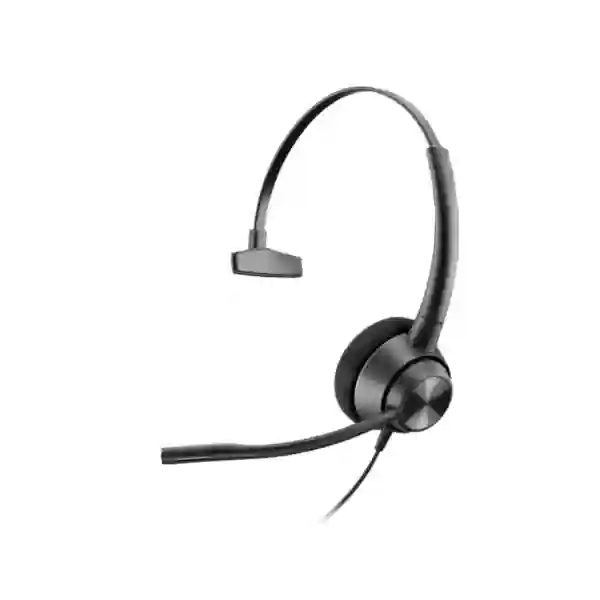
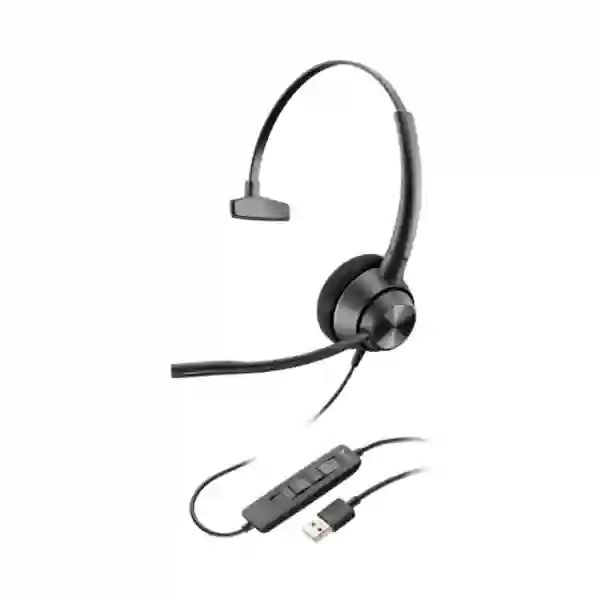
HP Poly EncorePro 310 Mono QD Headset
For customer-care desks, reception teams and contact centres in Tanzania that need single-ear listening with a flexible noise-cancelling boom microphone. Choose this wired QD model when your desk phone or computer can be connected through a verified compatible Poly QD cable or adapter. Check that connection before requesting your quote.
At a glance
- Single-ear, on-ear wearing style for awareness of nearby activity
- Flexible noise-cancelling boom microphone focused on speech
- Poly Quick Disconnect connection for compatible cable systems
- SoundGuard acoustic limiting described by HP for the QD reference
- Wired design suited to desk-based calling without battery charging
- Device-side telephone cable or USB adapter may be needed
Buying checkpoint: QD is not a built-in USB plug. Confirm a compatible lower cable or adapter.
A headset designed around conversations
Choosing a business headset starts with the work it must support. The HP Poly EncorePro 310 Mono QD Headset is a wired, single-ear model created for people who spend substantial time speaking with customers, colleagues, or service users. Its practical combination of a flexible noise-cancelling boom microphone, voice-focused audio, an adjustable over-the-head fit, and a Quick Disconnect connection makes it a candidate for telephone-based service roles. The important qualification is that the QD connector is an interface within a headset system, not a universal plug for every desk phone or computer. Confirm the rest of the connection before purchasing.
For a Tanzanian office evaluating headsets for reception, customer care, internal help desks, order enquiries, or an existing call centre, the sensible first question is whether agents already use a compatible Poly QD cable or adapter. If they do, a replacement QD headset can be a straightforward part of an established workstation design. If they do not, the complete requirement includes a compatible bottom cord, a headset interface, or an appropriate USB-to-QD adapter selected for the actual device. A headset that looks ideal on paper may not function at all when paired with the wrong cable.
The EncorePro 310 is the mono, or monaural, member of its series. It covers one ear while leaving the other ear free to notice a nearby colleague or supervisor. That characteristic can be useful where verbal coordination is part of the job, but it is not the same as blocking room sound from the wearer. For a consistently noisy room or work requiring fewer interruptions, evaluate a two-ear alternative as well. Choosing by listening conditions and connection type is more reliable than choosing by headline features alone.
Quick feature summary
The core configuration is a wired, on-ear monaural headset with a flexible boom microphone and Poly Quick Disconnect termination. HP describes noise-cancelling microphone performance, voice-optimised frequency response, and SoundGuard acoustic limiting for the EncorePro 310 QD family. The single-ear format is intended for speech work in which the user benefits from hearing callers without being entirely cut off from the room. It is not a Bluetooth headset, and the QD connection should not be confused with a native USB-A, USB-C, RJ9, or 3.5 mm plug.
HP’s published reference specification for its EncorePro 310 QD variant identifies an adjustable headband, an on-ear design, a wired connection, and a headset plus user guide in the box. Exact supplied packaging and accessory bundles should still be confirmed against the quoted item. In particular, do not assume that a phone-specific lower cable or USB adapter comes with the headset. This detail affects whether a new user can start work immediately and often matters more to implementation than a long list of audio measurements.
SoundGuard is an audio protection feature, not a substitute for sensible listening levels or an organisation’s hearing-safety procedures. Likewise, noise cancellation on the boom microphone is designed to improve what a caller hears; it does not mean the exposed ear is actively noise-cancelled. These distinctions help buyers understand precisely which problem the product addresses and prevent confusion with other EncorePro 310 connector versions.
What Quick Disconnect means in everyday work
Quick Disconnect, abbreviated QD, is a separable connection in the headset lead. An agent can separate the headset from the compatible lower cable without removing the entire workstation cable from the desk telephone or adapter. On a busy desk this is convenient when an operator needs to move temporarily away from a station, switch to another compatible headset, or remove a personal headset at the end of a shift. It is a physical connection feature, not wireless range. Once separated, the headset is not carrying audio across the room.
The correct system has two sides: the headset’s Poly-compatible QD plug and a lower connection chosen for the target device. An office desk phone may require a model-specific direct-connect cable, headset port cable, amplifier, or other telephone interface. A computer workstation generally needs a supported QD-to-USB adapter or audio processor; the bare QD connector will not fit a computer’s ordinary USB socket. Some organisations already use a compatible installed cable and need only the worn headset. Others need a complete connection package and should ask for that explicitly.
Do not decide compatibility based only on the shape of a telephone connector. Two phones can use ports that appear similar but differ in wiring, gain, signalling, or accessory requirements. The correct match is established through the phone model, the current desk installation, and the adapter manufacturer’s compatibility information. When requesting a quotation, share the make and exact model of the telephone or USB adapter, and mention any existing lower-cable part number if available. That small amount of information reduces trial-and-error purchases.
Single-ear listening: when mono is the right choice
One-ear listening is a deliberate workplace choice. Staff at reception may need to hear a visitor approaching while speaking with someone on the phone. A dispatcher may have to listen to another team member, and a customer-support agent may need to acknowledge a supervisor without removing the headset. A mono design makes that sort of environmental awareness easier because one ear remains uncovered. It also leaves the agent more exposed to the surrounding conversation, movement, and machinery noise than a two-ear wearing style.
Before adopting mono headsets across an entire team, observe the work rather than assuming every seat is the same. A quiet accounts desk and a crowded service floor can create very different listening conditions. In a space where surrounding voices frequently compete with the caller, a binaural model may help some users focus. The trade-off is less direct awareness of the room. Consider trialling both wearing styles with realistic incoming calls, at normal background sound levels, and with the staff who will use them.
Mono also does not mean the user should compensate for a loud room by turning call volume to the maximum. Improve workstation placement, reduce unnecessary ambient noise, and set appropriate audio levels. If workers regularly miss words, the cause may be network quality, desk-phone configuration, the microphone position, an unsuitable cable, or room conditions rather than the number of earpieces. A thoughtful choice matches the hearing environment, the tasks, and the user’s preference.
Microphone positioning and speech clarity
The EncorePro 310’s adjustable boom microphone is a practical feature for work that depends on clear speech. HP describes the microphone as noise cancelling, and the headset as using a voice-optimised frequency response. In use, the aim is to put the microphone close enough to the talker’s mouth to capture speech consistently while making surrounding office sounds less prominent for the person at the far end. Real-world clarity still depends on positioning, telephone circuitry, room acoustics, network conditions, and the compatible connection accessory.
Teach users to set the headband before positioning the boom. The earpiece should sit comfortably over the listening ear, and the boom should be placed as recommended in the headset instructions, typically near rather than directly in front of the mouth. A microphone set too far away may make the caller hear a low voice; one placed badly may pick up breath sounds or rubbing against clothing. A brief test call with another colleague is a more useful setup check than guessing from the way the headset looks.
Noise-cancelling microphones are not magic silence generators. Very loud conversation, fans directed at the user’s face, nearby announcements, or a desk facing a noisy doorway can still affect the transmitted voice. Pair good headset fit with sensible placement of team members and other noise sources. For customer-facing teams, a short standard procedure for microphone placement and test calls helps create consistent audio from one agent to the next without needing complicated technical tools.
SoundGuard: what acoustic protection does and does not say
HP identifies SoundGuard acoustic protection on the EncorePro 310 QD reference model. Its published product information describes acoustic limiting intended to reduce exposure to sudden high-level sounds by limiting them below 118 dBA. This is a specific manufacturer-described protection function; it should not be presented as medical protection, total prevention of hearing damage, or proof that all listening conditions are safe. Employers should still follow relevant occupational health practices and encourage moderate volume settings.
Audio-protection terminology can be confusing because product families and USB variants may use additional software-dependent features. Do not assume that every SoundGuard Digital feature, software control, alert, or advanced listening measurement is available through a passive QD connection. HP notes that certain digital features require additional software, and the capabilities depend on the complete device setup. An IT buyer should ask what the proposed desk-phone cable or USB processor supports rather than assigning features from a different EncorePro product to this headset.
Sound protection is one element in a larger workplace decision. Agents need audio that is intelligible at a sensible volume, a functioning telephone path, and time to adjust their fit. If call audio suddenly becomes harsh, distorted, or inconsistent, investigate the phone, cable, amplifier, or service rather than repeatedly raising volume. The best deployment combines a suitable headset, correct connection accessories, user guidance, and a simple process for reporting audio problems.
Comfort and fit across a working shift
A headset worn for many calls needs to be comfortable as well as audible. The EncorePro 310 uses an over-the-head, single-ear format with an adjustable fit. The manufacturer describes the product as lightweight and designed for contact-centre work. Its on-ear cushion sits against one ear rather than surrounding both ears like a large over-ear headset. That form can feel less enclosed to some workers, while others may prefer the support or isolation of a larger two-ear design. Individual comfort should always be tested.
Start with the headband adjusted so the earpiece sits naturally without pulling sideways. Make small adjustments rather than forcing the boom or cup into position. Long hair, glasses, head coverings, and a person’s preferred listening side can influence fit. The goal is secure placement during ordinary head movement, clear speech pickup, and no need to hold the headset against the ear. For staff who alternate between phone work and desk tasks, check whether the cable is routed without catching on keyboards, chair arms, or clothing.
Comfort also depends on habits outside the product. Encourage sensible breaks from continuous calls where roles permit, keep shared headsets hygienic, and replace damaged cushions with the correct accessory when available. A short fit check during onboarding can prevent unnecessary complaints later. The headband should not be treated as something that must fit everyone identically. An adjustable wired headset offers a practical starting point, but personal fit and the actual work environment determine whether it is the best choice.
Connecting the headset to a desk telephone
For an existing desk-phone environment, begin with the telephone’s exact manufacturer and model. Check whether it provides a dedicated headset port, whether a lower cable is already installed, and whether your current telephone requires an amplifier or other interface. The headset’s QD connector is then joined to the device-side cable selected for that phone. This is a system design step rather than a promise that the EncorePro 310 will work with every handset carrying a similar-looking socket.
Ask three questions before making a bulk order. First, is the telephone’s headset interface supported by the proposed Poly-compatible lower cord? Second, how will the agent answer and end calls: on the telephone, through a separate electronic hookswitch arrangement, or by another approved method? Third, does the supplied cable preserve suitable microphone level and receiver audio? Call-control functions do not appear automatically just because a QD headset is attached. The phone and associated accessories determine the available controls.
Where a site has several telephone models, avoid combining every desk into one unverified purchase assumption. Create a small inventory of endpoints and group them by their interface needs. Test the proposed cable with one real telephone from each group, using both incoming and outgoing calls. Listen for low volume, distortion, echo, or any inability to answer calls. Document the successful cable pairing so replacements can be ordered consistently. This protects the buying decision without requiring a lengthy technical project.
Using a QD headset with a computer or softphone
The QD edition is not a plug-and-play USB headset. A desktop or laptop running a softphone normally needs a compatible QD-to-USB adapter or audio processor. The adapter is the link between the headset’s analogue-style quick-disconnect termination and the computer’s digital USB audio interface. A successful connection depends on that accessory as well as the operating system and softphone settings. HP lists PC compatibility for the EncorePro 310 QD reference, but that should not be mistaken for native USB connectivity from the headset alone.
After the adapter is connected, verify that the operating system sees the expected audio input and output. Select the device inside the calling application, place a trial call, and confirm microphone gain and received volume. Where the application provides separate audio test and call-control settings, check both. If the team uses an application such as a browser-based service desk or installed calling client, test the actual production application rather than relying solely on the computer’s generic sound test.
Do not advertise a Teams button, mute-warning voice prompt, remote management feature, or inline answer control for this QD product unless the complete selected adapter and application combination has been verified to support it. Those features may be shown on other USB models in the EncorePro range and can be easy to confuse with the QD version. For a new computer-only deployment, compare the total cost and convenience of a QD headset plus suitable adapter against a native USB headset before making a final choice.
The right fit for different business scenarios
In a reception environment, an employee may answer calls while greeting visitors and hearing colleagues nearby. A mono headset can fit that mixed awareness requirement, provided the space is not so noisy that it masks the caller. Confirm the desk telephone or computer interface and check where the cable will run. If the user must move repeatedly away from the desk, remember that QD permits physical disconnection; it does not allow the conversation to continue while walking without an appropriate separate wireless system.
A customer-care team may share a row of workstations or assign each agent a personal headset. QD can be convenient where the telephone-side connection remains at the desk and the worn headset can be disconnected at shift changes. In that situation, establish a clear policy about personal versus shared cushions, cleaning procedures, and secure storage. It is also worth checking the physical wear of frequently used lower cables so contact problems are not misdiagnosed as headset faults.
An internal help desk, reservations team, sales counter, or service centre may use either physical desk telephones or computer calling applications. In those environments the suitability of the EncorePro 310 depends more on the connection design and room conditions than on the industry name. Collect two or three representative tasks and perform test calls. Ask operators whether they need awareness of the room, whether one ear is enough for clear listening, and whether the cable allows comfortable movement at the desk.
Selecting QD, USB-A, USB-C, or two-ear alternatives
The name EncorePro 310 appears across more than one connector version. The QD variant is intended for installations that use a compatible quick-disconnect path. Other EncorePro 310 variants have built-in USB connections suitable for computers with matching ports. A buyer who orders by model family without checking the suffix or connection type could receive a headset that needs different accessories. Make the quoted connection type explicit and compare it with the sockets and calling applications already in use.
A native USB-A or USB-C headset can simplify a new computer-only workstation because its connection is made directly to the matching computer port. A QD headset may be attractive for a fleet that already owns compatible lower leads and wants a replaceable worn unit. Neither choice is automatically superior. Evaluate the total system, including adapters, maintenance, agent practices, compatibility, and any required call controls. Avoid assuming that a USB-to-QD adapter will deliver exactly the same functions as an integrated USB variant.
The EncorePro 320 is the related binaural option for buyers who prefer audio over both ears. If background speech is distracting, compare it with the mono EncorePro 310 under actual working conditions. A two-ear headset is not a substitute for a correctly positioned microphone or a functioning connection, and its increased coverage may reduce awareness of nearby colleagues. The useful comparison is therefore mono versus binaural for hearing style, and QD versus native USB for connection style. These are two separate decisions.
A practical checklist before ordering in Tanzania
Whether purchasing one unit or equipping a larger office in Tanzania, record what is already at each desk. List the telephone make and model, whether staff use a PC softphone, the current headset connection, and any adapter part numbers that can be read from installed equipment. If equipment is being replaced, note whether the existing lower cord will be retained. A photograph of the current connector and the device labels can be useful during a quotation review, although the exact model numbers remain the most reliable compatibility evidence.
Next decide on the wearing style. Explain that the EncorePro 310 is single-ear, on-ear, over-the-head, and wired. Ask whether the user needs to hear the room while on calls, or whether surrounding conversation is a significant distraction. Then confirm the expected package contents and whether a separate compatible lower cable, USB interface, or other device-side accessory must be added. Distinguish the headset’s purchase price from the full installed workstation cost so there are no unexpected extras.
Finally, request confirmation of the exact quoted product identifier, warranty applicable to the supplied goods, availability, price in the applicable currency, delivery arrangements, and any return conditions. These are commercial details to verify with the supplier, not assumptions supplied by a generic product description. For multiple workstations, ask whether the proposed item and accessories can be trialled against a representative device first. The goal is a purchase that fits the existing system, not merely the closest product name.
Planning a small pilot before a larger rollout
A short pilot is often the lowest-risk way to confirm a headset choice. Choose one quiet workstation and one workstation with typical peak-hour background noise. Where possible, include different telephone models or computer adapters in the test. Provide the exact intended QD lower cables, let users adjust the headband, and make several realistic calls. Evaluate whether the receiving party can understand normal conversation without repeated requests to speak up or reduce background sound.
Keep the pilot observations simple and specific. Record the endpoint model, cable or adapter identifier, calling application if used, chosen audio settings, and any connection issues. Ask the agent about pressure on the ear, cable positioning, awareness of colleagues, and ability to hear callers. Ask the person receiving the calls to comment on intelligibility and distracting noise. A successful pilot establishes a practical reference configuration that IT staff can reproduce across similar workstations.
Do not treat the results as a blanket guarantee for every installation. Different phones, firmware settings, acoustic conditions, or user preferences can change the outcome. If the pilot reveals weak microphone audio or one-way sound, check the cable and device configuration before concluding that the headset model is unsuitable. Once the basic connection is verified, document a standard setup process and train staff on how to reconnect the QD plug and report audio faults.
Steps for setting up a working station
Begin with the connection path. Identify whether the end device is a desk phone or computer and obtain the verified compatible Poly QD lower cable, audio processor, or interface. Inspect connectors for visible damage before connecting anything. Attach the device-side accessory according to its own installation instructions, then join the headset’s QD connector firmly to the matching cable. Route the lead so it does not pull against the edge of the desk or create a snag near a chair.
Fit the headset to the user next. Position the on-ear cushion over the preferred listening ear, adjust the headband for stability, and move the flexible microphone boom to a suitable speaking position. Start at a comfortable listening volume and use the telephone or supported adapter’s controls for adjustment. Make an outgoing call and receive an incoming call. Check that both parties can speak and hear, then test whatever answering and muting procedure the workstation actually supports.
Show users where the QD separation point is and when it is appropriate to use it. Depending on the phone and call setup, disconnecting during a live call can interrupt audio even though the call itself may remain active on the endpoint. Teach staff to verify their call status before stepping away. After installation, record the tested phone or adapter pairing so a replacement headset can be fitted without repeated investigation.
Troubleshooting low sound, missing sound, and background noise
If the headset has no sound, first check that the QD plug is fully joined to the correct lower cable and that the lower cable is properly seated in the device. Verify that the desk telephone is using the intended headset path or that the computer has selected the correct audio device. Check whether sound is muted at the telephone or within the calling application. When possible, compare with a known working headset and cable to isolate which component is causing the problem.
If the caller can hear the agent poorly, inspect microphone placement and the compatibility of the lower cable. A mismatched cable can cause symptoms that cannot be solved by bending the microphone or increasing software gain. Ask the far end whether the voice is quiet, distorted, intermittent, or affected by room sounds; these are different symptoms with different probable causes. Test against another known working endpoint before replacing equipment. For inconsistent audio, check that repeated QD connections have not left a loose or damaged contact.
If background noise remains troublesome, separate microphone-side problems from listening-side problems. The noise-cancelling boom helps the far-end listener, whereas the open ear of a mono headset continues to hear the room. Move noisy equipment away from microphones, adjust desk layouts where practical, and use a test call during the normal busy period. If the wearer cannot focus because of room conversation, a binaural headset may be a better trial. If the remote caller hears excess noise, microphone positioning and acoustic layout should be checked first.
Shared headsets, hygiene, and long-term care
In a shared-desk environment, decide whether each worker will have an individually assigned headset or whether a common headset will be used between shifts. Both approaches need a simple cleaning and storage procedure. Follow the headset manufacturer’s care guidance and avoid spraying liquid directly into the microphone, speaker, or QD connector. Check that cleaning products are suitable for the materials of the actual supplied cushion. If replacement cushions are offered, verify that they match the model before ordering.
Disconnect using the intended QD joint rather than yanking the lead. Keep the cable clear of chair wheels and closing drawers, and inspect the boom and headset band for obvious damage when a user reports a problem. If a station stops working, swap components methodically with known good equipment instead of changing several items simultaneously. This helps distinguish a damaged lower cable from a headset fault or a problem in the telephone or USB interface.
Consider stocking appropriate spare accessories for a larger deployment, but do not buy one generic lower cord for every desk without checking device compatibility. Keep a simple record of model, connection type, adapter, and workstation so new staff can be set up reliably. Good maintenance is mostly routine: sensible handling, clean cushions, secure connectors, documented cable selection, and early attention to intermittent audio.
Procurement considerations for IT and operations teams
An operations manager may evaluate the EncorePro 310 principally on whether staff can communicate clearly and wear it comfortably. An IT manager must also consider connector compatibility, standardisation, troubleshooting, and the cost of additional interfaces. A procurement team needs the exact quoted product identity, quantity, commercial terms, and what is included. Bringing these three viewpoints together before ordering is more efficient than dealing with mismatched expectations after headsets arrive.
For an existing compatible Poly QD estate, replacing worn headset units may be simpler than redesigning every connection. For a new laptop-based support team, direct USB variants might deserve a comparison because separate adapters add another component to purchase and manage. For a mixed environment, a common QD wearing unit paired with different verified device-side accessories may be worth exploring, although that approach still needs model-by-model testing. The right answer depends on the installation, not on a universal compatibility claim.
Ask the supplier to distinguish the supplied headset itself from every associated item. A complete quote might need additional phone cables, USB audio adapters, spare cushions, or other components, depending on the devices present. Do not rely on a generic image to prove that those items are included. Confirm commercial availability and warranty for the exact quotation rather than extrapolating from a manufacturer page for a different country or revision.
Voice quality depends on the whole communications system
A quality headset cannot compensate for every problem in a telephone system. Calls may suffer from inadequate network capacity, congestion, unstable connections, incorrect audio-device settings, aggressive voice processing, or handset-port gain differences. For an IP telephone or hosted calling service, network health and the phone’s configuration influence the result the user hears. For a computer softphone, the selected sound device, application permissions, and adapter behaviour all matter.
Start any complaint investigation with a known good test call. Ask whether the symptom happens only on one workstation or across several users, whether it appears on internal calls or external calls, and whether it began after a cable, phone, or software change. Keep the headset microphone in its recommended position throughout the test. This makes it easier to tell a headset connection issue from a wider service problem.
For Tanzanian organisations using a mixture of desk phones and computers, the same general checks apply regardless of the telecommunications provider. The EncorePro 310 does not itself determine SIP trunk compatibility, telephone-line availability, call quality across a carrier network, or hosted platform features. It supplies the listening and speaking interface at the workstation through a compatible connection path. Product selection should therefore be coordinated with, but not confused with, broader telephony planning.
What the manufacturer reference specification tells buyers
HP’s current EncorePro 310 QD reference presents the headset as a black, wired, on-ear monaural product with a noise-cancelling microphone and SoundGuard protection. A published QD variant specification identifies a nominal headset weight of approximately 70 grams, a cable length of about 762 millimetres, and a 32-ohm impedance. These figures are useful reference details for understanding the size and form of the product, but buyers should confirm the precise supplied revision and product identifier before treating any regional specification sheet as their purchase record.
HP also identifies a flexible boom and a voice-oriented audio design. It is tempting to compare every figure with a competitor headset, but isolated microphone bandwidth or driver measurements rarely show how a live call will sound through a particular desk telephone and lower cable. A short operational test usually reveals more about speech intelligibility, fit, and connector suitability than a long sequence of numbers. Where a tender requires precise measurements, request the relevant official datasheet for the exact quoted part.
The public manufacturer material identifies a headset and user guide as the base box contents for the reference variant; it does not establish that a site-specific lower cable is included in every commercial package. A further important distinction is that a model reference or manufacturer part number is not the same thing as FourTeck’s listing SKU. The customer should rely on the exact quoted item description, any confirmed bundle details, and its stated commercial terms.
Accessibility and individual working preferences
Different users may have different hearing preferences, fit needs, or ways of working. The EncorePro 310 is a single-ear model with an adjustable band, but that alone does not prove that it suits every person. Some users prefer to listen through a particular ear. Others need more isolation or a different wearing style to understand speech clearly. Where possible, let intended users try the headset rather than treating a standard issue model as the only acceptable choice.
An inclusive procurement review should consider whether a wired lead restricts comfortable movement, whether the headband interferes with eyewear or other worn items, and whether mono listening suits the user’s environment. Users who need both ears covered, a different shape of cushion, or hands-free mobility over a distance may need an alternative model. These are straightforward functional requirements, not shortcomings that can be inferred from a product photograph.
Supervisors can gather useful feedback through a simple trial: Can the employee hear the caller at an appropriate volume? Is the other party receiving a clear voice? Is the fit comfortable through typical tasks? Can the employee manage the QD connector without difficulty? A successful selection supports both the communication task and the person using the equipment.
How to request an accurate quote
An effective quote request identifies the HP Poly EncorePro 310 Mono QD Headset by name and explicitly states that the required connection is Quick Disconnect, not integrated USB. Include the desired quantity and state whether the order is for replacement headsets on existing Poly QD workstations or a new deployment. If an existing QD lead is available, provide its part number. If a new device-side cable is needed, share the desk telephone model or the intended computer and softphone environment.
Ask the supplier to clarify what the proposed line item includes, particularly whether the quote contains only the headset or also a tested compatible cable or adapter. Request the exact quoted manufacturer identifier so any technical reference can be matched to the supplied model. Confirm commercial terms, local availability, applicable warranty documentation, and delivery arrangements directly during the buying process. This page does not state a Tanzania price or stock position because those details require current listing-specific verification.
For multiple seats, explain whether every station uses the same endpoint. If not, split the list by endpoint type so the accessories can be matched correctly. A small pilot order may be sensible where the connector arrangement is unfamiliar. Once compatibility is proven, ordering can be based on a documented combination rather than assumptions about all QD headsets being interchangeable.
Product specification overview
| Product family | HP Poly EncorePro 300 Series |
|---|---|
| Model discussed | EncorePro 310, monaural Quick Disconnect version |
| Connection | Wired Poly QD; device-side compatible cable or adapter required |
| Wearing style | Adjustable over-the-head, single-ear, on-ear |
| Microphone | Flexible noise-cancelling boom |
| Acoustic protection | HP Poly SoundGuard acoustic limiting |
| Colour | Black |
| Reference QD variant weight | Approximately 70 g in HP published technical data |
| Reference QD variant headset cable | Approximately 762 mm in HP published technical data |
| Reference QD variant impedance | 32 ohms in HP published technical data |
| Reference package | Headset and user guide; confirm the exact quoted bundle |
| FourTeck listing SKU | Not provided; request confirmation with the quotation |
The technical measurements above are HP’s published reference values for an EncorePro 310 QD variant where indicated. They are not a statement of the SKU, stock, bundle, or warranty on a specific FourTeck Tanzania listing. Confirm the precise part and supplied accessories with the quotation before buying.
Frequently asked questions
Is the HP Poly EncorePro 310 Mono QD Headset wireless?
No. The QD version is a wired headset. Quick Disconnect refers to a physical connection that can be separated from the compatible lower lead. It does not give the wearer Bluetooth or wireless walking range. When disconnected, the user is no longer receiving audio through the headset. If continuing a call while moving freely is essential, evaluate a separate compatible wireless headset solution rather than assuming QD provides that function.
Does it plug directly into USB-A or USB-C?
No. The QD headset does not terminate in either standard USB connector. Computer use requires a compatible QD-to-USB adapter or audio interface selected for the computer and the calling software. Separate EncorePro 310 USB-A and USB-C variants exist, but those are different connection versions. Check the quote before ordering because the similar product names can cause avoidable confusion.
Can I connect it to my existing desk phone?
Possibly, provided a matching lower cable or audio interface is selected for the exact telephone model. The headset’s QD connector alone is not a universal telephone plug. Share the phone make, model, and current headset connection details to verify the correct accessory. For larger orders, make a test call on a representative phone before standardising the combination.
Is a connection cable included in the box?
HP lists the headset and user guide as the base contents for its reference QD variant. A separate telephone-specific lower cable or computer USB adapter should not be assumed to be included. Commercial bundles can differ, so confirm the exact quote and package contents. If no suitable existing cable is available, ask for the complete compatible connection as part of the purchase.
What is the difference between mono and stereo?
Mono means this model has one earpiece and leaves the other ear free. That can help an employee notice colleagues or visitors while on a call. A stereo or binaural headset has earpieces for both ears and may be preferable where surrounding conversations are distracting. Choose according to the workplace and individual preference, not on the assumption that one wearing style is always better.
Does the headset cancel all surrounding noise?
No. The manufacturer describes a noise-cancelling boom microphone intended to improve the speech heard by the other person. It does not make the user’s uncovered ear silent and is not described here as active noise cancellation for the listener. Background conversations can remain audible to the wearer. Good microphone placement and reasonable room acoustics still matter.
What is SoundGuard on the EncorePro 310?
SoundGuard is HP Poly’s acoustic limiting technology. The manufacturer describes limiting high-level sound below 118 dBA for its referenced QD model. That is a specific product function, not a guarantee of zero hearing risk or a replacement for safe listening practices. Do not assume that optional digital SoundGuard features found in other setups are available through every QD connection.
Does this version have a dynamic mute alert?
Do not assume that it does. Published product-family materials distinguish certain USB-only features, including verbal mute alerts, from the QD connection option. If mute notifications are a key requirement, confirm the feature for the precise quoted headset, adapter, software, and deployment before ordering. The same caution applies to built-in inline call controls and application-specific buttons.
Can I use it with Microsoft Teams or another softphone?
The headset can be considered for PC-based calling through a compatible QD-to-USB interface, but the specific software experience depends on the adapter, computer, and calling application. Do not infer native USB operation or Teams-specific controls from the QD product name. Verify device detection, microphone audio, speaker audio, and any needed call-control features in the exact application before deployment.
Is this suitable for a busy customer-service team?
It is designed as a contact-centre style headset and is worth considering where agents need single-ear listening, a noise-cancelling boom, and a compatible wired QD connection. Suitability depends on the surrounding noise, user comfort, and existing telephone equipment. Testing a sample station during a normal working period is sensible before a larger order, especially where different phone models are in use.
What is the difference between the EncorePro 310 and EncorePro 320?
The EncorePro 310 is the mono model with a single earpiece. The related EncorePro 320 is a two-ear model in the same product family. The number alone does not specify the connector: check QD versus native USB separately. A buyer choosing between the two should compare the degree of awareness needed at the desk and the likely level of room noise.
Which details should I send when requesting a quotation?
State the product name, QD connector requirement, quantity, and whether the use is with a telephone or computer. Include the exact telephone model or existing adapter information. If the workstation is new, ask whether a compatible lower cord or USB interface must be quoted as a separate line. Confirm the quoted item identifier, inclusions, local availability, warranty terms, price, and delivery arrangements directly before purchase.
Request a compatible QD headset quotation
Ask FourTeck Tanzania about the HP Poly EncorePro 310 Mono QD Headset for your desks or team. Share your quantity, telephone model or PC adapter details, and whether you already have Poly-compatible QD lower cables. Request confirmation of the exact headset variant, any required connection accessories, current commercial terms, and applicable support documentation.
Next step: request an itemised quote and confirm device compatibility before ordering.




Reviews
There are no reviews yet.