
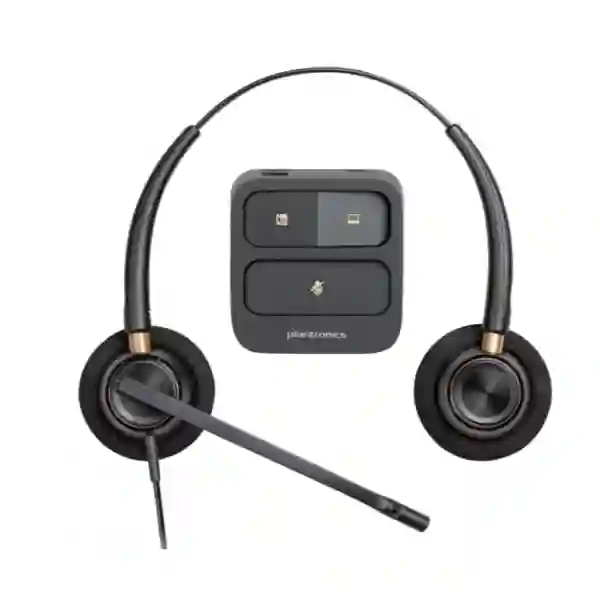
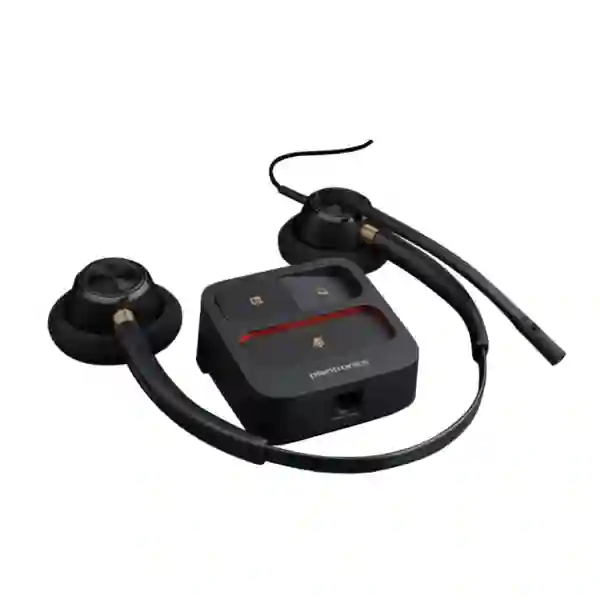
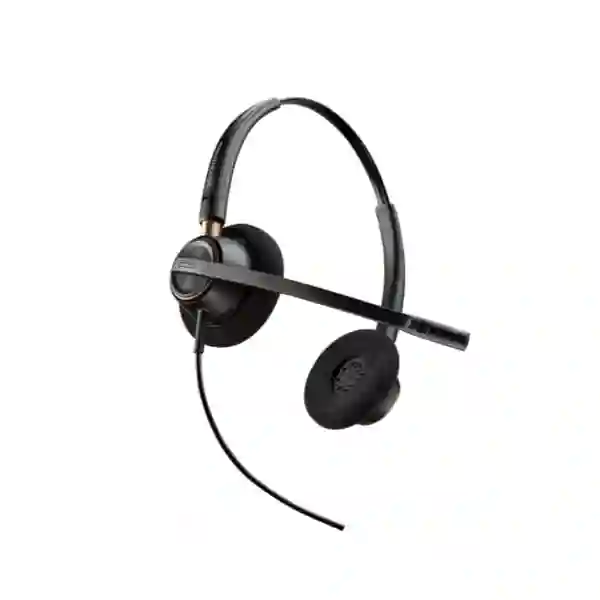
HP Poly EncorePro 520 Stereo QD Headset
Give voice-focused staff a lightweight, dual-ear headset with a noise-cancelling boom microphone and Poly Quick Disconnect. Built for fixed workstation calling, the HP Poly EncorePro 520 Stereo QD Headset is relevant to contact centres, service desks and busy offices considering reliable wired audio.
Key specifications at a glance
Published manufacturer values describe the standard EncorePro 520 QD variant. Verify the exact manufacturer reference and connection accessories for your quotation. Operating-system support through a suitable adapter includes Windows 10, Windows 11 and macOS.
Who should shortlist this headset?
Consider the EncorePro 520 for dedicated calling roles where two-ear audio is preferred and a suitable Poly QD connection can be supplied. Its strongest fit is voice communication at a fixed workstation. A one-ear headset may suit staff who must keep hearing nearby activity; a wireless option may suit people who need to continue calls while moving. Always compare the fully connected workstation, not the headset in isolation.
A headset built around spoken conversations
The EncorePro 520 serves a specific kind of work: listening carefully, responding clearly and moving between customer calls with as little interruption as practical. It is a professional corded communications headset rather than a consumer entertainment device. A two-ear, on-ear arrangement, microphone boom and Quick Disconnect connector make sense where agents sit at assigned or shared workstations and use a business telephony platform throughout the day. Teams considering it should first establish which phone or computer they use and whether a suitable connection accessory is already installed.
For organisations in Tanzania, the purchase decision is not just about the headset shell. It involves call clarity, user comfort, the working environment and the complete connection path. A headset that suits a desk phone may need a different accessory to operate with a laptop. It is worth confirming all of those details before buying a single unit or issuing a larger procurement request. This page explains the practical selection steps rather than assuming that every office has the same equipment.
What the stereo, on-ear design changes
The 520 uses two earpieces, sometimes described as binaural or stereo. Both ears receive audio, allowing an employee to focus on the caller rather than relying on one covered ear. That can be useful in a customer support room where conversations are happening at neighbouring desks, but the earpieces are not active-noise-cancelling headphones and do not create silence. Normal speech and room sounds may still be heard. It is sensible to trial the headset where people actually work rather than judge isolation from a specification sheet.
Two-ear coverage also has a trade-off. Employees who need frequent conversations with supervisors or must monitor reception activity may prefer a one-ear model. A well-planned team can use stereo headsets for dedicated calling roles and monaural headsets for jobs that require more awareness of nearby colleagues. The EncorePro 520 is therefore best considered on the basis of each role, not automatically specified for every member of an organisation.
Quick Disconnect explained without confusion
QD means Quick Disconnect. The headset cable ends in a Poly QD connector designed to connect with a compatible Poly cable or adapter. The wearer can separate that connection without removing the complete cable from the phone or computer. This is useful when stepping away from a desk, changing positions or managing a shift handover. The feature is mechanical and wired; it does not turn the headset into a wireless device or transmit call audio when disconnected.
A QD plug is also not a USB-A plug, USB-C plug, ordinary 3.5 mm audio jack or direct RJ-style telephone connector. Buyers should not expect to insert it into a laptop and start making calls. Check the device end of the adapter, the headset-facing connector and the supported telephone or computer model. Treat this accessory as a functional requirement, not an optional cosmetic add-on. The correct connection arrangement may differ between office locations, departments and existing handset models.
Connecting the headset to a Windows or Mac computer
For PC calling, the headset needs a compatible QD-to-computer audio adapter. A suitable Poly USB adapter provides the connection between the headset and the computer, but its precise model and computer-side connector should be checked before purchasing. HP lists compatibility with Windows 10, Windows 11 and macOS in its specifications for the EncorePro 520 when appropriately connected. A computer operating system being listed does not mean the bare QD plug fits the computer’s USB port.
After connection, IT staff should select the adapter as the microphone and speaker device in operating-system settings and in the calling application. Test incoming audio, outgoing speech, volume and the application’s mute control with a real test call. Where company computers have limited USB ports or strict device policies, confirm the adapter’s physical connection and organisational approval in advance. This practical test is more useful than assuming that every software platform and adapter pairing is certified.
Connecting to a business desk phone
The 520 may also serve desk-phone users, provided the correct Poly-compatible connection cable or interface is available for the actual telephone model. Do not assume that one QD-to-telephone lead works with every brand, handset port or telephone configuration. The phone may require a dedicated accessory or different interface for audio and call control, and the existing telephony deployment may use a headset amplifier or switch. Record these requirements before selecting the cable.
For a desk-phone deployment, identify the manufacturer, full phone model and available headset socket. Then check what users expect from the headset: audio only, a remote answer function, switch operation or coordination with a computer. The standard QD headset itself should not be advertised as supplying every type of remote call control. During a pilot, check what happens when the employee answers, ends, parks or transfers a call. The phone and the chosen accessory determine much of that behaviour.
Why the complete connection path matters
Successful communication depends on more than a headset’s compatibility label. The working chain includes the earpieces, microphone, headset lead, QD join, appropriate computer or phone adapter, device audio settings, calling software and the network or telephone service. A fault at any point can appear to the user as a defective headset. Standardising the path makes deployment easier to test, document and support.
Before ordering, ask whether the business currently has Poly QD adapters and whether those units are compatible with the selected model. Existing parts should be identified by actual model rather than appearance. Where adapters are not available, include them separately in the bill of materials and compare the full per-seat cost. For mixed desk-phone and PC environments, separate configuration options may be needed. A clear connection diagram for each workstation type helps the purchasing team avoid an order that delivers excellent headsets but leaves agents unable to use them.
Noise-cancelling microphone: what it does
The EncorePro 520 includes a noise-cancelling boom microphone. Its purpose is to favour the wearer’s speech over some nearby noise, which can improve the calling experience where multiple agents speak in the same room. It is particularly relevant to support desks, telephone sales teams and help centres with ongoing conversation. The microphone is not a guarantee that all sounds, echoes or surrounding voices will disappear, and it cannot correct an unstable phone connection.
Microphone position is important. HP highlights visual and tactile guidance for positioning the flexible boom. Staff should adjust it according to the headset’s instructions so that it remains in a consistent position relative to the mouth, then check speech on a live test. The microphone should not be assessed only by how clear it sounds to the wearer; the person at the other end needs to judge intelligibility. If callers still hear an office echo, review room acoustics and the adapter or application settings as well.
Voice-focused sound rather than entertainment audio
HP specifies 30 mm speakers and a speaker bandwidth of 150 Hz to 6.8 kHz for the EncorePro 520 variant referenced in its product data. This underlines the headset’s role in business speech communication rather than music production, video editing or recreational listening. Clear phone conversations depend on the entire audio chain, including the calling codec, service, microphone placement and listener volume. A stated frequency range alone does not guarantee an excellent call.
When a team tests headsets, include a range of voices and accents, quiet and busy working periods and both incoming and outgoing calls. Ask agents whether instructions and names remain understandable without repeatedly increasing playback volume. A test involving actual call handling is more representative than playing a music file. Organisations that also rely on detailed media monitoring should confirm whether a dedicated communications headset meets that secondary requirement, or whether another headset category would be more suitable.
Comfort across repeated call sessions
At approximately 74 g, this is a relatively lightweight dual-ear corded headset. HP’s design uses a headband and foam-padded on-ear cushions intended for extended communications use. Low weight can help, but comfort depends on individual head shape, adjustment and the pressure of the earpieces. One person’s preferred fit may not match another’s. The best buying decision follows a trial covering several representative shifts or working periods.
During a fit trial, encourage users to adjust the headband, microphone position and cable route. Ask whether the cushions remain comfortable, whether the frame feels stable when users turn their heads and whether the lead catches on desks or chair arms. A headset should support normal work without constant readjustment. Consider glasses, head coverings and personal comfort needs as part of the evaluation. A lightweight technical specification is helpful, but it is not a substitute for user feedback gathered under ordinary office conditions.
The value and limits of acoustic protection
Poly identifies SoundGuard as acoustic limiting technology for its communication headsets and describes limiting of sudden sound peaks below 118 dBA. This is useful product information for purchasers who want to consider acoustic safeguards in a contact-centre environment. However, no single headset feature removes the need for sensible listening levels, suitable workplace policies and correct device configuration. SoundGuard should not be presented as a medical guarantee or proof that any exposure duration is safe.
People responsible for occupational comfort should consider the normal playback volume, length of calls and background noise that encourages users to turn audio up. Staff should know how to adjust levels in their connected device and application. Compare actual listening comfort in the environment where the product will operate. If the organisation has formal hearing-protection requirements, apply its relevant workplace assessment rather than relying only on a marketing feature name. The headset is one part of a broader responsible audio setup.
Materials, adjustment and everyday durability
The EncorePro family has been designed for frequent handling, with a flexible boom and an adjustable wearing arrangement. The 520’s microphone boom can rotate through approximately 290 degrees according to HP’s published specifications, allowing users to find a suitable working position. That range should be treated as a design feature, not an invitation to force parts past normal resistance. Regular adjustment, cable handling and storage habits will influence how long a headset remains usable.
In a busy team, prevent cords from being trapped under furniture, snagged on bags or stretched during workstation changes. Use the QD join as intended rather than tugging the connector by its cable. Train staff to store the earpieces and microphone boom without compressing them under other equipment. A standard process for reporting worn cushions, damaged leads and inconsistent audio can reduce avoidable disruption. Durable construction supports a procurement case, but real service life depends on care, usage patterns and the operating environment.
Managing the headset cable at a workstation
HP lists the QD headset’s cable length at 78.5 cm. That length describes the headset portion of the wired connection; it is not necessarily the total reach after a separate adapter or phone cable is connected. Teams planning seated workstations should consider where the QD join sits, where the computer or phone is positioned and how the cable passes around the desk. A long or short accessory lead can substantially change the practical arrangement.
For each workstation type, test the full set while the user moves naturally between keyboard, screen, note-taking area and telephone controls. Place the QD connection where the wearer can reach it easily but where it is unlikely to catch on furniture. Do not route cables across walkways or chair wheels. The right configuration should allow seated movement without pulling at the ear cushions. These small ergonomic details matter when a purchase is being repeated across many desks rather than tested on only one counter.
A realistic fit for Tanzania customer-facing teams
Organisations serving customers in Tanzania may need equipment for inbound enquiries, appointments, remote customer assistance, internal support, sales conversations or routine business calling. The EncorePro 520 can be a candidate when these activities happen at fixed workstations and employees favour two-ear audio. Its QD connector may also appeal to teams replacing an established Poly QD headset fleet. None of these use cases proves the product is available locally or compatible with a particular business’s telephony installation.
A practical local purchasing process should start with the devices already on site and the calling methods employees actually use. An office relying on desk telephones has different accessory needs from a service team running calls through a PC softphone. Mixed sites may require more than one cable choice. Ask for a quotation based on quantities, connection types and required accessories. Price, stock, delivery timing and warranty handling should be confirmed for the specific Tanzania order rather than inferred from overseas listings.
Contact centres and help desks
Contact-centre managers usually need repeatable results: a consistent user experience, clear speaking instructions and quick replacement when accessories become worn. The EncorePro 520 offers a conventional two-ear listening format and a boom microphone suited to structured call handling. It can be evaluated for teams that deal with service enquiries or continuous voice calls. A standard headset can also simplify introductory training if the associated QD adapters and desk setups are the same.
The most important performance indicators are practical rather than promotional. During a pilot, ask how often callers request repetition, whether agents hear instructions easily, whether microphones are positioned consistently and whether employees find the fit acceptable. Record problems separately as headset, adapter, software or network issues. A headset alone cannot reduce queue length, improve call-routing logic or guarantee customer satisfaction. It is one piece of the working environment, so the deployment should be judged alongside call workflows and existing system quality.
Reception and administrative offices
Reception staff and administrative employees may alternate between phone conversations and in-person interactions. For someone who spends long periods on calls, the stereo coverage may help maintain focus. For someone who must continuously hear colleagues, deliveries or visitors, covering both ears may be less convenient. The best choice is determined by the actual job, not the impression that a dual-ear headset is automatically more professional.
Consider a small comparative trial with a one-ear alternative before standardising. Evaluate whether the person can communicate comfortably with the caller while remaining aware of the office’s other responsibilities. Review microphone positioning, telephone compatibility and the cable route at a counter or reception desk. If workers need to move away from the workstation while continuing to hear a call, a corded QD solution will not meet that requirement. A genuinely wireless model should be considered instead, with its own connectivity and charging checks.
Hybrid offices and fixed home workstations
A QD headset can work in a home-office or hybrid arrangement when the necessary compatible PC adapter is available at each location. The main advantage is a familiar corded calling setup that does not require headset battery charging. However, the wearer remains tethered to the connected device. Separating the QD connection permits the wearer to leave the workstation physically but does not preserve headset audio while away.
For a hybrid team, document whether employees transport the headset only, the adapter only, or a complete approved set. Make sure IT policies allow the chosen USB adapter and that remote staff know where to select it in their operating system and calling software. Include a simple startup test covering input level, output level and microphone placement. Remote collaboration quality also depends on household noise and internet reliability; even a good noise-cancelling microphone has practical limits. These arrangements should be planned rather than assumed from the word ‘hybrid’.
Compatibility with calling and meeting software
The connection to a communication application is provided through the selected adapter and computer configuration. A call may involve Microsoft Teams, another softphone or a business communications platform, but actual support features must be checked for the exact QD adapter, software version and operating system. Do not confuse the standard EncorePro 520 QD headset with a separately named USB or Teams-specific version of the EncorePro family.
The QD version should not be advertised as offering built-in USB call buttons or native Teams certification merely because related models in the 500 Series provide those features. In HP’s family documentation, certain firmware, cloud-update and software-integration features are explicitly associated with USB models. Buyers should verify the end-to-end headset and adapter combination for any required mute, answer or remote-management behaviour. During the pilot, have actual users place, receive and end calls using the organisation’s normal software, not just a generic sound-test page.
Quick Disconnect versus a direct USB headset
A QD headset and a direct USB headset can both serve computer calling, but they are different purchases. With a QD model, the headset connects to a compatible intermediate cable or adapter, which provides the computer-side interface. This can be attractive where a business already has compatible QD infrastructure or wishes to replace only worn headset units. A direct USB headset instead provides its computer connection without that separate QD accessory.
For a new deployment with no existing accessories, compare the complete price and support burden of both approaches. Consider who manages adapters, how cables are issued, whether employees share workstations and which call controls the software supports. It may be more practical to choose direct USB where there is no value in keeping a QD estate. Conversely, a QD approach can make sense when an organisation has proven compatible equipment. The choice should be a documented operational decision, not a guess from similar model names.
Stereo 520 versus a mono headset
The 520 covers both ears. A mono headset covers one ear and leaves the other comparatively open to surrounding conversation. This is a meaningful distinction for teams deciding between focused calling and ongoing awareness of room activity. Neither style is best for every employee. The same office might legitimately have one-ear devices for reception and two-ear devices for dedicated telephone-support agents.
When comparing a mono alternative within the EncorePro range, verify its exact model and connector rather than assuming accessories are identical solely because the products share a family name. Ask workers to test intelligibility and comfort in their ordinary environment. A quieter office may not need additional ear coverage, while a noisy call floor may value it. If users report that they cannot hear their immediate surroundings when necessary, that is a legitimate reason to reconsider stereo even if call audio sounds good. Good procurement reflects the work pattern.
When a wireless model may be better
The EncorePro 520 is a wired solution. It does not offer Bluetooth mobility, wireless roaming or a rechargeable headset battery. Those characteristics can be positive where the work is stationary and the organisation wants a straightforward corded device. They are limitations where supervisors move between desks, staff retrieve files during a call or agents need to keep speaking while walking around the office.
Separate physical Quick Disconnect from wireless freedom in every buyer discussion. Disconnecting the QD plug breaks the headset’s audio path; it does not provide ongoing listening away from the desk. If mobility is a core requirement, compare a suitable wireless communications headset after checking its range, supported endpoints, battery and charging arrangements. If employees mostly remain seated, the wired 520 may be a more direct fit. The right choice comes from movement requirements and connection compatibility, not from ranking one technology as universally superior.
What to verify before requesting a quotation
A useful quotation request should specify the number of users, whether the headsets will be dedicated or shared and which computers, desk phones or softphone applications need support. For the device connection, include brand, exact model and the available port. If adapters already exist, record their model identifiers and ask whether they can be reused. Specify whether the requirement is for the headset only or for a complete working set with connection accessories.
For the commercial side, request confirmation of the precise product variant, supplied items, required adapters, availability, lead time and applicable local warranty terms. Ask about replacement cushions if the fleet will be used intensively. For staff with different roles, state whether stereo coverage is compulsory or whether an alternative wearing style should be quoted too. This produces a purchasing comparison that reflects total deployed cost and removes uncertainty that can otherwise emerge after delivery. Do not rely on an overseas product number alone to identify the target local listing.
A practical headset pilot for a team
Before rolling out headsets at scale, select a small group representing the main use cases. Include agents with heavy call volumes, different working positions and any distinct computer or desk-phone configurations. Confirm the connection accessory for each participant and use ordinary business calls rather than only a brief demonstration. The pilot should include enough use to expose comfort and cable-management problems as well as basic audio issues.
Record feedback in a simple consistent format: fit, stability, microphone clarity, incoming speech, connection reliability and ease of using the QD feature. Ask whether callers report difficulty hearing the employee, and separate those comments from internet or application faults. Document adapter models and software settings so IT can reproduce a successful configuration. If a role needs one-ear awareness or wireless movement, the pilot may show that another headset category is preferable. This is a useful result, not a failure of the evaluation.
Rolling out to multiple workstations
Once a pilot establishes a working combination, create a standard bundle for each workstation type. It may contain the headset, compatible QD accessory and brief connection guidance, even where the items are purchased under separate lines. Label equipment so that different adapters are not accidentally exchanged. A consistent deployment makes new-agent onboarding easier and reduces preventable support calls.
For mixed environments, use separate approved configurations for desk telephones, PCs and any dual-device setup. Do not assume one lead supports every endpoint. Prepare a short checklist for IT acceptance: audio output, microphone input, correct device selection, normal answer and end behaviour, QD reconnection and safe cable routing. Keep a record of any exceptions and the reason they are necessary. Organisations can then scale their purchases according to known working arrangements rather than distributing bare QD headsets and leaving users to discover their own missing accessories.
Shared desks and hygiene considerations
In a shared-desk environment, decide whether the headset belongs to an individual employee or stays at the workstation. Personal issue can reduce the need for multiple people to share cushions, while fixed installations may be simpler to support. Neither policy is universally right; consider the rotation schedule, access control, cleaning arrangements and costs of spare components. Foam on-ear cushions are a wear item, so the procurement plan should account for condition checks and suitable replacements.
Use cleaning procedures approved for the equipment rather than soaking the microphone or earpieces. Disconnect the headset as appropriate before maintenance, protect the connectors from liquid and allow cleaned parts to dry fully before reuse. Staff should know where to report a damaged cushion or loose cable. A shared-fleet plan works best when the person responsible for consumables and replacements is identified in advance. The benefit is more consistent day-to-day operation and less uncertainty during shift changes.
Cushions, spares and ongoing care
The standard EncorePro 520 is supplied with foam ear cushions according to HP’s model specifications. Cushions can compress or wear during frequent use, and their condition influences the wearing experience. Before a fleet purchase, ask which genuine compatible replacement parts are available for the exact version and how they will be ordered. Avoid assuming that accessories for a similarly named model necessarily fit this headset.
Regular care should be simple and repeatable. Inspect the cushions, headband, cable and QD connector periodically. Remove debris gently according to manufacturer instructions, avoid harsh chemicals and replace damaged components through the appropriate support channel. Where there is inconsistent audio, examine the physical connection before purchasing a new headset. A small stock of verified compatible spares may be useful in a large contact centre, but the required quantity depends on staff count and actual usage. No specific spare-part availability in Tanzania is assumed here.
Understanding what comes in the box
HP’s specification for the referenced Poly EncorePro 520 QD headset states that the package contains the headset. It does not establish that a particular QD-to-USB adapter, phone lead, desk-phone controller or other connection accessory is included. The safest procurement assumption is to verify accessory inclusion explicitly in the quotation rather than interpret a product photograph or a generic family description as evidence.
A buyer should be able to answer three questions before confirming an order: which headset variant is supplied, which compatible connection accessory makes it work with the intended device and which pieces will arrive together. Ask the seller to itemise any accessory that is being quoted separately. If buying replacement headsets for an existing Poly QD environment, confirm that the current cables are suitable and in serviceable condition. Where equipment is new, request a complete compatible solution rather than an incomplete headset-only order.
Troubleshooting when there is no sound
If a headset appears silent, start with the simple points in the connection chain. Ensure the QD halves are securely joined and that the adapter is fully connected to the computer or desk phone. Check device volume and any call-specific mute or output-selection controls. For a computer, confirm that the actual adapter is selected as the speaker device in the operating system and also in the calling application, which may maintain separate settings.
Then make a test call and try an approved known-working headset or adapter if available. This comparison can help isolate whether the fault follows the headset, cable, interface or workstation. Avoid repeatedly disconnecting equipment under strain or forcing a connector that does not fit. HP’s EncorePro support guidance also recommends checking physical connections and application audio selections. If the issue persists, record the equipment models, symptoms and test results before raising a technical-support request. A disciplined sequence avoids unnecessary replacement purchases.
Troubleshooting when callers cannot hear the agent
When the employee hears the other person but the caller receives poor or no microphone audio, first inspect the microphone boom position. Confirm that it is placed consistently relative to the user’s mouth and that the intended microphone is selected in the calling application. Examine application permissions, mute controls and computer input settings. A working earpiece does not prove that the microphone has been selected correctly.
Next, confirm the QD join and adapter connection. If the microphone is intermittently silent, test with a known-good compatible headset or adapter to isolate the component. Ask the remote participant whether audio is distorted, quiet, intermittent or completely absent; each symptom suggests a different next check. Also consider local background noise and call-network quality before concluding that the microphone is defective. Record these observations in the support ticket so a technician can act on evidence rather than replace several components without a reliable diagnosis.
Managing model names and product identifiers
The EncorePro family includes different wearing styles, connectors and specialised variants. Product names such as EncorePro 520, HW520, 520V and related USB models can look similar in a catalogue, but they should not be treated as interchangeable. HP lists the standard EncorePro 520 Binaural Headset with Quick Disconnect under a manufacturer product reference in its published specifications; that identifier is not automatically the merchant’s local SKU.
The critical identifying information for this page is the stereo, on-ear QD design with a conventional noise-cancelling microphone. A voice-tube version or a direct USB model is a separate variant to verify. When ordering, compare the official manufacturer’s product reference with the seller’s exact quoted item and the accessories the business intends to use. An accurate model confirmation is especially important for repeat orders and spare-part selection. It prevents an apparently small naming difference from becoming a compatibility problem across multiple desks.
Evaluating the total cost of deployment
A headset price alone does not represent the full cost of a working communications workstation. A new QD setup may also require a computer adapter or desk-phone connection cable. Larger teams may need replacement cushions, spare accessories, shipping and time for setup or training. A low unit price can lose its advantage if the necessary connection parts were omitted from the original comparison.
Compare quotations by a working-seat specification: headset variant, appropriate adapter, confirmed endpoint compatibility, included items and support arrangements. Keep roles requiring different devices as separate lines instead of hiding the differences in one average price. For a Tanzania order, seek the actual local quotation rather than using an overseas retail price or an assumed currency conversion. This also makes it easier to evaluate what can be reused from an existing QD installation and what must be purchased new. Accurate scope is more important than an attractive but incomplete headline price.
Selection checklist for an IT administrator
An IT administrator should first document the organisation’s communication endpoints and decide whether a wired QD strategy is desirable. The checklist begins with the phone or computer, continues through the necessary adapter and ends at the headset. Include operating-system support, application audio settings, any required call-control behaviour and the approved method for handling accessories. Check device restrictions that might prevent a USB adapter from working on a managed PC.
Next, confirm user-facing needs: one ear or two, fixed or mobile working, comfort, background noise and shared-equipment policy. Ensure the order description matches the exact EncorePro 520 stereo QD model rather than a related USB or voice-tube version. Finally, specify an acceptance test that the support team can repeat when equipment arrives. These steps help control technical surprises and provide a traceable basis for reordering, without assuming software certification or hardware compatibility beyond what has actually been tested.
How to make the purchase decision
Choose the EncorePro 520 when your role involves frequent spoken conversations, you want a dual-ear wired wearing style and you can establish a compatible QD connection to the intended device. It is a sensible category to trial for fixed-position contact-centre agents and service professionals. It may be a less appropriate match for staff who need one ear free, wireless movement, direct USB without an additional adapter or a headset primarily intended for rich entertainment audio.
The final decision should be based on the complete endpoint configuration and real wearer feedback. Confirm the quoted model, quantity, matching QD accessories and any optional spares. If replacing an existing headset, identify the working cable before assuming reuse. If building a new workplace, compare direct USB options as well. Request an itemised Tanzania quotation and compatibility confirmation so the purchase delivers a functional calling setup rather than only the headset hardware.
Frequently asked buyer questions
Is the Poly EncorePro 520 a USB headset?
No. The EncorePro 520 model described here uses a Quick Disconnect connector. Its plug does not directly fit a computer’s USB-A or USB-C socket. A compatible QD-to-computer audio adapter is required for PC use. Separate EncorePro family products have direct USB connectivity, so confirm the exact variant before ordering. If your business wants a headset that connects directly to USB without an intermediate QD adapter, ask for a suitable direct USB model instead. Both options can be appropriate, but they should not be confused.
Will it work with a desk phone?
It can be used with a compatible desk-phone setup, but the required cable or interface depends on the telephone model. Give the supplier the phone’s manufacturer, full model and available connection port so that the correct Poly-compatible accessory can be identified. A generic-looking QD lead should not be assumed to support every phone. For a business fleet, test normal answer, end and transfer workflows on the actual devices before approving a large order. The headset’s wired QD connector alone does not provide every telephone-control feature.
Does Quick Disconnect mean wireless?
No. Quick Disconnect lets you physically separate the headset from a connected QD cable or adapter. The headset itself remains a corded device and has no Bluetooth connection or wireless audio link. When the headset is detached, it cannot relay live call sound to the wearer’s ears or microphone. If employees need to walk around while continuing a conversation, a purpose-built wireless communications headset should be considered. The QD function is valuable for convenient physical detachment, not for roaming.
What is the difference between the EncorePro 520 and 520V?
The standard EncorePro 520 described here uses a conventional noise-cancelling boom microphone. Variants with the V designation are associated with a voice-tube style. Because similar names appear in the same headset family, the exact quoted manufacturer reference and the product’s microphone configuration should be verified before purchasing. Do not substitute a voice-tube product when staff expect the standard boom design, or the other way around, without evaluating hygiene, maintenance and user preferences. Connection accessories and available replacement parts should also be checked for the precise variant.
Is the microphone noise cancelling?
Yes. HP identifies a noise-cancelling microphone for the standard EncorePro 520 QD model. It is intended to make the user’s speech easier to understand when other sounds are present, but it cannot eliminate every nearby voice, strong echo or transmission problem. Positioning matters: staff should follow the headset’s microphone-positioning guidance and perform an outgoing speech test. If a caller still experiences poor audio, check the adapter, selected microphone, room acoustics and connection quality as well as the headset itself.
Is it comfortable for long call sessions?
The model weighs approximately 74 g and uses a headband with foam on-ear cushions. Those characteristics support its professional calling use case, but comfort is personal and can vary with head shape, glasses, the way the headset is adjusted and the duration of use. Before buying for an entire contact centre, have representative employees trial it across real working periods. Look for pressure, slipping, cable interference and repeated microphone readjustment. A successful fit test is a more reliable guide than weight alone.
Does the EncorePro 520 have active noise cancellation in its speakers?
The model is specified with a noise-cancelling microphone, not as a set of active-noise-cancelling listening headphones. Its two on-ear earpieces can help a wearer concentrate on call audio, but users should not expect complete suppression of a busy office. Evaluate it in the real working environment, particularly if adjacent desks are noisy. If strong isolation is a key requirement, compare headset types and room-noise controls rather than assuming that microphone noise cancellation also means electronically cancelling sounds heard by the wearer.
Does it include its QD-to-USB adapter?
HP’s product specification lists the headset as the item in the box. It does not establish that a QD-to-USB adapter or desk-phone connection lead is included. Those accessories may need to be supplied separately, depending on the quoted bundle. Ask for an itemised quotation that names the accessory and confirms the endpoint it supports. This is particularly important when ordering for new desks that have no existing Poly QD infrastructure. Without a compatible connection accessory, the headset may arrive before it can be used.
Can it be used with Microsoft Teams?
A computer using a suitable audio adapter may be able to use the headset for Teams calling, but features and certification depend on the exact adapter and software configuration. Do not mistake the standard QD headset for a Teams-specific USB model in the same family. Confirm the required behaviour, including microphone selection, mute and answering calls, with the actual adapter being purchased. For managed company PCs, also check USB device policies. A short real-call pilot is recommended before deploying the same combination to all staff.
What does SoundGuard do?
SoundGuard is Poly’s acoustic limiting technology for communications audio. HP describes limiting unexpected loud peaks below 118 dBA in the headset family. It is a relevant safeguard to consider, but it does not eliminate the need to manage everyday listening volume or evaluate workplace noise conditions. Avoid treating the feature as a guarantee that extended listening at any chosen volume is harmless. Managers should combine sensible settings, user awareness and appropriate workplace procedures with the headset’s built-in protection.
Is this a suitable headset for a busy call centre?
It is designed for professional calling and is a candidate for agents who want two-ear coverage, a corded connection and a boom microphone. Suitability depends on the actual desk setup, surrounding noise, employee fit and the available Poly QD accessories. A busy contact centre should pilot it with different users and call types before ordering large quantities. Compare the headset with one-ear or direct USB alternatives where roles require different levels of awareness or different connectors. Call quality also depends on software and network conditions outside the headset.
How can a Tanzania business request the correct configuration?
Provide the number of headsets needed, the computer or desk-phone models, any existing Poly QD adapter references and the communication application used by staff. State whether the purchase should include connection leads and replacement cushions, and whether all users need two-ear coverage. Ask the supplier to confirm the exact model variant, complete contents, compatible accessories, local availability, price and applicable support terms in writing. This approach produces a quotation for usable workstations and helps avoid ordering a QD headset without the essential connection components.
Request an HP Poly EncorePro 520 quotation
For a Tanzania business purchase, share your quantity, device models and whether you need QD-to-USB or desk-phone connection accessories. Ask for the precise headset variant, the complete itemised bundle, compatibility confirmation and current commercial terms. This avoids a headset-only order when a working connection is needed.




Reviews
There are no reviews yet.