
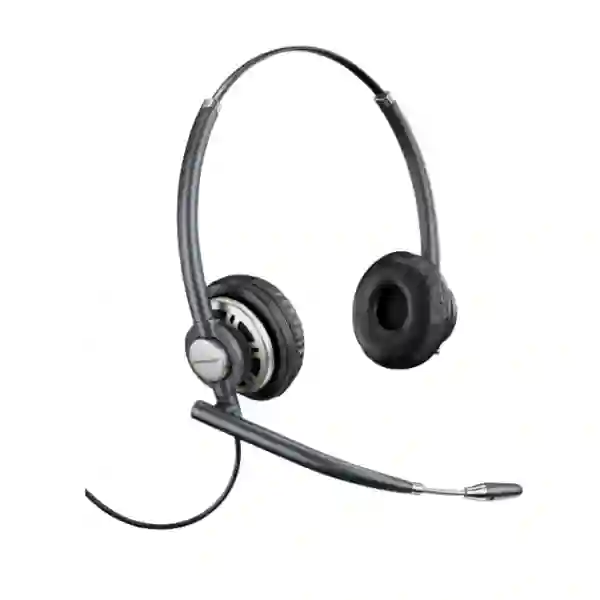
HP Poly EncorePro 720 Stereo QD Headset for business calls in Tanzania
Equip call-focused employees with an on-ear stereo headset built for telephone-intensive work. The EncorePro 720 combines a noise-cancelling boom microphone, two earpieces, an adjustable fit, and Poly Quick Disconnect technology. It suits contact centres, reception and service desks that need consistent wired communication rather than wireless mobility.
Before ordering: the QD connector is not a direct USB plug. Confirm a compatible Poly QD-to-desk-phone cable or USB audio processor for each workstation. Request a product-and-connection quotation with the phone or computer model and quantity.
Quick facts for purchasing teams
Stereo / binaural, on-ear, over-the-head design.
Wired Poly Quick Disconnect (QD), with the appropriate endpoint accessory.
Noise-cancelling microphone on an extendable boom.
Approx. 78 g headset with synthetic-leather-surface ear cushions.
HP identifies the EncorePro 720 QD product family with manufacturer product number 8R707AA. Regional suffixes may vary. This manufacturer number is not presented as a FourTeck listing SKU.
Who is the EncorePro 720 designed for?
The HP Poly EncorePro 720 Stereo QD Headset is intended for users who spend a substantial portion of the working day speaking with customers or colleagues by telephone or through a compatible computer calling system. It is especially relevant where users have assigned desks, clear call procedures and a predictable need for a cabled headset. Two earpieces can help the wearer stay focused on the call when nearby conversations are taking place, although the on-ear design should not be confused with electronic active noise cancellation.
The decision is less about choosing the most elaborate headset and more about matching the working environment. An inbound support agent may value consistent microphone positioning and quick separation from a desk connection. A receptionist may need to hear colleagues in the room as well as telephone callers; in that case a single-ear model could be preferable. An IT buyer may value standardised accessories and a documented connection path more than an unfamiliar feature list. Assess the employee role, telephone equipment and expected shift pattern before selecting the wearing style.
What Quick Disconnect actually means
Quick Disconnect, commonly shortened to QD, describes the detachable connection on the headset cord. The wearer can separate the headset from a compatible cable or processor without removing the headset from the head. This can be useful during a scheduled break or when moving away from a workstation. It is a physical connection approach, not a wireless communication feature, a USB standard or a guarantee that the headset will fit every telephone socket.
The headset terminates in a QD interface. The other side must be selected to match the intended equipment, whether an enterprise desk phone or a computer. For many desk-phone deployments this means an appropriate direct-connect lead or audio accessory; for computer calling it typically means a compatible Poly USB-to-QD audio processor. Those items should be quoted and checked separately, because the manufacturer’s box contents for this product specify the headset. A cable that looks similar, or a generic telephone adapter, should not be assumed electrically or functionally compatible.
QD also helps with a practical operational need: a user can disconnect the headset from the workplace cable when leaving a desk, then reconnect at the same station. It does not automatically transfer a call, park a call, mute the microphone or change the calling application’s state. These actions remain governed by the telephone system, processor and configured call controls. A purchasing plan should document which actions agents are expected to perform before walking away.
Choose the connection accessory before purchasing
Start by identifying the exact endpoint, including brand, model, hardware variation and available headset socket. For a desk phone, record the headset port type, any existing amplifier or control accessory, and how calls are answered. For a computer, identify whether the employee uses a softphone, browser contact-centre console or another calling application, and what USB ports are available. This basic inventory avoids the common problem of receiving good headsets that cannot be connected to the installed equipment.
When a Poly QD-to-USB audio processor is proposed, ask the supplier to confirm its compatibility with the 720 and the required computer platform. HP’s documentation for Poly DA audio processors supports the EncorePro QD families, but exact processor model and call-control behaviour still matter. USB-A and USB-C are distinct physical connectors; select the one that matches the workstation rather than assuming the computer will have both. Where a USB-C adapter or docking station is involved, test that exact chain as part of the pilot.
With desk phones, the compatible lead and any additional electronic hook switch or amplifier should be checked against the individual telephone model. Some environments use the telephone’s own headset button; others require separate control equipment. An accessory that provides audio does not necessarily provide remote answer/end functions. Include the connection accessory in the complete bill of materials rather than treating it as a minor item to source after installation.
Desk-phone deployment: the checks that prevent call failures
For a fixed desk-phone position, the most important first step is to understand the physical headset connection already supported by the handset or base unit. Ask for the telephone make and model rather than relying on the words IP phone or office telephone. Two devices from the same telephone brand can have different headset interfaces. A compatible QD direct-connect cable is selected for the endpoint, not by the headset name alone.
After the connection is established, check two-way speech, speaker volume, microphone level and the call-answer workflow. Place an incoming call, make an outgoing call, put a call on hold and resume it. If the user routinely transfers calls, perform a transfer while wearing the headset. Do not assume disconnecting the QD joint is the correct method for holding a live customer call; the telephone’s own control sequence must be used. Train the employee to distinguish QD separation from call handling.
For shared positions, consider where the cable will rest during a break and how the user will reconnect it without straining the desk-phone port. A labelled cable and a simple workstation instruction can reduce accidental unplugging of the wrong connector. If an office is planning a telephone-system upgrade, capture both the existing phone model and the likely replacement model; the required connection lead may change even while the headset itself remains useful.
Computer and softphone deployment: a practical path
On a computer, the EncorePro 720 QD normally needs a supported Poly QD-to-USB processor or another verified compatible interface. Connecting the bare QD end directly to a USB port is not possible. The processor provides the interface through which the operating system recognises an audio device. HP lists Windows 10, Windows 11 and macOS in the headset specifications, but successful operation still depends on the chosen processor, its USB connection and the calling software.
During a softphone pilot, select the intended audio device in the operating system and calling application, then verify speaker and microphone operation separately. A headset can produce clear sound in a system audio test yet fail to provide reliable call handling inside a specific contact-centre application. Test incoming ringing, mute indication, answer/end operation where supported, conferencing and recovery after a computer sleep or docking change. If inline controls are needed, confirm the processor model rather than promising controls built into the headset’s QD lead.
Consider supportability when many employees use the same configuration. IT staff should document a known-good processor model, cable routing, approved operating-system versions and the steps for selecting the correct audio device. Where employees move between workstations, establish whether they carry just the headset or the full headset-plus-adapter set. This affects spare-stock quantities and how quickly the help desk can restore a user after an adapter is misplaced.
Noise-cancelling boom microphone: what it improves
The EncorePro 720 uses a noise-cancelling microphone intended to emphasise the wearer’s voice during conversations. In a service area where other agents speak nearby, this can help make the speaker easier for the remote caller to understand. The microphone uses an adjustable boom so it can be positioned close to the mouth. The extent of background-noise reduction depends on microphone placement, surrounding noise and the connected telephone or USB processor; no headset can eliminate every competing sound.
HP specifies a microphone bandwidth from 100 Hz to 6.8 kHz. This is a technical range describing captured voice frequencies, not a promise that every phone call will reproduce the full range. Call quality is also shaped by the platform codec, network conditions, desk-phone configuration and the remote caller’s equipment. A microphone test should therefore use the actual calling workflow rather than only a recording made in a quiet room.
If a team regularly handles confidential details, focus on both clear speech and room acoustics. Keep loud discussions away from the agent’s microphone area, provide appropriate spacing between desks and establish sensible privacy procedures. A noise-cancelling boom is a useful component in that environment, but it does not make nearby speech inaudible to the microphone in all circumstances.
Adjustable boom geometry and consistent speech pickup
HP lists a boom extension of approximately 120 to 145 mm and rotation of 290 degrees for the EncorePro 720 QD configuration. Those figures help explain why the microphone can be adjusted for different head and face shapes. For a practical starting position, the wearer should place the microphone near the corner of the mouth while keeping it out of the path of exhaled breath. A supervisor or IT technician can then confirm the result with a real test call.
Small changes matter more than they may appear. A boom that is too far away may make the user sound distant; one placed directly in front of the lips can capture breath noise. Recheck placement after the headband or earpiece position changes. During a multi-user trial, allow each person to adjust the headset rather than evaluating only one fit. Record the setting or guidance that produced a clean call, and include it in onboarding.
The adjustable boom is also relevant to employees who wear glasses or frequently look between a screen and paper documents. Positioning should avoid obstructing vision or brushing against the face. Avoid forcing the microphone arm beyond its intended movement. If users repeatedly bend it in the same direction, a brief fitting demonstration is likely more useful than replacing a correctly functioning headset.
Stereo on-ear listening: understanding the trade-off
Stereo or binaural means that the headset has an earpiece for each ear. For employees taking back-to-back calls, this design can help keep call audio central and reduce the need to monitor a conversation through only one side. HP describes the 720 as an on-ear model, so the cushions rest against the ears rather than enclosing them completely like many over-ear headphones. This distinction matters when planning long shifts, hygiene procedures and employee comfort.
Two-ear coverage is often useful in a contact centre with sustained nearby speech. However, a manager should not choose stereo simply because it sounds more advanced. Reception, security control rooms and coordination desks may require frequent awareness of in-room speech or announcements. A mono headset can be a better operational match in those situations. The correct selection is determined by the worker’s responsibilities and safety procedures rather than a universal claim that stereo always improves productivity.
Ask trial users about pressure, heat, fit and whether they can hear the cues needed for their role. Where staff use hearing-assistance devices, seek an individual compatibility and workplace assessment instead of assuming the standard earpieces will suit everyone. A sensible deployment offers an alternative wearing style when required and records the circumstances under which it will be provided.
SoundGuard hearing protection: what it does and does not claim
HP identifies SoundGuard as the acoustic protection technology in the EncorePro 720 QD headset. Its manufacturer guidance describes acoustic limiting intended to protect against sudden high-level sound events, with a limit below 118 dBA for applicable QD headsets. This is a headset-level characteristic, not proof that every employee’s total daily noise exposure will remain within a workplace limit. The selected audio processor, telephone settings, call volume and daily use patterns still matter.
It is important to distinguish SoundGuard on this QD model from SoundGuard Digital features referenced for certain USB solutions. Capabilities and controls described for a digital USB processor should not automatically be attributed to a headset-only QD configuration. If an organisation has formal acoustic exposure requirements, it should review the exact headset-plus-processor combination and the applicable workplace policy rather than relying on the SoundGuard name alone.
Daily listening comfort also depends on sensible volume choices. Train employees to start calls at a moderate setting, reduce unnecessary amplification and report unusually loud or distorted audio. If users consistently turn volume high because callers sound faint, investigate the connection path or platform audio settings rather than treating louder listening as the only remedy. Acoustic limiting is one component of a responsible communication environment, not a substitute for the wider hearing-safety programme.
Comfort and fit across long shifts
HP specifies a headset weight of approximately 78 grams, which is relatively light for a complete dual-ear business headset. Its slim over-the-head structure and synthetic-leather-surface cushions are designed for close-fitting use. Weight is only one part of comfort, however. Head shape, hair, eyewear, headset pressure, ambient temperature and the length of continuous use can change how a person experiences the same product.
Build a fitting check into the staff trial. Users should adjust the band so the earpieces rest securely without needing constant readjustment. Ask whether there are pressure points after a realistic period of calling, rather than judging from a two-minute demonstration. Staff should be able to move their heads normally while talking and should not need to hold an earcup in place. Confirm that the microphone stays positioned when they turn towards a screen or document.
A consistent fit can also support more reliable voice pickup because users are less likely to repeatedly move the boom. Provide practical guidance on wearing the cable on the same side of the desk as the telephone or adapter. Keep the cable away from chair wheels and moving drawers. For employees who find a stereo design too enclosing or uncomfortable, consider a comparable mono configuration rather than assuming that one form factor must serve every position.
Ear cushions, materials and ongoing care
The HP product specification describes artificial leather as the surface material of the ear cushions. This creates a smooth contact surface that employees may find convenient for routine wipe-downs, but correct cleaning practice still matters. Follow the current manufacturer care guidance and the employer’s hygiene procedures, particularly when several staff use the same position. Avoid soaking the cushion or exposing the headset to aggressive cleaning agents that could damage the material.
Shared headsets need a clear ownership policy. Decide whether each employee has a personal headset and shares only the desk connection cable, or whether the entire headset is pooled. Personal issue may simplify hygiene management; pooled equipment may require more rigorous cleaning and replacement-cushion planning. Whatever the arrangement, tell staff where to store headsets during breaks and how to report damaged cushions without attempting makeshift repairs.
Inspect the boom, headband and cable periodically for visible strain or abrasion. A headset that has audio intermittently when the cable is moved may need a connection inspection before it is put back into daily service. If cushions require replacement, confirm the exact compatible spare part rather than assuming all EncorePro cushions are interchangeable. Sensible care and a small stock of verified accessories can reduce the disruption caused by preventable wear.
Why wired audio is still useful for operational desks
A wired headset is often an appropriate choice for a desk where an employee spends most of the shift at a computer or telephone. There is no headset battery to schedule around, no charging cradle occupying the work surface and no Bluetooth pairing exercise for the employee. The QD design creates an intentional separation point when the worker needs to leave the station. These are operational characteristics, not guarantees of better sound than every wireless alternative.
Wired equipment does involve physical cable management. Users should plan where the lead runs, how it reaches the QD joint and where the connector sits when disconnected. A busy operations area with frequent walking between desks may be better served by a wireless device. Conversely, a fixed workstation may benefit from the simplicity of a documented headset-and-processor combination. Align the connection method with how people actually move during their workday.
IT departments can also evaluate whether a common wired setup reduces training variation across a team. That potential advantage is strongest when all workstations use the same approved telephone or processor configuration. If a company has many different telephone models, standardisation may require more than one accessory. The correct procurement unit is therefore not always just the headset; for operational planning it may be the complete ready-to-use station kit.
Use case: inbound customer contact centres
In an inbound contact centre, the ability to hear callers and present a consistent voice is fundamental to daily work. The EncorePro 720’s dual-ear layout and noise-cancelling microphone suit roles where calls are frequent and staff sit near other operators. Supervisors evaluating the model should listen for clarity during live conversations, not merely in an isolated product demonstration. Test it during a busy calling period when desks, keyboards and nearby voices create a realistic acoustic environment.
The complete user experience also depends on the agent desktop. In a computer-based contact centre, verify the QD-to-USB processor and whether the calling platform supports any required mute, answer or end-call interactions. Where an agent must switch between applications while maintaining a call, test the selected audio device after system notifications, browser refreshes and headset reconnection. Document a recovery process that the agent can follow without leaving a customer waiting unnecessarily.
For a large team, consider a staged purchase. Fit and test a sample group with different head shapes, work patterns and workstation setups, then confirm whether the results justify a wider rollout. Identify any minority of users who need a single-ear or alternative headset. Doing this before an organisation-wide order can be more valuable than comparing headline specifications in isolation.
Use case: reception and front-office communications
A reception team may use an IP desk phone, a PC calling console or a combination of both. The EncorePro 720 can be relevant when the receptionist manages sustained telephone traffic, but its stereo construction should be weighed against the requirement to hear walk-in visitors. Some receptions operate in dedicated telephone rooms where two-ear call focus is desirable; others depend on constant face-to-face awareness. Test the design in the actual reception layout.
The QD joint can be convenient when the employee steps away from a designated calling position. It does not replace the phone’s transfer, park or hold controls. Create a short instruction that distinguishes leaving the desk from placing the caller on hold. If receptionists rotate between positions, record whether each desk uses the same phone model and connection accessory. A spare headset alone will not be useful if the alternate desk has a different unsupported cable.
Ask reception employees to test periods of simultaneous ringing, visitor arrivals and team coordination. The results may support assigning the EncorePro 720 to dedicated telephone staff while retaining a mono option for more outward-facing positions. Matching the wearer to the task is a more reliable approach than treating every front-office employee as having the same audio requirements.
Use case: IT service desks and internal support teams
Help-desk staff often alternate between listening carefully to a caller and working through technical steps on a computer. A well-positioned noise-cancelling microphone can help them give instructions clearly while other service-desk conversations continue nearby. The dual-ear format may help with caller concentration, especially during lengthy troubleshooting conversations. Yet comfort and the ability to hear team escalations should still be checked with the people who will wear the headset.
Computer-based support teams should confirm how their chosen USB audio processor behaves with the service-management calling software. Does the correct microphone stay selected when a technician docks a laptop? Is the audio restored after a remote-support session changes system settings? Can users switch from a call to a recorded knowledge-base clip without unexpected volume changes? Those are application and workstation questions, not specifications to assume about the QD headset itself.
When support staff share desks, standardise adapter placement and label each headset connection. Keep a short local troubleshooting guide for unplugged QD connections, incorrect output devices and microphone muting. These basic controls can reduce unnecessary replacement requests. A small pilot with the most common laptop and docking arrangements can reveal practical issues that a single desktop demonstration would miss.
Use case: appointment, billing and customer administration
Teams handling appointments, billing enquiries, account questions or booking changes need intelligible speech and repeatable call-handling steps. For these roles, the EncorePro 720 is worth considering when work is largely desk based and conversations happen throughout the day. A noise-cancelling boom microphone can be useful when several colleagues operate in the same room, but headset choice must be accompanied by sensible workstation spacing and confidential-information procedures.
Run a short evaluation that includes typical scripted interactions and real variations in caller audio. Staff should be able to hear names, numbers and instructions without raising the volume excessively. They should also be able to speak clearly while typing or checking a record. If the department’s software records calls, confirm the system’s recording settings independently; the headset itself is not a call recorder and cannot guarantee the completeness or security of recorded conversations.
Procurement should decide how employees will identify and maintain their assigned headset and whether spare units are available. Replaceable accessories, a documented QD cable and a clear escalation procedure often determine the day-to-day success of the deployment as much as the headset’s initial sound. It is sensible to buy for the actual supported workflow rather than for a generic list of office features.
Use case: operations, dispatch and coordination desks
At dispatch or coordination desks, workers may need to communicate rapidly while monitoring screens, documents or live status boards. A corded dual-ear headset can be suitable for a position dedicated mainly to telephone communications. However, if personnel must continuously hear an alarm, shouted instruction or radio conversation in the room, the suitability of two-ear coverage must be evaluated carefully. Hearing critical local cues can take priority over the concentration benefits of stereo listening.
Trial users should demonstrate their real tasks while wearing the headset. Can they hear the sounds that workplace procedures require them to hear? Does the boom obstruct their view of nearby screens? Is the cable routed away from emergency controls and frequently opened drawers? Does the connection permit a quick departure from the desk without pulling equipment? These are operational risk questions that should inform a buying decision.
Do not represent SoundGuard as a replacement for workplace safety design, or QD separation as an emergency call-control feature. The relevant telephone system and operating procedures govern how calls are maintained, transferred or ended. For mixed radio and telephone environments, confirm each communications system separately; the EncorePro 720 is not presented as a universal interface to every radio console.
Use case: multi-shift teams and shared workstations
Businesses that operate multiple shifts need a consistent and maintainable headset arrangement. The EncorePro 720 can be allocated per employee while compatible QD connection accessories stay at designated desks, or units can be managed as pooled equipment under an appropriate hygiene process. Decide which approach matches the workforce before deciding how many headsets and accessories to purchase. The number of operators and the number of equipped workstations are not always identical.
Create an inventory record that separates the headset, USB processor or direct-connect cable, and any approved spare parts. If a connection problem occurs, support staff can then distinguish a failed headset from a loose cable or the wrong workstation adapter. Label common accessory variations clearly. Two cables can look similar even though one is suitable for a desk phone and another is meant for a computer.
Before shift handover, staff can perform a short check: inspect the QD joint, confirm the microphone is in position, test incoming audio and make sure the calling application or telephone is set to the expected device. A repeatable check is more valuable than assigning fault immediately to the headset when a caller cannot hear an operator. In busy teams, a quick swap test with a known-good compatible accessory can shorten diagnosis.
EncorePro 720 versus a single-ear alternative
The main wearing-style difference between the EncorePro 720 and an EncorePro 710-type mono configuration is straightforward: the 720 covers both ears, while a mono headset leaves one ear uncovered. Both approaches can be appropriate in professional calling environments. Choose the 720 when dedicated call listening and concentration are especially important. Consider a mono alternative when employees need more continuous awareness of colleagues, customers or other events taking place in the room.
The decision should not be made from photographs alone. Ask representative staff to try the actual headset while carrying out their normal duties. Evaluate call comprehension, speech intelligibility, comfort, awareness of room cues and how often the user adjusts the headset. If stereo causes staff to remove one earpiece for long periods, it may be a signal that the mono style better fits that role.
Also compare connector versions carefully. A headset can be offered in QD and USB variants with superficially similar names. Selecting a mono unit does not automatically solve a computer connection problem; similarly, selecting the stereo 720 does not imply it includes a USB lead. Request exact manufacturer model confirmation and the corresponding accessory configuration for the specific workstation.
EncorePro 720 QD versus a direct-USB headset
A direct-USB headset has a USB connector built into its cable, while this EncorePro 720 configuration uses QD and depends on a compatible interface accessory to reach a computer. Direct USB may simplify a single-user laptop purchase, especially when staff do not need to disconnect the headset from an adapter. QD may be attractive in a managed contact-centre environment because workstations can retain standard audio processors while employees disconnect their personal headsets when leaving.
Neither choice should be called universally better. A direct-USB model can have different built-in controls or software behaviour, and a QD model’s controls depend on the accessory and platform. Review microphone performance, comfort, maintainability, software compatibility and how replacement equipment will be managed. If a business is migrating from desk phones to PC-based calling, the QD approach may offer a practical transition only if the proposed USB processor is supported and verified for the chosen software.
When requesting quotations, specify the complete intended connection and whether any audio processor is included. A headset-only quote and a ready-to-deploy workstation kit are not identical offers. Compare like with like, including any required cable, processor and recommended spare components, so the purchasing decision reflects the true implementation need.
Reading the official specifications correctly
HP lists 28 mm speaker drivers and a speaker bandwidth of 150 Hz to 6.8 kHz for the EncorePro 720 QD model. The microphone bandwidth is specified as 100 Hz to 6.8 kHz. These values describe components and voice-oriented performance ranges; they should not be read as measures of music fidelity, wireless range or overall call quality. Real call intelligibility depends on both endpoints, the active codec and the telecommunications environment.
The main headset cable is listed as 890 mm. This figure should not be treated as the total distance between the employee and their computer or desk phone because a QD adapter or direct-connect cable adds its own length and routing. The headset weighs approximately 78 grams, is black, and uses an on-ear stereo design with artificial-leather-surface cushions. HP documents a 120–145 mm adjustable microphone boom with 290-degree rotation for this manufacturer product number.
HP identifies SoundGuard acoustic protection and lists the box contents as a headset. Its published product identification for the applicable QD version is 8R707AA, though country suffixes and packaging versions can differ. When a purchase order requires a precise country-specific identifier, ask for the exact part number printed on the supplier quotation. The FourTeck inventory SKU has not been provided and should not be inferred from HP’s manufacturer part number.
Technical specification reference
Use the reference values below as a model-identification and evaluation checklist. They come from HP’s EncorePro 720 QD product specification, not from an inspection of a local listing. Always verify that the quoted regional item is the intended version, particularly where supplier catalogues distinguish different suffixes or bundle configurations.
Some accessories may be offered in bundles by a reseller. A bundle description should specify its individual components instead of relying on the headset model name to imply a processor, cable, carry case or call-control module. The safest order confirmation names the headset version and each separately supplied accessory.
| Product | HP Poly EncorePro 720 / HW720 stereo QD headset |
|---|---|
| Manufacturer product number | 8R707AA (verify regional suffix) |
| Headset style | Over-the-head, on-ear, dual-ear / binaural |
| Connectivity | Wired Poly Quick Disconnect |
| Microphone | Noise cancelling, adjustable boom |
| Microphone frequency range | 100 Hz–6.8 kHz |
| Speaker size | 28 mm |
| Speaker frequency range | 150 Hz–6.8 kHz |
| Microphone boom | 120–145 mm extension; 290° rotation |
| Acoustic protection | SoundGuard for applicable QD version |
| Cable length | 890 mm headset cable |
| Weight | Approximately 78 g |
| Ear cushion surface | Artificial leather |
| Color | Black |
| Manufacturer-listed box contents | Headset |
| Computer connection | Appropriate compatible QD-to-USB processor required |
| Desk-phone connection | Model-matched QD accessory / direct-connect cable required |
A buyer checklist for a correct Tanzania quotation
A useful quotation begins with business requirements rather than the headset name alone. State how many employees need headsets, how many desks are being equipped and whether employees will use dedicated or shared devices. Identify each telephone or computer model, the calling software where applicable, and whether headsets should be stereo or mono. If several departments have different needs, divide the quantity accordingly. That prevents a generic order being mistaken for a complete deployment specification.
Ask the supplier to list the exact HP product number and separately identify the compatible QD cable or USB audio processor. Confirm whether a chosen adapter supports the intended endpoint and required call handling. If the organisation needs spare cushions, processors or connection leads, ask for those as separately described items. The requested quotation should also clarify the included contents and terms rather than assuming that accessories shown in a product-family illustration are in the box.
For organisations purchasing in Tanzania, provide a delivery destination and the intended project schedule so commercial and logistics details can be confirmed. Do not assume a local stock position, delivery date, price in Tanzanian shillings or installation coverage without an actual confirmed quotation. The relevant decision is whether the final offer matches the deployed endpoint, quantity and operational needs. Asking those questions first helps avoid unexpected accessories and preventable delays.
Pilot testing: a low-risk approach before bulk purchase
Begin with a few representative operators instead of testing only the equipment manager’s desk. Include employees who speak for long periods, users with glasses, a person using the busiest contact-centre row and at least one workstation that reflects any unusual phone or computer configuration. Provide the correctly matched connection accessory for each pilot station. The test should mirror real work conditions, including peak periods and normal call-handling procedures.
Evaluate incoming audio, outgoing voice clarity, background-noise behaviour, microphone placement and comfort over a meaningful portion of a shift. Test how the QD joint is used during breaks and whether its location is convenient. Confirm the user can reconnect confidently and that the calling application or phone behaves as expected. Ask trial users about heat, pressure, cable interference and audible room cues. Record both positive observations and issues rather than relying on an overall impression.
When the trial ends, document what passed, what needs an accessory adjustment and whether a different wearing style would help particular roles. Approval should cover the whole workstation kit: headset, adapter, telephone or computer, application and use procedure. This approach also produces useful information for induction and support. It reduces the chance that a successful demonstration on one device will be mistaken for verified compatibility across all company equipment.
Installation and employee onboarding
For desk-phone installations, connect the verified QD cable according to the telephone and accessory instructions, then check the correct call pathway. For computer installations, connect the supported QD audio processor, select the resulting device in the system and application, and test both microphone and speaker. Avoid guessing at alternative sockets or forcing connectors into place. A connection that physically fits is not enough to establish correct compatibility.
During onboarding, show the employee how to place the headband, adjust the earpieces and position the microphone near the mouth without creating breath noise. Demonstrate the QD separation point and explain what happens to the active call on that specific platform. Teach normal call hold, transfer and end procedures through the telephone or approved application. The employee should know that disconnecting a cable is not equivalent to intentionally ending or securing a call.
Keep the first-day checklist short: correct headset and adapter, comfortable fit, clear two-way audio, expected call controls and a known route for reporting faults. A written instruction attached to the desk or supplied through IT documentation is helpful when many employees join at different times. Consistent setup and training can make a more visible difference to daily results than adding unverified accessories.
Troubleshooting: no sound, low volume or intermittent audio
When the user hears nothing, first confirm the cable is fully seated at the QD joint and at the telephone or USB processor. Check the selected speaker device on the computer or the headset output setting on the desk phone. If the microphone is working but the user cannot hear the caller, focus on the output path and volume. If the caller cannot hear the user, confirm that mute is not active in the application or processor and verify that the correct microphone device is selected.
When sound is intermittent, inspect the connector and cable route for strain or repeated movement. Test with a known-good compatible accessory and workstation before deciding which component should be replaced. Do not pull a cable by its wires to disconnect it; use the intended connector handling procedure. A fault that appears only during computer docking, sleep recovery or application switching may be a processor or software issue rather than a defect in the earpieces.
If callers say the agent sounds muffled, reposition the boom and repeat the test. If the user reports excessive background sound, examine both microphone placement and the surrounding work area. If volume must be set unusually high, check the platform’s audio gain and the connection chain instead of immediately increasing it further. For persistent faults, record the exact endpoint, processor model, symptoms and steps already tried so the support team can reproduce the problem.
Troubleshooting: inconsistent software call controls
A QD headset and a USB processor perform different functions. The headset provides the earphones and microphone; any supported computer audio interface and certain inline control capabilities come from the chosen processor and integrated calling platform. It is therefore possible for two-way audio to work even if an answer or mute control does not. Treat that as a compatibility or configuration question instead of automatically assuming a hardware fault.
Confirm the exact processor model, its required software environment and the application in which the failure occurs. Compare the behaviour with the application in focus and running in the background. If a user has more than one microphone connected, verify which is active after a restart. When using a laptop dock, note whether reconnecting the dock changes default audio devices. Build a simple support decision tree for your approved workstation build.
Do not promise native certification for a named conferencing or contact-centre application based only on the EncorePro family name. Compatibility claims may differ among the QD, USB and other members of the family. The relevant test is the actual combination purchased. If additional platform-specific controls are essential, request written confirmation of support for the exact combination before placing a bulk order.
Managing replacements, hygiene and lifecycle costs
Headset ownership, accessory inventory and fault diagnosis become increasingly important as the number of users grows. Assign a clear process for reporting a broken headband, worn ear cushion or damaged QD lead. Record whether staff may swap a personal headset between desks and who maintains the connection accessory at each workstation. This avoids the familiar problem of working audio processors being discarded because the headset cable was damaged.
Consider a modest number of spare components based on the actual operational risk rather than an invented failure rate. A contact centre that depends on every staffed desk may justify readily accessible compatible spares; a smaller office may use a different approach. Keep spare items labelled by exact product family and endpoint compatibility. Do not substitute visually similar cables without checking them, and avoid mixing incompatible components inside one unmarked storage box.
When cleaning or replacing parts, follow manufacturer guidance and site hygiene requirements. Document when an item is retired rather than repeatedly repairing a compromised connector. A well-managed replacement process should let IT identify whether the fault belongs to the headset, USB audio processor, desk-phone lead or application. These records can also inform future purchasing decisions without relying solely on headline product prices.
Planning a move from office desk phones to PC calling
Some organisations continue to use desk phones while adding browser-based or computer softphones. The EncorePro 720 QD can be considered in this kind of environment because the headset uses a detachable QD interface and compatible accessories can provide different endpoint connections. The transition is not automatically plug-and-play: each proposed computer connection still needs the supported USB audio processor, and each desk-phone connection requires the correct lead.
Before a migration, inventory existing telephone models, target computer hardware, USB port types and calling applications. Identify whether staff require call controls or monitoring features beyond two-way audio. Test both the old and new connection paths with the same headset only if both combinations are supported. A successful call on a desk phone says nothing definitive about performance in a browser softphone unless that arrangement is also tested.
For phased projects, mark which stations are operating on which connection kit. This reduces confusion when an employee moves between desks or an IT technician replaces equipment. Budget for any processor or cable changes separately from the headsets. If the eventual setup requires a different wearing style or direct-USB functions, compare alternatives rather than retaining QD at any cost. The best migration outcome is a documented and supportable user experience.
Workstation ergonomics and room planning
A headset should fit into the desk environment rather than complicate it. Assess where the telephone or USB processor sits relative to the user, which side the QD joint will be reached from and whether the cable crosses a writing surface or keyboard. Route the connection so it does not snag on chairs or drawers. In high-density contact centres, a simple consistent position for the QD joint can make daily use and support easier.
The stereo earpieces help define an employee’s listening experience, but room acoustics still matter. Nearby conversations, loud ventilation and reflective surfaces can contribute to background noise captured by any microphone. Consider practical changes such as desk arrangement, reasonable speaking volumes and acoustic treatment where justified. The headset’s noise-cancelling microphone should be evaluated as part of this environment, not expected to correct every room-design problem.
User comfort also depends on temperature and how long staff wear the headset without a break. Encourage appropriate break procedures and fitting adjustments under company policy. If a particular user needs to hear a local announcement or speak regularly to nearby colleagues, consider whether a one-ear model is safer and more practical. A good ergonomics review treats equipment selection, workplace layout and task design as connected decisions.
Procurement for multiple departments and branches
Businesses with several departments can benefit from a small selection of approved headset configurations rather than one device for every possible role. For example, dedicated call agents might trial the EncorePro 720 stereo QD, while reception roles might trial a mono option. The connection accessory may also vary between a desk-phone department and a computer-based support team. Document the approved combinations by department and endpoint.
For branches, ask each site to confirm telephone hardware, USB availability and the number of equipped desks. A central purchase order can still include a controlled mix of compatible cables and processors. This is more accurate than assuming all branches use the same phone just because they share a telephone service. Keep the installation checklist and user training consistent across sites where the hardware allows.
Before ordering for Tanzania-based operations, obtain a written quotation confirming the exact part number, any required accessories, commercial terms and destination arrangements. Confirm support and warranty handling in the offer instead of assuming manufacturer information automatically describes local fulfilment. The purpose of standardisation is to make deployment and support predictable; it should not prevent teams with genuinely different duties from using a more suitable headset.
Request the right product-and-accessory quotation
To prepare a useful enquiry, share the product name HP Poly EncorePro 720 Stereo QD Headset, required headset quantity, workstation count, calling endpoint brand and model, and whether the team uses desk phones or PC-based calling. For computers, include the operating system, relevant call application and preferred USB connector type. State whether employees will have personal headsets, share positions or move between branches.
Ask for a clear breakdown of the headset and each connection accessory, with any relevant regional part-number suffix identified. If possible, include one pilot kit before a larger order. The finished quotation should make it straightforward for your team to check connection compatibility, the included box contents, commercial terms and any project-specific delivery arrangements. FourTeck Tanzania can use this requirement list to discuss an appropriate configuration; no stock, price or delivery promise is implied by this page.
Frequently asked questions
Does the HP Poly EncorePro 720 plug directly into a laptop?
No. This is the wired Quick Disconnect version, not a direct-USB headset. A supported QD-to-USB audio processor is normally required for a laptop or desktop computer. Ask for the exact compatible processor and the right USB connector for your workstation. After connecting, select and test the audio device in the calling application. Do not assume that a generic USB cable will provide the same result.
Can I connect this headset to an IP phone?
It may be used with a compatible desk-phone connection accessory, but compatibility must be checked against the specific phone model and port. The headset uses Poly QD rather than a universal IP-phone socket. Tell the supplier which phone is in use and whether headset answer or end controls are needed. The right direct-connect lead and any additional equipment should be included in the workstation quotation.
Is the EncorePro 720 a stereo or mono headset?
The EncorePro 720 is a stereo, dual-ear or binaural model. Both ears are covered by on-ear cushions. That can suit sustained calling in a busy contact centre, while people who must remain aware of conversation or activity around them may prefer a single-ear configuration. A short practical trial with the employees and their real work tasks is the best way to establish the preferred wearing style.
Does noise cancelling mean the wearer will not hear room noise?
No. The published noise-cancelling feature describes the boom microphone’s ability to reduce some unwanted background noise in transmitted speech. It is not a claim that the earcups provide electronic active noise cancellation or eliminate the sounds around the listener. Room noise, headset fit, communication platform and microphone position all affect the actual result. Evaluate it in the intended environment.
What is Poly SoundGuard on the QD version?
SoundGuard is HP Poly’s acoustic limiting technology for communications headsets. HP describes protection against sudden high sound levels on applicable QD headsets, with limiting below 118 dBA. This should not be confused with all SoundGuard Digital functions of particular USB configurations. Responsible listening levels, connection settings and workplace hearing policies remain important, especially during long shifts.
What is included in the headset box?
HP’s specification for the EncorePro 720 QD manufacturer product lists a headset under box contents. Do not assume a compatible USB audio processor, desk-phone direct-connect cable or other accessory is supplied unless the exact seller quotation identifies it as part of the bundle. Ask for a bill of materials with each component named. This avoids a delivery that contains the correct headset but no way to connect it.
Does it work with Windows and macOS?
HP identifies Windows 10, Windows 11 and macOS in its product specifications. Actual computer use requires a compatible QD-to-USB interface, correct audio-device selection and support from the intended calling application. Test the precise adapter and operating system in your organisation rather than treating the operating-system list as universal certification for every softphone or call-control feature.
Is the headset wireless or Bluetooth-enabled?
No. The specified EncorePro 720 QD model is a corded, wired headset. Quick Disconnect is a physical plug that lets the user separate from the workstation cable; it is not Bluetooth and does not provide a wireless link or battery-powered mobility. A workplace requiring people to talk while moving around may need a different wireless model.
Can the headset be used by contact-centre agents throughout a shift?
It is designed for telephone-intensive business work and has an adjustable fit, lightweight construction and dual-ear listening. However, comfort differs among wearers. Test it over representative working periods and ask employees about pressure, temperature, glasses and microphone placement. Provide a mono or otherwise suitable alternative for roles or individuals who need one. A product specification alone cannot guarantee identical comfort for every person.
How long is the headset cable?
HP lists an 890 mm cable length for this QD configuration. That is a headset-side specification and not a promise of the complete reach from employee to telephone or PC. A connection accessory has its own physical length and layout. During setup, ensure that the entire path is long enough for normal movement but does not trail across chair wheels or create trip and snag hazards.
Does disconnecting the QD connection end the telephone call?
Do not assume so. QD physically separates the headset from the compatible cable or audio processor. Call hold, transfer, mute and end behaviour depend on the telephone or calling software and accessory configuration. Train employees to use the approved call-handling controls before leaving a workstation, and verify what happens during separation on the exact deployed system.
Which HP manufacturer number should be quoted?
HP identifies the Poly EncorePro 720 Binaural Headset + Quick Disconnect using base manufacturer number 8R707AA. Regional suffixes or bundle identifiers can differ, so ask the supplier to confirm the complete supplied part number. A manufacturer number is not the same as a seller’s local inventory SKU. The exact FourTeck Tanzania listing SKU has not been provided.
Can the ear cushions be cleaned or replaced?
The model uses ear cushions with an artificial-leather surface. Follow the manufacturer cleaning instructions and your workplace hygiene procedures. Avoid harsh chemicals or soaking unless specifically approved. Where replacement cushions are needed, confirm the exact compatible spare part for the headset. For pooled equipment, define who cleans and inspects it between users rather than assuming a shared desk makes cleaning unnecessary.
What should I provide when asking FourTeck Tanzania for a quote?
Provide headset quantity, destination, phone or computer model, calling platform, number of equipped desks, whether stereo is desired and whether a QD cable or USB processor is already available. Mention any deployment deadline, pilot requirement or need for compatible spares. This information supports a more accurate product-and-accessory discussion; local price, stock, warranty handling and delivery details require a specific confirmed quotation.
Discuss the correct EncorePro 720 QD setup
The best order includes more than the name of a headset. Tell FourTeck Tanzania how many users you have, which telephones or computers they use, and whether you need USB audio processors or desk-phone QD leads. A model-matched connection plan helps your team assess comfort, voice clarity and day-to-day call handling before committing to larger quantities.
Specifications refer to the HP manufacturer model. The exact accessory combination, local commercial terms and availability require confirmation in a quotation.




Reviews
There are no reviews yet.