
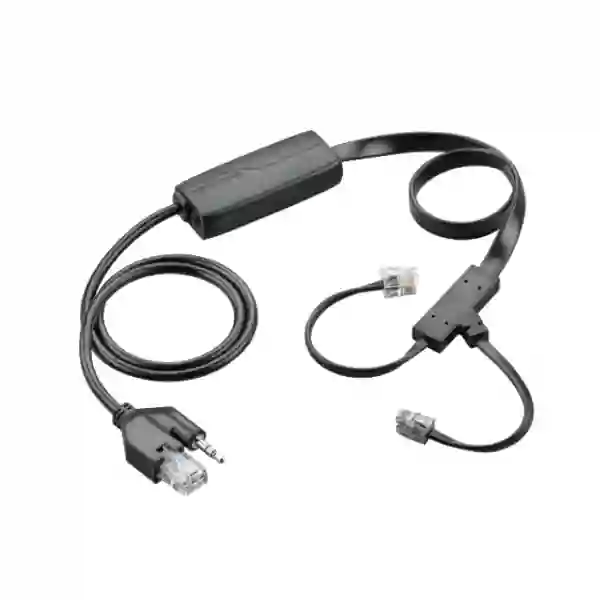
HP Poly APC-43 Electronic Hook Switch Adapter
Connect a supported Poly wireless headset base to a compatible Cisco desk phone for electronic answer-and-end call control without a mechanical handset lifter. Check both device models and the Cisco phone setting before ordering.
Key product facts at a glance
| Brand and model | HP Poly APC-43 |
|---|---|
| Accessory type | Electronic Hook Switch (EHS) cable |
| Main purpose | Remote answer and end for supported desk-phone calls |
| Primary phone family | Selected Cisco desk phones; exact models must be verified |
| HP product reference | 85Q55AA; former Poly reference 38350-13 |
| Not included by description | Headset, headset base and desk phone are separate components |
Cisco models illustrated in HP’s APC-43 guide
The models below appear in HP’s documented APC-43 connection arrangements. Confirm the specific base, phone software, EHS setting and any expansion-module requirements before relying on a model match.
Installation essentials
- Identify both devices and read the matching manufacturer wiring diagram.
- Disconnect the desk phone network cable during EHS installation, as HP instructs.
- Attach the two-prong EHS end to the appropriate Poly base connection and the other connections to the Cisco phone as illustrated.
- Where the documented base switches apply, use listening 3, configuration A and speaking 2 as the starting settings.
- Have the phone administrator enable Wireless Headset Hookswitch Control if needed.
- Reconnect and test answer, two-way audio and end behavior with a real call.
Different phone models and expansion-module installations can require different wiring. Use the exact manufacturer instructions rather than an assumed universal connection.
What the APC-43 does in a Cisco desk-phone setup
The HP Poly APC-43 electronic hook switch adapter is a purpose-built connection between certain Cisco desk phones and supported Poly wireless headset bases. Its job is to pass electronic call-control signals so a user can answer or end a desk-phone call with the headset control instead of physically lifting a telephone handset. The adapter supports a more convenient way to work at a reception counter, service desk, office workstation, or another location where staff regularly move between a chair, documents, and nearby equipment. The desk phone remains the calling device; the APC-43 provides the compatible connection for call control.
This distinction matters when choosing accessories. The APC-43 is not a wireless headset, a Bluetooth transmitter, a power supply, a desk phone, or a complete phone system. It does not independently create a radio connection or enable calls through a computer. A compatible Poly headset base, its paired headset, the intended Cisco desk phone, and the necessary phone configuration must already be available. When these pieces align, an EHS cable can replace the need for a separate mechanical handset lifter. Buyers should confirm the exact phone and headset-base pairing before ordering.
Why electronic hook-switch control matters
A desk phone and a wireless headset can pass voice audio without always providing full remote call control. For example, a user might hear a conversation through a headset but still need to walk back to the telephone to answer a ringing call. Electronic Hook Switch, often shortened to EHS, addresses that specific workflow by allowing a supported headset control to communicate with the desk phone’s hook-switch function. For employees handling frequent calls, avoiding an extra handset action can make routine call handling less disruptive and reduce clutter around the telephone.
The important outcome is not simply whether the headset produces sound; it is whether the phone recognizes the electronic answer and end commands correctly. That recognition depends on the supported handset arrangement, cable routing, headset base, and provisioning of the Cisco phone. It should therefore be tested with an actual incoming call after installation. A buyer evaluating the APC-43 should ask for model-level compatibility confirmation rather than relying on a broad statement that a headset is compatible with Cisco, because audio compatibility and EHS call-control compatibility are different requirements.
Who should consider this adapter
The APC-43 is relevant for teams already using, or planning to use, supported Poly wireless headset systems with compatible Cisco desk phones. Typical environments include front-desk staff who need to greet visitors while managing calls, administrative teams who step away from a workstation for paperwork, support personnel reviewing information during conversations, and shared offices where desk space is valuable. The practical benefit is the ability to keep a supported headset on while handling call start and end functions away from the physical telephone.
It is not necessary for every headset user. If employees conduct all calls through a laptop softphone, their headset connection and call-control requirements can be entirely different. If a desk phone already supports a headset through another integration method, its manufacturer-approved connection may be more appropriate. If a user needs only a wired headset, a compatible direct headset connection could be simpler. Before spending on an accessory, identify the actual call source, telephone model, headset-base model, required answer and end behavior, and any existing accessories that must remain connected.
Documented Cisco phone compatibility
HP’s APC-43 EHS cable user guide documents the following Cisco desk phones in its primary connection example: 7821, 7841, 7861, 7942G, 7945G, 7962G, 7965G, 7975G, 8841, 8851, and 8861. The guide also provides a separate connection arrangement for the Cisco 6945. These model numbers are useful starting points when examining an existing telephone fleet, but a supported model name by itself does not establish that every current configuration, accessory combination, or headset base will work without adjustment.
Look at the complete model number printed on the phone or available in its device information, not only the product-family name. Two phones in the same Cisco series can have different port layouts, firmware behavior, or requirements for supplementary cables. Check the headset base as well, because the adapter is designed to connect two specific device types rather than to operate as a universal cable. If your Cisco model is not listed in the documented examples, do not assume compatibility based on similar appearance. Seek an exact combination check before procurement.
Cisco phones with expansion modules
Some workstations have a Cisco desk phone with an attached key expansion module for monitoring additional lines or contacts. HP’s APC-43 installation guide separately illustrates connections involving the Cisco 7942G, 7945G, 7962G, 7965G, and 7975G with expansion modules. The illustrated arrangement includes an additional adapter component for this configuration, which is different from treating the phone as a standalone handset. This is an important procurement detail for reception desks and operator stations where line-key modules occupy existing connection points.
Record whether the phone has a sidecar or expansion module, its exact model, and the headset base being connected. Do not assume the standard standalone-phone installation drawing applies unchanged, and do not order an extra adapter solely because an expansion module is present. The correct accessory set depends on the specific combination shown in the manufacturer’s setup documentation. If planning a fleet replacement, separate ordinary desk phones from expansion-module workstations in the purchasing list so the more complex positions can be reviewed and tested individually.
Match the Poly headset base as carefully as the phone
The APC-43 is attached to the electronic hook-switch connection on a supported Poly base, not directly to any wireless headset by itself. HP’s setup material illustrates base-switch arrangements for selected Savi, CS500 and related office headset systems, including examples for legacy Savi 700, CS500 or CS500-XD, Voyager Legend CS, and MDA200 setups. These examples show why identifying the base is important: a headset family name alone may not identify the correct electrical connection or the available controls on a particular base unit.
For a new installation, collect the exact base model printed on the equipment, the full headset kit name, and the Cisco phone model. For a replacement installation, document the existing cable and all adapters before disconnecting them. Headset product lines change over time, and some newer systems use other desk-phone interfaces or integration accessories. Do not treat this page as a promise that every product carrying the Poly brand supports the APC-43. The safest purchasing process is a compatibility check against the manufacturer’s instructions for the exact devices installed at the desk.
Check the whole communication workflow before ordering
Start by mapping a normal call from beginning to end. Where does the call arrive: on a physical Cisco phone, a computer application, or a mixed telephone setup? Does the user need to answer while away from the desk, end a call on the headset, adjust headset volume, monitor several lines, or move between different call sources? The APC-43 addresses the electronic answer-and-end connection for a compatible desk-phone arrangement. It should not be presented as a replacement for headset audio cables, a telephone subscription, or device-specific software configuration.
Next check who manages the Cisco phone. In some organizations, users can change headset settings locally; in others, the setting is controlled by the IT or telephony administrator. An accessory can be physically connected yet fail to provide remote answer and end functions because the telephone has not been provisioned for wireless hookswitch control. Ask whether the required feature can be enabled, who has permission to enable it, and whether configuration changes will remain in place after the telephone restarts or is reprovisioned.
Understand the model and product identifiers
APC-43 is the product model and the descriptive name used for this Cisco-focused EHS connection. HP’s product catalogue associates the APC-43 with HP product number 85Q55AA and the legacy Poly or Plantronics reference 38350-13. These identifiers help distinguish the intended adapter from other similarly named Poly EHS accessories. They are not automatically a FourTeck Tanzania store SKU, and they should not be copied into a local inventory field unless that inventory explicitly uses the same identifier and labels it accordingly.
Part-number checking matters because related products can appear together in quotations or online catalogues. An APC-43 is not interchangeable merely because another accessory starts with APC, APD, APP, APS, or APU. Such designations can identify different phone or connection families. When requesting pricing, give the complete product name plus any relevant manufacturer reference, then provide the phone and headset base models. If a supplier proposes a substitution, ask them to demonstrate that the alternative supports the same device combination and required remote call-control behavior.
Phone configuration: enable wireless hookswitch control
HP’s guide instructs administrators to set the Cisco phone option named Wireless Headset Hookswitch Control to Enabled for APC-43 operation. It describes reaching the relevant option through the phone’s settings area, including Device Configuration and Media Configuration on the supported interface. Menu wording and access may differ across firmware versions and phone deployments. The essential requirement is that the phone must permit the electronic hook-switch signaling used by the adapter; plugging in a cable does not necessarily activate the feature.
If Wireless Headset Hookswitch Control appears disabled or cannot be changed by the user, contact the organization responsible for Cisco telephony configuration. Do not attempt to bypass an organization-managed setting without authorization. IT teams may need to check phone profiles, provisioning rules, or platform-specific administration before declaring the cable faulty. Record the current setting before making a change and use the manufacturer’s instructions for the exact phone and call-control platform. After activation, retest a real incoming call rather than assuming the menu setting alone proves successful operation.
Prepare the desk before installation
Confirm that the Cisco phone, Poly base, headset and any existing telephone accessories are identifiable and accessible. Read the correct manufacturer connection diagram before removing cables. If the workstation uses an expansion module, separate audio switching device, or dedicated line-control accessory, include it in the plan. A quick photograph or written port map of the original installation can make it easier to restore service if a connection has been misunderstood. Keep the new adapter and its connectors free from strain, and avoid routing the cable where a chair or drawer will pinch it.
HP’s APC-43 instructions explicitly tell installers to disconnect the desk phone’s network cable while installing the EHS cable. Follow that precaution and any site-specific change procedure before manipulating the connection. The phone may be powered through its network cable, so plan the intervention for a suitable time and notify staff if the telephone will become temporarily unavailable. Do not open telephone equipment, modify connectors, or improvise pin wiring. Installation should follow the provided connection diagram and any applicable local workplace safety requirements.
Connect the APC-43 correctly
The HP procedure begins by connecting the two-prong EHS connector to the compatible Poly base. The remaining APC-43 connection or connections are then routed to the specific Cisco desk-phone ports shown for the actual telephone model. Depending on the illustrated configuration, the installer may need to distinguish between the phone’s headset audio path and its auxiliary EHS connection. The position and shape of nearby ports can differ, so the correct drawing is more dependable than deciding by cable length or visual resemblance alone.
Complete the required cable routing without placing tension on plugs or tight bends next to the connectors. Where a supported online indicator accessory is part of the intended system, consult its specific connection instructions; it is optional and may be sold separately. After checking that all connectors are seated in the intended ports, reconnect the desk phone’s network cable using the site’s procedure and allow the phone to resume normal service. Then verify audio and remote call control separately. If the handset or headset path does not behave as expected, return to the diagram rather than repeatedly moving cables at random.
Poly base settings shown in HP’s APC-43 guide
For the base types covered in HP’s APC-43 configuration table, the documented starting positions are listening volume 3, configuration switch A, and speaking volume 2. These are practical reference points for setting up the illustrated Savi 700, CS500, CS500-XD, Voyager Legend CS, and MDA200-style examples. The guide also notes that switch positions vary by device, so the same control may look different or be located elsewhere on another base. Apply these values only where they correspond to the actual headset-base controls and the documented APC-43 configuration.
Treat these as model-specific setup instructions rather than universal acoustic settings for all wireless headsets. Listening and speaking comfort can vary with phone settings, user preferences, and the environment, but changing switches without a plan can make diagnosis harder. First establish the correct configuration position and a working audio connection, then assess voice clarity in a short test call. If the base has different controls or software-managed settings, consult its current user guide. Record the baseline so the technician can restore it after troubleshooting.
Run a practical acceptance test
After connection, place one incoming call to the desk phone while the headset is idle. Confirm that the expected ringing indication occurs, press the headset call-control button, and determine whether the call is answered without lifting the handset. Speak in both directions to confirm that the remote party can hear the headset wearer and the wearer can hear the caller. Then use the headset call-control button to end the call and verify that the desk phone returns to its idle state. This sequence tests the specific behavior that motivated the adapter purchase.
Repeat the exercise with an outgoing call if the team’s workflow requires it, and test any call handling that is important for the role, such as a busy-line scenario or answering after a short delay. If the handset remains active, the phone does not go off hook, or audio is available only after pressing a telephone button, record the exact step that failed. These observations help distinguish a signaling problem from an audio-routing problem. For a shared workstation, have an ordinary user perform the test so usability is checked as well as technical connectivity.
If remote answer or end does not work
A common symptom is that the headset passes audio but the wearer cannot answer or terminate calls with the headset control. Start by confirming that this is truly the expected feature for the phone and base combination. Verify the Cisco model, the adapter identity, the Poly base model, and the approved cable route. Next review whether Wireless Headset Hookswitch Control is enabled on the Cisco phone. A disabled or administratively restricted feature can prevent the desired electronic signaling even when the physical connection appears secure.
Check that the headset itself is correctly paired with and operating through its base; a paired headset and an EHS connection are separate parts of the system. If another user has changed the phone configuration, compare the working and nonworking settings with IT approval. Do not assume a defective cable from one failed test, and do not try unapproved third-party pin adapters as a shortcut. Capture the phone firmware information, headset base details, switch positions, and test results before escalating. A precise fault description is much more useful than reporting that the headset simply does not work.
If there is no audio or only one-way audio
Call-control success does not prove correct audio routing. If the phone answers from the headset but no sound is heard, check the intended headset-audio connection as well as the EHS plug. Review which device has been selected as the active audio path, whether the headset is muted, and whether the headset base and phone are set to suitable levels. Confirm the headset works on its own base before changing telephone-side settings. A microphone problem and a speaker problem should be recorded separately because they can have different causes.
For one-way audio, perform a controlled test using a known caller and change only one setting at a time. Verify that the desk-phone connection is as illustrated and that base controls match the manufacturer’s APC-43 reference arrangement. Do not increase volume indefinitely to compensate for an incorrect cable or configuration. If audio fails only during certain call transfers, holds, or line selections, note the exact sequence and involve the telephony team. The adapter is designed to provide an interface, not to repair unrelated network, handset, headset, or call-routing faults.
If call behavior becomes inconsistent
An intermittent connection can be more difficult to investigate than a complete failure. Users might report that the headset sometimes rings but does not seize the line, or that a call continues on the phone after the headset control has been pressed. First determine whether the problem can be reproduced consistently and whether it started after a move, desk reconfiguration, firmware update, or telephone provisioning change. Inspect connectors for strain or loose seating without damaging the device. Confirm that the appropriate EHS mode is still enabled.
Where the behavior is time-dependent, capture how long the call was active before the symptom occurred and whether the desk phone itself showed a state change. Compare a direct handset call with a headset-controlled call to isolate the affected path. Avoid restarting or reprogramming a production telephone repeatedly without a support plan. In an organization-managed Cisco environment, diagnostic logs and configuration records may be needed to establish whether the failure originates with the headset, cable, phone, or telephony platform. Keep a record of interventions so a later technician knows what has already been tested.
Changes after a phone reset or software update
Enterprise desk phones can receive settings from a central calling platform. An EHS configuration that works today can be affected by a changed device profile, replacement telephone, or a centrally managed software update. This is not a claim that APC-43 systems are inherently unstable; it is a reason to document the configuration that produced a successful installation. Record the Cisco model, software version where available, assigned workstation, Poly base model, adapter identification, and the state of Wireless Headset Hookswitch Control.
If call control stops working after a scheduled change, start by comparing those records before replacing hardware. Check whether the phone retained its headset setting and whether the same connection drawing still applies. If a new phone model has been introduced, verify its compatibility rather than assuming that the old adapter will transfer automatically. When several workstations show the same symptom at once, a shared configuration change may be a more productive first investigation than multiple independent cable replacements. Coordinate adjustments with the responsible IT team and test with end users.
Desk layout and cable care
Although the APC-43 is a small accessory, its placement can affect reliability. Keep its cable away from moving chair arms, sliding desk trays, sharp furniture edges, and equipment that is regularly repositioned. Avoid pulling the cable to disconnect a plug. A gently routed cable allows the headset base to sit where the user can see its status indicators and easily return the headset for charging. Use appropriate cable management without binding the accessory so tightly that the connectors bear the full weight of the run.
At shared desks, labels can help staff identify the correct headset base and avoid accidentally unplugging the EHS lead during routine cleaning or rearrangement. If the desk phone is regularly moved between counters, include the cable in the handover or relocation checklist. Avoid assuming that an identical-looking replacement cable has the same wiring or intended device family. Good physical housekeeping does not replace technical compatibility checks, but it reduces the number of preventable connection faults and makes troubleshooting less disruptive to everyday phone use.
Reception desks and multi-line workstations
Reception and switchboard positions are often more demanding than ordinary single-line desks. A receptionist may monitor multiple extension appearances, transfer calls, and work with a key expansion module. The APC-43 can be considered where the actual Cisco desk-phone configuration is among HP’s supported arrangements, but a basic answer-and-end test is not sufficient for every workflow. Confirm how the system behaves with multiple incoming calls, held calls, forwarded calls, and any separate operator application. These functions can be governed by the phone platform rather than by the EHS cable.
For positions with expansion modules, review HP’s specific diagram before selecting the required accessory combination. If the receptionist must operate a computer contact-center application as well as a desk phone, identify whether the same headset is meant to switch between both sources. A cable that handles the Cisco desk-phone hook-switch signal should not be promised to control a separate computer application. Document which functions are performed on the phone, on the headset, and in software; that simple division makes product choice and training much clearer.
IT service desks and support teams
At a service desk, the practical need may be to answer a desk-phone call while looking up device records or walking to nearby equipment. Electronic hook-switch control is useful when the core calling workflow remains on a compatible Cisco phone and employees already use supported wireless headset bases. The adapter is an enabling accessory, not a substitute for the headset’s own wireless range, battery capacity, audio processing, or ergonomic design. Those capabilities are determined by the selected headset system.
Before equipping a team, test one representative workstation with the actual phone software, headset base, desk layout, and user procedure. Confirm whether support staff place calls from the handset, headset button, phone keypad, or a separate application. Build a simple one-page instruction for answering, ending, muting, and returning to the base, making clear which controls belong to the headset and which belong to the phone. Training reduces calls to IT that are caused by unfamiliar controls rather than equipment failures. Keep the pilot results with the procurement record.
Choosing between EHS and a mechanical handset lifter
A mechanical handset lifter physically raises a telephone handset when a compatible headset system requests a call. An EHS accessory such as the APC-43 instead uses electronic signaling supported by the phone and headset base. Where the exact equipment combination supports EHS, the electronic approach avoids placing a lifting mechanism over the handset cradle. That can simplify the appearance of the desk and remove the adjustment work associated with positioning a mechanical lifter. It does not eliminate the need for correct phone provisioning or the appropriate audio connection.
A lifter can remain relevant when a telephone lacks the electronic interface or configuration required for EHS, provided that the chosen lifter is compatible with the phone and headset. Neither method is universally better for every desk. The right comparison includes installed phone models, headset base compatibility, call-control reliability, service access, equipment lifecycle, and the installation steps IT can support. Buyers should not order the APC-43 simply to replace a lifter without first confirming that their Cisco telephone exposes the supported EHS function.
How this differs from USB or Bluetooth connections
USB accessories, Bluetooth pairings, and electronic hook-switch cables address different connection paths. A computer-connected headset may receive call-control instructions from software, while a Bluetooth device may pair directly with supported hardware. The APC-43 specifically links a compatible Poly desk-headset base and the EHS interface of selected Cisco desk phones. It does not add Bluetooth capability to a Cisco phone, convert analog audio into a computer USB headset, or enable arbitrary headset controls across different calling applications.
This distinction is especially important in hybrid offices where workers use both a laptop meeting application and a physical desk phone. Some headset systems support multiple call sources, but the ability to switch between them depends on that headset system and its supported connections. The APC-43 should be evaluated only as the telephone-side EHS element. Before placing an order, list each call source separately and confirm how calls will be answered and ended on each source. Doing so prevents one accessory from being expected to solve unrelated device-integration requirements.
Plan a consistent office deployment
For organizations replacing or installing several adapters, begin with an inventory rather than a bulk quantity. Group Cisco phones by exact model, note whether they have expansion modules, identify the installed Poly headset bases, and record the management platform or the person authorized to change telephone settings. A small pilot should include the most common workstation and any special reception configuration. Test the supported call-control actions and audio path before approving a wider rollout.
Create a repeatable checklist covering port verification, safe disconnection of the phone’s network cable during installation, base switch settings where applicable, enablement of wireless hookswitch control, incoming-call tests, outgoing-call tests, and user sign-off. Document unexpected differences instead of forcing every workstation into a single wiring pattern. An organized rollout is particularly helpful when purchasing for multiple locations in Tanzania: staff can compare equipment by model without assuming that every site uses the same Cisco configuration. Supply quantities, timing, and support responsibilities should be confirmed through the actual procurement process.
Buying guidance for customers in Tanzania
If you are sourcing the HP Poly APC-43 in Tanzania, the most useful first step is to provide a clear description of the existing installation. Include the Cisco phone model, the Poly wireless headset or base model, whether a key expansion module is fitted, and the number of desks that need the accessory. State whether the requirement is a new installation, replacement for a missing cable, or correction of a nonworking call-control connection. This information is more useful than a photograph of a generic telephone plug alone.
Ask for confirmation of the exact manufacturer item being quoted and whether other parts are necessary for your setup. Request the current local price, tax treatment, supply status, warranty terms, and delivery arrangements directly from the seller; these commercial details are not established by the manufacturer’s installation guide. No Tanzania-specific price, stock level, office address, shipment timeline, or installation service is implied here. When several units are needed, request a device-by-device compatibility review before finalizing the quantity, especially if your office combines legacy and newer desk-phone models.
What to check when replacing a lost or damaged adapter
A replacement order can be straightforward when the current system was working and only its EHS cable has been lost or damaged. Even then, verify the product identification rather than buying the first similarly shaped lead. Check that the system used an APC-43 and identify any secondary accessory that was part of the original route. Where available, compare the manufacturer’s number and the physical connector arrangement against the documentation. A replacement cable should match the intended Cisco-to-Poly base connection, not merely fit one socket.
If the original adapter stopped working, first record whether there was a physical defect or a change in telephone behavior. A desk phone that has lost its administrator-enabled hookswitch setting may exhibit symptoms resembling a failed cable. Conversely, a visibly damaged connector should not be forced back into service. Keep faulty items separate from working inventory and preserve the original configuration details for the support team. If a replacement produces the same failure, revisit the whole device combination and administration settings instead of continuing to exchange cables without diagnosis.
Keep a clear support and handover record
An accessory is easiest to support when someone other than the original installer can understand its purpose. Record the installation date, Cisco model, Poly base model, APC-43 identification, expansion-module arrangement if any, base switch positions, phone hook-switch setting, and the result of the acceptance test. Label the workstation or attach the information to the organization’s asset record rather than leaving the only notes in an individual’s inbox. These simple details help when the desk moves or changes ownership.
Train the end user on the difference between answering with a headset button and selecting the headset audio path on the Cisco phone. Explain how to report a fault: whether the caller could be heard, whether the far end could hear the user, what the phone displayed, and which button was pressed. In managed installations, ask staff not to disconnect the EHS adapter as a general-purpose charging cable. Clear handover information makes troubleshooting faster and prevents useful compatibility knowledge from being lost during staff changes.
A concise pre-purchase decision
The HP Poly APC-43 electronic hook switch adapter is a strong candidate when the requirement is remote answer-and-end control for a documented Cisco desk phone paired with a compatible Poly wireless headset base. It is a less suitable choice when the phone model is unknown, the call source is only a computer application, the headset base cannot be confirmed, or the necessary phone configuration is unavailable. A small amount of device verification is more valuable than buying an adapter based on brand names alone.
To request a suitable quotation, supply the Cisco model, Poly base model, number of workstations, and details of any expansion modules. Ask for the exact APC-43 manufacturer reference and confirmation that the planned wiring and phone settings match the selected equipment. If anything remains uncertain, request a compatibility review before committing to a wider deployment. The next step is to contact FourTeck Tanzania through its normal enquiry or quotation process and describe the actual telephone arrangement; this avoids promising an unverified local price or immediate availability.
Frequently asked questions
Will the APC-43 work with every Cisco IP phone?
No. HP documents specific Cisco desk-phone models and connection diagrams, including selected 6900, 7800, 7900 and 8800 family devices. Compatibility should be checked against the exact phone model, its installed configuration, and the particular Poly headset base. A phone carrying a Cisco logo is not enough to establish EHS support. The same is true of two phones that look similar from the front. If the model is not covered by the current documented pairing, request confirmation before buying.
Does the APC-43 include a wireless headset?
No. The APC-43 is an electronic hook-switch adapter cable for a compatible desk-phone and Poly headset-base connection. It does not include the radio headset, headset charging base, Cisco telephone, or calling service as part of the adapter itself. Buyers preparing a new workstation should identify all components already owned and all components still required. If you already have a suitable Poly headset base, the APC-43 may be the missing interface for remote desk-phone answer and end control.
Can I answer and end calls without lifting the handset?
That is the intended purpose of an EHS connection when every device and setting in the installation is compatible. The headset control sends an electronic action through the Poly base and adapter to the Cisco desk phone. However, physical connection alone is not a guarantee of correct operation. The Cisco phone must permit wireless headset hookswitch control, and the base must use the appropriate connection and settings. Perform a real incoming-call test to verify both answering and ending.
What Cisco phone setting is needed?
HP’s APC-43 guide specifies that Wireless Headset Hookswitch Control should be Enabled on the Cisco telephone. It refers to the phone’s settings menus and notes that an administrator may need to act when the setting is disabled. Menu names can differ across releases and deployed systems, so follow the applicable instructions for your phone. If the required option is controlled centrally, ask the telephony administrator to review the device configuration rather than trying random changes to the headset base.
What base-switch positions does HP document?
For the illustrated compatible Poly bases, HP documents listening-volume position 3, configuration-switch position A, and speaking-volume position 2. Those positions are a setup reference for specific legacy base types covered in the guide, not an instruction for every Poly wireless headset product. Switch locations can differ, and some systems may use a different control method. Check the base model first, follow the correct device instructions, and use a two-way call to verify clear audio after configuration.
Can it work with a Cisco expansion module?
HP’s guide includes a separate APC-43 wiring arrangement for selected Cisco 7942G, 7945G, 7962G, 7965G, and 7975G phones fitted with expansion modules. Such workstations can require additional attention to the illustrated adapter and cable route. Do not assume a standard telephone-only connection applies without change. Confirm the exact phone, expansion module, and headset base so the correct accessories can be identified before installation or replacement.
Is this the same as a handset lifter?
No. An EHS cable sends electronic hook-switch instructions between compatible devices; a mechanical handset lifter physically raises or lowers a handset. Both can support answering away from the telephone in the right installation, but they use different methods and have different compatibility requirements. The APC-43 can remove the need for a mechanical lifter where the supported Cisco and Poly setup provides EHS functionality. It cannot make an unsupported phone acquire electronic hookswitch capability.
Why can I hear calls but not answer from the headset?
The audio path and the electronic answer/end signaling are related but separate. A headset can sometimes pass speech even when the EHS connection is not enabled, correctly routed, or supported. Confirm the phone and headset-base models, check the cable route against HP’s diagram, and ensure Wireless Headset Hookswitch Control is enabled. Then repeat a call test. If the setting is controlled centrally or the failure appeared after a phone update, provide those details to the telephony team.
Can the APC-43 control calls in a laptop application?
The APC-43 is designed for the supported desk-phone EHS connection, not as a universal computer call-control interface. A laptop softphone or conferencing application may use a USB, Bluetooth, or software-specific headset connection. Some Poly headset systems offer multiple source options, but those capabilities need to be checked against the actual base and application. List the phone and computer calling requirements separately before buying; an EHS cable should not be expected to replace software integration.
Is the APC-43 compatible with any Poly headset?
No universal compatibility should be assumed. The cable connects to supported Poly headset bases, and the physical headset must work with that base. HP’s APC-43 guide includes illustrations involving particular legacy Poly and Plantronics base families, but that is not proof that every current or historic Poly headset accepts the same EHS arrangement. Provide the exact base product number for confirmation. When replacing an older headset system, review the connection method again rather than automatically reusing the previous cable.
What does manufacturer reference 85Q55AA mean?
HP’s catalogue associates 85Q55AA with the Poly APC-43 electronic hookswitch item and also shows an older Plantronics reference, 38350-13. These are useful manufacturer identifiers for clarifying the requested accessory. They should not automatically be treated as a seller’s own SKU or as evidence of the particular store’s available stock. Include the identifier in a quotation request, but verify the exact item name and the compatibility of the supplied variant before purchase.
How do I request a Tanzania quotation?
Provide the number of adapters required, every Cisco desk-phone model involved, the Poly headset-base models, and whether any desks have line-key expansion modules. Explain whether the request is for a new installation or a replacement. Ask the sales team to confirm the quoted manufacturer item, accessory requirements, local pricing, availability, shipping terms, and warranty conditions. Those commercial details should be supplied in an actual quotation rather than assumed from general product documentation. This approach also gives technical staff enough information to flag incompatible combinations early.
Request an APC-43 compatibility check and quote
To enquire about the HP Poly APC-43 in Tanzania, share your Cisco desk-phone model, the Poly wireless headset-base model, the required quantity and whether an expansion module is attached. Ask for confirmation of the exact accessory and a current quotation before purchase. This is a non-linked enquiry call to action because no relevant verified FourTeck Tanzania destination was available.
Ask FourTeck Tanzania for a product quotation




Reviews
There are no reviews yet.