
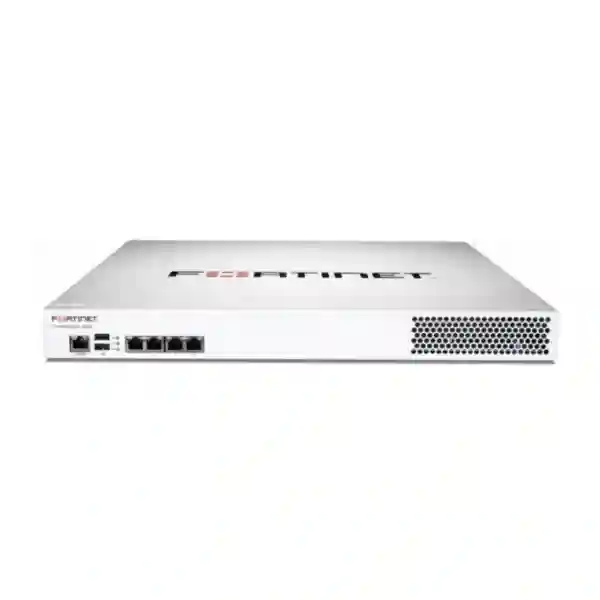
FortiManager FMG-200G Tanzania
FortiManager FMG-200G gives network and security teams a dedicated platform for centralized administration of Fortinet environments. It is designed for organizations that need to standardize policies, control configuration changes, accelerate branch deployment and improve operational visibility without administering every FortiGate independently. For Tanzanian enterprises with a head office plus branches, stores, clinics, campuses, warehouses or remote sites, centralized management can turn a collection of separate security appliances into a more consistent operating model.
Verified FMG-200G Specification Snapshot
Fortinet’s current FortiManager data sheet identifies FMG-200G as a 1RU rackmount appliance with a default capacity of 30 devices or VDOMs. It has 8 TB raw storage provided by two 4 TB drives, 4 TB usable storage after the default RAID 1 configuration, RAID 0/1 support, four Gigabit Ethernet RJ45 interfaces and an RJ45 console port. The published sustained log rate is 50 and the listed daily log figure is 2 GB/day. Fortinet specifies 100–240V AC, 50–60 Hz input, average power consumption of 90.1 W, maximum consumption of 99 W and front-to-back airflow. These figures should be used for procurement and rack planning rather than assumptions based on other FortiManager models.
Default managed devices/VDOMs, with each VDOM counted as a licensed network device.
Raw storage across two 4 TB drives; 4 TB usable after default RAID 1.
Four Gigabit Ethernet RJ45 interfaces plus an RJ45 console port.
Rackmount format for structured server-room and data-center installation.
What FortiManager FMG-200G Solves
Managing several FortiGate appliances one at a time increases the chance of policy drift, inconsistent object naming, duplicated work and undocumented configuration changes. FortiManager is intended to centralize this operational layer. Administrators can organize managed environments, work with policy packages and templates, coordinate configuration changes and support repeatable deployment processes. Fortinet also positions FortiManager for SD-WAN overlay orchestration, automation through REST APIs, scripts, connectors and automation stitches, and zero-touch provisioning workflows. The business benefit is not simply another management screen: the value is a more controlled process for operating distributed security infrastructure.
FMG-200G should be sized around the number of Fortinet devices and VDOMs that will be managed, the expected administrative domains, logging requirements, operational growth and support requirements. A buyer with 25 physical FortiGates but extensive VDOM use may have a different licensing count from a buyer with 25 simple branch firewalls. Before quotation, document every physical device, every VDOM, planned branches and likely additions during the intended service life.
Centralized Policy, Automation and Branch Operations
A centralized management architecture is especially useful where the same baseline controls must be applied across many sites. Instead of recreating common objects and policies manually, teams can build controlled templates and policy structures, then manage change through a common workflow. This is relevant for retail chains, financial services, education groups, healthcare organizations, logistics companies, hospitality operators, government environments and enterprises with branch connectivity. FortiManager can also help administrators coordinate SD-WAN and Fortinet Security Fabric operations across supported deployments.
Zero-touch provisioning can reduce the amount of configuration that must be performed locally when a supported branch device is introduced. This does not eliminate planning: WAN addressing, device registration, template design, routing, VPN, segmentation, security profiles and rollback procedures still need to be documented. The strongest deployment begins with a clean design for naming, administrator roles, policy ownership, backup, firmware governance and change approval.
Compatibility and Procurement Planning
Fortinet describes FortiManager as a management platform for FortiGate and the wider FortiOS-based networking ecosystem, including supported FortiSwitch, FortiAP and FortiExtender environments. Compatibility should always be checked against the FortiManager and managed-device software versions selected for the project. Procurement teams should not assume that any historical FortiOS release, third-party integration or feature combination is automatically supported. Record the existing firmware versions and intended upgrade path before implementation.
A complete quotation request should state the FMG-200G hardware requirement, number of physical managed devices, number of VDOMs, desired support term, expected administrative domains, rack and power environment, deployment locations, required migration or onboarding services, and whether configuration templates, policy cleanup, SD-WAN orchestration or administrator handover are in scope. Fortinet’s ordering information lists the hardware as FMG-200G and identifies support and optional service subscriptions separately, so commercial proposals should make the included service term explicit.
FortiManager FMG-200G Tanzania
For organizations operating in Tanzania, the FMG-200G is most relevant when network security has moved beyond a single independently managed firewall. A company may have a primary FortiGate at headquarters, smaller FortiGates at branches, VPN-connected sites, separate VDOMs for business units, or a growing SD-WAN design. In that environment, the management challenge becomes consistency. Teams need to know which policy version is approved, how branch objects are named, when a configuration changed and how a new location can be brought online without rebuilding every setting manually. FMG-200G provides a dedicated centralized platform for this operating model.
Tanzania buyers should begin by creating an accurate device and VDOM inventory. The published default capacity is 30 devices/VDOMs, and every VDOM counts as a licensed network device. This detail matters when an organization uses virtualization heavily. The inventory should also record FortiOS versions, WAN connectivity, VPN relationships, policy ownership, branch criticality and expected expansion. That information allows the technical team to judge whether FMG-200G fits the current estate with sensible operational headroom.
Infrastructure planning is equally important. FMG-200G is a 1RU rackmount appliance with front-to-back airflow and a specified operating range of 0°C to 40°C. A server room should provide suitable rack space, stable power, cooling and protected management connectivity. Where business continuity requirements are high, discuss power protection, configuration backup, management-network resilience and the optional redundant AC power-supply capability shown in Fortinet documentation. A procurement request should separate verified appliance capabilities from project services such as onboarding, migration, policy normalization and administrator training.
FortiManager FMG-200G Dar es Salaam
Dar es Salaam organizations often concentrate headquarters, commercial operations, data rooms and internet connectivity in one location while supporting remote branches elsewhere. For such a topology, FortiManager FMG-200G can serve as the central operational point for a supported Fortinet security estate. The useful question is not merely whether a business owns several FortiGates, but whether administrators are spending too much time repeating changes, comparing configurations and maintaining branch consistency. Central policy administration becomes valuable as site count and change frequency grow.
A Dar es Salaam deployment plan should map the management path between FMG-200G and every managed device. Separate management access from ordinary user traffic where the architecture permits, restrict administrative access appropriately, define named administrator accounts and document recovery access. If branch devices use different internet providers or private WAN services, the design should account for reliable management reachability without weakening security. Organizations using SD-WAN should also define standardized branch templates and identify the site-specific variables that cannot be shared.
For procurement, provide a branch list, device models, VDOM counts, FortiOS versions, expected new locations and support-term preference. This produces a more meaningful quote than requesting only an appliance price. Businesses with audit requirements should also define who can approve policy changes, how configuration revisions are reviewed and what records must be retained. FMG-200G can provide the centralized management foundation, while governance determines how safely that capability is used.
FortiManager FMG-200G Mwanza
Mwanza businesses with distributed sites can use centralized Fortinet management to reduce the operational distance between a main IT team and remote firewalls. This can be relevant to logistics operations, healthcare groups, education networks, retail chains, financial services and companies that connect regional facilities back to a central application environment. When each firewall is managed separately, a routine policy update can become a multi-device maintenance task. FortiManager is designed to make these workflows more structured and repeatable.
Before selecting FMG-200G, count managed devices and VDOMs carefully against the platform’s 30-device/VDOM default capacity. Then classify policies into common and site-specific requirements. Common rules, address objects and deployment templates can be standardized, while site-specific WAN addressing, local VLANs or special applications can be documented separately. This planning helps prevent a centralized platform from simply reproducing inconsistent configurations at larger scale.
Mwanza projects should also plan for remote troubleshooting. Document management IP addresses, connectivity dependencies, branch contacts, backup configurations and escalation procedures. If a branch loses its primary WAN path, administrators should understand whether the management session will remain reachable through an alternate design. FMG-200G supports central administration, but resilient access depends on the underlying network architecture. Include these operational requirements in the quotation so the deployment scope reflects the real multi-site environment.
FortiManager FMG-200G Arusha
In Arusha, organizations in hospitality, tourism, professional services, education and regional operations may maintain several sites with shared security standards but different local connectivity. FMG-200G can help a central IT function manage supported Fortinet devices through one platform, particularly where branch configurations need consistent security policies, VPN design and administrative control. The platform’s value increases when configuration changes must be coordinated rather than performed ad hoc at individual devices.
An Arusha buyer should evaluate the appliance as part of an operating process. Decide how new branch FortiGates will be registered, how templates are assigned, which policy packages are shared, how exceptions are approved and how administrators separate production changes from testing. FortiManager supports automation and zero-touch workflows, but automation should follow a documented standard. Templates that are not carefully designed can distribute errors just as efficiently as correct settings.
The physical installation also deserves attention. FMG-200G requires 1RU of rack space and uses front-to-back airflow. Confirm rack depth, cable routing, protected power and cooling before delivery. If the appliance will be placed in a shared server room, reserve management switch ports and document IP addressing in advance. For commercial evaluation, request a quote that distinguishes hardware, FortiCare or other selected support/service elements, deployment labor and any migration work. This makes proposals easier to compare on scope rather than headline price alone.
FortiManager FMG-200G Dodoma
Dodoma organizations managing multiple Fortinet security gateways can consider FMG-200G where centralized governance is more important than device-by-device administration. Public-sector environments, institutions, education networks, NGOs and multi-site enterprises may need repeatable policies across locations while retaining controlled exceptions for each site. FortiManager provides a management layer that can support standardized configuration, policy workflows and visibility across supported Fortinet devices.
A useful pre-purchase exercise is to document the security estate as a table: site, device model, serial inventory, FortiOS version, VDOM count, WAN links, VPN peers, critical applications and local administrator contacts. The 30-device/VDOM default capacity must be assessed using VDOMs as licensed devices where they are present. Organizations close to that boundary should consider expected growth rather than sizing only for today’s count.
Governance should be designed before onboarding. Define who may create objects, edit policies, install changes, approve exceptions and perform emergency recovery. Keep secure configuration backups and maintain a tested rollback process. Where procurement rules require formal comparison, ask suppliers to state the exact hardware SKU, service/support term, included implementation tasks and exclusions. This prevents ambiguity between the physical FMG-200G appliance and the professional work required to integrate it into an existing Fortinet environment.
FortiManager FMG-200G UAE
UAE businesses commonly operate headquarters, branches, warehouses, retail outlets and remote users across fast-changing network environments. FortiManager FMG-200G is suited to a Fortinet estate that remains within its published 30-device/VDOM default capacity and needs centralized policy administration. A distributed organization can use centralized templates and controlled policy workflows to reduce manual repetition as new locations are introduced.
For UAE projects, procurement teams should separate capacity planning from connectivity performance. FMG-200G is a management appliance rather than the traffic-forwarding firewall for each branch. Therefore, firewall throughput sizing remains a FortiGate decision, while FMG-200G sizing focuses on managed device/VDOM counts, administration, storage and operational requirements. This distinction helps prevent buyers from comparing FortiManager specifications with NGFW throughput figures that solve a different problem.
Regional buyers can review broader cybersecurity and infrastructure options through Fourteck UAE IT and security solutions, where firewall and enterprise networking requirements can be considered alongside the management platform. For an FMG-200G quote, include device inventory, FortiOS versions, branch count, VDOM usage, service term, rack requirements and deployment scope. Also specify whether the project includes migration from standalone administration or another FortiManager platform.
FortiManager FMG-200G Uganda
Uganda organizations with FortiGate deployments across offices and branches can use FMG-200G to centralize supported management workflows. This is particularly relevant where an IT team must keep VPN, internet-access and security policies aligned across locations while reducing repetitive device-by-device changes. The appliance’s default 30-device/VDOM capacity gives procurement teams a clear starting point for sizing, provided VDOMs are counted correctly.
The first design task is inventory. List every FortiGate, each VDOM, current FortiOS release, branch role and connectivity method. Then group sites by configuration pattern. A retail chain may have a common branch template; a head office may require a separate policy package; a data-center firewall may need tighter change control. FortiManager is most useful when these differences are intentionally modeled instead of allowing every location to become unique.
Uganda buyers can review related regional infrastructure through Fourteck Uganda IT solutions. When requesting FMG-200G pricing, ask for the exact appliance, selected support/service term and clearly defined implementation scope. Do not assume local stock or lead time; request current confirmation as part of the quotation. For remote branches, also document management-path resilience and recovery procedures before centralized onboarding begins.
FortiManager FMG-200G Kampala
Kampala can act as the central administrative location for organizations with Fortinet security appliances distributed around Uganda. FMG-200G gives the security team a dedicated management platform for policy and configuration operations across supported devices. This can simplify branch rollout where the same security baseline is required at many sites but local addressing, ISP settings and business applications differ.
A Kampala deployment should begin with a clean management network design. Restrict administrative access, define role-based responsibilities, document DNS and time services, reserve rack space and ensure stable protected power. Because FMG-200G is a 1RU appliance with front-to-back airflow, physical installation should follow the rack’s airflow plan. The optional redundant AC power-supply capability documented by Fortinet can be discussed where availability requirements justify it; it should not be assumed to be included by default.
Operationally, establish a change workflow before migrating devices. Decide how policies are reviewed, when configuration installs occur, how emergency changes are reconciled and how backups are retained. If multiple administrators work on the environment, use clear naming and ownership conventions. Procurement documentation should also list VDOM counts because these affect the managed-device count. A well-scoped Kampala project therefore combines appliance procurement with configuration governance, onboarding and administrator handover rather than treating centralized management as a plug-and-play purchase.
FortiManager FMG-200G Arua
For organizations with an Arua branch connected to a larger Fortinet estate, centralized management can reduce dependence on local firewall administration. The branch can follow centrally maintained security standards while still retaining site-specific WAN, VLAN and application settings. This is useful where specialist network staff are based elsewhere and remote sites need consistent configuration without frequent manual intervention.
FMG-200G planning should consider how an Arua device communicates with the management platform and what happens during WAN disruption. A centralized console cannot replace a resilient connectivity design, so administrators should document alternate access, branch recovery procedures and secure local emergency credentials where organizational policy permits. Zero-touch provisioning can streamline supported deployments, but the branch still needs correct physical installation, ISP details and validated templates.
From a procurement perspective, Arua should be represented as part of the total device/VDOM inventory rather than as an isolated firewall purchase. If the organization expects new sites, include them in capacity planning. Record support requirements, deployment responsibilities and whether branch onboarding will be remote or assisted on site. This turns the FMG-200G decision into an operational plan for the entire Fortinet estate, with Arua benefiting from the same controlled policy framework as larger locations.
FortiManager FMG-200G Mbarara
Mbarara businesses and institutions with multiple Fortinet-secured locations can use centralized management to create a more consistent operating model. A branch may have a different ISP, subnet plan or application set from headquarters, but core controls such as administrator policy, security objects, VPN standards and change procedures can still be centrally governed. FortiManager helps separate reusable standards from legitimate site-specific differences.
When planning FMG-200G, count all managed devices and VDOMs and compare the result with the published default capacity of 30. Then assess whether 4 TB usable storage after default RAID 1 is appropriate for the management and logging design. If long-term analytics or broader log retention is a primary objective, evaluate the overall Fortinet architecture rather than assuming FortiManager replaces every dedicated analytics requirement.
Mbarara procurement teams should request explicit commercial details for hardware, support term and services. Deployment tasks may include registering existing FortiGates, establishing administrative domains, importing configurations, cleaning duplicate objects, building templates, testing policy installs and documenting rollback. These tasks vary by environment and should be quoted separately where necessary. The result is a clearer project scope and a better basis for comparing proposals.
FortiManager FMG-200G Gulu
Gulu branches can benefit from FMG-200G when they are part of a wider Fortinet-managed organization. Central administration is particularly useful when a small local team needs to follow security standards defined by a central IT function. Policy packages and templates can help reduce configuration drift, while a documented approval process keeps exceptions visible instead of allowing them to accumulate silently at branch level.
For a Gulu rollout, validate WAN reachability, DNS, time synchronization, device registration and software compatibility before onboarding. Avoid combining onboarding with unnecessary firmware changes unless the upgrade path has been tested. A staged approach can bring one representative branch under management, validate policy installation and rollback, then expand to similar sites. This reduces operational risk compared with migrating every device simultaneously.
Procurement should account for future site growth and VDOM usage. If the organization is already near the FMG-200G default capacity, the model decision should be revisited before purchase. The quotation should identify the exact FMG-200G hardware, selected support or subscription elements, deployment scope and any travel or remote-service assumptions. Gulu then becomes part of a controlled multi-site architecture rather than a standalone configuration island.
FortiManager FMG-200G Kenya
Kenyan organizations operating FortiGate firewalls across Nairobi, Mombasa, Kisumu, branches or regional facilities can use FMG-200G where centralized management fits a maximum planning envelope of 30 devices/VDOMs by default. The platform is relevant to IT teams that need consistent policy administration, controlled configuration changes, branch templates and a clearer operational view of a distributed Fortinet estate.
Buyers should distinguish centralized management from security analytics and from the firewall itself. FMG-200G coordinates supported management functions; FortiGate appliances enforce traffic policy at the network edge, while other Fortinet components may address dedicated analytics or specialized security functions. A procurement design should define these roles before selecting quantities and subscriptions. The Fourteck regional Fortinet Kenya solutions page provides related context for firewall, FortiAnalyzer, FortiManager and branch-security planning.
For quotation, provide the managed-device inventory, VDOM count, FortiOS versions, number of sites, intended administrative domains and expected growth. Include whether the project needs migration, template creation, policy cleanup, SD-WAN orchestration or training. A precise scope allows the commercial proposal to reflect the actual management project rather than only the appliance box.
FortiManager FMG-200G Kuwait
Kuwait organizations with several FortiGate appliances can consider FMG-200G when a dedicated centralized management platform is preferable to administering devices individually. Distributed offices, retail sites, hospitality operations and enterprises with segmented environments can use centralized workflows to keep shared security objects and policies more consistent while documenting legitimate site differences.
The published 30-device/VDOM default capacity is the key sizing figure to verify first. Count VDOMs as managed devices, then add planned expansion. Next, validate rack, power and cooling requirements: the appliance is 1RU, accepts 100–240V AC at 50–60 Hz and is specified for 0°C to 40°C operation. A protected server-room environment and resilient management connectivity should be part of the project design.
Commercial evaluation should cover more than unit price. Ask suppliers to identify support duration, included services, deployment assumptions and any optional components. If centralized management is being introduced into an existing estate, request an onboarding plan that covers configuration review, backup, compatibility checks, administrator roles and rollback. This helps a Kuwait buyer evaluate the complete operational outcome instead of comparing incomplete hardware-only quotations.
FortiManager FMG-200G Ghana
Ghanaian enterprises with Fortinet deployments across offices, stores, campuses or operational sites can use FMG-200G to create a centralized management layer. The platform is designed to reduce repetitive administration and support more consistent policy and configuration workflows. For organizations with limited specialist staff at remote sites, this can help concentrate security administration while maintaining documented branch standards.
The appliance should be selected only after the device and VDOM count is known. Its default capacity is 30 devices/VDOMs, so growth planning is important. A business with 20 physical appliances may still approach the limit if several use multiple VDOMs. Administrators should also record software versions and confirm compatibility before onboarding. Centralization is most successful when configuration naming, policy ownership and change approval are standardized before migration.
For broader regional infrastructure planning, Fourteck Ghana IT solutions covers firewall, networking and related business infrastructure. An FMG-200G quotation should state the exact hardware, service/support term and professional-services scope. Buyers should request current availability rather than assuming stock, and should document rack, power and management-network requirements before implementation.
FortiManager FMG-200G Nigeria
Nigeria’s multi-site enterprises can face significant configuration overhead when security appliances are spread across offices, branches and operational facilities. FMG-200G provides centralized Fortinet management for environments that fit its published 30-device/VDOM default capacity. A central platform can help security teams organize policies, standardize configuration patterns and coordinate branch changes without treating each firewall as an unrelated system.
Large geographic distribution makes management-path resilience important. Before onboarding remote Nigerian sites, document how each FortiGate reaches the management platform, what alternate connectivity exists, how emergency access is controlled and how configuration rollback will be handled. Standard templates can simplify repeated branch designs, but local WAN parameters, routing and application requirements must remain accurately modeled. A pilot migration can expose these differences before a broader rollout.
Buyers can review complementary infrastructure categories through Fourteck Nigeria IT solutions. For FMG-200G procurement, include the complete Fortinet inventory, VDOMs, expected branch growth, FortiOS versions and desired support period. Request separate visibility of hardware and implementation services so stakeholders understand exactly what the commercial offer covers.
FortiManager FMG-200G Seychelles
Seychelles organizations with security devices across multiple islands, properties or business sites can benefit from reducing the need for hands-on firewall administration at every location. FMG-200G can centralize supported Fortinet management where the total device/VDOM count fits its published capacity. Hospitality groups, service organizations and multi-property businesses may find centralized templates useful for keeping core security controls consistent while retaining site-specific connectivity details.
Remote-site planning should prioritize recoverability. Document WAN providers, management addressing, VPN relationships, local contacts and secure emergency procedures. Where travel between sites is time-consuming, configuration backup and carefully tested remote change processes become especially important. Zero-touch provisioning can support repeatable deployment, but it should be built on validated templates and clear device-registration procedures.
A Seychelles quotation should include the appliance, support/service term, onboarding requirements and any remote or onsite implementation assumptions. Count every VDOM, include planned properties or branches and check software compatibility before finalizing the architecture. The physical appliance also requires suitable rack, cooling and power conditions. Treating these elements as part of the initial procurement brief helps avoid discovering infrastructure gaps after equipment is ordered.
Related Fortinet and Fourteck Resources
A centralized management project normally sits within a wider firewall and network-security architecture. Regional buyers can use Fourteck Kenya Fortinet solutions to review related Fortinet categories, FortiGate 30G Uganda as an example of a compact managed branch firewall, and FortiGate firewall planning in Kenya for branch-security context. These resources help buyers distinguish the centralized management role of FortiManager from the enforcement role of FortiGate appliances.
Quotation Checklist
Frequently Asked Questions
How many devices can FMG-200G manage?
Fortinet lists 30 devices/VDOMs by default for FMG-200G. Each VDOM operating on a physical or virtual device counts as one licensed network device, so sizing must include VDOMs rather than counting only physical appliances.
How much storage does FortiManager FMG-200G have?
Fortinet specifies 8 TB raw storage using two 4 TB drives. With the default RAID 1 configuration, the published usable storage is 4 TB.
Is FMG-200G a firewall?
FMG-200G is a FortiManager centralized management appliance. FortiGate appliances enforce firewall and security policies on network traffic; FortiManager provides centralized management, policy and orchestration functions for supported Fortinet environments.
Does FMG-200G support zero-touch provisioning?
Fortinet lists zero-touch provisioning for FortiManager 200G. The practical deployment still requires correct device registration, connectivity, templates and change-control planning.
What should I provide for an FMG-200G quotation?
Provide the number of physical devices and VDOMs, FortiOS versions, branch count, expected growth, desired support term, rack location and whether onboarding, migration, policy cleanup, template creation or training is required.
Decision Recap
FortiManager FMG-200G is designed for centralized administration of a Fortinet environment with 30 devices/VDOMs by default. Its 1RU form factor, 8 TB raw storage, default RAID 1, four GE RJ45 interfaces and FortiManager automation capabilities make it a purpose-built management appliance rather than a traffic-forwarding firewall. The right buying decision depends on an accurate device/VDOM inventory, software compatibility, expected growth, support term and a clear onboarding plan.
Plan Your FMG-200G Deployment
Share your FortiGate inventory, VDOM count, branch locations, FortiOS versions and management objectives with Fourteck. A requirements-led quotation can separate the FMG-200G hardware from support, onboarding and professional services so your procurement team can evaluate the complete project scope.




Reviews
There are no reviews yet.