
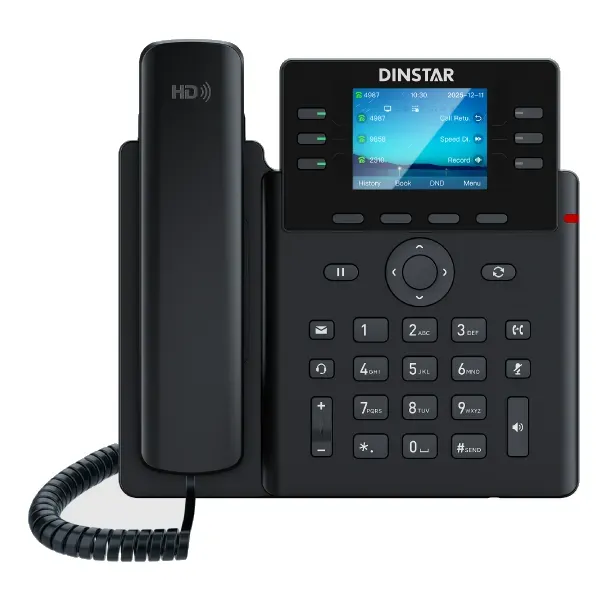
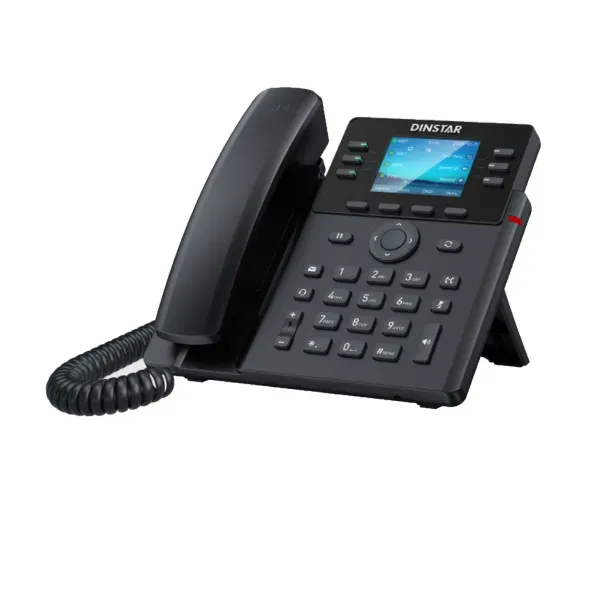
Dinstar G280 Business IP Phone
The Dinstar G280 is an entry-level color-screen business IP phone built for organizations that want practical SIP calling, programmable call-control keys and Gigabit desktop connectivity without moving into a high-end executive handset class. It supports up to six SIP accounts, provides 30 programmable line keys, uses a 2.8-inch 320 × 240 backlit color TFT display and supports five-way audio conferencing. For day-to-day office communication, those capabilities make the G280 suitable for general business users, supervisors, service desks and staff who need more than a basic two-line phone.
A key procurement detail is the power method. The standard G280 is supplied for external-adapter operation and does not provide PoE support, while the closely related G280P supports Power over Ethernet. Buyers planning a PoE-only rollout should therefore select the correct variant rather than assume that every G280-series unit can be powered directly from a PoE switch.
Best for: office desks, service teams, supervisors, SME and branch deployments.
SIP accounts: up to 6.
Display: 2.8-inch color TFT, 320 × 240.
Keys: 30 programmable line keys.
Power note: G280 uses an adapter; G280P adds PoE.
SIP accounts for multiple identities, lines or business call routes.
Programmable line keys for speed dial, BLF and frequently used functions.
Audio conferencing for quick multi-party business conversations.
Dual-port Ethernet supports a modern voice-and-data desk connection.
What the Dinstar G280 solves for business users
A business desk phone should make common calling actions predictable. The Dinstar G280 addresses that need with a color display, a generous set of programmable keys and multiple SIP identities. Rather than forcing users to navigate several menus for basic actions, administrators can map frequently used functions such as speed dial, busy-lamp-field monitoring, call transfer or conference access to programmable controls. That is especially useful in offices where staff repeatedly contact the same departments, monitor colleague status or handle several call paths during the working day.
The phone also supports HD voice with wideband codecs including G.722 and OPUS-WB, a full-duplex speaker and DSP-based audio processing. Actual voice quality still depends on the end-to-end environment: PBX configuration, codec negotiation, LAN quality, WAN stability, SIP provider performance and handset/headset conditions all contribute. For that reason, a successful G280 project should include network readiness checks rather than treating the handset as an isolated purchase.
Dinstar positions the G280/G280P for broad SIP interoperability. The manufacturer lists compatibility with platforms including Dinstar UC/IP-PBX products, 3CX, Asterisk, Yeastar, Xorcom, VoIP.ms, BroadSoft and FreeSWITCH. Organizations should still validate the exact features they require, because core SIP registration can work while advanced functions such as BLF behavior, directory integration, auto-provisioning templates or special PBX features may depend on platform-specific configuration.
Verified Dinstar G280 technical highlights
| Area | Verified capability | Planning relevance |
|---|---|---|
| SIP identities | Up to 6 SIP accounts | Useful for users handling multiple lines, services or extensions. |
| Display | 2.8-inch 320 × 240 color TFT LCD with backlight | Provides visual access to menus, call status and phone functions. |
| Keys | 30 programmable line keys plus soft keys | Supports customizable day-to-day call workflows. |
| Audio | HD voice, full-duplex speaker, DSP, G.722 and OPUS-WB support | Designed for clearer business calling when the network and PBX support wideband audio. |
| Conference | 5-way audio conference | Allows a host to bring multiple participants into an audio call. |
| Networking | Dual-port 10/100/1000 Mbps Ethernet | Supports desk pass-through designs where a PC shares the physical network drop. |
| Security | SIP over TLS and SRTP support | Can support encrypted signaling/media when the PBX and configuration also support them. |
| Management | Web GUI, auto provisioning via FTP/TFTP/HTTP/HTTPS/PnP, Dinstar NMS, web software upgrade | Helpful for standardized rollout and ongoing administration. |
G280 or G280P: select the power model deliberately
The G280 and G280P share the same core phone concept, but the power method changes how they fit into an office deployment. The standard G280 does not provide PoE support and is designed for external power-adapter use. The G280P supports PoE, and its power adapter is optional. This difference matters in new office projects because PoE allows the handset to receive power through the Ethernet cable from a suitable PoE switch. That can reduce the number of wall adapters at desks and can simplify centralized UPS-backed power design.
Do not select the G280P only because PoE sounds preferable. If a site already uses standard switching and has reliable power sockets at each desk, the G280 may be fully suitable. Conversely, where phones are expected to remain powered through a UPS-backed PoE access switch during short mains interruptions, the G280P is usually the more logical series variant. The final choice should be based on switch capability, port availability, power budget, cabling layout and the organization’s resilience objectives.
Compatibility, provisioning and voice-network readiness
The Dinstar G280 follows SIP standards and supports SIP v1 and SIP v2, DTMF methods including in-band, RFC2833 and SIP INFO, and common network services required for managed IP telephony. Manufacturer documentation highlights compatibility with a range of IP-PBX platforms, but procurement teams should always confirm the required functions before bulk purchase. Registration, calling, transfer and hold are one layer; directory synchronization, BLF subscriptions, voicemail indicators, TLS certificates, emergency dial plans and automated configuration may require additional testing.
For larger rollouts, auto provisioning becomes particularly important. Dinstar lists FTP, TFTP, HTTP, HTTPS and PnP provisioning methods, alongside an intuitive web interface and Dinstar NMS. A structured deployment normally starts with a standard configuration template, agreed extension naming, VLAN settings, time-zone and NTP parameters, codec priorities and security controls. These choices are then tested on a small group before broad rollout. That approach reduces desk-by-desk variation and makes support easier when a phone is replaced.
The network should also be designed for voice. Organizations may use a voice VLAN to separate and manage phone traffic, apply QoS where appropriate and make sure access switches and uplinks are not congested. SIP traffic passing through firewalls may require carefully designed rules and NAT behavior. Where a hosted PBX is used, internet stability and latency can be as important as LAN performance. A technically capable phone cannot compensate for a poorly engineered path between the user and the call-control platform.
Useful FourTeck resources for planning an IP phone deployment
Review the broader Tanzania portfolio when the phone project also needs switching, firewalls, Wi-Fi, structured cabling or integrated IT planning.
Tanzania business technology shop
Explore related business hardware categories and complementary equipment for complete office projects.
FourTeck Tanzania services
Use this service overview when the requirement extends beyond supply into installation, configuration, integration or lifecycle support.
FourTeck specialist IP phone resource
Compare the wider business IP-phone landscape when deciding whether the G280 is the best fit for each user role.
FourTeck Uganda technology solutions
Useful for organizations planning related communication or infrastructure requirements across Uganda and Tanzania.
Dinstar G280 Business IP Phone Tanzania
For Tanzania-based organizations, the Dinstar G280 is most relevant when the requirement is a standards-based desk phone with more programmable control than a basic entry model but without the higher cost and complexity of a large executive endpoint. A procurement team evaluating phones for a new office, branch refresh or PBX migration can use six SIP accounts to support different identities or call services, while 30 programmable line keys can be mapped to frequently used functions. This can help reception-adjacent users, sales teams, supervisors and service staff work more efficiently when they regularly transfer calls or monitor colleague availability.
The Tanzanian deployment decision should begin with the PBX and network, not with the handset alone. Confirm whether the voice platform is on-premises, cloud-hosted or hybrid, whether it supports the desired SIP features, and whether user extensions will be provisioned centrally. A site with managed switching can separate voice traffic using VLANs and apply QoS policies according to its network design. If the office expects to power phones from Ethernet, specify G280P rather than G280. If the standard G280 is selected, include suitable adapter power points and consider how phones should behave during power interruptions.
For multi-branch Tanzania projects, standardization can reduce operational effort. A common phone template, consistent extension numbering, agreed codec policy, directory configuration and documented administrator access make it easier to support devices in different locations. Businesses should also decide whether wired headsets or EHS wireless headsets are required for heavy call users. Dinstar documents EHS wireless headset support for brands including Plantronics, Jabra and Sennheiser, but the exact headset model and connection arrangement should be checked before purchase.
When requesting a quotation in Tanzania, include quantity, preferred G280 or G280P model, PBX brand/version, whether PoE is available, number of active SIP identities per user, headset requirement and whether configuration or installation support is needed. Supplying these details allows a more meaningful proposal than asking only for a unit price. It also helps identify whether some users should receive a simpler phone while managers or reception teams need a different model.
Dinstar G280 Business IP Phone Dar es Salaam
Businesses in Dar es Salaam often need IP telephony across offices, customer-facing desks, warehouses, professional services environments and multi-floor commercial premises. The Dinstar G280 can fit these environments where users need multiple SIP accounts, clear visual call information and customizable keys. A front-office coordinator might configure line keys for frequently contacted departments, while a supervisor can use programmable functions for transfer, pickup and speed-dial workflows. The color display provides a more informative interface than a basic monochrome phone without moving into a large touchscreen format.
For a Dar es Salaam office refresh, inspect the existing LAN before ordering a large handset quantity. Determine whether each desk has one or two Ethernet drops, whether a PC will connect through the phone’s second Gigabit port, and whether switch ports are managed. Where a single cable serves the desk, the phone’s dual-port Gigabit design can allow the workstation to share the wired connection, subject to the organization’s VLAN and security design. If PoE is expected, confirm that the selected switch has sufficient PoE capacity and order the G280P variant rather than the non-PoE G280.
Organizations migrating from analog extensions should also plan the call-control side. Existing phone numbers may be delivered through SIP trunks, gateways or provider services depending on the telecom arrangement. The IP phone itself does not replace the PBX or trunk service. A complete deployment therefore considers extension design, inbound routing, IVR, department queues, voicemail, after-hours handling and user permissions. The handset is the endpoint through which users experience those features.
For procurement in Dar es Salaam, a useful RFQ should state whether the phones are for a new office, replacement project, PBX migration or expansion. Include the required number of phones, expected installation date, PBX platform, network-switch details, PoE preference, headset needs and whether users require preconfigured extensions. This information reduces ambiguity and helps the project team distinguish product supply from configuration, network remediation and commissioning work.
Dinstar G280 Business IP Phone Mwanza
In Mwanza, the G280 can be considered for business environments that want a standardized SIP desk-phone platform across administrative offices, customer-service points, sales teams and branch operations. Six SIP accounts create flexibility where one user may need a primary extension plus additional line identities or services. The 30 programmable keys can be especially useful in organizations with frequent internal calling, because common contacts and call-handling actions can be presented as repeatable one-touch functions rather than memorized extension codes.
A Mwanza deployment should account for network stability and power design. If phones rely on external adapters, each desk needs a dependable outlet and any resilience requirement should be planned at that layer. If the organization wants central power through the network, the G280P paired with a correctly sized PoE switch can simplify endpoint power. A UPS on the switch and network edge can help preserve service during short power events, but that benefit also depends on the PBX, router, firewall and internet or SIP-trunk path remaining operational.
Call quality should be treated as an infrastructure outcome. HD voice capabilities are valuable only when codecs, network latency, packet loss and PBX settings support them. For branch links or cloud PBX services, measure internet consistency and avoid oversubscribing constrained links. Voice VLANs and QoS can help organize traffic, but they should be configured with an understanding of the whole network rather than applied as generic settings. Documentation of switch ports, phone MAC addresses and extension assignments also makes support more efficient after rollout.
When comparing quotes in Mwanza, buyers should separate the handset specification from services and accessories. Check whether the proposal is for G280 or G280P, whether an adapter is included where required, whether configuration is part of the price, and whether headsets are separate. If an organization already has an IP PBX, share its model and software version so the integrator can evaluate the expected provisioning and feature behavior before finalizing a large order.
Dinstar G280 Business IP Phone Arusha
Arusha organizations in tourism, professional services, education, administration and multi-site operations may value a desk phone that supports straightforward SIP deployment and enough programmable controls for busy staff. The Dinstar G280 provides six SIP accounts and 30 line keys, so it can support users whose work involves frequent transfers, repeated contacts or monitoring of team extensions. Five-way conferencing also offers a built-in option for ad hoc audio collaboration without requiring every conversation to move to a separate meeting platform.
For hospitality or service-oriented environments, call workflows deserve specific planning. Determine whether incoming calls go to a main reception, departmental queues or direct numbers, and define what happens when extensions are busy or unanswered. The phone can expose these PBX features to users, but the logic itself is usually configured in the IP-PBX or hosted voice platform. A well-designed call flow can improve customer experience more than simply increasing the number of physical keys on a desk.
Network design in Arusha should also reflect the building layout. Offices spread across several floors or buildings may require managed access switches, fiber uplinks and VLAN segmentation. The phone’s dual Gigabit ports can support desk connectivity, yet the switch infrastructure still determines overall stability. If PoE is part of the design, use the G280P. For sites with standard G280 phones, confirm adapter availability and cable management so power arrangements do not become inconsistent across desks.
Before procurement, create a small user-role matrix: basic desk user, heavy caller, manager, receptionist and common-area phone. The G280 may suit several of these roles, but not necessarily all. Reception users may need even more advanced consoles, while occasional users may not need 30 programmable keys. Matching hardware to roles prevents overbuying and makes training easier. A pilot of a few phones can also validate PBX registration, BLF behavior, call transfer, directories and headset use before a larger Arusha deployment proceeds.
Dinstar G280 Business IP Phone Dodoma
For organizations in Dodoma, the Dinstar G280 can support structured office communication where open SIP interoperability and straightforward administration are important. The phone’s six SIP accounts allow multiple identities, while its 30 programmable keys can help users access internal colleagues or common call functions quickly. This is relevant for administrative departments, service counters, project teams and business offices where staff need more flexible call handling than a basic single-line endpoint.
A Dodoma project should document security expectations before deployment. Dinstar supports SIP over TLS and SRTP, but these capabilities must also be supported and correctly configured on the PBX or service provider. Strong administrator credentials, controlled web-management access, updated firmware and appropriate network segmentation are part of a responsible rollout. Avoid exposing phone management interfaces directly to the public internet. Remote administration should use the organization’s approved secure access method.
Provisioning is another important factor for government-adjacent, enterprise or multi-department installations. Manual configuration may be acceptable for a handful of phones, but larger quantities benefit from repeatable templates. Dinstar supports several auto-provisioning methods, allowing administrators to standardize settings such as account configuration, time parameters, codec preferences and function keys. The selected method should be aligned with the organization’s security policy and change-management process.
When budgeting in Dodoma, include the supporting infrastructure rather than treating the unit price as the entire project cost. The required elements may include managed switches, PoE capacity for G280P, UPS protection, patching, VLAN configuration, PBX licenses or subscriptions, SIP services, headsets and installation labor. Not every deployment needs all of these components, but documenting them early reduces unexpected changes. A quotation request should therefore specify the existing environment and desired outcome so the bill of materials reflects the full requirement.
Dinstar G280 Business IP Phone UAE
For UAE businesses evaluating the Dinstar G280, the strongest use case is a cost-conscious SIP desk-phone rollout that still needs a color screen, multiple accounts and extensive programmable keys. Offices with structured call flows can assign keys to BLF, speed dial and common functions, giving users a predictable interface for transfers and internal collaboration. The phone can be considered for branch offices, service desks, general administrative users and supervised teams, while higher-end users may require a larger display, wireless connectivity or broader executive features.
UAE deployments often operate in mature network environments, so the key design question may be whether to standardize on PoE. The G280 itself uses an external adapter, whereas the G280P is the PoE variant. In a new fit-out with managed PoE switching, G280P can reduce desk power clutter and align phone power with centralized UPS infrastructure. In an existing office with non-PoE switching and available sockets, G280 may avoid unnecessary network upgrades. Confirm the exact model on every quotation because the power distinction is operationally significant.
Compatibility testing should cover the customer’s chosen PBX or cloud service, including extension registration, BLF, call transfer, conference, voicemail notification and directory behavior. Dinstar lists several widely used systems, but business deployments should validate required features against the exact software version and provisioning method. For contact-center or headset-heavy teams, confirm the selected headset model and EHS compatibility before scaling the order.
Cross-regional organizations with offices in the UAE and Africa may benefit from a consistent endpoint strategy, but local telecom services and network conditions can differ. Keep handset templates standardized where possible while allowing site-specific SIP, VLAN, dial-plan and emergency-number settings. A procurement document should identify the destination country, quantity, required variant, PBX platform and accessory list so logistics and technical configuration are not mixed into a vague single-line request.
Dinstar G280 Business IP Phone Uganda
Ugandan organizations considering the Dinstar G280 can use it as a standardized SIP endpoint for offices and branches where users need several line identities and programmable controls. Six SIP accounts provide headroom for multiple registrations, while 30 programmable keys can simplify frequently repeated calling tasks. The G280 can therefore serve as more than a basic desk handset without requiring the larger screens and additional connectivity features of premium models.
For a Uganda-wide branch deployment, standardization should include both handset settings and network assumptions. Define whether each site uses an on-premises PBX, central PBX over private connectivity or a hosted voice service. Establish consistent extension numbering, codec policy, NTP, firmware and security settings. Where internet links vary in quality, test call behavior under realistic traffic levels. Voice is sensitive to loss and jitter, so nominal bandwidth alone does not guarantee reliable service.
The G280/G280P power distinction should also be recorded in the bill of materials. If branches already have managed PoE switching, G280P may be simpler to operate. If not, the standard G280 can use an external adapter. For organizations seeking resilience, remember that powering the phone is only one part of continuity; the switch, router, firewall, PBX and WAN connection also need backup or redundancy appropriate to the business requirement.
Procurement teams should request confirmation of model, accessories and configuration scope on quotes. A low handset price can become misleading if adapters, headsets or deployment work are excluded but assumed. For larger rollouts, ask for a staged plan covering pilot testing, provisioning, user labeling, deployment, acceptance checks and documentation. The goal is not only to place phones on desks but to produce an IP telephony environment that can be supported consistently across offices.
Dinstar G280 Business IP Phone Kampala
In Kampala, the G280 may appeal to businesses replacing older SIP handsets or building new phone systems for growing teams. Its 2.8-inch color display gives users a compact visual interface, while the programmable key capacity supports roles that depend on rapid call handling. Sales departments, support desks and office administrators can benefit from configuring frequently contacted extensions and call functions rather than navigating menus for every action.
A Kampala deployment should assess switch configuration before phones are installed. If the network uses voice VLANs, verify how phones receive VLAN information and how connected PCs are handled through the second Ethernet port. Confirm DHCP, DNS and NTP behavior, and make sure firewall rules do not interfere with SIP signaling or RTP media. For hosted PBX services, test WAN performance during normal business load rather than relying only on an off-hours speed test.
For teams that spend much of the day on calls, headset planning can materially affect usability. Dinstar documents EHS wireless headset support for several established headset brands, but procurement should verify the exact combination and required cable or adapter. Users who rarely call may prefer the handset or speakerphone, while contact-heavy roles may gain productivity from a compatible headset. Align the phone and accessory decision with how people actually work.
When comparing the G280 with other phones in Kampala, focus on required SIP accounts, display size, programmable keys, power method, audio features and management capabilities. Do not compare only by brand name. A simpler phone might be sufficient for low-call-volume users, while reception or executive staff may need a higher class device. A mixed-model deployment can be more economical than forcing one phone specification onto every desk, provided provisioning and support processes remain manageable.
Dinstar G280 Business IP Phone Arua
For businesses and institutions in Arua, the Dinstar G280 can provide a practical SIP endpoint where stable wired networking is available and users require flexible call controls. Its six SIP accounts and programmable keys can support branch administration, departmental calling and multi-line communication without introducing a complex user interface. The phone’s Gigabit Ethernet ports also make it suitable for modern wired desks where the phone and workstation may share a network connection under a properly designed VLAN scheme.
Remote or branch locations benefit from disciplined deployment planning. If the central PBX is hosted elsewhere, verify the connectivity path, firewall policy and bandwidth quality before scaling the phone count. Packet loss, high jitter or unstable routing can affect voice even when ordinary web browsing appears acceptable. Consider a small pilot with realistic simultaneous calls and business traffic. This produces better evidence than relying solely on theoretical link speed.
Power requirements are also important in locations where continuity is a concern. Standard G280 units require external power; G280P can use PoE. Either approach can be made resilient, but the design differs. Adapter-powered phones may need local UPS support, while PoE phones can draw from a centrally protected switch. The rest of the communications path must also remain powered, including network edge equipment and any local PBX appliance.
For procurement in Arua, request clear documentation of what is included with each unit and what services are optional. Confirm model variant, power accessories, warranty terms from the seller, configuration scope, delivery assumptions and any headset requirement without presuming these items. For distributed organizations, maintaining a spare-device policy and a secure configuration backup can reduce downtime when a handset needs replacement.
Dinstar G280 Business IP Phone Mbarara
Mbarara businesses evaluating new IP phones may choose the G280 when they need a middle ground between very basic endpoints and premium manager phones. The color display and 30 programmable keys provide practical visual and one-touch control for users who regularly handle transfers, speed dials, pickup functions and multiple lines. Up to six SIP accounts can support more complex extension requirements without requiring separate physical phones for each identity.
Before purchasing, map the expected user roles and daily call patterns. A general administrative user may need only one SIP account but still benefit from quick access to colleagues. A supervisor may use multiple registrations or more BLF keys. A reception position could exceed the G280’s practical comfort level depending on the number of monitored extensions and might require a more advanced console. Role-based selection produces a better long-term result than choosing solely by the highest specification.
Mbarara projects should also verify the PBX feature set. The phone supports standards-based SIP and common call functions, but the PBX determines much of the business logic. Test voicemail indication, forwarding, transfer behavior, ring groups, pickup, conferencing and directory access. If auto provisioning will be used, validate the template and upgrade process with a few devices first. This helps prevent a configuration mistake from being distributed across an entire deployment.
For installation planning, inspect cabling quality and switch-port availability. Dual Gigabit ports can support the phone and a connected PC, but only if the cabling and switching are appropriate. Decide whether the project will use G280 adapters or G280P with PoE. Include labeling, extension records and user handover in the rollout plan. Good documentation is particularly valuable when support teams need to troubleshoot a phone remotely after deployment.
Dinstar G280 Business IP Phone Gulu
In Gulu, organizations can consider the Dinstar G280 for wired office telephony where users need standards-based SIP, multiple account capability and customizable call controls. The phone is not positioned as a touchscreen collaboration device; its value is in focused business calling. That makes it suitable for organizations prioritizing dependable desk workflows, straightforward deployment and the ability to connect with commonly used SIP PBX platforms.
A useful implementation starts with a call-flow workshop. Identify main numbers, department routes, after-hours behavior, voicemail and escalation paths before phones are programmed. Then decide which functions should be exposed on programmable keys. This prevents a cluttered layout in which every available key is assigned without considering user priorities. The best key map is often different for sales, administration, finance and support teams.
Network and power should be assessed as one system. If existing switches do not support PoE, standard G280 units with external adapters may be the simplest approach. If a network refresh is already planned, G280P and managed PoE switches can centralize power and simplify desk cabling. In either case, confirm UPS strategy according to the organization’s continuity needs. Also verify that firewall and WAN paths support the SIP service without unstable NAT behavior.
For purchasing in Gulu, ask vendors to identify the exact model on the quote and avoid accepting ambiguous descriptions such as “G280 series” when the power variant matters. Include quantity, PBX details, network design, accessory requirements and deployment support in the RFQ. For larger installations, a pilot should confirm audio quality, feature-key behavior and provisioning before bulk rollout, helping reduce risk and giving users a chance to validate the interface.
Dinstar G280 Business IP Phone Kenya
Kenyan organizations can evaluate the G280 as an entry-level color-screen business phone for SIP-based office environments. The combination of up to six accounts and 30 programmable keys is relevant for users who handle more call functions than a basic desk endpoint supports. For multi-site organizations operating across East Africa, the G280 can also form part of a standardized endpoint strategy, provided each country’s service-provider, numbering and connectivity requirements are handled separately.
In Kenya, many deployments will involve hosted PBX platforms, on-premises PBXs or hybrid architectures. The handset should be tested with the exact environment because “SIP compatible” does not automatically mean every advanced feature works identically across all platforms. Validate BLF, transfer, voicemail indication, remote phonebooks and auto provisioning. If encryption is required, confirm TLS/SRTP support end to end, including certificates and provider configuration.
The power model should be selected according to the network. Standard G280 uses an external adapter, while G280P supports PoE. In offices already equipped with managed PoE access switches, the PoE version may simplify deployment and centralize backup power. Where users are in small branches with conventional switches, the adapter-powered G280 may be more practical. Avoid mixing variants unintentionally because support teams need to know how each desk phone receives power.
A Kenyan procurement team should compare total deployment cost, not only per-phone pricing. Add any required PoE switches, UPS capacity, headsets, PBX subscriptions, SIP service, configuration, site visits and training. Conversely, avoid purchasing services that are not needed if the internal IT team already manages provisioning. A clear scope divides hardware, licenses, telecom services and professional work so proposals can be compared on equivalent terms.
Dinstar G280 Business IP Phone Kuwait
For Kuwait offices, the Dinstar G280 can be considered where the business needs a compact color display, multiple SIP registrations and a substantial number of configurable keys. It suits conventional desk-telephony workflows rather than users seeking video, Android applications or large touch displays. The phone’s focus makes it practical for administrative teams, supervisors and general business users in structured SIP environments.
When deploying in a modern office fit-out, determine whether the network architecture is designed around PoE. The standard G280 does not support PoE, so it requires an external adapter. The G280P supports PoE and is normally the variant to evaluate when the phone must be powered by the access switch. This distinction affects desk power, UPS strategy and cabling, so the model should be specified explicitly in project documents.
Kuwait businesses using hosted or enterprise PBX systems should validate interoperability at the feature level. Basic SIP registration may be straightforward, but directory behavior, BLF, secure signaling and provisioning can differ by platform. Create a test profile for representative users and confirm transfer, hold, conference, voicemail, caller ID, codec behavior and failover expectations. If the system uses a session border controller, include that path in testing.
For purchasing, include the destination site, quantity, variant, required headsets and PBX details in the quotation request. If phones are part of a larger branch rollout, also identify switch model, available PoE budget and VLAN plan. A clear technical scope helps separate hardware decisions from telecom-service decisions and reduces the risk of receiving phones that require unplanned power or configuration changes after delivery.
Dinstar G280 Business IP Phone Ghana
Ghanaian businesses can use the G280 as a standards-based IP desk phone when they need multiple SIP accounts, programmable call keys and Gigabit network connectivity in a compact form factor. It can fit growing offices that want more call-handling flexibility than a two-line handset but do not require the feature set of an executive-class phone. The key is to match the endpoint to user workflows instead of assuming one model should serve every employee.
For offices with centralized PBX administration, auto provisioning can make larger deployments easier to manage. Standard templates can define SIP registration, time settings, codec priorities, phonebook resources and programmable keys. Changes should be controlled and tested before mass distribution. A rollback or backup approach is useful, particularly where support is provided remotely and technicians cannot visit every branch immediately.
Connectivity quality should be measured if the PBX is cloud-hosted or located at another site. Real-time voice is sensitive to jitter and packet loss, so a stable path matters more than headline download speed. Managed switches, sensible VLAN design and QoS policies can support a voice-ready LAN. The G280’s dual Gigabit Ethernet design also helps at desks where a PC connects through the phone, but security and VLAN behavior should be tested to ensure the workstation and voice endpoint receive the correct network access.
Ghana procurement teams should verify whether the quote references standard G280 or PoE-capable G280P. If external adapters are needed, confirm they are included or separately specified. If PoE is preferred, confirm switch compatibility and power budget. Also clarify whether configuration, installation and user handover are included. These questions prevent hidden assumptions and make it easier to compare proposals from a total-project perspective.
Dinstar G280 Business IP Phone Nigeria
Nigeria-based organizations looking for a practical SIP desk phone can consider the Dinstar G280 for administrative, sales, service and branch-office users. Six SIP accounts provide flexibility for multiple identities, and 30 programmable keys support rapid access to extensions and call functions. The color display and HD voice features make the phone more capable than a minimal entry handset while retaining a traditional desk-phone workflow that is familiar to many business users.
Power planning is particularly important for organizations that design around UPS or inverter-backed infrastructure. The standard G280 requires an external adapter, while G280P supports PoE. A PoE architecture can centralize phone power through network switches, but those switches and upstream equipment must be included in the backup-power design. Adapter-powered phones may instead rely on local protected outlets. Neither method is universally better; the correct approach depends on the site.
For Nigerian companies with multiple offices, central provisioning and monitoring can simplify support. Establish a consistent firmware baseline, administrator policy and configuration template, then document site-specific SIP credentials and network values securely. Test branch connectivity to the PBX under realistic conditions, particularly where voice traverses public internet links. Consider redundancy only where the business impact justifies it, and avoid assuming a second WAN automatically improves calls without proper routing design.
When obtaining a quote in Nigeria, provide clear technical and commercial scope. State the number of G280 or G280P phones, PBX platform, desired accessories, whether switch upgrades are needed and whether the project includes installation or only hardware supply. If users need headsets, specify wired or EHS requirements. A structured RFQ makes it easier to compare suppliers and ensures the final system is designed around actual communication needs rather than unit price alone.
Dinstar G280 Business IP Phone Seychelles
For businesses in Seychelles, the G280 can be a sensible endpoint for offices, hospitality administration, service teams and multi-department operations that rely on SIP-based communication. The device supports up to six SIP accounts and offers 30 programmable line keys, giving users a flexible interface for frequently contacted extensions and common call functions. Five-way conferencing can also support quick coordination calls without requiring users to schedule a separate meeting service.
Island and multi-site deployments benefit from careful logistics and spares planning. Before standardizing a phone model, validate PBX compatibility and establish a configuration backup so a replacement phone can be prepared efficiently. For organizations operating several properties or offices, maintain consistent extension naming and provisioning standards. This reduces the amount of site-specific knowledge required when support teams troubleshoot remotely.
Network architecture should reflect whether the PBX is local or cloud-hosted. A local PBX can reduce dependence on WAN connectivity for internal calls, while a hosted platform can simplify centralized service management; each has tradeoffs. The G280 can register to standards-based SIP systems, but successful voice operation still depends on firewall policy, NAT, DNS and internet quality. Test call paths before broad deployment.
Power choice should again be explicit. The standard G280 uses an external adapter and the G280P supports PoE. In hospitality or office environments with PoE switching, G280P can reduce power adapters at desks. In smaller sites, standard G280 may be adequate. A Seychelles quotation should state the exact variant, power accessories, quantity, headset requirements and deployment scope. Where equipment is being consolidated with other network hardware, include switches and UPS requirements in the same planning exercise so the voice system is not designed independently of the infrastructure that supports it.
How to decide whether the Dinstar G280 is the right phone
Users need a color SIP phone, up to six accounts, many programmable keys and Gigabit Ethernet, and external adapter power is acceptable.
The same core feature set is wanted but the deployment requires PoE from compatible switches.
Users require a much larger display, built-in wireless connectivity, video, expansion modules or a simpler low-cost endpoint.
Quotation checklist for Dinstar G280 projects
Provide these details when requesting a quote:
✓ Quantity of phones and required delivery destination.
✓ Exact variant: G280 adapter-powered or G280P PoE.
✓ Existing PBX or hosted voice platform and software version where known.
✓ Number of SIP accounts or extensions expected per user.
✓ Network-switch model and PoE availability if G280P is required.
✓ Headset model or headset requirement for call-heavy users.
✓ Whether configuration, provisioning, installation, training or support is required.
✓ Any security requirements such as TLS/SRTP, voice VLANs or restricted management access.
Dinstar G280 frequently asked questions
Does the Dinstar G280 support PoE?
The standard G280 does not support PoE and uses an external power adapter. The G280P is the PoE-capable variant. Confirm the exact model before purchase if your deployment is designed around PoE switches.
How many SIP accounts does the G280 support?
Dinstar specifies support for up to six SIP accounts on the G280 series, allowing a user to register multiple SIP identities where the PBX or service supports that design.
Can the G280 work with 3CX, Asterisk or Yeastar?
Dinstar lists compatibility with 3CX, Asterisk, Yeastar and several other SIP platforms. For business rollout, validate the exact functions you need on the specific PBX version, especially provisioning, BLF, directories and secure calling.
Does the G280 support HD voice?
Yes. Dinstar documents HD voice with wideband codec support including G.722 and OPUS-WB, together with a full-duplex speaker and DSP. End-to-end audio quality still depends on the network and call platform.
How many programmable keys are available?
The G280 series provides 30 programmable line keys, allowing administrators to configure frequently used functions such as speed dial and BLF according to the organization’s call workflow.
Can the G280 use a wireless headset?
Dinstar documents EHS wireless headset support and names Plantronics, Jabra and Sennheiser among supported brands. Verify the exact headset model, cable and EHS arrangement before ordering accessories in volume.
Is the G280 suitable for a call center?
It can suit some call-heavy roles because it supports multiple SIP accounts, programmable keys and EHS headsets. However, contact-center requirements vary, so validate headset workflow, call-control software, wallboard/agent integration and provisioning before choosing it for every agent.
Can the phone be centrally provisioned?
Yes. Dinstar lists auto provisioning using FTP, TFTP, HTTP, HTTPS and PnP, in addition to web management and Dinstar NMS. The exact deployment method should be chosen according to scale and security policy.
Decision recap
The Dinstar G280 is a strong candidate when a business wants a conventional SIP desk phone with a color screen, six SIP accounts, 30 programmable keys, HD voice, five-way conferencing and Gigabit Ethernet. Its value comes from practical call handling and management rather than luxury features. The main procurement decision is power: choose G280 for adapter-powered operation or G280P when PoE is required. After that, validate PBX interoperability, headset requirements, provisioning approach and network readiness.
A successful purchase is therefore not simply “which phone is cheapest?” It is “which phone matches the user role, PBX, network and support model with the least operational friction?” Use the G280 where its feature set fits, use a simpler model where users need less, and step up to a higher-end phone where display size, wireless connectivity or advanced executive functions justify it.
Plan your Dinstar G280 deployment with FourTeck
Share the number of users, PBX platform, network-switch details, power preference, headset requirements and deployment locations. FourTeck can use that information to help structure a product and implementation discussion around the actual business requirement rather than a generic handset list. For existing systems, include the current phone models and the reason for replacement; for new systems, include the expected call flow, extension count and branch design. This creates a more accurate basis for quotation, compatibility review and rollout planning.




Reviews
There are no reviews yet.