
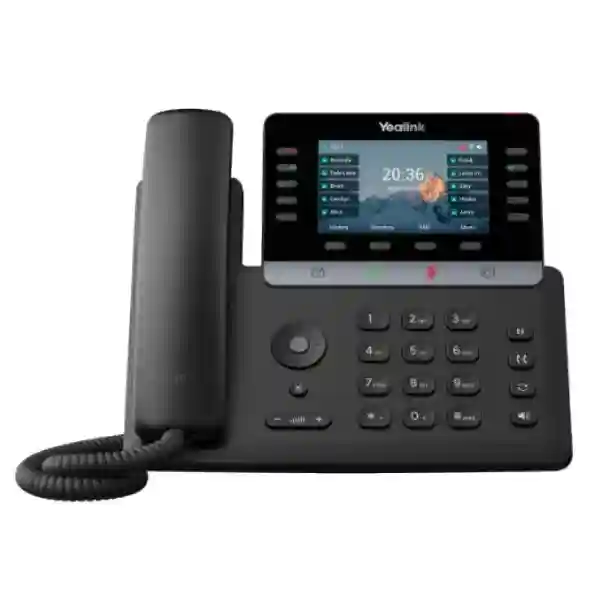
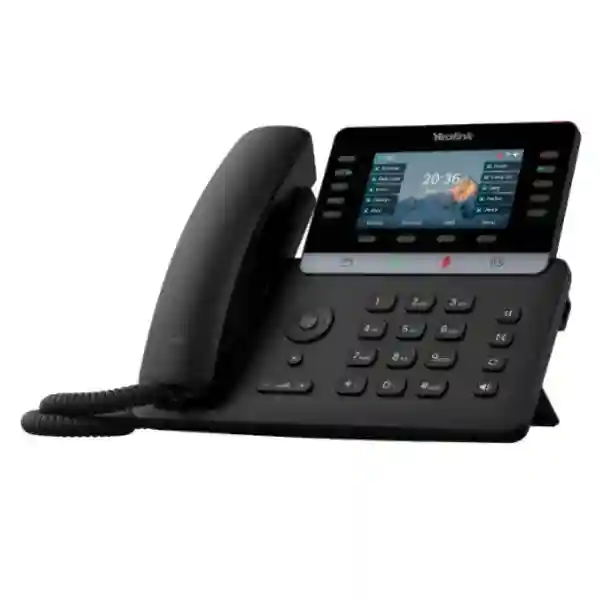
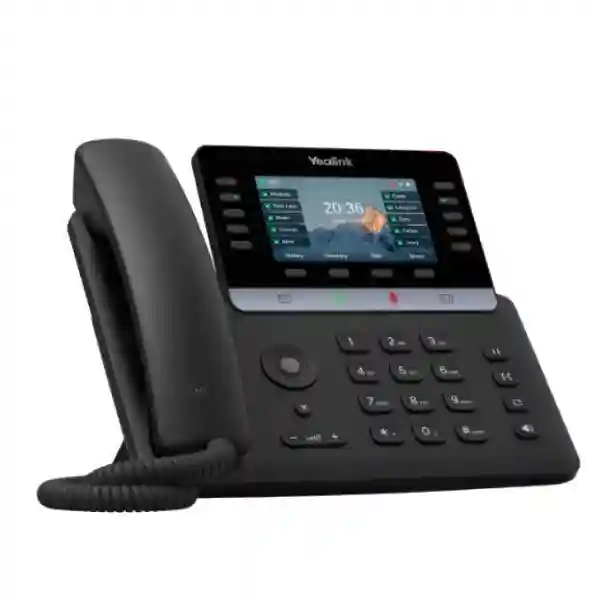
Yealink SIP-T74W Business Phone Tanzania
The Yealink SIP-T74W Business Phone is a premium SIP desk endpoint created for managers, professional users, reception teams, service coordinators and other business users who need more than a basic extension. Its combination of a 4.3-inch 480 x 272 colour display, up to 16 VoIP accounts, built-in Wi-Fi 6, Bluetooth 5.0, dual-port Gigabit Ethernet, PoE, USB connectivity, programmable keys and expansion support gives IT teams several practical ways to standardise professional desks without making everyday operation complicated. For Tanzania organisations moving from analogue telephony, refreshing an existing IP PBX, adopting hosted voice or building new branches, the T74W offers a strong blend of clear calling, secure SIP operation, flexible accessories and scalable call handling.
FourTeck supports business customers by helping them match the phone to the real environment around it: SIP platform, IP PBX or cloud PBX, extension design, VLAN and QoS policy, PoE availability, wireless coverage, headset preferences, expansion requirements and provisioning method. A capable desk phone delivers its best value only when those surrounding elements are aligned. Procurement teams can therefore use this page to understand the core hardware, the buying questions that matter, the regional deployment considerations and the information to prepare before requesting a quotation.
4.3-inch Colour Display
A 480 x 272 colour screen presents lines, menus, contacts, caller information and status clearly for busy professional users.
Wi-Fi 6 + Bluetooth 5.0
Built-in dual-band Wi-Fi and Bluetooth support make desk layout and compatible headset planning more flexible.
16 VoIP Accounts
Up to 16 SIP accounts support advanced users, shared roles, multi-line workflows and department-specific calling needs.
Gigabit PoE
Dual-port Gigabit Ethernet and IEEE 802.3af PoE simplify structured office deployments when a suitable PoE switch is available.
Yealink SIP-T74W Overview
Yealink positions the SIP-T74W as a high-end colour-screen business phone for management and professional users. The phone provides HD handset and speaker audio, a hearing-aid-compatible handset, Acoustic Shield, Smart Noise Filtering and a full-duplex hands-free speakerphone. These capabilities are designed to improve clarity and comfort in offices where conversations may take place alongside colleagues, customer activity or other background sound. Wideband audio includes G.722, while the phone also supports commonly used narrowband codecs so administrators can align it with the voice platform and network policies in use.
The device supports up to 16 VoIP accounts and a broad set of everyday call functions including hold, transfer, forwarding, waiting, speed dial, DND, redial, auto answer and ten-way conferencing. Directory options include a local phonebook for up to 1,000 entries together with XML or LDAP remote phonebooks and Google Contacts support. For staff who handle frequent transfers or line monitoring, the phone supports programmable DSS keys and BLF-style workflows. Five pages of line keys can provide up to 50 programmable functions, while up to three compatible colour-screen expansion modules can be cascaded for larger key layouts when a front-desk or assistant workflow requires them.
Connectivity is one of the T74W’s strongest practical advantages. Wired deployments can use dual-port Gigabit Ethernet and PoE, while built-in IEEE 802.11 a/b/g/n/ac/ax dual-band Wi-Fi offers a wireless network option where appropriate. Bluetooth 5.0 can be used with compatible headsets and phones, and the USB 2.0 port supports USB headsets, recording, selected Yealink accessories and expansion modules. This mix lets IT teams standardise one professional phone across several desk conditions rather than creating a separate endpoint policy for every location.
Verified Technical Highlights
| Area | Yealink SIP-T74W Detail | Planning Value |
|---|---|---|
| Display | 4.3-inch, 480 x 272 colour LCD | Clear call status, menu navigation, contacts and DSS operation. |
| Accounts | Up to 16 VoIP accounts | Suitable for advanced, shared and multi-line users. |
| Wireless | Dual-band Wi-Fi 6 and Bluetooth 5.0 | Flexible office layouts and compatible wireless headset use. |
| Network | Dual-port Gigabit Ethernet, IEEE 802.3af PoE | Fast wired connectivity with single-cable power where PoE is available. |
| USB | 1 x USB 2.0 | Supports compatible headsets, recording and expansion accessories. |
| Security | TLS 1.3, SRTP, secure boot, AES configuration encryption, 802.1X, WPA2/WPA3, TEE hardware encryption | Supports stronger endpoint, signalling, media and configuration protection. |
| Provisioning | Browser, phone and auto-provisioning; FTP/TFTP/HTTP/HTTPS, PnP and management options | Useful for repeatable multi-phone rollout and ongoing management. |
Who Should Choose the Yealink SIP-T74W?
The T74W is most relevant when the person at the desk handles enough calls to benefit from a colour screen, programmable keys, multiple accounts and headset options, but does not necessarily need a large touchscreen collaboration device. Typical examples include department managers, executive assistants, office administrators, branch coordinators, customer service supervisors, front-office staff and senior sales personnel. A reception desk can benefit from programmable keys and optional expansion modules, while a manager may value Bluetooth, Wi-Fi, clear speakerphone operation and straightforward access to multiple lines.
Companies should avoid selecting a phone solely because it is more feature-rich than an entry model. The better approach is to map user roles. Standard staff who mainly answer one extension may be served by a simpler device, while users who monitor multiple lines, use headsets, manage calls for other people or move between wired and wireless desks can justify the extra capability of the T74W. This role-based approach keeps a rollout cost-efficient while giving demanding users enough functionality.
Compatibility, PBX and Network Planning
The SIP-T74W uses SIP and is designed for broad interoperability, but every business deployment should still confirm compatibility with the selected IP PBX, hosted PBX or SIP service. Administrators should verify registration method, transport, authentication, codec policy, dial plan, caller ID behaviour, voicemail, BLF, transfer methods, directory integration and any server-side recording requirement. The phone supports IPv4 and IPv6, static or DHCP addressing, QoS, VLAN functions, SIP over common transports and several security technologies, giving network teams the building blocks for a structured voice environment.
For wired installations, check switch-port availability, PoE budget, VLAN assignment, LLDP or DHCP behaviour and QoS markings before mass deployment. For wireless installations, review coverage, signal quality, authentication, channel planning and the effect of busy office traffic on voice quality. Wi-Fi 6 capability is valuable, but good voice still depends on a correctly engineered wireless network. The safest purchasing discussion therefore combines phone quantity with LAN, PoE, PBX and wireless information rather than treating the device as an isolated box.
Yealink SIP-T74W Tanzania
Businesses searching for the Yealink SIP-T74W in Tanzania are often planning an office communication upgrade rather than replacing a single handset. A new head office, branch expansion, customer support desk, hotel reception, clinic administration area, school office or professional services team may require SIP phones that fit both present calling needs and future growth. The T74W is particularly relevant when managers and front-office users need a more capable endpoint with multiple line appearances, a colour display, programmable keys and headset flexibility. Before procurement, Tanzania buyers should list the number of users, current or proposed PBX, SIP provider, cabling status, PoE switch capacity and whether Wi-Fi will be used as a primary or secondary access method.
Power and network design deserve special attention. PoE can simplify desk installation because power and network connectivity travel through the Ethernet cable from a compatible switch, reducing the number of adapters at desks. Where PoE is not available, the optional power adapter requirement should be confirmed as part of the quotation. In sites using Wi-Fi, administrators should still plan reliable power for the phone and test wireless quality in the actual desk area. Voice performance depends on latency, packet loss, congestion and routing as well as the endpoint itself, so network readiness should be checked before a large rollout.
Procurement teams in Tanzania can improve quotation accuracy by specifying quantity, city, user roles, PBX platform, headset requirements, expansion-module needs, power preference and expected deployment date. This helps distinguish a straightforward product supply request from a broader IP telephony project that may need switches, structured cabling, SIP configuration, firewall policy or user handover. For related regional technology requirements, businesses can also review FourTeck Tanzania technology solutions as a starting point for wider infrastructure planning.
Yealink SIP-T74W Business Phone Dar es Salaam
Dar es Salaam offices often combine management, sales, logistics, finance, service and reception functions in the same site, creating different calling requirements across departments. The SIP-T74W can be allocated to staff who handle higher call volumes or need greater line visibility, while more basic extensions can use simpler models. In an organisation with several floors or departments, this mixed-device approach can provide a practical balance between capability and budget. The T74W’s 16-account capacity, programmable keys, headset support and Gigabit connectivity suit demanding desks where users regularly transfer calls, monitor colleagues or manage several service identities.
A Dar es Salaam deployment should begin with a network review. Offices in commercial buildings may already have managed Ethernet switching and structured cabling, making PoE a clean choice. Other sites may rely on a mix of legacy cabling and wireless connectivity. The T74W’s built-in Wi-Fi 6 provides flexibility, but IT teams should test signal strength and congestion during normal working hours instead of assuming wireless coverage is sufficient because laptops connect successfully. Real-time voice is less tolerant of instability than many ordinary office applications.
For reception and service desks, optional expansion modules can provide extra programmable keys when users need to monitor many extensions. Headset selection is another important issue: USB, Bluetooth and EHS-related options can support different working styles, but exact accessory compatibility should be checked before bulk purchase. Businesses requesting a quote should identify whether phones are for a new PBX, a hosted SIP service, a branch migration or a replacement project. That information allows configuration and deployment planning to be discussed alongside price, rather than after the devices arrive.
Yealink SIP-T74W Business Phone Mwanza
For Mwanza organisations, a business phone project may involve a main office, warehouse, branch, education facility, clinic, hospitality operation or trading environment where dependable internal and external communication is important. The SIP-T74W suits professional desks that need a combination of line handling, clear audio and network flexibility. Its colour display helps users navigate contacts and call status, while Bluetooth and USB connectivity can support headsets for staff who spend significant time on the phone. Managers can also use speakerphone functions for quick office discussions without moving to a separate conference device for every short call.
The decision between Ethernet and Wi-Fi should be made site by site. Wired Gigabit Ethernet with PoE can provide a predictable foundation when managed switches and cabling are available. Wireless deployment can be useful where desks move, cabling is difficult or temporary layouts are common, but Wi-Fi should be treated as a designed voice access method rather than a convenience feature. Coverage surveys, stable power, correct security settings and suitable quality-of-service policies help protect call performance.
Mwanza buyers planning several devices should also consider provisioning. The phone supports central configuration and auto-provisioning approaches that can reduce repetitive manual setup when the PBX or management environment is prepared correctly. Standardising naming, firmware, time settings, phonebooks and security policies makes support easier after rollout. A quotation request should therefore include user quantity, branch count, preferred network method, PBX details and any need for headsets or expansion keys. This gives procurement and technical teams a common basis for evaluating the project rather than comparing only unit price.
Yealink SIP-T74W Business Phone Arusha
Arusha businesses in hospitality, tourism support, professional services, education, administration and commercial operations may need a desk phone that looks professional at customer-facing points while still giving IT teams standard SIP management. The SIP-T74W fits this role well because it combines a modern colour interface with practical call controls, secure network features and flexible headset options. Front-desk staff can benefit from programmable keys and rapid call handling, while managers can use multiple accounts, Bluetooth and speakerphone functions for day-to-day coordination.
Hotels and service-oriented organisations should map their call flows before choosing endpoint quantities. A reception user may need BLF monitoring, transfer keys and possibly expansion modules, whereas back-office staff may require only a smaller number of functions. A T74W deployment can therefore form the premium layer of a mixed Yealink or multi-model phone environment. This prevents over-specifying every extension while still giving demanding roles a capable device.
Network reliability remains central. If the phone is connected to an IP PBX over a local LAN, VLAN and QoS policy should be checked together with switch PoE capacity. If the voice platform is hosted elsewhere, internet resilience, firewall rules and NAT behaviour become additional considerations. In wireless areas, confirm Wi-Fi authentication and signal stability at each intended desk. Arusha buyers can make procurement more efficient by sharing the exact extension count, PBX type, locations, headset requirements and expected support scope. The goal is not simply to purchase a premium phone; it is to ensure the phone operates reliably in the communication workflow it is meant to support.
Yealink SIP-T74W Business Phone Dodoma
Dodoma offices that require dependable professional communication can consider the SIP-T74W for managers, coordinators, reception staff and administrative users who handle several call paths or require more programmable controls than a basic desk phone offers. The 4.3-inch display makes line status and menu navigation easier to read, while up to 16 SIP accounts can support users with multiple identities, departments or service lines. Organisations with formal procurement processes can use the official technical features as a baseline and then define their own required PBX, network, accessory and security criteria.
For public-sector, education, NGO, professional and commercial environments, standardisation can be as important as individual device features. Yealink’s unified firmware approach across parts of the T7X family can simplify maintenance when multiple compatible models are used. The T74W also supports auto-provisioning methods, which can reduce manual configuration during larger rollouts. Administrators should document extension naming, firmware policy, authentication, VLAN design, phonebook sources and management access before deploying many units.
Dodoma projects should also plan for the user experience after installation. Staff need basic guidance on transfers, hold, voicemail, headset operation, directory access and reporting problems. A technically successful SIP registration does not automatically mean the rollout is complete. Procurement enquiries should include quantity, desk roles, PBX platform, switch and PoE details, whether wireless connectivity will be used, and any accessory requirements. This enables the project to be scoped around a working communication environment instead of a product-only transaction.
Yealink SIP-T74W Business Phone UAE
UAE businesses looking for the Yealink SIP-T74W typically compare it with other premium SIP desk phones for management, reception, customer service and professional user roles. The T74W’s built-in Wi-Fi 6, Bluetooth 5.0, Gigabit Ethernet, PoE and expansion support make it useful in offices where endpoint flexibility matters. Companies with structured LANs can power the phone through suitable PoE switches, while serviced offices or changing desk layouts can evaluate Wi-Fi where the wireless network is engineered for voice traffic.
For UAE procurement, it is useful to separate endpoint choice from PBX choice. The phone supports standard SIP functions and a wide feature set, but organisations should confirm interoperability with their chosen hosted or on-premise platform, especially for BLF, directory services, call recording and advanced call control. Headset compatibility should also be confirmed where users spend long periods on calls. Reception desks can evaluate optional EXP55 expansion modules when a larger programmable key field is required.
FourTeck’s UAE site maintains a dedicated Yealink T74W Dubai reference for buyers comparing this same model in the Emirates. Organisations operating across Tanzania and the UAE can use a consistent model strategy where appropriate, while still adapting provisioning, SIP services and network settings to each site. Bulk or multi-branch enquiries should specify location, quantity, platform and rollout schedule so accessory, power and deployment requirements can be reviewed together.
Yealink SIP-T74W Business Phone Uganda
Uganda organisations evaluating the SIP-T74W may be building a new IP telephony system, replacing older desk phones or standardising professional endpoints across branches. The phone is best suited to users who need multi-line visibility, richer call handling, headset support and modern connectivity. Up to 16 SIP accounts provide flexibility for complex user roles, while the colour display, programmable keys and optional expansion capability support reception, management and service environments.
Network planning should begin with a choice between wired and wireless operation. Gigabit Ethernet with PoE is a strong fit where switches and structured cabling already exist. Wi-Fi 6 can help in desks where cabling is inconvenient, but voice quality still depends on stable RF coverage, internet performance for hosted systems and correct QoS. For remote branches, resilience may be improved by planning redundant connectivity or clear failover procedures at the network level rather than relying only on the endpoint.
Uganda-based groups with projects that span multiple sites can also review FourTeck Uganda for region-specific infrastructure requirements. When requesting T74W pricing, buyers should include quantities, city, PBX type, SIP provider, headset preferences and whether any reception positions require expansion modules. This information creates a more useful quotation and reduces the risk of purchasing phones without the power, networking or accessory components needed for deployment.
Yealink SIP-T74W Business Phone Kampala
Kampala’s mix of corporate offices, service businesses, healthcare, education, hospitality, retail administration and technology firms creates many use cases for SIP phones. The T74W is a particularly good match for users who must handle several lines, transfer calls frequently or work with headsets throughout the day. Its programmable keys can be aligned with extension monitoring and common call actions, while the display gives clearer visual feedback than a basic monochrome office phone.
In office buildings with managed networks, PoE can simplify installation and centralise power protection through the switching infrastructure. IT teams should check total PoE budget and not only whether individual ports support PoE. VLAN and QoS settings can then be applied consistently for voice devices. In smaller or changing offices, built-in Wi-Fi 6 may reduce cabling pressure, but each desk should be tested for signal quality and roaming is generally less relevant for a fixed desk endpoint than stable coverage.
For customer-facing positions, headset selection affects user comfort and call handling speed. Bluetooth can be convenient for mobility around the desk, while USB or other supported headset methods may suit fixed workstations. Kampala buyers should therefore include accessory requirements in the initial quote. If the rollout is large, auto-provisioning and configuration templates should also be planned early. A well-prepared project can make dozens of phones consistent in firmware, directory access, security settings and function keys, simplifying support after go-live.
Yealink SIP-T74W Business Phone Arua
Arua businesses and institutions that need professional IP calling can use the T74W where management, reception or coordination staff require stronger functionality than a simple single-line handset. The phone’s core value in a branch environment is flexibility: it can operate on a wired Gigabit connection, use PoE when compatible switching is available, or connect through built-in Wi-Fi 6 where the network design supports voice. Bluetooth and USB options also allow the endpoint to adapt to headset-driven roles.
Branch deployments should account for the connectivity between the site and the PBX. If the PBX is hosted in the cloud or located at another office, WAN performance and firewall behaviour can directly affect registration and call quality. Network teams should test round-trip delay, packet loss and stability, then configure voice prioritisation where supported. The phone includes security functions such as TLS, SRTP, secure boot and encrypted configuration support, but those capabilities should be incorporated into a complete security policy rather than assumed to be active by default.
For procurement, the most useful request includes the number of phones, extension plan, network connection method, PBX or SIP service, power method and any accessories. Organisations that expect growth should also think about provisioning from the beginning. Even a small first phase can benefit from consistent configuration and documentation, making future additions easier. This is particularly important when technical support may be centralised away from the branch and local staff need a predictable, well-labelled setup.
Yealink SIP-T74W Business Phone Mbarara
Mbarara organisations can evaluate the SIP-T74W for professional desks in business administration, education, healthcare, hospitality, finance, distribution and service environments. Users who frequently transfer calls, monitor extensions or manage several SIP identities can make effective use of the programmable line keys and account capacity. The phone’s screen and physical controls support a traditional business-phone workflow, which can make adoption easier for teams moving from older PBX handsets.
When replacing analogue phones, businesses should remember that IP telephony shifts part of the voice system onto the data network. Switch capacity, PoE, DHCP, VLANs, internet resilience and firewall rules can therefore become part of the phone project. The T74W’s Gigabit Ethernet interface helps avoid making the phone an unnecessary bottleneck when a computer shares the desk network path, subject to the planned topology. Wi-Fi 6 is available for suitable deployments, but wired connectivity may remain preferable for fixed high-use desks where cabling is practical.
Mbarara buyers should also consider lifecycle administration. Central provisioning reduces the need to configure every device independently, and consistent firmware can simplify support. Directory sources and function-key layouts can be standardised by user role. Procurement teams should provide the intended use case, quantity, PBX environment and accessory requirements so the final supply matches the deployment. This role-based planning is more reliable than purchasing identical premium phones for all users regardless of need.
Yealink SIP-T74W Business Phone Gulu
For Gulu offices and institutions, the SIP-T74W can serve as a professional endpoint for decision-makers, coordinators, administrators and front-desk staff who need dependable SIP calling and faster access to common functions. The phone provides enough programmable capacity for busy users while remaining a conventional desk handset rather than a complex touchscreen collaboration terminal. That balance can be useful where staff want a familiar calling experience but IT teams need modern networking, provisioning and security capabilities.
A branch phone project should be tested as an end-to-end service. Successful SIP registration is only the first step. Teams should place internal and external calls, test hold and transfer, verify voicemail, check caller ID, confirm headset behaviour and ensure emergency or special dial patterns are understood where applicable. If BLF or shared-line functions are required, they should be tested with the actual PBX platform because feature behaviour can depend on server implementation.
The T74W can be powered by PoE from a compatible network switch, helping reduce desktop adapters. Where that infrastructure is unavailable, the optional power-adapter requirement should be addressed in the quote. If Wi-Fi is chosen, wireless credentials and security should be managed carefully rather than shared informally. A Gulu procurement brief should therefore include connectivity, power, PBX, quantity, user roles and rollout responsibilities. This provides a practical basis for deciding whether the T74W is the right professional phone or whether a mixed set of models would better fit different desks.
Yealink SIP-T74W Business Phone Kenya
Kenya organisations seeking a premium SIP desk phone can consider the T74W for executive, management, reception and high-use professional roles. The device combines traditional physical call controls with modern wireless and security features, making it suitable for companies that want familiar desk-phone operation without being limited to wired-only deployment. For multi-branch businesses, a standard professional model can also simplify user training and support if the same configuration approach is used across locations.
Kenyan deployments should align phone selection with the wider voice architecture. Hosted PBX, on-premise IP PBX and SIP trunk environments each have different network and management considerations. Administrators should confirm account registration, codecs, directories, call recording, BLF and provisioning features with the actual platform. PoE switch capacity and network segmentation should be planned for wired sites, while Wi-Fi locations need careful RF design and authentication. Security features such as TLS and SRTP can be used as part of a secure deployment when supported and configured end to end.
Businesses with East African operations can review FourTeck Kenya for related regional technology requirements. A useful quotation brief includes quantity, city, PBX platform, SIP provider, intended users, headset type, power preference and project date. This gives suppliers and IT teams the context required to discuss complete deployment needs instead of comparing the handset price in isolation.
Yealink SIP-T74W Business Phone Kuwait
Kuwait businesses can use the SIP-T74W in management offices, reception areas, professional services, hospitality, healthcare administration, trading companies and other environments where users need a capable SIP endpoint with flexible connectivity. The combination of Gigabit Ethernet, PoE, Wi-Fi 6 and Bluetooth allows the same phone model to accommodate several office layouts. Up to 16 SIP accounts and programmable keys make it suitable for users responsible for multiple lines or departments.
When a business operates in multiple GCC or African markets, endpoint standardisation can reduce training and support complexity. The phone configuration still needs to reflect each site’s PBX, network and security environment, but common hardware and user guides can simplify operations. Procurement teams should verify local power and accessory requirements, expected quantities and any expansion-module needs before finalising an order.
For Kuwait-specific infrastructure projects, customers can also visit FourTeck Kuwait. The most effective buying conversation combines the phone with details about the SIP service, number of extensions, switching, PoE, headsets and deployment timeline. This avoids late-stage surprises such as missing power supplies, incompatible headset assumptions or insufficient network preparation. IT teams should also confirm provisioning and firmware practices so new units can be added consistently as the organisation grows.
Yealink SIP-T74W Business Phone Ghana
Ghana businesses can position the SIP-T74W as a professional phone for managers, reception teams, administrators and customer-facing staff who require more line visibility and accessory flexibility than entry-level endpoints provide. Its built-in wireless features are useful for modern offices, while the Gigabit Ethernet and PoE capability make it equally suitable for structured network deployments. The phone’s security functions support organisations that want stronger endpoint controls as part of an overall voice-security policy.
Projects should start with clear role mapping. A reception user may need expansion keys and a headset, a manager may prioritise Bluetooth and multiple accounts, while a general office user may not need this level of capability. Using the T74W selectively can therefore help keep a broader rollout efficient. If several branches are involved, auto-provisioning and central configuration can improve consistency and reduce the need for repeated manual setup.
Ghana buyers can use FourTeck Ghana for wider regional technology enquiries. For T74W procurement, provide quantity, delivery location, PBX or hosted voice platform, SIP details, network readiness and accessory requirements. IT teams should also test voice quality under normal traffic, not only during an empty-office installation window. This ensures that network performance and QoS are assessed in conditions closer to daily operation.
Yealink SIP-T74W Business Phone Nigeria
Nigeria organisations with busy offices, service desks and multi-branch operations can consider the SIP-T74W for users who need advanced SIP call handling, clear audio and flexible connectivity. The phone’s multiple account support is useful for staff working across brands, departments or queues, while programmable keys can speed access to colleagues and common call functions. USB, Bluetooth and EHS-related accessory options support headset workflows for users who spend extended periods on customer or internal calls.
A reliable deployment should treat power and network resilience as part of the phone design. PoE allows centralised power from compatible switches, which can be beneficial when network equipment is protected by appropriate backup systems. Hosted voice deployments also depend on internet availability, so organisations with critical call functions may need broader connectivity resilience at the site level. The phone itself includes strong protocol and security capabilities, but call continuity ultimately depends on the entire chain from endpoint to PBX and carrier.
For region-specific project discussions, businesses may review FourTeck Nigeria. A complete T74W quotation request should include user count, branch locations, PBX type, SIP account structure, headset preferences and the desired rollout window. This information enables more accurate planning for accessories, provisioning and deployment rather than leaving those items to be resolved after procurement.
Yealink SIP-T74W Business Phone Seychelles
Seychelles businesses in hospitality, tourism services, administration, finance and professional operations may need premium desk phones for front offices, reservations, management and coordination teams. The SIP-T74W fits these roles when users need a polished colour-screen endpoint with multi-account support, headset options and flexible network connectivity. Reception or reservations teams can use programmable keys and optional expansion modules to streamline frequent transfers and internal calling, while managers can use Bluetooth and speakerphone features for daily communication.
Island and multi-site environments should pay particular attention to the connection between the phone and the voice platform. If the PBX is hosted or located off-site, internet stability, firewall configuration and failover planning can matter as much as the handset itself. Wired Ethernet with PoE is attractive for fixed desks because it centralises network and power, while Wi-Fi 6 can help where cabling constraints exist. Whichever method is chosen, voice traffic should be tested under realistic load.
Procurement teams can reduce delays by specifying whether the project is a new installation, a replacement of older phones or an expansion of an existing SIP system. Include quantity, PBX platform, extension plan, headset requirements, switch and PoE details and any need for directory integration. The T74W offers a broad capability set, but successful deployment depends on aligning those features with the actual service environment and support model.
Deployment and Installation Checklist
Before installing Yealink SIP-T74W phones, prepare a simple deployment worksheet. Record each user’s name or role, extension, SIP account, desk location, MAC address, network method and accessory requirement. Confirm whether the device will receive power from a PoE switch or an optional adapter. For wired phones, validate the switch port, VLAN and DHCP behaviour. For wireless phones, test the selected SSID and authentication method. Then configure the PBX registration, time zone, caller ID, voicemail access, transfer behaviour, directory source and programmable keys. Where central provisioning is available, use standard templates rather than manual one-off configurations.
After configuration, perform practical acceptance tests: inbound and outbound calls, internal extension calls, hold, attended and blind transfer, voicemail, caller ID, DND, headset answer/end functions where supported, speakerphone, directory lookup and any BLF keys. Test audio in the real office during normal activity. If secure SIP and SRTP are required, verify that they are actually negotiated with the PBX instead of assuming endpoint support means encryption is active. Finally, document admin access, firmware policy and recovery steps for the support team.
Security and Administration
Yealink lists a broad security feature set for the T74W, including TLS 1.3, SRTP, secure boot, encrypted configuration files, 802.1X, WPA2/WPA3 and a TEE hardware encryption solution. These capabilities are valuable, but security depends on configuration across the full system. Administrators should use strong credentials, restrict management access, prefer encrypted management channels, keep firmware current under a controlled policy and disable services that are not needed. Network segmentation can also reduce unnecessary exposure of voice devices.
Provisioning servers should be protected because they can contain configuration data and credentials. If remote management is used, define who has access and how changes are logged. Organisations should also plan for device replacement, factory reset and decommissioning so old configuration is not left on hardware that leaves service. These operational practices complement the phone’s built-in security functions and help create a more maintainable voice environment.
Headsets, Expansion Modules and Accessories
The T74W supports several accessory paths, including USB headsets, compatible Bluetooth headsets, the EHS40 wireless headset adapter and the EXP55 colour-screen expansion module. Accessory support is useful because professional users have different working patterns. A manager may prefer Bluetooth for short mobile conversations around the desk, while a receptionist or contact-centre-style user may choose a dedicated headset for consistent all-day comfort. Up to three compatible expansion modules can be cascaded where many programmable keys are needed.
Accessory selection should be validated against the current Yealink compatibility information before ordering. Headset answer/end synchronisation and advanced functions can vary by model and connection method. Procurement teams should therefore include exact headset requirements in the phone quotation rather than purchasing accessories separately based only on connector type. The same applies to power adapters and wall-mount brackets, which Yealink lists as optional items in the package specification.
Buying Guidance: Is the T74W the Right Level?
The T74W makes sense when users need a professional colour display, built-in Wi-Fi 6, Bluetooth, multiple SIP accounts, programmable keys and expansion support. If most staff only need basic extension calling, a lower-tier phone may provide better value for those desks. Conversely, users who need a much larger touch interface or specialised collaboration features may require a higher model. The most efficient architecture often mixes endpoint tiers according to user role rather than applying one phone to every desk.
Buyers should compare total deployment cost, not only handset price. Consider PoE switching, power adapters where required, headsets, expansion modules, PBX licences, SIP services, configuration effort, cabling and ongoing support. A quote that includes these items is easier to evaluate than a bare hardware price. The T74W’s strong provisioning and networking features can also reduce administrative effort when used properly, which is part of its value in larger rollouts.
Quotation Checklist
For a useful Yealink SIP-T74W quotation, provide: required quantity; delivery city and country; whether the phones are for a new or existing system; PBX or hosted voice platform; SIP provider if relevant; number of accounts per user; wired or Wi-Fi preference; PoE availability; headset model or preferred headset style; need for EXP55 expansion modules; wall-mount requirement; power-adapter requirement; directory integration; expected rollout date; and whether configuration or installation assistance is needed. This information allows the phone, accessories and deployment scope to be assessed together.
Frequently Asked Questions
How many SIP accounts does the Yealink SIP-T74W support?
Yealink specifies support for up to 16 VoIP accounts. This makes the phone suitable for advanced professional users and multi-line roles, subject to the capabilities and configuration of the chosen PBX or SIP service.
Does the SIP-T74W have Wi-Fi?
Yes. It has built-in dual-band Wi-Fi supporting IEEE 802.11 a/b/g/n/ac/ax, commonly described as Wi-Fi 6 support. Wireless deployment should still be planned for coverage, security and voice quality.
Does the Yealink T74W support Bluetooth?
Yes. Bluetooth 5.0 is built in. It can be used with compatible Bluetooth headsets and supported phone integration functions.
Can the T74W be powered by PoE?
Yes. Yealink specifies IEEE 802.3af PoE, class 2. The connected switch must provide sufficient PoE capacity. A power adapter is listed as optional.
Can I add more programmable keys?
Yes. The phone supports programmable DSS keys and can work with compatible EXP55 colour-screen expansion modules. Yealink states that up to three expansion modules can be cascaded.
Is the SIP-T74W suitable for reception?
It can be a strong reception option when the user needs multiple lines, BLF-style monitoring, programmable keys, a headset and optional expansion modules. The correct setup depends on the PBX and call-flow design.
Does the T74W support secure SIP communications?
The phone supports technologies including TLS 1.3 and SRTP, together with secure boot and encrypted configuration capabilities. Actual secure calling depends on compatible PBX configuration and end-to-end deployment.
Can the phone be centrally provisioned?
Yes. Yealink supports browser, phone and auto-provisioning methods, including common provisioning protocols and management options suitable for repeatable deployments.
Decision Recap
Choose the Yealink SIP-T74W when you need a premium business desk phone with a clear colour display, up to 16 SIP accounts, modern wired and wireless connectivity, strong headset options, programmable keys and scalable expansion. It is particularly well suited to managers, reception positions and professional users who handle more complex calling than a basic extension. Before purchase, validate PBX compatibility, network design, power, accessories and provisioning requirements. This turns a capable handset into a dependable business communication endpoint rather than an isolated piece of hardware.
Talk to FourTeck About Your SIP-T74W Project
Share your quantity, Tanzania location, PBX platform, SIP provider, PoE availability, headset needs and rollout schedule. FourTeck can use those details to help structure the product and deployment discussion around the actual office requirement.




Reviews
There are no reviews yet.