
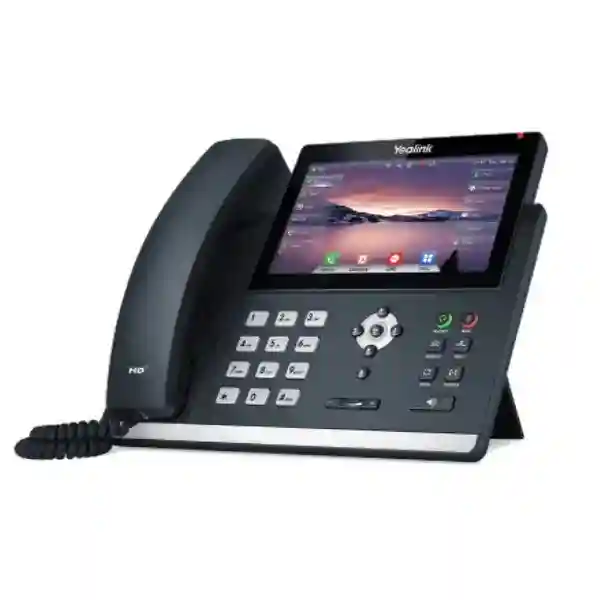
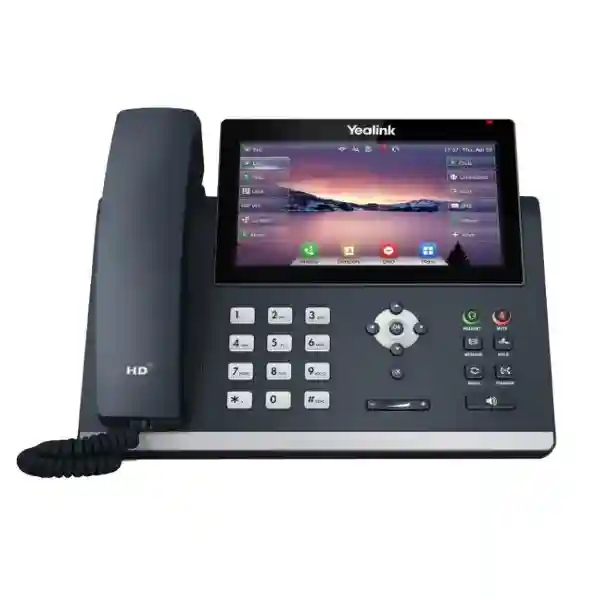
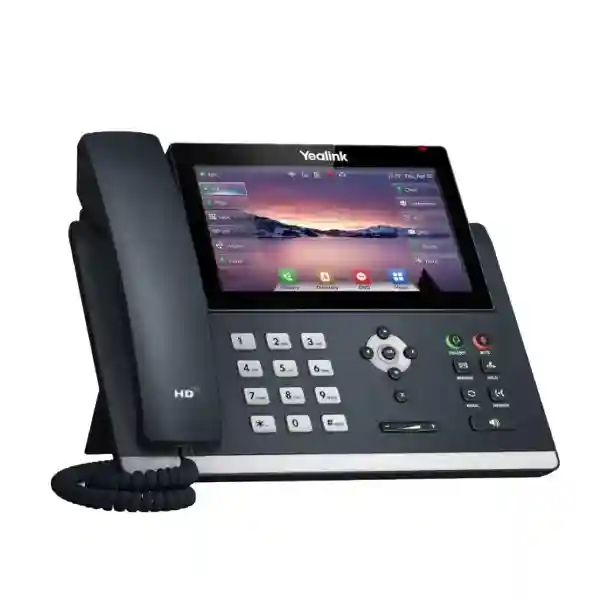
Yealink SIP-T48U Tanzania
Premium touchscreen SIP phone for business communication
The Yealink SIP-T48U is built for professionals who handle frequent calls, multiple lines and feature-rich IP telephony workflows. Yealink specifies a 7-inch 800 × 480-pixel colour touchscreen with backlight, support for up to 16 SIP accounts, dual-port Gigabit Ethernet, IEEE 802.3af PoE, two USB 2.0 ports and 29 one-touch DSS keys. Those capabilities make the model especially relevant for executive desks, reception positions, supervisors and users who need rapid access to transfer, hold, conferencing, directory and programmable line functions. The phone also supports a full-duplex hands-free speakerphone, Yealink HD voice functions, hearing-aid compatibility, call recording options and a broad set of SIP and network-management features.
Core verified capabilities
7-inch touchscreen · 16 SIP accounts · dual Gigabit Ethernet · PoE · dual USB · 29 touch DSS keys · 10-way conferencing · expansion-module support · optional Wi-Fi and Bluetooth adapters · USB recording · secure SIP features.
What the Yealink SIP-T48U solves
Business telephony becomes harder to manage when users juggle several extensions, shared lines, transfer destinations and headset workflows from a basic desk phone. The SIP-T48U addresses that problem with a large touch interface and programmable DSS functions that put commonly used telephony actions closer to the user. For reception personnel, the screen and expansion options can simplify monitoring and routing. For managers and executives, the same interface can provide direct access to contacts, lines and call-control features without forcing users through small monochrome menus. For IT teams, standard SIP support, browser and phone configuration, auto-provisioning mechanisms and common network services help integrate the endpoint into structured deployments.
The phone is not a complete telephone system by itself. It normally operates as an endpoint registered to a compatible SIP server, IP-PBX or hosted voice platform. Buyers should therefore confirm the intended PBX, SIP credentials, VLAN design, power method and accessory requirements before ordering. If the site already uses PoE switching, one Ethernet cable can carry both data connectivity and electrical power to the phone. Where PoE is unavailable, an appropriate optional external power adapter may be required. Wireless connectivity is also optional rather than built in: Yealink lists support for Wi-Fi through compatible WF40/WF50 adapters and Bluetooth through supported BT-series adapters connected by USB.
Yealink SIP-T48U key features
7-inch touch display
The 800 × 480 colour touchscreen provides a larger visual workspace for call handling, directories, soft keys and programmable functions.
Up to 16 SIP accounts
Multiple SIP registrations support users who work with several lines, identities or shared business call flows, subject to PBX configuration.
Dual Gigabit Ethernet
Two Gigabit network ports support common desk deployments where a PC is connected through the phone while the phone links to the LAN.
PoE support
IEEE 802.3af Class 3 PoE can simplify installation by carrying network data and power over the Ethernet infrastructure.
Dual USB 2.0
Two USB ports create flexibility for supported headsets, Wi-Fi, Bluetooth, USB recording and related accessories.
Expansion capability
The T48U can connect to supported colour-screen expansion modules, making it suitable for roles that need more programmable keys.
Technical specifications at a glance
| Area | Verified specification |
|---|---|
| Display | 7-inch 800 × 480-pixel colour touchscreen with backlight |
| Accounts | Up to 16 VoIP/SIP accounts |
| Network | Dual-port Gigabit Ethernet; static or DHCP addressing; IPv6 support |
| Power | IEEE 802.3af PoE Class 3; optional external adapter |
| USB | 2 × USB 2.0 ports |
| Programmable keys | 29 one-touch DSS keys |
| Conference | 10-way conferencing |
| Audio | HD handset, HD speaker, full-duplex speakerphone, Acoustic Shield and Smart Noise Filtering |
| Security | SRTP, TLS 1.3, HTTPS certificate management, AES256 configuration-file encryption, IEEE 802.1X and secure boot among supported functions |
| Dimensions | 266 × 226 × 85 × 54 mm as published by Yealink |
Compatibility, provisioning and integration
The SIP-T48U supports SIP v1 and SIP v2, which makes it suitable for many standards-based IP telephony environments. Yealink documents configuration through the phone, browser and automatic provisioning, with provisioning support that includes FTP, TFTP, HTTP and HTTPS, plus PnP and TR-069-related mechanisms. For multi-phone deployments, these capabilities can reduce repetitive manual configuration when the PBX or provisioning platform is designed appropriately. The model also supports common enterprise networking functions such as LLDP, CDP, DHCP VLAN, 802.1p/Q tagging, Layer 3 QoS marking, SNTP time synchronization and DNS-SRV. Before rollout, the network team should decide voice VLANs, DHCP options, QoS policy, certificates and credential-management practices rather than treating the phone as an isolated appliance.
Accessory planning deserves equal attention. Two USB ports allow supported accessories to be combined, but each project should confirm the exact adapter or headset model required. Yealink lists Wi-Fi support through WF40/WF50 adapters, Bluetooth through compatible BT-series adapters, USB call recording to supported storage and connectivity for supported Yealink headsets and the EXP43 expansion module. If wireless networking or Bluetooth is mandatory, it should be explicitly included in the bill of materials because the base T48U does not provide those functions as built-in radios.
Who should consider the SIP-T48U?
The strongest fit is usually a user who benefits from visual call control and high key density rather than a basic extension user. Executives may value the large touchscreen and direct access to multiple lines. Reception teams can use programmable keys and expansion modules for monitored extensions and frequent transfer destinations. Supervisors may use several SIP identities or shared line appearances. Customer-service teams can pair the phone with supported headsets for extended call handling. Hotels, professional offices, education administrators, healthcare reception points and branch operations can also consider the platform where the PBX design is compatible. For large deployments, organizations should standardize firmware, templates and provisioning rules so the user experience remains consistent across locations.
Yealink SIP-T48U Tanzania
Organizations researching the Yealink SIP-T48U in Tanzania are often trying to modernize business telephony without losing the familiarity of a physical desk phone. The T48U is particularly relevant where senior staff, reception desks, operations teams or call-intensive users need clearer visibility of lines, contacts and programmable functions. Its 7-inch touchscreen is more useful than a smaller display when users switch frequently between directories, line appearances and call controls. Up to 16 SIP accounts also provide flexibility for environments where one device may need several registrations or where managers use multiple business identities. The right procurement decision begins with the voice platform: confirm the IP-PBX or hosted SIP service, extension count, codec policy, security requirements and provisioning method before finalizing quantities.
For a Tanzania deployment, network readiness matters as much as the handset. Dual Gigabit Ethernet and PoE support mean the phone can sit naturally in a structured Ethernet environment, but the LAN should be assessed for PoE capacity, voice VLAN configuration and Quality of Service. If phones are being deployed across several offices, use consistent DHCP, DNS and provisioning practices to reduce troubleshooting. The T48U supports automatic provisioning mechanisms and enterprise network features, which can help IT teams create repeatable deployment patterns. Optional wireless accessories should be planned explicitly: Wi-Fi requires a supported WF40 or WF50 adapter, while Bluetooth depends on a compatible BT-series adapter. A quotation should therefore identify whether each user needs wired Ethernet only, wireless connectivity, a USB headset, Bluetooth, call recording or an EXP43 expansion module.
Tanzania buyers should also separate endpoint selection from PBX licensing and SIP service costs. The phone provides the physical interface and SIP endpoint capabilities, while extension licenses, trunks, numbers, recording policies and remote access depend on the telephony platform. For related regional telecom planning, businesses can review the wider FourTeck Tanzania technology portfolio for context around network and communications projects. When requesting a quote, provide the number of users, existing PBX platform, branch locations, PoE availability, required accessories and whether configuration assistance is needed. That information produces a more useful bill of materials than asking only for a handset price.
Yealink SIP-T48U Dar es Salaam
Dar es Salaam businesses considering the Yealink SIP-T48U typically need an endpoint suited to busy commercial offices, client-facing teams and multi-department organizations. Reception staff in a head office may benefit from the touchscreen and programmable DSS keys because call transfers, monitored extensions and frequently dialled contacts can be placed within easier reach. Senior management users may prefer the large display for directories, multiple accounts and visual call handling. Where a business runs a SIP-based PBX in its own server room, in a data centre or as a hosted service, the T48U can be provisioned as an endpoint once credentials and network settings are defined.
The Dar es Salaam deployment plan should consider cabling and power early. If office access switches support IEEE 802.3af PoE, the T48U can receive power through the network connection, reducing the need for separate desk-level adapters. Dual Gigabit Ethernet also allows common phone-and-PC desk layouts where the workstation is connected through the handset. Network administrators should confirm that uplinks, switch PoE budgets, VLAN design and QoS settings are appropriate for the total number of phones. In larger offices, a provisioning strategy is preferable to configuring each endpoint manually. The phone supports browser, device and automated configuration methods, so IT teams can define templates for repeated settings, subject to the capabilities of the chosen PBX and management environment.
Procurement teams in Dar es Salaam should list user roles before deciding how many T48U units are needed. Not every desk requires a premium touchscreen phone. The strongest business case usually appears at reception, executive, supervisory and high-call-volume positions, while simpler users may be served by other SIP models. That role-based approach controls cost while preserving a consistent SIP architecture. Accessory requirements should also be specified per user: headset type, optional Bluetooth adapter, optional Wi-Fi adapter, expansion module and power adapter where PoE is unavailable. For a quote, include extension quantities, PBX make and version, expected call flows, site count and the preferred deployment schedule. FourTeck can then structure the request around the complete telephony requirement rather than a standalone device.
Yealink SIP-T48U Mwanza
Businesses evaluating the Yealink SIP-T48U in Mwanza may be planning a new office phone system, replacing legacy analog endpoints or extending an existing IP-PBX to additional teams. The model is designed for users who need more than basic dial-and-answer functionality. Its colour touch interface, 29 one-touch DSS keys and support for up to 16 SIP accounts make it useful for users who monitor multiple lines or require frequent access to call transfer, hold, conference and directory functions. The 10-way conferencing capability can also support audio collaboration where the PBX and network environment are configured appropriately.
A Mwanza rollout should begin with a simple site survey. Confirm whether desks have reliable Ethernet cabling, whether access switches provide PoE, and whether voice traffic will share the same infrastructure as computers and other devices. Because the T48U includes two Gigabit Ethernet ports, it can be integrated into many existing desk layouts without limiting the attached PC to Fast Ethernet. For larger quantities, define voice VLANs and QoS settings so voice traffic is prioritized consistently. It is also sensible to document SIP server addresses, extension numbering, outbound dialing rules, emergency dialing policy and time synchronization before installation. These decisions reduce configuration differences between individual handsets and make support easier after handover.
Buyers should avoid assuming that wireless functions are built into the phone. Wi-Fi and Bluetooth require compatible accessories, while PoE depends on a suitable network switch or injector. The power adapter is optional in Yealink’s published package information. When requesting a Mwanza quotation, specify whether phones will be powered by PoE or adapters and whether users need USB headsets, Bluetooth headsets, recording or expansion modules. If the organization operates several branches, ask for a standardized provisioning and labeling plan so extensions can be deployed consistently. This approach helps the SIP-T48U become part of a maintainable communications system rather than a collection of individually configured devices.
Yealink SIP-T48U Arusha
For organizations in Arusha, the Yealink SIP-T48U can suit hospitality administration, tour operations, professional services, education, healthcare reception and corporate offices where staff need quick, dependable access to SIP calling features. The large touchscreen supports a more visual workflow than entry-level desk phones, while programmable DSS keys can be assigned to commonly used functions according to the PBX configuration. In front-desk environments, this can make extension monitoring and call routing more intuitive. In executive offices, the same interface can support multiple SIP registrations, contact access and direct call-control functions.
The network design should match the intended call quality and reliability. The T48U supports Gigabit Ethernet, PoE, VLAN-related functions and QoS marking, but those capabilities only help when switches, routers and the PBX are configured as a coherent system. An Arusha office using a shared data and voice network should verify switch capacity, cable quality, IP addressing and bandwidth before rollout. Branch connectivity also matters if the PBX is located elsewhere. Organizations using site-to-site connectivity, internet-based SIP services or centralized PBX infrastructure should assess latency, packet loss, firewall policy and failover options as part of the telephony project.
The T48U supports a range of security mechanisms including SRTP for voice and TLS for signaling where the platform supports matching configuration. IT teams should coordinate certificates, credentials and provisioning access instead of leaving default policies unmanaged. For buyers comparing phones, focus on user requirements rather than only screen size. A user who needs many monitored extensions, headset flexibility or multiple accounts can justify the T48U more easily than someone who handles only occasional calls. When requesting an Arusha quote, identify the number of executive, reception, supervisory and standard users separately. That makes it possible to create a mixed handset plan while keeping the wider SIP system standardized.
Yealink SIP-T48U Dodoma
Organizations looking for the Yealink SIP-T48U in Dodoma may include public-sector offices, professional firms, institutions, NGOs and private businesses that need a structured IP telephony endpoint for managers and high-activity users. The phone supports up to 16 SIP accounts and provides 29 one-touch DSS keys on a 7-inch touchscreen, giving users significant control over line and feature access. Its HD handset and speaker functions, Acoustic Shield and Smart Noise Filtering are designed to improve the calling experience, while full-duplex speakerphone support can help users who frequently place hands-free calls.
Procurement planning should include both the endpoint and the supporting network. Where Dodoma offices already use managed Ethernet switches, verify PoE availability and VLAN capacity. The phone supports IEEE 802.3af PoE Class 3, so suitable switches can power endpoints without separate adapters. If PoE is not available, include the appropriate external power adapters in the procurement list. For centralized deployments, teams should create a configuration template covering SIP server details, extension format, time settings, firmware policy, directory integration and security parameters. The T48U supports multiple auto-provisioning methods, helping reduce manual work when the surrounding platform is properly prepared.
For departments that use headsets, determine whether wired USB, supported DECT or Bluetooth operation is preferred. Bluetooth requires a compatible adapter, and Wi-Fi likewise requires a supported dongle. These details influence both price and USB-port usage. Expansion modules are valuable for roles that need many programmable buttons, but they are usually unnecessary for ordinary desk users. A practical Dodoma buying strategy is therefore to map each job role to its call-handling needs, then assign the T48U to positions where its interface and expansion capacity create measurable value. Quotations should include quantities, PBX type, network power method, accessory needs, expected deployment sites and support scope so the proposed solution matches the actual operating environment.
Yealink SIP-T48U UAE
The Yealink SIP-T48U is also relevant for UAE organizations and regional procurement teams that standardize SIP endpoints across Gulf and African offices. Its 7-inch touchscreen, 16-account capacity, dual Gigabit Ethernet and PoE make it appropriate for business desks where users need sophisticated call handling without moving to a computer-only softphone workflow. Regional IT teams can standardize a common handset profile for executives, reception positions and supervisors while using simpler phones for general users. This mixed-deployment model helps preserve consistent SIP provisioning and directory practices without over-specifying every workstation.
For UAE deployments, procurement teams should confirm the exact PBX or hosted voice service, supported codecs, security settings and provisioning requirements before purchasing. The T48U supports SIP v1/v2, TLS 1.3, SRTP, IPv6, 802.1X and other enterprise network functions, but interoperability depends on the chosen platform configuration. Optional Bluetooth and Wi-Fi adapters should be itemized separately. The same applies to external power adapters where PoE is not available and to EXP43 expansion modules where users require additional programmable keys. Headset compatibility should be checked against the exact headset model and preferred connection method.
Companies coordinating multi-country projects can use the broader FourTeck UAE technology site for regional infrastructure context while keeping the Tanzania project requirements distinct. A good UAE quotation request should include the number of phones, target sites, PBX environment, accessory requirements, PoE availability and desired staging or configuration work. Buyers should also avoid relying on a web price from another market because currency, tax, logistics and project scope can differ materially. The most useful commercial comparison is a like-for-like bill of materials that includes phones, required adapters, expansion modules, headsets, licenses and deployment services relevant to the actual voice architecture.
Yealink SIP-T48U Uganda
Uganda organizations considering the Yealink SIP-T48U can use it as a high-function SIP endpoint for headquarters, branch offices, reception desks and management users. The touchscreen and 29 programmable DSS keys are valuable where staff handle frequent internal transfers, shared lines or multiple contacts. Support for up to 16 SIP accounts can accommodate complex extension designs, while dual Gigabit Ethernet helps the phone fit modern business LANs. The two USB ports also allow supported accessories such as headsets, Wi-Fi adapters, Bluetooth adapters, recording storage or expansion devices to be incorporated according to the user’s needs.
Before ordering for Uganda, define whether the voice platform is centralized or distributed. A centralized PBX can simplify administration across branches, but WAN quality becomes important. Sites should be assessed for latency, packet loss, bandwidth, firewall policy and internet resilience. Where each branch has local telephony infrastructure, configuration consistency becomes the priority. The T48U supports auto-provisioning, which can help IT teams maintain standardized settings across many endpoints. PoE planning is equally important: verify switch power budgets before connecting a large number of phones, and include optional power adapters where PoE is unavailable.
For regional solution planning, businesses can review the FourTeck Uganda technology portfolio alongside the Tanzania project. This is particularly useful for organizations operating in both markets and aiming to standardize endpoint models, headsets, extension policies and provisioning procedures. A strong request for quotation should state the required quantity by office, current or proposed PBX platform, need for Bluetooth or Wi-Fi, number of receptionist expansion modules, PoE status and any requirement for configuration support. This allows the handset decision to be evaluated within the complete communications architecture rather than as a standalone hardware purchase.
Yealink SIP-T48U Kampala
Kampala businesses often need phone systems that can scale from a single office to multiple departments and branches. The Yealink SIP-T48U fits the premium endpoint tier for users who need more screen space, programmable functions and multiple SIP registrations. A reception desk can use DSS keys for frequent transfer destinations, while managers may assign keys to colleagues, shared lines or feature codes supported by the PBX. The touchscreen interface can reduce the friction of navigating long menus, especially for users who regularly access contacts, call history or line features.
Network planning for Kampala deployments should treat voice as a business application. The handset’s Gigabit Ethernet and QoS capabilities work best when the LAN is designed with voice VLANs and prioritization. PoE can reduce desk clutter, but switch capacity must be confirmed for the planned device count. When the PBX is cloud-hosted or located at another site, internet quality and redundancy should also be reviewed. Security settings such as TLS and SRTP should be coordinated with the PBX so encryption policies are consistent end to end. Administrators should manage firmware and provisioning centrally where possible and protect management interfaces with appropriate credentials.
Kampala procurement teams can improve budget accuracy by grouping users into profiles. Receptionists may require the T48U plus expansion modules and headsets. Executives may need Bluetooth or USB headset support. Standard office staff may not require the same premium device. IT administrators should also confirm whether Wi-Fi is genuinely necessary; wired Ethernet is usually preferable for predictable voice performance when cabling is available. The final quotation should list handset quantities, accessories, power method, PBX compatibility, configuration scope and any branch-staging requirements. This makes the commercial proposal easier to compare and reduces the risk of missing adapters or accessories after deployment begins.
Yealink SIP-T48U Arua
For offices in Arua, the Yealink SIP-T48U can support professional IP telephony where selected users need advanced call handling and clear visual access to phone functions. The phone is most compelling when the role involves several lines, frequent transfers, call monitoring or headset use. It supports up to 16 SIP accounts and includes a large touchscreen, 29 touch DSS keys and dual USB ports. These features can give branch managers, front-office staff and coordinators a more capable endpoint than entry-level desk phones while remaining part of a standards-based SIP architecture.
Arua deployments should place particular emphasis on infrastructure readiness. Voice quality depends on stable network performance, so offices should verify internal cabling, switch quality and internet or WAN connectivity before installing phones. PoE is useful because it allows compatible switches to power the T48U directly; however, planners must confirm the switch power budget and include power adapters where required. For a branch connected to a central PBX, administrators should test registration stability, call quality and firewall behavior before a large rollout. QoS policies can help prioritize voice traffic when data and voice share the same network.
Because the T48U supports browser and automated configuration, organizations can create a repeatable branch template rather than configuring every handset differently. This is especially helpful when an IT team supports Arua from another city. Document extension numbers, device labels, SIP credentials, firmware version and accessory assignments so replacement or troubleshooting work is predictable. Wireless and Bluetooth features should be included only where needed because they require supported adapters. When requesting a quote, provide a clear count of premium users, standard users, headsets, expansion modules and PoE requirements. This role-based specification leads to a more accurate and maintainable communications deployment.
Yealink SIP-T48U Mbarara
The Yealink SIP-T48U can suit Mbarara organizations that want a professional touchscreen SIP phone for managers, reception staff, coordinators and customer-facing users. The model combines a 7-inch display with 16 SIP account support, giving it enough capacity for complex desk roles. Its programmable DSS functions can be assigned to lines, contacts or PBX features, helping users reduce the time spent navigating through menus during busy call periods. For hands-free collaboration, the phone provides a full-duplex speakerphone and supports 10-way conferencing, subject to the wider voice platform and network configuration.
Mbarara buyers should verify how the phone will be powered and connected. IEEE 802.3af PoE support makes installation straightforward on a properly designed managed-switch environment, while the optional external adapter is relevant at desks without PoE. Dual Gigabit Ethernet supports common pass-through workstation layouts. Where voice traffic uses the same uplinks as business applications, configure VLANs and QoS consistently and monitor WAN quality if the SIP platform is remote. If several offices are involved, automatic provisioning can make configuration and firmware management more consistent across sites.
Accessory planning can significantly affect the final bill of materials. A headset user may need USB, EHS or supported wireless accessories; Wi-Fi and Bluetooth depend on separate compatible adapters. Receptionists handling many extensions may also benefit from EXP43 expansion modules, while ordinary office users may not need them. The best procurement process therefore starts with job roles, not just a model count. Include the current PBX, number of extensions, required call flows, PoE availability, preferred headset type and expected deployment sites in the request for quotation. That level of detail helps avoid under-specification and makes it easier to build a consistent solution for future branch expansion.
Yealink SIP-T48U Gulu
Gulu businesses and institutions evaluating the Yealink SIP-T48U may be looking for a durable business-class endpoint that supports modern SIP communications and centralized administration. The T48U’s large touchscreen and programmable key capacity can help reception, management and operations users handle calls more efficiently than they could with a basic two-line phone. Up to 16 SIP accounts allow flexible account assignment, while dual USB ports provide room for supported peripherals such as headsets, adapters and recording storage. The device can also connect to supported expansion modules when additional programmable keys are needed.
The network should be prepared before the handset arrives. Confirm PoE support, switch capacity, DHCP design, voice VLANs and Quality of Service. If the PBX is hosted remotely, test internet stability and firewall behavior from the Gulu site. Voice traffic is sensitive to latency and packet loss, so a reliable WAN design matters more than raw bandwidth alone. The T48U supports a range of enterprise networking and security functions, but the phone should be configured to match the PBX and LAN policy rather than simply left at generic settings. IT teams should control firmware, credentials and provisioning sources to reduce security and support issues.
For procurement, distinguish essential accessories from optional conveniences. Wired Ethernet with PoE is often the simplest deployment. Wi-Fi should be used when cabling constraints justify it and requires a compatible adapter. Bluetooth likewise needs a supported adapter. Headset models should be checked for compatibility before bulk ordering. For Gulu projects connected to offices elsewhere in Uganda or Tanzania, a common handset and provisioning standard can simplify support and staff movement. The quotation request should explain the cross-site architecture, required quantities and accessory mix so the commercial offer reflects the actual communications workflow.
Yealink SIP-T48U Kenya
Kenya organizations looking at the Yealink SIP-T48U are generally comparing premium SIP phones for executive, reception and high-call-volume roles. The T48U offers a visual interface that is significantly richer than entry-level SIP handsets, with a 7-inch touch display and 29 programmable DSS keys. Up to 16 SIP accounts make the phone suitable for multi-line environments, while dual Gigabit Ethernet lets it integrate into modern business networks without imposing a Fast Ethernet bottleneck on a connected workstation. Its dual USB design also provides flexibility for supported headsets, Bluetooth, Wi-Fi, recording and expansion-related workflows.
For Kenya deployments, compatibility with the existing PBX should be confirmed before ordering. A standards-based SIP phone still depends on proper provisioning, firmware support and feature mapping. Functions such as BLF, shared lines, call recording and directory integration may be implemented differently by different platforms. Buyers should therefore provide the PBX make, version and desired user features when requesting a quotation. Network planners should also confirm PoE switch budgets, VLAN design and QoS, especially in sites where voice and data share the same access network.
Organizations coordinating projects between Kenya and Tanzania can use the FourTeck Kenya technology portfolio as a regional reference while standardizing the technical specification of the handset itself. The procurement team should request like-for-like pricing that includes all required accessories rather than comparing handset-only prices. A T48U used with PoE and wired Ethernet may need no power adapter, while another user could require Bluetooth, a headset or an expansion module. Clear user profiles make those differences explicit. This is particularly important for multi-site rollouts where a small accessory omission multiplied across many desks can create deployment delays.
Yealink SIP-T48U Kuwait
For Kuwait businesses, the Yealink SIP-T48U can serve as a premium desk endpoint in offices that rely on SIP-based communications and need efficient call handling for managers, reception teams and customer-facing staff. Its 7-inch touchscreen supports intuitive access to line and directory functions, while 29 DSS keys can be programmed to fit the organization’s call flows. The device supports up to 16 SIP accounts, giving it flexibility in multi-line or shared-role environments. Dual Gigabit Ethernet and PoE support make it suitable for structured office networks using managed access switches.
A Kuwait deployment should be planned around the voice platform rather than the handset alone. Confirm SIP server requirements, extension licenses, trunking, security settings, call recording policy and directory integration. The T48U supports TLS, SRTP, 802.1X and other security-related functions, but these should be configured in coordination with the PBX and network. If users require Bluetooth or Wi-Fi, specify compatible adapters in the order. If PoE is not available, include power adapters. For reception roles with many monitored extensions, confirm whether one or more supported expansion modules are required and ensure the desk layout can accommodate them.
Regional procurement often involves comparing different supply routes, but the technical bill of materials should remain constant across quotes. List the exact phone model, quantity, accessory models, power method, headsets, configuration scope and delivery destination so offers can be evaluated fairly. Multi-office organizations should also standardize firmware and configuration templates. That creates a consistent user experience and makes support easier when staff move between offices. If the wider organization operates in Tanzania or East Africa as well, use the same core SIP architecture principles while adapting network and commercial details to each site.
Yealink SIP-T48U Ghana
Ghana organizations considering the Yealink SIP-T48U can use the model for executive desks, reception areas, finance teams, customer-service supervisors and other roles where a large interface and extensive programmable functions improve daily call handling. The phone supports 16 SIP accounts and 29 one-touch DSS keys, providing more flexibility than basic SIP endpoints. Dual USB ports make it possible to add supported headsets, wireless adapters or recording storage, while expansion modules can increase the number of programmable keys available to users who monitor many extensions.
Infrastructure planning should confirm that office switches can provide the required PoE and that the LAN supports voice VLANs and QoS. If the phone system is hosted or centralized outside the site, internet reliability and firewall configuration become important. The T48U supports common SIP and enterprise network features, but the deployment should be validated against the actual PBX. Features such as BLF, shared line appearance, centralized recording and directories need coordinated configuration. For multi-site organizations, automatic provisioning can simplify endpoint setup and reduce the chance of inconsistent settings across branches.
Procurement should also account for future expansion. If reception coverage is expected to grow, plan for potential EXP43 modules and headset upgrades. If users might work from flexible desks, review hot-desking and authentication practices supported by the PBX. Bluetooth and Wi-Fi are optional and should be specified only where they solve a genuine workflow or cabling need. Ghana buyers comparing quotations should ask for a full component list and avoid assuming that an advertised handset price includes every accessory. A complete request should state quantity, PBX platform, PoE availability, required accessories, deployment sites and desired configuration assistance.
Yealink SIP-T48U Nigeria
Nigeria enterprises and institutions evaluating the Yealink SIP-T48U may need a business phone that combines SIP interoperability with a large visual interface for demanding desk roles. The T48U’s 7-inch touchscreen and 29 programmable DSS keys can assist receptionists and supervisors who handle many extension states and transfer destinations. Up to 16 SIP accounts also support complex line assignments, while the 10-way conferencing function provides additional collaboration flexibility. For executives, the interface can simplify access to contacts, history and telephony features without depending solely on a desktop application.
In larger Nigerian offices, the handset should be deployed as part of a network architecture designed for voice. PoE switching can simplify power distribution, but switch capacity and backup-power strategy should be reviewed. Voice VLANs and QoS can help isolate and prioritize call traffic. Where the PBX is cloud-hosted or centrally located, WAN resilience becomes a key design concern. Organizations should assess how calls behave during internet outages and whether redundant connectivity is required for critical teams. The phone’s support for SIP security and management functions should be matched to the capabilities of the PBX and network security policy.
Nigeria procurement teams should create role-based bundles. A receptionist might need the phone, an expansion module and a professional headset. A manager may need Bluetooth or a wired headset but no expansion module. A meeting-focused user may rely more heavily on speakerphone and conferencing. This approach prevents unnecessary accessories while ensuring critical users have the right tools. For organizations with projects across multiple African markets, consistent endpoint selection and provisioning can reduce training and support complexity. The final request for quotation should include exact model, quantities, locations, accessory mix, power method and configuration expectations.
Yealink SIP-T48U Seychelles
The Yealink SIP-T48U can be relevant to Seychelles hotels, resorts, professional offices, service businesses and institutions that need a feature-rich SIP desk phone for management and front-office roles. The device offers a 7-inch touchscreen, support for up to 16 SIP accounts and a substantial set of programmable DSS functions. These capabilities can be helpful where staff need to transfer calls rapidly, monitor extensions or work with several lines. Dual USB ports also provide flexibility for supported headsets, wireless adapters and recording, depending on the exact business workflow.
For island and multi-property environments, deployment planning should consider both local LAN design and connectivity to any centralized PBX. If the voice platform is located in another building, country or cloud region, test WAN latency, packet loss and resilience before rolling out a large number of phones. PoE is useful in professionally cabled sites because it reduces the number of power supplies at desks and can be backed by central UPS infrastructure when designed correctly. Managed switches should have sufficient PoE budget and should be configured with appropriate VLAN and QoS policies.
Seychelles buyers should also consider spare units and standardized configuration as part of lifecycle planning, particularly when a site has many rooms, departments or geographically separated properties. The T48U supports automated provisioning mechanisms that can help replace or add devices without rebuilding every setting manually. Accessory choices should be documented by role, and wireless features should only be specified where needed because Bluetooth and Wi-Fi use separate supported adapters. When requesting a commercial proposal, provide the PBX platform, number of users, property or office locations, PoE status, headset needs and desired support scope so the proposed bill of materials is complete.
Buying guidance: how to specify the right T48U deployment
1. Confirm the PBX
State the IP-PBX, hosted SIP service or call-control platform and version. This is the first compatibility checkpoint for accounts, BLF, directories, recording and provisioning.
2. Profile each user
Separate reception, executives, supervisors and standard users. Premium T48U units are most valuable where the touchscreen and DSS functions are actively used.
3. Verify PoE
Check switch compatibility and power budget. If PoE is not available, include the required power adapters in the commercial request.
4. Choose accessories
Specify headsets, Wi-Fi adapters, Bluetooth adapters, recording storage and expansion modules rather than assuming they are included in the base package.
Related communications resources
A SIP phone is only one layer of a business communications solution. Organizations that are standardizing desk endpoints should also review the PBX, SIP trunks, switching, PoE, network segmentation, remote-site connectivity and headset strategy. The FourTeck IP phone resource site provides broader IP telephony context for endpoint planning. Regional buyers managing deployments across East Africa can combine that technical planning with the Tanzania, Uganda and Kenya FourTeck regional resources already linked above. The objective should be a coherent communications design in which endpoints, network infrastructure and call-control services are specified together.
Frequently asked questions
Does the Yealink SIP-T48U have built-in Wi-Fi?
No. Yealink lists Wi-Fi support through compatible WF40 or WF50 USB adapters. If wireless networking is required, include the supported adapter in the bill of materials and confirm the target wireless environment.
Does the SIP-T48U support Bluetooth?
Bluetooth is supported through compatible Yealink BT-series USB adapters rather than a built-in radio. Check the current Yealink accessory compatibility for the headset and firmware combination you intend to use.
How many SIP accounts can the T48U use?
Yealink specifies support for up to 16 VoIP/SIP accounts. The exact account design and available features depend on the PBX or hosted SIP platform.
Can the Yealink SIP-T48U run on PoE?
Yes. The phone supports IEEE 802.3af PoE Class 3. Confirm that the network switch has adequate PoE capability and overall power budget for the planned number of phones.
Can receptionists add more programmable keys?
Yes. Yealink documents support for colour-screen expansion modules such as the EXP43. This can be useful for reception or operator roles that monitor many extensions or require additional programmable functions.
Can the T48U record calls?
The phone supports USB call recording to a compatible USB flash drive, and it also includes PBX-related recording features. Recording must be configured appropriately and organizations should follow applicable privacy, consent and retention rules.
What information should I provide for a quotation?
Provide the required quantity, PBX or hosted SIP platform, office locations, PoE availability, headset requirements, need for Wi-Fi or Bluetooth, expansion modules, power adapters and any configuration or deployment support required.
Quotation checklist
Before requesting a Yealink SIP-T48U quotation, prepare the following details: total phone quantity; number of reception, executive and standard users; PBX or hosted voice platform; SIP account count; site locations; PoE switch availability; voice VLAN design; wired or Wi-Fi requirement; Bluetooth or USB headset requirement; expansion-module quantity; power-adapter quantity; directory or BLF expectations; call recording needs; rollout schedule; and whether configuration, staging or remote deployment assistance is required. A complete specification reduces the risk of missing accessories and makes competing quotations easier to compare.
Decision recap
Choose the Yealink SIP-T48U when the user genuinely benefits from a large touchscreen, many programmable functions, multiple SIP accounts, Gigabit networking and accessory expansion. It is particularly well suited to executive, reception and supervisory roles. Do not choose it solely because it is the highest-feature option; a mixed endpoint strategy may be more economical. Confirm PBX compatibility, network readiness and accessory requirements before placing an order. Treat PoE, headsets, Bluetooth, Wi-Fi and expansion modules as specific design choices rather than assumptions. For multi-site projects, prioritize standardized provisioning and documented configuration so every T48U behaves consistently across the organization.
Plan your Yealink SIP-T48U deployment
Share your required quantity, PBX platform, office locations, PoE environment and accessory needs with FourTeck. A structured request makes it easier to align the handset, headset, network and configuration scope with your actual business telephony requirements.




Reviews
There are no reviews yet.