
Business IP Telephony • Tanzania
Yealink SIP-T44W Tanzania
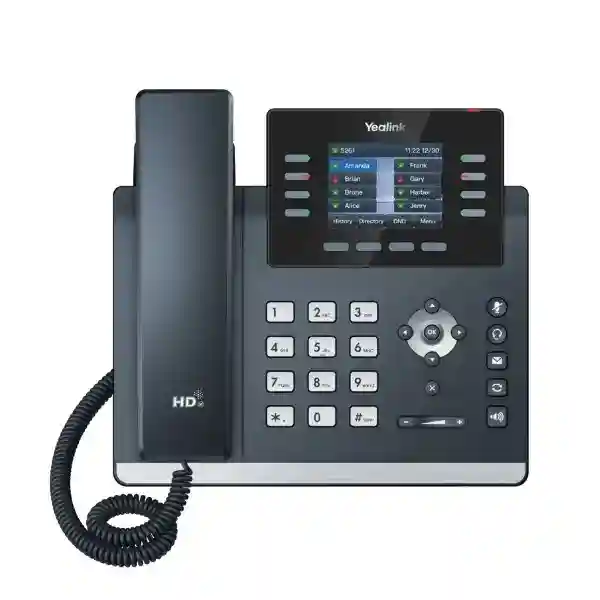
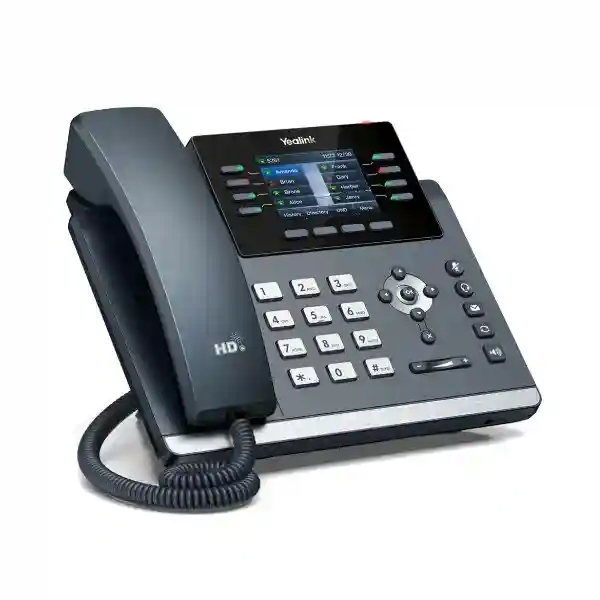
The Yealink SIP-T44W is a well-rounded SIP desk phone designed for modern business calling, combining a 2.8-inch color display, support for up to 12 SIP accounts, dual-port Gigabit Ethernet, Power over Ethernet, built-in dual-band 2.4 GHz and 5 GHz Wi-Fi, Bluetooth 4.2, dual USB ports and Yealink Optima HD Voice. It is particularly suitable for organizations that want a dependable office handset without giving up flexible wireless connectivity, headset options or expansion capability.
For procurement teams in Tanzania, the main question is not only whether the phone has the right headline features, but whether it fits the PBX platform, SIP trunk, voice VLAN, PoE switching, Wi-Fi design, headset workflow and future user-growth plan. FourTeck can help buyers evaluate those dependencies before quotation so the handset is selected as part of a workable voice environment rather than as an isolated device.
Quick answer
Choose the SIP-T44W when you need a professional SIP phone with built-in Wi-Fi and Bluetooth, Gigabit Ethernet, PoE, HD voice, multi-account capability, USB accessories and expansion support for everyday office, reception and shared-workspace deployment.
Yealink SIP-T44W overview
Yealink positions the SIP-T44W as a feature-rich Wi-Fi SIP phone for business users and co-working environments. The phone uses a 2.8-inch 320 × 240 color LCD with backlight and supports up to 12 SIP accounts. Its connectivity set is a major differentiator: dual-port Gigabit Ethernet supports wired office networking, while integrated dual-band Wi-Fi can simplify locations where running an additional data cable is inconvenient. Built-in Bluetooth 4.2 supports compatible wireless accessories, and two USB ports can be used for functions such as USB headsets, USB recording and supported expansion options.
The T44W also supports Power over Ethernet, so a compatible PoE switch can provide both network connectivity and electrical power through the Ethernet cable. That can reduce the number of individual power adapters at desks and make central UPS protection easier when the switching infrastructure is backed up. For organizations deploying many phones, standardized network design, provisioning and user profiles matter as much as hardware. A properly planned voice VLAN, QoS policy, DHCP strategy, SIP security settings and centralized configuration process can make rollout and later troubleshooting much more predictable.
320 × 240 backlit LCD for menus, line status, contacts and call handling.
Suitable for users handling multiple extensions, identities or lines on a compatible SIP platform.
Dual-band 2.4/5 GHz Wi-Fi and Bluetooth 4.2 broaden desk placement and accessory options.
Designed for efficient business network deployment and workstation pass-through connectivity.
Verified features and practical benefits
HD business audio
Yealink Optima HD Voice, Acoustic Shield and Smart Noise Filtering are designed to improve call intelligibility in typical office environments. Audio quality still depends on the complete call path, including headset or handset choice, codec negotiation, LAN congestion, internet stability, PBX configuration and SIP trunk quality.
Flexible desk connectivity
Dual-port Gigabit Ethernet supports conventional structured cabling, while integrated Wi-Fi offers another deployment option where network cabling is limited or desks move frequently. For business-critical voice, signal quality, RF congestion and roaming design should be checked before relying on wireless connectivity.
Accessory expansion
Dual USB ports support workflows involving compatible USB headsets, USB recording and Yealink expansion modules. This gives organizations room to standardize one handset model across normal office users and higher-volume call handlers while adding accessories only where needed.
PoE deployment
PoE support can simplify desk power and allows voice endpoints to share centrally protected switching infrastructure. Procurement teams should verify switch PoE capacity, UPS runtime and port availability across the planned number of phones instead of checking only whether individual ports support PoE.
Technical specifications at a glance
| Area | Verified capability | Buying relevance |
|---|---|---|
| Display | 2.8-inch 320 × 240 color LCD with backlight | Clear menu and line-status visibility for daily office use. |
| SIP | Up to 12 SIP accounts | Useful where users need several identities, extensions or line registrations. |
| Ethernet | Dual-port Gigabit Ethernet | Supports desk-phone plus PC topologies in conventional office networks. |
| Wireless | Built-in 2.4/5 GHz Wi-Fi and Bluetooth 4.2 | Provides flexibility for wireless placement and compatible accessories. |
| Power | PoE supported | Can simplify deployment when a compatible PoE switch is available. |
| USB | Dual USB ports | Supports selected headsets, recording and expansion use cases. |
| Audio | Optima HD Voice, Acoustic Shield, Smart Noise Filtering | Designed for clearer professional voice conversations. |
| Expansion | Supports color-screen expansion modules | Relevant for reception, attendant and high-call-volume positions. |
Compatibility, PBX integration and deployment planning
The SIP-T44W is a standards-based SIP endpoint, but successful deployment should still begin with compatibility checks. Confirm the exact IP PBX or hosted voice platform, supported provisioning method, required SIP features, codec policy, line-key behavior, BLF requirements, directory integration, call recording expectations and any security requirements before ordering a large quantity. Different platforms may expose different combinations of phone features, and custom templates may be needed to standardize settings across multiple handsets.
Network design is equally important. Wired deployments should confirm Gigabit switch availability, PoE capacity, voice VLAN assignment, DHCP options, DNS, NTP, firewall rules and QoS. Wireless deployments should verify 2.4 GHz or 5 GHz coverage at the exact desk positions, not merely elsewhere in the building. Voice is sensitive to packet loss, latency and jitter, so a Wi-Fi signal that is acceptable for casual browsing may still be unsuitable for sustained business calls under load.
For broader telephony planning, review FourTeck Tanzania’s business technology services, technology shop and procurement guidance, integrated IT and telecom overview, FourTeck Tanzania company overview and quotation and contact page. These verified pages help connect the handset decision with switching, Wi-Fi, structured cabling, support and wider infrastructure planning.
Who should consider the SIP-T44W?
The SIP-T44W is a strong fit for general office users, managers, administrative staff, shared desks, customer-service teams and reception-adjacent roles that need more than a basic entry-level phone but do not require a large touchscreen device. Integrated Wi-Fi can be helpful in flexible offices and renovated spaces where cable routes are constrained. Bluetooth and USB connectivity provide practical headset choices, while expansion support gives busy call handlers a path to add more visible keys when required.
Organizations should choose by workflow rather than specification count. A standard desk user may need only a single extension, transfer, hold, conference and directory access. A receptionist may need BLF monitoring, transfer shortcuts and an expansion module. A supervisor may prioritize a wireless headset and multiple line appearances. Mapping those user profiles before procurement can reduce both overspending and frustration after deployment.
Yealink SIP-T44W Tanzania
For organizations sourcing the Yealink SIP-T44W in Tanzania, the most useful starting point is a deployment brief that identifies the number of users, current phone system, branch count, cabling condition, switch capacity and call-handling requirements. The T44W’s blend of wired Gigabit networking and integrated Wi-Fi is valuable because Tanzanian workplaces vary widely: some offices have structured Cat6 cabling and PoE switching at every desk, while others operate in leased premises where adding new cable runs is inconvenient. The handset supports either approach, but the final design should still favour the most stable connection available for business-critical voice.
A Tanzania quotation should clearly state handset quantity, whether power is expected from PoE or a separate approved adapter, required headsets, any expansion modules, and whether provisioning or PBX configuration is part of the requested scope. Buyers should also identify whether the phones will connect to an on-premises IP PBX, a hosted SIP service, or a multi-site voice platform. This prevents purchasing a capable phone while overlooking licensing, extension creation, SIP trunk capacity or network changes needed to make it operational.
For larger deployments, it is sensible to pilot a small group of phones before a broad rollout. Confirm call quality, feature-key behaviour, directory access, transfer workflows, voicemail, BLF, Wi-Fi performance where used, headset compatibility and remote provisioning. Tanzania businesses with several offices can then standardize a template covering firmware policy, VLANs, security settings, naming and user training. FourTeck’s broader Africa IT solutions network can also be relevant when a regional organization wants related technology planning across more than one country.
Yealink SIP-T44W Dar es Salaam
Businesses in Dar es Salaam often need IP telephony for headquarters, service offices, professional firms, hotels, logistics operations, retail administration, contact handling and multi-department environments. The Yealink SIP-T44W can suit these scenarios when users need a compact color-screen desk phone with strong connectivity options. In a modern office tower, PoE and structured cabling may be the preferred method because it keeps devices on a managed LAN and allows centralized power protection. In a refurbished or flexible workspace, built-in dual-band Wi-Fi can reduce the need to install a new cable purely for the handset, provided the wireless network is designed for reliable real-time voice.
For Dar es Salaam deployments, voice quality should be assessed together with internet and LAN performance. An organization can own excellent endpoints and still experience poor calls if there is packet loss, overloaded Wi-Fi, an undersized internet link or badly configured QoS. Before ordering, document concurrent call expectations, SIP trunk capacity, switch uplinks, voice VLANs and any remote branch connectivity. If the site uses shared internet for cloud applications, video meetings, backups and phones, network prioritization becomes especially important during busy periods.
Procurement teams should also classify users. Reception or customer-service staff may benefit from USB headsets and expansion modules; executives may prefer Bluetooth headsets; ordinary office users may only need the handset and PoE. This role-based approach prevents unnecessary accessories while ensuring busy positions have the controls they need. When requesting a quote for SIP-T44W phones in Dar es Salaam, include the phone system brand, number of extensions, desired accessories, switch model, cabling status and whether configuration, installation or user handover is required. That produces a more useful proposal than asking for a unit price alone.
Yealink SIP-T44W Mwanza
In Mwanza, the SIP-T44W can be considered for branch offices, healthcare administration, education, distribution, hospitality, professional services and growing businesses that need reliable desk communications. A practical deployment should account for the local site layout and how the branch connects back to central systems. If the PBX is hosted elsewhere or shared with a head office, WAN stability becomes part of the phone design. Where connectivity is intermittent, it is especially important to understand how the selected PBX handles registration loss, failover, emergency calling procedures and call forwarding during an outage.
The T44W gives network designers flexibility because it supports both Gigabit Ethernet and dual-band Wi-Fi. Wired Ethernet remains attractive at fixed desks because it is generally easier to monitor and segment. Wi-Fi can be useful for temporary offices, training rooms or locations where floor layouts change, but coverage testing should be carried out at the intended phone positions. A warehouse office or building with thick walls can behave very differently from an open-plan office, so wireless planning should use actual site conditions rather than a generic range estimate.
Mwanza buyers planning several phones should confirm PoE switch capacity and spare ports, then decide whether voice devices need dedicated VLANs and QoS. The quotation should separate phones from optional accessories and deployment services, making it clear what is included. If a branch is adding IP phones as part of a larger upgrade, consider switching, Wi-Fi, firewall rules, UPS protection and cabling at the same time. This integrated approach can reduce troubleshooting later because power, network and voice dependencies have been addressed before handsets arrive.
Yealink SIP-T44W Arusha
Arusha has a diverse business environment that includes hospitality, tour operations, NGOs, professional firms, education, healthcare and administrative offices. These organizations often need a phone system that can support front-desk calling, departmental extensions and communications between local and remote teams. The Yealink SIP-T44W fits well where a full business SIP experience is needed in a compact handset. Its color screen, multi-account support, wired Gigabit connectivity, integrated Wi-Fi, Bluetooth and headset options make it adaptable across reception, management and general office roles.
Hospitality and customer-facing operations should pay particular attention to call routing and user workflow. The handset alone does not create queues, IVR menus or departmental hunt groups; those capabilities depend on the IP PBX or cloud voice platform. Before ordering phones, define who answers incoming calls, what happens after hours, which desks need line monitoring, and whether users require call recording, voicemail or mobility. This information determines both the PBX configuration and whether accessories such as expansion modules are justified.
For Arusha offices relying on wireless connectivity, test the 5 GHz and 2.4 GHz environment at working hours because interference and building materials can affect voice stability. For wired deployments, verify PoE and VLAN configuration. A mixed deployment is also possible, using Ethernet where cabling exists and Wi-Fi where it does not. When comparing quotations, look beyond the handset price and confirm provisioning, PBX licensing, SIP trunk requirements, accessories, installation scope and support responsibilities. A transparent bill of materials is particularly valuable when the phones are part of a larger office refresh involving switching, Wi-Fi or structured cabling.
Yealink SIP-T44W Dodoma
For organizations in Dodoma, including administrative offices, institutions, contractors, professional services and expanding enterprises, the SIP-T44W offers a practical combination of SIP capacity and deployment flexibility. Up to 12 SIP accounts can support users who manage more than one identity or line, while the color display and programmable keys provide a familiar desk-phone experience. Integrated Wi-Fi is useful where office layouts change or where adding new Ethernet drops would be disruptive, although critical desks should use whichever connection method delivers the most consistent quality after testing.
A Dodoma voice project should start with the phone system rather than the endpoint count. Confirm the PBX platform, extension plan, number ranges, SIP trunk arrangement, inbound routing, voicemail policy and branch-to-branch dialing. Then map the physical network: switches, PoE budget, UPS, VLANs, wireless coverage and internet resilience. This order of work helps avoid situations where phones are purchased first and the organization later discovers that the network or PBX requires additional upgrades.
For institutions deploying multiple T44W units, centralized provisioning can reduce repetitive configuration and make future changes easier. Standardize labels, time settings, firmware policy, directory sources and security settings. Reception or administrative teams may benefit from a compatible expansion module if they monitor many extensions, while general users may require no extra hardware. When requesting pricing in Dodoma, provide quantities by user type rather than one undifferentiated total. This allows a quotation to distinguish standard desks, reception positions and users who need wireless headsets, making the deployment more cost-effective and easier to support.
Yealink SIP-T44W UAE
In the UAE, the Yealink SIP-T44W is relevant to companies standardizing SIP desk phones across offices, branches, co-working environments and service teams. The combination of Gigabit Ethernet, PoE, Wi-Fi and Bluetooth suits workplaces where different desk types require different connection methods. Businesses with structured cabling can use PoE for a clean installation, while flexible spaces can use built-in wireless connectivity after validating signal quality and voice performance. Dual USB ports also allow selected users to add headsets, recording functions or expansion accessories without moving to a completely different phone platform.
UAE organizations frequently operate multi-site environments, so provisioning and consistent PBX templates can be more valuable than configuring phones individually. Before rollout, test the T44W against the selected SIP platform and confirm functions such as BLF, transfer, hold, voicemail access, directories, caller ID and conferencing. Where compliance or recording policies apply, clarify whether recording occurs on the endpoint, PBX or another service and confirm retention requirements separately. The phone supports secure transport features, but enterprise security still depends on the wider architecture, including credential policy, network segmentation, firewall rules and firmware management.
For regional procurement, FourTeck’s UAE technology solutions site can support broader discussions around IP telephony, networks and related infrastructure. A useful quote request should include quantity, office locations, PBX platform, desired headsets, PoE availability, Wi-Fi usage and installation scope. This helps distinguish a hardware-only requirement from a complete telephony deployment and avoids assumptions about accessories, licenses or service coverage.
Yealink SIP-T44W Uganda
Ugandan businesses evaluating the SIP-T44W should consider how voice services will operate across offices, branches and remote users. The handset provides a strong business feature set, but its real value comes from integration with the chosen SIP environment. Organizations with a central PBX can use standard extension numbering and call routing across sites, while hosted deployments may reduce the need for local PBX hardware. In either case, the WAN and LAN should be checked for voice traffic, especially if the same connection also carries cloud applications, video meetings and large data transfers.
The phone’s integrated dual-band Wi-Fi can be useful for premises where desk cabling is limited. However, a wireless deployment should not be treated as automatic. Test signal level, interference, channel utilization and access-point capacity at the desks. For fixed office users with available cabling, dual-port Gigabit Ethernet and PoE provide a straightforward wired option. Teams with high call volumes can use compatible USB or Bluetooth headsets, and expansion support can help attendants monitor additional lines or extensions where the PBX supports those functions.
For organizations buying across Uganda, the FourTeck Uganda technology solutions site provides a regional point of reference for wider IP PBX, networking and infrastructure requirements. A procurement checklist should include phone quantity, user roles, PBX compatibility, PoE, cabling, wireless coverage, accessories, provisioning and support expectations. Clarifying those items before ordering makes it easier to compare quotations on a like-for-like basis.
Yealink SIP-T44W Kampala
Kampala offices often combine corporate administration, customer support, finance, professional services, retail management and regional coordination. The Yealink SIP-T44W can serve these environments as a standardized desk phone that is capable enough for everyday users while still offering expansion options for heavier call-handling roles. The built-in Wi-Fi and Bluetooth reduce dependence on external adapters, and dual USB connectivity gives organizations flexibility when selecting headsets or expansion accessories.
Before deploying the phones, Kampala businesses should confirm whether their switches provide sufficient PoE capacity. A switch may advertise PoE on many ports but still have a total wattage budget that becomes important when dozens of endpoints are connected. UPS protection should also be considered because IP phones depend on the network path; keeping the handset powered is not useful if the switch, router, firewall or PBX shuts down. For cloud PBX deployments, internet resilience and failover procedures should be documented so staff know what happens during a connectivity interruption.
A practical Kampala rollout can begin with a small pilot group representing several user types: a standard employee, a manager using Bluetooth, a receptionist using busy-lamp keys and perhaps a Wi-Fi-connected phone. Validate call quality and workflows, then replicate a proven configuration. When requesting a quote, state whether you need hardware only or a complete deployment including PBX setup, extension creation, network preparation, provisioning and training. Clear scope helps prevent hidden gaps between a handset purchase and a fully operating business voice system.
Yealink SIP-T44W Arua
For offices and institutions in Arua, the SIP-T44W can be useful where a professional SIP endpoint is needed but deployment conditions may differ from a large city headquarters. Branch offices should pay special attention to upstream connectivity and remote-management capability. If the PBX is hosted in Kampala, another country or the cloud, every call depends on a reliable WAN path. Testing latency, packet loss and jitter is therefore an important step before finalizing a large handset order.
The phone’s built-in Wi-Fi provides a practical option when structured cabling is unavailable at a particular desk, but wireless voice should be designed deliberately. Check the access point, frequency band, interference and signal quality in the actual room. If Ethernet is available, PoE can simplify power and allow the phone to be protected by the same UPS infrastructure as the network switch. Where local power stability is a concern, network and voice resilience should be considered together rather than buying separate desktop adapters without a wider continuity plan.
Arua buyers can reduce support effort by keeping configurations consistent with other branches. Use standard extension naming, feature keys, firmware versions and provisioning templates where possible. Keep a simple record of each phone’s assigned user, MAC address, extension and site. If a reception desk needs many monitored extensions, confirm expansion-module requirements before procurement. If most users only make and receive normal calls, avoid adding accessories that do not serve a clear workflow. This role-based approach keeps the deployment practical and easier to maintain.
Yealink SIP-T44W Mbarara
Businesses in Mbarara can use the SIP-T44W for office extensions, front desks, departmental users and branch communications where a capable SIP phone is required. The handset’s 12-account capacity is useful for more complex line arrangements, but the majority of users may need only one or two extensions. The benefit is flexibility: one model can be configured differently for different roles without forcing every user into the same feature set.
When planning a Mbarara deployment, inspect the existing network before ordering. Confirm whether desk ports run at Gigabit speed, whether switches support PoE, and whether voice VLANs can be configured. If Wi-Fi will be used, test both bands and ensure that the access points have enough capacity for concurrent voice plus normal client traffic. Business Wi-Fi designed mainly for browsing may need tuning before it becomes a dependable platform for many always-on desk phones.
Procurement should also address the PBX and SIP service. Verify extension licenses, trunk channels, inbound numbers, voicemail capacity and branch dialing. If the organization expects growth, estimate how many additional users might be added over the next two or three years and whether the switching and PBX platforms can accommodate them. A complete quote request should specify handset quantity, accessories, power method, PBX platform and services required. This enables a supplier to propose a coherent solution rather than simply provide a per-unit phone price with deployment questions left unanswered.
Yealink SIP-T44W Gulu
In Gulu, the Yealink SIP-T44W can support office communications for NGOs, education, healthcare administration, professional services, distribution and growing enterprises. It is a useful choice when organizations want a desk phone that can remain consistent across multiple locations while adapting to either wired or wireless network conditions. The phone’s compact color display, HD voice technologies, Gigabit ports, PoE, Wi-Fi and Bluetooth provide a balanced feature set for standard office users and selected higher-call-volume roles.
Branch design should account for where the PBX is located. If voice services are centralized, test the path from Gulu to the PBX during typical working hours. If a local PBX is used, clarify backup, remote administration and how calls should behave if the internet fails. Organizations with important inbound calling may also want a documented fallback process such as mobile forwarding or alternate routing, depending on what the SIP provider and PBX support. These continuity decisions belong in the voice design rather than being left until after an outage.
For handset deployment, PoE-backed wired connections are often easy to manage when cabling exists. Wi-Fi can solve specific placement challenges, but it should be validated for voice. Headset requirements should be tied to work patterns: staff who spend hours on calls may benefit substantially, while occasional callers may not. Standardizing the configuration across Gulu and other branches can simplify support, spare management and user training. Include installation and provisioning expectations in the quotation so responsibilities are clear from the start.
Yealink SIP-T44W Kenya
Kenyan businesses considering the SIP-T44W can deploy it as a general-purpose SIP desk phone for office users, customer-service staff, branch teams and reception environments. Its built-in Wi-Fi is particularly useful for flexible workplaces, while dual-port Gigabit Ethernet and PoE remain strong choices for fixed desks. The phone also supports USB and Bluetooth accessories, allowing organizations to tailor the same core handset to different working styles without introducing many unrelated models.
For Nairobi and other Kenyan locations, buyers should confirm the PBX platform and whether all required features have been tested with the T44W. SIP registration is only the starting point. Organizations may depend on BLF, attended transfer, call pickup, corporate directories, voicemail indicators, conferencing or specific provisioning workflows. A short technical validation can reveal configuration differences before hundreds of phones are deployed. Network design should include PoE budgets, VLANs, QoS and internet resilience for hosted voice platforms.
FourTeck’s Kenya IT solutions site can be relevant for organizations coordinating regional procurement or matching IP phone deployment with switching, Wi-Fi and PBX work. When comparing Kenyan quotations, ensure that the same scope is being compared: handset only, handset plus adapter, headset, expansion module, configuration, installation and support can all change total project cost. Also verify the exact model and included accessories because similar T4-series phones can differ in wireless capability and display features.
Yealink SIP-T44W Kuwait
For businesses in Kuwait, the SIP-T44W offers a practical option for office telephony where wired and wireless connectivity flexibility is valuable. Corporate offices, service companies, hospitality operations and multi-site businesses can use a common handset platform while configuring different line appearances and feature keys for each role. Integrated Bluetooth and Wi-Fi avoid the need for separate wireless dongles, and the dual USB design supports selected headset and expansion use cases.
A Kuwait deployment should still be planned around the voice platform. Verify SIP interoperability with the chosen PBX or service, then confirm the specific user functions required. Network engineers should review voice VLANs, QoS, PoE capacity and firewall policy. If the organization uses a cloud PBX, internet availability becomes part of the telephony service level; dual internet links or other continuity measures may be appropriate for sites where incoming and outgoing calls are operationally critical.
Temperature-controlled office conditions are normally straightforward for desk phones, but infrastructure rooms still need proper cooling and power protection because switches, firewalls and PBX appliances affect every phone. Procurement teams should ask for exact scope rather than relying on model-name pricing. Include quantity, branch count, accessories, installation requirements and any migration from an existing PBX. A staged migration can allow departments to move in manageable groups while preserving tested call routes and reducing disruption. This is particularly helpful where phone numbers, IVR menus or call queues must remain available throughout the transition.
Yealink SIP-T44W Ghana
Ghanaian businesses looking for a flexible SIP desk phone can consider the Yealink SIP-T44W for administrative teams, front desks, professional users and branch offices. The phone combines a compact color display with multi-account support, Gigabit Ethernet, PoE, built-in dual-band Wi-Fi, Bluetooth and USB connectivity. This balance makes it suitable for organizations that want a consistent endpoint across conventional cabled offices and selected desks that rely on wireless connectivity.
For deployments in Accra or other business centers, voice traffic should be treated as a real-time application. Check the LAN for congestion and ensure the PBX or hosted service has adequate capacity. Where many phones share Wi-Fi, design the wireless network for client density and airtime rather than assuming that strong signal alone guarantees call quality. Wired PoE remains attractive for fixed positions, especially where switches and UPS systems are centrally managed.
FourTeck’s Ghana technology procurement site can support organizations coordinating wider technology needs. For an accurate T44W quotation, include user count, PBX platform, SIP provider, desk locations, headset needs and whether expansion modules are required. Also clarify whether phones will be preconfigured before deployment or provisioned on site. Standard configuration templates are valuable for organizations with multiple branches because they reduce differences in feature keys, firmware and security settings that can otherwise complicate support.
Yealink SIP-T44W Nigeria
Nigerian organizations can use the SIP-T44W in corporate offices, service centers, customer-support operations, hospitality administration and branch environments that require standards-based SIP telephony. The phone’s multi-account support and accessory options make it suitable for both general users and positions that handle heavier call volumes. Its integrated Wi-Fi and Bluetooth can also reduce external adapters, which simplifies desk setup and inventory management.
For Lagos, Abuja and other locations, network resilience should be considered alongside handset features. An IP phone depends on the LAN, power and PBX path. Where outages or internet interruptions would materially affect operations, plan UPS capacity for switching and routing, document failover options and decide how inbound calls should be handled when a site is unreachable. Hosted voice can simplify central management, but it increases dependence on WAN availability; on-premises PBX can keep internal calling local but still needs power, backup and administration.
A strong procurement process separates verified phone capabilities from project assumptions. The T44W supports PoE, Wi-Fi, Bluetooth, Gigabit Ethernet and expansion options, but availability, delivery time, warranty terms, SIP-provider compatibility and installation scope should be confirmed for each purchase. Organizations buying many units should request a pilot, define user profiles and establish a provisioning template before mass deployment. That approach reduces risk and makes it easier to compare competing quotations based on the same accessories and service scope rather than headline unit price alone.
Yealink SIP-T44W Seychelles
In Seychelles, the Yealink SIP-T44W can be relevant to hotels, professional offices, financial services, administration, tourism businesses and multi-site organizations that need dependable SIP desk communications. Hospitality environments in particular often require different user profiles: reception may need visibility of many extensions, back-office teams may need standard calling features, and managers may prefer wireless headsets. The T44W’s expansion support, Bluetooth, USB connectivity and multi-account capability let one handset platform serve several of those roles with different configurations.
Island and multi-building environments should pay careful attention to the network path. If a PBX is centralized, remote extensions depend on stable links between locations. If phones use Wi-Fi, access-point coverage must be validated at each desk and not inferred from guest-Wi-Fi experience. Voice traffic is continuous and latency-sensitive, so a design optimized only for intermittent web browsing can perform poorly for calls during busy periods. Where Ethernet is available, PoE can provide a simple and manageable deployment model.
When requesting a Seychelles quotation, include the exact site count, user roles, PBX platform, SIP service, expected concurrent calls and accessory needs. If the project involves an existing analog or digital phone system, document which numbers and call flows must be preserved during migration. A phased transition can help test configuration and user training before the entire organization moves. Procurement teams should also verify local delivery, warranty and support terms at the time of purchase instead of assuming they are identical to another market.
Buying guidance: T44W versus simpler or larger desk phones
Choose the T44W over a simpler desk phone when built-in Wi-Fi or Bluetooth matters, when users benefit from a color screen, when dual USB connectivity is useful, or when expansion-module support is part of the role. A lower-cost model can be perfectly adequate for users who only need one extension and basic call handling on a wired desk. Conversely, users who require a much larger display, touch interface, very high key visibility or advanced executive features may be better served by a higher-tier model. The best fleet often uses two or three standardized user profiles rather than forcing one model onto every desk.
When evaluating alternatives, compare the full deployment requirement: built-in versus optional Wi-Fi, Bluetooth availability, number of SIP accounts, display size, Ethernet speed, PoE, headset options, expansion support, provisioning method and platform compatibility. A phone that is cheaper as a bare unit can become more expensive if wireless adapters, power supplies or other accessories must be added to meet the same requirement.
Related infrastructure for a reliable IP phone deployment
A good SIP phone deployment depends on the network underneath it. Managed switches provide VLAN and QoS control; PoE can simplify handset power; business Wi-Fi supports locations where cabling is impractical; firewalls protect the edge and control SIP-related traffic; UPS systems help keep key network equipment running through short power events. Structured cabling, labeling and documentation make moves, adds and troubleshooting much easier.
Organizations operating across multiple markets can also review FourTeck’s specialist IP phone resource for broader endpoint considerations. The objective is not to add unnecessary infrastructure but to ensure that the phone system has adequate power, connectivity, segmentation, security and management from the first day.
Quotation checklist for Yealink SIP-T44W
State how many phones are for standard users, reception, supervisors and executives.
Provide the exact voice platform and current firmware or service environment where known.
Confirm PoE availability, switch model, voice VLAN, cabling and whether Wi-Fi will be used.
List wired or wireless headsets, expansion modules and any required power accessories.
Specify whether you need supply only, provisioning, installation, PBX configuration, migration or training.
Define who will manage firmware, user changes, fault diagnosis and PBX administration after rollout.
Frequently asked questions
Does the Yealink SIP-T44W have built-in Wi-Fi?
Yes. Yealink specifies built-in dual-band 2.4 GHz and 5 GHz Wi-Fi supporting 802.11a/b/g/n/ac. This can simplify deployment in locations without a convenient Ethernet outlet, but business voice quality still depends on wireless coverage, interference and network load.
Does the T44W support Power over Ethernet?
Yes. PoE support allows a compatible PoE switch to deliver network connectivity and power through Ethernet. Confirm the switch’s available PoE budget and whether the wider network infrastructure is protected by UPS if power continuity is important.
How many SIP accounts does the T44W support?
Yealink lists support for up to 12 SIP accounts. The number of identities a user actually needs depends on the PBX design and call workflow.
Can I use a headset with the SIP-T44W?
Yes. The phone supports USB headset and EHS use cases and also includes Bluetooth 4.2 for compatible wireless devices. Confirm the exact headset model and required integration before buying in volume.
Can the SIP-T44W be used at a reception desk?
Yes, depending on the number of monitored extensions and PBX features required. The T44W supports color-screen expansion modules, so reception or attendant roles can add more visible keys when appropriate.
Is the SIP-T44W compatible with my PBX?
The phone is a SIP endpoint, but full feature compatibility should be checked against the specific PBX or hosted service. Confirm registration, provisioning, BLF, transfer, directory, voicemail and any required security features before mass rollout.
Should I use Ethernet or Wi-Fi for the T44W?
Use the connection that delivers the most reliable voice performance in your environment. Ethernet with PoE is straightforward for fixed desks; Wi-Fi is valuable where cabling is difficult or desks move, provided coverage and congestion have been validated.
What information should I provide for a quotation?
Provide quantity, location, PBX platform, SIP provider if known, PoE availability, wired or Wi-Fi preference, headset and expansion requirements, and whether you need installation or configuration. This makes the quotation much more accurate.
Decision recap
The Yealink SIP-T44W is best suited to organizations that want a professional SIP desk phone with built-in wireless connectivity, Gigabit Ethernet, PoE, flexible headset options and room for expansion. Its strongest value appears when it is matched to a properly designed PBX and network rather than bought as a standalone handset.
Before purchase, verify PBX interoperability, network capacity, PoE, Wi-Fi quality, accessories and deployment scope. For multi-site projects, standardize user profiles and provisioning templates so the phone behaves consistently across offices.
Talk to FourTeck about your SIP-T44W requirement
Share the number of phones, your current PBX or hosted voice service, user roles, PoE availability, Wi-Fi plans and accessory requirements. FourTeck can help frame a quotation around the actual deployment rather than only the handset quantity. This is especially useful when the project also involves switches, Wi-Fi, VLANs, SIP trunks, structured cabling or migration from an older phone system.




Reviews
There are no reviews yet.