
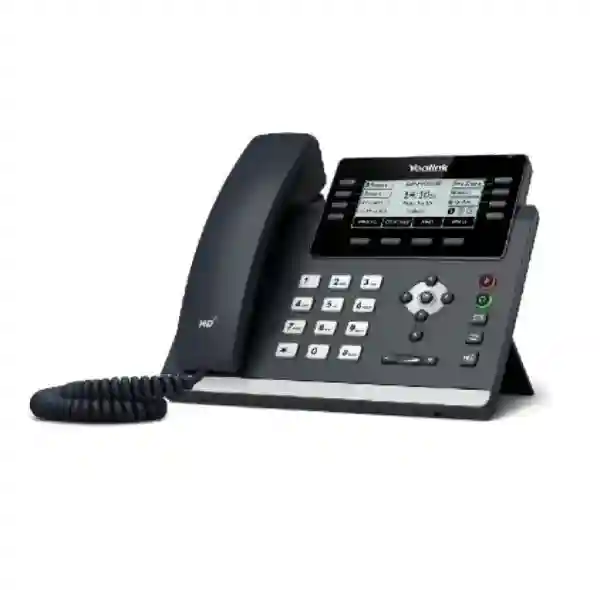
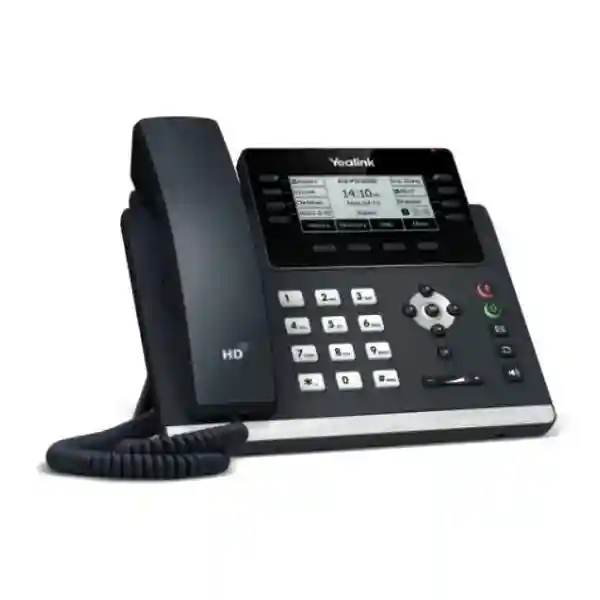
Yealink SIP-T43U
The Yealink SIP-T43U is designed for organizations that want a capable SIP desk phone without moving every user to a large color touchscreen. It combines a 3.7-inch 360 × 160 backlit graphical display, up to 12 SIP accounts, dual USB 2.0 ports, dual-port Gigabit Ethernet, IEEE 802.3af Power over Ethernet, headset support, expansion-module support and enterprise-oriented provisioning. For Tanzanian businesses planning IP telephony, the practical value is not only the handset itself: the T43U can fit into a properly designed voice VLAN, PoE switching environment and SIP or IP-PBX deployment where users need dependable call handling, programmable keys and centralized configuration.
What the Yealink SIP-T43U solves for business users
Many offices need more than a basic two-line phone but do not require a premium video endpoint at every desk. The SIP-T43U fills that middle ground. Yealink positions it as a feature-rich business phone with up to 12 SIP accounts and support for the EXP43 expansion module. That makes it suitable for knowledge workers, managers, reception-support roles, shared desks and teams that need multiple line appearances or programmable functions. The dual USB design also gives administrators flexibility because USB can be used for compatible headsets, wireless connectivity accessories, recording to supported USB storage and expansion options. Before ordering accessories, the exact adapter and firmware compatibility should be confirmed for the intended deployment.
For organizations moving from analog telephony, the T43U should be treated as part of a wider IP voice system. The phone relies on the local network, SIP service or IP-PBX, switching, addressing and quality-of-service policy. Power over Ethernet can simplify desk installation when a compatible PoE switch is available, while the second Gigabit Ethernet port can help connect a workstation through the phone where that topology is appropriate. A voice project should therefore include endpoint quantity, extension plan, SIP trunk or hosted service compatibility, VLAN design, PoE budget, cabling quality and user roles rather than focusing only on the phone price.
12 SIP accounts
Supports up to 12 VoIP accounts for users who need several identities, line appearances or service registrations, subject to PBX and provider configuration.
Dual USB ports
Two USB 2.0 ports increase flexibility for compatible headsets, Bluetooth or Wi-Fi dongles, USB recording and supported expansion workflows.
Gigabit + PoE
Dual-port Gigabit Ethernet and IEEE 802.3af PoE help the phone fit into modern switched office networks with centralized power.
HD voice
Yealink Optima HD Voice, Acoustic Shield, Smart Noise Filtering and wideband codec support are designed to improve speech clarity in compatible calling environments.
Verified Yealink SIP-T43U technical highlights
| Display | 3.7-inch 360 × 160-pixel graphical LCD with backlight |
| SIP / VoIP accounts | Up to 12 |
| Ethernet | Dual-port Gigabit Ethernet |
| Power | IEEE 802.3af PoE Class 2; optional external AC adapter |
| USB | 2 × USB 2.0 |
| Expansion | Supports Yealink EXP43 expansion module; up to three modules according to Yealink documentation |
| Audio | HD handset and speaker, Acoustic Shield, Smart Noise Filtering, G.722 and additional codecs |
| Conference | 5-way local audio conferencing |
| Provisioning | Browser, phone and auto-provisioning; FTP/TFTP/HTTP/HTTPS; PnP; TR-069 and Yealink deployment mechanisms |
| Security | SRTP, TLS 1.3, HTTPS certificate management, AES256 configuration-file encryption, IEEE 802.1X, IPv6, secure boot and additional network security functions |
Compatibility, provisioning and deployment planning
A successful T43U rollout starts with compatibility. SIP is standardized, but individual call features, provisioning templates, BLF behavior, voicemail integration, directory functions and security settings can depend on the selected IP-PBX or hosted voice platform. Yealink lists common SIP and business telephony interoperability capabilities, yet buyers should still confirm the exact PBX version, firmware baseline, SIP trunk behavior and required features before a large deployment. For a few phones, manual configuration may be acceptable. For dozens or hundreds, centralized provisioning is more important because it reduces configuration drift and makes changes repeatable.
Network readiness is equally important. The phone supports VLAN-related mechanisms, QoS tagging, LLDP/CDP and PoE. A voice VLAN can separate signaling and media traffic from general user data, while QoS can help prioritize real-time voice when links become busy. The switch must have enough PoE power for all connected endpoints, not merely enough PoE-capable ports. UPS protection for the switch, router, firewall and PBX can also be considered if continuity during short power interruptions is operationally important. For broader planning, explore FourTeck Tanzania technology services, which cover integrated network, communication and infrastructure considerations rather than treating phones as isolated devices.
Buying guidance for Yealink SIP-T43U projects
For procurement teams, a useful quotation request should include the number of phones, number of sites, required SIP or PBX platform, PoE availability, headset needs, wall-mount requirements, any need for Wi-Fi or Bluetooth, expected programmable-key requirements and whether EXP43 modules are required. If wireless connectivity is needed, specify whether the requirement is Wi-Fi, Bluetooth headsets or both so the correct compatible Yealink accessory can be checked. If the organization already uses a headset fleet, provide the exact headset model because USB and EHS behavior can vary by accessory.
The T43U is often attractive where users need more line handling and programmability than an entry-level phone but do not need a large color display. Reception-heavy users may need one or more expansion modules, while general office users may be well served by the base phone. A phased deployment can standardize firmware, provisioning and call flows before scaling. Organizations can review broader endpoint and infrastructure categories through the FourTeck Tanzania business technology shop guide, which explains the relationship among IP phones, PBX, PoE switching, cabling and related systems.
Yealink SIP-T43U Tanzania
For organizations searching for the Yealink SIP-T43U in Tanzania, the most useful purchasing decision begins with the communication environment rather than the handset alone. The T43U supports up to 12 SIP accounts and gives users a physical-key workflow that can be easier to standardize across offices where staff handle regular inbound and outbound calls. Its 3.7-inch backlit display provides caller and menu information without the cost or complexity of a large touchscreen. Dual USB ports make the platform adaptable for compatible wired or wireless headset workflows, optional Wi-Fi or Bluetooth accessories and supported recording or expansion use. For reception, shared administration desks, customer service, finance, sales and management roles, these capabilities can reduce the need to move to a much higher-end endpoint simply to gain more programmable functionality.
In Tanzania, businesses frequently evaluate IP telephony alongside network upgrades, branch connectivity, internet reliability and PoE switching. The SIP-T43U supports dual-port Gigabit Ethernet and PoE, which means a properly designed LAN can carry both voice service and workstation connectivity while also powering the handset. This does not remove the need to size the PoE budget or apply network policies. Where a switch powers many phones, access points and cameras, the combined power demand must be checked. Voice VLANs, QoS and secure provisioning should also be planned so call quality and administration remain consistent as the number of extensions grows.
For multi-site Tanzanian organizations, centralized configuration can be particularly valuable. Yealink supports auto-provisioning mechanisms that can help administrators apply consistent account settings, server addresses, feature keys and security parameters. Before rollout, test the exact PBX, SIP provider and firmware combination, especially for BLF, call park, voicemail, directory and transfer behavior. A procurement request should therefore state the PBX platform, user count, site count and required user roles. This helps distinguish standard desk users from receptionists who may benefit from EXP43 expansion modules.
FourTeck Tanzania presents IP phones as part of an integrated business technology environment covering voice, networking and support. Buyers can review the wider FourTeck Tanzania IT and telecom portfolio when the requirement includes PBX, switches, Wi-Fi, firewalling or structured infrastructure in addition to handsets. For quotation accuracy, share phone quantity, accessories, deployment sites, PoE availability, PBX details and any requirements for installation or configuration rather than requesting a handset-only price without the system context.
Yealink SIP-T43U Dar es Salaam
Dar es Salaam businesses often operate in environments where call handling is tied directly to customer service, logistics, sales, finance and administrative coordination. The Yealink SIP-T43U can suit these roles when users need a dependable SIP desk endpoint with more flexibility than an entry model. Its support for up to 12 SIP accounts can accommodate multiple identities or line appearances, while 21 paperless DSS key positions across three pages provide programmable access to common functions. For front desks, executive assistants or departments handling repeated transfers, the ability to add EXP43 expansion modules can extend direct key access without replacing the base handset.
A Dar es Salaam deployment should be planned around the office LAN. The phone includes dual-port Gigabit Ethernet and PoE, enabling it to connect through managed switching and, where appropriate, pass Ethernet connectivity onward to a user workstation. In offices with IP cameras, Wi-Fi access points and phones sharing PoE infrastructure, the switch power budget and uplink capacity should be reviewed as a whole. Voice quality benefits from stable LAN performance, appropriate QoS and controlled internet contention. If SIP traffic traverses a firewall or relies on hosted telephony, NAT, security policies and provider requirements should be tested before mass deployment.
Headset use is another practical consideration. Staff who spend much of the day on calls may prefer a compatible USB or wireless headset, and the T43U offers USB and EHS support. Where Bluetooth or Wi-Fi is required, Yealink uses optional compatible adapters rather than integrating every wireless function in the base phone. That makes accessory selection an explicit procurement task. List the headset models, wireless requirements and expected number of accessories in the quotation so compatibility can be confirmed rather than assumed.
For growing Dar es Salaam offices, standardizing on a model such as the T43U can simplify user training and provisioning. Create a standard configuration for general users, another for managers and a reception profile with expansion keys if needed. That approach reduces support variation and makes future additions easier. Procurement teams should also document whether power adapters are required because Yealink lists the external adapter as optional; in a PoE-ready office, centralized switch power may be the cleaner choice.
Yealink SIP-T43U Mwanza
In Mwanza, the Yealink SIP-T43U can be considered by businesses that need structured desk telephony for offices, trading operations, hospitality administration, healthcare administration, professional services, education and multi-department organizations. A SIP phone deployment can help centralize extension dialing and call-routing features when paired with a suitable PBX or hosted voice platform. The T43U provides up to 12 SIP accounts, local 5-way audio conferencing, programmable keys and a backlit display, giving users familiar desk-phone controls while still operating as an IP endpoint.
The network design is particularly important when voice shares links with cloud applications, file transfers, CCTV or guest Wi-Fi. The T43U supports QoS-related mechanisms and VLAN functions, but these features only provide value when the switching and routing environment is configured consistently. For sites with constrained WAN bandwidth or links that vary during peak periods, traffic management and call-path testing should form part of acceptance testing. Organizations using a hosted PBX should also verify how the provider handles codecs, NAT traversal, registration intervals and failover.
For local administrators, Yealink’s provisioning functions can reduce repetitive handset setup. Instead of manually entering every SIP account and key assignment, an organization can use a supported provisioning process so phones receive defined settings at deployment. This is especially useful when Mwanza is one branch in a wider organization because the same configuration standards can be applied across multiple sites. Administrators should maintain a firmware baseline, configuration backup method and documented naming convention for extensions and devices.
When requesting a quotation for Mwanza, identify whether the need is phone-only supply or a broader telephony project. A complete project may require PoE switching, rack organization, patching, PBX licenses, SIP service, headsets, UPS protection or configuration assistance. The phone’s dual USB ports and EXP43 support allow later expansion, but future accessories should be considered in the initial design so USB use, desk space and user roles remain practical. A clear requirement prevents under-specification and avoids paying for capabilities that users do not need.
Yealink SIP-T43U Arusha
Arusha organizations may evaluate the Yealink SIP-T43U for offices that coordinate reservations, administration, customer inquiries, professional services, tourism operations, education, NGOs and multi-site teams. In these settings, call clarity and predictable handling can matter more than a complex visual interface. Yealink’s Optima HD Voice platform, Acoustic Shield and Smart Noise Filtering are intended to improve voice experience, while the hearing-aid-compatible handset supports a broader range of users. Actual call quality still depends on the codec path, PBX, network and carrier conditions, so endpoint capability should be matched with sound network design.
The T43U has eight line keys that can be programmed across multiple pages, making it useful for frequently accessed features, BLF or speed-dial functions where supported by the phone system. A busy administrative team can use those keys for internal contacts or call-handling functions rather than navigating menus for every action. Where more visual keys are required, the phone supports Yealink EXP43 expansion modules. This can be valuable for reception or coordination desks, but the exact number of monitored extensions and desired functions should be defined before ordering modules.
For Arusha sites, power and connectivity deserve attention during planning. PoE can reduce adapter clutter and centralize power through a managed switch, while UPS-backed switching may help maintain internal calling during short mains interruptions if the PBX and network remain powered. If the location cannot provide PoE at every desk, the optional external power adapter should be included in the bill of materials. Similarly, if the phone must operate away from Ethernet cabling, verify the supported Wi-Fi adapter and radio requirements before assuming wireless operation.
A good deployment plan should include extension mapping, user profiles, firmware, provisioning, directory behavior, voicemail access, time settings and support responsibility. For organizations with seasonal staff or changing desks, hot-desking and flexible seating capabilities may be relevant where supported by the PBX. Testing these workflows with a small pilot group can confirm that call transfer, park, pickup and headset behavior match how the Arusha office actually works before wider rollout.
Yealink SIP-T43U Dodoma
In Dodoma, the Yealink SIP-T43U can fit business, institutional and administrative offices that need standard SIP telephony with room for advanced call handling. The phone’s 12-account capacity is more than many ordinary users require, but it can be useful when an endpoint must present several lines, departments or service identities. The 3.7-inch display keeps the interface compact, while dedicated keys for headset, mute, redial and speakerphone support everyday calling without forcing users through touch menus.
For departments that handle calls on behalf of several colleagues, programmable DSS keys and optional expansion modules can improve visibility and speed. BLF, call pickup, call park, executive-assistant functions and other IP-PBX features depend on the server platform and configuration, so buyers should not evaluate the phone in isolation. Before ordering a large quantity, test the specific functions used by the organization. A model can support SIP standards while still requiring platform-specific provisioning or feature settings for the intended workflow.
Dodoma deployments can also benefit from consistent configuration governance. Standardize extension numbering, NTP settings, provisioning URLs, VLAN parameters and firmware policy. Use strong administrative credentials and secure transport settings where supported by the PBX. Yealink documentation lists SRTP, TLS 1.3, HTTPS certificate management, AES256 configuration-file encryption, IEEE 802.1X and secure boot among the device’s security capabilities. Those features should be incorporated into a broader voice-security policy instead of being viewed as automatic protection without configuration.
When preparing a Dodoma quotation, include the expected number of users, existing PBX, network switch model, whether PoE is available, the quantity of wired or wireless headsets, and whether wall mounting is required. If the site is being built or renovated, coordinate handset positions with data outlets and switch-port availability. That prevents late changes such as adding unmanaged switches at desks or relying on adapters because PoE was not planned. The goal is a clean, documented voice deployment that can be supported and expanded predictably.
Yealink SIP-T43U UAE
For UAE businesses evaluating the Yealink SIP-T43U, the device is relevant to offices that want a mature SIP endpoint with Gigabit networking, PoE and flexible accessory support. It can be deployed in corporate offices, shared workspaces, service desks, branch networks and reception environments where physical call keys remain desirable. Up to 12 SIP accounts and support for EXP43 modules allow the phone to cover a wide range of roles without requiring a touchscreen at every position.
UAE projects often include mixed communication environments, including hosted PBX, on-premises systems, SIP trunks, remote branches and standardized headset fleets. The T43U’s provisioning features can support centralized deployment, but exact compatibility with the selected voice platform should be confirmed. For large rollouts, define a standard firmware release and test core functions such as transfer, hold, conferencing, BLF, voicemail and directory access before replicating the profile. This is especially important when a business has several offices or uses separate telecom providers across locations.
Network design remains central. The phone’s dual-port Gigabit Ethernet can simplify desk connectivity and PoE can reduce the need for individual adapters. Managed switching should provide sufficient PoE power and allow voice VLAN and QoS policies. Where voice traffic leaves the site through an internet firewall, the security and NAT configuration should be validated to avoid one-way audio, intermittent registration or feature failures. SIP ALG behavior varies among network devices, so it should be tested rather than assumed helpful.
Organizations operating between Tanzania and the Gulf may also want consistent phone standards across regional offices. FourTeck’s wider regional technology presence can support cross-market planning; the FourTeck UAE technology site provides a relevant reference for UAE-focused telecom and IT solution requirements. Procurement should still be site-specific: include quantities, local PBX details, accessories, installation scope and network readiness for each office so the same phone model is deployed appropriately rather than copied blindly across different environments.
Yealink SIP-T43U Uganda
The Yealink SIP-T43U is a practical candidate for Ugandan organizations moving from analog extensions to SIP-based communications or expanding an existing IP-PBX. Its feature set supports general office users as well as staff who need additional line appearances or programmable functions. The combination of a backlit graphical display, up to 12 SIP accounts, dual USB, Gigabit Ethernet and PoE gives IT teams a versatile endpoint that can be standardized across many desks while still allowing selected users to add headsets, wireless adapters or expansion modules.
For multi-branch environments, deployment management is often more important than a single handset feature. Yealink supports auto-provisioning and zero-touch-oriented mechanisms that can reduce manual setup when phones are distributed among different sites. A configuration template can define SIP server details, extension behavior, key assignments and network settings. The organization should still maintain control of credentials, provisioning security and firmware testing so an automated process does not simply spread a configuration mistake across every phone.
Ugandan buyers should also assess connectivity at each site. A headquarters may have managed PoE switching and stable fiber, while a smaller branch may depend on different internet access or have limited network infrastructure. The T43U can use an optional power adapter where PoE is unavailable, and supported Wi-Fi accessories can provide an alternative in some scenarios, but wired Ethernet is usually preferable for fixed voice endpoints when good cabling exists. Voice performance should be tested under normal business load, not only when the network is quiet.
For regional support and planning context, the FourTeck Uganda IT solutions site covers IP PBX, VoIP and networking needs that relate directly to a T43U deployment. When requesting a quote, specify whether the project is for a single Ugandan location or several branches, and include the PBX platform, extension count, expected call-handling features, switch and PoE availability, headset requirements and any need for configuration services.
Yealink SIP-T43U Kampala
Kampala businesses often have diverse telephony roles within the same office. A reception desk may monitor many extensions, a sales team may work heavily with headsets, managers may need several SIP identities, and general users may simply need a reliable desk phone. The Yealink SIP-T43U can cover these roles through a common hardware platform. General users can work with the base phone, while heavier call-handling roles can use compatible headsets or EXP43 expansion modules where the PBX and configuration support the desired functions.
A Kampala office choosing the T43U should identify whether the existing network can support voice cleanly. Dual-port Gigabit Ethernet avoids limiting a connected workstation to Fast Ethernet speeds, and PoE can simplify the desk footprint. However, organizations should calculate switch power budgets, review VLAN design and confirm the QoS path between phone and voice service. If users report poor calls during busy periods, the cause may be WAN congestion, wireless backhaul, firewall behavior or ISP conditions rather than the handset itself.
Security should be designed into deployment. The T43U supports encrypted voice and signaling capabilities, certificate management, secure boot and authentication mechanisms, but the PBX and provisioning server also need compatible settings. Administrators should avoid exposing phone management interfaces unnecessarily, use controlled provisioning sources and change default or temporary credentials. Device inventory should record MAC address, extension, user, firmware and physical location to make support easier as the installed base grows.
Procurement teams in Kampala can reduce ambiguity by separating base phone quantities from accessories. List the number of EXP43 modules, power adapters, wall mounts, USB headsets, EHS adapters and wireless dongles independently. Confirm which items are optional and whether they are included in each quoted package. This prevents a technically correct phone order from arriving without the accessories required by the intended user profiles. A pilot of several users across reception, management and normal desk roles can expose configuration issues before a wider office rollout.
Yealink SIP-T43U Arua
For organizations in Arua, a SIP phone project may be driven by the need to connect a branch more effectively with a headquarters, reduce dependence on isolated analog extensions or create consistent dialing between departments. The Yealink SIP-T43U supports standard SIP operation and a broad set of IP-PBX features, making it suitable as part of a structured branch telephony design. Users gain familiar physical call controls, a clear backlit display and programmable DSS keys while administrators gain web, phone and auto-provisioning options.
Branch connectivity should shape the design. If the PBX is hosted elsewhere, the site’s internet path becomes a critical dependency. Voice traffic uses comparatively modest bandwidth, but it is sensitive to delay, jitter and packet loss. A branch should therefore be tested during actual business hours when cloud applications, backups or other traffic are active. QoS can help on managed networks, but it cannot create capacity where an upstream link is severely constrained. A backup connectivity plan may be useful for sites where voice availability is operationally important.
Power strategy matters as well. With PoE, phones can be powered from a central switch, and the switch can in turn be protected by a UPS. This is often cleaner than relying on separate wall adapters at every desk. If the existing switch is not PoE capable, the optional adapter can be considered, but procurement should decide that before shipment. The same applies to wall-mount brackets and wireless accessories, which Yealink lists separately from the core package in its documentation.
For an Arua branch, simplicity can be more valuable than maximum feature count. Build a standardized user profile, restrict unnecessary administrative access and document the extension plan. Use programmable keys only for functions staff actually need. If expansion modules are not required, omit them. If Bluetooth or Wi-Fi are not needed, keep the endpoint wired and straightforward. This role-based approach reduces support complexity and helps the organization gain the benefits of the T43U without turning every desk into a custom configuration.
Yealink SIP-T43U Mbarara
Mbarara businesses considering the Yealink SIP-T43U can use it as a standardized SIP endpoint for office administration, customer service, sales, reception and management. The model’s 12-account capacity and programmable keys offer room for more advanced use than a basic phone, while the physical interface remains familiar for staff who prefer dedicated keys for hold, transfer, speakerphone, mute and navigation. This balance can be useful when replacing analog phones but maintaining a conventional desk-phone user experience.
A transition plan should identify existing telephone numbers, extensions, ring groups and call routes before hardware is deployed. Moving to SIP provides an opportunity to clean up old routing rules and define what should happen when users are busy, unavailable or out of office. The T43U supports many phone-side functions, but the call logic usually belongs in the PBX or hosted platform. Clear call-flow documentation makes testing easier and prevents confusion when users move from legacy systems.
Mbarara sites should also consider the physical network. Each phone needs a reliable Ethernet path or a deliberately planned wireless alternative. If phones connect through the same switch as PCs and other endpoints, managed VLAN separation can improve organization and troubleshooting. PoE availability should be confirmed port by port, and total switch power capacity should be checked. Where phones are connected through older cabling, certify or test questionable links rather than assuming voice problems are caused by SIP configuration.
For headset-intensive users, choose accessories based on work style. USB headsets can be straightforward for fixed desks, while wireless headsets may benefit users who move around. Electronic hook switch support can enable remote call control with compatible systems. Exact headset compatibility should be verified by model. When seeking a quotation, include user roles and accessory quantities so the commercial offer reflects the real deployment, not only a count of handsets. This also helps compare proposals fairly because one quote may include adapters or headsets while another lists only the base phone.
Yealink SIP-T43U Gulu
In Gulu, the Yealink SIP-T43U can support organizations that need a reliable desk endpoint for branch telephony, administration and coordinated customer communication. It is suitable where a business wants to deploy SIP extensions using a common model while retaining flexibility for heavier call users. The phone supports up to 12 VoIP accounts, local conferencing and numerous IP-PBX functions, while its paperless DSS key pages can be customized for speed dial, BLF or other supported functions.
For sites outside a main headquarters, remote administration is a key factor. Yealink’s provisioning and management options can allow IT staff to establish consistent settings without manually configuring each phone at the desk. The organization should secure that process, document who controls provisioning and keep a tested rollback plan for firmware changes. Dual firmware images provide additional resilience against certain upgrade problems, but change management is still recommended, especially when a site depends heavily on voice communication.
A Gulu deployment should be designed around actual connectivity and power conditions. Where managed PoE switching is available, the phone can be powered centrally. If it is not, include the optional power adapter. If WAN connectivity is shared with large downloads, CCTV backhaul or cloud synchronization, test voice during those traffic peaks. QoS on the LAN can protect voice queues locally, but end-to-end performance also depends on routers, internet links and the upstream voice provider.
The T43U can also be a sensible choice when an organization wants headsets for selected users but not every desk. Dual USB ports allow flexible expansion, so one standardized handset model can serve several user types. Procurement should list which employees need USB headsets, wireless adapters or expansion modules. This prevents accessories from being purchased universally when only specific roles need them. For branch standardization, maintain a simple bill of materials and device register covering the phone, stand, cables, optional adapter, mounts and any USB accessories assigned to each user.
Yealink SIP-T43U Kenya
Kenyan businesses searching for the Yealink SIP-T43U will find a competitive market with many resellers listing the model. The most meaningful comparison, however, is not just the handset price. Buyers should compare whether quotations include the optional power adapter, wall-mount accessories, configuration, warranty terms, taxes, delivery scope and any required wireless or headset accessories. Several public reseller pages emphasize the same core specifications—3.7-inch display, up to 12 SIP accounts, dual USB, Gigabit Ethernet and PoE—so differentiation often comes from deployment support and the completeness of the quoted solution rather than the base hardware.
For Nairobi or multi-branch organizations, the T43U can fit into standardized IP-PBX environments where administrators want consistent provisioning and user controls. Before scale deployment, confirm compatibility with the target PBX or hosted SIP service and test BLF, transfer, voicemail, call park and directory integration. When a quotation references interoperability in broad terms, ask for confirmation against the exact platform version and firmware planned for your deployment rather than relying on a generic statement that the phone supports SIP.
The T43U’s dual-port Gigabit design makes it suitable for modern office networks where a PC may share the desk connection through the phone. PoE can simplify power distribution, provided the switch has enough capacity. Kenyan organizations with several branches should also consider centralized configuration, firmware control and a consistent voice VLAN policy. That turns the purchase from a collection of individual phones into a manageable fleet.
FourTeck’s Kenya IT and VoIP solutions site provides regional context for IP PBX, VoIP phones, networking and unified communication. For cross-border organizations operating in both Kenya and Tanzania, using the same endpoint family may simplify training and support, but each site’s carrier, PBX and network conditions still need independent validation. Request quotations with a clearly defined accessory and service scope so proposals can be compared on equal assumptions.
Yealink SIP-T43U Kuwait
For Kuwait-based businesses, the Yealink SIP-T43U can serve as a mid-range SIP desk phone for corporate offices, professional services, hospitality administration, service desks and distributed branches. The hardware combines enterprise-oriented networking with a straightforward physical interface: a backlit monochrome display, Gigabit Ethernet, PoE, dual USB and programmable line keys. This can be attractive where users spend significant time on conventional voice calls and do not need video or a large touch display at every seat.
In procurement, verify the full bill of materials. The external AC adapter and wall-mount bracket are optional in Yealink documentation, so they should not be assumed to be included. A PoE-based deployment can reduce adapters, but it depends on compatible switching and an adequate power budget. Where desks use wireless headsets, identify the exact compatible adapter or EHS requirement. If Wi-Fi is needed, confirm the supported Yealink dongle and the intended wireless environment.
Kuwait organizations with centrally managed IT can take advantage of auto-provisioning to standardize settings and reduce manual handset configuration. A controlled deployment process should include test phones, firmware validation, configuration templates and rollback procedures. Voice-security settings should be aligned with the PBX, including TLS and SRTP where supported end to end. Network access controls such as 802.1X may also be relevant in more regulated environments, but implementation should be tested with the switching infrastructure.
When comparing the T43U with higher or lower Yealink models, focus on user role. An employee who needs basic extension calling may not use the additional accounts or expansion capabilities, while reception and coordination users may gain significant value from programmable keys and EXP43 support. A role-based mix of models can therefore be more economical than forcing every desk to use the same highest specification. If standardization is more important than model variety, the T43U can offer enough headroom to support a broad range of office users from one common platform.
Yealink SIP-T43U Ghana
Ghanaian businesses assessing the Yealink SIP-T43U can position it as part of a complete office voice solution rather than a standalone desk device. The phone supports up to 12 SIP accounts, giving organizations flexibility for departmental identities, multiple registrations or line appearances. Its physical keys, backlit display and local conferencing can suit everyday business calling, while dual USB and expansion-module support provide a path for users who need headsets, wireless connectivity accessories or more programmable keys.
A Ghana deployment should begin with call-flow design. Document inbound numbers, IVR choices, ring groups, queues, after-hours behavior, voicemail and internal extension ranges. The T43U can expose many of these functions to users, but the PBX controls the core routing logic. Testing should therefore include both endpoint and server behavior. If users depend on BLF or call pickup, validate those functions on the exact PBX. If directories are important, confirm whether the organization will use local contacts, LDAP or another remote directory source.
Network quality can strongly affect user perception. The phone includes Gigabit Ethernet and QoS capabilities, but a poorly configured or overloaded WAN can still create jitter and packet loss. Managed switches, voice VLANs and adequate internet capacity help create a more predictable environment. For locations with frequent short power interruptions, a UPS-backed PoE switch and network core can preserve communications more effectively than individual phone adapters alone, provided the PBX and upstream connectivity remain available.
For procurement, separate must-have features from optional accessories. General staff may need only the phone and PoE connection. Customer-service agents may need USB headsets. Reception may need EXP43 modules. Users in difficult-to-cable locations may require validated Wi-Fi adapters. This segmentation keeps the quotation accurate and avoids overbuying. Organizations should also request clarity on warranty, support scope, configuration responsibilities and delivery terms rather than assuming these are identical among suppliers.
Yealink SIP-T43U Nigeria
Nigerian businesses can use the Yealink SIP-T43U in office communication projects that require SIP endpoints with scalable administration and a familiar desk-phone workflow. The model’s support for up to 12 accounts, programmable DSS keys and expansion modules gives administrators flexibility to create different user profiles on common hardware. This is useful for organizations with reception desks, multi-department call handling or shared office environments where some users need more visibility into extension status than a basic phone provides.
Connectivity planning is particularly important in distributed Nigerian operations. A headquarters may host the PBX while branches register across WAN or internet links. In that design, call resilience depends on both local LAN stability and the path to the voice platform. Network teams should measure latency, jitter and packet loss at normal busy-hour traffic levels, configure QoS where effective and understand how failover links behave. A secondary internet connection may keep data flowing but still require SIP and firewall rules to be tested for voice continuity.
Power design should also be deliberate. PoE can centralize phone power and simplify desks. Pairing the PoE switch, router and PBX or edge gateway with appropriate UPS protection can provide a more coherent continuity strategy than powering individual phones while the network itself is unavailable. If PoE is not available, include the optional Yealink AC adapter in the procurement plan. Do not assume it is standard in every package offered by every reseller.
For large deployments, automate carefully. Yealink’s provisioning options can reduce the burden of configuring many phones, but configuration files should be secured and tested. Use a pilot group representing different roles, validate call transfer, hold, conference, voicemail, BLF, directory access and headsets, and then expand in controlled stages. Maintain an inventory linking each device to its user and extension. This operational discipline is often more important to long-term success than any one handset specification.
Yealink SIP-T43U Seychelles
For Seychelles organizations, especially hospitality, professional services, administration and multi-property operations, the Yealink SIP-T43U can provide a standardized SIP desk endpoint with useful expansion capabilities. The phone’s 12-account support allows flexible identity and line configuration, while its physical controls remain easy for users who primarily need voice rather than a rich touchscreen experience. The combination of PoE, Gigabit Ethernet and provisioning features also makes it suitable for professionally managed networks.
Hospitality and multi-building deployments should distinguish guest-room telephony requirements from administrative desk requirements. The T43U is generally better suited to staff who need richer call handling than to a simple guest-room extension. Administrative users may benefit from programmable keys, headsets and expansion modules, while simpler endpoints may be more appropriate elsewhere. Matching the handset to the role avoids unnecessary cost and keeps the user interface aligned with daily tasks.
Because island environments can involve distributed sites and internet-dependent services, organizations should evaluate whether the PBX is local, hosted or hybrid. A hosted PBX reduces local server requirements but makes WAN connectivity more critical. An on-premises PBX can preserve internal calling during external outages but requires local maintenance. The T43U can participate in either architecture as long as SIP compatibility and provisioning are confirmed. Branches should test codec behavior, NAT traversal and firewall policies before rollout.
Procurement for Seychelles should be explicit about quantities, shipping scope, accessories and configuration responsibility. If PoE switching is already installed, confirm available power capacity. If desks use wireless headsets, provide exact headset requirements. If Wi-Fi is necessary, verify the supported adapter and signal conditions at the installation point. For organizations with several properties, create a consistent naming and extension scheme so devices can be identified remotely. A well-documented rollout makes future replacement, expansion and troubleshooting much easier than an unmanaged collection of individually configured phones.
Quotation checklist for Yealink SIP-T43U
Frequently asked questions
How many SIP accounts does the Yealink SIP-T43U support?
Yealink specifies support for up to 12 VoIP accounts. The practical number used at a desk depends on the organization’s PBX design, user role and call-handling requirements.
Does the T43U support Power over Ethernet?
Yes. Yealink specifies IEEE 802.3af PoE, Class 2. The network switch must support PoE and have sufficient total power budget for all connected powered devices.
Does the Yealink SIP-T43U have Wi-Fi and Bluetooth built in?
Wireless functions are provided through supported optional USB adapters. Confirm the current Yealink accessory and firmware compatibility before ordering, especially for mixed headset and wireless requirements.
Can the SIP-T43U use an expansion module?
Yes. Yealink documents support for the EXP43 color-screen expansion module and up to three modules for additional programmable keys. This can be useful for reception or high-call-volume roles.
Is a power adapter included?
Yealink lists the external AC power adapter as optional. Package contents can differ by seller or market, so quotations should clearly state whether an adapter is included. A PoE deployment may not require one.
Can the T43U be centrally provisioned?
Yes. Yealink documents browser, phone and auto-provisioning options including FTP, TFTP, HTTP, HTTPS, PnP and additional deployment mechanisms. The exact provisioning method should match the organization’s PBX and security policy.
Decision recap
Choose the Yealink SIP-T43U when the requirement calls for a business SIP phone with more capacity and expandability than a basic desk endpoint, but without the need for a large touchscreen. Its strongest practical differentiators are the 12-account capacity, dual USB ports, Gigabit networking, PoE, programmable DSS keys, EXP43 support and enterprise provisioning options.
Before ordering, validate the PBX or hosted SIP platform, PoE and network readiness, accessory requirements and user roles. A technically capable handset will only perform as well as the voice platform, LAN, WAN and configuration around it.
Plan your Yealink SIP-T43U deployment
Share your required phone quantity, sites, existing PBX or SIP platform, PoE availability, headset needs, expansion-module requirements and installation scope. FourTeck can use that information to prepare a more accurate product and solution quotation, including the network dependencies that influence a successful IP-phone deployment.




Reviews
There are no reviews yet.