
Yealink WPP30 Wireless Presentation Pod
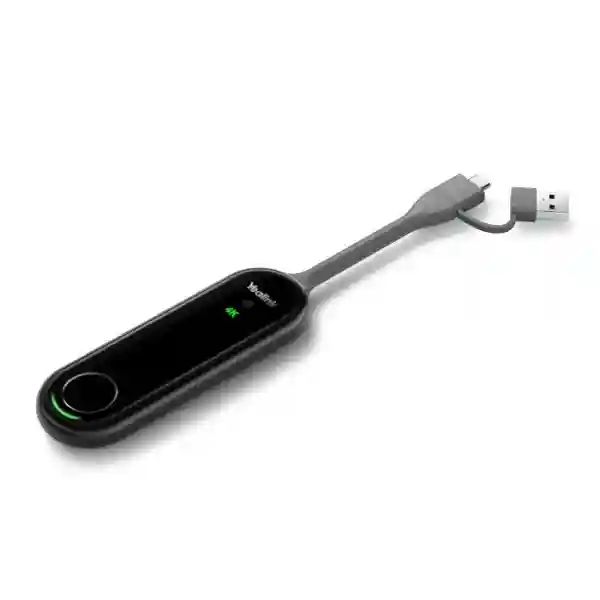
The Yealink WPP30 Wireless Presentation Pod gives compatible Yealink meeting spaces a fast way to move presentation content from a laptop or supported device to the room display without making every presenter depend on a long HDMI cable or a complicated network-sharing procedure. Yealink positions the WPP30 as a 4K Ultra HD wireless presentation accessory with hardware encoding, Wi-Fi 6, dual-band wireless operation and a straightforward presentation button. For organisations in Tanzania that want meeting rooms to feel easier for employees, visiting executives, trainers and project teams, the practical value is consistency: connect the pod, use the supported sharing workflow and keep the discussion focused on the content rather than on adapters, drivers and screen-selection problems.
What the WPP30 Does
WPP30 is a wireless presentation pod for supported Yealink room systems. It can transmit presentation content at up to 4K resolution at 30 frames per second, uses a high-performance 2×2 MIMO Wi-Fi 6 module, supports 2.4GHz and 5GHz bands and is designed around a self-built wireless network so presentation traffic does not have to depend on the organisation’s general-purpose Wi-Fi in the same way as many software-only casting methods.
Who Should Consider It
The product is relevant to boardrooms, executive meeting rooms, huddle spaces, training rooms, classrooms and customer presentation areas already using or planning compatible Yealink collaboration equipment. It is particularly useful where presenters frequently change, where laptops use a mix of USB-C and USB-A connections, and where the organisation wants a repeatable content-sharing method with fewer loose video adapters at the table.
Compatibility Comes First
WPP30 capabilities vary with the Yealink Room or Video System that hosts it. Features such as wireless BYOD, reverse control, multi-screen presentation and specific room-platform workflows should therefore be checked against the exact MeetingBar, MeetingBoard, MVC or other compatible system, along with its software and firmware. Procurement should identify the host model before treating WPP30 as a universal wireless dongle.
Verified Yealink WPP30 Features and Specifications
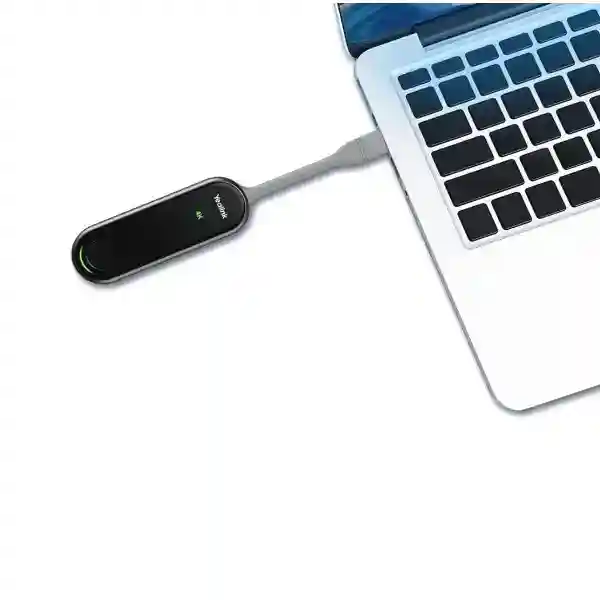
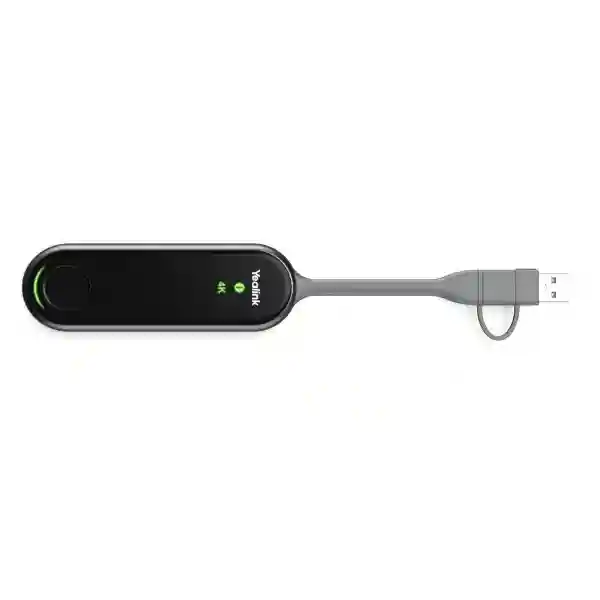
Official Yealink material identifies the WPP30 as a wireless presentation pod with hardware encoding up to 4K/30fps. It uses a full-featured USB Type-C interface and includes a USB-C-to-USB-A adapter so organisations can support a broader range of presenter computers. Yealink lists 5V/600mA input power, typical power consumption of 2.2W, a dedicated start/stop presentation button and status indicators for 4K/UHD, system error and system state. The wireless specification includes Wi-Fi 6 and IEEE 802.11 a/b/g/n/ac/ax operation across supported 2.4GHz and 5GHz frequencies. Yealink also publishes Bluetooth 5.0 support and WPA-PSK/WPA2-PSK security in its specification material.
| Area | Published capability | Buyer relevance |
|---|---|---|
| Presentation | Up to 4K/30fps hardware-encoded sharing | Useful for detailed slides, dashboards, design material and high-resolution content. |
| Wireless | 2×2 MIMO Wi-Fi 6, 2.4GHz/5GHz | Designed for responsive room sharing with dual-band flexibility. |
| Computer connection | Full-featured USB-C plus USB-A adapter | Helps mixed laptop fleets where some users have legacy USB-A and others have USB-C. |
| Security | AES/WPA security functions; published WPA-PSK/WPA2-PSK support | Supports a more controlled presentation path than informal public casting. |
| Collaboration | Multiple screen sharing, annotation, whiteboard and reverse-control functions on supported systems | Extends the room from passive screen mirroring into interactive collaboration where the host system supports it. |
Why Businesses Choose a Dedicated Wireless Presentation Pod
A meeting room can contain excellent cameras, microphones and displays yet still frustrate users when content sharing is awkward. Cable-only rooms often accumulate adapters that go missing, fail after repeated handling or do not match the guest’s laptop. Software-only casting can introduce account prompts, network discovery problems or corporate restrictions. WPP30 provides a physical, room-oriented workflow: the presenter uses a compatible USB connection and starts or stops sharing from the pod. That makes the sharing method visible and easier to explain. A small instruction label on the table can often be enough for a guest to understand what to do.
The strongest reason to buy WPP30 is therefore not simply that it is wireless. It is the combination of hardware encoding, Yealink-room integration and a repeatable user interface. Organisations standardising several meeting rooms can create the same presentation habit across sites, reducing the need for users to learn a different casting method in every room. IT teams also gain a defined accessory that can be recorded in the bill of materials, paired to the intended room system, labelled, tracked and replaced using a known model reference.
Compatibility, Pairing and Deployment Guidance
Yealink documentation shows WPP30 being paired with compatible room endpoints by connecting the pod to the room system’s supported USB port and following the pairing prompt. The pod can then be connected to a presenter’s computer through USB-C or USB-A, depending on the laptop and workflow. Exact behaviour can vary with the room platform, software version and host model. For example, some Yealink MeetingBoard and MeetingBar configurations support presentation, BYOD or interactive control functions differently. Buyers should therefore provide the exact room-system model and intended collaboration platform when requesting a quotation.
Before deployment, verify laptop operating systems, USB port capability, corporate endpoint restrictions, room firmware, the method used to connect the room endpoint to the corporate LAN and whether guest users need presentation without access to the internal Wi-Fi. Where the WPP30 host system creates or uses its own wireless presentation path, the organisation should still document how the room endpoint itself reaches meeting services and how network security policies apply. If extended desktop, application-window sharing, touch reverse control or wireless BYOD is required, include those functions explicitly in the requirement so compatibility can be confirmed rather than assumed.
Buying Checklist Before You Order
Prepare the room details before requesting WPP30 pricing. Record the host Yealink model, firmware state, collaboration platform, number of rooms, laptop mix, USB-C and USB-A requirements, whether users need duplicated or extended desktop, whether touch control is expected, and whether the organisation plans to use the room hardware for laptop-hosted meetings. Also confirm how many pods are required per room and whether a spare is needed for multi-room standardisation. Yealink states that up to four content streams can be presented in supported environments, but the practical workflow depends on the compatible host system and room design.
For a broader meeting-room project, consider the complete system rather than the pod in isolation. The room may also require a Yealink video bar or MeetingBoard, display, touch controller, mounting hardware, network connection, power protection, suitable internet service and user training. FourTeck Tanzania’s broader business technology and video-conferencing portfolio can help buyers frame those dependencies before finalising the bill of materials.
Yealink WPP30 Wireless Presentation Pod Tanzania
For organisations evaluating the Yealink WPP30 Wireless Presentation Pod in Tanzania, the first buying question should be how people currently share content in meeting rooms. Many offices use a mixture of HDMI cables, USB-C adapters, wireless screen mirroring and ad-hoc conferencing applications. That approach can work in a single room but becomes difficult to support across several departments or branches. WPP30 is most valuable when an organisation is already using a compatible Yealink room platform and wants a standard presentation experience. Its 4K/30fps hardware-encoded output is suited to high-resolution presentations, financial dashboards, technical drawings, marketing material and video-rich training content. The dual-band Wi-Fi 6 design can support responsive room sharing, while the physical presentation button gives users a clear action to start or stop content transmission.
Tanzania deployments should be planned around the whole room. A company may have head-office boardrooms, branch meeting rooms, training facilities and executive offices with different laptop types and collaboration habits. Procurement should identify whether each room uses a Yealink MeetingBar, MeetingBoard, MVC system or another compatible host, and confirm required functions such as presentation only, reverse touch control, multi-screen sharing or BYOD. Where staff travel between offices, using a repeatable room workflow can reduce support calls because employees know what accessory to use and how sharing should behave.
The commercial decision should also consider quantity, spare units, asset labelling, storage between meetings and user guidance. WPP30 is a small accessory and should be treated as managed room equipment, not a loose personal dongle. Mounting or cable-management arrangements should keep it accessible without allowing it to disappear into a drawer. Buyers can combine WPP30 planning with wider conferencing, networking and display requirements. FourTeck can help review compatibility and quotation scope without assuming that every Yealink room system exposes every advanced WPP30 function.
Yealink WPP30 Wireless Presentation Pod Dar es Salaam
Dar es Salaam businesses often operate fast-moving meeting environments where customers, suppliers, regional managers and project teams arrive with different laptops. In these rooms, content sharing needs to work predictably even when the presenter is not part of the internal IT environment. A Yealink WPP30 can simplify this workflow when paired with a supported Yealink room system. Instead of asking a visitor to join a corporate wireless network or install a third-party casting utility before a presentation, the organisation can provide a controlled presentation accessory and a short instruction. USB-C and the supplied USB-A adapter help accommodate mixed computer fleets, although buyers should still confirm that the presenter’s USB-C port supports the intended WPP30 workflow and that corporate security policies permit the accessory.
For Dar es Salaam boardrooms, consulting offices, professional services firms, logistics companies, hospitality groups and training centres, room reliability is often more important than adding another complex feature. Standardising the presentation path can reduce the time lost at the beginning of client meetings. The WPP30’s hardware encoding and supported 4K/30fps sharing are useful where teams present high-resolution proposals, project plans or visual media. Its self-built wireless approach can also reduce dependence on general office Wi-Fi for the local presentation link, although the room endpoint may still require dependable network connectivity for Teams, Zoom or other collaboration services.
Before ordering for a Dar es Salaam project, list each room’s host system, display count, table layout, cable access and collaboration platform. Decide whether one pod per room is sufficient or whether shared environments need additional presentation units. Clarify whether touch interaction, annotation, multi-screen content or wireless BYOD is expected. These advanced functions are host-system dependent and should be included in the compatibility review. A quotation should also state whether installation, pairing, room testing and user orientation are required in addition to hardware supply.
Yealink WPP30 Wireless Presentation Pod Mwanza
Mwanza organisations using hybrid meetings can benefit from a presentation workflow that is easy to repeat across offices, training areas and management rooms. The WPP30 is relevant where a compatible Yealink endpoint is already part of the room design and users need to share spreadsheets, maps, production reports, training slides or browser applications without continuously changing physical video cables. For businesses with visiting teams or rotating presenters, the pod’s visible start/stop control can make the room easier to understand than a collection of adapters and undocumented casting procedures.
A good Mwanza deployment begins with a room inventory. Record the Yealink model, room software, display resolution, laptop operating systems and how users join meetings. Some rooms may only require local wireless presentation, while others may need the laptop to use the room camera, microphone and speakers in a BYOD workflow. Those are different requirements and should not be described simply as screen sharing. Yealink’s own documentation notes that advanced WPP30 behaviour can differ between room systems, so confirmation against the exact host is essential. Procurement teams should also identify whether extended desktop is needed for presenters who want to keep notes private while displaying slides to the room.
For multi-site companies connecting Mwanza with Dar es Salaam, Arusha or international branches, consistent room design can be a practical benefit. Matching presentation accessories, labels and quick-start instructions across rooms can help employees work without relearning the meeting environment. The buying discussion should include replacement planning because a presentation pod is frequently handled. Keep the model recorded in the asset register, store the USB-A adapter with the pod, and test pairing after major room-system firmware updates. These small operational controls help protect the value of the conferencing investment.
Yealink WPP30 Wireless Presentation Pod Arusha
Arusha meeting spaces may serve tourism companies, NGOs, education organisations, professional services teams, government-linked projects and regional operations that regularly host participants from different organisations. That mixed-user profile makes simple content sharing especially important. A compatible Yealink WPP30 setup gives the room a defined presentation method: connect the pod to the supported laptop port and use the Yealink sharing workflow rather than depending on every guest to understand the room network. The USB-C connection and USB-A adapter broaden device coverage, while the compact format keeps the accessory suitable for conference tables and portable room kits.
For training and workshop use, the WPP30’s support for high-resolution content, annotation, whiteboard and multi-screen functions can be useful where the host Yealink system supports them. Facilitators may need to compare content from more than one participant or interact with material shown on a compatible touchscreen. These features should be tested with the room system before rollout because the pod does not create all collaboration functions on its own. The host endpoint, display capabilities, software and meeting platform remain part of the overall experience.
Arusha buyers should consider how the accessory will be managed during events. If the room is used by external presenters, make the pod easy to identify and include a short instruction card explaining the supported connection method. If the device will move between rooms, label it with the intended room or host system so pairing does not become confusing. For permanent installations, store the USB-A adapter securely with the pod and plan cable reach from common laptop positions. A complete quotation should note the target room system, quantity, required features and whether pairing, testing or user familiarisation is part of the requested service scope.
Yealink WPP30 Wireless Presentation Pod Dodoma
In Dodoma, organisations planning meeting rooms for administration, education, professional services and project coordination may need a presentation accessory that supports structured room operation. The WPP30 fits best where the organisation has standardised on a compatible Yealink collaboration platform and wants staff to share content without relying on a single fixed laptop at the podium. Its 4K/30fps hardware-encoded sharing capability can support detailed documents and visual material, while the dual-band Wi-Fi 6 radio is designed for low-latency presentation within the Yealink room workflow.
Procurement teams should distinguish the WPP30 from general consumer casting devices. It is intended as part of a Yealink collaboration architecture. That means the host room model should be included in every request for quote. If a department already has a MeetingBar, MeetingBoard or MVC configuration, record the exact model and software state. If the room is being designed from scratch, select the room endpoint first based on camera coverage, microphones, platform requirements and room size, then confirm WPP30 compatibility as an accessory. This sequence avoids buying a presentation pod before the room architecture has been defined.
For shared Dodoma meeting facilities, user simplicity should be documented as an operational requirement. Decide whether staff need one-press duplicate display only or whether they also require extended desktop, application-window sharing, reverse control or wireless BYOD. Consider how the accessory will be stored, who is responsible for firmware alignment, and how guests will be instructed. A short room guide can state which USB port to use, how to begin sharing and how to stop. These procedures reduce support dependency and help the organisation achieve the intended benefit from the hardware.
Yealink WPP30 Wireless Presentation Pod UAE
UAE organisations often standardise meeting technology across offices, customer centres and executive spaces, making a consistent content-sharing accessory valuable when Yealink room systems are part of the collaboration strategy. WPP30 can support high-quality wireless presentation with up to 4K/30fps hardware encoding and dual-band Wi-Fi 6 operation. In fast-moving commercial environments, a physical presentation pod can make it easier for employees and guests to understand how content enters the room system, particularly where meeting spaces are used by many departments throughout the day.
The buying process should focus on room compatibility rather than on the WPP30 specification alone. UAE deployments may involve Microsoft Teams Rooms, Zoom Rooms, third-party applications through BYOD or a combination of workflows. Some Yealink systems support WPP30 for presentation only, while others can expose additional functions such as IP-based BYOD, reverse control or richer interaction. The exact Yealink host model and software version should therefore be checked. Corporate endpoint management may also restrict USB accessories, so managed Windows and macOS devices should be tested against security policies before a large rollout.
For companies purchasing across the Middle East and Africa, it can be useful to align the accessory policy between regions while allowing room-system differences. FourTeck’s Africa IT and collaboration portfolio can support wider regional planning, while the final bill of materials should still be built room by room. Include quantity, host endpoint, platform, laptop mix, required sharing mode and expected user experience in the quotation request. Do not assume that a pod used successfully with one room generation will provide identical advanced behaviour with every other Yealink device.
Yealink WPP30 Wireless Presentation Pod Uganda
Uganda businesses considering WPP30 should evaluate it as a room-standardisation accessory for compatible Yealink video systems. A predictable presentation method can be useful for head offices, branches, training rooms and customer meeting areas where staff need to move quickly from discussion to shared content. The pod supports USB-C connectivity and includes a USB-A adapter, helping organisations accommodate both newer and older laptop designs. Its Wi-Fi 6 wireless architecture and up to 4K/30fps hardware-encoded output are designed for clear, responsive presentation rather than relying entirely on the computer’s CPU for encoding.
Before purchasing for Uganda, identify whether the room requirement is basic presentation, collaborative annotation, multi-screen comparison or full BYOD. These terms describe different workflows. Basic sharing may simply mirror a laptop display, while wireless BYOD may allow a compatible laptop-hosted meeting application to use Yealink room peripherals. Advanced behaviour varies across supported Yealink endpoints. Procurement should provide the exact MeetingBar, MeetingBoard, MVC or other system model so the configuration can be checked accurately.
Companies coordinating multiple offices can use a common room checklist for deployment. Verify network readiness, screen connection, camera and microphone function, room firmware, pod pairing, laptop compatibility and user instructions. A small accessory can have a large effect on perceived room quality because presentation problems are visible to everyone in the meeting. The FourTeck Uganda technology site provides regional context for organisations coordinating communication and IT requirements there. For cross-border rollouts, keep hardware part numbers, firmware notes and pairing records with the room documentation so support teams can identify what is installed.
Yealink WPP30 Wireless Presentation Pod Kampala
Kampala companies may use meeting rooms for client presentations, internal management, financial review, training and remote coordination with regional branches. A WPP30 can reduce the dependence on loose video adapters when the room is built around a supported Yealink endpoint. The user can connect through the appropriate USB interface and follow the Yealink presentation workflow, making the process easier to document for staff and visitors. For businesses with frequent guest presenters, this physical handoff can be simpler than asking each person to join a protected corporate wireless network before they can display content.
The WPP30 specification is only one part of the decision. Kampala buyers should consider how laptops are managed. Some organisations block external USB devices or limit the software that can run from removable accessories. Others require macOS screen-recording permissions or Windows endpoint approval. Test the intended workflow on representative corporate devices before placing a multi-room order. Also confirm whether users need audio sharing, extended desktop or application-window sharing. These functions can affect user instructions and may depend on the Yealink host system and software state.
Room layout matters as well. Keep the pod within comfortable reach of the presenter and avoid a cable path that crosses a walkway. If the room uses a large interactive display, confirm whether reverse control and annotation are supported in the selected configuration. Where multiple employees may present in sequence, evaluate whether the room workflow benefits from more than one sharing device or from multi-stream support. The quotation should capture the intended use instead of listing only “WPP30 x quantity,” because a precise requirement makes it easier to confirm the correct accessory and avoid missing dependencies.
Yealink WPP30 Wireless Presentation Pod Arua
Arua organisations planning professional video meeting spaces may value WPP30 for its ability to make content sharing a defined part of the room rather than an improvised laptop connection. This is especially relevant for training, project coordination and management meetings where a presenter needs to move quickly between speaking and showing visual material. In a supported Yealink environment, the pod provides a recognisable presentation control and can reduce the number of different adapters that staff need to understand.
Connectivity planning should still account for the broader room. The WPP30’s local wireless presentation link does not remove the need for dependable internet service when the room is participating in a cloud meeting. Camera and microphone performance, network capacity, display configuration and platform credentials all remain separate parts of the user experience. A good deployment test should include a full meeting: join the platform, share a high-resolution presentation, play content with audio if required, stop sharing, switch presenters and confirm that the room returns to normal operation without intervention.
Arua buyers should also determine how support will be handled after installation. Record the WPP30 model, host room model, pairing status and firmware information in the room documentation. Keep the USB-A adapter with the device and create a clear storage point. If staff move the pod between rooms, establish a procedure for re-pairing and verification rather than assuming it will work identically everywhere. For organisations with branches in different cities, a small checklist can standardise troubleshooting: confirm power and connection, verify pod status indicators, check the host room state and test the presenter’s device. That operational discipline can be more valuable than adding unnecessary accessories.
Yealink WPP30 Wireless Presentation Pod Mbarara
Mbarara businesses, education institutions and service organisations can use a compatible WPP30 deployment to simplify presentation in rooms where different users bring their own laptops. The accessory is designed around a one-press sharing concept and supports high-resolution presentation through hardware encoding. For organisations that regularly review operational dashboards, training materials or detailed documents, up to 4K/30fps sharing can help preserve clarity on a suitable room display. The dual-band Wi-Fi 6 capability is intended to provide a responsive local presentation path in supported Yealink configurations.
The purchase should be based on the host system and user journey. If the meeting room already contains a Yealink MeetingBar or MeetingBoard, record the exact model and check the current accessory compatibility documentation. If the room is new, do not choose WPP30 before deciding on the main conferencing architecture. A small room may need an all-in-one video bar, while a larger boardroom can require different camera, microphone and controller arrangements. WPP30 then becomes one component in that design rather than the device that determines the rest of the room.
For Mbarara procurement, include the number of rooms, laptop connection types, intended collaboration platform and expected advanced features in the quotation. If guests will use the pod, create an uncomplicated instruction that avoids internal technical language. If employees use managed devices, test endpoint security and permissions before deployment. Where rooms are shared heavily, inspect the pod cable and adapter periodically because they are handled more frequently than fixed room hardware. Good asset management helps keep the presentation experience reliable and prevents a small missing adapter from making an otherwise functional meeting room inconvenient.
Yealink WPP30 Wireless Presentation Pod Gulu
Gulu organisations evaluating a Yealink WPP30 can focus on ease of use, compatibility and room consistency. A wireless presentation accessory is most useful when it replaces a confusing process with a clear routine. In supported Yealink rooms, WPP30 offers a physical share control, USB connectivity options and a dedicated wireless presentation path. That can help in meeting spaces where several departments use the same technology and where presenters should not need specialist IT knowledge to show a document or slide deck.
A practical Gulu deployment plan should identify the common types of meetings. A management review may need only duplicate-screen sharing. Training may benefit from extended desktop so the presenter can keep notes separate. Workshops may value annotation or whiteboard functions. Client meetings may involve guest laptops subject to different security policies. List these use cases before requesting a quote because the features available through WPP30 depend on the Yealink host and room software. This makes compatibility confirmation more important than selecting the accessory from a generic specification list.
The deployment should also include a basic acceptance test. Confirm the pod pairs correctly with the host system, check both USB-C and USB-A workflows if both are expected, test presentation at the room’s normal display resolution, verify audio sharing where required, and confirm how sharing ends. If the room uses an interactive display, test any required reverse control. Document the result so future firmware updates can be compared against a known working state. For multi-location organisations, the same test script can be used across rooms and cities, helping IT teams identify whether a problem comes from the laptop, the pod, the room endpoint or the meeting platform.
Yealink WPP30 Wireless Presentation Pod Kenya
Kenya organisations planning Yealink collaboration rooms can use WPP30 as a standard wireless content-sharing accessory when the selected room system supports it. The value is particularly clear in organisations with many meeting rooms or multiple offices, where inconsistent cables and casting applications create avoidable support work. Standardising the presentation method gives employees a familiar workflow regardless of which room they enter. The pod’s hardware encoding, Wi-Fi 6 connectivity and support for up to 4K/30fps sharing make it suitable for modern high-resolution room displays.
For Nairobi and wider Kenya deployments, test the product against the actual corporate laptop build rather than a personal computer. Endpoint protection, USB restrictions and operating-system permissions can affect the presentation workflow. Organisations should also decide whether visitors are permitted to use the pod and whether the device needs cleaning or handling procedures in shared rooms. If the room system supports multiple content streams, define whether that capability is genuinely useful for collaborative workshops or whether a simple one-presenter policy will make the room easier for general staff.
Regional buyers can review broader communication and infrastructure considerations through the FourTeck Kenya IT solutions site. For a WPP30 quotation, provide the room endpoint, collaboration platform, quantity, connection types and required sharing features. If the requirement covers several sites, separate the room inventory by location rather than assuming every space is identical. A large boardroom may require a different Yealink architecture from a small huddle space even when both teams want wireless presentation. The most reliable procurement approach is to standardise the user experience while allowing the underlying room hardware to match the size and purpose of each space.
Yealink WPP30 Wireless Presentation Pod Kuwait
Kuwait businesses often require polished meeting spaces for management, customer presentations and cross-border collaboration. When a compatible Yealink room platform is installed, WPP30 can provide a clean way to bring laptop content into the meeting without leaving several video adapters on the table. The unit supports high-resolution sharing and is compact enough to remain part of the permanent room setup. USB-C plus USB-A adapter support helps organisations accommodate different laptop generations, which is useful in rooms shared by employees, consultants and external visitors.
For Kuwait projects, the room’s collaboration platform and endpoint configuration should be documented before the accessory is quoted. A Teams-oriented Yealink room may use the pod differently from another supported system, particularly for BYOD or interactive functions. Buyers should describe whether they need only wireless presentation or also want the laptop to work with the room camera, microphones and speakers. That distinction affects compatibility review and user instructions. It is also useful to confirm whether the corporate device policy allows the required Yealink software or driver behaviour for the intended sharing mode.
The FourTeck Kuwait technology portfolio can support broader regional project planning. For multi-room orders, build a matrix listing room name, host model, screen count, controller, WPP30 quantity and required workflow. This makes it easier to stage and test each room before handover. Staff training does not have to be complex: a one-page quick guide can show how to connect the pod, start sharing, choose the appropriate display mode and stop presentation. Clear operating guidance protects the investment by reducing unnecessary resets and improvised cabling.
Yealink WPP30 Wireless Presentation Pod Ghana
Ghana organisations looking for a professional content-sharing method can consider WPP30 where a compatible Yealink room system is already selected. The pod is designed to make presentation a simple physical action rather than a software discovery exercise. That can be helpful for offices, training rooms and client spaces where presenters regularly change. The combination of Wi-Fi 6, hardware encoding and up to 4K/30fps output supports detailed business content on suitable room displays, while the USB connection options broaden support across different laptops.
The accessory should be evaluated alongside network and meeting-platform requirements. The WPP30 can provide a self-built local wireless path for sharing, but cloud conferencing still depends on the room endpoint’s network connection and the organisation’s internet service. If a meeting becomes unstable, it is therefore important to distinguish between local presentation performance and the external meeting connection. Deployment documentation should show the room endpoint’s wired or wireless network path, the WPP30 pairing relationship and the collaboration service used by the room.
For Ghana procurement, confirm the exact product requirement and avoid assuming that a WPP30 can add every advertised collaboration feature to any Yealink device. Advanced functions vary by supported room system. Provide the host model, firmware version where available, operating-system mix, desired display modes and whether touch interaction is needed. For organisations standardising several rooms, create an acceptance checklist and verify one representative room before a broad rollout. This approach gives the IT team a chance to identify policy restrictions, USB compatibility or user-training issues early, when changes are easier and less expensive than after equipment has been distributed across multiple sites.
Yealink WPP30 Wireless Presentation Pod Nigeria
Nigeria businesses with busy collaboration environments can use WPP30 to standardise wireless presentation in supported Yealink rooms. Large organisations often have a mix of executive rooms, project spaces, training centres and branch offices, and presentation problems can scale quickly when every room uses a different combination of cables and casting applications. A defined Yealink accessory can make support easier because the device, pairing process and expected workflow can be documented. The WPP30’s high-resolution hardware-encoded sharing and Wi-Fi 6 design also fit modern rooms where displays and presentation content increasingly use higher resolutions.
For Lagos, Abuja and other locations, plan the accessory around the room endpoint. Document whether each space uses MeetingBar, MeetingBoard, MVC or another supported Yealink platform. If the organisation needs wireless BYOD, confirm that capability specifically; presentation sharing and BYOD are related but not identical functions. Corporate laptops may also use strict endpoint controls, so the pod should be tested with the standard managed image and common security policies. For guest use, determine whether presentation from unmanaged laptops is permitted and provide an alternative wired path where organisational policy requires it.
Multi-site procurement can benefit from a standard naming system for room equipment. Label the pod to the room, keep the USB-A adapter attached or secured nearby, and record pairing information. Include a small spare pool only if justified by the number and criticality of rooms rather than assuming unlimited stock. A successful rollout should be measured by user experience: can a typical employee enter the room, connect, present and stop sharing without calling IT? If the answer is yes, the accessory is serving its purpose. If not, review the room workflow, permissions and instructions rather than automatically adding more technology.
Yealink WPP30 Wireless Presentation Pod Seychelles
Seychelles organisations in hospitality, professional services, public administration and tourism-related operations may need meeting spaces that work equally well for local teams and international visitors. A WPP30 in a compatible Yealink room can provide a clear presentation workflow for guests who need to show a proposal, training deck or business application. The accessory’s compact form helps keep the conference table organised, while USB-C and USB-A connectivity options can support a wider mix of laptops.
Hospitality and customer-facing environments place special value on intuitive operation. A guest should not have to understand the internal network before presenting. Where policy permits, the WPP30’s dedicated Yealink sharing workflow can help separate the act of displaying content from general access to the corporate Wi-Fi. The organisation should still define acceptable-use rules and test the accessory with common Windows and macOS devices. If the meeting room uses an interactive display, verify any required touch or reverse-control behaviour with the exact Yealink host configuration.
Seychelles buyers should also consider support and lifecycle documentation because specialised room accessories may not be replaced instantly. Record the product model and host system, keep the adapter with the pod and maintain a simple recovery guide for re-pairing or firmware alignment. If the room is critical for high-value client meetings, test the presentation path as part of regular room checks alongside camera, microphone, speaker, display and internet connectivity. Procurement requests should include destination, quantity, room type, host platform, laptop mix and required features so the quotation can be reviewed as a complete operating requirement rather than a generic accessory order.
Use Cases for the Yealink WPP30
Executive Boardrooms
Give senior users and guests a defined presentation method for reports, dashboards, strategy material and remote meetings.
Training Rooms
Support instructors who need to move between lecture content, applications and collaborative material on a compatible Yealink system.
Client Presentation Areas
Reduce the need for visitors to understand internal display cabling or network details before they can show business content.
Multi-Site Standardisation
Create a repeatable sharing workflow across compatible Yealink rooms while documenting pairing, firmware and user guidance.
Quotation Checklist
To request an accurate Yealink WPP30 quotation, provide the quantity, delivery destination, exact Yealink room-system model, meeting platform, laptop operating systems, USB-C/USB-A requirements, desired presentation modes and any need for wireless BYOD, reverse control, whiteboard or multiple simultaneous content streams. Mention whether the project includes new room systems, displays, touch controllers, installation or testing. State whether the WPP30 is being purchased for an existing room or as part of a new Yealink deployment. This information helps separate basic accessory supply from a broader meeting-room integration requirement.
Frequently Asked Questions
Does the Yealink WPP30 support 4K wireless presentation?
Yes. Yealink publishes support for hardware-encoded content sharing up to 4K at 30 frames per second. Actual room output should still be checked against the compatible Yealink host system, display and selected sharing mode.
Does WPP30 use Wi-Fi 6?
Yes. Yealink specifies a 2×2 MIMO Wi-Fi 6 module with supported 2.4GHz and 5GHz operation and IEEE 802.11 a/b/g/n/ac/ax compatibility.
Can WPP30 connect to USB-A laptops?
The WPP30 uses a full-featured USB-C interface and Yealink lists a USB-C-to-USB-A adapter with the device, allowing supported workflows on computers that provide USB-A. Confirm operating-system, port and security-policy compatibility for the intended deployment.
Can several users share content?
Yealink documentation states that up to four content streams can be presented on supported systems. The practical feature set depends on the Yealink Room or Video System in use, so multi-screen requirements should be verified against the exact host model.
Does WPP30 support annotation and reverse control?
Yealink lists annotation, whiteboard and reverse-control capabilities for supported environments. Advanced functions differ across compatible Yealink room systems and software versions, so do not assume every function is available with every endpoint.
Is WPP30 a universal wireless HDMI adapter?
No. It should be treated as a Yealink collaboration accessory designed to work with compatible Yealink room and video systems. Purchase decisions should start by confirming the exact host system and intended workflow.
Decision Recap
Choose Yealink WPP30 when the organisation already has or is planning a compatible Yealink room system and wants a standard, high-quality wireless presentation method. Its strongest benefits are simple physical operation, hardware-encoded sharing up to 4K/30fps, Wi-Fi 6, dual USB connection options and integration with supported Yealink collaboration features. Do not choose it purely as a generic wireless display accessory. Confirm the host endpoint, firmware, platform, laptop policy and required collaboration functions first. For cross-border organisations, the FourTeck Africa collaboration portfolio provides a regional reference point, while country-specific deployments should still be validated room by room.
Talk to FourTeck About Your WPP30 Requirement
Share the Yealink room-system model, destination, number of rooms and the presentation experience you want users to have. FourTeck can use that information to prepare a more precise product and accessory discussion. If the WPP30 is part of a larger meeting-room project, include the room size, display setup, collaboration platform, controller, laptop mix and expected BYOD functions so the complete requirement can be reviewed together.




Reviews
There are no reviews yet.