
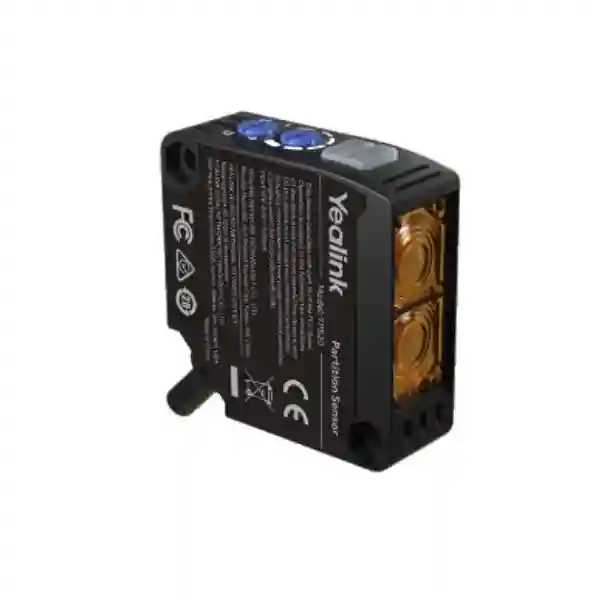
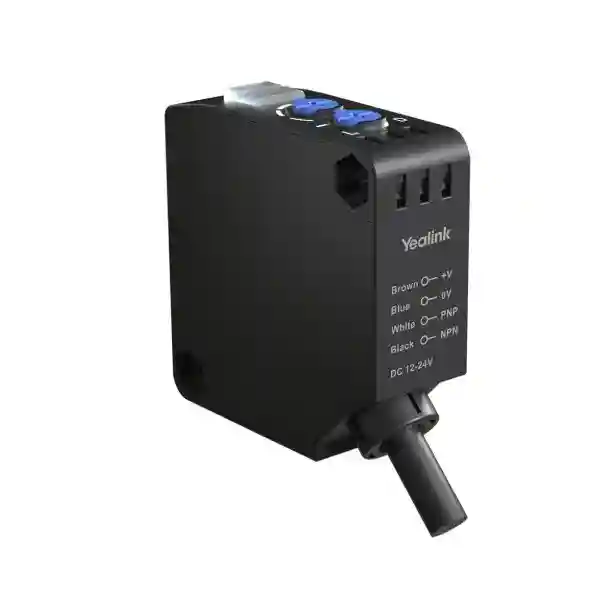
Yealink YPS20 Partition Sensor
The Yealink YPS20 Partition Sensor is a compact surface-mount infrared sensor created for divisible meeting rooms where a movable wall or partition changes how the room should operate. Instead of relying only on staff to remember which audio or room-control preset to select after a space is divided or combined, the YPS20 can detect the partition state and report it to the Yealink room solution so the appropriate configuration can be applied. For organisations designing flexible boardrooms, training rooms, multipurpose conference spaces and executive collaboration suites, this makes the physical room state part of the automation logic.
Yealink specifies an effective sensing distance of up to 1.5 metres, infrared diffuse-reflection detection, adjustable sensitivity, clear orange and green indicators, and a 10-metre cable for flexible placement. In Yealink divisible-room deployments, the YPS20 connects to the AP08 GPIO interface and is configured with Yealink Room Designer and related room-control components. FourTeck can help buyers prepare the room information, partition count, installation distances, AP08 requirements and broader collaboration bill of materials before quotation.
effective detection
included cable
IR light source
specified rating
Diffuse-reflection infrared detection helps identify whether the movable partition is present in the sensor path, while adjustable sensitivity allows commissioning to suit the actual room geometry.
The sensor can connect to the AP08 GPIO input so partition state can participate in divided-room and combined-room preset logic configured in Yealink Room Designer.
A supplied 10-metre cable gives installers practical freedom to position the YPS20 where the partition can be detected without placing the device in a busy user path.
Orange and green indicators support commissioning and troubleshooting by providing visual feedback about action and stable sensing conditions.
What the Yealink YPS20 does in a divisible room
A divisible room is designed to operate in more than one physical format. A large meeting space may be used as one boardroom for an executive session, then divided into two smaller rooms for parallel meetings. The challenge is that the audio routing, microphones, loudspeakers, camera behaviour and control logic may need to change at the same time as the wall. The YPS20 gives the room system a simple physical-state input: it senses the movable partition and passes that state into the Yealink architecture. When commissioning has been completed correctly, the room system can use that signal to trigger the preset appropriate to a combined or divided layout.
This is important because the YPS20 is not a general occupancy sensor and it is not a standalone conferencing appliance. Its job is specific: detect a partition condition reliably enough to support room automation. In Yealink documentation, the YPS20 is used with the AP08 audio processor, its GPIO input and Room Designer configuration. For more complex divisible-room designs, Yealink also documents room controllers and third-party control integration. Buyers should therefore evaluate the sensor as part of the room-control and audio architecture rather than as an isolated accessory.
For a procurement team, the best quotation request should state how many physical partitions exist, how many final room combinations are required, the approximate distance from each proposed sensor location to the partition, the location of the AP08 or equipment rack, the conferencing platform in use and whether the project requires automatic or manually assisted scene changes. That information is more useful than requesting a sensor quantity alone because it allows the integrator to check how many sensing points, GPIO connections, cables and control components are actually needed.
Verified Yealink YPS20 technical specifications
| Sensor type | Diffuse reflection |
| Maximum effective detection distance | 1.5 m |
| Light source | Infrared LED, 850 nm |
| Response time | Less than 0.5 ms |
| Supply voltage | DC 12–24 V, ±10% |
| Control output | NPN/PNP output with wiring switching |
| Current output | 100 mA |
| Action mode | Dark ON / Light ON, knob selectable |
| Indicators | Orange action indicator and green stable indicator |
| Operating temperature | -35 °C to 55 °C |
| Operating humidity | 35–85% RH, no dew |
| Ingress rating | IP65 to IEC standard |
| Construction | ABS body with PMMA lens |
Yealink also specifies protection against reverse power connection, output short circuit and output reverse connection. Ambient-light guidance matters during installation: strong direct lighting or sunlight can influence optical sensing, so installers should position and test the sensor in the actual room environment rather than assume that a nominal distance alone guarantees a stable result.
Installation and commissioning guidance
Good YPS20 performance begins with placement. The sensor should be mounted where normal movement by people or objects will not repeatedly cross the sensing path. Yealink guidance recommends positioning the optical axis as close to perpendicular to the partition as practical. Where perfect alignment is impossible, the installation should still be tested carefully because an angled reflection can reduce effective range. The partition surface itself also matters: darker or less reflective finishes can require a shorter sensor-to-partition distance or sensitivity adjustment.
Commissioning should include repeated opening and closing of the partition while observing the YPS20 indicators and the room-system response. Confirm that the combined state is detected consistently, confirm the divided state, then test intermediate physical conditions such as people walking near the partition, curtains, furniture movement and changing lighting. After the physical detection is stable, verify that the AP08 or room controller recalls the intended audio and collaboration presets. A successful project is not merely a sensor that changes LED state; it is a complete room that enters the correct operating mode every time the wall configuration changes.
Who should consider the Yealink YPS20?
Organisations that combine two executive meeting spaces for larger sessions can use partition-state detection as part of a more predictable automation workflow.
Training centres often alternate between one large class and simultaneous smaller groups, making automated room-state changes useful for instructors and support teams.
Ballrooms and meeting suites with movable walls can benefit when audio and conferencing configurations follow the physical space rather than depending on repeated manual reconfiguration.
Flexible teaching and meeting spaces can use partition sensing as one element in a controlled AV design for changing class or event formats.
Yealink YPS20 Partition Sensor Tanzania
For organisations in Tanzania, the Yealink YPS20 is most relevant when a collaboration project includes operable walls, movable partitions or meeting areas that must function both independently and as a larger combined space. The buying decision should therefore begin with the room plan rather than the sensor specification alone. A Tanzania project team should identify every partition line, the final room combinations required, where users enter and move, the likely mounting positions and the location of the AP08 or other Yealink room components. These details determine whether the standard 10-metre cable is sufficient and whether the infrared line of sight can be kept clear during normal operation.
Procurement teams should also confirm the wider collaboration design. The YPS20 can provide the partition-state signal, but the business outcome depends on the AP08, Room Designer configuration, microphones, speakers, cameras, displays, touch controls and the conferencing platform working as a coordinated system. For a new build or refurbishment, involving the AV and interior teams early can prevent a finished wall, decorative panel or cable route from blocking the sensor or forcing an awkward mounting angle. For an existing room, a site assessment should measure the sensor-to-partition distance and check lighting and reflective conditions before hardware is fixed permanently.
A strong quotation request for Tanzania should include floor plans, photos of the partition, room dimensions, preferred conferencing platform, number of partitions, equipment-rack location and the desired divided/combined operating behaviour. FourTeck can use this information to help structure the equipment discussion around the complete collaboration environment. Organisations comparing broader meeting-room technology can also review the FourTeck Tanzania technology shop for the wider product categories involved in conferencing projects.
Yealink YPS20 Partition Sensor Dar es Salaam
In Dar es Salaam, divisible-room projects commonly fit offices, hotels, training venues, headquarters and professional meeting facilities where space must serve several functions during the day. In that environment, the YPS20 can be used as a small but important automation input. When a movable wall changes a single large room into two smaller rooms, the sensor can report the physical state so a commissioned Yealink system can call the appropriate settings. This reduces the operational burden on reception staff, facilities teams or meeting hosts who might otherwise need to choose technical presets manually after every room change.
The installation review should pay close attention to room finishes and the way people move through the space. A sensor mounted too close to a walking route or aimed at a reflective decorative object may behave unpredictably even when the nominal 1.5-metre range is respected. Installers should select a protected mounting position, keep the optical path as perpendicular to the partition as practical and test detection while the room lighting is operating under realistic daytime and evening conditions. The supplied 10-metre cable is useful, but cable paths should still be planned before decorative ceilings or wall panels are closed.
For Dar es Salaam procurement, quote preparation should include the full divisible-room outcome: how many independent meeting zones are needed, which microphones and speakers belong to each zone, how cameras should behave in combined mode, what users see on the control interface and what should happen if the partition is only partially moved. The YPS20 is valuable because it can trigger automation, but a reliable user experience depends on the presets and room logic created around it. Buyers should request commissioning, testing and documentation as part of the project scope rather than treating the sensor as a plug-and-play standalone device.
Yealink YPS20 Partition Sensor Mwanza
For Mwanza organisations planning flexible meeting areas, the Yealink YPS20 can support a design where one room is frequently rearranged for management meetings, training, project sessions or larger events. The practical advantage is repeatability. Once the sensor, AP08 and room presets are installed and tested, users do not need to understand the technical routing behind a room change. The physical position of the partition becomes an input to the system, allowing the room design to respond in a consistent way when spaces are separated or combined.
Before ordering, measure the actual sensor-to-partition distance and study the surface that the infrared beam will see. Yealink publishes an effective sensing distance up to 1.5 metres, but commissioning should always be based on the actual partition material, angle and lighting. Installers should confirm the action and stable indicator behaviour, then validate the AP08 response for every supported room state. If the building has a high ceiling, decorative bulkheads or a distant equipment rack, cable routing should also be included in the bill of materials rather than assumed after delivery.
Mwanza buyers should consider lifecycle and support needs as well. Document the sensor mounting location, cable route, AP08 GPIO assignment, sensitivity setting and the Room Designer presets used for divided and combined operation. That information makes later troubleshooting easier when furniture layouts change, a partition is refurbished or AV equipment is upgraded. The most useful quotation therefore combines hardware quantities with installation assumptions and commissioning requirements. A well-documented design gives facilities and IT teams a clear reference for how the YPS20 interacts with the rest of the meeting-room system.
Yealink YPS20 Partition Sensor Arusha
Arusha has a strong mix of hospitality, institutional, NGO, conference and business environments where meeting rooms often need to adapt to different group sizes. In these spaces, the Yealink YPS20 can support an automation strategy that follows the physical partition. A hotel conference suite may operate as two client rooms in the morning and one larger presentation room later. A training facility may separate groups for workshops and then combine the space for a plenary session. In each case, the sensor can help the Yealink system recognise the room state without expecting every user to manually reconfigure the audio environment.
Design discipline is important. A YPS20 should be installed where event activity will not repeatedly interfere with its sensing path. Temporary banners, portable staging, curtains and movable furniture should be considered when selecting the location because conference spaces change frequently. The 1.5-metre maximum effective distance and adjustable sensitivity give useful flexibility, but the final setting should be validated with the real partition and typical lighting. Strong direct light should be avoided where possible, and the sensor should be tested through repeated open/close cycles before handover.
For Arusha procurement, the project brief should distinguish the physical-room requirement from the conferencing-platform requirement. The YPS20 detects a partition; it does not replace cameras, microphones, DSP configuration or room controls. Buyers should define how audio zones, camera views and user interfaces behave in each layout and ensure the AP08 and related Yealink components are included where required. This approach makes the quotation easier to compare because it covers the complete operating result rather than only the price of an individual sensor.
Yealink YPS20 Partition Sensor Dodoma
In Dodoma, government, institutional, education and corporate meeting environments may need rooms that change between committee sessions, training formats and larger combined events. The Yealink YPS20 is suited to projects where those room changes should be reflected automatically in the AV configuration. By monitoring the movable partition state and feeding that status into the Yealink room solution, the sensor can help reduce setup steps for end users and support a repeatable workflow across different room arrangements.
Planning should start with the physical room. Identify the partition type, where it fully closes, whether there are recesses or tracks that affect sensor alignment, and whether the proposed mounting point is protected from accidental contact. The sensor uses infrared diffuse reflection, so perpendicular alignment and a stable reflective target are useful. The installation team should verify the green and orange indicators while the partition is both present and absent, then confirm that the intended combined and divided presets activate correctly. Room documentation should record these settings for future maintenance.
A Dodoma buyer preparing a request for quotation should include the expected number of room states and the broader Yealink design. If a single partition creates two rooms, the automation requirement may be straightforward; if several partitions create three or four spaces, the design can require more sensing inputs and more complex room-control logic. The procurement discussion should therefore include AP08 capacity, controllers, microphone zones, speaker routing, display and camera behaviour. This system-level approach prevents the YPS20 from being ordered without the components and engineering effort required to make it useful.
Yealink YPS20 Partition Sensor UAE
For UAE projects, the Yealink YPS20 is particularly relevant to corporate headquarters, hotel conference floors, training centres and high-specification boardrooms where operable walls are integrated into the interior design. In these environments, the visual simplicity of the sensor is useful because the technical automation can remain largely invisible to meeting participants. The key requirement is still engineering: the sensor must see the partition reliably, the AP08 or control platform must interpret the state correctly, and the AV presets must be designed for each room combination.
UAE integrators should coordinate the YPS20 with fit-out contractors early. Ceiling details, acoustic panels, motorised partitions and decorative wall finishes can affect where the sensor can be mounted and how its cable reaches the equipment location. The supplied 10-metre cable supports many room layouts, but routes longer than that should be reviewed before procurement. Sensitivity should be set during commissioning rather than left at an arbitrary maximum, and testing should be repeated under the lighting scenes used by the venue.
For cross-border organisations that operate in both Tanzania and the Gulf, standardising divisible-room documentation can simplify support. Use the same naming scheme for sensors, GPIO inputs, room states and presets across sites. Buyers coordinating regional AV deployments can review the broader FourTeck network through FourTeck UAE technology solutions. The objective is not to assume identical room designs in every country, but to make the engineering method, documentation and handover process consistent enough that internal IT teams can support the environment confidently.
Yealink YPS20 Partition Sensor Uganda
Uganda organisations considering the Yealink YPS20 should look at the complete lifecycle of a divisible meeting space: how often the room changes, who moves the partition, who starts meetings and who supports the AV environment when something goes wrong. The YPS20 can remove one manual decision by detecting whether a partition is present, but it delivers the most value when the surrounding room is designed to react predictably. This is especially useful for training spaces, hotels, institutional meeting rooms and corporate facilities where different teams use the same room configuration throughout the week.
Installation should be based on measurement and testing. Keep the sensing distance within Yealink’s published range, aim the sensor cleanly at the partition, avoid a path that people or objects regularly cross, and verify the indicators under the lighting conditions expected in daily use. The AP08 connection and Room Designer presets should then be tested through all supported room combinations. If the project includes several partitions, document each sensor separately so maintenance teams can quickly identify which input corresponds to which physical wall.
Uganda procurement teams can improve quotation quality by sharing room drawings, photos, partition dimensions and the current conferencing equipment list. This helps distinguish a simple sensor addition from a broader collaboration-room redesign. Buyers handling projects across Kampala and other cities can also review FourTeck Uganda IT and collaboration solutions for regional technology context. The YPS20 should ultimately be specified as part of a tested divisible-room workflow rather than as an isolated accessory.
Yealink YPS20 Partition Sensor Kampala
Kampala offices, conference facilities and institutional campuses often need meeting rooms that support several audiences without permanently dedicating a large space to one purpose. A movable partition can solve the space problem, while the Yealink YPS20 can help solve the technology-transition problem. When the partition state changes, a properly configured system can use the sensor input to call the corresponding room preset, helping audio zones and other integrated functions follow the physical layout.
The sensor specification should be matched to the actual room. Yealink lists a maximum effective sensing distance of 1.5 metres and provides adjustable sensitivity. During commissioning, the team should confirm that the sensor detects the partition consistently when closed but does not trigger on normal movement when the space is open. The two-colour indicators provide useful feedback during this process. Cable distance to the AP08 should be checked before fixing the sensor so installers do not discover a routing problem after ceiling and wall finishes are complete.
For Kampala buyers, a procurement request should state whether the room uses Microsoft Teams Rooms, Zoom Rooms, BYOD or another collaboration workflow because the wider control experience can influence the design even though the YPS20 itself is focused on partition detection. The quotation should also address commissioning and handover. Ask for a clear description of what happens in each room state, how the system can be overridden if required and which configuration files or diagrams will be supplied after installation. Those details turn a component purchase into an operationally supportable room solution.
Yealink YPS20 Partition Sensor Arua
For an Arua deployment, the Yealink YPS20 can be considered when a meeting, training or multipurpose room uses a movable divider and the organisation wants the technology configuration to follow that divider automatically. This may be useful for institutions, development organisations, hospitality facilities and businesses that need to extract more value from a limited amount of meeting space. The sensor’s job is straightforward, but its success depends on the physical installation and control design being treated carefully.
Before equipment is ordered, confirm that the intended sensor location is within the 1.5-metre effective range and that the partition surface can be detected reliably. Avoid placing the sensor where doors, people or mobile equipment can repeatedly enter the optical path. The 10-metre supplied cable may simplify placement when the AP08 is in a nearby rack or cabinet, but the cable route should still be measured. Commissioning should include repeated partition movement and a check of both sensor indication and room preset changes.
Arua projects can also benefit from a practical spare-and-support plan. The installation documentation should identify the exact YPS20 location, its cable termination, the AP08 GPIO input and the associated Room Designer logic. If the room is reconfigured in the future, these records make it easier to assess whether the sensor needs to be moved or retuned. Buyers should request a bill of materials that includes mounting and connection needs alongside the sensor itself, then verify the final divided and combined user experience during handover.
Yealink YPS20 Partition Sensor Mbarara
In Mbarara, flexible conference and training spaces can support more events when the room can be split without creating a complicated technology reset every time. The Yealink YPS20 contributes to that goal by detecting the movable partition and passing its state into the Yealink room-control workflow. When the system has been designed and commissioned correctly, the room can apply different audio or collaboration presets depending on whether spaces are combined or separated.
For reliable results, the installer should treat the YPS20 as an optical sensor rather than simply a wall accessory. Distance, angle, partition finish and ambient light all influence the installation decision. The sensor should be mounted away from unnecessary movement and tested at the exact sensitivity setting that works for the room. The two indicators help verify action and stable sensing, while the AP08 connection should be labelled so the room can be supported later without tracing wires from scratch.
Mbarara procurement teams should define the handover requirement before purchase. A useful acceptance test would cover every room state, confirm that the intended presets are recalled, check that users can still control the room normally and confirm what happens if the wall is moved while a meeting is active. The project documentation should show the sensor location, cable route and control relationship. These steps are particularly valuable when the meeting space is managed by facilities staff rather than dedicated AV technicians, because the system must be understandable after the integrator leaves.
Yealink YPS20 Partition Sensor Gulu
Gulu organisations planning modern training rooms or conference facilities can use the Yealink YPS20 as part of a divisible-room design where physical space and AV behaviour need to stay synchronized. The sensor can detect the partition condition and provide a signal to the Yealink room system, allowing the configured divided or combined state to be recalled. For users, the desired result is simple: the room should behave correctly without requiring them to understand routing, DSP presets or control logic.
The project team should first verify where the sensor can be mounted safely. Ceiling or side-wall positions may help keep it away from normal traffic, provided the sensing axis reaches the partition at a suitable angle and distance. The maximum effective range is 1.5 metres, and sensitivity is adjustable, so installation should be tuned to the real environment. Strong direct light and moving objects can affect optical sensing, which is why final testing should happen after the room furniture, lighting and partition have been installed.
For Gulu buyers, consider the service process after commissioning. Record the sensor setting, AP08 input and the expected visual indicator state for both partition positions. If facilities staff know what the LEDs should look like, they can distinguish a sensing problem from a conferencing-platform issue more quickly. Include this information in handover notes and ask the integrator to demonstrate the changeover sequence. A small investment in documentation can greatly reduce troubleshooting time over the life of the room.
Yealink YPS20 Partition Sensor Kenya
In Kenya, the Yealink YPS20 fits projects where corporate, education, hospitality or conference facilities use divisible spaces and want the collaboration system to react to the physical wall state. The sensor is best evaluated during the room-design stage because its location affects cabling, sight line and reliability. Where a room is being refurbished, the AV integrator should work with the architect or fit-out team so the sensor has a stable target and remains visually discreet without being hidden behind decorative elements.
A Kenya deployment should verify the complete signal chain: YPS20 sensing, AP08 GPIO input, Room Designer logic and the resulting audio or room-control preset. Test each state repeatedly and include likely real-world disturbances such as people moving near the partition or lighting scenes changing. The 10-metre cable provides useful installation flexibility, but the equipment-rack location should still be measured and documented. If multiple partitions are involved, a clear naming convention for sensors and inputs becomes essential.
Businesses coordinating projects across East Africa can use consistent documentation and acceptance criteria even when room sizes vary. For Kenya-specific technology enquiries, FourTeck Kenya IT and video conferencing solutions provides a regional route for related requirements. When requesting a YPS20 quotation, include the number of rooms, number of movable partitions, room drawings, existing Yealink equipment and desired automation behaviour so the quote can be assessed as a system rather than a simple sensor count.
Yealink YPS20 Partition Sensor Kuwait
Kuwait organisations designing executive boardrooms, training facilities and premium meeting suites can use the Yealink YPS20 when movable partitions must trigger predictable changes in the AV environment. The sensor’s compact form helps it fit into professionally finished spaces, but mounting should remain technically correct. The infrared path must see the partition reliably, and the device should not be installed simply where it is easiest to hide if that location creates poor detection geometry.
Project teams should review the 1.5-metre sensing limit and 10-metre cable length during design coordination. Sensitivity should be commissioned using the real partition and final lighting. Where rooms use automated curtains, motorised wall systems or complex architectural finishes, test for unintended reflections or obstructions before handover. After the sensor signal is stable, the AP08 and room-control presets should be checked so microphones, loudspeakers and other integrated components behave as intended in each room state.
For regional organisations purchasing across several markets, it is useful to standardise the quotation data: floor plan, partition count, sensor locations, AP08 location, conferencing platform and desired presets. Kuwait buyers can explore FourTeck Kuwait business IT and Yealink solutions when coordinating related communication infrastructure. The key purchasing principle remains the same: select the YPS20 as part of a commissioned room architecture, not as an isolated component without defined control behaviour.
Yealink YPS20 Partition Sensor Ghana
For Ghana meeting-room projects, the Yealink YPS20 can add automation to spaces that use physical partitions to support different group sizes. A combined conference room may need one audio matrix and camera arrangement, while two divided spaces need independent routing and controls. The YPS20 can provide the physical-state signal that helps the Yealink system know which configuration should be active. This is particularly useful where rooms are reconfigured often and different teams use them without dedicated AV staff present.
Installation should be checked against the actual partition surface. The YPS20 uses diffuse-reflection infrared sensing with a maximum effective distance of 1.5 metres. Adjustable sensitivity helps adapt the sensor to the environment, but the correct value should be determined through testing. Keep the sensor path clear, avoid strong direct light where possible and verify that the orange and green status indicators remain stable during normal room use. The supplied 10-metre cable should be routed and labelled cleanly to the AP08 area.
Ghana procurement teams should ask for a room-level bill of materials and commissioning scope. That means defining sensors, AP08 inputs, controllers, audio zones and any additional Yealink collaboration hardware required for the intended use. For regional business technology support, FourTeck Ghana technology solutions can provide a related market reference. The final handover should demonstrate each room state and include configuration documentation so facilities and IT staff know how the sensor participates in the system.
Yealink YPS20 Partition Sensor Nigeria
Nigeria enterprises, hotels, education facilities and event venues frequently operate rooms that must support both smaller meetings and larger gatherings. The Yealink YPS20 can be part of an engineered solution that removes repetitive manual changes when those rooms are divided or combined. By detecting a movable partition and passing its state to the Yealink control architecture, the sensor allows predefined room behaviour to follow the physical space rather than depend on users selecting the right technical preset.
The YPS20 should be installed after reviewing room geometry, partition finish, ambient light and cable access. Keep the active sensing path within Yealink’s published 1.5-metre limit, align the sensor properly and validate its response through repeated tests. The 10-metre cable is useful for typical installations, but large conference suites may still require careful rack placement or cable-extension planning. Label the connection and document the sensitivity setting so later support teams can distinguish a configuration issue from a physical sensing problem.
For Nigeria procurement, avoid comparing quotations only by sensor quantity. One project may include a simple two-way divisible room, while another may require several partitions, multiple AP08 processors or coordinated camera and control logic. The correct comparison is the complete operational result and the scope of commissioning. Buyers can also review FourTeck Nigeria IT and communication solutions for regional context. A good proposal should make clear which room states are supported, what hardware is included and what testing will be completed before handover.
Yealink YPS20 Partition Sensor Seychelles
In Seychelles, hospitality, resort, government and business facilities may use multipurpose meeting spaces where one room must serve different event sizes. The Yealink YPS20 is useful when those spaces include a movable partition and the AV system should recognise whether the area is divided or combined. This can reduce setup effort for venue teams, especially when meeting rooms change configuration between guest events, internal training, board meetings and presentations.
Because premium hospitality spaces often use decorative finishes, sensor placement should be coordinated early. The YPS20 needs a dependable infrared reflection from the partition, so it should not be concealed in a way that blocks the optical path. The installation should respect the 1.5-metre maximum effective distance, use the adjustable sensitivity to match the real surface and avoid direct strong light where possible. The supplied 10-metre cable should be routed neatly and remain serviceable after ceiling or wall finishes are complete.
Seychelles procurement teams should also plan for remote support and clear documentation. The handover package should identify the sensor location, AP08 GPIO connection, divided and combined presets and basic troubleshooting indicators. This becomes valuable when the room is maintained by general facilities staff or when external AV support is not immediately on site. Asking for a complete commissioning record, rather than simply the device datasheet, gives the organisation a practical reference for keeping the room operational over time.
Compatibility, integration and room-control considerations
The strongest verified integration path for the YPS20 is with the Yealink AP08. Yealink documentation shows the sensor connected to the AP08 GPIO input and used with Room Designer smart-scene settings for automatic activation of divided and combined presets. Yealink also documents more advanced divisible-room architectures in which room controllers and third-party control systems coordinate audio, video and user-interface behaviour. This means compatibility should be evaluated at the project level. A YPS20 purchase makes most sense when the room already uses, or is being designed around, the compatible Yealink components required for the intended automation.
For a simple two-way divisible room, one partition state may be sufficient to distinguish the combined and divided layouts. In more complex spaces with multiple partitions, the control logic becomes more involved because several physical combinations may be possible. The engineering team should list every valid state, identify the sensor inputs required and decide which presets correspond to each state. Cameras, microphones, speakers and touch interfaces should be considered at the same time so the room does not switch audio correctly while leaving users with an inappropriate camera view or control screen.
Buying and quotation checklist
Providing these items with the enquiry helps avoid a quote that is technically incomplete. It also allows the project team to identify whether the YPS20 is being added to an existing compatible Yealink environment or is part of a new divisible-room build that needs additional processing and control components.
Frequently asked questions
What is the Yealink YPS20 used for?
It is a surface-mount partition sensor for divisible meeting rooms. It detects the presence or position of a movable partition using infrared sensing and can provide that state to a compatible Yealink room-control design.
How far can the YPS20 detect a partition?
Yealink specifies a maximum effective sensing distance of 1.5 metres. Actual commissioning should account for the partition surface, angle, lighting and the selected sensitivity setting.
Does the YPS20 work by itself?
The sensor can detect the partition state, but automatic divisible-room behaviour depends on the surrounding control architecture. Yealink documents integration with the AP08 GPIO interface and Room Designer, with room controllers or third-party control also used in more advanced designs.
What cable is supplied with the YPS20?
Yealink specifies a 10-metre cable, allowing the sensor to be placed at a practical detection point while connecting back to the room-processing equipment.
Can sensitivity be adjusted?
Yes. The sensor provides adjustable sensitivity, which is useful during commissioning when adapting the detector to the distance, partition finish and room environment.
What should be checked before ordering?
Confirm the number of partitions, room states, YPS20 mounting distance, AP08 availability, cable route, room controller requirements and the way cameras, microphones, speakers and displays should behave in divided and combined modes.
Is the YPS20 suitable for meeting rooms with changing lighting?
The sensor is designed for optical infrared detection and Yealink publishes ambient-illumination limits. Installers should avoid strong direct light where possible and test the room under the lighting scenes used in practice.
Why use automatic partition detection instead of manual room presets?
Automatic detection can reduce user steps and help keep the selected room configuration aligned with the actual physical space. Manual override and operational procedures can still be part of the final design depending on the project.
Decision recap: is the YPS20 the right component?
Choose the Yealink YPS20 when the project has a genuine movable-partition requirement and the room is being built around a compatible Yealink divisible-room architecture. Its key strengths are focused rather than general: infrared partition detection, adjustable sensitivity, up to 1.5-metre effective range, a 10-metre cable, visible status indicators and integration with AP08/Room Designer workflows. If the room is permanently fixed, the sensor may add no value. If the room is divisible but uses a different control ecosystem, compatibility should be reviewed before purchase.
The best outcome comes from treating the YPS20 as one element of a designed collaboration environment. Define the physical room states, engineer the AV presets, install the sensor where it can see the partition reliably, test every state and document the configuration. That process is more important than simply choosing the lowest unit price because it determines whether the automation works reliably after handover.
Consultation and quotation preparation
When contacting FourTeck about the Yealink YPS20 Partition Sensor, send the country and city, number of divisible rooms, number of partitions, photos or drawings, approximate sensor distance, existing Yealink equipment and the required divided/combined behaviour. If the project is still at design stage, include ceiling plans and equipment-rack location where available. This allows the discussion to cover the full meeting-room requirement rather than only the sensor part number.
For broader collaboration, networking and infrastructure planning, FourTeck can align the room requirement with the surrounding business technology environment. This is useful for multi-site organisations that want consistent room standards across Tanzania and other regional operations while still adapting each installation to its actual room geometry and infrastructure.




Reviews
There are no reviews yet.