
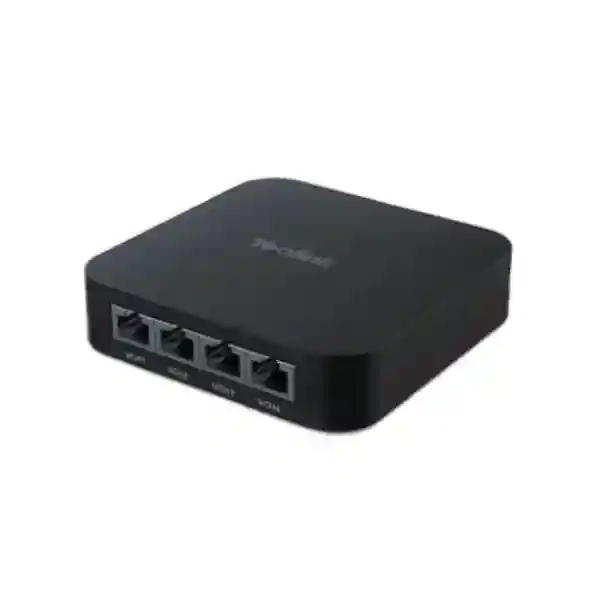
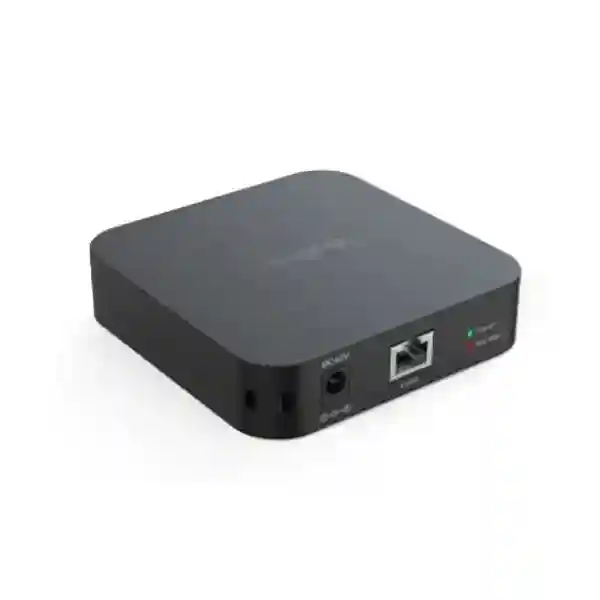
Yealink RCH40 Room Cable Hub
The Yealink RCH40 Room Cable Hub is built for meeting-room audio and video networking where a cleaner, more structured connection path is needed between compatible Yealink conferencing devices. Official Yealink information identifies the RCH40 as a compact Gigabit PoE hub with four 10/100/1000 Mbps downlink ports, IEEE 802.3af/at support, and a total PoE power budget of up to 90W. Each PoE port can supply up to 30W, subject to the total power budget and the connected equipment. This combination makes the RCH40 relevant to medium and large meeting-room designs that use distributed cameras, microphones, speakers or other compatible Yealink AV endpoints.
For buyers in Tanzania, the value of the RCH40 is not simply the number of Ethernet ports. The important question is whether the room design, Yealink platform, cable distances, PoE load and endpoint compatibility make the RCH40 the correct hub for the project. Fourteck can help procurement and IT teams translate a room requirement into a practical bill of materials, check the expected endpoint connections, review whether the standard RCH40 or RCH40 E2 is appropriate, and identify supporting switching, cabling, conferencing and display requirements before ordering.
What the Yealink RCH40 does
A modern meeting room often contains several networked AV devices rather than a single camera connected directly to a PC. Cameras, microphones, speakers, touch controllers and room processors may need data connectivity, power and an orderly cabling plan. The RCH40 acts as a room cable hub for compatible Yealink environments, allowing multiple connected devices to share a structured Gigabit Ethernet and PoE topology. Yealink also describes EasyConnect behaviour that can simplify the connection between the hub and compatible Yealink VCH interfaces. The practical benefit is a tidier design with fewer individual power arrangements and a clearer path for future service work.
The hub should not be treated as a universal unmanaged office switch. Its role is closely tied to Yealink room-system deployments, so compatibility must be checked against the exact cameras, microphones, speakers and room components in the proposed design. Yealink publishes both RCH40 and RCH40 E2 information, and the editions differ in features such as QoS and Energy Efficient Ethernet behaviour. In particular, current Yealink documentation notes that certain devices, including CM20, CS10 or Dante-related environments, require RCH40 E2 because of the EEE-disabled requirement. This is why a quotation should identify the exact edition rather than referring only to “RCH40” generically.
Gigabit connectivity
Four 10/100/1000 Mbps downlink ports support high-speed room-device connectivity. Confirm the proposed topology and uplink arrangement for the complete Yealink system.
PoE power budget
The RCH40 supports a total PoE budget up to 90W, with up to 30W per port. Actual power planning must account for every attached endpoint and the total simultaneous load.
Compact deployment
The compact chassis is designed for meeting-room integration where equipment needs to be placed discreetly near AV infrastructure while remaining accessible for maintenance.
Edition awareness
RCH40 and RCH40 E2 are not identical. Buyers should verify the edition required for current Yealink components and any QoS or EEE-specific design requirement.
Verified technical highlights
Yealink’s current RCH40 material specifies four Gigabit Ethernet downlink ports, 802.3af/at PoE capability, a total PoE budget of up to 90W and up to 30W per port. The product includes power-state and PoE-budget indicators, supports multiple deployment methods, and is designed for meeting-room audio and video networking. Current Yealink support material also distinguishes the RCH40 E2 from the earlier RCH40, including QoS support on E2 and different EEE behaviour. Because Yealink updates product documentation over time, the exact supplied edition, included power adapter, accessory set and endpoint compatibility should be verified against the quotation and the latest vendor documentation before installation.
Planning the RCH40 inside a complete meeting room
A productive conferencing room depends on much more than a cable hub. Camera placement determines how naturally participants are framed. Microphone selection depends on table shape, seating distance, room acoustics and whether ceiling or table pickup is preferred. Speakers need to provide clear speech without creating feedback. Displays must be correctly sized for viewing distance, and the network must deliver stable bandwidth to the chosen collaboration platform. Power, cable routing, rack or furniture space and the physical path between room components can all affect the final design.
For organisations comparing meeting-room options, start with room size and user workflow. Identify whether the room will be used mainly for Microsoft Teams Rooms, Zoom Rooms, BYOD meetings or another supported architecture. Then list the intended camera, microphone, speaker and control devices. Check how each endpoint connects, whether it receives PoE, and whether it is specifically supported through the chosen RCH40 edition. This prevents an accessory from being purchased in isolation and later discovering that another hub, processor, adapter or different topology is required.
Fourteck Tanzania’s business technology shop is useful when the RCH40 is part of a broader procurement exercise, because conferencing hardware often needs to be evaluated alongside displays, structured cabling and network equipment. Organisations that need design, installation or integration guidance can also review Fourteck Tanzania services to align the device purchase with the wider room environment.
Compatibility and buying guidance
Compatibility is the most important pre-order check for the RCH40. A buyer should provide the exact Yealink room-system model, camera model, microphone type, speaker model and any existing hub or processor. If an organisation already has Yealink equipment installed, the current firmware and connection topology should be documented before adding another component. If the room is being designed from scratch, the product list should be validated as one system rather than line by line. This is especially important where RCH40 E2-specific behaviour is required.
Power planning matters as well. Four PoE-capable ports do not automatically mean that any four PoE devices can be connected simultaneously. The total power requirement of the selected endpoints must remain within the available budget, and each port’s maximum must also be respected. Cable category, run length, termination quality and physical routing should be checked during installation. In rooms with under-table cable trays, floor boxes or ceiling-mounted devices, the path of each cable should be planned before furniture is fixed in place.
For procurement teams, a good RCH40 quotation request should state quantity, destination, exact room-system model, desired RCH40 edition if known, connected endpoint list and whether installation assistance is required. Ask the supplier to identify the edition and included accessories clearly. Avoid basing the order solely on a product photo or shortened marketplace title, because the RCH40 and RCH40 E2 distinction can matter to the technical design.
Yealink RCH40 Room Cable Hub Tanzania
For Tanzania organisations, the Yealink RCH40 Room Cable Hub is most relevant when a meeting room is being built around compatible Yealink conferencing hardware and the project needs a compact way to connect and power distributed room endpoints. Corporate offices, financial institutions, professional services firms, universities, hotels, training facilities and public-sector organisations may all operate rooms where video meetings are now part of normal business. In those environments, cabling quality and the relationship between camera, microphone, speaker, room computer and network infrastructure directly affect user experience.
A Tanzania deployment should begin with the room rather than the accessory. Identify the number of seats, table layout, screen position, preferred collaboration platform and where cameras and microphones need to be mounted. The RCH40 can then be evaluated as part of that topology. The four Gigabit downlink ports and up-to-90W PoE budget can simplify a compatible design, but the connected devices must be confirmed against Yealink documentation and the available power budget. For new deployments, cable routes can be planned before furniture and ceiling finishes are closed. For retrofit projects, existing cable quality and spare pathways deserve attention because meeting rooms often contain legacy HDMI, USB, network and power cabling from earlier systems.
Tanzania buyers should also consider continuity and maintainability. A neatly documented room with labelled cables and an identified RCH40 edition is easier to troubleshoot than an improvised collection of adapters and power supplies. Request the exact model designation on the quotation, check the required power adapter arrangement, confirm all endpoint compatibility, and include any necessary patch leads or mounting provisions. Where the RCH40 is one element of a larger collaboration upgrade, it is sensible to review the LAN, internet connection, Wi-Fi conditions and display infrastructure at the same time. That broader view reduces the risk of solving cabling while leaving another bottleneck untouched.
Yealink RCH40 Room Cable Hub Dar es Salaam
Dar es Salaam has a wide range of offices, headquarters, financial organisations, logistics businesses, hotels, education institutions and project teams that depend on reliable hybrid meetings. The RCH40 can fit into medium and large Yealink meeting-room deployments where several compatible AV devices need structured Ethernet and PoE connectivity. In a boardroom or management meeting space, the goal is usually not to expose technical complexity to users. The room should allow people to start a call, hear remote participants clearly and present content without staff manually reconnecting equipment before every meeting.
When preparing an RCH40 requirement for a Dar es Salaam site, map the physical room first. Note the display wall, camera position, table or ceiling microphone locations, equipment cabinet, floor boxes and any pathway from the conference table to the front of the room. This helps determine whether the RCH40’s compact form factor and four Gigabit downlinks will simplify the cabling. If multiple PoE endpoints are planned, calculate their combined requirement and compare it with the 90W total budget. If the room design includes components that require RCH40 E2, specify that edition explicitly so procurement does not substitute an older variant.
Commercial buildings can also introduce practical constraints such as shared risers, restricted drilling, raised floors, decorative ceilings or furniture that hides service access. These issues are best addressed during design, not after equipment arrives. For a quotation, provide the full Yealink room-system model, endpoint list, quantity of rooms and whether the project is new construction, renovation or replacement. If the organisation has several Dar es Salaam meeting rooms, standardising the room architecture can simplify support, spares and user training. The RCH40 may be one repeatable component in that standard, provided every room’s device count and compatibility have been validated.
Yealink RCH40 Room Cable Hub Mwanza
Mwanza businesses and institutions can use the Yealink RCH40 as part of a properly planned conferencing room where connected Yealink AV devices need dependable Gigabit links and PoE delivery. Organisations coordinating teams between Lake Zone operations, Dar es Salaam, other Tanzanian cities and international partners often need meeting rooms that work consistently without relying on temporary desktop-style wiring. A permanent room design is easier to operate when power, network paths and endpoint roles are documented from the outset.
For a Mwanza installation, the most important decision is whether the RCH40 matches the exact Yealink ecosystem being deployed. The hub’s four 10/100/1000 Mbps downlink ports and up-to-90W total PoE capability are useful technical characteristics, but they do not replace compatibility checking. Confirm the camera, microphone and speaker models, and determine whether the deployment requires the standard RCH40 or RCH40 E2. If the system will expand later, consider whether the current topology leaves enough connection and power headroom or whether a different Yealink architecture would be more appropriate.
Mwanza procurement teams may also need to account for remote support and replacement planning. Labelling each cable, recording the hub edition, documenting the uplink and keeping the room diagram with the IT asset record can reduce troubleshooting time. Where meeting continuity is important, review the power source for the entire room, not only the RCH40. Display, room PC, network equipment and conferencing devices may all need an appropriate power-protection strategy. The best purchasing request therefore describes the complete room rather than asking only for “one RCH40.” This allows the supplier to check accessories and dependencies before a quotation is finalised.
Yealink RCH40 Room Cable Hub Arusha
Arusha supports tourism, hospitality, international organisations, professional services, education and regional business activities where remote collaboration can be an everyday requirement. The Yealink RCH40 Room Cable Hub can support selected Yealink conferencing deployments by organising network and PoE connections for compatible room devices. In a hotel boardroom, NGO meeting space, training centre or corporate office, this can help create a more deliberate installation than using separate power supplies and unstructured cables around a meeting table.
Room usability should lead the design. An Arusha conference room used for executive calls may prioritise clean furniture lines and hidden cabling, while a training room may need flexible seating and wider microphone coverage. Those physical differences affect where the RCH40 can be mounted, how cable routes are concealed and whether future access remains practical. The RCH40’s compact dimensions make discreet placement possible, but ventilation, service access and cable bend radius should still be considered. Connected PoE devices must be checked against the per-port and total power limits.
If the room includes newer Yealink devices, verify whether RCH40 E2 is required. Yealink’s current material distinguishes the E2 variant in areas such as QoS and EEE behaviour, and certain endpoints specifically depend on the E2 design. That makes edition control a procurement issue as well as a technical one. For organisations with multiple Arusha rooms, create a standard bill of materials and a room drawing for each room type. A small-room template, medium-room template and boardroom template can reduce variation and make support easier. The RCH40 should be specified only where it fits the selected Yealink architecture, not automatically added to every room.
Yealink RCH40 Room Cable Hub Dodoma
Dodoma organisations planning conference rooms for government, administration, education, professional services or growing private-sector operations can consider the RCH40 where compatible Yealink endpoints need a compact PoE-connected room hub. Hybrid meetings are often used to link central teams with other Tanzanian regions, suppliers, consultants and remote stakeholders. A structured room reduces the number of last-minute technical interventions required before those meetings begin.
For Dodoma projects, document the meeting workflow and endpoint list before requesting hardware. The RCH40 offers four Gigabit downlink ports and an up-to-90W PoE budget, but every intended camera, microphone or speaker should be verified for compatibility and power draw. If the planned Yealink solution contains devices that rely on the RCH40 E2 architecture, make that requirement explicit in the procurement specification. This avoids receiving a functionally different edition because the shortened product name looked equivalent during purchasing.
Infrastructure readiness is equally important. Check structured cabling, network access, internet reliability, display positions and power protection. If the meeting room is in a new building, coordinate AV pathways with electrical and furniture work while changes are still easy. If it is a retrofit, inspect existing cables instead of assuming they meet current requirements. A clear as-built document should show where the RCH40 is mounted, which device is connected to each port, how the uplink is routed and how power is supplied. This documentation is valuable when rooms are maintained by different IT teams or when support is needed months after commissioning. For procurement, include room count and endpoint quantities so the quotation can be reviewed as a complete deployment rather than a single accessory purchase.
Yealink RCH40 Room Cable Hub UAE
UAE meeting-room projects frequently combine professional AV integration, structured cabling, room-control systems and enterprise collaboration platforms. The Yealink RCH40 can be considered where a compatible Yealink architecture requires four Gigabit PoE downlinks and a consolidated room-device connection point. Offices, training centres, hospitality spaces and multi-site businesses may value a repeatable meeting-room standard because it simplifies deployment and support across several facilities.
Before specifying an RCH40 in the UAE, identify the exact room kit and all connected Yealink endpoints. Verify whether the solution calls for RCH40 or RCH40 E2, because the editions have documented technical differences. Calculate the total PoE requirement and ensure that the intended endpoint combination remains within the 90W total budget and the per-port limit. In professionally finished rooms, placement should also account for joinery, table boxes, cable conduits and service access so the hub is concealed but not inaccessible.
Organisations coordinating technology across UAE and East African offices may benefit from using a common room standard, but local room size and infrastructure still need to be assessed. A design that works in a six-seat room may not suit a long boardroom with distributed microphones. Where UAE procurement or regional IT coordination is involved, Fourteck UAE can provide a regional reference point for broader IT and collaboration requirements. The quotation request should state the desired Yealink platform, exact endpoint models, quantities, room type, installation scope and any existing infrastructure that will be retained. That information supports a more accurate technical review and reduces avoidable substitutions.
Yealink RCH40 Room Cable Hub Uganda
Uganda organisations looking to build dependable Yealink meeting rooms can use the RCH40 as a specialised connection hub when the planned devices and topology are compatible. The product is particularly relevant where several AV endpoints need Gigabit Ethernet and PoE within a single room. Its four downlink ports and up-to-90W total PoE budget can make the physical design cleaner than individual power and network arrangements, but the project still requires endpoint-by-endpoint verification.
A Uganda deployment should start by identifying the collaboration platform and room type. Boardrooms, management rooms, training spaces and small conference rooms have different camera and microphone needs. Check whether each proposed endpoint connects through the RCH40 and whether RCH40 E2 is required. For projects using modern Yealink ceiling microphones, speakers or Dante-related components, current vendor guidance should be checked carefully because edition-specific behaviour may apply. The room’s LAN and internet service also matter; a well-cabled room can still deliver poor meetings if bandwidth, latency or network policy is inadequate.
For businesses operating in Kampala and other Ugandan locations, a standard design can help when several rooms are rolled out over time. Keep an equipment list, port map and cable labels for every room. Procurement should request the exact edition, included accessories and support scope, rather than relying on a generic “RCH40 hub” description. Organisations that need a wider Uganda technology conversation can reference Fourteck Uganda IT solutions, where communication and networking requirements can be considered together. This is useful when the meeting-room project is part of a larger office network or unified-communications upgrade.
Yealink RCH40 Room Cable Hub Kampala
Kampala businesses often need meeting spaces that support customers, regional teams and international partners without repeated setup work. The Yealink RCH40 can contribute to that goal in compatible room-system designs by acting as a central Gigabit PoE connection point for selected Yealink AV endpoints. The hub is not a complete conferencing system by itself; it is an infrastructure component whose value depends on the camera, microphone, speaker, controller and room processor around it.
For a Kampala office, map cable pathways from the front display wall to the meeting table or ceiling devices. Many installation problems are physical rather than electronic: cables may have nowhere to pass, furniture may block service access, or a retrofit may contain old cabling that cannot be reused reliably. Decide where the RCH40 will sit and how technicians can reach it later. Then calculate the PoE demand and verify every endpoint. If the room uses RCH40 E2-specific components, make the edition a mandatory line item in the purchasing specification.
IT managers should also define how the room will be supported after handover. Record firmware versions where relevant, label ports and retain the room diagram. If several Kampala branches or floors use similar rooms, standardise as much as practical while still accounting for room size and acoustics. Procurement teams should compare quotations on scope as well as price: exact RCH40 edition, included power supply, cables, installation, configuration and testing can change what is actually being delivered. A well-defined quotation helps avoid a low headline price that omits the components needed to make the room operational.
Yealink RCH40 Room Cable Hub Arua
In Arua, organisations connecting regional teams, project offices, education facilities, healthcare administration or NGOs may depend on video collaboration to reduce unnecessary travel and maintain communication with other locations. The Yealink RCH40 can support a compatible meeting-room design by providing a compact hub for Gigabit data and PoE-connected Yealink AV devices. Its usefulness is greatest when the room has been planned as a system rather than assembled from unrelated accessories.
Arua projects should give special attention to maintainability and infrastructure resilience. The hub may simplify the device side of the room, but the complete solution still depends on stable network connectivity, suitable structured cabling and reliable power. Consider UPS protection for the network and room electronics where meeting continuity matters. The RCH40’s total 90W PoE budget should be treated as a design limit, not a target that every room must consume. Add the expected load of each endpoint and leave a sensible margin where the architecture permits.
If support resources are shared across multiple Ugandan sites, documentation becomes especially valuable. Keep a record of the exact RCH40 or RCH40 E2 edition, connected devices, cable IDs and installation date. During procurement, state the destination, room type and existing Yealink equipment so compatibility can be assessed before dispatch. If a future expansion may add microphones or speakers, mention that plan early; it could affect whether the current hub arrangement remains suitable. The objective is not simply to obtain the accessory, but to create a room that can be operated and supported predictably over its lifecycle.
Yealink RCH40 Room Cable Hub Mbarara
Mbarara organisations investing in modern meeting rooms can consider the Yealink RCH40 when their selected Yealink AV architecture needs a compact four-port Gigabit PoE hub. Businesses, universities, healthcare organisations and regional offices may use video collaboration to connect specialists and decision-makers across Uganda and beyond. A permanent room installation can improve consistency compared with portable setups, provided the network, room acoustics and endpoint layout are designed together.
The RCH40 should be specified after the camera and audio design is understood. If participants sit around a long table, microphone placement and cable paths may differ from a classroom-style room. Ceiling devices can require different installation access from table devices. The hub location should minimise unnecessary cable runs while remaining serviceable. Its PoE budget of up to 90W and per-port capability must be checked against the planned devices. Verify RCH40 E2 requirements whenever current Yealink endpoint documentation calls for EEE-disabled or QoS-specific behaviour.
For procurement in Mbarara, request a quotation that names the exact edition and separates the hub from optional installation or supporting accessories. Confirm what is included in the package and what cables or mounting items must be sourced separately for the proposed room. If the room is part of a larger office upgrade, coordinate switch ports, VLAN policy, internet capacity and display requirements at the same time. This approach helps the RCH40 solve the problem it is designed for—organised room-device connectivity—without overlooking the wider infrastructure that determines whether users experience reliable meetings.
Yealink RCH40 Room Cable Hub Gulu
Gulu-based offices, education projects, NGOs and regional organisations may use hybrid meetings to coordinate with Kampala, other East African locations and international teams. The Yealink RCH40 can form part of a compatible room deployment where multiple Yealink AV endpoints need Ethernet connectivity and PoE. By bringing device connections into one purpose-built hub, the room can be easier to cable and document than a collection of independent network and power adapters.
A practical Gulu design should prioritise reliability and straightforward support. Begin with the exact Yealink room system and list every connected camera, microphone, speaker and controller. Verify whether the RCH40 or RCH40 E2 matches those components. Check the combined PoE load against the total 90W budget and confirm cable distances. For ceiling or wall-mounted devices, inspect cable routes before installation day so the project does not depend on improvised surface cabling after the room is finished.
Organisations with limited on-site technical resources benefit from clear documentation. Label each RCH40 port, retain the connection diagram and record any room-specific settings. If the meeting room depends on remote support, photographs of the finished rack, under-table installation or equipment cabinet can help technicians understand the physical layout without being on site. When requesting a quotation, include whether configuration and testing are required, and describe the existing network. The RCH40 does not replace an appropriate LAN, internet connection or conferencing platform, so those dependencies should be reviewed whenever recurring call-quality or connectivity problems are part of the reason for the upgrade.
Yealink RCH40 Room Cable Hub Kenya
Kenya organisations standardising Yealink meeting rooms can consider the RCH40 for compatible deployments that need four Gigabit PoE downlinks and a compact room-device connection point. Companies with offices in Nairobi, Mombasa or other locations may run multiple meeting-room sizes and can benefit from standard hardware patterns, provided the selected components fit each room. The RCH40 is particularly relevant to structured room designs rather than ad-hoc desktop conferencing.
The design process should confirm the conferencing platform, endpoint models, cable paths and PoE demand. A hub with a 90W total PoE budget still requires a load calculation, and exact compatibility must be checked against Yealink’s current documentation. RCH40 E2 may be necessary for specific modern Yealink devices, so edition control should be part of the quotation. Where multiple rooms are deployed, standardising the edition can reduce support complexity, but only after confirming that the chosen standard meets every room’s device requirements.
For regional procurement teams working across Tanzania and Kenya, consistent documentation can be as important as consistent hardware. Use the same naming convention for room types, cable labels and asset records, and keep each room’s connection drawing with the support documentation. Buyers needing a wider Kenyan technology context can review Fourteck Kenya IT and video conferencing solutions. When requesting the RCH40, include the exact room kit, quantity, delivery destination and whether installation or testing is part of scope. This gives the supplier enough information to validate the accessory within the wider room architecture rather than pricing it as an isolated item.
Yealink RCH40 Room Cable Hub Kuwait
Kuwait businesses planning boardrooms, executive meeting spaces and training rooms can use the Yealink RCH40 in compatible conferencing architectures that require concentrated Gigabit Ethernet and PoE connectivity. The device’s compact form and four downlink ports can support neat installation inside meeting-room furniture or AV service areas when appropriately ventilated and accessible. As with any room-infrastructure component, however, its suitability depends on the exact Yealink endpoints and topology.
For Kuwait projects, check whether the required model is RCH40 or RCH40 E2. Current Yealink information documents different QoS and EEE characteristics between the editions, and certain connected devices need the E2 version. Include the edition on the bill of materials and ask that it be confirmed on the quotation. Calculate PoE load from the endpoint specifications and keep within the 90W total power budget. In larger meeting rooms, consider whether the four-port architecture is sufficient or whether the complete Yealink design calls for another hub or processor arrangement.
Commercial projects may also involve consultants, fit-out contractors and IT teams. Coordinate cable pathways and equipment positions early so the RCH40 and connected devices can be serviced without dismantling furniture. Organisations sourcing within Kuwait can also review Fourteck Kuwait technology solutions for related networking and collaboration planning. A useful quotation request should state room count, display configuration, platform, Yealink endpoint models and installation scope. The more complete the room information, the easier it is to identify whether the RCH40 is the right hub and whether any supporting components are missing.
Yealink RCH40 Room Cable Hub Ghana
Ghana organisations using Yealink conferencing equipment can consider the RCH40 for meeting rooms where compatible devices need organised Gigabit and PoE connectivity. Offices, banks, professional firms, universities, hospitality businesses and distributed enterprises may all rely on video meetings for day-to-day coordination. A well-planned room helps users focus on the meeting rather than on reconnecting cables, finding power adapters or troubleshooting endpoint links.
The RCH40 provides four Gigabit downlink ports and supports a total PoE budget up to 90W, but the important procurement question is how those capabilities map to the proposed room. List each camera, microphone, speaker and controller, then verify compatibility and power. If the room contains endpoints that require RCH40 E2, specify that edition explicitly. Consider where the hub will be mounted and how cables will be labelled. In retrofit environments, test existing structured cabling before assuming it can be reused for room AV devices.
For organisations that support several Ghana locations, establish a room standard with clear exceptions. A typical six-person room may use one design while a boardroom uses another. Keeping the RCH40 only in templates where it is technically required prevents unnecessary variation. Procurement should also identify whether installation, configuration, testing and user handover are included or separate. This enables more meaningful quotation comparisons. Meeting-room infrastructure works best when the supplier understands both the immediate accessory requirement and the longer-term support model, including how firmware, replacement parts and room changes will be handled over time.
Yealink RCH40 Room Cable Hub Nigeria
Nigeria enterprises and institutions may use the Yealink RCH40 in compatible meeting-room systems where several networked AV endpoints need a central Gigabit PoE connection point. Larger corporate offices, financial services, energy companies, education institutions and multi-branch businesses often depend on room systems for internal coordination and external customer meetings. The RCH40 can help simplify the physical connection layer when it is selected as part of a complete Yealink room design.
Technical selection should be disciplined. Confirm exact endpoint models, desired conferencing platform and the required RCH40 edition. Yealink’s current documentation distinguishes RCH40 E2 from the earlier version, and certain devices can require the E2 architecture. Calculate the total PoE load rather than assuming all four ports can always be populated with maximum-power devices. Verify cable category, route and termination quality, particularly in large offices where the conference room may be some distance from the network cabinet or where under-floor pathways are shared with other services.
For Nigerian organisations running several offices, the RCH40 can be included in a repeatable room standard when the chosen endpoints remain consistent. Standard drawings, cable labels and configuration records simplify handover to local support teams. Procurement should compare quotations on the exact supplied model, included power components and service scope. If the project is part of a larger communication or infrastructure rollout, coordinate the meeting room with switching, internet resilience and power protection. This systems approach is more reliable than purchasing the hub first and attempting to adapt the rest of the room around it afterward.
Yealink RCH40 Room Cable Hub Seychelles
Seychelles businesses, hospitality groups, professional services organisations and government teams may depend on video collaboration to coordinate across islands and with overseas partners. In compatible Yealink room systems, the RCH40 provides a compact way to connect multiple AV endpoints using Gigabit Ethernet and PoE. This can be valuable in meeting spaces where visual cleanliness, limited equipment space and straightforward maintenance are important.
Because island deployments can make replacement logistics more significant, technical validation before ordering is especially useful. Confirm the exact Yealink room system, all connected devices and whether RCH40 E2 is required. Check PoE demand against the 90W total budget and verify that the quotation includes the correct edition and expected accessories. Where devices are mounted in ceilings, walls or custom furniture, consider service access so a technician can inspect connections without major disruption.
Environmental and building conditions should also inform the room design. Network and AV electronics should be installed in appropriate indoor conditions, protected from moisture and excessive heat, and connected through properly terminated structured cabling. For hospitality environments, the meeting room may need to serve many different guest devices, so the underlying Yealink room architecture and any BYOD requirements should be defined early. A clear acceptance test should verify that each connected endpoint powers correctly, is recognised by the room system and performs as intended during a real call. Documentation of the RCH40 port map and the room’s network connection will make future support substantially easier.
Installation and deployment checklist
Identify whether the required hardware is RCH40 or RCH40 E2 and match it to the endpoint requirements.
Record model numbers for cameras, microphones, speakers and other compatible devices before finalising the topology.
Keep the combined demand within the documented total budget and respect individual port limits.
Check cable category, length, termination, table boxes, conduits and future service access before installation.
Validate power, connectivity, audio, camera behaviour and real conferencing calls after installation.
Label ports and cables, record the hub edition and retain an as-built room diagram for support.
Quotation checklist for Yealink RCH40
To receive a useful quotation, provide more than the product name. State the number of RCH40 units required, country and city, exact Yealink room-system model, cameras, microphones, speakers and any other endpoints that will connect through the hub. Mention whether you specifically require RCH40 E2. If the edition is not known, ask for compatibility validation rather than guessing. Include the number and size of rooms, whether the deployment is new or a retrofit, and whether you need installation, configuration, testing or only supply.
Also identify any existing infrastructure that must be reused, including cabling, switches, displays and room PCs. If the project has a deadline, share the target date but request confirmed availability rather than assuming stock. Do not treat online pricing as a guarantee of local availability, shipping scope or warranty terms. A procurement-ready quotation should clearly identify the exact product, quantity, included accessories, commercial terms and service scope so purchasing teams can compare like with like.
Frequently asked questions
What is the Yealink RCH40 used for?
It is a room cable hub for compatible Yealink meeting-room audio and video deployments. It provides Gigabit Ethernet and PoE connectivity for supported endpoints and helps simplify room cabling.
How many ports does the RCH40 provide?
Yealink specifies four 10/100/1000 Mbps downlink ports. The complete device also includes the uplink arrangement used in the room-system topology.
What is the PoE budget?
The RCH40 supports a total PoE budget of up to 90W, with up to 30W per port. Actual endpoint combinations should be checked against both per-port and total limits.
What is the difference between RCH40 and RCH40 E2?
Current Yealink documentation shows edition differences including QoS support on RCH40 E2 and different Energy Efficient Ethernet behaviour. Yealink also notes that some newer devices require RCH40 E2. Always confirm the required edition for the exact room system.
Can I use RCH40 as a normal office network switch?
It is designed specifically around Yealink meeting-room audio and video networking. For general LAN switching, use a network switch selected for that purpose. The RCH40 should be chosen according to Yealink room-system compatibility.
What information should I send for a quote?
Send the required quantity, city and country, exact Yealink room-system and endpoint models, desired RCH40 edition if known, and whether installation or configuration is required.
Decision recap
Choose the Yealink RCH40 when the confirmed Yealink room architecture requires a compact four-port Gigabit PoE hub and the connected endpoints fit within its power and compatibility limits. Verify RCH40 versus RCH40 E2 before ordering. Plan the hub as one part of the complete room, including cameras, microphones, speakers, displays, network access, power protection and structured cabling. For Tanzania procurement, request an itemised quotation that identifies exact edition and service scope. Where the requirement spans additional countries, Fourteck’s regional technology sites can support broader planning without assuming local stock or service coverage that has not been confirmed.
Consultation panel
Share your room size, seating plan, conferencing platform, Yealink camera and audio devices, room count and desired deployment date. Fourteck can use that information to help structure the product requirement and identify questions that should be resolved before procurement. The objective is a room that is easy to use, clearly documented and technically aligned with the supported Yealink architecture.




Reviews
There are no reviews yet.