
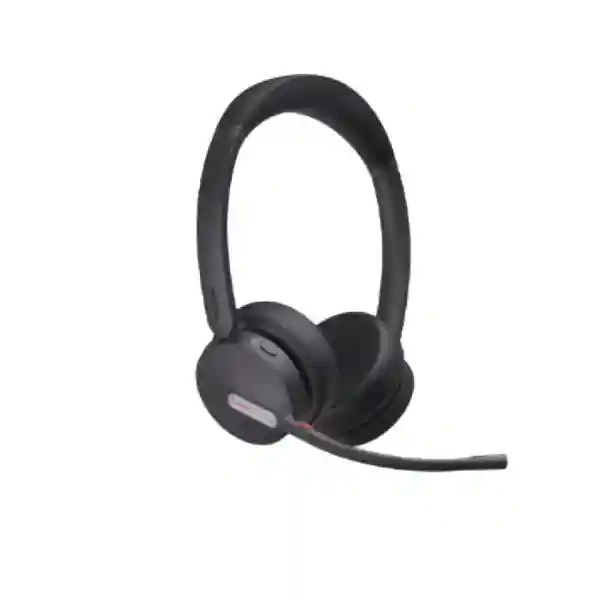
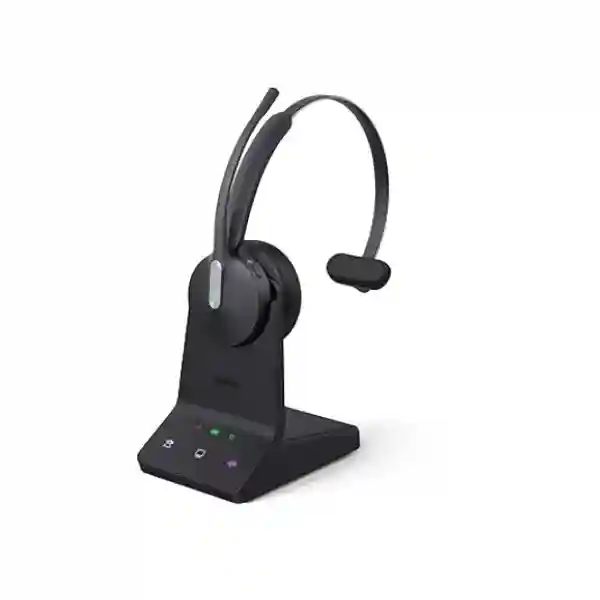
Yealink WH64 Workstation
The Yealink WH64 Workstation is an all-in-one business communications station built around a wireless headset, a 4-inch capacitive touchscreen, an integrated speakerphone, docking functions and practical USB connectivity. It combines DECT and Bluetooth 5.3 so users can work with the stable range expected from professional DECT while retaining convenient Bluetooth connectivity for supported devices. For organizations in Tanzania evaluating headsets for reception teams, customer service, managers, hybrid workers or open-office staff, the WH64 Workstation is especially relevant when the goal is to simplify device switching and reduce desktop clutter without giving up dedicated call controls.
Yealink positions the WH64 Workstation for open offices and hybrid workers. The official product information lists Mono and Dual variants, three MEMS microphones in the headset, Acoustic Shield Technology 2.0, a visual busylight, USB connectivity to PC and IP phone, and wireless range of up to 185 metres in DECT mode under suitable conditions. The workstation also functions as a hands-free speakerphone and provides a touch interface for call and device management. Actual range and operating performance will depend on the site, walls, radio conditions, endpoint compatibility and deployment configuration.
Choose the WH64 Workstation when you want a business headset solution that brings DECT, Bluetooth, PC and phone connectivity, touchscreen control, speakerphone use and workstation-style docking into one coordinated desktop platform.
What makes the Yealink WH64 Workstation different?
Many office headsets are designed as a headset plus a charging base. The WH64 Workstation extends that idea by making the base a functional collaboration console. Its 4-inch, 480 × 800 capacitive touchscreen gives the user a visible control surface rather than requiring every action to happen on the headset or computer. The workstation includes a 53 × 24 mm speaker unit and omnidirectional microphone for hands-free conversations, while the headset itself uses three MEMS microphones for focused voice pickup. The design is intended to help users move between personal headset calls, workstation speakerphone use and connected communication devices with fewer separate accessories on the desk.
The headset supports DECT and Bluetooth 5.3. Yealink states a DECT wireless range of up to 185 m / 606 ft and Bluetooth operating range of up to 50 m / 164 ft under suitable conditions. Secure DECT is listed at Step C. For teams working in larger offices, the DECT link can be useful when staff need to stand, walk to a nearby filing area, consult a colleague or move around a department while remaining available on a call. Range should always be treated as a maximum laboratory-style figure rather than a guaranteed building-wide distance because walls, partitions, radio density and construction materials affect real-world coverage.
For voice clarity, Yealink uses Acoustic Shield Technology 2.0 and a three-microphone arrangement in the headset. This is designed to reduce distracting background sound around the caller and make the speaker’s voice easier for the far end to understand. It is especially relevant to reception areas, customer-service teams, shared offices and hybrid workspaces where nearby conversations can otherwise leak into calls. The WH64 Workstation does not list traditional headset ANC in the current workstation datasheet; the focus is microphone-side noise reduction for communications rather than active cancellation of what the wearer hears.
4-inch touchscreen
A 480 × 800 capacitive display provides a dedicated interface for call and audio management at the desk.
DECT + Bluetooth 5.3
Dual wireless technologies give businesses a flexible way to connect professional calling and Bluetooth devices.
Three-microphone headset
The headset uses three MEMS microphones with Yealink Acoustic Shield Technology 2.0 for clearer conversations in active offices.
Workstation speakerphone
The base can be used for hands-free audio, useful for quick shared discussions or desk-side collaboration.
Verified WH64 Workstation specifications
Connectivity, call control and workstation use
The WH64 Workstation supports USB connectivity to a PC and IP phone and is designed to make device switching easier for users whose workday moves between softphone calls and desk-phone conversations. Yealink lists two Type-C USB 2.0 ports on the workstation together with a Mini USB port, DC power connection, busylight port and a Type-C USB 2.0 connection on the headset. The exact cable and phone integration path should be checked against the phone model and the selected WH64 package before procurement. Yealink lists the EHS62 wireless headset adapter and a compatible telephone cable among optional accessories.
Call controls include answer, end and reject, hold and unhold, volume adjustment and microphone mute. Raising the boom arm can mute the microphone, while lowering it can unmute, which can be convenient during short interruptions. The visual busylight on the headset helps nearby colleagues see when a user is engaged, and Yealink offers the BLT60 external busylight as an optional accessory for a more visible desk-level status indicator.
The workstation can pair with more than one headset for particular collaboration or training workflows. Yealink support information states that a workstation can connect up to four headsets, comprising one primary and three secondary units, and can connect to up to two Bluetooth devices simultaneously. That can be useful for supervisor monitoring, training scenarios or environments where a second person needs to participate. Organizations planning these workflows should confirm the exact supported functions for their software, desk phone and firmware version before rollout.
Mono or Dual: which WH64 Workstation should you choose?
WH64 Workstation Mono
The Mono version uses a single-ear wearing style and weighs approximately 92 g. It can suit reception desks, office administrators, sales coordinators and other users who need to remain aware of nearby conversations while handling calls. Yealink lists up to 14 hours of DECT talk time and up to 26 hours in Bluetooth mode for the Mono variant. A single-ear design can also feel more natural for staff who frequently switch between phone conversations and face-to-face interactions.
WH64 Workstation Dual
The Dual version covers both ears and weighs approximately 151 g. It can be a better fit for focused calling, open-plan environments and users who spend long periods in online meetings or customer conversations. Yealink lists up to 16 hours of DECT talk time and up to 32 hours in Bluetooth mode. Stereo music playback is supported on the Dual headset. The choice between Mono and Dual should reflect the workplace rather than simply selecting the more expensive option.
Compatibility and buying guidance
Yealink states that the WH64 Workstation is designed to work with multiple manufacturers’ IP phones and UC platforms. Compatibility should still be validated against the exact desk phone, softphone, operating system, required call-control features and any optional adapter before a business places a multi-unit order. A headset may pass audio successfully while advanced functions such as remote answer, call status, mute synchronization or device switching depend on the endpoint and integration method.
For broader workplace planning, buyers can review the Fourteck Tanzania technology shop for related communications and workplace equipment, and the Fourteck Tanzania services portfolio when the headset is part of a wider IP telephony, conferencing or endpoint deployment. These pages help procurement teams consider supporting infrastructure and integration rather than treating the headset as an isolated purchase.
Yealink WH64 Workstation Tanzania
Organizations searching for the Yealink WH64 Workstation in Tanzania are usually not looking for a consumer headset. The buying requirement is more often connected to business voice, contact handling, hybrid meetings or a broader refresh of workplace communication equipment. In that environment, the key questions are whether users need Mono or Dual wearing style, whether the workstation will connect to a PC, an IP phone or both, which UC applications are used, and whether remote call controls must work with the existing endpoint. Those details matter more than a headline range figure or a single battery specification.
The WH64 Workstation is particularly relevant for Tanzanian businesses that have staff moving between browser-based collaboration applications, desktop softphones and traditional SIP desk phones. The workstation architecture can reduce the number of separate devices on a desk by combining charging, touch call control, speakerphone use and USB hub functions. For reception teams and customer-facing staff, the Mono model may preserve awareness of colleagues and visitors. For concentrated calling in open offices, the Dual model can provide a more enclosed listening experience. In both cases, the three-microphone system and Acoustic Shield Technology 2.0 are aimed at helping the far-end listener hear the caller more clearly when office noise is present.
Procurement teams in Tanzania should confirm the exact model and variant before requesting a quotation. Yealink currently lists part number 1208736 for WH64 Workstation Dual and 1208737 for WH64 Workstation Mono on its current specification page. Regional stock codes can differ between channels, so the manufacturer’s current part number, required UC version, quantity, accessory needs and intended phone integration should be stated clearly. If the deployment includes desk phones, identify the phone manufacturer and model. If it is primarily for Microsoft Teams or another UC platform, identify the desktop environment and required control functions.
A good Tanzania quotation request should also describe whether users are all in one office or spread across branches, how many headsets are needed, whether hot desks or shared workstations are involved, and whether external busylights are desired. Organizations planning multiple communication technologies can start from the Fourteck Tanzania business technology overview to connect the headset requirement with IP telephony, conferencing, networking and endpoint planning. No assumption should be made about local stock, delivery time or compatibility until the exact requirement has been checked.
Yealink WH64 Workstation Dar es Salaam
For businesses in Dar es Salaam, the Yealink WH64 Workstation can fit environments where employees handle a high volume of calls while switching between desktop applications, IP phones and mobile communications. Examples include corporate offices, travel and logistics desks, professional services, customer support teams, financial operations, hospitality administration and multi-branch organizations. The workstation’s value is strongest where the user’s desk is already a communications hub and where a basic Bluetooth headset does not provide the same dedicated call interface or DECT-oriented office workflow.
Open-plan offices in Dar es Salaam can create practical audio challenges. Nearby conversations, ringing phones, air-conditioning and general movement can make the microphone side of a call sound busy. The WH64 Workstation uses three MEMS microphones and Yealink’s Acoustic Shield Technology 2.0 to focus on the user’s voice and suppress surrounding noise. That does not remove the need for sensible desk placement, acoustic treatment or appropriate call-centre design, but it gives organizations a headset designed specifically for professional communication rather than general-purpose entertainment use.
When deploying the WH64 Workstation in a Dar es Salaam office, buyers should map the user’s normal call path. A receptionist who works mainly on an IP phone may require a compatible phone connection and possibly an EHS62 or telephone cable depending on the endpoint. A hybrid worker who spends the day on a PC may use USB connectivity as the main path and Bluetooth for a mobile device. Managers who want quick desk-side conversations may appreciate the built-in speakerphone on the workstation, allowing short calls or collaborative discussions without passing a headset between people.
For larger office refreshes, standardization is worth considering. A business can decide which user roles receive Mono, which receive Dual, which need external busylights and which desks need phone integration. This makes the bill of materials easier to review and can simplify support later. The technical team should record firmware, application environment, connection method and accessory requirements for each profile. The objective is a predictable deployment, not simply purchasing the same headset for every user regardless of role.
Yealink WH64 Workstation Mwanza
Businesses in Mwanza considering the Yealink WH64 Workstation may be supporting head-office staff, branch administration, sales teams, healthcare administration, education, distribution, hospitality or service operations where dependable voice communication matters. The WH64 Workstation is useful when staff need the freedom to move around their immediate work area without abandoning a live conversation. Yealink lists up to 185 metres of DECT range under suitable conditions, but real range inside a Mwanza office or facility will depend on building layout, reinforced walls, floors, partitions and radio conditions.
The practical buying decision should therefore begin with workflow. A user who stays at a small desk and uses only a laptop may not need the full workstation feature set. A supervisor who moves between a desk, nearby colleagues and filing or operational areas can benefit more from the DECT design. The workstation also combines a touch interface, speakerphone and charging base, which can make it easier to keep the headset ready for daily use. Fast charging support can be helpful when a user forgets to dock the headset, although battery life should still be managed according to the real call schedule.
For Mwanza teams that rely on IP telephony, verify the relationship between the headset and the phone platform before ordering. Confirm the exact IP phone model, USB availability, expected remote call control and whether an accessory is required. If users work on softphones, document the operating system and UC application. Yealink provides management options through Yealink USB Connect on PC and Yealink Management Cloud Service, which may be relevant to administrators managing more than a few devices. Management capabilities and licensing implications should be checked against the organization’s chosen deployment method.
Procurement can also be simplified by separating core requirements from optional accessories. Start with the workstation and Mono or Dual headset, then identify whether the BLT60 external busylight, EHS62 adapter, telephone cable or replacement cushions are needed. This keeps the quotation clear and prevents optional items from being mistaken for included equipment. For a branch-standardization project, using the same decision template across sites can help compare quantities, user profiles and integration requirements consistently.
Yealink WH64 Workstation Arusha
Arusha organizations often combine office administration with hospitality, tourism, professional services, education, NGOs, project teams and regional coordination. In these environments, employees can spend significant time on calls with suppliers, customers, branches and international colleagues. The Yealink WH64 Workstation addresses that style of work by combining professional headset functions with a desktop collaboration console. Its 4-inch capacitive touchscreen can give the user a direct place to manage audio and connected devices, reducing the need to navigate multiple software windows for routine call actions.
The Mono and Dual variants allow an Arusha business to match headsets to the job. Reception and front-desk teams may prefer Mono because one ear remains open to the surrounding workspace. Reservations, sales, support and administrative users who need more focus may prefer Dual. Battery specifications also differ slightly: Yealink lists up to 14 hours of DECT talk time for Mono and up to 16 hours for Dual, while Bluetooth-mode talk time is listed up to 26 hours for Mono and 32 hours for Dual. These are maximum figures and real usage depends on volume, connection mode, firmware and operating behavior.
For organizations conducting hybrid meetings, the base speakerphone adds another useful mode. It can support an impromptu desk-side conversation with a colleague without requiring both people to share the wearable headset. It should not be treated as a substitute for a properly designed meeting-room audio system when several participants are seated around a large room. For dedicated room collaboration, buyers should evaluate purpose-built microphones and conferencing equipment separately rather than stretching a personal workstation beyond its intended use.
Arusha procurement teams should request quotations using an exact configuration: quantity, Mono or Dual, intended phone or PC connection, UC platform, accessory requirements and expected deployment date. If the organization has branches outside Tanzania, record whether the same headset standard will be used elsewhere. Consistent user profiles can make training and support easier while still allowing local procurement and compatibility checks to account for the equipment already installed at each location.
Yealink WH64 Workstation Dodoma
In Dodoma, the Yealink WH64 Workstation can suit administrative offices, institutions, professional services, project teams and organizations that need reliable communication between desks, departments and remote participants. The device is most relevant when users spend a substantial part of the day on voice or online meetings and need a more structured desktop experience than a basic mobile headset. The combination of DECT, Bluetooth, a dedicated touch console and speakerphone allows the workstation to support different communication paths from one position.
For administrators and procurement teams, lifecycle planning is important. A headset fleet should not be purchased only on the basis of initial unit price. Consider which users need Mono or Dual, whether replacement cushions will be stocked, how damaged or lost headsets will be handled, what firmware management process will be used and whether optional phone adapters are standardized. Yealink USB Connect and Yealink Management Cloud Service are listed as management options, giving IT teams a basis for centralized configuration or administration depending on the chosen environment.
Secure wireless design can also matter in institutional settings. Yealink lists Secure DECT Step C and the current workstation specifications reference authentication and encrypted DECT operation. Security is still broader than the radio link alone: administrators should control PCs, UC accounts, desk phones and user credentials according to organizational policy. A secure headset cannot compensate for weak endpoint passwords, exposed systems or unmanaged user accounts. Treat the WH64 Workstation as one component in the communications environment.
Before ordering for Dodoma, test the intended endpoint combination whenever practical, especially if the environment uses mixed phone brands. The official documentation states broad compatibility with manufacturers’ phones and UC platforms, but specific call-control behavior can vary. A short pilot with the actual softphone or desk phone can validate audio, answer and end control, mute synchronization, Bluetooth behavior and user comfort. This is particularly valuable before a large deployment because it turns compatibility from an assumption into an observed result.
Yealink WH64 Workstation UAE
The Yealink WH64 Workstation is also relevant to organizations operating between Tanzania and the UAE, especially companies that want a common headset standard across regional offices. UAE environments often include high-density offices, customer service teams, professional services, logistics, trading companies and multinational operations where users work across Microsoft Teams, softphones and desk telephony. The WH64 Workstation’s mix of DECT and Bluetooth can support that multi-device reality without requiring users to rely on one wireless method for every scenario.
Regional standardization should still respect local endpoint differences. A Tanzania branch may use one IP phone model while a UAE office uses another, or one location may be more heavily PC-based. The headset can remain part of the standard, but adapters, cables and configuration profiles may differ. Procurement teams should therefore build a common specification around the WH64 Workstation while allowing site-specific line items for integration. This is better than assuming one bill of materials will work identically in every country.
For users in high-density office layouts, the three-microphone voice pickup and Acoustic Shield Technology 2.0 can be attractive because they are designed to reduce background conversation reaching the far end. The dual-sided busylight provides a visible status cue to colleagues, and the optional external BLT60 can make status easier to see around partitioned desks. These features can reduce interruptions when teams understand and respect the busy indication, but good workspace etiquette and acoustic planning remain important.
Businesses coordinating technology requirements in the UAE can also reference Fourteck UAE for regional IT and communication requirements while maintaining a consistent product decision with the Tanzania deployment. Availability, pricing, local delivery and exact commercial terms should always be confirmed for the relevant market at quotation time rather than inferred from another region.
Yealink WH64 Workstation Uganda
Ugandan organizations evaluating the Yealink WH64 Workstation may be planning headsets for corporate users, branch teams, contact handling, reception or hybrid collaboration. The workstation is well suited to employees whose day includes both computer-based communication and desk-phone calling because it offers dedicated workstation controls and multi-device connectivity rather than forcing users to reconnect a simple headset repeatedly. That can reduce friction for staff who work across several communication channels throughout the day.
The buying process should start with a device inventory. Record each desk phone manufacturer and model, whether users connect through Windows or another supported desktop platform, which UC application is standard, and whether mobile Bluetooth is required. Then assign Mono or Dual according to work style. Mono can suit staff who must interact with people physically nearby, while Dual is often preferred by users who need more concentration during long calls. The correct choice is a user-experience decision as much as a technical one.
Yealink lists a fast-charge function in the current workstation datasheet, with 15 minutes providing approximately 40% battery. This can help busy staff recover from an undocked headset, but disciplined docking remains the simplest way to keep devices ready. The workstation itself provides a natural home for the headset when not in use. IT teams can also plan spare ear cushions and cleaning procedures where headsets are assigned to employees for long-term use.
For organizations managing both Tanzania and Uganda operations, the Fourteck Uganda technology site can support regional coordination while the Tanzania site remains the reference for Tanzanian procurement. Cross-border organizations should align model naming, user profiles and compatibility tests so the same standard can be supported without assuming that commercial terms or installed endpoints are identical in every location.
Yealink WH64 Workstation Kampala
Kampala offices commonly combine fast-paced internal communication with customer calls, video meetings and mobile coordination. In such an environment, the Yealink WH64 Workstation can provide a more controlled desktop communications setup by bringing headset charging, call interaction, speakerphone use and device connectivity together. The 4-inch touchscreen is particularly useful for users who prefer visible controls at the desk rather than relying solely on small headset buttons or software controls scattered across the computer screen.
When planning a Kampala deployment, pay attention to radio expectations. The advertised DECT range of up to 185 metres should not be translated into a promise that the headset will cover an entire building. Dense concrete, metal partitions, floor slabs and other radio systems can reduce effective range. A pilot user should test the actual walking paths that matter: reception to filing area, manager’s office to nearby team, customer service desk to supervisor station, or workstation to a printer or documentation point. This gives practical coverage information that is more valuable than a theoretical maximum.
The headset’s 30 mm speaker covers a 20 Hz–20 kHz frequency range, while talk mode is specified as wideband 100 Hz–8 kHz. The microphone range is listed at 100 Hz–10 kHz. These specifications reflect a device designed for both communication and general audio use, with stereo music supported on the Dual version. Businesses should still prioritize voice intelligibility, comfort and endpoint compatibility when the primary purpose is professional calling.
For multi-user deployments, Kampala IT teams can define a small acceptance checklist: verify physical comfort, confirm audio on the target application, test mute behavior, check answer and end controls, confirm phone integration, validate Bluetooth device switching and note the firmware version. Completing those checks on a pilot unit reduces the likelihood that a purchasing decision based on specifications alone will create deployment surprises.
Yealink WH64 Workstation Arua
For organizations in Arua, a professional wireless headset can be useful where a smaller office still handles an important volume of supplier, branch, client or administrative calls. The Yealink WH64 Workstation should be considered when the user benefits from movement around the desk area and when multiple communication devices are part of the workday. The workstation format provides a consistent place to dock, charge and control the headset while also supporting hands-free speakerphone use at the desk.
A smaller site should avoid overbuying simply because the workstation has many features. Begin with the users who spend enough time on calls to justify a dedicated professional setup. Administrative leads, front desk users, customer coordinators and managers are common candidates. Other employees may be better served by simpler devices if they make only occasional calls. Role-based deployment keeps the project focused and can reduce the quantity of specialized accessories that must be managed.
Connectivity should be checked carefully if the site uses older desk phones or a mixture of vendors. Yealink offers optional accessories such as the EHS62 and a telephone cable for WH64-series integration, but the correct accessory depends on the phone. Provide the exact make and model when asking for compatibility guidance. Where calling is computer-based, test the chosen softphone with the workstation and confirm whether the organization needs advanced call controls beyond basic audio.
For Arua buyers working through a centralized procurement department, it is useful to document the local requirement instead of submitting only a product name. Include quantity, user roles, PC and phone models, preferred Mono or Dual style, whether users need mobile Bluetooth, and whether busylights are required. This gives the supplier enough information to identify missing accessories and helps prevent a quotation from looking complete when an essential integration item has been omitted.
Yealink WH64 Workstation Mbarara
Mbarara businesses and institutions can use the Yealink WH64 Workstation where staff need reliable desk communication but also need freedom to move within the immediate office. The product’s DECT capability is designed for professional wireless use, while Bluetooth provides an additional connection method for compatible devices. This combination can be especially useful for managers and administrative users who alternate between a computer, a desk phone and a mobile device during the day.
Comfort should be evaluated as part of the buying decision because a headset that looks strong on a specification sheet can still be unsuitable for someone who wears it for many hours. Yealink describes the WH64 as designed around ergonomic principles and offers Mono and Dual formats. A small pilot group can compare the two styles and identify preferences before a larger purchase. For shared desks, hygiene procedures and replaceable cushions should be considered, although individually assigned headsets are usually simpler to manage from a comfort and cleanliness perspective.
Battery planning is straightforward when the docking habit is consistent. Yealink lists approximately 1.5 hours for a full charge, with long talk-time figures in both DECT and Bluetooth modes. The most useful operational practice is to make docking part of the user’s routine at the end of a call period or workday. For critical call roles, businesses can keep a documented process for charging and replacement rather than relying solely on maximum advertised battery figures.
Mbarara procurement teams should also check the expected lifecycle of the connected phone system. If the organization plans to replace desk phones with a softphone platform soon, the headset choice should support the future design as well as today’s environment. The WH64 Workstation’s multi-device approach can make that transition easier, but compatibility with both the current and planned platform should be verified before the purchase is finalized.
Yealink WH64 Workstation Gulu
In Gulu, the Yealink WH64 Workstation can serve organizations that need dependable professional calling for administration, support, coordination and remote collaboration. A key benefit of the workstation concept is that it creates a defined communications point at the desk rather than relying on ad-hoc pairing between a general Bluetooth headset and whichever device happens to be used that day. That structure can improve consistency for users who depend on calling as part of their primary job.
The integrated speakerphone is also useful for short, informal collaboration. A staff member can bring a nearby colleague into a conversation without passing the headset between people, which is more practical and hygienic. For formal meetings with several participants, however, organizations should use room-appropriate conferencing equipment rather than assuming a personal workstation will cover a large table or boardroom. Selecting equipment according to the meeting scenario produces a better experience for both local and remote participants.
Noise reduction should be understood correctly. Yealink’s Acoustic Shield Technology 2.0 and three-microphone design aim to reduce surrounding noise transmitted to the other party. This can improve clarity in shared offices. The current workstation datasheet lists ANC as “No,” so buyers should not confuse microphone noise reduction with active noise cancellation for the wearer’s ears. That distinction is important when comparing the WH64 Workstation with headsets marketed primarily around listener-side ANC.
A Gulu quotation request should include whether the headset will be used mainly for phone calls, UC meetings or both. Also include the desk-phone model, PC connection type, mobile-device requirement and number of units. If users will move between sites, specify whether they need to carry only the headset or whether each site will have a workstation. These workflow details help determine whether the WH64 Workstation is the right package or whether another headset configuration would be more practical.
Yealink WH64 Workstation Kenya
Kenyan organizations looking at the Yealink WH64 Workstation often have similar requirements to regional businesses in Tanzania: hybrid work, Teams or UC calling, IP telephony, multi-branch operations and employees who need to move around the office while staying connected. The WH64 Workstation can support a standardized regional communications strategy because the same core headset platform offers Mono and Dual options and can connect through DECT, Bluetooth and USB-based workstation integration.
Regional standardization is valuable for support. IT teams can document one approved headset family, define user profiles and keep a consistent list of accessories. Procurement teams can compare quotations using the same product naming and part numbers. Training can focus on one set of controls, including boom-arm mute behavior, touch workstation use and docking. However, standardization should not override compatibility testing: a Kenya office may use different IP phones, UC applications or PC policies from a Tanzania branch.
For higher-density offices in Nairobi or other Kenyan business centres, the professional DECT design and call-focused microphone system may be particularly relevant. Teams should still test radio coverage and audio behavior in the real workspace. A quoted maximum range is not a substitute for a site test, and background-noise performance is influenced by how the microphone is positioned and how loud the surrounding environment becomes.
Organizations coordinating procurement in Kenya can review Fourteck Kenya for regional technology requirements, while Tanzanian requirements can remain aligned with the Tanzania project. A cross-country bill of materials should clearly separate common product standards from country-specific commercial terms, delivery arrangements and endpoint compatibility. That keeps technical consistency without creating unsupported assumptions about local stock or pricing.
Yealink WH64 Workstation Kuwait
For Kuwait-based offices and organizations operating between East Africa and the Gulf, the Yealink WH64 Workstation offers a professional headset platform that can fit corporate communication, customer-facing teams and hybrid work. The workstation is most useful when users regularly switch between PC applications, desk phones and Bluetooth-connected devices. A dedicated touch console can make that workflow easier to understand than a basic headset whose device state is represented only by small LEDs or computer software.
In high-use communication roles, battery and comfort become operational issues rather than minor specifications. The WH64 Workstation provides long rated talk times and a dock designed to keep the headset charged between sessions. Organizations should still observe user comfort during a trial because Mono and Dual styles feel different over a full working day. Procurement can use pilot feedback to decide whether one variant should be standardized or whether both should be offered according to role.
Businesses should also evaluate the headset against their preferred UC platform and desk telephony architecture. Yealink states broad compatibility with various phone manufacturers and UC platforms, but the exact control experience should be checked with the actual environment. If advanced desk-phone integration is required, confirm whether an EHS62 or another approved cable is needed. If the workstation is PC-centric, validate USB connectivity, call control and device management policies.
For multinational teams, document the model and configuration using precise product names rather than informal descriptions such as “Yealink wireless headset.” The WH64 family includes different packages, and the Workstation version should not be confused with WH64 Hybrid or other bases. Exact naming helps ensure that the ordered unit includes the touch workstation experience expected by the user and prevents a quotation from being compared against a technically different WH64 package.
Yealink WH64 Workstation Ghana
Ghanaian businesses considering the Yealink WH64 Workstation can use the same structured buying approach: first identify user roles, then map devices and calling platforms, and only then select Mono or Dual quantities and accessories. The workstation can suit customer service, reception, sales, finance, project coordination and management teams where professional voice communication is frequent enough to justify a dedicated solution.
The WH64 Workstation’s integrated speakerphone can be helpful in offices where a user occasionally needs to involve someone sitting nearby. Because the base includes its own microphone and speaker, the user can move from private headset use to hands-free desk audio without adding a separate speakerphone. This can reduce desktop clutter, though the workstation should remain positioned where its microphone and controls are easy to reach.
For IT administrators, management capability is another consideration. Yealink identifies Yealink USB Connect for PC management and Yealink Management Cloud Service as management options. Larger organizations should determine whether centralized monitoring or configuration is part of their endpoint-management strategy and whether any cloud-management account, policy or licensing requirement applies to their chosen setup. The most important point is to plan management before deployment rather than treating firmware and configuration as an afterthought.
When comparing quotations in Ghana or across regions, ensure that each quote refers to the same Workstation variant and includes the same accessories. A lower quote may exclude an adapter or external busylight that another quote includes. Procurement should compare part number, Mono or Dual, cables, power adapter, optional accessories, warranty terms stated by the seller and delivery scope. The official Yealink workstation datasheet lists a two-year limited warranty, but the local purchasing contract and support process should still be confirmed with the supplier.
Yealink WH64 Workstation Nigeria
Nigeria’s large corporate, financial, technology, services and contact-centre environments create a strong use case for professional headsets that can handle heavy communication. The Yealink WH64 Workstation brings DECT and Bluetooth together with a touch-enabled base, making it suitable for users who move between desk-phone calls, computer meetings and mobile communication. The platform is particularly attractive when the organization wants an endpoint that feels like part of the desk setup rather than a portable headset that must be paired and managed independently.
For contact-heavy teams, microphone performance is central. The headset uses three MEMS microphones with Yealink’s Acoustic Shield Technology 2.0 and AI-oriented noise reduction. The purpose is to keep the caller’s voice intelligible when colleagues are speaking nearby. A well-positioned boom microphone remains important; users should be shown how to wear the headset correctly and how the boom-arm mute action works. Training is simple but can materially improve call quality and reduce accidental mute errors.
High-volume deployments should be staged. Start with representative users from reception, support, management and hybrid work. Validate the exact UC applications and phone models, collect comfort feedback, test wireless movement and confirm the accessory list. After the pilot is stable, the organization can expand using standardized profiles. This approach is more reliable than purchasing hundreds of units based only on a product datasheet, especially in mixed-vendor environments.
Procurement teams should also distinguish between manufacturer capabilities and local commercial claims. The official data supports the product’s wireless technologies, battery figures, touchscreen, microphone arrangement and package components. Stock, price, delivery date, installation scope and local support arrangements depend on the seller and must be confirmed at quotation time. Keeping those two categories separate makes purchasing decisions clearer and avoids treating changing commercial conditions as permanent product specifications.
Yealink WH64 Workstation Seychelles
In Seychelles, the Yealink WH64 Workstation may be relevant to hospitality administration, travel services, professional offices, government and business teams where international communication is frequent. A compact office can still benefit from a professional headset when staff handle reservations, suppliers, remote teams or customer calls for several hours each day. The workstation’s speakerphone, touch controls and docking functions can create a clean, organized desk setup without requiring separate accessories for every audio task.
The choice between Mono and Dual should consider how much a user interacts with people physically present. Front-office and administrative staff may prefer Mono so they can hear nearby colleagues or visitors, while back-office staff handling long calls may prefer Dual for greater concentration. Both variants use the same core workstation concept, so an organization can standardize on the WH64 Workstation family while giving different roles the wearing style that fits their job.
Organizations with limited on-site IT resources should document configuration carefully. Record the workstation connections, phone model, UC application, firmware version and any optional adapters. A clear handover note can make future troubleshooting easier, especially when support is coordinated remotely. Users should also know the basic controls, charging process and how to identify device status on the workstation and busylight.
For procurement, request the exact WH64 Workstation variant rather than a general WH64 description. Yealink sells several WH64 configurations, and differences in base design and accessories are significant. A quotation should therefore state the Workstation model, Mono or Dual choice, manufacturer part number when available, quantity and accessory needs. This makes it easier to compare offers fairly and reduces the risk that a different WH64 package is supplied because the description was too broad.
Use cases for the Yealink WH64 Workstation
Reception and administration
Mono wearing style, visible call status and phone/PC connectivity can suit users who manage calls while interacting with colleagues and visitors.
Customer service and sales
Dual wearing style, long talk time and microphone-side noise reduction can support users who spend extended periods in customer conversations.
Hybrid professionals
Users who alternate among PC, desk phone and Bluetooth devices can benefit from one coordinated workstation rather than separate audio accessories.
Supervisors and trainers
Support for a primary headset plus secondary headsets can help selected training or monitoring workflows when configured according to Yealink guidance.
Related Fourteck resources
A headset deployment often depends on other parts of the communications environment. The Fourteck Tanzania shop provides a broader view of business technology categories, while the services page covers IP telephony, conferencing, networking, infrastructure and support considerations. Organizations working across East Africa can also use Fourteck Uganda and Fourteck Kenya for country-specific technology discussions, while Fourteck UAE supports Gulf-region requirements. These resources are relevant when a WH64 Workstation project forms part of a wider regional communication standard.
Quotation checklist for Yealink WH64 Workstation
Frequently asked questions
Does the Yealink WH64 Workstation use DECT and Bluetooth?
Yes. Yealink’s current WH64 Workstation documentation lists DECT and Bluetooth 5.3. The headset can use DECT for professional wireless communication with the workstation and Bluetooth for supported Bluetooth device connections.
What is the wireless range?
Yealink lists up to 185 m / 606 ft for DECT and up to 50 m / 164 ft for Bluetooth under suitable conditions. Real range depends on walls, floors, radio interference and building layout.
Is the WH64 Workstation available as Mono and Dual?
Yes. Yealink lists both WH64 Workstation Mono and WH64 Workstation Dual. The current Yealink specification page lists part numbers 1208737 for Mono and 1208736 for Dual.
Does the WH64 Workstation have a touchscreen?
Yes. The workstation uses a 4.0-inch 480 × 800 capacitive touchscreen designed for call, device and audio interaction.
Can it connect to an IP phone and PC?
The official workstation documentation lists USB connectivity to PC and IP phone and describes multi-device use. Exact phone compatibility and remote call-control behavior should be verified against the phone model and any required accessory.
Does it have active noise cancellation?
The current workstation datasheet lists headset ANC as No. It does, however, use three microphones with Acoustic Shield Technology 2.0 and noise-reduction processing intended to reduce background sound transmitted to the far end of a call.
How long does the battery last?
Yealink lists DECT talk time up to 14 hours for Mono and 16 hours for Dual. Bluetooth talk time is listed up to 26 hours for Mono and 32 hours for Dual. Actual battery life varies with usage conditions.
How long does charging take?
The official documentation lists approximately 1.5 hours for a full charge and a fast-charge capability that can reach about 40% in 15 minutes.
Can several headsets connect to one workstation?
Yealink support documentation states that one workstation can connect up to four headsets: one primary headset and three secondary headsets. This can support selected collaboration, training or monitoring scenarios.
What should I provide when requesting a quote in Tanzania?
Provide quantity, Mono or Dual preference, desk-phone model if used, UC platform, computer environment, whether mobile Bluetooth is required and any optional accessories such as EHS62 or BLT60. This helps make the quotation technically complete.
Decision recap
The Yealink WH64 Workstation is best evaluated as a communications workstation rather than simply a wireless headset. Its strongest differentiators are the 4-inch touch console, integrated speakerphone, DECT plus Bluetooth connectivity, multi-device design, headset microphone array, visual busylight and the choice of Mono or Dual wearing styles. It can be a strong fit for open offices, hybrid workers and staff who spend a significant portion of their day on business calls.
Before purchasing, confirm the exact variant, phone and UC compatibility, required accessories and user role. For larger deployments, test a pilot unit in the real office and document the approved configuration before scaling. This approach gives procurement and IT teams a repeatable standard while avoiding assumptions about endpoint behavior.
Consultation panel
For a Yealink WH64 Workstation quotation in Tanzania, share the quantity, Mono or Dual requirement, the desk phone model, UC platform and any accessory needs. Fourteck can use those details to prepare a more relevant product discussion and identify integration questions before ordering. Pricing, availability, delivery scope and local commercial terms are confirmed through the quotation process rather than assumed on this page.




Reviews
There are no reviews yet.