

Yealink UH46 USB Headset Tanzania
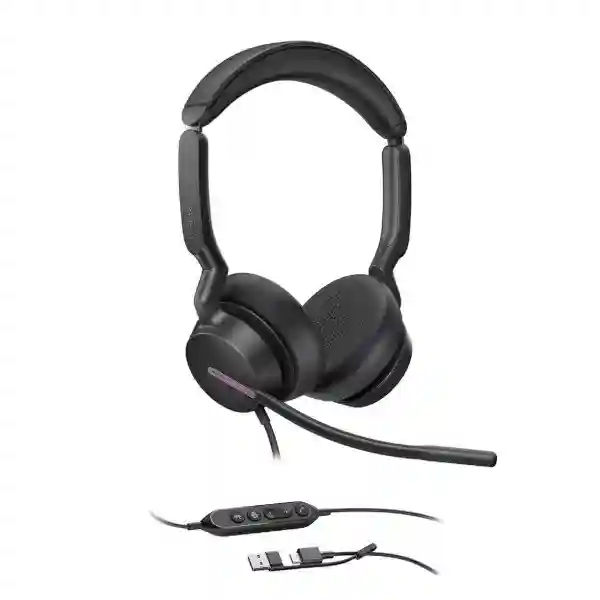
The Yealink UH46 USB Headset is designed for professional calling where microphone clarity, predictable USB connectivity and comfortable all-day use matter. Yealink positions the UH46 for office and call-center environments, with three microphones, Acoustic Shield Technology 3.0, a 35 mm speaker platform, inline controls and a USB-C cable supplied with a USB-A adapter. Organizations can choose Teams-certified and UC versions, and can select mono or dual wearing styles according to user preference and job role.
3-microphone noise cancellation · 35 mm speakers · USB-C with USB-A adapter · inline call control · dual busylights · boom-up mute · Windows and macOS support · Yealink USB Connect and Yealink Management Cloud Service.
What the Yealink UH46 solves for business users
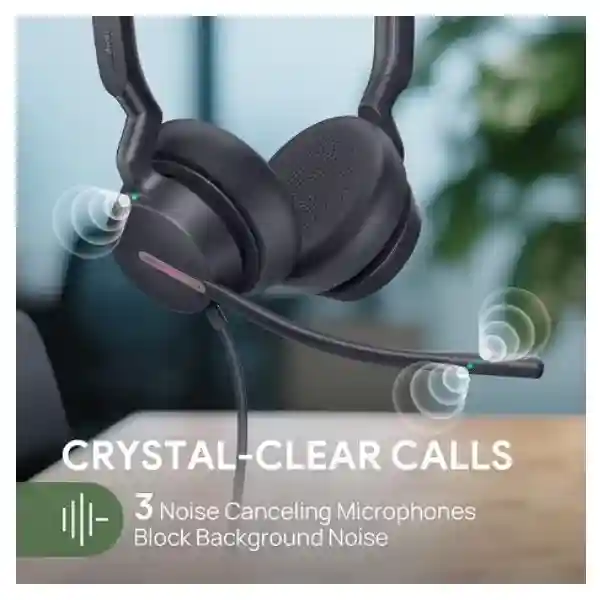
A professional headset has to do more than reproduce sound. In busy offices, shared spaces and customer-service teams, the microphone must prioritize the speaker’s voice while reducing distracting background activity. The UH46 uses three microphones together with Yealink Acoustic Shield Technology 3.0 for voice isolation. The design is intended to help the far-end participant hear the headset wearer more clearly during calls and meetings.
The headset also addresses device-connection friction. Its connection is a USB-C cord with a USB-A adapter, so organizations that have a mix of newer USB-C laptops and established USB-A desktops can standardize on one headset family without maintaining separate cable versions for every workstation. Inline controls provide common call functions such as answer, end, reject, volume adjustment and microphone mute. The microphone boom can be lifted to mute and lowered to unmute, giving users a physical interaction that can be easier to remember during frequent calls.
For audio playback, Yealink specifies 35 mm speakers with a 20 Hz–20 kHz frequency-response range and dynamic behavior intended for call and music modes. Hearing-protection functions include Peak Block Protection, Australian G616 protection and daily noise-exposure protection. Dual busylights help communicate call status to nearby colleagues, which is useful in open-plan offices where visual cues can reduce interruptions.
Microphone system
Three microphones with Yealink Acoustic Shield Technology 3.0 are designed to isolate speech from surrounding noise, making the UH46 suitable for business calling in active workplaces.
USB flexibility
A USB-C cord and supplied USB-A adapter support convenient connection to modern and legacy workplace computers without needing a separate headset model for each connector type.
Call control
Inline controls provide call handling, volume and mute functions. The boom-up mute gesture and dual busylights make call-state awareness more immediate for the wearer and nearby colleagues.
Verified Yealink UH46 specifications
| Connection | USB-C cord with USB-A adapter |
| Microphones | 3; microphone frequency response 100 Hz–14 kHz |
| Speaker | 35 mm; speaker frequency response 20 Hz–20 kHz |
| Supported computer OS | Microsoft Windows and Apple macOS |
| Management | Yealink USB Connect (PC) and Yealink Management Cloud Service |
| Controls | Answer/end/reject, volume up/down, microphone mute/unmute, boom-up mute |
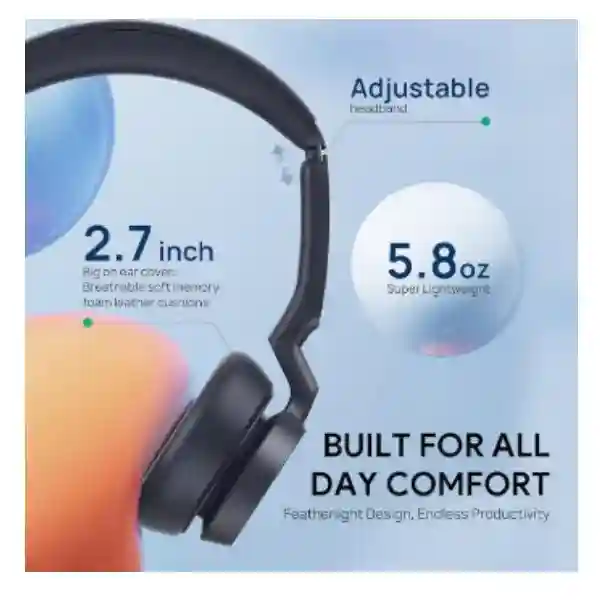
| Weights | Dual 166 g; Mono 127 g |
| Available variants | Teams and UC; mono and dual options are published by Yealink |
Selecting the right UH46 variant
For users who spend much of the day on calls, a dual-ear version can help create a more focused listening experience by covering both ears. A mono version keeps one ear open to the surrounding workplace, which can be preferable for reception desks, supervisors or staff who need to maintain awareness of nearby conversations. Teams-certified variants are designed for Microsoft Teams-oriented deployments, while UC variants suit broader unified-communications environments. Before a bulk purchase, confirm the collaboration platform, workstation connectors, operating-system policy, user role, preferred mono or dual wearing style and any desk-phone compatibility requirements.
Yealink publishes UH46 part numbers including 1308182 for UH46 Dual Teams USB-C/A, 1308183 for UH46 Dual UC USB-C/A and 1308242 for UH46 Mono USB-C/A. Procurement teams should still confirm the exact required commercial part number on the quotation because regional channel naming and variant availability can change.
Related FourTeck business technology resources
The UH46 is often purchased as part of a wider voice, collaboration or endpoint standardization project. FourTeck Tanzania’s business technology overview covers integrated IT, telecom and collaboration planning. For multi-country requirements, the FourTeck Uganda, FourTeck Kenya, FourTeck UAE and FourTeck Africa sites support related regional planning. These links are useful when procurement teams want consistent headset, IP-phone, conferencing and workplace technology standards across branches.
Yealink UH46 USB Headset Tanzania
For organizations buying the Yealink UH46 USB Headset in Tanzania, the primary decision is not simply whether the headset connects by USB. The better procurement question is whether the selected variant fits the organization’s collaboration platform, user roles, workstation mix and support process. The UH46 is a practical candidate for contact centers, customer-service teams, finance departments, inside-sales groups, remote support desks, administrators and staff who participate in frequent online meetings. Its three-microphone system and Acoustic Shield Technology 3.0 are particularly relevant when users work near other people, printers, air-conditioning systems or normal office activity that can otherwise reach the far end of a call.
Tanzania-based businesses often operate a mixed fleet of devices accumulated over multiple refresh cycles. Some laptops may provide USB-C as the main peripheral interface while established desktops and docking stations still rely heavily on USB-A. Because the UH46 uses a USB-C cable with a USB-A adapter, IT teams can reduce the need to stock connector-specific headset versions. This matters in organizations with several branches because a common accessory standard simplifies deployment and replacement. The headset is published for Windows and macOS, and management can be supported through Yealink USB Connect on PC and Yealink Management Cloud Service where an organization chooses to use Yealink’s management ecosystem.
A Tanzania quotation should identify the required quantity, mono or dual preference, Teams or UC preference, device types, operating systems and whether the headsets will be used only with computers or also with compatible Yealink phones. Yealink’s current compatibility documentation lists UH46 among tested wired USB headsets for selected Yealink desk-phone families, but exact phone model and firmware requirements should be checked before purchase. Businesses standardizing communications should also consider spare units, replaceable ear-cushion planning, user labeling, cleaning procedures and a simple process for firmware or settings management. FourTeck can use those details to prepare a more accurate proposal without making assumptions about stock, delivery time or project scope.
Yealink UH46 USB Headset Dar es Salaam
Dar es Salaam businesses frequently combine open-plan offices, customer-facing teams and hybrid meeting practices, creating a strong use case for a consistent professional headset. The Yealink UH46 can suit teams that spend long periods on voice or video calls and need a wired connection that avoids battery charging. Wired USB can be attractive for fixed desks because users connect directly to the workstation and do not need to remember charging cycles, pair Bluetooth devices or manage radio interference. The inline controller keeps essential call functions accessible without forcing the user to search for software buttons during a conversation.
For call-heavy departments in Dar es Salaam, headset selection should be based on actual seat behavior. A dual-ear headset is usually the stronger fit where agents need concentration, while mono can work better for reception, branch coordinators or supervisors who must hear nearby colleagues. The UH46’s dual busylights give a visible indication that a user is engaged on a call, which can help reduce interruptions in shared offices. Boom-up mute also provides a quick physical way to silence the microphone when a user needs to speak briefly with a nearby colleague.
Procurement teams planning fifty, one hundred or more headsets should think about standardization before ordering. Capture the exact laptop or desktop interfaces in use, confirm whether USB-C ports are available directly or through docks, and identify the communication software used by each department. Where Microsoft Teams is the corporate standard, the Teams-certified variant may be preferred; where multiple UC applications are used, the UC version may fit better. For organizations with Yealink IP phones, confirm the phone model against Yealink’s current compatibility list rather than assuming every USB-equipped handset provides identical call control. A useful Dar es Salaam request-for-quotation should include quantities by variant, target deployment date, device environment and whether configuration assistance, endpoint standardization or related IP-phone requirements are part of the same project.
Yealink UH46 USB Headset Mwanza
Organizations in Mwanza evaluating the Yealink UH46 should focus on reliability, user comfort and ease of support across day-to-day business operations. The wired design makes the headset straightforward for fixed desks, branch offices and service counters where predictable connectivity is more important than wireless mobility. The supplied USB-A adapter also helps when an organization has both modern laptops and older desktop systems. Standardizing on one headset family can make onboarding simpler because users learn the same inline controls, mute behavior and wearing adjustments.
The microphone system is an important factor for offices with conversations happening nearby. Yealink specifies three microphones and Acoustic Shield Technology 3.0, designed to reduce background interference and prioritize the wearer’s speech. That can be valuable for customer-care calls, procurement discussions, online training and internal meetings where voice clarity affects how professional the business sounds to customers or partners. The 35 mm speaker platform supports a wide audio frequency range, while the headset also includes hearing-protection functions intended for sustained professional use.
For Mwanza deployments, it is sensible to test a small number of units with the applications and devices that will actually be used before scaling to a larger purchase. Check call-control behavior, microphone selection in the operating system, default audio devices in Teams or other UC applications, comfort over a full working session and whether mono or dual better suits each role. Branch IT administrators should document USB port policies and keep a small spare pool where headsets are operationally critical. If the same business operates locations in Dar es Salaam, Arusha or outside Tanzania, using one approved headset model can reduce accessory variation and make cross-branch support easier. A quotation should therefore identify not only the number of units but also the preferred Teams or UC version, mono or dual configuration and the endpoint types users connect to.
Yealink UH46 USB Headset Arusha
Arusha organizations in tourism, professional services, education, administration and multi-site business operations often rely on frequent voice and online collaboration with colleagues and customers in other locations. In those settings, a professional wired headset can improve consistency compared with laptop speakers and built-in microphones. The Yealink UH46 is designed around business communication, offering three microphones, USB-C connectivity with a USB-A adapter, inline call control and dual busylights in a headset that is available in mono and dual configurations.
For staff who participate in online meetings from shared offices, microphone performance is often the most important purchase criterion. Background conversations can make a call difficult for remote participants even when the person wearing the headset thinks the room is quiet enough. The UH46’s Acoustic Shield Technology 3.0 and three-microphone design are intended to isolate the user’s voice. A dual-ear version can also help the wearer focus on the meeting by reducing distraction from room activity, while mono remains useful for front-desk or coordination roles where environmental awareness is necessary.
An Arusha procurement plan should match headset type to job function rather than issue one configuration automatically. Identify users who handle continuous customer calls, managers who join periodic meetings, reception staff who need one ear open and employees who move between desks. Because the UH46 is wired, hot-desk layouts should provide reachable USB ports or docks and a clear approach for shared-device hygiene. Teams-based organizations should specify the Teams-certified version where required, while mixed-platform organizations may prefer the UC option. For larger projects, include the headset in the wider endpoint design alongside laptops, docks, IP phones and meeting-room systems so users receive a consistent audio experience whether they are at a desk or joining a room meeting.
Yealink UH46 USB Headset Dodoma
In Dodoma, organizations procuring communication equipment for administrative teams, service desks, project offices or institutional environments can use the Yealink UH46 as a standardized wired headset for computer-based calling. Its USB-C connection with USB-A adapter supports a practical mix of workstation generations, which can be valuable when departments do not refresh every laptop and desktop at the same time. Since the headset does not depend on a wireless battery, it can remain ready for fixed-desk use throughout the working day.
The UH46’s controls are designed around routine call actions. Users can answer, end or reject calls, adjust volume, mute the microphone and use the microphone boom position as a mute control. This reduces dependence on finding controls inside an application window. Dual busylights provide a visual cue to colleagues, particularly useful in environments where staff share rooms or service counters. Yealink also publishes hearing-protection functions, which are relevant for teams that spend significant portions of the day listening through headsets.
For Dodoma projects, procurement should include a short technical acceptance checklist. Confirm Windows or macOS compatibility for the installed fleet, verify the expected behavior in Teams or other UC software, test the USB-A adapter on any older desktops and confirm the preferred headset style for each role. If Yealink desk phones are part of the environment, confirm the exact model and firmware against the current compatibility documentation. Government, NGO, education and enterprise buyers may also need clear model descriptions on procurement documents, so quote requests should state Yealink UH46, the desired mono or dual format and Teams or UC requirement rather than using only a generic description such as USB headset. That level of detail reduces substitutions and helps the supplier prepare a precise commercial response.
Yealink UH46 USB Headset UAE
Organizations operating between Tanzania and the UAE often look for common workplace standards that can be repeated across locations. The Yealink UH46 can support that type of standardization because the core product family provides Teams and UC options, mono and dual wearing choices and flexible USB-C/A connection. A shared headset standard helps IT teams create consistent user instructions, spare-unit policies and endpoint configurations even when laptop models differ between branches.
In UAE offices with dense open-plan seating or high call volumes, microphone isolation and visible call status can improve day-to-day collaboration. The UH46’s three-microphone system works with Yealink Acoustic Shield Technology 3.0, while dual busylights show when a user is occupied. The 35 mm speakers are designed for both speech and broader audio playback, making the headset suitable for employees who alternate between calls, training content and other computer audio during the day. Wired operation also removes the need to manage headset charging schedules at fixed workstations.
Cross-border procurement teams should avoid assuming that a single commercial part number fits every department. Teams-certified users, UC users, mono users and dual users may require different order lines. The quotation process should therefore specify the version needed per site, the destination country and the systems the headset must connect to. For UAE requirements, buyers can also review the regional FourTeck site at FourTeck UAE when coordinating local technology projects. Where one organization operates in both Tanzania and the UAE, a combined standards document covering headset model, connector policy, collaboration platform and supported phone endpoints can make future onboarding and replacement purchasing more controlled.
Yealink UH46 USB Headset Uganda
Ugandan businesses considering the Yealink UH46 can evaluate it as a professional endpoint for computer-based voice, contact-center work and unified communications. The combination of wired USB, three microphones and inline call controls makes it particularly suitable for users who spend much of their working day at a desk. Because the headset includes both USB-C connectivity and a USB-A adapter, organizations can deploy it across mixed hardware fleets without purchasing separate connector-specific models for every workstation.
For multi-branch organizations, headset standardization can be operationally important. A common model means users receive the same mute behavior, control layout and wearing adjustment across sites. Help-desk staff can troubleshoot one product family, and procurement teams can define clearer approved-device lists. Mono variants can be assigned to employees who must hear their surroundings, while dual variants can be prioritized for concentrated calling. Teams-certified and UC options allow the deployment to follow the organization’s collaboration platform rather than relying on a generic consumer headset.
Before ordering for Uganda, confirm the exact quantities, user roles and endpoint environment. Test the headset with the specific laptops, desktops or Yealink phones in use. If a business operates both Uganda and Tanzania, document whether the same variant will be used in both markets or whether local user roles differ. Customers can also refer to FourTeck Uganda for regional project coordination. A well-prepared request should include the headset version, connector expectations, target application, whether headsets will be individually assigned or shared and whether related IP phones or collaboration equipment are part of the purchase.
Yealink UH46 USB Headset Kampala
Kampala offices often contain a mix of customer-support functions, shared workspaces, sales teams and administrative staff, each with different headset needs. The Yealink UH46 provides a business-oriented wired option that can be matched to those roles through mono and dual variants. Users who handle sustained voice calls may prefer dual-ear coverage for focus, whereas reception or supervisory staff can benefit from mono wearing because one ear remains open to nearby activity.
Noise management is central to headset performance in busy offices. The UH46 uses three microphones and Yealink Acoustic Shield Technology 3.0 to prioritize speech and reduce surrounding sound reaching the far end. That capability can improve call quality for teams working in open rooms where multiple people speak at once. Dual busylights add a visual indication that the user is occupied, and boom-up mute gives a fast physical action for temporary muting. These details can reduce minor communication errors that become significant when a team handles dozens of calls per person per day.
A Kampala deployment should also consider desk setup. Since the UH46 is wired, ensure USB ports on laptops, docks or desktop systems remain accessible. In hot-desking environments, decide whether users carry individually assigned headsets or whether shared stations maintain their own units; the hygiene and asset-tracking approach will differ. IT teams should verify software defaults so the UH46 becomes the selected microphone and speaker when connected. For Microsoft Teams environments, specify the appropriate Teams-certified version. For broader UC use, specify the UC variant. If Yealink desk phones are involved, match exact phone models to Yealink compatibility guidance before purchase. These checks are simple but help prevent a large order from arriving before the endpoint environment has been validated.
Yealink UH46 USB Headset Arua
For organizations in Arua, a wired professional headset can be a practical choice where users need dependable desk-based communications without the extra operational step of charging wireless devices. The Yealink UH46 connects using USB-C and includes a USB-A adapter, making it easier to support mixed-generation computers. Its inline controller provides commonly used call functions and keeps audio adjustment within reach even when the user’s meeting or softphone window is not in the foreground.
The headset’s three-microphone arrangement and Acoustic Shield Technology 3.0 are intended for voice isolation. This is relevant not only in large contact centers but also in ordinary branch offices where several employees may share one room. Better microphone focus can reduce the amount of surrounding conversation heard by customers, suppliers or colleagues on remote calls. Users can also move the boom upward to mute and downward to unmute, which gives a clear physical indication of microphone state in addition to software controls.
Arua buyers should consider lifecycle support when planning quantities. If the headset will be operationally important, order planning can include a small number of spare units and replacement ear cushions according to the organization’s maintenance policy. Record which users receive mono versus dual models, and label shared assets where appropriate. For branches connected to a centralized IT team elsewhere in Uganda, standardizing on the same UH46 variant can reduce troubleshooting differences. Before procurement, verify the collaboration platform, computer operating systems, connector access and any Yealink desk-phone integration. A detailed quotation request helps ensure the commercial offer reflects the correct version rather than a similar-looking headset from the same series.
Yealink UH46 USB Headset Mbarara
Mbarara organizations can use the Yealink UH46 in roles where clear voice communication and straightforward device connection are more important than wireless mobility. Examples include customer support, front-office administration, finance, remote training, internal service desks and employees who participate in frequent web meetings. The headset’s USB-C cable and included USB-A adapter simplify connection across mixed workplace computers, which is helpful when equipment refreshes happen in phases rather than all at once.
For day-long use, comfort and call controls matter alongside technical specifications. Yealink positions the UH46 as an all-day-wearing headset and offers mono and dual versions. The dual design can help users concentrate on calls, while the mono design allows more awareness of surrounding activity. Inline buttons cover answer, end, reject, volume and mute functions, while the microphone boom can itself act as a mute control. Dual busylights signal call activity to nearby staff and can reduce accidental interruptions.
When a business in Mbarara is buying several units, a structured pilot can provide useful information before full deployment. Select representative users from different departments, verify that their Windows or macOS computers detect the headset correctly, test the main UC application and confirm that the preferred mono or dual style remains comfortable over a normal workday. If the organization uses Yealink desk phones, verify the exact model in the latest compatibility information. Then document the approved part number and variant for procurement. This method is more dependable than purchasing a generic quantity of “Yealink UH46” without identifying whether Teams certification, UC configuration or wearing style differs by department.
Yealink UH46 USB Headset Gulu
Businesses and institutions in Gulu that rely on remote communication can benefit from standardizing audio endpoints instead of allowing each user to depend on laptop microphones or unrelated consumer headsets. The Yealink UH46 provides a defined business headset platform with three microphones, 35 mm speakers, inline controls and USB-C/A connectivity. Standard equipment can improve consistency in user training and technical support because IT teams know which controls and connection method every supported user has.
For shared offices, the headset’s noise-cancellation approach is particularly relevant. Acoustic Shield Technology 3.0 works with the microphone array to focus on the wearer’s speech and reduce unwanted background sound. This does not eliminate the need for sensible workspace acoustics, but it can improve the far-end experience compared with an open laptop microphone. The headset also includes hearing-protection features published by Yealink, which is useful to consider for people who spend extended periods listening to calls.
Gulu procurement teams should separate user profiles before requesting a quotation. Continuous-call users may need dual-ear units, while coordinators or reception personnel may prefer mono. Teams-focused organizations should identify the Teams-certified variant; other environments may use the UC version. Because the UH46 is a wired headset, it is also worth checking workstation layout so cables reach comfortably without crossing walkways or being stretched around furniture. For branch networks, maintain a simple asset register recording headset model, assigned user and replacement date. If support is centralized from Kampala or another location, using the same headset standard across branches helps remote troubleshooting because instructions remain consistent.
Yealink UH46 USB Headset Kenya
Kenyan organizations with regional operations can consider the Yealink UH46 when they need a wired headset standard that can be repeated across departments and countries. Its USB-C connection with USB-A adapter supports mixed endpoint fleets, while Teams and UC variants make it possible to align procurement with the collaboration platform. Mono and dual options allow different job roles to use the same product family without forcing every employee into the same wearing style.
For offices with frequent online meetings or customer calls, the combination of three microphones and Yealink Acoustic Shield Technology 3.0 is designed to improve outgoing voice isolation. This is useful in open offices where background speech is a common problem. The 35 mm speakers support both call and general computer audio, and inline controls keep routine call actions close to the user. Dual busylights provide an at-a-glance status cue to colleagues, while the boom-up mute action can reduce accidental hot-mic situations.
Regional procurement managers should build an approved-device specification that names the exact UH46 variant rather than only the family name. Include Teams or UC, mono or dual, quantity, supported computer types and any desk-phone requirement. Businesses coordinating purchases in Kenya can review FourTeck Kenya for country-specific project engagement. Where the same company also operates in Tanzania or Uganda, a shared accessory standard can reduce spare-part complexity and simplify onboarding. Before scaling to a large fleet, test call controls and default audio-device behavior with the actual collaboration software and endpoint images used by the organization.
Yealink UH46 USB Headset Kuwait
For businesses in Kuwait, the Yealink UH46 offers a wired headset format suitable for fixed desks, customer-service operations and staff who participate in frequent UC meetings. Wired USB can be advantageous where organizations want a consistent endpoint that does not depend on battery charging or Bluetooth pairing. The USB-C connection with supplied USB-A adapter also supports mixed laptop, docking-station and desktop fleets, giving procurement teams more flexibility during phased equipment refreshes.
The UH46’s audio design is focused on professional communication. Three microphones and Acoustic Shield Technology 3.0 are designed to isolate the wearer’s voice, while 35 mm speakers provide a broad audio range for calls and other computer sound. Inline controls handle common call actions, and the microphone boom can be moved upward to mute. Dual busylights can help in dense offices where colleagues need a visible indication that someone is on a call.
Kuwait procurement should begin with the collaboration environment. Teams-centric organizations can select the Teams-certified version, while mixed or other UC deployments may prefer the UC edition. Then decide which roles need mono and which need dual. Where users connect to Yealink IP phones, verify current compatibility before ordering because USB support and call-control behavior can vary between phone models and firmware. For multi-site companies, include the headset in a broader endpoint standard that defines supported laptops, docks, phones and meeting platforms. This allows IT support staff to troubleshoot from a documented baseline rather than dealing with many unrelated headset models.
Yealink UH46 USB Headset Ghana
Ghanaian businesses that want to improve the consistency of voice calls can evaluate the Yealink UH46 as a standard professional USB headset for office and contact-center users. The device combines a three-microphone system, USB-C/A connectivity, 35 mm speakers and physical call controls. These characteristics make it relevant for organizations that want a predictable desktop accessory rather than relying on built-in laptop audio or consumer headsets with varying connection methods.
For teams that work in open offices, outgoing microphone quality can have a direct impact on customer experience. The UH46 uses Acoustic Shield Technology 3.0 together with its microphone array to focus on the user’s voice. Dual busylights help communicate call status, and boom-up mute offers a quick way to silence the microphone when necessary. Users who need greater concentration can select a dual-ear version, while staff who must remain aware of their surroundings can use mono.
A Ghana procurement specification should include more than the model name. State whether the requirement is Teams or UC, mono or dual, how many units are needed, the computers or phones to which they will connect and whether centralized management is part of the intended deployment. Yealink USB Connect can support PC-side management, while Yealink Management Cloud Service is part of the vendor’s published management options. When comparing quotes, make sure suppliers are offering the requested variant rather than treating all UH46 configurations as interchangeable. For organizations with offices elsewhere in Africa, using a common headset family can also simplify spares, user guidance and support documentation.
Yealink UH46 USB Headset Nigeria
In Nigeria, businesses with sales desks, customer-care operations, financial teams, distributed project groups or hybrid workers can consider the Yealink UH46 for wired professional communication. A wired headset is often a strong fit for high-call-volume fixed desks because the user does not need to manage charging or pairing. The USB-C cable with USB-A adapter also allows one headset family to work across a broader mix of workplace computers.
The three-microphone design and Acoustic Shield Technology 3.0 are intended to improve voice isolation, which can be valuable in energetic office environments. The headset’s dual busylights signal call status, while the inline controller provides quick access to volume, mute and call handling. The 35 mm speakers support a broad frequency range so the device can serve both communication and ordinary computer audio. Yealink also publishes hearing-protection features for the UH46, an important consideration for teams exposed to headset audio for much of the workday.
For Nigerian enterprises purchasing at scale, compatibility testing should precede a full rollout. Test representative laptops and desktops, confirm the chosen collaboration platform recognizes the headset correctly and identify whether Teams-certified or UC versions are needed. Where Yealink phones are included, match the exact phone models to current compatibility documentation. Divide users into mono and dual profiles according to role. A detailed request for quote should also indicate branch destinations and expected quantities so commercial planning can be accurate. Cross-border companies can standardize the same UH46 family in Tanzania and Nigeria while still choosing different variants where user behavior requires it.
Yealink UH46 USB Headset Seychelles
Organizations in Seychelles often depend heavily on reliable remote communication with partners, guests, suppliers and colleagues outside the islands. A professional wired headset such as the Yealink UH46 can provide a more controlled audio endpoint than a laptop’s built-in microphone and speakers. The three-microphone system is designed to emphasize the wearer’s voice, while USB-C connectivity with a USB-A adapter makes connection straightforward across common business computers.
For hospitality, professional services, administration and support functions, the correct wearing style will depend on how much environmental awareness the user needs. Dual-ear UH46 versions can suit concentrated meetings or reservation/customer-service teams, whereas mono can suit front-desk roles where users must hear people nearby. Inline controls allow fast call handling without relying entirely on software controls. Dual busylights indicate when the wearer is occupied, which can be useful in shared back-office spaces.
Procurement in Seychelles should account for the cost and inconvenience of replacing mismatched equipment after delivery, so exact variant identification is particularly important. Confirm Teams or UC preference, mono or dual wearing style, connector access and supported operating systems before finalizing the order. If a business also maintains offices or support teams in East Africa or the UAE, aligning on one headset family can simplify remote troubleshooting and spare planning. Maintain a small internal specification sheet recording the approved part number, supported applications and device models. That documentation makes future expansion easier and reduces the likelihood that later purchases introduce incompatible or differently controlled headsets into an otherwise standardized environment.
Compatibility and deployment guidance
The UH46 is published for Microsoft Windows and Apple macOS and can be managed using Yealink USB Connect on PC. Yealink also lists the UH46 among tested wired USB headsets for selected Yealink IP phones. Compatibility should nevertheless be checked against the exact phone model, firmware and desired call-control functions before a purchase. USB audio may work at a basic level even when every advanced control is not supported, so the safest approach is to validate the exact endpoint combination.
For enterprise rollout, configure operating-system audio defaults, Teams or UC application defaults and user training together. A headset deployment is most successful when users know how to mute, adjust volume, select the correct audio device and report faults. Keep cable routing comfortable, avoid strain on USB ports and decide how shared headsets will be cleaned. For contact centers or shared desks, these operational details are as important as the headline specifications.
Frequently asked questions
Is the Yealink UH46 a wireless headset?
No. The UH46 is a wired USB headset. It connects using a USB-C cord and includes a USB-A adapter.
Does the UH46 support Microsoft Teams?
Yes. Yealink publishes Teams-certified UH46 variants as well as UC variants. Specify the required version on the quotation.
Does the Yealink UH46 have noise cancellation?
Yes. Yealink specifies a three-microphone noise-cancellation design with Acoustic Shield Technology 3.0 to improve voice isolation for calls.
Can I use the UH46 with USB-A and USB-C computers?
The headset uses a USB-C cord and is supplied with a USB-A adapter, allowing connection to compatible computers with either connector type.
Is the UH46 available in mono and dual versions?
Yes. Yealink publishes mono and dual UH46 configurations. Dual is commonly selected for greater listening focus, while mono can suit roles that require awareness of nearby activity.
Can the UH46 connect to Yealink desk phones?
Yealink compatibility documentation lists UH46 among tested wired USB headsets for selected Yealink IP phone families. Confirm the exact phone model and firmware before ordering.
Quotation checklist for Yealink UH46
To receive a precise quotation, provide the total quantity, Teams or UC requirement, mono or dual preference, destination, workstation type, operating systems, intended collaboration software and any Yealink desk-phone models. For large deployments, also state whether you need a pilot quantity first, whether headsets are individually assigned or shared, and whether related IP phones, laptops, docks or meeting-room systems are part of the same project. This information allows the commercial and technical teams to identify the correct variant without making assumptions about pricing, stock, delivery time or compatibility.
Decision recap
Choose the Yealink UH46 when you need a professional wired USB headset with flexible USB-C/A connection, three-microphone voice isolation, 35 mm speakers, inline call controls and Teams or UC options. Select mono for greater awareness of the surrounding workplace and dual for stronger listening focus. Validate the exact PC, application and Yealink phone environment before a bulk rollout. For organizations buying across several offices, define one approved UH46 variant per user role and document the standard for future replacements.
Talk to FourTeck about your headset requirement
FourTeck can help prepare a business quotation for the Yealink UH46 based on your required quantity, variant and endpoint environment. The same conversation can include compatible Yealink IP phones, communication systems, user workstations and collaboration requirements where a broader deployment is planned. Use the verified FourTeck Tanzania contact page to share your requirement and request commercial guidance.




Reviews
There are no reviews yet.