
Business Voice Accessory • QD to RJ9 • Mono / Dual
Yealink YHS34 Wired Headset
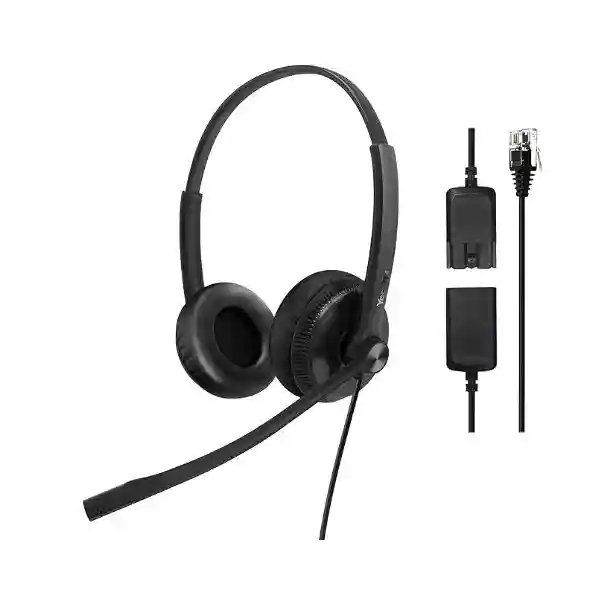
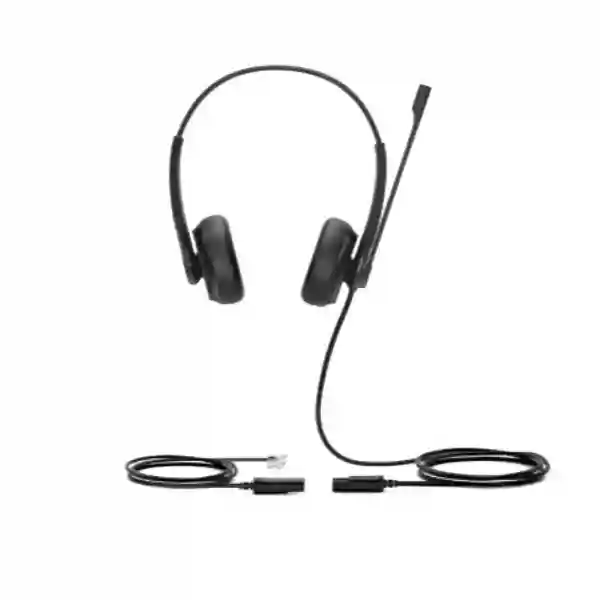
The Yealink YHS34 Wired Headset is designed for offices that use compatible Yealink desk phones and want a straightforward, battery-free headset for everyday business calls. Its QD-to-RJ9 connection suits fixed desk-phone workflows, while wideband audio, a noise-cancelling microphone, passive noise isolation and Yealink ActiveProtection help create a more practical calling environment for receptionists, support staff, sales teams, administrators and other users who spend significant time on voice communications. FourTeck can help buyers in Tanzania and regional markets confirm the exact phone model, choose Mono or Dual, plan quantities and prepare a quotation around the real deployment requirement.
Direct wired desk-phone connection for supported Yealink IP phones, with no charging or wireless pairing workflow.
A 28 mm speaker and wideband audio design support clear business-call listening across compatible Yealink phone environments.
A uni-directional ECM microphone and passive noise cancellation help reduce distracting background sound during calls.
Choose one-ear awareness for front-desk roles or two-ear listening focus for call-intensive teams and shared offices.
What is the Yealink YHS34 Wired Headset?
The YHS34 is a professional analog over-the-head headset built around the way many businesses still use desk phones: a user sits at a fixed workstation, handles repeated inbound or outbound calls and needs both hands free for typing, checking records, taking notes or serving a customer. Yealink specifies QD, or Quick Disconnect, with an RJ9 connection to compatible Yealink IP phones. That makes the headset particularly relevant when an organisation already operates a Yealink desk-phone estate and wants a headset that fits that environment rather than introducing a separate USB, Bluetooth or DECT workflow.
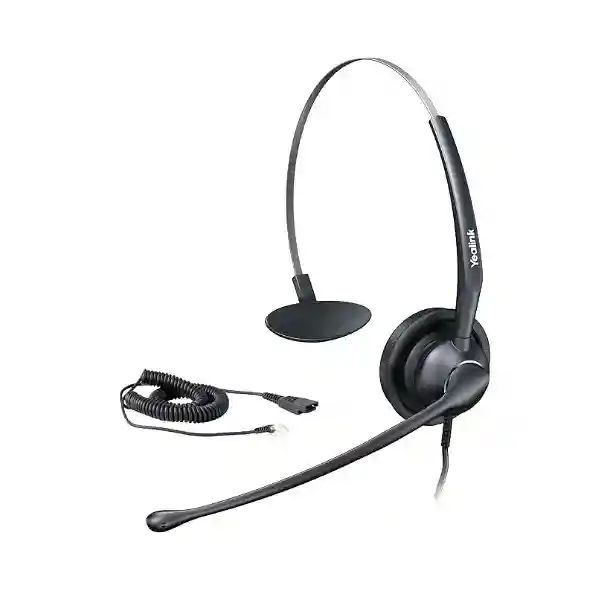
The headset is available in YHS34 Mono and YHS34 Dual. The Mono model places audio on one ear, which can be useful for receptionists, supervisors and front-office workers who need to hear colleagues or visitors while remaining on a call. The Dual model uses two earpieces and is usually the more natural choice for agents, sales desks, helpdesks and users working in busier shared spaces where more listening focus is helpful. Yealink lists the YHS34 with leather ear cushions, while the separate YHS34 Lite family uses foam cushions. Buyers should therefore specify the exact variant rather than assuming that all similarly named YHS34 packages are identical.
The product is purpose-built for voice communication. Yealink lists a 28 mm speaker, 20 Hz to 20 kHz speaker frequency response, a uni-directional ECM microphone with a 100 Hz to 8 kHz response range, and a 320-degree bendable boom arm. The supplied connection path includes a 0.9 m headset cable and a 1.2 m QD-to-RJ9 cable. The key buying question is not simply whether the headset has an RJ9 plug; it is whether the exact desk-phone model and intended user role match the YHS34. Compatibility verification before a multi-seat purchase is therefore a sensible procurement step.
Verified Yealink YHS34 Features and Specifications
| Specification | Yealink YHS34 Details |
|---|---|
| Product type | Professional analog wired, on-ear business headset |
| Variants | YHS34 Mono and YHS34 Dual |
| Part numbers | 1308022 YHS34 Mono; 1308023 YHS34 Dual |
| Connection | QD to RJ9 |
| Headset cable | 0.9 m |
| QD to RJ9 cable | 1.2 m |
| Microphone | One uni-directional ECM microphone; 100 Hz–8 kHz frequency response |
| Speaker | 28 mm; 93 dB SPL at 1 kHz; 20 Hz–20 kHz frequency response; 32 ohm at 1 kHz |
| Audio features | HD Voice / wideband speaker performance, noise-cancelling microphone and passive noise cancellation |
| Hearing protection | Yealink ActiveProtection |
| Boom arm | 320-degree bendable microphone boom |
| Package contents | Headset, QD-to-RJ9 cable and Quick Start Guide |
Compatibility should be checked against the specific Yealink phone model and firmware environment before purchasing for a large user group. The YHS34 is not a USB PC headset and does not use Bluetooth; its value is strongest when the deployment requirement is a simple wired headset connected to a compatible Yealink desk phone.
Who should choose YHS34 Mono or YHS34 Dual?
Choose YHS34 Mono when the employee must balance telephone communication with awareness of the room. A receptionist may need to hear a visitor enter, a clinic front desk may need to coordinate with nearby staff, or a supervisor may need to monitor activity while speaking to a caller. The single-ear format keeps one ear open and can make the headset feel less isolating in roles where physical interaction and telephone work happen at the same time.
Choose YHS34 Dual when the job is predominantly call focused. Contact-centre agents, inside-sales representatives, booking teams, customer-care staff and helpdesk users often benefit from two-ear listening because it reduces distraction from nearby conversations. The Dual version does not create active noise cancellation, but the two-ear form and passive isolation can make it easier to concentrate in a shared workspace. Teams should still manage room acoustics and seating layouts rather than expecting any headset to remove every source of office noise.
For mixed departments, standardising on both versions can be more sensible than forcing a single headset style on everyone. Procurement can maintain one product family while assigning Mono to reception and supervisory roles and Dual to high-call-volume roles. The first step is to list user roles, desk-phone models and daily call patterns. The FourTeck Tanzania technology shop provides a broader procurement context for organisations comparing IP phones, PBX hardware, headsets and supporting network equipment as one business communication environment.
Compatibility, deployment and buying guidance
The YHS34 is commonly attractive to buyers because setup is simple, but a simple physical connector should not replace compatibility checking. An organisation may have several generations of Yealink phones, different firmware releases, a mix of executive and entry-level handsets, or a transition toward softphones and Teams calling. A wired RJ9 headset is ideal when users will remain on the desk phone. If the organisation expects staff to take calls mainly from laptops or mobile devices, a USB or wireless headset family may be a better long-term standard. FourTeck can help frame that decision by asking which device actually carries the call today and which device is expected to carry it after the next communication-system upgrade.
Deployment planning is also about the user, not only the port. A call-centre project should define the number of seats, whether desks are assigned or shared, whether users need Mono or Dual, how replacement ear cushions will be managed, and whether spare units should be kept for operational continuity. Front-office deployments should consider whether staff need to hear visitors while wearing the headset. Shared workspaces may need stronger acoustic control in the room itself. These questions determine whether the YHS34 is the right fit and how many units should be ordered.
For larger voice projects, headset procurement should be tied to the phone and network plan. FourTeck’s Tanzania technology services page explains the wider approach to planning, deployment, integration and support across business IT and communication systems. This is relevant when headsets form part of a new IP-PBX rollout, office move, customer-service expansion or desk-phone refresh rather than a one-off accessory purchase.
Yealink YHS34 Wired Headset Tanzania
Businesses searching for the Yealink YHS34 Wired Headset Tanzania are often trying to solve a practical problem: staff spend too much time holding a handset, call quality is inconsistent at busy desks, or a new Yealink phone deployment needs headsets that are simple to understand and easy to assign. In Tanzania, the YHS34 is best considered as part of the desk-phone workflow. Confirm the exact Yealink phone model first, decide whether each user needs Mono or Dual, then calculate quantities by role rather than ordering one version for everyone. Reception, customer care, reservations, telesales, finance follow-up, procurement and internal helpdesk teams can all have different listening needs even when they share the same phone platform.
For offices with a stable Yealink desk-phone environment, the YHS34 removes several day-to-day concerns associated with wireless headsets. There is no battery to schedule, no Bluetooth pairing to reset and no charging cradle occupying desk space. The QD connection can also be useful for users who need to disconnect from the cable without removing the headset. That simplicity is valuable for organisations managing many workstations, because fewer user steps usually mean fewer avoidable support calls. The trade-off is that users remain physically connected to the desk phone. Teams that need to walk around a warehouse, clinic, hotel, showroom or open office while talking should compare a suitable wireless alternative instead of choosing YHS34 only because it is familiar.
Tanzanian procurement teams should include the desk-phone model, quantity, Mono/Dual preference, delivery destination and project timescale when requesting a quotation. If the purchase forms part of an IP telephony upgrade, also share the PBX platform, expected extension count and whether phones are already installed. This gives the supplier enough context to identify obvious mismatches before ordering. It also creates a clearer bill of materials when phones, PoE switching, PBX hardware, headsets and cabling are being purchased together.
FourTeck Tanzania’s broader technology integration approach is relevant to buyers who want the headset decision connected to the rest of the voice environment. For a single replacement headset, the process can remain simple. For a multi-seat rollout, compatibility records, user-role mapping, standardised models and spare planning create a more maintainable result. The YHS34 is particularly strong where the requirement is a lightweight, fixed-desk, RJ9-connected Yealink headset for repeated daily calls.
Yealink YHS34 Wired Headset Dar es Salaam
In Dar es Salaam, demand for a Yealink YHS34 wired headset can come from corporate offices, logistics companies, travel operators, property businesses, clinics, service desks, hospitality teams and contact-centre environments where desk phones remain central to daily customer communication. The practical buying question is whether employees spend enough time on calls to justify hands-free operation. For a receptionist answering frequent enquiries, a sales coordinator updating a CRM while speaking, or a support agent checking tickets during a call, a headset can improve the workflow simply by freeing both hands and keeping the microphone in a consistent position.
Dar es Salaam offices often contain a mix of user roles in the same location. Front desk staff may prefer YHS34 Mono so they can maintain awareness of walk-in visitors and nearby colleagues. Back-office customer-service or telesales users may prefer YHS34 Dual for more concentrated listening. Procurement should therefore avoid treating headset choice as a cosmetic preference. A short departmental survey can identify who requires room awareness, who handles long calls, who works in a shared space and who uses the phone only occasionally. This allows the headset quantity and variant mix to reflect actual working patterns.
The existing Yealink phone estate should be documented before a larger purchase. Record the model at representative desks and identify whether the organisation is standardised or running several generations of handsets. The YHS34 uses QD to RJ9 and Yealink publishes compatibility information for its enterprise phone ranges, but exact confirmation is still sensible before bulk procurement. If a future project is moving communication toward PC softphones, browser calling or mobile-first work, buyers should decide whether a desk-phone-specific headset still matches the three- to five-year endpoint strategy.
A strong quotation request from Dar es Salaam should therefore state quantity, phone models, Mono/Dual preference, site location, intended departments and whether the order is standalone or part of an IP-PBX project. This information makes the commercial response more useful than a simple request for the lowest unit price. The objective is to buy a headset standard that users will actually wear, that connects correctly to the installed phones and that can be supported consistently as teams grow.
Yealink YHS34 Wired Headset Mwanza
For businesses in Mwanza, the Yealink YHS34 can suit fixed desks where voice calls are an important part of customer service, administration, bookings, purchasing or branch coordination. A wired headset is especially easy to standardise in environments where users work from an assigned station and do not need to roam while speaking. Because the YHS34 does not depend on a rechargeable battery or wireless pairing, the operating routine is predictable: the user connects through the compatible Yealink phone, wears the headset and handles calls from the desk. This can reduce small but frequent issues such as uncharged devices, pairing changes and misplaced charging accessories.
Mwanza buyers planning multiple units should treat comfort and role fit as seriously as the connector. Customer-facing staff who need to notice activity around them can be mapped to the Mono version, while call-intensive users in shared rooms can be mapped to Dual. It is also useful to decide whether headsets are individually assigned or shared between shifts. Individually assigned headsets simplify hygiene and personal adjustment, while shift environments may need a documented process for cleaning, cushion replacement and spare units. These are operational details, but they have more impact on user satisfaction than many headline technical specifications.
Compatibility remains the first technical checkpoint. The YHS34 is an RJ9 desk-phone headset, not a general-purpose USB headset for laptops. If staff regularly switch between a desk phone and a computer-based meeting platform, the organisation should compare a USB or multi-device model rather than assuming one accessory can cover every workflow. Conversely, if the business relies on Yealink IP phones for almost all calls, the YHS34’s focused design may be a benefit because there is less configuration to manage.
When asking for a Mwanza quotation, include exact phone models and quantities, not only the headset name. Indicate how many Mono and Dual units are expected, whether the phones are already installed and whether the project includes new extensions or PBX work. This allows the commercial discussion to include compatibility, user-role allocation and future growth. The result is a clearer purchase record and a lower risk of receiving a headset type that does not match the installed calling environment.
Yealink YHS34 Wired Headset Arusha
Arusha organisations in tourism, hospitality, education, professional services, healthcare and administration may use desk phones for reservations, guest enquiries, internal coordination and supplier communication. In these roles, the Yealink YHS34 provides a simple hands-free option for users who remain at a fixed workstation. Reservation desks can type booking details while speaking, reception teams can look up information without balancing a handset, and administrative staff can work through longer calls with a more consistent microphone position. The value is therefore rooted in workflow efficiency rather than in adding unnecessary headset features.
The Mono-versus-Dual decision is particularly relevant for front-of-house environments. A hotel or tour-office receptionist may need to hear a guest standing at the counter and may prefer YHS34 Mono. A back-office reservations or call-handling team can be better suited to YHS34 Dual when concentration is more important than room awareness. If the office is acoustically busy, the headset’s noise-cancelling microphone and passive isolation can help, but buyers should also review seating, room noise and call volumes. Good call quality is the combined result of the headset, phone, network and environment.
Before ordering, confirm that the desk phones have the required headset interface and are part of the compatible Yealink environment. The YHS34 uses QD to RJ9 and does not replace a USB conference headset for laptop meetings. Organisations that mix desk-phone calls with Teams, Zoom or browser calling should map each workflow. Some users may still be ideal YHS34 candidates, while others may need a USB or wireless model. A role-based standard avoids overbuying premium features for some desks while under-serving others.
For an Arusha quotation, provide the number of users, exact phone models, department types, Mono/Dual split and whether the project is connected to a broader telephony upgrade. If branches in other East African countries use the same Yealink platform, a common headset standard can simplify support and spares. FourTeck’s Kenya technology platform is a useful regional reference for organisations coordinating technology requirements across Tanzania and Kenya.
Yealink YHS34 Wired Headset Dodoma
In Dodoma, offices, institutions, service organisations and administrative teams may look for the Yealink YHS34 when they need a reliable wired headset for Yealink desk phones. The strongest use cases are fixed desks that handle repeated voice calls and benefit from hands-free operation. Procurement staff can speak while reviewing purchase records, reception users can access visitor information, and service teams can update systems without repeatedly moving a handset between ear and shoulder. These everyday ergonomic and workflow improvements are the practical reason to consider a business headset.
Standardisation is useful when an organisation has many desks. Define which phone models are approved, which headset variant fits each user profile and how replacements will be handled. A simple standard might allocate YHS34 Mono to reception and supervisory users who need room awareness, YHS34 Dual to call-heavy staff, and no headset to low-call-volume desks. This keeps procurement controlled and avoids placing accessories where they add little value. If a department later moves toward softphone calling, the standard can be reviewed rather than assuming the RJ9 headset remains appropriate for every device.
The YHS34’s wired architecture can be attractive in structured environments because it does not introduce batteries, radio pairing or charging schedules. It also means the user remains attached to the desk-phone cable. That is acceptable for many administrative desks, but not for staff who need to move between counters, shelves or rooms while speaking. Buying guidance should therefore include a mobility question before the order is finalised. If movement is essential, compare a compatible wireless option rather than trying to make a fixed wired headset fit the wrong job.
Dodoma quotation requests should list quantity, exact Yealink phone model, Mono or Dual preference, department and destination. For new voice projects, add PBX details, extension count and any PoE or network requirements. This creates a better basis for evaluating the total communication solution and reduces the chance that a headset order is treated separately from the phones and infrastructure it depends on.
Yealink YHS34 Wired Headset UAE
UAE organisations commonly operate structured desk-phone environments across reception areas, sales floors, customer service, clinics, hospitality, logistics and professional offices. The Yealink YHS34 fits users who want a simple RJ9 headset tied directly to a compatible Yealink phone. It is especially relevant when the organisation values predictable operation over mobility: no battery charging, no Bluetooth pairing and no software setup for the headset itself. For busy offices, this can make rollout and first-line support straightforward, particularly when many users have similar desk-phone workflows.
The correct version depends on the user role. A front desk in Dubai or Abu Dhabi may prefer Mono because staff need to remain aware of visitors and colleagues. A contact-centre or inside-sales desk may prefer Dual to reduce distraction and keep the user focused on the caller. Because the YHS34 is a passive wired product rather than an active-noise-cancelling wireless system, businesses in very noisy rooms should also review workspace acoustics and seating. The headset can help, but it should not be expected to compensate for an unsuitable call-floor environment.
Before buying at scale, confirm phone models and future collaboration strategy. UAE businesses often use both desk phones and computer-based calling platforms. If a user spends most of the day on Teams or other UC software, a USB headset may align better with the primary device. If the desk phone remains the main endpoint, the YHS34’s direct QD-to-RJ9 design can be exactly the simplicity required. Mixed organisations may standardise different headset families by user type instead of forcing a single model across all departments.
A useful UAE RFQ should state quantity, exact Yealink phone models, Mono/Dual split, delivery emirate and whether the request is linked to new phone or PBX procurement. Multi-country organisations can use the same format when standardising across East Africa and the Gulf. Consistent requirement documents help procurement compare like-for-like solutions instead of focusing on unit price without checking device compatibility and intended user workflow.
Yealink YHS34 Wired Headset Uganda
Ugandan businesses with Yealink desk phones can consider the YHS34 for reception, service, sales and administrative desks where users handle frequent calls without needing wireless mobility. Its practical value is straightforward: the headset creates a hands-free calling position so employees can work with computers, forms or customer records during a conversation. The QD-to-RJ9 design is intended for compatible Yealink phone environments, so procurement should begin by identifying the phone models already deployed rather than choosing the headset in isolation.
For a nationwide organisation or a business with several branches, standardisation can make support easier. A central IT team can define approved phone/headset combinations, keep a small number of spare units and record which departments receive Mono or Dual. Mono is useful where staff need environmental awareness, while Dual is generally more appropriate for call-intensive work. This role-based method also helps control cost because the business can purchase what each job requires rather than selecting by personal preference alone.
Connectivity planning matters if the company is modernising its communication platform. The YHS34 is not a USB PC headset, so a migration from desk phones toward laptop softphones can change the accessory requirement. Procurement teams should ask what device will carry most calls during the useful life of the headset. If Yealink desk phones remain central, YHS34 can be a clean fit. If hybrid and softphone work is increasing quickly, a different model family may provide more device flexibility.
When preparing a Uganda request, include phone model, quantity, department, Mono/Dual preference and destination. For regional projects, the FourTeck Uganda technology site can support country-specific procurement conversations, while the Tanzania page remains useful for organisations that want to standardise communication equipment across neighbouring operations.
Yealink YHS34 Wired Headset Kampala
Kampala offices often combine customer-facing reception areas with sales, support, finance and operational teams in the same building. This makes the YHS34 Mono/Dual choice more important than a single blanket purchase. Reception users can benefit from Mono when they must listen to a caller while remaining responsive to people at the counter. Support or inside-sales users can benefit from Dual when they need stronger listening concentration during continuous conversations. Mapping the headset to the job is a small planning step that can improve user acceptance after deployment.
For organisations operating Yealink IP phones, the YHS34 offers a direct desk-phone approach through QD to RJ9. The absence of batteries can be an advantage in high-utilisation roles because there is no charging schedule to manage. However, users cannot freely roam from the desk as they would with a DECT or Bluetooth headset. Managers should therefore ask employees how they actually work: do they remain seated for calls, or do they regularly walk to shelves, printers, counters or colleagues? The answer determines whether wired simplicity is a benefit or a limitation.
Kampala deployments should also consider call-floor acoustics. The YHS34 includes a noise-cancelling microphone and passive noise cancellation, but the best results come from combining an appropriate headset with sensible desk spacing, controlled room noise and stable voice networking. If callers complain about echo, delay or intermittent audio, the cause may sit elsewhere in the phone, LAN, QoS configuration or internet path. Headset selection should therefore be part of a broader quality conversation rather than the only troubleshooting action.
For quotations, provide phone models and user counts, then identify Mono and Dual roles. If the requirement is part of a new office or contact-centre setup, include the expected PBX, extension count and network status. This information helps create a more accurate communication bill of materials and gives procurement a clearer basis for comparing proposals beyond headline price.
Yealink YHS34 Wired Headset Arua
For organisations in Arua, a wired headset can be a practical choice when employees work from fixed desks and reliability is more important than wireless movement. The Yealink YHS34 is designed for compatible Yealink IP phones through a QD-to-RJ9 path, making it relevant for branch reception, office administration, customer assistance and internal coordination. The core value is not complexity; it is predictable daily use. Once the headset is matched to the phone, users can concentrate on calls without managing charging or pairing routines.
Smaller branch environments can still benefit from role-based selection. A person who combines telephone work with face-to-face visitors may be better served by Mono, while an employee who handles repeated remote conversations may prefer Dual. If there are only a few seats, testing one unit with a representative phone and user can be worthwhile before standardising. For larger quantities, documenting the phone model and headset assignment in the asset list makes later replacements easier.
Arua buyers should also consider how the headset fits into branch continuity. Wired units do not need battery replacements, but physical wear items such as ear cushions and cables should still be considered across a multi-year lifecycle. Keeping a spare can prevent a single damaged unit from interrupting a call-heavy role. Shared headsets should have a clear cleaning policy, while personally assigned headsets can be labelled and adjusted once for each user.
A complete quotation request should list exact Yealink phone models, quantity, Mono/Dual preference and whether the order includes other telephony equipment. Where the branch connects to a central PBX or multi-site voice network, include that context so compatibility and user expectations are clear. The YHS34 is most compelling when the requirement is simple and fixed: a comfortable Yealink desk-phone headset for repeated business calls with no need for wireless roaming.
Yealink YHS34 Wired Headset Mbarara
Mbarara businesses may choose the Yealink YHS34 for customer service, clinic administration, education offices, retail back offices, hospitality reservations or general company desks where Yealink phones are already installed. The headset allows employees to maintain a stable speaking position while using both hands for computer work or paperwork. This can be particularly useful during longer calls where holding a handset becomes uncomfortable or where a caller expects the employee to enter information while speaking.
The YHS34 should be treated as a desk-phone accessory rather than a universal communications headset. It uses RJ9 through a Quick Disconnect cable and is designed around compatible Yealink IP phones. If employees also spend substantial time in laptop meetings, procurement should determine whether separate devices are acceptable or whether a USB-capable headset would be more efficient. This prevents a situation where a new headset works perfectly for desk calls but sits unused because the user’s daily communication has moved to a computer.
For staff who remain on the desk phone, Mono and Dual can be assigned by environment. Mono supports awareness of the room; Dual supports more focused listening. Noise-cancelling microphone design helps the far-end caller hear the user more clearly, while passive noise isolation assists the wearer. In a busy office, those features should be combined with sensible desk positioning and management of unnecessary background sound. Voice quality is always a system outcome, including the handset, PBX, LAN and internet connection where applicable.
Mbarara purchasing requests should specify the exact phone model and number of users. Include the intended departments and whether users need Mono or Dual. If the requirement covers a new branch, list any planned PBX, switching or network components as well. A structured request helps the supplier respond with compatible equipment and gives internal procurement a clearer audit trail for why the chosen headset matches the job.
Yealink YHS34 Wired Headset Gulu
Gulu organisations looking for a straightforward business headset can consider the YHS34 when Yealink desk phones are the main calling device. Its wired QD-to-RJ9 architecture keeps operation simple and avoids dependence on a charging routine. This is useful for desks where calls happen throughout the day and the employee needs the headset ready whenever the phone rings. Typical roles include reception, reservations, customer assistance, sales coordination and administrative support.
A small deployment can be planned with three checks: phone compatibility, user role and mobility. First, identify the exact Yealink phone model. Second, decide whether Mono or Dual best fits the employee’s need for environmental awareness. Third, confirm that the user is comfortable remaining at the desk during calls. If any of these conditions are uncertain, test the workflow before purchasing a larger quantity. This avoids replacing a technically compatible headset later because it does not fit the way people work.
For a branch that expects growth, it can be helpful to create a simple headset standard with approved models and spares. The same document can record which desks use Mono and which use Dual, how shared units are cleaned, and who approves replacements. This reduces ad-hoc purchasing where different headsets accumulate over time and support teams must troubleshoot several connection types. Standardisation also helps procurement compare future quotations consistently.
When requesting a Gulu quotation, provide quantity, phone models, site location and whether the request is standalone or part of a larger voice project. If a PBX or phone refresh is planned, include the expected timeline so headset selection is aligned with the future environment, not only the current one. The YHS34 is a sensible fit when Yealink RJ9 desk phones remain central and users value clear, battery-free, fixed-desk calling.
Yealink YHS34 Wired Headset Kenya
Kenyan businesses often deploy Yealink phones in reception, sales, customer care, hospitality, education, healthcare and general office environments. The YHS34 can fit these installations where the employee works mainly from a desk and wants a headset that does not require charging or wireless setup. Its direct connection and professional call-focused design make it particularly relevant for organisations standardising multiple seats around a compatible Yealink phone family.
For Nairobi offices and branches elsewhere in Kenya, procurement should separate the buying decision into endpoint compatibility and user role. Endpoint compatibility answers whether the YHS34 connects correctly to the phone. User role answers whether Mono or Dual is the better wearing style and whether a wired headset suits the employee’s movement. A receptionist may prioritise awareness, while a customer-care agent may prioritise concentration. A warehouse supervisor who walks during calls may need wireless freedom instead. These distinctions are more useful than simply asking for the most popular headset.
Multi-country companies can also use the YHS34 as part of a common headset policy when the same Yealink desk-phone environment appears in Tanzania and Kenya. Standard part numbers, user-role rules and spare quantities can simplify procurement and make support documentation easier to reuse. Where local phone models differ, the standard should include a compatibility matrix rather than assuming identical hardware at every branch.
A Kenya quotation request should contain exact phone model, headset quantity, preferred Mono/Dual split and destination. If the order accompanies a new PBX or IP-phone rollout, include extension counts and deployment timing. This helps keep headsets aligned with the wider communications project and reduces the risk of buying accessories before the final phone platform is confirmed.
Yealink YHS34 Wired Headset Kuwait
Kuwait offices using Yealink desk phones may choose the YHS34 for fixed workstations where staff handle frequent business calls. Service desks, reception teams, sales coordinators, clinics and professional offices can benefit from a headset that keeps both hands available while maintaining a consistent microphone position. The wired design is simple to operate and does not rely on a battery, making it useful for call-heavy desks where the device should be available throughout the working day.
The local buying process should begin with phone verification. The YHS34 is a QD-to-RJ9 analog headset designed for compatible Yealink IP phones. If a company uses a mixture of Yealink desk phones, PC calling and mobile applications, procurement should map users by primary device. A desk-phone user may be a strong YHS34 candidate, while an employee who spends most of the day in computer meetings may be better suited to a USB headset. This prevents the organisation from choosing one accessory model simply for purchasing convenience.
Mono and Dual should then be assigned according to the workplace. Mono supports interaction with the surrounding room and can fit reception or supervisory desks. Dual places both ears on the call and is generally more suitable where users need stronger concentration. In noisy offices, the headset’s microphone design and passive isolation help, but room acoustics remain important. Managers should not use a headset purchase to avoid solving excessive background noise at source.
A complete Kuwait RFQ should state exact phone models, quantity, Mono/Dual preference and deployment location. Add project context when phones or PBX systems are also being purchased. That information gives suppliers the ability to discuss compatibility and lets procurement compare proposals using the full requirement rather than a single unit price.
Yealink YHS34 Wired Headset Ghana
Ghanaian organisations with compatible Yealink desk phones can use the YHS34 for call-intensive fixed desks in customer service, reception, administration, hospitality, healthcare and professional services. The product is deliberately straightforward: a wired headset, an RJ9 desk-phone connection through Quick Disconnect and a microphone positioned for business conversations. This simplicity can be valuable where organisations prefer equipment that is easy to explain, assign and replace without wireless pairing procedures.
The best deployment starts with a user-role list. Identify employees who spend a significant part of the day on calls and separate them from occasional phone users. Among the high-call group, identify who needs room awareness and who needs stronger isolation. This naturally leads to Mono and Dual allocation. The result can be a smaller and better-targeted order than buying headsets for every phone. It also provides a clear rationale when managers approve the purchase.
Compatibility should be confirmed before an Accra or wider Ghana rollout. The YHS34 is not intended as a generic USB headset for PCs. If the organisation expects desk phones to remain in use, the dedicated RJ9 design can be a benefit. If the business is planning a transition toward cloud calling on laptops, headset selection should be coordinated with that roadmap. Procurement should avoid buying accessories that fit a platform scheduled for near-term replacement.
When asking for pricing, include the phone model, number of users, desired Mono/Dual mix and whether the project includes new phones or PBX work. For multi-country organisations, use the same requirement template across locations so compatibility checks and part numbers remain visible. A structured headset policy can make support easier than allowing each branch to select unrelated accessories independently.
Yealink YHS34 Wired Headset Nigeria
Nigeria has a wide range of call-intensive business environments, from financial and professional offices to logistics, hospitality, healthcare, education and support operations. Where Yealink desk phones are already the primary voice endpoint, the YHS34 provides a practical wired headset option for staff who remain at assigned workstations. The absence of battery management is useful for long shifts, while the microphone and passive noise-control features support clearer business conversations in shared offices.
Large organisations should avoid selecting the headset only by model name. Start with an inventory of phone models by site and department, then identify where YHS34 compatibility is confirmed. Next, map user roles to Mono or Dual. Customer-facing reception roles can benefit from Mono, while call-centre and support roles often prefer Dual. Finally, identify users who need mobility or PC calling, because those requirements may justify a different headset family. This segmentation allows procurement to standardise intelligently without pretending that every user has the same workflow.
For offices in Lagos, Abuja or other commercial centres, call quality should be considered across the whole communications path. A headset can improve microphone positioning and user comfort, but it cannot correct network congestion, poor SIP quality or unstable internet links. New headset deployments are therefore a good time to ask whether users experience recurring voice issues and whether the underlying phone and network environment also needs attention.
A Nigeria quotation should list quantity, exact Yealink desk-phone models, Mono/Dual split, destination and whether the order belongs to a broader IP-telephony project. Organisations with branches in East Africa and West Africa can apply one requirement template across countries, then adapt quantities and compatible phone models by site. This produces better procurement control and a more consistent user experience.
Yealink YHS34 Wired Headset Seychelles
In Seychelles, hospitality, tourism, professional services, administration and customer-facing operations may use Yealink desk phones for reservations, guest communication, supplier coordination and internal calling. The YHS34 can fit fixed workstations where staff want hands-free operation without wireless charging or pairing. This is particularly relevant to reservations and front-office environments where employees need to type, check booking information or update records while maintaining a conversation.
Mono and Dual should be selected according to the balance between caller focus and awareness of the physical environment. A reception desk may favour Mono because the employee must interact with guests and colleagues while wearing the headset. A reservations or customer-care desk may favour Dual for more concentrated listening. In either case, comfort should be evaluated against the expected wearing time. Employees who use the headset for most of the day will notice fit and cushion condition more than occasional users.
Because island procurement can make replacement planning important, organisations should consider spares and lifecycle items at the time of purchase. A spare headset for a critical reservations desk may be more valuable than waiting for a replacement after a cable or cushion is damaged. At the same time, buyers should avoid over-ordering without validating compatibility. Confirm Yealink phone models first and keep a simple record of the approved phone/headset combinations.
A Seychelles RFQ should include exact phone model, quantity, Mono/Dual requirement, site and intended use. If the project includes new phones or PBX equipment, provide that context so the headset decision stays aligned with the final communications platform. The YHS34 is best positioned as a dependable, wired Yealink desk-phone accessory for staff who value clear, fixed-desk calling rather than roaming or multi-device connectivity.
Industries and practical use cases
Hands-free calling while checking visitors, appointments, deliveries or customer records. Mono is often the more natural starting point when room awareness matters.
Dual can support concentration for users who handle repeated conversations and need both hands available for ticketing, CRM or order systems.
Useful for staff who speak while preparing quotations, entering bookings or reviewing product and customer information on a computer.
A practical option for purchasing, finance and office-support staff whose work involves recurring supplier, customer and internal calls.
Quotation checklist for Yealink YHS34
A clear quotation request reduces back-and-forth and helps confirm that the product matches the real installation. Before requesting price and availability, gather the information below.
Frequently Asked Questions
Does the Yealink YHS34 connect by USB?
No. The YHS34 is an analog wired headset that uses a Quick Disconnect cable to an RJ9 connection for compatible Yealink IP phones. Buyers who need a computer USB headset should compare Yealink USB headset families instead.
What is the difference between YHS34 Mono and YHS34 Dual?
Mono uses one earpiece and keeps one ear open to the room. Dual uses two earpieces and is better suited to users who want more listening focus. The correct choice depends on the employee’s role and work environment.
Does the YHS34 require charging?
No. It is a wired analog headset and does not use a headset battery. This makes it suitable for fixed workstations where continuous availability is more important than wireless mobility.
Is the Yealink YHS34 suitable for call centres?
It can be suitable for fixed call-handling desks using compatible Yealink phones. Dual is often preferred for focused listening, but the correct choice should consider phone compatibility, room noise, wearing time and whether agents require mobility.
Does YHS34 have noise cancellation?
Yealink specifies a noise-cancelling microphone and passive noise cancellation. It is not described as an active-noise-cancelling headset, so buyers should not confuse passive isolation with electronic ANC.
Which Yealink phones support YHS34?
Yealink publishes broad compatibility across its enterprise IP phone range, including many T3, T4, T5 and selected Teams/SFB models. Because phone generations and firmware vary, confirm the exact model before a bulk purchase.
What comes in the YHS34 package?
Yealink lists the headset, QD-to-RJ9 cable and Quick Start Guide. Confirm the exact Mono or Dual part number on the quotation before ordering.
What information should I send for a FourTeck quotation?
Send quantity, exact Yealink phone model, required Mono/Dual mix, delivery location and whether the purchase is part of a wider IP-phone or PBX project. This allows a more useful compatibility and procurement discussion.
Decision recap: is the Yealink YHS34 right for your team?
Choose the YHS34 when users primarily call from compatible Yealink desk phones, work from fixed desks, value a battery-free headset and need a professional wired solution for frequent voice communication. Choose Mono where environmental awareness matters; choose Dual where concentrated listening matters more. Consider another headset family when users require wireless roaming, USB computer connectivity or multi-device switching.
The best procurement decision combines product compatibility with user workflow. A headset can be technically compatible and still be wrong for a mobile employee, just as a feature-rich wireless model can be unnecessary for a fixed reception desk. FourTeck can help buyers build a practical requirement around phone model, department, quantity and future calling strategy before a quotation is finalised.
Speak with FourTeck about Yealink YHS34
For a useful commercial response, share the number of headsets required, the Yealink desk-phone model, the intended users and the destination. FourTeck can then discuss the YHS34 Mono/Dual choice, compatibility considerations and how the headset fits into a broader IP telephony requirement. This is particularly valuable for multi-seat projects where the wrong connector or wearing style can create unnecessary returns and inconsistent user experience.
For broader technology planning, review the Tanzania shop and services pages linked above. They provide context for organisations combining headsets with IP phones, PBX hardware, switching, cabling and other business technology. The aim is a communication environment that is simple for staff to use and practical for IT teams to support.




Reviews
There are no reviews yet.