
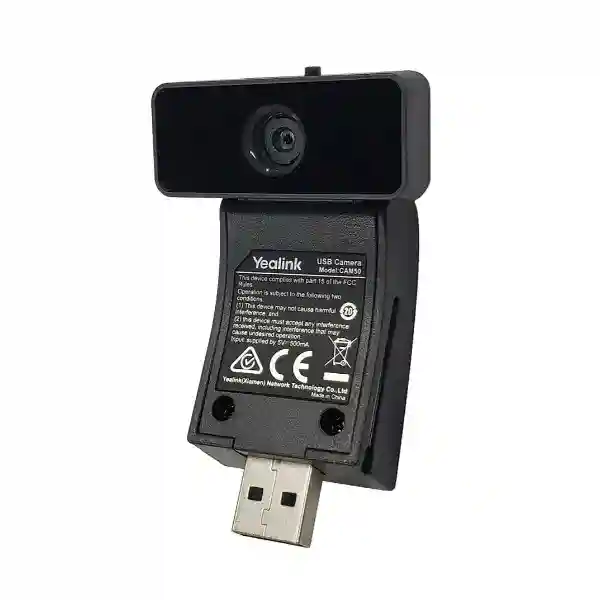
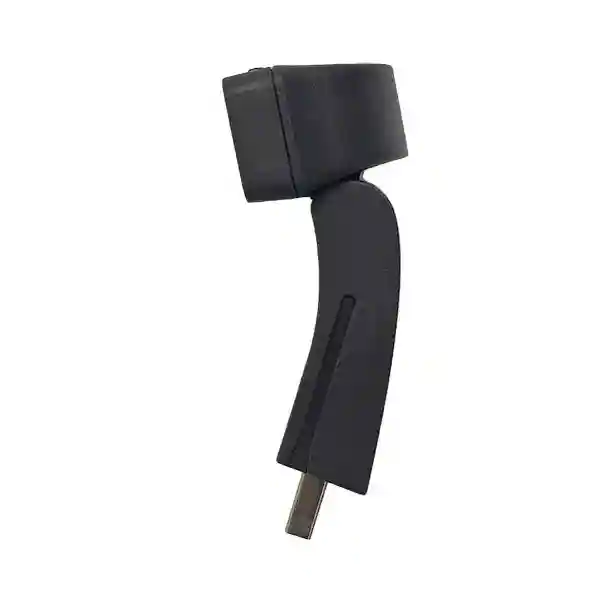
Yealink CAM50 Phone Camera Tanzania
The Yealink CAM50 Phone Camera is a compact HD camera module built for compatible Yealink SIP-T58 desk phones that need desktop video calling without adding a separate USB webcam to a computer. According to Yealink documentation, the CAM50 uses a 2-megapixel camera, supports 720p video at 30 frames per second, connects through USB 2.0, includes an LED indicator, and provides a manually adjustable camera angle with a privacy shutter. Its video codec support includes H.264 High Profile, H.264 and VP8. For Tanzanian organizations already using supported Yealink SIP-T58 handsets, the CAM50 can be a practical way to add face-to-face communication at an individual desk while preserving the familiar telephone workflow.
This product should be selected by compatibility rather than by camera resolution alone. Yealink’s earlier CAM50 documentation lists compatibility with SIP-T58 IP phones, including SIP-T58V and SIP-T58A generations, while newer Yealink T58W documentation also refers to CAM50 camera support with updated camera parameters. Because phone hardware and firmware revisions can differ, buyers should confirm the exact host phone model and software version before ordering. FourTeck can help review the intended phone model, business use case, quantity and deployment context before a quotation is prepared.
Designed for business desktop video calling with 720p output at up to 30 fps.
Connects to the supported phone’s USB camera port without a separate software driver.
A physical shutter gives users a visible way to cover the camera when video is not required.
The camera angle can be tilted forward or backward to improve framing at the desk.
Yealink CAM50 Technical Specifications
| Camera | 2 megapixels |
| Video output | 720p at 30 fps |
| Video codecs | H.264 High Profile, H.264, VP8 |
| Horizontal field of view | 63.2° |
| Vertical field of view | 38° |
| Diagonal field of view | 70° |
| Interface | USB 2.0 |
| Power | 5V, less than 500mA via USB port |
| Operating temperature | 0–40°C |
| Operating humidity | 10–95% |
Desktop Video Communication and Compatibility Planning
The CAM50 is most useful where an organization wants to keep communications centered on a business desk phone. Reception teams, managers, departmental users, branch coordinators and customer-facing personnel may prefer the simplicity of answering voice and supported video calls from a dedicated endpoint rather than depending on a laptop for every interaction. The camera’s integrated form factor reduces desk clutter and gives the user a predictable position for video framing. The physical shutter also supports everyday privacy discipline by making it immediately obvious whether the lens is covered.
Before purchasing, confirm the complete phone identity, not simply the T58 family name. Check the exact model, firmware branch, USB port availability and intended calling platform. The CAM50 is not a generic room camera and should not be treated as a substitute for a conference-room PTZ camera or video bar. For meeting rooms, explore FourTeck Tanzania’s video conferencing and collaboration solutions, where room size, microphone pickup, display placement and network performance can be planned as one solution. Businesses standardizing desk telephony can also review the same site’s IP phone, VoIP and infrastructure coverage for related deployment requirements.
Yealink CAM50 Phone Camera Tanzania
For organizations in Tanzania, the Yealink CAM50 is a focused accessory rather than a general-purpose webcam. Its strongest fit is a business that already owns, or plans to deploy, compatible Yealink SIP-T58 phones and wants selected users to join video-enabled conversations directly from the desk. Procurement teams should therefore start with an endpoint inventory. Record the exact phone model, hardware revision where available, firmware version, number of users requiring video, and whether the existing call platform supports the planned video workflow. This prevents a common procurement mistake: ordering camera modules for handsets that appear visually similar but do not support the same accessory combination.
Tanzanian buyers may also need to consider network readiness. Although the CAM50 itself attaches to the phone by USB, the resulting video traffic still depends on the IP network and the quality of the WAN connection used for remote calling. Branches operating over constrained links should review available bandwidth, latency, packet loss and Quality of Service policies before treating the camera as a simple peripheral purchase. A well-configured LAN with appropriate voice and video prioritization can provide a more predictable experience than an unmanaged network where large downloads compete with real-time traffic. Power stability is also relevant because the camera draws power through the host phone’s USB interface, so the phone and its network/power source should be included in continuity planning.
For quotation preparation in Tanzania, provide the CAM50 quantity, exact compatible phone model, deployment city and whether the project includes phones, switching, IP PBX integration, configuration or user rollout. If the requirement extends beyond individual desks into huddle spaces or boardrooms, it may be more appropriate to compare dedicated conferencing endpoints rather than force a desk-phone camera into a room application. FourTeck Tanzania can help frame the bill of materials around the actual use case. Organizations with wider regional operations can also coordinate related requirements through FourTeck Africa for cross-border technology planning.
Yealink CAM50 Phone Camera Dar es Salaam
Dar es Salaam businesses often operate headquarters, customer-service centers, logistics teams, professional offices and multi-branch operations where desk-based communication remains central. In such environments, the Yealink CAM50 can be considered for users who need video capability without moving their primary communications away from a compatible SIP-T58 desk phone. A practical deployment starts by identifying roles that genuinely benefit from video. Executive assistants, senior managers, remote coordinators, customer account teams and technical support staff may gain value, while other users may only require standard voice endpoints. Selective deployment keeps the project aligned with business need rather than treating every phone as an identical workstation.
Infrastructure assessment is important in busy urban offices. LAN switches should have sufficient capacity for the phone estate, voice VLANs should be documented, and real-time traffic should not be left to compete randomly with backups, cloud synchronization or large file transfers. If phones are powered by PoE, the switch power budget should be checked for the entire endpoint population, even though the CAM50 receives its power through the phone’s USB interface. Internet-connected video calls should be tested across the organization’s actual service provider links, particularly where offices rely on shared business broadband or redundant WAN paths. A successful pilot with representative users can expose bandwidth or firewall issues before a full rollout.
When requesting a Dar es Salaam quotation, include the installation site, quantity, existing phone models, expected video workflow and any need for IP PBX, switching or network support. Do not assume availability, delivery time or warranty terms from a web page; these should be confirmed in the formal commercial proposal. If the requirement evolves into a meeting-room project, FourTeck’s wider Tanzania collaboration portfolio can help compare desk cameras with dedicated room systems. The objective is to preserve a consistent user experience: individual desk video where it makes sense, and purpose-built conferencing equipment where multiple participants need shared microphones, speakers and camera coverage.
Yealink CAM50 Phone Camera Mwanza
Organizations in Mwanza may use the Yealink CAM50 for branch-to-head-office communication, management coordination, supplier meetings or internal support where key users already rely on compatible Yealink T58 series phones. The compact camera is particularly suited to a single-user desk because its field of view and adjustable tilt are intended for personal framing rather than covering a large room. That distinction matters when planning deployments for branches. A branch manager seated at a desk may be an excellent use case, while a six-person meeting table should be assessed for a wider collaboration system with suitable microphone coverage.
Network reliability should be considered alongside the accessory. Video can reveal network weaknesses that may not be noticeable during ordinary voice calls. Packet loss, inconsistent latency or limited upstream capacity can reduce call quality even when the camera is functioning normally. Mwanza sites connected to a central PBX or cloud platform should therefore document their WAN design, firewall rules, QoS policies and failover behavior. If there are multiple branch offices, standardizing phone firmware, configuration templates and camera usage guidance can simplify support. Staff should also understand the privacy shutter so they have a clear physical way to disable the lens when video is not required.
For procurement, send the exact handset model and a photo or inventory record if the phone version is uncertain. This is especially useful when equipment has been purchased over several years and different T58 variants may be present. Request the camera as part of a validated endpoint list rather than as an isolated line item. If Mwanza users need broader telephony modernization, consider the relationship between SIP endpoints, PoE switching, call routing and internet resilience at the same time. A structured quote can separate camera hardware, phones, licenses where applicable, installation and configuration so decision makers can compare options clearly.
Yealink CAM50 Phone Camera Arusha
Arusha has a diverse mix of hospitality, tourism, professional services, education, development organizations and regional offices, many of which coordinate frequently with remote teams. The Yealink CAM50 may fit users who need a personal video endpoint at a fixed desk and already operate a supported Yealink SIP-T58 phone. Its plug-and-play design can simplify the physical installation, but project success still depends on verifying the complete communications environment. The phone must support the camera, the calling platform must support the required video workflow, and the network must be suitable for real-time media.
For hotels or service organizations, it is worth separating administrative communications from guest-facing systems. CAM50 devices are better suited to office users such as management, reservations leadership, finance teams or corporate coordination desks than to shared public spaces. For NGOs and distributed project teams, a desktop video endpoint can provide an always-available communication position without relying on staff to connect a personal laptop webcam. In education and training organizations, individual administrators or coordinators may benefit, while classrooms normally require purpose-designed cameras and audio systems with wider coverage.
Arusha procurement teams should identify whether they are adding cameras to an existing phone estate or buying a complete new communication system. For an existing estate, compatibility and firmware validation are first priorities. For a new deployment, compare the cost and operational value of camera-enabled desk phones with alternative collaboration architectures. Consider bandwidth, PoE switching, VLANs, call server capability, remote provisioning and user support. When requesting pricing, provide quantities, intended users, phone models, site details and any need for configuration assistance. This creates a quote that reflects the deployment rather than only the accessory price.
Yealink CAM50 Phone Camera Dodoma
In Dodoma, the CAM50 can be evaluated for government offices, corporate branches, education institutions and organizations that maintain formal desk-phone workflows while increasing the use of video communication. A dedicated camera attached to a supported desk phone can be useful where employees work from consistent desks and require a controlled business endpoint. The solution is less dependent on users remembering external webcams or choosing the correct device in a computer application. Instead, the camera becomes part of the phone environment, with a physical privacy shutter and adjustable angle available directly at the workstation.
Public-sector and institutional procurement may require clear model identification and documented specifications. The CAM50 should be listed by exact model, and the host phone should be identified separately. Technical schedules can include 2-megapixel capture, 720p at 30 fps, USB 2.0, supported codecs and stated field-of-view values, while avoiding assumptions about features not published for the specific model. If a tender includes newer T58W phones, the current Yealink documentation should be checked because camera characteristics and bundles may differ from earlier T58A/T58V documentation. Treating all generations as identical can create avoidable evaluation problems.
A Dodoma rollout should include a simple acceptance test: confirm camera detection, video display, privacy-shutter operation, image framing and a real call over the production network. Where users connect across ministries, campuses or corporate branches, test the intended call path rather than relying only on a local self-view. Procurement teams can request a phased approach, beginning with a small number of representative users before scaling. The quote should state hardware, compatible endpoints, any configuration scope and commercial terms separately so the organization has a clear basis for approval and lifecycle planning.
Yealink CAM50 Phone Camera UAE
Organizations in the UAE often operate multi-site offices with standardized voice and collaboration platforms. The Yealink CAM50 can serve as a desk-level video accessory where compatible SIP-T58 phones remain part of that standard. In a structured enterprise rollout, the camera should be mapped to user roles and endpoint models. This is preferable to ordering a generic quantity because a mixed phone estate may contain devices with different accessory support. Inventory data from the call-management or device-management platform can help identify which users are suitable candidates before procurement.
UAE deployments may also involve secure enterprise networks, centralized firewalls and carefully controlled real-time communications. The camera’s USB connection does not eliminate the need to plan media traffic. Voice and video still traverse the phone and network, so firewall policy, NAT behavior, WAN capacity and call-platform configuration must support the intended use. For branch offices connected by SD-WAN or VPN, test representative calls across the actual network path. Users who travel frequently may benefit more from laptop or mobile collaboration tools, while fixed executives, reception teams and operational coordinators may prefer the consistency of a camera-equipped business phone.
For UAE requirements, buyers can coordinate regional technology projects through FourTeck UAE. Provide the exact phone model, camera quantity, office location, intended call platform and any need for configuration or wider telephony support. Formal quotations should be used to confirm pricing, stock status, lead time and warranty terms. Multi-country customers with Tanzania operations can standardize documentation while allowing each site to validate local connectivity and deployment needs independently.
Yealink CAM50 Phone Camera Uganda
For organizations in Uganda, the CAM50 is a sensible consideration when the objective is to extend supported Yealink business desk phones with personal video capability. It can suit enterprises, NGOs, education institutions, healthcare administration and distributed branch networks where specific staff need regular face-to-face communication. The most important purchasing step is to verify compatibility with the exact installed phone. A deployment built around SIP-T58 variants should not assume that every device accepts the same camera or firmware combination, especially where phones were sourced in different procurement cycles.
Branch connectivity is another planning factor. Video sessions consume more network resources than voice-only calls, so organizations linking Kampala and regional offices should assess WAN performance, particularly upstream capacity and packet loss. Quality of Service can help protect real-time media during periods of high utilization, but QoS must be applied consistently across the relevant network devices to be effective. Firewall and NAT policies should be tested with the chosen calling platform before cameras are distributed widely. A pilot can also confirm user framing, lighting and desk positioning.
Organizations can review broader regional collaboration and telephony requirements through FourTeck Uganda. A useful quotation request includes the number of cameras, phone models, cities, whether new phones are also required and whether the project needs IP PBX, switching or configuration support. Commercial details such as availability, lead time and warranty should be confirmed on the quotation rather than inferred. The goal is to match the CAM50 to a validated endpoint and network design so it performs as a dependable business communication accessory.
Yealink CAM50 Phone Camera Kampala
Kampala headquarters and branch offices may find the CAM50 valuable for executives, supervisors, customer teams and support personnel who use compatible Yealink T58-series phones throughout the day. A desk camera can reduce the friction of moving between separate devices when a business call changes from voice to video. The physical privacy shutter also provides an intuitive control in offices where users want visible assurance that the camera is covered between calls.
For larger Kampala sites, endpoint management becomes more important than the accessory itself. Standardize firmware, document which phone models are compatible, label deployment groups and maintain a record of where cameras are installed. If phones are centrally provisioned, configuration templates should be reviewed to make sure camera-enabled users receive the correct video and call settings for the chosen communications platform. LAN capacity, PoE power for the phones and WAN performance should all be tested under real operating conditions, especially during business hours when other cloud applications are active.
A procurement request should distinguish between a simple accessory order and a managed communication project. For an accessory order, provide exact model compatibility and quantity. For a project, also provide PBX or hosted calling platform details, site count, switching environment and expected support scope. Organizations planning meeting rooms should not use the CAM50 as a substitute for room equipment; instead, select a room system based on participant count, seating, acoustic conditions and display needs. This separation helps Kampala businesses build a more maintainable collaboration environment with the right endpoint for each workspace.
Yealink CAM50 Phone Camera Arua
Arua-based branches can use personal desktop video to stay connected with headquarters, project teams and external partners without requiring every user to depend on a computer-based meeting setup. Where a supported Yealink T58 desk phone is already present, CAM50 can offer a compact approach for selected users. The camera’s 720p output and adjustable angle are suitable for an individual desk position, while the privacy shutter gives users direct control over lens exposure.
Remote and regional offices should pay close attention to connectivity. A camera can be installed correctly yet deliver a poor meeting experience if the WAN link is unstable or saturated. Before ordering in quantity, carry out test calls at the target branch during normal operating hours. Check latency, packet loss, available upstream bandwidth and firewall behavior. If the site depends on a backup internet link, confirm whether real-time calls can continue acceptably during failover. This type of practical testing can be more valuable than comparing headline camera specifications.
Procurement teams should also plan how devices will be supported after rollout. Maintain records of phone firmware, camera assignment and user location. Keep a clear process for determining whether a reported video issue comes from the camera, phone, network or calling platform. When requesting a quote for Arua, include site quantity, exact handset models and whether deployment help is required. A small pilot order can be appropriate when the existing phone estate is mixed or poorly documented. Once compatibility and network performance are confirmed, the same validated design can be replicated across similar desks.
Yealink CAM50 Phone Camera Mbarara
In Mbarara, the CAM50 can support organizations that want branch managers, administrators, education staff or healthcare-office personnel to participate in direct video conversations from a business desk phone. Because the product is a phone camera rather than a general meeting-room camera, it should be positioned close to the individual user and matched to a supported host phone. The adjustable tilt lets the user refine framing for different desk heights and seating positions, while the integrated shutter supports straightforward privacy between sessions.
For branch deployments, use a repeatable checklist. First verify the phone model and firmware. Then connect and detect the camera, confirm the image locally, place a test video call, check audio/video synchronization and verify that the shutter physically blocks the lens. Next evaluate the network during busy periods. This process provides evidence that the complete endpoint works in the real site environment. If several Mbarara offices or departments are involved, document the validated configuration and use it as the standard for subsequent installations.
When budgeting, account for the surrounding communication system. A camera purchase may reveal the need for phone upgrades, additional PoE switch capacity, call-platform configuration or improved WAN service. Those items should be separated in the commercial proposal so managers can understand what is essential and what is optional. For organizations already operating across Uganda, standardizing accessories and endpoint documentation can reduce support effort. The CAM50 is most effective when treated as one component in a controlled voice-and-video environment rather than an isolated peripheral.
Yealink CAM50 Phone Camera Gulu
Gulu organizations with distributed teams may use desktop video to reduce travel for routine coordination, interviews, supplier discussions and management meetings. The Yealink CAM50 fits individual users who have a compatible T58-series phone and prefer an always-ready business endpoint. Its compact design is particularly useful where desk space is limited and where the organization wants video capability integrated directly with telephony rather than adding another device to a computer setup.
The network path should be validated carefully at regional sites. Video calls are sensitive to inconsistent connectivity, and problems may arise from local Wi-Fi bridges, congested WAN links, overloaded routers or restrictive firewall policies rather than from the camera itself. A wired phone connection on a properly managed switch is generally easier to troubleshoot than a chain of unmanaged links. Where organizations operate centralized communications from Kampala or another hub, test real calls between the sites that will actually communicate.
For a Gulu quotation, identify the phone model, number of camera users, existing call platform and any deployment or training requirement. Staff instructions can be simple: adjust the camera for head-and-shoulders framing, use adequate front lighting, close the privacy shutter when video is not needed and report call-quality issues with the time and remote destination so support teams can investigate the network path. This operational discipline helps the organization get more value from a relatively straightforward accessory while reducing avoidable support calls.
Yealink CAM50 Phone Camera Kenya
Kenyan businesses with Yealink desk-phone deployments can evaluate CAM50 for personal video communication at fixed workstations. Typical candidates include management, reception leadership, sales coordinators, branch supervisors and support teams. Rather than equipping every employee automatically, map the accessory to roles that regularly use video. This creates a more efficient deployment and helps IT teams focus testing on the users who depend on the feature.
Enterprises with offices in Nairobi, Mombasa or other locations should verify network behavior between sites and cloud communication services. The camera’s 720p capability is only one part of perceived quality. Lighting, user position, display size, network bandwidth, codec negotiation and the remote endpoint all affect the final call. A well-lit desk and stable network can often matter more than chasing a higher camera specification. The CAM50’s physical shutter is also a practical benefit in shared offices because users can quickly cover the lens when they are not in a video session.
Regional requirements can be coordinated through FourTeck Kenya. Include exact phone models, quantities, site locations and call-platform details in the request. If the organization is standardizing across Kenya and Tanzania, create one compatibility matrix for all Yealink phone variants and then confirm commercial conditions per country. This approach improves consistency without assuming that stock, lead time or support terms are identical in every market.
Yealink CAM50 Phone Camera Kuwait
In Kuwait, the Yealink CAM50 can serve organizations that continue to rely on enterprise desk phones while adding visual communication for selected staff. The camera is most appropriate for a single seated user and compatible T58-series hardware. Its field of view is narrower than room-oriented cameras, which helps maintain a personal desk composition but also means it should not be selected for group coverage. Buyers should define the intended seat, phone model and communication platform before placing an order.
Enterprise networks in Kuwait may include centralized security gateways, SIP infrastructure, cloud calling and branch connectivity. Video calls should be included in network policy design and acceptance testing. Confirm that firewall and NAT behavior supports the chosen platform, that QoS is configured where appropriate and that WAN links have sufficient headroom. For high-availability sites, test how active calls behave during internet or path failover. The camera itself is simple, but the media path may cross several infrastructure components that determine call quality.
For procurement, request a formal quotation that separates CAM50 units, compatible phone hardware if required, configuration services and any wider telephony work. Confirm availability, warranty and delivery conditions on the current commercial offer. Organizations with offices in East Africa and the Gulf should keep a standard deployment record for model numbers, firmware and user setup while allowing each local site to validate network conditions independently. This creates a more supportable environment than treating each camera as an unrelated purchase.
Yealink CAM50 Phone Camera Ghana
Ghanaian organizations can consider CAM50 where compatible Yealink T58 desk phones are already used by personnel who need direct video capability. A good deployment begins with user segmentation. Identify who regularly joins video-enabled business calls from a fixed desk, who works mainly by voice and who uses a laptop collaboration platform. The camera should be assigned where it simplifies a real workflow. This is particularly relevant for managers, remote coordinators, customer service supervisors and distributed administrative teams.
Network assessment should accompany the purchase. Video traffic can expose congestion that is hidden during voice calls, so test the actual route to common remote destinations. Confirm LAN stability, WAN capacity, firewall policy and call-platform support. If phones are powered by PoE, review the switch budget for the overall handset deployment, and include the communications rack, UPS and internet links in continuity planning. The CAM50 draws through the phone’s USB connection, but reliable operation still depends on the host phone and its network environment.
For projects in Ghana, FourTeck Ghana can be used for related regional technology requirements. Quotations should be based on exact model compatibility, quantity and deployment scope. If a customer operates both Ghana and Tanzania sites, the same technical standard can be documented across countries while each office confirms local commercial and network conditions. Avoid assuming price, stock or lead time until a current quote is issued.
Yealink CAM50 Phone Camera Nigeria
Nigeria’s large multi-site enterprises, professional services firms, financial organizations, education institutions and distributed operations often need communication standards that can be supported consistently across many users. The Yealink CAM50 can fit within such a standard when compatible T58 phones are already deployed and selected users require integrated desktop video. The camera’s plug-and-play physical connection simplifies installation, but large estates still require disciplined compatibility records and controlled firmware management.
In sites with variable connectivity, organizations should test video under realistic conditions. A successful local preview does not prove that remote calls will be stable. Assess bandwidth, packet loss, latency and jitter across the actual internet or private WAN path. If multiple providers or SD-WAN policies are used, confirm how real-time traffic is steered. A pilot with users in several representative locations can provide better evidence than a single headquarters test. Users should also receive simple guidance on privacy shutter use, camera angle, lighting and how to report call-quality issues.
Regional procurement inquiries can be supported through FourTeck Nigeria. Supply the exact phone models, camera quantity, cities and whether the scope includes installation, IP PBX work, switching or network optimization. For multi-country projects, establish a common bill-of-materials naming standard and firmware baseline, then confirm country-specific commercial terms separately. This makes lifecycle management easier and reduces confusion between similar Yealink product generations.
Yealink CAM50 Phone Camera Seychelles
Organizations in Seychelles may have smaller office populations but frequent international communication needs. The Yealink CAM50 can be useful for senior staff, administration teams, hospitality management or remote coordinators who use a supported Yealink T58 desk phone and want a dedicated personal video endpoint. The camera’s compact size and integrated mounting approach help keep the workstation tidy, while the adjustable angle allows the user to compensate for different desk and seating positions.
International connectivity should be part of the deployment assessment. Video quality depends on the complete path between endpoints, and island locations may place particular importance on WAN resilience and available upstream capacity. Test calls to the destinations users contact most frequently, not only to a nearby local endpoint. If the organization uses backup connectivity, verify whether the business expects video calls to remain active during failover or whether voice-only continuity is sufficient. These operational requirements influence network design more than the camera hardware itself.
For procurement, document the exact host phone, required quantity, intended calling platform and whether replacement phones or network equipment are also needed. Because smaller markets may involve project-based sourcing, commercial details should be confirmed on a current quotation rather than assumed. A carefully documented order reduces the chance of receiving a camera that cannot be used with the installed phone generation. If the requirement is for shared boardrooms or meeting spaces, compare purpose-built conferencing products instead of extending a personal desk-camera design beyond its intended role.
Buying Guidance: When CAM50 Is the Right Choice
Choose CAM50 when the user has a confirmed compatible Yealink T58-series phone, sits at a fixed workstation and needs direct video calling from the phone. Consider another solution when the use case is a group meeting room, a laptop-centric collaboration workflow, a requirement for substantially wider room coverage or an endpoint that is not compatible with CAM50. The best buying decision is therefore based on workflow and compatibility rather than on the camera specification alone.
Compatible Yealink T58 desk phone, one primary user, fixed desk position, desire for integrated business video and a simple physical privacy control.
Meeting rooms, large groups, unsupported phones, laptop-first collaboration, advanced auto-framing requirements or projects needing a dedicated room camera and microphone system.
Quotation Checklist for Yealink CAM50
For an accurate quotation, provide: exact Yealink phone model; CAM50 quantity; city and country; existing PBX or calling platform; whether new phones are required; whether switching, PoE, IP PBX or network configuration is part of the project; preferred project timing; and any requirement for installation or remote configuration support. If the installed phone model is uncertain, provide the model label from the underside or rear of the phone rather than relying on appearance.
Frequently Asked Questions
What resolution does the Yealink CAM50 support?
Yealink’s CAM50 datasheet specifies a 2-megapixel camera with 720p video at 30 frames per second.
Does CAM50 need a separate driver?
The manufacturer describes CAM50 as plug-and-play for supported Yealink phones, connected through the phone’s USB camera port without a separate software driver.
Which phones work with CAM50?
Older Yealink CAM50 documentation names SIP-T58V and SIP-T58A family compatibility, while newer T58W documentation also references CAM50. Because revisions differ, confirm the exact host phone and current Yealink compatibility before purchasing.
Does the CAM50 have a privacy shutter?
Yes. Yealink specifies an adjustable camera with a physical privacy shutter and LED indicator.
Can CAM50 be used as a meeting-room camera?
It is primarily a desk-phone camera intended for individual desktop video communication. Larger meeting spaces should be evaluated for dedicated conferencing cameras, microphones and room systems.
What should I provide for a Tanzania quote?
Provide the exact phone model, required quantity, deployment city, calling platform and whether you also need phones, PBX, switching, network configuration or installation support.
Decision Recap
The Yealink CAM50 is a straightforward business accessory when it is matched to the correct host phone and a real need for desk-based video. Its core strengths are 720p at 30 fps, 2-megapixel capture, USB 2.0 plug-and-play operation, an adjustable view and a physical privacy shutter. The main procurement risk is not the camera specification; it is compatibility. Verify the exact phone generation and firmware before ordering, then test the intended call path over the production network.
Plan Your Yealink CAM50 Deployment
Send FourTeck your phone model, camera quantity, site locations and communication-platform details. The requirement can then be reviewed for compatibility, supporting infrastructure and quotation scope before purchase.




Reviews
There are no reviews yet.