
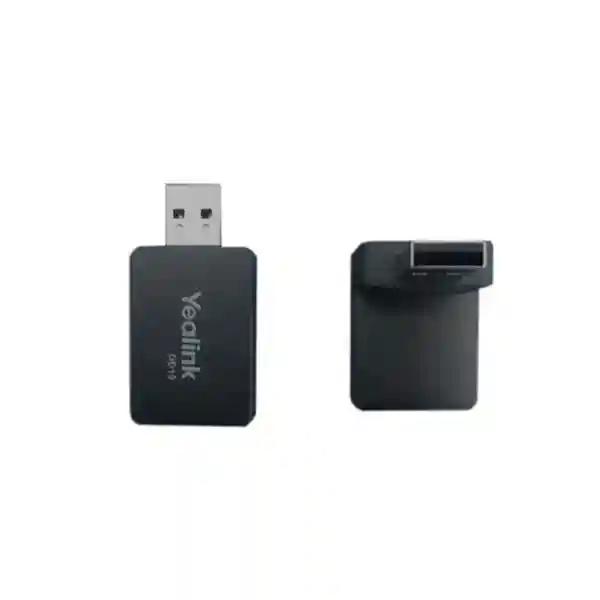
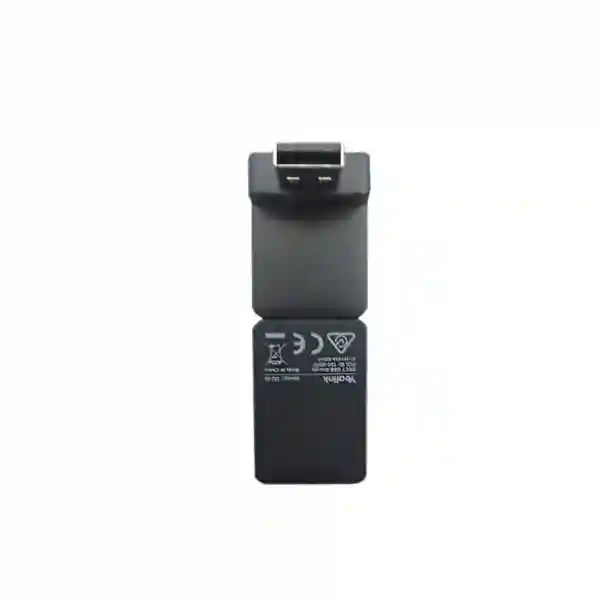
Yealink DD10K DECT USB Dongle
The Yealink DD10K DECT USB Dongle is a compact accessory for organizations that want to extend selected Yealink desk phones into a DECT-based communication environment. Rather than treating a desk phone and cordless system as completely separate endpoints, the DD10K can enable specific supported Yealink phones to participate in DECT workflows, subject to model and firmware compatibility. For Tanzania buyers, this is particularly useful when a business wants to keep the familiar interface of a desk phone while adding the flexibility of a Yealink DECT architecture for offices, reception points, warehouses, retail sites, hospitality environments or operational areas.
Yealink currently specifies a DECT transmission rate of 1152 kbps/s, two internal QWL omnidirectional antennas, USB 2.0 connectivity, power consumption of 815 mW, and a physical size of approximately 73 mm × 27 mm × 8 mm with a stated weight of 2 g. The accessory is small, but correct deployment depends on the exact desk phone, its firmware, the base or multi-cell platform and the role the phone is expected to perform. Some supported Yealink phones can operate as a DECT desk phone registered to a compatible base, while certain other supported models can act as a base-side element for compatible cordless handsets.
FourTeck approaches the DD10K as part of a complete voice solution rather than as an isolated USB accessory. Before ordering, customers should confirm the exact Yealink phone model, current firmware, DECT base or multi-cell system, handset family, required user mobility and any wider IP PBX or SIP integration. This page is designed to help business buyers understand those decisions before requesting a quotation.
What the Yealink DD10K does
DECT enablement
The DD10K adds DECT capability to selected Yealink desk phones. Depending on the supported model and operating mode, the phone can participate as a DECT desk endpoint or serve a base-oriented role with compatible Yealink cordless handsets.
USB deployment
The hardware interface is USB 2.0. Installation is physically straightforward, but firmware and role configuration still need to match Yealink guidance for the selected phone and DECT infrastructure.
Business mobility
A DECT design can help organizations separate voice mobility from general Wi-Fi usage, while retaining desk-phone workflows where fixed endpoints are still important for reception, management, supervisors or shared operational points.
Verified technical highlights
| Item | Verified detail |
|---|---|
| Interface | USB 2.0 |
| DECT transmission rate | 1152 kbps/s |
| Antennas | 2 internal QWL omnidirectional antennas |
| Power consumption | 815 mW |
| Dimensions | 73 mm × 27 mm × 8 mm |
| Weight | 2 g |
| Package contents | DD10K DECT USB Dongle and Quick Start Guide |
Yealink publishes frequency-band and range information that can vary according to regional regulation and installation conditions. Because radio regulations and supported device combinations matter, a quotation should be tied to the destination market and the exact Yealink platform rather than assuming that every DD10K deployment is identical.
Compatibility planning before purchase
Compatibility is the most important buying question for the DD10K. Yealink’s current support matrix lists compatibility for selected T5-series models including T53, T53W, T54W, T57W, T58W and VP59, and selected T8-series models including T85W, T87W, T88W, T88W Pro and T88V Pro. Yealink also lists several legacy models such as T41S, T42S, T56A, T58A and T58V as compatible. The same matrix marks many other T3, T4, T7, conference-phone and camera-equipped variants as unsupported. This means buyers should never choose the DD10K only because the phone has a USB port or because a related model appears similar.
Firmware is equally important. Yealink documentation for particular deployment modes specifies minimum firmware levels and describes how some phones may upgrade or downgrade the DD10K firmware when inserted. In a T54W DD-phone scenario, for example, Yealink documentation explains that the dongle can be inserted in the rear USB port, after which DD-phone mode is enabled and the phone can be registered to compatible DECT infrastructure. The exact steps and supported base systems should be checked against the current documentation for the customer’s phone model.
For a business quotation, useful information includes the phone model printed on each endpoint, current firmware version, number of endpoints, existing DECT base or multi-cell system, handset types, building layout and the desired calling workflow. This avoids ordering an accessory that is electrically connected but unsupported in the intended operating role.
Business use cases
The DD10K is relevant where a business wants to blend fixed desk-phone usability with DECT mobility. A reception area may retain a feature-rich desk phone while nearby staff use cordless handsets. A warehouse supervisor may need a fixed desk endpoint at a control point while operational staff move through the facility. A retail or hospitality site may combine a desk phone at the manager’s station with cordless handsets for floor teams. In each case, the value is not simply wireless connectivity; it is the ability to design calling around job roles.
Organizations should also review the broader voice network. The IP phone still depends on appropriate LAN connectivity, voice VLAN policy where used, PBX or SIP registration, quality-of-service planning and stable network infrastructure. The DECT layer solves a particular wireless endpoint problem, but it does not replace the need for a correctly designed IP telephony platform.
For related planning, customers can review FourTeck Tanzania’s broader business technology portfolio at FourTeck Tanzania, which covers IP phones, IP PBX, switching, Wi-Fi and integrated support. Multi-country organizations can also coordinate regional technology requirements through FourTeck.
Yealink DD10K DECT USB Dongle Tanzania
For Tanzania organizations, the Yealink DD10K is most useful when purchased as part of a clearly defined DECT and IP telephony design. The first question should be whether the existing Yealink desk phones are on Yealink’s current compatibility list. The second should be whether the intended role is a DECT desk phone registered to a base or a compatible desk phone operating in a base-oriented arrangement with cordless handsets. These are different deployment paths, and the design should be confirmed before procurement. Businesses with mixed-generation Yealink estates should inventory exact model numbers because visually similar phones may have different DD10K support status.
Tanzania customers may be replacing older desk phones, extending a reception or operations team, or standardizing voice endpoints across multiple branches. In these cases, the DD10K can help preserve suitable existing phones where they remain supported while adding DECT flexibility. However, it should not automatically be treated as the least-cost path. If many endpoints are unsupported or nearing replacement, a wider phone and DECT refresh may be simpler to operate. A procurement review should compare the number of dongles required, compatible base capacity, handset requirements, firmware readiness and the effort of maintaining mixed endpoint generations.
Building layout also influences the final design. Yealink publishes idealized DECT range figures, but real coverage depends on walls, shelving, machinery, floor construction and radio conditions. Warehouses, hotels and multi-floor offices should therefore treat published range as a planning reference rather than a guarantee. A solution may require appropriate base placement or multi-cell infrastructure. The network side should be ready as well: switch ports, PoE where required by the desk phone, voice VLANs, DHCP, DNS, PBX connectivity and UPS protection can all influence service continuity.
When requesting a Tanzania quotation, provide your Yealink desk-phone models, firmware versions if available, base-station model, handset count, user count and a short description of the site. This allows the accessory to be assessed in context and reduces the chance of buying a dongle for an unsupported combination.
Yealink DD10K DECT USB Dongle Dar es Salaam
Dar es Salaam businesses often operate in communication-intensive environments where reception, sales, logistics, customer service and management teams need different endpoint behavior. The DD10K can be appropriate for offices that already use compatible Yealink phones and want to introduce DECT capability without redesigning every user position. A front desk can remain on a familiar Yealink desktop interface, while the wider DECT environment can support staff who need to move between rooms, service areas or operational zones. The purchasing decision should still begin with exact model verification because a USB-equipped Yealink phone is not automatically DD10K compatible.
For a Dar es Salaam headquarters or branch, it is useful to map users by role. Reception may require line keys and visible call handling. Managers may need a fixed desk endpoint. Warehouse or facilities staff may benefit from cordless mobility. Once those roles are defined, the DECT base architecture can be sized around the number of handsets, expected concurrent usage and physical coverage. If the site spans multiple floors or includes dense walls and equipment rooms, coverage planning becomes more important than the dongle itself.
The IP network should be reviewed at the same time. Voice quality can be affected by congested uplinks, poor switching design, unstable internet paths to hosted PBX services or incomplete QoS policy. A well-planned phone deployment should document VLAN assignments, PBX registration details, extension naming and power protection. If the existing PBX is being upgraded, confirm whether the selected Yealink endpoints and call features remain fully supported after the change.
A useful quotation request for Dar es Salaam includes the site address, number of compatible Yealink desk phones, number of cordless users, base or multi-cell model, PBX platform and any requirement for installation or configuration. This gives the supplier enough context to quote an accessory that fits the actual voice design rather than merely matching the brand name.
Yealink DD10K DECT USB Dongle Mwanza
In Mwanza, organizations may use Yealink communications across offices, retail locations, hospitality sites, clinics, education facilities or distribution operations. The DD10K is best evaluated where there is a clear need to connect supported desk phones with a DECT environment. A business that already owns compatible T5-series phones, for example, may be able to add DECT functions without replacing every desk endpoint. The practical value is strongest when the current phone estate is documented and the planned base system is known.
Coverage should be considered early in sites with thick masonry, separate buildings, storage areas or outdoor operating zones. Yealink’s stated range figures are measured under defined conditions and cannot be treated as a promise for every site. A Mwanza warehouse with metal racking will behave differently from an open office, and a hotel corridor will behave differently from a single-floor retail space. The number and location of DECT base elements should therefore be planned from the building, user movement and expected calling areas.
Operational support also matters. When a DD10K is introduced, record which phone it is installed on, its firmware level, extension, base registration and intended user. This is especially useful for businesses with multiple branches because future troubleshooting can distinguish a DECT registration issue from a PBX, LAN or handset issue. Standard naming and configuration backups can reduce support time.
For procurement in Mwanza, send the phone model list rather than only a quantity request. If some phones are not compatible, the bill of materials can separate DD10K accessories from replacement or alternative endpoints. That approach gives the buyer a cleaner commercial comparison and a more maintainable voice platform.
Yealink DD10K DECT USB Dongle Arusha
Arusha businesses in hospitality, travel, professional services, education and operations often need voice systems that are easy for staff to use while supporting movement between desks and service areas. The Yealink DD10K can be part of that design when the existing desk phone is supported and the DECT platform is compatible. For hotels and lodges, for example, a fixed desk endpoint may be useful at reception or an administrative office, while cordless handsets serve supervisors or service teams. In an office, the same concept can support reception, accounts and managers alongside mobile staff.
The accessory itself does not determine the total number of users or the coverage footprint. Those depend on the connected Yealink phone role, base system, handsets and DECT architecture. Buyers should therefore avoid specifying “DD10K only” without describing the desired result. A better requirement is to state how many fixed phones need DECT capability, how many cordless users are required, which rooms or outdoor areas need coverage, and whether an existing Yealink base is already installed.
Firmware consistency is particularly useful for multi-device environments. Before deployment, compatible phones should be reviewed against Yealink’s current documentation and upgraded where required under a controlled change process. After installation, test inbound and outbound calling, transfer behavior, hold, paging or intercom functions where used, and movement across the intended coverage area. This validates the system as a business workflow, not just as a connected accessory.
Arusha buyers seeking a quotation should include the phone model, PBX platform, base system and site type. If the project is a new installation rather than an accessory add-on, it may be more effective to review the complete Yealink endpoint mix before deciding how many DD10K units are needed.
Yealink DD10K DECT USB Dongle Dodoma
For organizations in Dodoma, the DD10K can support a structured migration from fixed-only Yealink telephony toward a mixed desk-and-DECT environment. This may be relevant for administrative offices, institutions, project teams, service organizations and facilities where some users remain desk-based while others need to move around a building. The main advantage is architectural flexibility, but that flexibility only applies to supported Yealink combinations. A pre-purchase compatibility check is therefore more valuable than assuming every current desk phone can be upgraded with the same dongle.
Procurement teams should ask for a compatibility schedule that maps each existing phone model to the intended DD10K role. That schedule can identify units that are supported, units that require firmware attention and units that should be replaced or handled differently. For larger estates, this simple step can prevent inconsistent deployments where identical-looking desks have different capabilities. It also creates a useful record for future maintenance.
The physical installation is straightforward because the DD10K uses USB 2.0, but the operational design includes more than insertion. Registration to the appropriate DECT platform, endpoint naming, extension association, user training and coverage testing should be part of the commissioning process. Where a phone is being used in a DD-phone mode, follow the specific Yealink procedure for that model and firmware rather than applying a generic sequence.
For Dodoma projects, include planned growth in the quotation discussion. If the current requirement is a small number of users but the site may expand, the base or multi-cell architecture should be selected with that future state in mind. Buying the dongles first and solving capacity later can create unnecessary rework.
Yealink DD10K DECT USB Dongle UAE
UAE organizations that standardize Yealink endpoints across regional branches can use the DD10K as one component of a consistent voice architecture. The accessory is particularly useful when supported desk phones need to integrate with Yealink DECT systems without replacing the desk interface that users already know. A group operating in both Tanzania and the UAE may want the same extension conventions, handset families and deployment documentation across branches, while still adapting radio planning and procurement to each local site.
The UAE market often includes office towers, retail environments, warehouses and hospitality properties with very different coverage behavior. A single-floor office may require a relatively simple DECT arrangement, while a warehouse with racking or a multi-floor property may need a multi-cell design. The DD10K should therefore be specified after understanding where each supported desk phone sits within the wider topology. Yealink’s published radio figures are useful for reference, but site conditions determine the practical result.
For cross-border IT teams, standardized firmware management and asset records can be more valuable than the accessory cost itself. Record each dongle against its desk phone, extension, base registration and site. This creates a repeatable support process and makes it easier to compare user experience across locations. Businesses should also maintain a current compatibility list because newer phone families may not necessarily support the DD10K even if older models did.
Organizations with UAE requirements can review FourTeck UAE for broader regional technology planning. For a DD10K quotation, include exact phone models, base platform, user quantity and whether the request is for supply only or part of a larger IP telephony deployment.
Yealink DD10K DECT USB Dongle Uganda
Uganda businesses considering the Yealink DD10K should begin with the same disciplined compatibility process used for any regional rollout: identify the exact phone model, verify it against Yealink’s current support matrix, confirm firmware and define the required DECT role. This is especially important for organizations that have accumulated Yealink phones over several years, because legacy and current models may sit side by side. A mixed estate can still be manageable when the supported combinations are documented before accessories are purchased.
The DD10K may suit branch offices, warehouses, retail operations, clinics, hospitality environments and service organizations where fixed desk phones remain important but some users need cordless reach. The design should identify who needs a desk interface, who needs a handset, how calls are transferred and which physical zones require coverage. That user workflow determines whether the accessory creates real value.
A Uganda deployment should also consider the network and power layers. IP phones depend on reliable switching, PBX registration and stable network services. Where phones use PoE, switch capacity and UPS protection can improve continuity during short interruptions. If hosted voice is used, internet resilience may also affect call quality even though the DECT link between handset and base is local.
FourTeck’s regional Uganda site at FourTeck Uganda can support a broader multi-site conversation. A good quotation request should state whether the customer already has Yealink DECT bases and handsets or is starting a new platform, because that changes the correct bill of materials.
Yealink DD10K DECT USB Dongle Kampala
Kampala organizations often need scalable voice systems for corporate offices, service desks, education, healthcare, retail and branch networks. The DD10K can be useful where selected Yealink phones already in service are compatible and a DECT layer is being introduced or expanded. Instead of treating every user as either fully desk-bound or fully cordless, the system can be designed by role. Reception and managers can retain supported desk phones, while operational users can use compatible DECT handsets.
A Kampala deployment should include a phone audit before ordering. Record the model, firmware and current extension for each target device. Compare that list against Yealink’s current compatibility matrix. Phones shown as unsupported should not be included simply because they belong to the same product family. This audit becomes even more valuable if the customer has several offices, because it prevents accessories being distributed to locations where they cannot be used.
Coverage testing should reflect the actual building. Office partitions, concrete, lifts, equipment rooms and floor separation can all change DECT behavior. For an installation with critical mobility requirements, base placement and multi-cell design should be considered as engineering tasks rather than guessed from a maximum-range number. Users should test calls along the routes they actually walk during daily work.
When preparing a quotation for Kampala, include whether configuration assistance, PBX integration or post-installation testing is required. The DD10K is a small hardware item, but a reliable business result depends on the surrounding phone, base, handset and IP telephony environment being aligned.
Yealink DD10K DECT USB Dongle Arua
For businesses and institutions in Arua, the DD10K can provide a focused way to add DECT functions to supported Yealink desk phones without turning the project into a complete endpoint replacement. This may be attractive for branch offices, service counters, logistics operations or facilities where the existing phone estate remains functional. The key is to identify which devices are genuinely supported and whether the planned DECT base environment matches the intended operating mode.
Remote or branch locations benefit from simple, documented configurations. After installation, label or record the desk phone, extension, DD10K, DECT base and handset relationships. If an issue occurs later, this documentation helps support staff determine whether the problem is local USB detection, DECT registration, RF coverage, PBX registration or the network path. That can reduce unnecessary device swaps.
Procurement should also account for spares and lifecycle planning without assuming stock or immediate replacement availability. If a branch depends heavily on a particular supported phone model, the organization should understand what it will do if that phone reaches end of life. In some cases, a planned migration to a newer supported architecture may be preferable to repeatedly adding accessories to aging endpoints.
For Arua, send a clear bill-of-requirement rather than only a model name. Include the number of supported desk phones, number of cordless users, site layout, PBX type and whether the DECT base is already installed. This allows the supplier to distinguish a straightforward accessory request from a wider communication-system design.
Yealink DD10K DECT USB Dongle Mbarara
Mbarara customers can evaluate the Yealink DD10K when they need a supported desk phone to participate in a DECT deployment while retaining familiar call controls at a fixed workstation. This can suit hotels, healthcare facilities, educational institutions, retail operations and businesses with administrative offices linked to mobile staff. The accessory is not a universal wireless adapter; it is a Yealink-specific DECT component whose value depends on the approved phone and system combination.
A good design separates compatibility from coverage. Compatibility asks whether the phone, firmware and base platform can work together. Coverage asks whether users can maintain reliable DECT communication through the actual building. Both need answers. A phone may be fully supported but still provide a poor experience if the base design does not account for walls, distance or operational areas. Conversely, good RF coverage cannot make an unsupported phone model compatible.
For businesses with multiple departments, plan extensions and user roles at the same time. Decide whether calls need to ring a desk phone and handset, whether users transfer calls between reception and mobile staff, and which users require fixed line keys. These workflow decisions help determine whether a DD10K-enabled desk phone is the right endpoint for each position.
Before requesting a Mbarara quotation, gather exact Yealink model numbers and describe the intended user experience. If a customer is replacing an old PBX at the same time, the project should be quoted as an integrated telephony requirement so endpoint, network and DECT dependencies can be checked together.
Yealink DD10K DECT USB Dongle Gulu
Gulu organizations looking for a Yealink DD10K should consider how the accessory fits their day-to-day communication pattern. A fixed desk phone is useful where a person handles repeated calls at one position, while DECT mobility is useful for supervisors, service staff and operations teams who move away from a desk. The DD10K can help bridge these working styles when used with compatible Yealink equipment, but the architecture should be intentional rather than assembled one accessory at a time.
For a branch deployment, standardization can simplify support. Use the same approved firmware level where practical, document base registrations and keep a list of supported handsets. If the organization has multiple sites, use consistent extension naming and configuration templates. This makes remote support easier and reduces the chance that two branches use different procedures for the same hardware.
Coverage should be verified through real call tests. Walk the routes that staff actually use, including storage rooms, corridors, service areas and building entrances if those zones are part of the requirement. A DECT solution that works at the manager’s desk but drops calls in the warehouse does not meet the operational need. Base placement and multi-cell planning should be adjusted around those findings.
For procurement in Gulu, include whether the requirement is a single DD10K, a small group of desk phones or a larger DECT expansion. Quantity alone does not show the correct design. Providing the base model and phone list allows a faster compatibility review and a more accurate quotation.
Yealink DD10K DECT USB Dongle Kenya
Kenya businesses with Yealink voice systems can use the DD10K where supported desk phones need DECT capability and a compatible base environment is available. The best projects begin with endpoint inventory. Record model numbers, firmware, extensions and physical locations, then map them to the current Yealink compatibility list. This is particularly useful for organizations with a combination of older T4/T5 devices and newer phone families because support varies significantly between models.
A multi-site Kenya rollout may involve Nairobi headquarters, branch offices, warehouses or customer-facing locations. Rather than buying the same quantity for every branch, assess user roles and coverage. One location may need several cordless users but only one DD10K-enabled desk phone, while another may rely heavily on fixed endpoints. The bill of materials should follow the communication workflow.
Integration with the PBX also deserves attention. Confirm extension registration, transfer behavior, caller identification, line keys and any call-group features that users depend on. If the deployment uses a hosted PBX, also review internet resilience and QoS. DECT provides the local radio link, but the call path beyond the endpoint still depends on the IP network.
Organizations with Kenya requirements can reference FourTeck Kenya for regional IT and telephony planning. When requesting a DD10K quote, include whether you already own compatible Yealink bases and handsets, because that information determines whether the accessory is an add-on or part of a larger system requirement.
Yealink DD10K DECT USB Dongle Kuwait
Kuwait organizations may use Yealink systems in offices, retail stores, hospitality properties, warehouses and service operations. The DD10K can add value when compatible desk phones need to work with a Yealink DECT architecture. The purchasing process should still be based on current technical documentation because older online descriptions sometimes list narrower or different compatibility than Yealink’s present support matrix. Using the current matrix prevents decisions based on outdated reseller content.
For large commercial sites, distinguish radio coverage from endpoint count. The USB dongle enables a phone function, while the base or multi-cell system determines much of the DECT coverage architecture. Buildings with concrete cores, lifts, equipment rooms or multiple floors should be assessed carefully. If users need mobility across broad areas, a multi-cell approach may be more appropriate than expecting a single base to cover every zone.
A standardized deployment checklist is useful: confirm phone model, firmware, USB detection, DECT registration, extension registration, inbound calling, outbound calling, transfer behavior and mobility testing. Document the final result. This creates a repeatable commissioning process for future branches and replacement devices.
Kuwait procurement teams should provide exact quantities and deployment context when requesting pricing. Avoid assuming stock, delivery time or warranty terms until they are stated in the formal quotation. The quote should clearly identify the DD10K accessory and any separate base stations, handsets, phones, licenses or installation services needed for the intended solution.
Yealink DD10K DECT USB Dongle Ghana
Ghana businesses considering the DD10K should evaluate it as a compatibility-driven accessory rather than a generic USB wireless device. Its purpose is to extend supported Yealink phones into DECT use cases, and the exact role depends on the phone and DECT platform. This makes pre-sales verification essential for customers buying accessories for existing equipment. A simple model-number audit can prevent the common mistake of ordering for phones that share a family name but are not supported.
The accessory can be relevant to offices, hospitality, distribution, healthcare and retail environments where fixed and mobile voice users work together. A manager or receptionist may prefer a desk phone, while operational staff require cordless movement. The DECT architecture can support that division of roles, but the number of base elements and handsets should be sized from the actual user and site requirements.
Network readiness remains part of the solution. Yealink IP phones must still communicate with the PBX, and that communication depends on correct LAN configuration. Review switch capacity, voice VLANs, DHCP, DNS, SIP settings, QoS and power protection where relevant. If remote branches connect to a central PBX through VPN or internet links, those paths should also be considered in troubleshooting and capacity planning.
For a Ghana quotation, provide the desk-phone models, firmware information if known, PBX type, base system and expected handset count. This helps separate verified requirements from assumptions and makes it easier to prepare a complete bill of materials.
Yealink DD10K DECT USB Dongle Nigeria
Nigeria organizations often operate large offices, branch networks, warehouses, retail sites and service environments where communications need to scale. The Yealink DD10K can be useful for selected compatible desk phones within those deployments, but scale makes compatibility discipline even more important. A mismatch repeated across dozens of endpoints creates far more disruption than a single-device error. Procurement should therefore be based on an approved device list rather than a generic request for “Yealink USB DECT dongles.”
For multi-branch operations, create a matrix showing site, phone model, firmware, extension, DD10K requirement, base system and handset count. This allows central IT teams to see which branches can use the accessory and which need alternative endpoints. It also supports phased rollout and easier support after deployment. Where branches differ physically, the same hardware list may still require different DECT coverage designs.
Voice resilience can also be important. If calls depend on centralized or hosted services, the organization should review WAN reliability, firewall policy and QoS alongside DECT coverage. The DD10K manages a local radio requirement; it cannot compensate for an unstable PBX connection or poorly designed network. A complete acceptance test should therefore include both mobility and end-to-end calling.
Nigeria buyers should request a quotation that separates hardware and services. The DD10K, base stations, handsets, phones, PBX licensing and installation may be distinct items. Clear separation makes commercial comparison easier and avoids the assumption that an accessory includes infrastructure that is actually purchased separately.
Yealink DD10K DECT USB Dongle Seychelles
Seychelles businesses in hospitality, tourism, administration and services may benefit from DECT mobility where staff move through guest areas, back offices and operational spaces. The Yealink DD10K can support this type of environment when used with compatible Yealink desk phones and the correct DECT platform. A hotel front desk, for example, may keep a fixed feature-rich phone while supervisors use cordless handsets. The accessory can help connect those roles without forcing every user onto the same endpoint type.
Property layout is critical. Guest rooms, concrete walls, service corridors, multiple buildings and outdoor areas can create coverage challenges that cannot be solved by the dongle alone. A DECT design should identify where staff must remain reachable and then place the appropriate base or multi-cell elements around those zones. Published maximum ranges are useful as technical references but should not replace site-specific coverage planning.
Support planning is also useful for island environments where replacement logistics may require more preparation. Businesses should document configuration, maintain appropriate spares according to their own continuity policy and avoid relying on unverified assumptions about local stock or immediate delivery. Firmware and configuration backups can make restoration easier if hardware is replaced.
For a Seychelles quotation, include the building type, phone models, base system, handset count and whether coverage spans separate structures or outdoor service areas. The more accurately the communication zones are described, the easier it is to determine whether the DD10K is a suitable component within the wider Yealink DECT design.
Installation and deployment checklist
1. Confirm the exact phone model. Check it against Yealink’s current DD10K compatibility matrix instead of assuming support from appearance, USB ports or family name.
2. Confirm firmware requirements. Review the current Yealink procedure for the specific phone and intended DECT mode.
3. Verify the base architecture. Identify the DECT base or multi-cell platform and the compatible handset family before registration.
4. Test business call flows. Validate inbound, outbound, transfer and mobility behavior according to the user’s real work.
5. Document the final configuration. Record phone model, firmware, extension, base registration and location for future support.
Buying guidance for IT and procurement teams
When comparing DD10K quotations, make sure the line item is the actual Yealink DD10K DECT USB Dongle and not a Bluetooth adapter or unrelated USB accessory. DECT and Bluetooth solve different wireless requirements. Confirm whether the quotation includes only the dongle or also any base station, handset, power supply, phone, licenses, configuration or installation. A clear bill of materials avoids misunderstandings later.
Do not select purely on unit price if the existing phone environment has not been checked. An apparently inexpensive accessory becomes poor value if it cannot be used with the deployed phone model or if the base architecture is insufficient for the required coverage. Conversely, where compatible phones and DECT infrastructure already exist, the DD10K can be a focused way to extend the system.
For regional organizations, standardize approved phone and firmware combinations. This simplifies purchasing, configuration and support across branches. The technical team should own the compatibility matrix, while procurement can use the approved list for repeat orders. Any substitution should be reviewed rather than accepted solely because it is branded Yealink.
A quotation should state the quantity, destination, validity and any commercial terms separately from technical compatibility. Stock, delivery and warranty should be taken from the supplier’s formal offer rather than assumed from generic web content.
Frequently asked questions
What is the Yealink DD10K?
The DD10K is a Yealink DECT USB dongle for selected Yealink IP phones. It adds DECT capability so compatible phones can participate in supported Yealink DECT scenarios. The precise function depends on the phone model, firmware and DECT platform.
Is the DD10K compatible with every Yealink phone?
No. Yealink publishes a specific compatibility matrix. Several T5 and T8 models are supported, along with selected legacy models, while many T3, T4, T7, conference and camera-equipped variants are not. Always verify the exact model before purchase.
Does the DD10K use USB?
Yes. Yealink specifies a USB 2.0 interface. Physical insertion is simple, but the phone may require a particular firmware version and configuration procedure depending on the intended DECT mode.
What DECT transmission rate does Yealink specify?
Yealink’s current DD10K documentation specifies a DECT transmission rate of 1152 kbps/s.
Can the DD10K turn a desk phone into a DECT desk phone?
For supported models and firmware, yes. Yealink documents DD-phone scenarios in which a compatible desk phone can register to supported Yealink DECT base or multi-cell infrastructure. Follow the model-specific guide.
How should I request a DD10K quotation?
Provide the exact desk-phone model, quantity, firmware if known, DECT base model, handset count, PBX platform and destination. If installation or configuration support is required, mention that too.
Quotation checklist
To prepare a useful quotation, include the following information: exact Yealink phone model numbers, required DD10K quantity, current firmware versions if available, DECT base or multi-cell model, compatible handset models, number of users, PBX or SIP platform, deployment city or country, and whether the requirement includes installation, configuration or testing.
If you are unsure whether your existing Yealink phones are supported, send the model list first. Compatibility verification is more important than ordering the accessory by quantity alone.
Decision recap
Choose the Yealink DD10K when you have a supported Yealink desk phone, a compatible DECT environment and a clear reason to combine fixed desk-phone workflows with DECT capability. Confirm model compatibility and firmware before purchase, then validate coverage and call behavior after installation. Avoid treating the DD10K as a universal wireless adapter or assuming that all Yealink phones with USB ports support it.
For multi-country projects, the same design principles can be repeated while adapting to each site. Consistent documentation, approved endpoint lists and clear quotations make regional deployments easier to support.
Talk to FourTeck about your Yealink DECT requirement
Whether you need one DD10K for an existing supported phone or a larger DECT and IP PBX deployment, provide your current phone models and intended user workflow. FourTeck can use that information to help define the right accessory quantity and identify any related endpoint, base-station, handset or network requirements before quotation.




Reviews
There are no reviews yet.