
Yealink headset workstation accessory
Yealink WHC60 Wireless Charger Tanzania
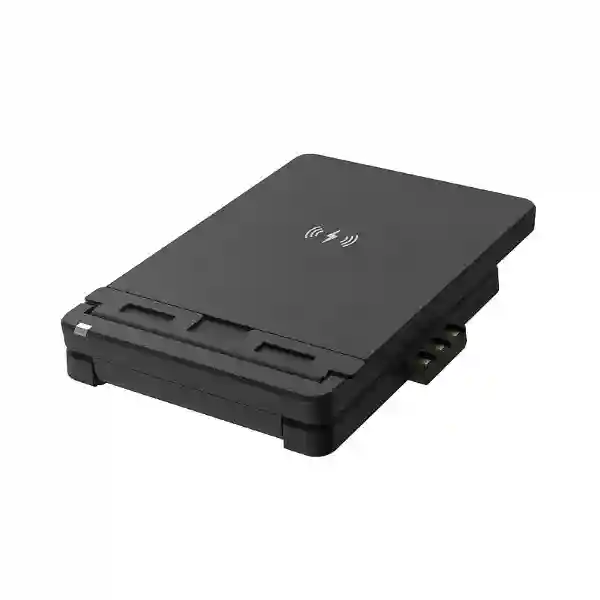
The Yealink WHC60 Wireless Charger is an optional charging stand created for the Yealink WH66 and WH67 DECT wireless headset workstations. Yealink positions it as a simple way to add wireless smartphone charging and an adjustable phone-support surface to the WH66/WH67 desk experience. For organisations in Tanzania, that makes the WHC60 most relevant when the purchasing goal is not merely another charger, but a cleaner and more usable communications workstation for executives, managers, reception personnel, customer-facing teams and hybrid workers who already use compatible Yealink headset bases.
Quick answer: what is the Yealink WHC60?
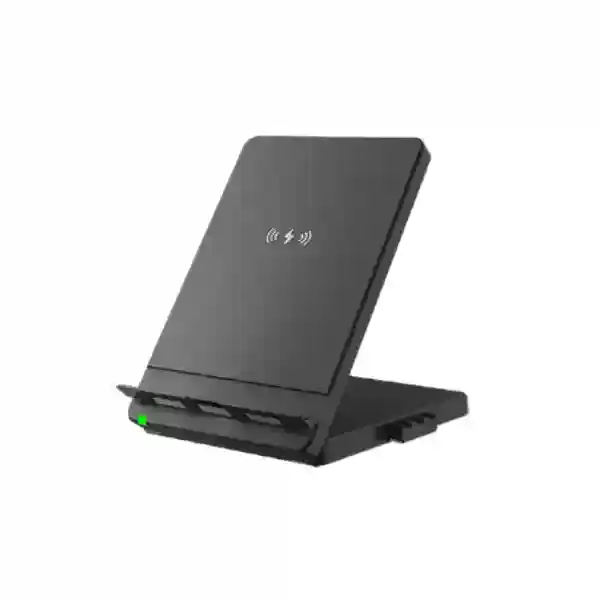
WHC60 is Yealink’s wireless charger accessory for WH66 and WH67 headset bases. Yealink documents three core characteristics: plug-and-play installation, an adjustable panel and wireless charging. When used with a WH66 or WH67 workstation, a compatible smartphone can be positioned on the charger while the phone is connected to the headset system through Bluetooth, allowing the smartphone screen to remain available for mobile video meetings while the Yealink headset handles professional audio. The accessory therefore fits best as part of an existing or planned WH66/WH67 workstation rather than as an unrelated generic office charger.
What buyers should confirm
Before ordering, confirm that the intended headset base is Yealink WH66 or WH67, that the smartphone supports wireless charging, and that the complete workstation workflow matches the user’s needs. Charging compatibility should be checked against the exact phone model and case. Businesses should also distinguish WHC60 from the headset itself: WHC60 is an accessory and does not replace the WH66/WH67 headset workstation. Current price, availability, commercial warranty, delivery and bundle contents should be confirmed in the quotation rather than assumed from overseas reseller listings.
Verified Yealink WHC60 features and use
Plug-and-play
Yealink describes the WHC60 installation as plug-and-play. When it is attached to a compatible WH66/WH67 base, the accessory is intended to become part of the existing workstation rather than requiring a separate complex configuration process.
Adjustable panel
The supporting panel can be adjusted so the smartphone can be positioned for convenient viewing. That is especially useful where the phone is used as the visual endpoint for a video call while the WH66 or WH67 provides the user’s headset audio.
Wireless charging
The accessory supports wireless charging for compatible smartphones. This can reduce the need to repeatedly connect a charging cable during a workday, but buyers should still verify the phone’s wireless-charging capability and any case-related limitations.
Mobile workstation
Yealink specifically presents WHC60 with WH66/WH67 as a mobile-phone workstation. A smartphone connected to the headset system through Bluetooth can be placed on the adjustable charger, letting the user combine the phone’s display with the headset’s audio during calls and video meetings.
Compatibility comes before price
The WHC60 purchase decision should begin with the surrounding workstation. Yealink’s official positioning identifies WH66 and WH67 as the supported headset bases. If a buyer uses another Yealink headset family, the WHC60 should not be assumed compatible simply because the product is a wireless charger. Likewise, the smartphone must support wireless charging. A procurement team should therefore record the headset base model, smartphone model, expected number of desks, whether users need the mobile-video workflow and whether each desk already has the relevant Yealink base.
For broader Yealink planning, review the FourTeck Tanzania Yealink business communication solutions guide, which explains how phones, headsets, conferencing and collaboration devices fit into workplace roles. Buyers comparing multiple Yealink categories can also use the Yealink product quotation and price-list guidance for Tanzania to structure a current bill of materials instead of relying on static online pricing.
How to specify the WHC60 in a business quotation
A useful quotation request should state the exact product as Yealink WHC60 Wireless Charger, identify the quantity, and list the headset base with which each unit will be used. If the organisation is ordering WH66 or WH67 workstations at the same time, the bill of materials should separate the headset workstation and WHC60 accessories clearly. This avoids assuming that the charger is included by default. The request should also state whether the deployment is for executive desks, call-handling staff, hybrid workers, meeting-room support desks or another defined use case.
Procurement teams should ask for current unit pricing, applicable taxes, lead time, warranty terms, exact package contents and any regional commercial conditions in the formal quotation. Overseas retailer pages can be useful for general market comparison but should not be treated as proof of Tanzania stock, local warranty or delivery. A current project quotation is the right place to confirm those conditions.
If the WHC60 purchase is part of a wider workplace technology project, the FourTeck Tanzania business technology shop provides context across telephony, conferencing, networks and supporting infrastructure, while the FourTeck Tanzania technology services overview helps organisations scope deployment, integration and lifecycle requirements around the endpoint purchase.
Yealink WHC60 Wireless Charger Tanzania
Organisations searching for the Yealink WHC60 Wireless Charger in Tanzania are usually solving a very specific desktop requirement: they already use, or intend to deploy, a Yealink WH66 or WH67 headset workstation and want the compatible smartphone charging stand that completes that setup. The right buying process therefore starts by confirming the installed Yealink headset base rather than selecting the accessory only from a product photograph. A company standardising executive, reception or hybrid-work desks can record which users have WH66 or WH67, which compatible smartphones need wireless charging and whether users regularly join video meetings from the mobile device. That information helps determine whether WHC60 should be deployed to every compatible desk or only to roles that benefit from the mobile-workstation arrangement.
For Tanzania procurement, quantity planning matters because accessories are often overlooked when a main headset project is approved. If fifty WH66/WH67 workstations are being purchased, procurement should decide whether fifty WHC60 units are required or whether a smaller quantity is appropriate for specific user groups. Finance teams can then compare the complete per-workstation cost rather than discovering accessory requirements after the headsets have been deployed. The bill of materials should keep the charger as its own line item and avoid implying that it is standard in every headset bundle unless the actual quotation states that clearly.
Compatibility should also be checked from the smartphone side. Wireless charging requires a compatible device, and cases or accessories can affect charging behaviour. A pilot desk can be useful where an organisation has a standard corporate smartphone model: connect the WHC60 to the WH66 or WH67 base, test wireless charging with the exact phone and case, pair the phone to the Yealink workstation by Bluetooth, and confirm that the viewing angle works for normal video meetings. This practical test turns a specification into a validated user workflow before wider purchase.
Tanzania buyers should request current pricing and commercial terms rather than reusing prices from foreign e-commerce listings. Exchange rates, sourcing routes, taxes, availability and warranty conditions can change. A strong request therefore includes quantity, city, required date, existing WH66/WH67 models, smartphone types and whether the request is hardware-only or part of a broader communications rollout. This gives the supplier enough information to quote the correct accessory and flag any compatibility question early.
Yealink WHC60 Wireless Charger Dar es Salaam
Dar es Salaam businesses often combine headquarters functions, customer-facing teams, executive offices, sales personnel and hybrid meeting activity in the same workplace. For this environment, Yealink WHC60 is most relevant where WH66 or WH67 headset workstations are already being used as premium desk communication hubs. An executive who handles mobile calls and joins smartphone video meetings may value the adjustable phone position and wireless charging more than a user whose phone remains in a bag for most of the day. A reception or service supervisor may use the workstation differently again. Role-based allocation therefore produces a better result than automatically adding the accessory to every desk.
A Dar es Salaam procurement team can create a simple compatibility register before requesting pricing. List each intended user, WH66/WH67 base model, smartphone model, case type and whether mobile video is part of the daily workflow. That register gives IT a clear pilot plan and gives purchasing an accurate quantity. If a new office fit-out is under way, include desktop power and cable-management considerations so the entire workstation stays organised. The WHC60 is intended to reduce charging-cable inconvenience at the phone position, but the surrounding PC, headset base, displays and other devices still need a sensible desk layout.
Corporate buyers should test the accessory before broad deployment when possible. A representative pilot can verify physical fit, charging behaviour, viewing angle and the Bluetooth call workflow with the company’s standard smartphone and Yealink headset configuration. User feedback is useful because an adjustable stand has ergonomic value only when the phone can be positioned comfortably for the actual seating height and desk arrangement. Pilot feedback can also identify whether some users would rather keep a conventional charger and therefore do not need WHC60.
When requesting a Dar es Salaam quotation, state the exact quantity, whether matching WH66/WH67 headsets are already owned, whether the project needs additional Yealink equipment and the desired delivery window. Ask for current commercial terms and exact inclusions. If the requirement extends into phones, meeting rooms or broader workplace communications, connect the accessory decision to the wider Yealink endpoint standard so desktop equipment remains consistent and easier to support.
Yealink WHC60 Wireless Charger Mwanza
For Mwanza organisations, the Yealink WHC60 can be considered as a focused workstation accessory for compatible WH66 and WH67 users rather than a standalone telephony project. Branch offices and regional operations often benefit from keeping accessories standardised with headquarters because support becomes easier when every site follows the same approved workstation profile. If a company has already selected WH66 or WH67 for managers, supervisors or hybrid workers, WHC60 can be evaluated as the matching smartphone charging stand for those specific roles.
A branch should avoid ordering accessories based solely on the quantity of employees. Instead, map how people communicate. Staff who spend much of the day away from their desks may not need a fixed charging stand, while managers who conduct frequent mobile video calls or handle smartphone-based communication at a desk may gain more value. The adjustable panel is particularly relevant when the phone screen must remain visible during a meeting. Wireless charging can also reduce repeated cable connection, provided the smartphone supports the charging method.
Remote supportability is another useful consideration. Standardising one accessory and one headset-base combination can make it simpler for central IT to document setup and troubleshooting. A support note can show how WHC60 connects to the WH66/WH67 base, how the smartphone is positioned, and how the phone is paired to the workstation by Bluetooth for the intended meeting workflow. Users should also know that the charger and Bluetooth connection solve different parts of the experience: charging powers the phone, while Bluetooth links mobile audio to the headset system.
For a Mwanza quotation, provide the branch quantity, exact Yealink base models, smartphone standard, project deadline and whether additional headsets or replacement equipment are required. If stock or delivery timing is important, ask the supplier to state those items explicitly in the current quotation. This is more reliable than assuming that availability visible in another country applies to Tanzania. A clear bill of materials also helps the branch receive only the accessories it can actually use.
Yealink WHC60 Wireless Charger Arusha
Arusha has a wide range of hospitality, tourism, professional-service, NGO, education and administrative workplaces, and these organisations can have very different desktop communication patterns. Yealink WHC60 is appropriate where a compatible WH66 or WH67 workstation is already part of that pattern. For example, an office manager or reservations supervisor who handles regular mobile communication may value a phone kept visible and charging, while a mobile operational employee may make less use of a fixed desk accessory. The purchasing decision should therefore follow the work role rather than the department name alone.
Hospitality and travel organisations can have long operating hours and frequent coordination between desk-based and mobile staff. Where selected supervisors use WH66/WH67 workstations, WHC60 can help keep a compatible smartphone accessible on the desk without adding a separate charging stand. The user can position the device at a useful angle, and the Yealink workflow allows the smartphone to be connected by Bluetooth to the compatible headset workstation. The accessory is not a replacement for a meeting-room system or a desk phone; it is a personal-workstation enhancement for a defined user.
For institutions and NGOs, procurement documentation can be particularly important. A request should identify WHC60 separately from the headset base and state the number of compatible bases already deployed. This reduces ambiguity in competitive quotation review. Buyers should also ask each supplier to specify current warranty, delivery and availability terms. If the organisation uses standard corporate smartphone cases, test the charging behaviour with those cases instead of assuming every device will behave identically.
An Arusha rollout can begin with a small pilot among representative users. Ask them to confirm charging reliability, comfortable viewing angle, desk-space impact and whether the mobile video workflow is genuinely useful. Those observations help decide whether to scale the accessory across all WH66/WH67 desks or keep it for selected users. A pilot-led decision avoids unnecessary purchasing while still giving high-use staff the workstation functionality they need.
Yealink WHC60 Wireless Charger Dodoma
Dodoma organisations considering the Yealink WHC60 should treat it as an accessory within a controlled endpoint standard. Administrative offices, institutions, professional organisations and growing private businesses may have formal purchasing processes where the model, quantity and intended compatibility need to be explicit. In that context, the quotation should state Yealink WHC60 Wireless Charger as a separate item and identify the WH66 or WH67 base that each unit is expected to serve. This makes technical evaluation straightforward and helps prevent the accessory from being mistaken for the complete headset system.
A structured request can also divide users into profiles. Executives and managers may need a visible smartphone position for calls and meetings; customer-facing staff may benefit from convenient charging; other employees may not require the accessory. The adjustable panel and wireless charging capability create value only when they fit the work pattern. If the phone is used for video conferencing, the user should test the angle with the real desk, chair and screen arrangement. Ergonomic fit is more meaningful than a generic feature list.
IT teams should validate the exact smartphone fleet as well. Wireless charging support varies by phone, and protective cases or attachments can affect charging. A pilot test with the organisation’s standard device gives procurement evidence before volume ordering. Where phones are managed centrally, support documentation can explain that the phone’s Bluetooth pairing to the WH66/WH67 is separate from the charging function, so troubleshooting can isolate audio pairing from power delivery.
For a Dodoma quotation, include quantity, current Yealink headset inventory, smartphone models, intended user roles and the required procurement date. Ask for exact commercial conditions in writing, including what is included with the quoted unit. If the project also includes wider IP telephony or conferencing, define those components separately so evaluation teams can compare complete solutions fairly. The aim is a transparent, compatible workstation bill of materials rather than a list of loosely related accessories.
Yealink WHC60 Wireless Charger UAE
UAE buyers may encounter many online listings for the Yealink WHC60, but a business procurement decision still benefits from the same compatibility discipline. The product is designed for Yealink WH66 and WH67 headset workstations, and the wireless charging function depends on a compatible smartphone. Organisations with regional offices can use a common workstation standard so an executive or manager receives the same headset-and-charger arrangement across sites, while commercial sourcing remains country-specific.
A UAE headquarters that coordinates Tanzania or East African branches may want a repeatable user profile such as “premium hybrid desk: WH66/WH67 plus WHC60”. That can simplify user training and support because the physical arrangement and Bluetooth workflow remain familiar. The standard should still state exact model numbers and avoid assuming that a similarly named accessory is equivalent. Regional IT documentation can include connection steps, phone-placement guidance and troubleshooting for both wireless charging and Bluetooth audio pairing.
Commercial evaluation should separate current market price from technical suitability. Different resellers may advertise different prices, delivery promises or warranty statements, and those terms apply to their own channels. A FourTeck project quotation should therefore be requested for the actual region and quantity. For multi-country procurement, compare like-for-like line items and ensure that taxes, freight, warranty and support scope are not being mixed into the unit price differently.
The WHC60 is particularly sensible where desk users frequently handle smartphone communication while relying on a professional Yealink headset. It can be less useful where corporate policy keeps phones away from desks or where users do not have compatible smartphones. A pilot with the intended phone model remains the most reliable way to validate the user experience. Multi-region organisations should standardise the technical requirement, then source and support it according to each country’s commercial conditions.
Yealink WHC60 Wireless Charger Uganda
Uganda organisations can evaluate Yealink WHC60 as part of a standard WH66/WH67 workstation design for offices and branches. The accessory is especially relevant when users combine smartphone calls or video meetings with professional headset audio and want the phone to remain positioned on the desk while charging. Because Yealink identifies WH66 and WH67 as the compatible bases, purchasing should begin with an inventory of those models. A company that uses several headset families should not assume WHC60 can be moved freely among them.
For multi-site operations, a useful policy is to define which employee profiles receive the accessory. That might include managers, customer-facing supervisors, hybrid workers or employees who regularly use mobile conferencing. Standard employees who primarily use a desk phone or PC soft client may not need it. This role-based allocation keeps the bill of materials proportional to actual use while preserving a consistent premium workstation for the staff who benefit most.
Uganda IT teams can also benefit from a simple pilot and support guide. Test the charger with the approved smartphone model and case, confirm the phone’s wireless charging behaviour, connect the phone to the WH66/WH67 through Bluetooth and validate the intended call or video workflow. Document the difference between charging issues and Bluetooth pairing issues. This small operational detail makes remote troubleshooting much easier across branches.
For regional projects involving Tanzania and Uganda, the technical specification can remain consistent even when sourcing and commercial terms differ. The FourTeck Uganda technology site can support Uganda-focused requirements, while FourTeck Tanzania can handle the Tanzania scope. Keep quantities, compatible base models, smartphone types and required dates clear for each country so quotations are comparable without assuming identical stock or delivery conditions.
Yealink WHC60 Wireless Charger Kampala
Kampala offices often concentrate executive, customer-service, sales and administrative users in one site, which creates a good opportunity for role-based workstation standards. Yealink WHC60 can be assigned to users who already have WH66 or WH67 and who benefit from keeping a compatible smartphone visible and charging. Rather than treating it as a universal phone accessory, procurement should connect each unit to a specific workstation and user need.
For a headquarters rollout, the simplest planning tool is a desk matrix. One column identifies the employee role, another records the Yealink headset base, a third lists the corporate smartphone, and a final column indicates whether WHC60 is required. This makes the quote quantity auditable and helps IT confirm that every accessory has a supported destination. It can also identify desks where a WH66 or WH67 must be purchased before WHC60 would make sense.
A pilot can focus on users who join mobile video calls. Ask them to test portrait and landscape positioning where practical, comfortable screen visibility, charging through the normal corporate phone case and the Bluetooth headset workflow. The purpose is not to measure a theoretical specification but to confirm that the accessory improves the way those users work. If the phone is seldom used during the workday, a lower-cost desk profile may be more appropriate.
Kampala buyers should also request exact commercial details instead of importing assumptions from international web listings. Ask for current price, delivery estimate, warranty terms and what the package contains. Where the requirement forms part of a broader Yealink project, combine accessory quantities with a clear headset and endpoint schedule. This allows the supplier to review compatibility and helps procurement compare a complete communication-workstation cost rather than isolated product prices.
Yealink WHC60 Wireless Charger Arua
For an Arua branch, the Yealink WHC60 can add convenience to a small number of compatible professional workstations without increasing configuration complexity. Branch environments usually benefit from equipment that can be documented and supported centrally. Because WHC60 is designed for WH66/WH67, a central IT team can create one approved diagram showing how the charger fits the base, how a compatible smartphone sits on the panel and how Bluetooth links the smartphone to the headset workstation for calls or video meetings.
The branch quantity should reflect actual desk use. A manager, administrator or customer-facing team lead who spends substantial time at a fixed desk may use the wireless charging stand regularly. Field-oriented staff may not. This distinction matters because accessories are easy to over-order when purchasing is based on headcount rather than workflow. A role-based list is especially useful for smaller branches where every item should have a clear purpose.
Before shipment, confirm the exact WH66/WH67 base models already present in Arua and the smartphones expected to charge. If the branch uses a corporate case, test or confirm compatibility rather than assuming the charging surface will work through every accessory attached to the phone. Support instructions should also show basic checks such as correct physical connection, phone alignment and separate Bluetooth pairing status.
For quotation preparation, state the branch location, quantity, installed headset bases, smartphone models and required date. Ask the supplier to specify current availability and delivery conditions. If a central Kampala or regional team is ordering for several branches, separate quantities by destination. This gives procurement a transparent allocation plan and prevents the accessory from arriving at sites that lack the compatible Yealink workstation.
Yealink WHC60 Wireless Charger Mbarara
Mbarara businesses considering the Yealink WHC60 should focus on the complete user workstation. The accessory has a clear purpose when the desk already uses a Yealink WH66 or WH67 and the user wants convenient smartphone charging with the phone available for mobile communication. If those conditions do not exist, WHC60 may not be the right item. That simple compatibility check should happen before pricing discussions.
Growing branch offices can define a small number of communication profiles. A general desk profile may use a conventional phone or soft client. A manager or hybrid profile may use WH66/WH67 plus WHC60. A reception profile may prioritise a different device arrangement. This method keeps accessories aligned with business roles and gives future procurement a repeatable rule when new staff join. It also reduces the chance of ordering wireless chargers for employees whose smartphones do not support the feature.
A local pilot should use the exact smartphones employees carry. Confirm charging while the normal case is fitted, check that the adjustable panel gives a comfortable angle and test the Bluetooth link to the Yealink workstation. If users rely on video meetings, include a real call in the pilot rather than judging the stand only on desk appearance. The goal is to validate a productive workflow before a broader rollout.
For procurement, provide the intended quantity, WH66/WH67 inventory, smartphone types and whether any matching headsets must also be supplied. Ask for current pricing, delivery and warranty information in the quotation. If Mbarara is one location within a larger Uganda rollout, use the same technical specification across branches while recording separate quantities and site deadlines. Standardisation helps central support, but commercial availability still needs to be confirmed for the actual project.
Yealink WHC60 Wireless Charger Gulu
Gulu organisations can approach WHC60 as a practical accessory decision for selected Yealink WH66/WH67 desks. The strongest reason to choose it is not simply that it is a wireless charger; it is designed to work with those specific Yealink headset workstations and supports an adjustable smartphone position that can be useful for mobile video communication. Businesses should therefore avoid comparing it only against generic charging pads without considering the integrated workstation purpose.
For a branch office, central IT can first verify which staff have compatible Yealink bases. Next, check whether those users carry wireless-charging smartphones and whether they regularly use the phone while at the desk. This creates a defensible quantity and prevents waste. It also helps procurement distinguish essential headset equipment from optional workflow accessories when budgets are being prioritised.
Support planning can remain simple. WHC60 installation is positioned by Yealink as plug-and-play, but users may still need basic guidance on phone placement and the separate Bluetooth pairing required for the mobile-workstation use case. A one-page internal guide with photographs from the organisation’s own pilot desk can reduce support calls. If wireless charging fails, IT can check phone capability and case interference before treating the Yealink accessory as faulty.
A Gulu quotation should include quantity, headset-base models, phone models, destination and required timeframe. If the branch is supplied from a central procurement function, label the allocation clearly in the purchase order. Ask for warranty and delivery terms that apply to the actual transaction. This creates a cleaner procurement record and gives users a workstation accessory that has been selected for a verified purpose rather than added as an untested extra.
Yealink WHC60 Wireless Charger Kenya
Kenyan organisations with Yealink WH66 or WH67 workstation deployments can use WHC60 as the matching wireless smartphone charging stand for selected users. For companies operating in both Kenya and Tanzania, the main advantage of a common accessory standard is operational consistency. User documentation, desk layouts and support guidance can follow the same pattern, while each country’s procurement team confirms its own price, availability, delivery and warranty conditions.
A regional endpoint standard should define the technical requirement in plain language: WHC60 is for WH66/WH67, the smartphone must support wireless charging, and the mobile-workstation workflow uses Bluetooth between the phone and the compatible headset base. This prevents local purchasing teams from substituting a generic stand when the actual requirement is integration with the Yealink workstation. It also prevents WHC60 being ordered for unrelated headset families.
In Nairobi or other Kenyan offices, user-profile allocation can keep spending targeted. Executives, hybrid workers and customer-facing managers may receive the accessory, while users who operate primarily from laptops or fixed IP phones may not. A pilot with the corporate phone standard should verify charging, case compatibility and comfortable viewing. If the organisation has more than one phone model, test each major model before approving a large quantity.
For Kenya-specific sourcing, organisations should request a local quotation and clearly identify the quantity and destination. Do not assume Tanzania commercial conditions carry across the border. For a regional project, keep one master equipment standard but separate purchase schedules by country. This balances technical consistency with practical sourcing. The result is a more supportable Yealink environment and a procurement trail that shows exactly which users and offices need the accessory.
Yealink WHC60 Wireless Charger Kuwait
Kuwait businesses evaluating Yealink WHC60 can use the same compatibility-first process: verify WH66 or WH67 at the desk, verify wireless charging on the smartphone and confirm that a visible adjustable phone position supports the user’s normal workflow. In corporate offices, the accessory can be valuable for managers and hybrid workers who move between PC collaboration and smartphone calls while maintaining a professional headset experience.
The product should be included in a broader workstation standard rather than purchased solely because it appears on an accessory list. A clear standard can specify which user categories receive WHC60 and why. That makes future expansion easier: when a new executive or manager workstation is deployed, purchasing knows whether the charging stand is part of the approved bundle. It also makes spare planning more rational because the organisation knows how many desks depend on the accessory.
Where employees use protective phone cases, test the actual corporate configuration. Wireless charging performance can depend on physical alignment and case design, so a device-level check is more reliable than assuming every phone will behave the same. Video-call users should test the viewing angle in normal office lighting and seating conditions. This evaluates the practical benefit of the adjustable panel rather than simply confirming that it moves.
Kuwait procurement should request current local commercial terms and avoid copying prices or warranty promises from unrelated markets. For multi-country FourTeck projects, define a common technical bill of materials but ask for separate country quotations where necessary. The consistent model name and compatibility requirement help IT maintain one workstation standard, while local sourcing teams retain control of taxes, delivery and warranty arrangements.
Yealink WHC60 Wireless Charger Ghana
Ghanaian businesses can consider Yealink WHC60 when their professional headset standard includes WH66 or WH67. The accessory adds a dedicated smartphone charging and viewing position to that workstation, which can be useful for managers, hybrid staff and users who rely on mobile communication during the workday. The purchase should remain tied to the compatible base because WHC60 is not positioned as a universal accessory for every Yealink headset.
A company with several offices can include WHC60 in an approved equipment catalogue. The catalogue should explain eligibility, such as “for WH66/WH67 users with compatible wireless-charging smartphones who require desk-based mobile conferencing.” This short statement prevents uncontrolled accessory spending and helps local procurement understand the business reason behind the model. It also gives support teams a clear expectation of where the product should be found.
Pilot testing remains worthwhile. Use the exact smartphone and case carried by the target user, place it on the charger, confirm stable charging and evaluate the viewing angle. Then pair the phone to the WH66/WH67 base by Bluetooth and test the intended call workflow. A successful test confirms more than product compatibility; it validates the complete experience the employee will use each day.
For quotation purposes, Ghana buyers should state quantity, installed headset-base models, smartphone models, required date and whether the order is part of a larger Yealink deployment. Ask the supplier to document current commercial terms rather than relying on prices from another country. A well-scoped request reduces ambiguity, supports fair quote comparison and keeps the accessory aligned with a verified communication need.
Yealink WHC60 Wireless Charger Nigeria
Nigeria’s large corporate and multi-branch environments can make endpoint standardisation particularly valuable. Where a business has chosen Yealink WH66 or WH67 for specific professional users, WHC60 can become the approved wireless charging accessory for those desks. This allows procurement to distinguish a premium hybrid-work profile from a standard desk profile and prevents each branch from selecting unrelated charging stands.
A regional policy should document the technical relationship clearly. WHC60 is designed for WH66/WH67; the smartphone must support wireless charging; and Bluetooth is used to connect the mobile device to the headset workstation for the integrated communication workflow. These statements are more important than marketing language because they determine whether the accessory can actually be used. Branch IT teams can then verify compatibility before submitting purchase requests.
Large companies can reduce risk through a controlled pilot involving several smartphone models and typical corporate cases. The test should cover charging, viewing position and a real mobile call or video meeting. Gather feedback on desk space and user convenience. The accessory may be highly useful for one role and unnecessary for another, so pilot evidence can guide profile-based deployment rather than a blanket purchase across thousands of employees.
Nigeria quotations should separate technical requirements from commercial assumptions. Ask for current price, availability, delivery, warranty and package contents for the actual destination. For companies that also operate in Tanzania, keep the approved model and user profile consistent while obtaining local commercial offers. This gives central IT a standard it can support and gives local procurement the flexibility to work with real market conditions.
Yealink WHC60 Wireless Charger Seychelles
Seychelles organisations, particularly hotels, professional offices, administration teams and multi-property businesses, can evaluate Yealink WHC60 for selected WH66/WH67 workstations. In smaller technology estates, standardising accessories can be especially useful because support teams may prefer a compact list of known components rather than many unrelated desk products. The WHC60 fits that approach when the organisation already has compatible Yealink headset bases.
A hotel or service organisation may assign the accessory to managers, reservations supervisors or administrative staff who use smartphones heavily while at their desks. The adjustable panel can keep the phone screen visible, while wireless charging helps maintain power during the day. Other operational staff who spend little time at a desk may not need the accessory. Mapping it to work patterns keeps the purchase proportionate.
Island logistics can make accurate ordering important because unnecessary returns or missing accessories are inconvenient. Before ordering, confirm the WH66/WH67 base, exact smartphone model and wireless-charging capability. A pilot with the normal case can identify physical compatibility issues early. Record the intended number of units and any matching headset workstations required so the shipment arrives as a complete, usable set.
For a Seychelles quotation, request current commercial conditions for the destination, including delivery and warranty information. Avoid assuming that availability shown on international web shops applies locally. For a regional company with Tanzania or other African operations, use a shared technical specification but maintain separate site quantities and commercial schedules. This creates consistent user workstations without overlooking the realities of local procurement.
Use cases for the Yealink WHC60
Executive desk
Keeps a compatible smartphone visible and charging beside a WH66/WH67 workstation for users who move frequently between PC, desk and mobile communication.
Hybrid worker
Supports a desk where mobile video calls are part of the workday and the user wants the phone positioned on an adjustable stand while using Yealink headset audio.
Customer-facing supervisor
Can suit supervisors who need a charged phone within view while handling professional calls through a compatible Yealink DECT headset workstation.
Buying and deployment checklist
| Check | Why it matters | What to record |
|---|---|---|
| Headset base | WHC60 is intended for Yealink WH66/WH67. | Exact model at each desk |
| Smartphone | Wireless charging depends on the mobile device and physical setup. | Phone model and case |
| User role | Not every WH66/WH67 user requires a phone charging stand. | Executive, manager, hybrid, service, other |
| Pilot | Validates charging, angle and Bluetooth workflow before volume purchase. | Test outcome and user feedback |
| Commercial terms | Price, availability and warranty can vary by market and date. | Current formal quotation |
Frequently asked questions
What is the Yealink WHC60 Wireless Charger?
It is Yealink’s optional wireless charging stand for WH66 and WH67 headset workstations. Yealink highlights plug-and-play installation, an adjustable panel and wireless charging. With a compatible smartphone connected to the WH66/WH67 through Bluetooth, the stand can form part of a mobile-phone workstation for calls and video meetings.
Which Yealink headsets work with WHC60?
Yealink’s official WHC60 product information identifies WH66 and WH67 as the compatible workstation bases. Do not assume compatibility with another headset family without model-specific confirmation.
Does WHC60 include a WH66 or WH67 headset?
WHC60 is an accessory. A quotation should clearly separate the wireless charger from the WH66/WH67 headset workstation unless the seller explicitly offers a bundle. Buyers should check package contents in the current quotation.
Can any smartphone charge on the WHC60?
The smartphone needs to support wireless charging, and practical charging can also be affected by the case or attachments. Test the exact phone model and normal case when compatibility is business-critical.
How does the mobile-workstation setup work?
The WHC60 provides the charging stand and adjustable phone position. Yealink describes connecting the mobile phone to WH66/WH67 through Bluetooth, placing the phone on the WHC60 and adjusting the angle so the phone display can be used for a video teleconference while the Yealink headset provides audio.
What should I provide for a Tanzania quotation?
Provide quantity, destination city, existing WH66/WH67 base models, smartphone models, required date and whether matching headset workstations are also needed. Ask the supplier to state current price, availability, warranty, delivery and package contents.
Should every WH66/WH67 user receive WHC60?
Not necessarily. Allocate the accessory according to user workflow. It is most useful where a compatible smartphone is used frequently at the desk for communication or video meetings and convenient wireless charging adds practical value.
Quotation checklist for Yealink WHC60
Prepare these details before asking for a quote: required quantity; city and country; existing WH66/WH67 quantity; whether new headset workstations are also required; corporate smartphone models; normal phone cases; target user profiles; desired delivery date; and whether the requirement is supply-only or part of a wider Yealink communications project.
Also ask the quotation to state exact product model, unit quantity, current commercial price, tax treatment, delivery conditions, warranty terms and package contents. Avoid assuming stock, delivery time or warranty from an overseas retailer. A project-specific quotation is the appropriate source for those commercial facts.
Decision recap
Choose the Yealink WHC60 Wireless Charger when the desk already uses or will use a Yealink WH66 or WH67 workstation, the user’s smartphone supports wireless charging, and keeping the phone visible on an adjustable stand improves the daily communication workflow. The accessory is especially relevant for users who combine mobile calls or video meetings with professional headset audio. It should not be treated as a universal charger for unrelated Yealink headsets.
The best procurement sequence is straightforward: confirm the compatible base, confirm the smartphone, pilot the real desk setup, allocate units by user role, and then request current regional commercial terms. This keeps the buying decision grounded in verified compatibility and practical use rather than generic accessory comparisons.
Talk to FourTeck about your Yealink workstation requirement
Send the WHC60 quantity, your WH66/WH67 models, smartphone types, destination and required date. If the request is part of a broader Yealink rollout, include headset, IP phone, conferencing or workplace requirements so the bill of materials can be reviewed as one communication environment.
For a direct quotation request, use the FourTeck Tanzania contact channel and ask for current commercial terms. This page intentionally does not claim live stock, fixed price, delivery timing or warranty beyond what can be confirmed in a current quotation.




Reviews
There are no reviews yet.