
Yealink MP56 E2 Zoom Phone Tanzania
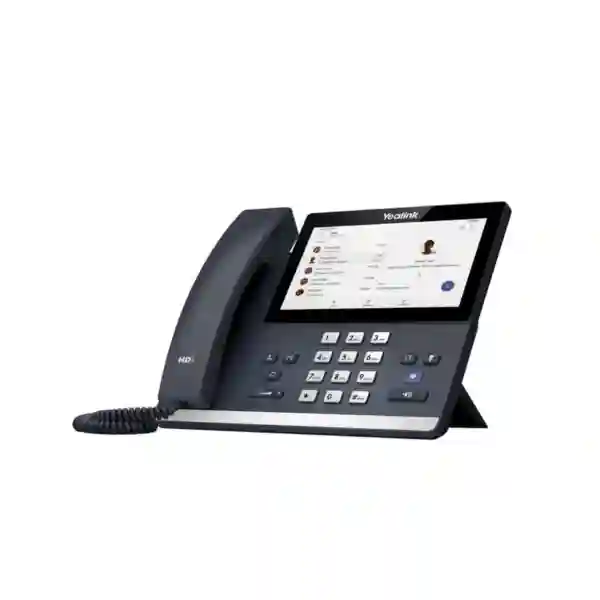
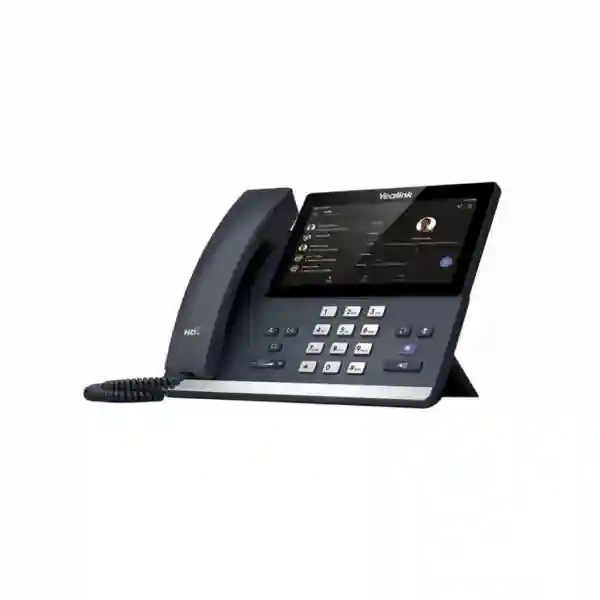
The Yealink MP56 E2 Zoom Phone is a purpose-built business desk phone for organizations that use Zoom as a core communications platform and want a dedicated endpoint at desks, front-office positions and shared work areas. Yealink positions the MP56 E2 Zoom around an Android 13 operating system, a 7-inch 1024 × 600 capacitive touch display, a Zoom-tailored interface, Yealink Optima HD audio, a magnetic handset, Bluetooth 5.2, dual-band 2.4 GHz and 5 GHz Wi-Fi, a USB Type-A connection for supported accessories, dual-port Gigabit Ethernet and Power over Ethernet. These characteristics make it especially relevant to workplaces that want a familiar Zoom experience without requiring every call to begin from a laptop or mobile device.
For Tanzania buyers, the important purchasing question is not simply whether a phone can place VoIP calls. The more useful question is whether the device aligns with the organization’s Zoom environment, network design, user roles, headset preferences, desk layout and device-management process. The MP56 E2 Zoom is designed for exactly this type of deployment. Its large touch interface can simplify day-to-day navigation, while wired Ethernet and PoE can support structured office installations and built-in Wi-Fi can provide additional placement flexibility where the deployment design allows it. Bluetooth connectivity also gives users the option to pair compatible headsets for hands-free working.
Fourteck Tanzania can help organizations evaluate the MP56 E2 Zoom as part of a wider voice, collaboration and network requirement. Buyers can also review the Fourteck Tanzania technology shop for related business IT categories, explore Fourteck Tanzania services for integrated communications and infrastructure planning, and use the specialist Fourteck IP phone resource when comparing business desk-phone requirements across brands and use cases.
What makes the Yealink MP56 E2 Zoom Phone different?
Native Zoom-oriented experience
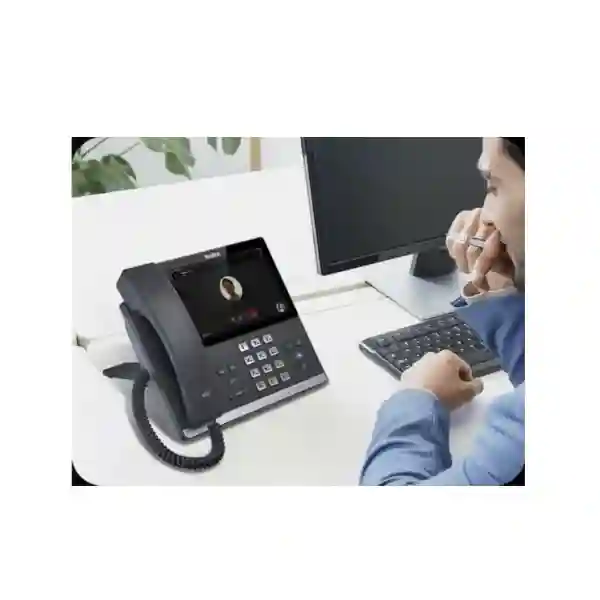
The phone is designed around a Zoom-tailored user interface, allowing organizations that standardize on Zoom to give employees a dedicated desk endpoint rather than relying only on softphones. This can be valuable for users who spend much of the day on voice calls, receive frequent inbound calls or prefer a physical handset.
7-inch capacitive touch display
The 1024 × 600 capacitive touch screen provides a larger workspace for navigation than traditional key-driven IP phones. For office users, this can make contacts, call controls, meeting information and common collaboration tasks easier to access at the desk.
Flexible network and accessory options
Dual-port Gigabit Ethernet with PoE supports conventional structured cabling, while dual-band Wi-Fi gives additional network options where appropriate. Bluetooth 5.2 and USB connectivity can support compatible headsets and accessories, helping different user profiles work in the way that suits them.
Centralized administration
The platform supports Zoom Device Management and Yealink management services. For organizations with multiple phones, branches or IT administrators responsible for lifecycle operations, centralized management can reduce the amount of manual device-by-device administration.
Verified Yealink MP56 E2 Zoom features
| Area | Verified capability | Business relevance |
|---|---|---|
| Platform | Android 13 with Zoom-tailored interface | Designed for organizations using Zoom as a core communications platform. |
| Display | 7-inch 1024 × 600 capacitive touch screen | Provides touch navigation and a large visual area for call and meeting controls. |
| Audio | Optima HD audio, Noise Proof technology, full-duplex speakerphone with AEC | Supports clearer business conversations across handset and speakerphone use. |
| Wireless | Bluetooth 5.2 and 2.4/5 GHz Wi-Fi | Adds flexibility for compatible headsets and network placement. |
| Wired network | Dual-port Gigabit Ethernet | Suitable for structured office networks and desk-side pass-through designs where planned. |
| Power | Power over Ethernet support | Can simplify desk installations when connected to a suitable PoE switch. |
| Accessories | USB Type-A and headset support; magnetic handset | Useful for users who prefer wired or compatible USB headsets and frequent call handling. |
| Management | Zoom Device Management and Yealink management platform support | Helps IT teams standardize configuration and operational oversight. |
Who should consider the MP56 E2 Zoom?
The MP56 E2 Zoom is most relevant to organizations that have already chosen Zoom Phone or are building a Zoom-centered collaboration environment. Typical user groups include office professionals who make and receive regular business calls, reception and customer-facing users who benefit from a dedicated always-available desk endpoint, managers who want a large touch interface, and organizations that prefer centrally managed hardware rather than unmanaged consumer devices. It can also be useful in standardized branch deployments where a consistent model simplifies user training, support and replacement planning.
The device should still be evaluated in context. Before ordering, confirm the required Zoom Phone licensing, the network method to be used, whether the switch provides appropriate PoE, whether Wi-Fi is permitted by the organization’s security policy, which headsets are intended, whether the phone will sit on a desk or be wall mounted, and how administrators plan to provision and manage it. Organizations with very basic calling needs may prefer a simpler model, while executive users who need a different handset format or additional premium features may want to compare higher-tier options.
Buying and deployment guidance for Tanzania
For a reliable deployment, treat the phone as one component in a wider communications system. A Zoom Phone endpoint depends on internet connectivity, LAN quality, DNS and security policy, switch configuration, user accounts, licensing and administrative control. Where Power over Ethernet is used, switch capacity should be reviewed so the number of connected phones does not exceed the available PoE budget. Where Wi-Fi is selected, signal quality and wireless capacity need to be suitable for real-time voice traffic rather than simply showing a strong signal icon.
Procurement teams should also define whether they need the phone only, any optional power supply, wall-mount accessories, wired or Bluetooth headsets, spare handsets, network switching upgrades or deployment services. Recording these requirements before requesting a quotation reduces ambiguity and makes it easier to compare offers on a like-for-like basis.
Yealink MP56 E2 Zoom Phone Tanzania
In Tanzania, the Yealink MP56 E2 Zoom Phone fits organizations that are modernizing business calling around cloud collaboration rather than maintaining a conventional desk-phone environment in isolation. Companies in professional services, logistics, education, technology, finance, hospitality administration and multi-branch operations may all have employees who still benefit from a fixed handset even when laptops and mobile apps are widely used. A dedicated Zoom Phone endpoint can give those users a clear, consistent place to handle voice calls without depending on whether a notebook is open, charged or connected to a headset.
The MP56 E2 is especially relevant when a business wants richer interaction than a basic SIP handset provides. Its 7-inch touch display can support a more visual workflow, while the Zoom-oriented interface reduces the cognitive gap between desktop Zoom usage and desk-phone calling. For IT managers, Android 13 and centralized management support provide a more current foundation than the older MP56 Zoom generation that Yealink has replaced. This distinction matters during procurement because buyers should verify that quotations refer to the E2 Zoom version rather than the discontinued original MP56 Zoom model.
Network readiness should be assessed before a larger rollout. A structured office deployment will often prefer Gigabit Ethernet and PoE because a single data cable can carry network connectivity and power from a suitable switch. This can simplify desk cabling and avoid using separate power adapters at every location. However, the total PoE requirement must be included in switch planning. Businesses that intend to use Wi-Fi should validate coverage, roaming behavior and congestion in the actual work areas. Voice quality depends on the wider network path, not just the specifications of the phone.
When preparing a Tanzania quotation request, provide the number of users, the exact Zoom environment, locations, whether existing PoE switches are available, any headset requirements, wall-mount needs and the desired deployment timeline. This allows the device requirement to be evaluated alongside network and user needs instead of treated as a stand-alone box purchase. Organizations planning broader upgrades can also review Fourteck Tanzania’s integrated IT and communications portfolio to place IP telephony within the wider network, security and collaboration architecture.
Yealink MP56 E2 Zoom Phone Dar es Salaam
Dar es Salaam organizations often operate in environments where sales, administration, customer service, logistics and management teams need dependable calling throughout the working day. The Yealink MP56 E2 Zoom Phone can suit these roles when Zoom Phone is already part of the communications strategy. Rather than asking every user to manage business calls through a laptop application, companies can provide a fixed endpoint with a large touch screen, physical handset, speakerphone and support for compatible Bluetooth or USB headsets. This gives users several ways to work while keeping the Zoom experience at the center of the desk.
For multi-floor offices, commercial buildings and branch environments in Dar es Salaam, the practical design question is how the phone will connect. Dual-port Gigabit Ethernet and PoE are useful when structured cabling and managed switches are available. The phone can be installed as part of a predictable wired design, and PoE can reduce the number of power adapters needed at desks. Where Wi-Fi is preferred, the built-in dual-band capability may help with placement, but the wireless network should be designed for voice quality and business density. Coverage alone does not guarantee low latency, low packet loss or stable real-time communication.
Procurement teams should also separate device cost from total deployment cost. A project may require headsets, PoE switch capacity, VLAN or QoS configuration, user licensing, administrator setup, cabling changes, training and support. By listing these items at the quotation stage, companies can avoid comparing a bare hardware price with a more complete deployment proposal. The MP56 E2’s centralized management options are especially useful when dozens of units are deployed because administrators can apply a more standardized operational process.
Dar es Salaam buyers should confirm that the model offered is specifically the MP56 E2 Zoom edition and not a Teams variant or older MP56 Zoom unit. The E2 Zoom model is designed around Android 13 and the Zoom-tailored experience. For organizations with reception desks, frequent callers or teams that spend much of the day on business voice, the physical handset and touch interface can offer a more dedicated workflow than a shared softphone-only approach.
Yealink MP56 E2 Zoom Phone Mwanza
For businesses in Mwanza, selecting a Zoom desk phone should begin with the operating environment. A company with a small administrative office may need only a handful of endpoints, while a larger distribution, education, healthcare administration or regional branch operation may require a repeatable device standard across several teams. The Yealink MP56 E2 Zoom provides a consistent hardware platform for users who need a physical handset but also work within Zoom. Its combination of a 7-inch touch screen and a Zoom-oriented interface helps bridge traditional desk calling with cloud collaboration.
Connectivity planning is important because regional offices may have varied LAN designs. Where Ethernet infrastructure is stable, the dual Gigabit ports and PoE support are useful for creating a clean desk installation. The second Ethernet port can support certain desk-side network designs, but network policies should be defined by the IT team rather than assumed. If Wi-Fi is used, the phone supports both 2.4 GHz and 5 GHz bands. In practice, administrators should test the actual wireless environment, especially in buildings with thick walls, multiple tenants, high client density or shared access points.
Audio workflow is another consideration. Some users prefer the magnetic handset for ordinary business calls, while others may need a Bluetooth or USB headset for long conversations or multitasking. Because the MP56 E2 supports multiple accessory paths, organizations can standardize the base phone while still giving different roles appropriate headset options. This can be useful for customer service, reservation teams, purchasing departments and coordinators who need to type while speaking.
When requesting a Mwanza quotation, specify whether the project is new or an expansion of an existing Zoom Phone deployment. Include the number of endpoints, current switch model if known, PoE availability, expected headset type and any wall-mounting requirement. It is also useful to note whether devices will be centrally administered from another city or by local IT personnel. This information helps determine whether the phone itself is the complete requirement or one element of a wider communications and network project.
Yealink MP56 E2 Zoom Phone Arusha
Arusha has a broad mix of organizations, including hospitality, tourism administration, professional offices, education, NGOs and regional business operations. In these environments, a desk phone remains useful when staff handle frequent external calls, reception duties or coordination work even if meetings and internal collaboration increasingly occur through cloud platforms. The Yealink MP56 E2 Zoom can provide a dedicated Zoom Phone endpoint that feels like a conventional business phone while adding a modern 7-inch touch interface and integrated Zoom-oriented workflow.
For hospitality and service-focused organizations, user roles should guide how the device is deployed. A front desk may value a fixed endpoint that is always in the same place, while managers may prefer a Bluetooth headset to move around their workspace. Administrative users can use the handset for focused calls and the full-duplex speakerphone for short collaborative conversations. The MP56 E2’s combination of Ethernet, Wi-Fi, Bluetooth and USB gives organizations flexibility, but that flexibility should be governed by a clear IT policy so support teams know which connectivity and accessories are standardized.
A reliable rollout also depends on the internet and LAN path to Zoom services. Voice performance can be affected by packet loss, congestion and poor wireless design. Businesses should therefore assess switching, PoE availability, VLAN segmentation where used, firewall policy and ISP reliability as part of the communications project. The handset cannot compensate for a weak network foundation. Organizations using backup internet connections should also confirm how failover affects active and new voice sessions.
Arusha procurement teams should ask suppliers to identify the precise model and included accessories. The power adapter may be optional depending on package and market, so buyers using non-PoE networks need to confirm what is required. Wall mounting, compatible headsets and any expansion requirements should also be clarified before purchase. A clearly defined bill of materials makes budgeting easier and reduces the chance of receiving hardware that cannot be deployed immediately in the intended environment.
Yealink MP56 E2 Zoom Phone Dodoma
Organizations in Dodoma evaluating cloud telephony often need to balance modern collaboration tools with the familiarity and reliability of a desk phone. The Yealink MP56 E2 Zoom is suited to this transition because it places a Zoom-tailored interface on a dedicated business handset. Government-facing organizations, professional offices, education teams, project units and administrative departments can use the device for daily calling while keeping user experience aligned with Zoom-based collaboration.
The 7-inch 1024 × 600 touch screen is one of the main reasons to choose the MP56 E2 over a basic keypad-centric phone. Users can interact with a larger visual interface, while the magnetic handset keeps the traditional desk-phone feel. Yealink’s Optima HD audio and noise-processing capabilities are designed to improve conversational clarity, and the full-duplex speakerphone with acoustic echo cancellation can support hands-free calls in suitable office spaces. For users in more open or noisy areas, a compatible headset may still provide the best day-to-day experience.
IT administrators in Dodoma should plan provisioning and management before distributing phones. The MP56 E2 supports Zoom Device Management and Yealink management services, which can help standardize configuration, monitoring and updates. Central administration is particularly relevant when phones are spread across departments or multiple sites. A device-management plan should include naming, ownership, firmware policy, user assignment, replacement procedure and how configuration changes are approved.
From a procurement perspective, buyers should avoid treating every MP56 name as equivalent. Yealink replaced the older MP56 Zoom with the MP56 E2 Zoom, and the E2 generation uses Android 13 with updated hardware characteristics. Quotation requests should therefore state the complete product name. Include quantity, desired accessories, PoE status, network method, deployment locations and whether installation or configuration assistance is required. This creates a clearer basis for comparing offers and planning an orderly rollout.
Yealink MP56 E2 Zoom Phone UAE
In the UAE, businesses often operate across multiple offices, free zones, customer-service teams and hybrid workplaces, making standardized communications hardware important for supportability. The Yealink MP56 E2 Zoom can fit companies that have adopted Zoom Phone and want users to have a dedicated business endpoint rather than depending entirely on software clients. Its touch-first interface, physical handset and support for wired and wireless accessories can suit different working styles without changing the core device platform.
Enterprise and mid-market UAE deployments frequently place greater emphasis on centralized administration and consistent standards. The MP56 E2’s support for Zoom Device Management and Yealink management platforms can help IT teams maintain a common baseline across endpoints. Before deployment, administrators should determine how phones will be assigned, provisioned, updated and monitored, and which features are permitted by corporate policy. Bluetooth and Wi-Fi are useful capabilities, but some organizations may choose to restrict them in specific environments for policy or operational reasons.
PoE can simplify office installations where managed switches already support sufficient power budget. This is particularly useful in fitted corporate spaces where reducing desktop adapters improves cable organization. Dual-port Gigabit Ethernet also aligns with structured LAN environments. However, phone deployment should be coordinated with voice VLAN, quality-of-service strategy, firewall requirements and internet resiliency. Large offices should test real call performance during busy periods rather than assuming that adequate general web browsing means the network is optimized for real-time voice.
UAE buyers comparing multiple Yealink Zoom phones should position the MP56 E2 as a standard office-worker model with a larger 7-inch touch screen. Organizations can review Fourteck UAE for broader regional IT, telecom and infrastructure requirements. A complete quotation should identify phone quantity, Zoom environment, headset needs, wall-mounting requirements, power method and any deployment services so hardware and implementation costs are understood separately.
Yealink MP56 E2 Zoom Phone Uganda
Uganda organizations adopting Zoom Phone may need a mix of soft clients and physical endpoints. The Yealink MP56 E2 Zoom is useful where employees benefit from a permanent desk device: receptionists, office administrators, managers, call-intensive staff and shared business functions. The phone’s 7-inch touch screen provides a richer interface than entry-level desk phones, while the magnetic handset preserves the familiar behavior users expect from a business telephone.
Network planning should begin with the number of devices and where they will be installed. PoE is convenient for offices with compatible switches because a single Ethernet cable can carry data and power. If the current switches do not support sufficient PoE capacity, that infrastructure cost should be included in the project rather than discovered during installation. Where Wi-Fi is used, both 2.4 GHz and 5 GHz support provide flexibility, but office coverage, channel utilization and access-point capacity need to be evaluated for real-time calling.
For organizations with branch networks, centralized management can become a major operational advantage. Zoom and Yealink management support can help administrators manage phones without visiting every desk for routine configuration. A standardized model can also simplify spare-device planning, user training and support documentation. Businesses should define which accessories are approved, including Bluetooth or USB headsets, because inconsistent accessory choices can create avoidable support issues.
Uganda buyers can review Fourteck Uganda communications and IT solutions when the phone requirement forms part of a larger VoIP, PBX or network project. For quotation accuracy, provide the intended Zoom service, quantity, city or site, current switching infrastructure, PoE availability, headset preferences and any requirement for configuration. The goal is to match the phone to the existing environment rather than purchasing hardware first and solving compatibility or power questions later.
Yealink MP56 E2 Zoom Phone Kampala
Kampala businesses often combine head-office functions, customer service, sales and regional coordination within the same location. The Yealink MP56 E2 Zoom can provide a consistent desk endpoint for these roles when Zoom Phone is the preferred calling platform. The large touch screen and native Zoom-oriented interface help users handle calls from a device that feels purpose-built for communications rather than from a general-purpose computer. This can be especially useful for users whose productivity depends on being reachable even while their laptop is occupied with another task.
The phone’s Bluetooth 5.2 capability is relevant to users who spend long periods on calls and prefer a wireless headset. USB headset support provides another accessory path, while the handset remains available for private or focused conversations. IT teams should still standardize supported headset models where possible because compatibility, call-control behavior and charging arrangements can vary by accessory. A defined accessory list makes support easier across larger deployments.
Kampala offices with managed Ethernet networks can take advantage of the MP56 E2’s dual Gigabit ports and PoE capability. This can reduce desktop power requirements and help keep phone deployment aligned with structured cabling. Where the second Ethernet port is used for a nearby workstation, administrators should review network segmentation and security policy. The phone should not be inserted into the LAN without considering VLAN design, DHCP, DNS, firewall rules and overall voice quality.
Before buying, organizations should confirm licensing and user assignment within Zoom, determine whether the phones are for named staff or shared positions, and document who will manage devices after installation. A strong procurement request includes quantity, existing network equipment, power method, accessories, rollout locations and expected user roles. This makes it easier to judge whether the MP56 E2 is appropriate for every seat or whether a mixed device strategy would be more economical.
Yealink MP56 E2 Zoom Phone Arua
In Arua, organizations with distributed teams or regional operations may use cloud communications to connect staff with colleagues, customers and suppliers in other cities. The Yealink MP56 E2 Zoom offers a dedicated endpoint for users who need dependable access to Zoom Phone from a fixed workplace. This can be useful for administrative desks, branch coordinators, service counters and management positions where a conventional handset remains more practical than using a notebook for every call.
The network design deserves particular attention in distributed environments. A phone can have strong audio hardware and still deliver poor results if internet connectivity is unstable or the LAN is congested. Organizations should evaluate ISP performance, router and firewall behavior, switching, wireless quality and backup connectivity where business continuity is important. If PoE is available, the MP56 E2 can use a single Ethernet cable for both network and power, reducing dependence on a separate desk-side adapter.
For smaller Arua branches managed from a central office, remote device-management capability can reduce the need for local manual configuration. Standard naming, user assignment, firmware policy and documented reset or replacement procedures are useful even when only a few phones are deployed. If staff turnover is frequent, administrators should also define how user accounts are removed and reassigned so shared hardware does not retain inappropriate access.
Arua buyers should request the exact MP56 E2 Zoom edition and verify what is included in the supplied package. Headsets, optional power supplies and wall-mount accessories may need separate consideration. It is also wise to distinguish between hardware availability and service readiness: the organization should have Zoom Phone licensing, network access and user provisioning prepared before expecting the device to become operational. A simple pre-deployment checklist can prevent delays when equipment arrives on site.
Yealink MP56 E2 Zoom Phone Mbarara
Mbarara businesses that are upgrading office communications can use the Yealink MP56 E2 Zoom as a standardized endpoint for Zoom-based calling. Its strongest value is not just the hardware specification; it is the combination of a physical business phone and a Zoom-tailored user experience. Employees who handle customer calls, purchasing, reservations, administration or management can work with a familiar handset while gaining a touch interface designed around the cloud communications platform their organization already uses.
For growing companies, standardization matters because mixed phone fleets can increase support work. Choosing one model for a broad office-user profile can simplify training, spare inventory, accessory selection and troubleshooting. The MP56 E2 offers Bluetooth and USB headset options alongside the handset and speakerphone, so one device can support several work styles. Administrators can then standardize a small set of approved accessories rather than sourcing a different phone for every individual preference.
A deployment survey should confirm how desks are connected. In offices with PoE switches, the phone can receive power and data through Ethernet. If PoE is not available, the project may require compatible external power supplies or switching changes. Wi-Fi can provide flexibility, but it should be selected intentionally rather than used as a substitute for inadequate cabling without evaluating performance. Real-time calls are sensitive to interference, roaming and congestion that may not be obvious during ordinary browsing.
When preparing a Mbarara purchase request, include the number of phones now and the likely growth over the next year, the Zoom licensing situation, office network details, headset requirements and whether devices will be centrally administered. This information helps determine the right scope and whether switching, cabling or configuration services should be included. It also helps avoid overbuying premium endpoints for roles that may only require simpler calling functions.
Yealink MP56 E2 Zoom Phone Gulu
Gulu organizations can consider the Yealink MP56 E2 Zoom when they want a modern desk phone that aligns with a Zoom communications strategy. The device is suited to office users who require a fixed, always-available endpoint and prefer not to route every business call through a personal mobile or computer. The 7-inch touch display, physical handset, hands-free speakerphone and support for compatible headsets give employees multiple ways to manage voice interactions during a normal workday.
For branch environments, the phone should be planned together with the network. PoE support can simplify installation when the site has capable switches, but the PoE budget needs to cover all intended phones. If several endpoints, wireless access points and cameras share the same switch, total power planning becomes important. Voice traffic should also be considered in bandwidth and quality-of-service design, particularly where the branch uses a shared internet connection for cloud applications, video meetings and large file transfers.
The built-in Wi-Fi option can be useful where cabling is difficult, but a business should validate access-point placement and client capacity before relying on wireless calling. Bluetooth 5.2 can support compatible headsets for mobility within the immediate work area. For support teams, documenting the chosen connectivity method for each device prevents confusion when troubleshooting, especially if some phones use Ethernet and others use Wi-Fi.
Gulu procurement teams should ask for the exact E2 Zoom model, not only “Yealink MP56.” They should also confirm accessories and whether a power adapter is needed. If the organization expects to scale the deployment to additional locations, it is useful to define a standard configuration from the first rollout. A consistent device template, management process and accessory list can make future expansion smoother and reduce the amount of site-specific rework.
Yealink MP56 E2 Zoom Phone Kenya
Kenyan organizations with Zoom Phone deployments can use the Yealink MP56 E2 Zoom as a standard desk endpoint for office workers and front-office roles. The phone is designed to provide a native Zoom-oriented experience on dedicated hardware, which can help businesses maintain consistent calling workflows across headquarters, branches and shared work areas. Users gain the familiarity of a physical handset alongside a large touch display, speakerphone and headset options.
For multi-site Kenyan businesses, centralized device administration should be included in the design from the beginning. Zoom Device Management and Yealink management capabilities can support a more consistent lifecycle process than manually configuring each phone. IT teams should document firmware policy, user assignment, naming conventions, accessory standards and replacement procedures. This becomes increasingly important as the number of phones grows across branches.
Network infrastructure must also match the deployment. Dual-port Gigabit Ethernet and PoE are useful for structured offices, while dual-band Wi-Fi can support selected scenarios where wireless performance is validated. Organizations should consider how voice traffic competes with video meetings, cloud applications and normal data use. A phone purchase does not remove the need for a reliable ISP connection, appropriate firewall configuration and well-designed LAN.
Kenya buyers should compare the MP56 E2 with simpler and more premium Zoom phone models based on user role rather than deploying the same cost level everywhere by default. Front-desk users, professionals with frequent calls and managers who value a larger touch interface may be strong candidates. Staff who make very few calls may not need the same endpoint class. A quotation request should therefore describe user groups, quantities, network readiness and accessories instead of listing only a model number.
Yealink MP56 E2 Zoom Phone Kuwait
In Kuwait, the Yealink MP56 E2 Zoom can serve organizations that want dedicated Zoom Phone hardware for offices, customer-service teams, reception areas and managerial desks. The device provides a modern interface without abandoning the familiar handset form factor. This can help employees who are comfortable with traditional business phones while the organization moves more communication functions into cloud collaboration services.
Office infrastructure is often an important deciding factor. Where PoE-enabled Gigabit switching is already part of the LAN, the MP56 E2 can be deployed with fewer desk-side power components. In environments using Wi-Fi, administrators should validate 5 GHz and 2.4 GHz coverage, channel usage and business-hour performance. Wireless flexibility is useful, but a phone used for important customer calls should not depend on an overloaded or poorly designed access point.
The phone’s Bluetooth and USB accessory support can accommodate different working styles. Call-intensive users may prefer headsets, while occasional callers may rely on the handset. Organizations should test and approve accessory models rather than assume every Bluetooth or USB headset will provide identical call-control behavior. Standardizing approved accessories also improves procurement consistency and reduces troubleshooting complexity.
Kuwait procurement teams should request a complete scope that distinguishes device hardware from optional power, headsets, installation, configuration and licensing. They should also verify that the quoted unit is the Zoom edition of the MP56 E2, because Yealink offers platform-specific variants. A clear deployment plan should identify who will administer devices, how they will be provisioned, and whether they belong to named users or shared desks. These operational details are just as important as the screen size or network specifications when building a reliable business phone environment.
Yealink MP56 E2 Zoom Phone Ghana
Ghanaian businesses evaluating cloud calling can consider the Yealink MP56 E2 Zoom when they need a physical desk endpoint integrated with a Zoom-first workflow. The device fits users who spend enough time on business voice communication to benefit from a permanent handset and dedicated touch interface. It can also reduce dependence on personal devices for business calling, helping companies keep communication hardware within a managed IT environment.
A successful rollout should start with network readiness. The MP56 E2 supports dual-port Gigabit Ethernet and PoE, making it suitable for structured office networks where compatible switching is available. If the current switch does not have sufficient PoE budget, the business should account for alternative power or an infrastructure upgrade. Dual-band Wi-Fi adds placement options, but wireless voice should be tested under realistic office load and not judged only by signal strength.
Audio and accessory needs should be matched to each role. Reception staff and frequent callers may benefit from a compatible headset, while managers may use the handset for private calls and speakerphone for short conversations. The device’s Bluetooth 5.2 and USB support make those options possible from a common platform. IT teams should maintain an approved accessory list and record which departments receive which configuration.
For Ghana procurement, it is useful to specify whether the organization already has Zoom Phone licenses, how many users need phones, whether sites have PoE switching and who will manage the devices. Buyers should also verify exact model naming because the MP56 family includes different platform editions and generations. Ordering the precise MP56 E2 Zoom model helps avoid receiving a device optimized for a different collaboration ecosystem. A well-written quotation request can include growth expectations so the initial deployment does not become difficult to scale.
Yealink MP56 E2 Zoom Phone Nigeria
Nigeria’s large and diverse business market includes enterprises, service companies, technology firms, financial organizations and distributed branch networks that may use Zoom Phone for cloud communications. The Yealink MP56 E2 Zoom can provide a consistent, dedicated endpoint for staff who require a physical phone at the desk. Its touch screen, handset, speakerphone and headset options make it flexible enough for several office roles without requiring every employee to use the same calling style.
For organizations with multiple locations, device standardization can reduce operational complexity. Using a defined model for office professionals allows IT teams to build one deployment guide, one accessory list and one support process. Zoom and Yealink management support can also help central administrators manage endpoints more consistently. The organization should still establish policies for firmware, account assignment, configuration changes and device replacement so centralized tooling is backed by a clear operating model.
Connectivity and power resiliency deserve special planning. PoE can simplify cabling, but the switch and its power source become critical to phone availability. Businesses should therefore consider UPS protection for network infrastructure where continuity matters. If Wi-Fi is used, access-point power and internet resiliency remain equally important. Voice performance can degrade when shared connections are congested, so organizations should evaluate the full path to cloud services and not focus only on endpoint features.
Nigerian buyers should ask suppliers to state the exact model, included accessories and whether power adapters are part of the package. They should also separate the cost of hardware from Zoom licensing, network upgrades, headsets and professional services. For larger procurements, a small pilot can be useful before broad rollout because it allows IT teams to test user experience, device management and network performance in the real environment. The result is a more informed decision than purchasing a large quantity based solely on a specification sheet.
Yealink MP56 E2 Zoom Phone Seychelles
In Seychelles, organizations in hospitality, professional services, administration and multi-location operations may rely on cloud communications to stay connected with staff, suppliers and customers across islands and international markets. The Yealink MP56 E2 Zoom can provide a dedicated desk endpoint for users who need a stable, professional calling device within a Zoom Phone environment. Its large touch screen and familiar handset form factor can make cloud calling more accessible to users who do not want to manage every conversation from a laptop.
For hospitality and service environments, placement and connectivity should be considered carefully. Offices with structured cabling can use Gigabit Ethernet and PoE, while selected areas may use Wi-Fi if wireless design is strong enough for real-time traffic. Network teams should examine internet reliability, backup connectivity and firewall policy because island locations can place greater emphasis on resilient WAN planning. The phone’s local capabilities cannot compensate for an unavailable cloud path, so continuity planning should include the wider communications network.
Headset choice is another practical issue. Bluetooth 5.2 and USB support allow compatible accessories, which may suit reservations teams, administration and users who need hands-free work. A physical handset remains valuable for private calls and for users who prefer conventional telephone ergonomics. By standardizing the phone while allowing a controlled set of accessories, an organization can balance user preference with manageable support.
Seychelles buyers should prepare quotations with enough detail to avoid incomplete comparisons. Include the exact MP56 E2 Zoom name, quantity, deployment sites, PoE availability, network method, headset requirement and whether configuration is needed. If devices are being deployed to more than one island or property, document where spares will be held and who will administer replacements. Planning these operational details in advance can make the phone fleet easier to support throughout its lifecycle.
Integration, licensing and network checklist
Before ordering the Yealink MP56 E2 Zoom, confirm that the organization’s Zoom Phone service and licensing are appropriate for the intended users. The phone is hardware for a Zoom-oriented communications environment; it does not replace the commercial service, user accounts or administrative setup required by Zoom. Buyers should clarify whether every device is assigned to a named user, shared position or common area and ensure that the planned licensing model matches that use.
On the network side, document Ethernet availability, switch speed, PoE class and budget, VLAN design if applicable, DHCP and DNS behavior, firewall policy, ISP performance and backup connectivity. For Wi-Fi deployments, record SSID policy, authentication method, access-point coverage and whether the chosen band provides reliable service in the installation area. Headset models should be tested, especially if users expect answer, mute or volume controls to integrate with call behavior.
Finally, establish a device-management process. Decide who owns configuration, how firmware updates are controlled, how devices are named, how users are assigned, and what happens when a phone is moved or replaced. A repeatable management standard is often more valuable over the lifecycle than an ad-hoc deployment that works only on the first day.
Frequently asked questions
Is the MP56 E2 Zoom the same as the older MP56 Zoom?
No. Yealink lists the MP56 E2 Zoom as the newer replacement for the original MP56 Zoom generation. Buyers should use the complete model name when requesting quotations so the current E2 Zoom variant is clearly identified.
What operating system does the MP56 E2 Zoom use?
Yealink specifies Android 13 for the MP56 E2 Zoom. This is one of the key generational differences compared with the earlier MP56 Zoom hardware.
Does it support Wi-Fi and Bluetooth?
Yes. The MP56 E2 Zoom includes dual-band 2.4 GHz and 5 GHz Wi-Fi and Bluetooth 5.2. Organizations should still validate wireless coverage and headset compatibility in their specific environment.
Can the phone be powered by PoE?
Yes. It supports Power over Ethernet, which can carry both network connectivity and power through a suitable Ethernet connection. The switch must have adequate PoE capability and power budget for the planned number of devices.
Does it support USB headsets?
Yes. Yealink specifies USB Type-A connectivity with USB headset support. For business rollouts, testing the exact headset model is sensible because accessory behavior can vary.
Is the MP56 E2 suitable for reception desks?
It can be suitable for reception and front-office roles where users need a dedicated Zoom Phone endpoint, a large touch interface and headset flexibility. The final choice should depend on call volume, accessory needs and whether additional line-handling controls are required.
Can administrators manage the phone centrally?
Yes. Yealink states support for Zoom Device Management and Yealink management services, which can help organizations standardize configuration and operational administration across multiple endpoints.
What information should I provide for a quotation?
Provide the exact model name, quantity, deployment city or sites, Zoom Phone status, current network and PoE availability, headset requirements, wall-mount needs, optional power requirements and whether configuration or deployment assistance is expected.
Quotation checklist
Quantity, exact MP56 E2 Zoom edition, desk or wall placement, and expected growth.
Zoom Phone environment, user assignment, licensing status and administrator ownership.
Ethernet or Wi-Fi, PoE availability, switching, firewall, internet resilience and cabling.
Bluetooth or USB headsets, optional power supplies, wall-mounting and spare accessories.
Decision recap
Choose the Yealink MP56 E2 Zoom when your organization uses Zoom Phone and wants a modern, centrally manageable desk endpoint with a large touch screen, Gigabit Ethernet, PoE, Wi-Fi, Bluetooth and headset flexibility. It is particularly appropriate for office professionals, front-office staff and users who benefit from a dedicated handset throughout the working day.
Before ordering, verify the exact E2 Zoom edition, licensing, network readiness, PoE capacity, accessories and management plan. This avoids the common mistake of focusing on hardware price while overlooking the infrastructure and service components that determine whether the phone will deliver a good user experience.
Consult Fourteck about your Yealink MP56 E2 Zoom requirement
If you are planning a single office, a reception deployment or a larger multi-site rollout, prepare your device count, Zoom Phone details, locations, network method, PoE status and headset requirements. Fourteck can use that information to help frame a more complete communications requirement instead of treating the purchase as an isolated handset order. This is particularly useful when switching, Wi-Fi, cabling, firewall policy or broader collaboration infrastructure may also need to be reviewed.




Reviews
There are no reviews yet.