
Microsoft Teams common-area calling for business
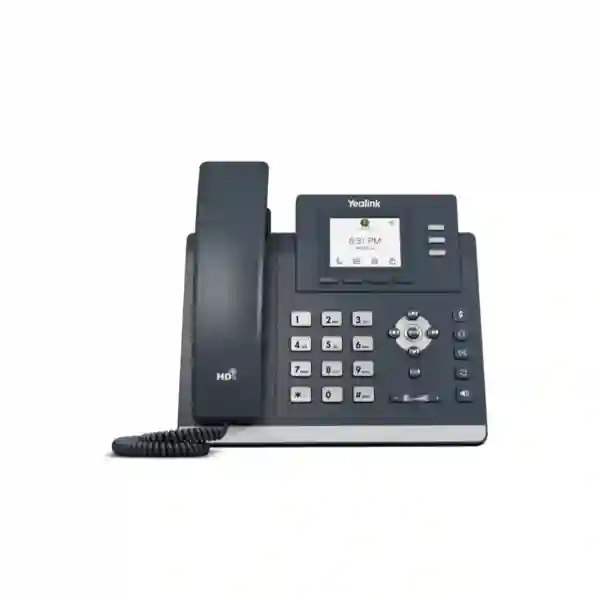
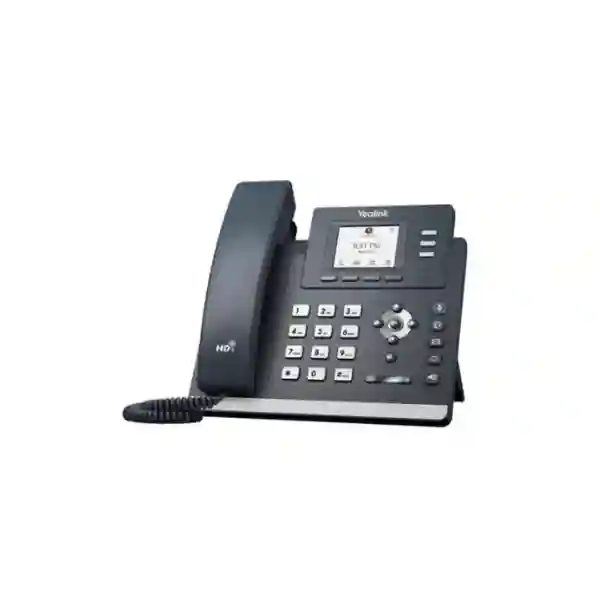
Yealink MP52 E2 Teams Phone
The Yealink MP52 E2 is a purpose-built Microsoft Teams desk phone for shared and common-area positions that need clear voice, physical keys, dependable wired networking and centralized administration. Current Yealink support information lists Android 15.0, Microsoft Device Ecosystem Platform support, a 2.4-inch non-touch color display, HD voice, AI noise cancellation, a hearing-aid-compatible magnetic handset, USB-A headset connectivity, dual-port Gigabit Ethernet, PoE and management through Microsoft and Yealink platforms.
For Tanzanian organizations moving voice workflows into Microsoft Teams, the MP52 E2 provides a practical endpoint for reception overflow positions, corridors, security desks, warehouses, schools, clinics, service counters, shared work points and other locations where a straightforward handset is more appropriate than a larger touch-screen collaboration device.
Quick answer
Choose the MP52 E2 when you need a native Teams calling endpoint with physical navigation, a small color screen, wired Gigabit connectivity, PoE and centralized device management for a shared or common-area location.
Best-fit question: Is the position mainly for dependable Teams calling rather than touch-driven productivity? If yes, the MP52 E2 deserves serious consideration.
What the Yealink MP52 E2 solves
Many Microsoft Teams Phone deployments include positions that do not need a premium executive handset. A warehouse desk, lobby, corridor phone, guard room, classroom administration point or shared service counter often needs something simpler: reliable calling, an easy-to-understand dial pad, clear voice, stable Ethernet, predictable power and the ability for IT administrators to manage devices consistently. The MP52 E2 is positioned around that requirement. Its physical keys reduce dependence on touch gestures, while the 2.4-inch 320 × 240 color screen provides call and status information without turning the phone into a tablet-like endpoint.
For procurement teams, this distinction matters. Buying the most feature-rich phone for every location can add cost and complexity without improving the user experience. The MP52 E2 is better viewed as a specialized endpoint for common-area and basic Teams calling. It supports core call controls, synchronized call logs, visual voicemail, meeting-call controls, web or credential sign-in, phone locking, emergency calling functions, power saving and Common Area Phone scenarios as documented by Yealink. It can also connect a compatible USB headset through its Type-A port or use the dedicated RJ9 headset interface.
The device also fits structured network environments. Dual-port Gigabit Ethernet allows the phone to connect to the LAN and pass a wired connection onward where appropriate, while IEEE 802.3af Class 3 PoE can deliver power from a compatible switch. That simplifies desk and shared-area installations when the access switch has sufficient PoE budget. An optional external Yealink power adapter can be used where PoE is not available, but final procurement should always confirm the exact package contents, power method and accessories required for the installation.
Native Teams focus
Microsoft Teams-tailored application and common-area positioning for organizations standardizing calling inside the Microsoft collaboration environment.
Physical controls
A non-touch display, dial pad, navigation keys and dedicated call-control buttons make the device straightforward for shared-use positions.
Voice-first design
HD handset and speaker audio, AI noise cancellation, full-duplex speakerphone with acoustic echo cancellation and a HAC handset support intelligible business calling.
Central management
Deployment, configuration, monitoring and updates can be handled through supported Microsoft and Yealink management methods, helping IT teams manage larger fleets.
Verified technical highlights
| Area | Yealink MP52 E2 Teams Phone |
|---|---|
| Operating platform | Android 15.0 in current Yealink support documentation; built on Microsoft Device Ecosystem Platform (MDEP). |
| Display | 2.4-inch 320 × 240 non-touch color screen with backlight. |
| Audio | HD voice, HD handset, HD speaker, AI noise cancellation, full-duplex speakerphone with AEC, HAC magnetic handset and multiple voice codecs. |
| Network | Dual-port Gigabit Ethernet; IPv4/IPv6; static/DHCP addressing; TLS 1.3; HTTPS; IEEE 802.1X. |
| Power | IEEE 802.3af PoE Class 3. Optional external Yealink AC adapter is listed by the vendor. |
| Headsets and I/O | 1 × USB Type-A, 1 × RJ9 handset port, 1 × RJ9 headset port and a security-lock port. |
| Management | Browser/phone/auto provisioning, Yealink RPS, QoE reports, Microsoft device-management support and Yealink management platforms. |
| Mounting | Desk use and wall-mountable deployment. |
Procurement note: older product flyers and reseller pages may still show Android 13 because the MP52 E2 launched with that software generation. Current Yealink support material lists Android 15.0, so firmware and software status should be verified at the time of deployment rather than inferred from an older marketplace listing.
Teams licensing, accounts and deployment planning
The phone hardware is only one part of a Microsoft Teams Phone deployment. Users or shared devices need the correct Microsoft account and licensing configuration for the functions the organization expects to use. Yealink’s current setup guidance points administrators to the Microsoft Teams admin center, Microsoft 365 admin center, endpoint-management tools and identity administration. For Common Area Phone use, the appropriate Microsoft licensing and shared-device configuration should be confirmed with the organization’s Microsoft administrator or licensing partner before rollout.
A good deployment starts with use cases, not quantities. Determine whether each MP52 E2 will be assigned to an individual, a shared common-area identity, a service location or a call-flow function. Confirm whether PSTN calling, Auto Attendant, call queues, voicemail, emergency calling or other Teams Phone services are required. The organization should also define authentication policy, device lock behavior, update windows, naming conventions, VLAN assignment and the management platform that will own lifecycle operations.
Network readiness is equally important. The access switch should have enough Gigabit ports and PoE power budget for the planned phones, voice traffic should be considered in VLAN and QoS design, DNS and time services should be reliable, and internet security policies must allow the Microsoft services required by Teams. Where sites experience power interruptions, protecting core switches, routers and internet equipment with suitable UPS capacity can help keep IP calling available during short outages. For broader telephony purchasing guidance, review the Fourteck Tanzania technology shop, which explains compatibility, PoE, lifecycle and infrastructure checks that should be completed before ordering.
Where the MP52 E2 fits best
Reception overflow and service points
Use a simple Teams handset where staff need to answer, transfer or place calls without the cost and complexity of an executive touch-screen phone.
Warehouses and operations areas
Physical keys and wired connectivity suit work points where predictable calling and easy navigation matter more than advanced personal collaboration features.
Education and healthcare common areas
Shared administrative positions, corridors and service desks can use a centrally managed Teams phone with a familiar handset and dial pad.
Multi-site standardization
Organizations with branches can define the MP52 E2 as a standard common-area endpoint while using higher models for managers, receptionists or users who need touch, wireless and richer features.
Yealink MP52 E2 Teams Phone Tanzania
For organizations searching for the Yealink MP52 E2 Teams Phone in Tanzania, the strongest buying case is usually a structured Microsoft Teams Phone rollout that needs dependable common-area endpoints. Tanzanian businesses increasingly run mixed environments in which staff use laptops, mobiles, meeting-room systems and dedicated desk phones together. In that architecture, the MP52 E2 is not intended to replace every user device. It fills the practical gap for fixed positions that need a familiar handset, physical keys and a consistent Teams experience without the cost or complexity of a larger touch-screen phone.
Before requesting a quotation, identify the number of shared positions, whether each location requires a Common Area Phone identity or named user account, and whether the call path includes Teams Phone PSTN services, operator connectivity, Direct Routing or another Microsoft-supported configuration. The network should be checked for PoE availability, free switch ports, VLAN design, DNS and internet reliability. If existing switches do not provide sufficient PoE capacity, factor that into the project rather than treating the handset purchase separately. The Fourteck Tanzania services page outlines the broader design, installation, configuration and support approach that can connect phones with switching, cabling, security and the rest of the workplace environment.
Tanzania procurement teams should also confirm packaging and accessory requirements. Yealink lists the phone, handset with cord, Ethernet cable, stand and quick-start guide as standard package contents, while the external AC adapter is optional. If PoE is planned, the adapter may not be necessary; if the phone will be installed on a non-PoE network, the correct power approach must be included. Headset requirements should also be defined before purchase because the MP52 E2 provides both RJ9 and USB Type-A connectivity, but the exact headset model should be validated for the intended user workflow.
For organizations operating across Tanzania, standardization can simplify inventory, user training and support. A clear endpoint matrix might assign the MP52 E2 to common areas, an MP54 E2 to standard office users who need touch interaction, and higher models to front-desk or executive roles. That type of role-based design avoids overbuying while keeping a consistent Yealink and Microsoft Teams management strategy. When requesting a Tanzania quotation, provide quantity, intended locations, licensing model, PoE availability, headset needs and whether configuration or deployment assistance is required.
Yealink MP52 E2 Teams Phone Dar es Salaam
Dar es Salaam organizations often have a combination of headquarters, customer-facing reception points, warehouses, branches, retail counters and operational facilities. That variety makes endpoint selection important. The Yealink MP52 E2 can be a strong fit where staff need Microsoft Teams calling at a fixed shared position but do not need a large touch interface, integrated Wi-Fi or Bluetooth. Examples include security desks, service counters, logistics points, reception overflow, shared administration desks and back-office locations where voice reliability is the primary requirement.
A Dar es Salaam rollout should begin with network and power checks. Confirm whether access switches provide IEEE 802.3af PoE, whether sufficient PoE budget remains after cameras and access points are counted, and whether each phone position has structured cabling. In buildings where phones share the same switch infrastructure as computers, cameras and wireless access points, VLAN planning and switch capacity should be reviewed before installation. Gigabit Ethernet helps the MP52 E2 integrate cleanly into modern wired access networks, but stable internet and correct Microsoft service reachability remain essential for the cloud calling experience.
For companies migrating from older PBX handsets, the practical change is not only physical. Teams identities, licensing, call queues, Auto Attendants, number assignment and emergency-calling policy need to be configured correctly. Users at shared positions should receive simple instructions for sign-in behavior, call transfer, mute, hold and voicemail where applicable. Administrators should decide whether devices will be managed primarily through Microsoft Teams Admin Center, Yealink management platforms or a coordinated approach. Firmware and Teams app updates should be included in the lifecycle process so common-area phones do not become forgotten endpoints.
When seeking a Yealink MP52 E2 quotation in Dar es Salaam, specify whether the project is a new Teams Phone deployment, a migration, a branch extension or a replacement of older endpoints. Include the number of devices, current switch models, available PoE, cabling status, Microsoft licensing position, headset requirement and wall-mounting needs. This gives the supplier enough context to separate the handset price from the supporting infrastructure required for a successful deployment.
Yealink MP52 E2 Teams Phone Mwanza
In Mwanza, the MP52 E2 is particularly relevant to organizations that are extending Microsoft Teams calling beyond a single head office. Branches, distribution operations, education sites, healthcare facilities and regional service offices may need a fixed phone at common positions even when most employees use Teams on laptops and mobile devices. A physical handset remains valuable when a location must be reachable regardless of which individual is on shift, when shared staff need a consistent point of contact, or when a desk requires a simple device that starts every day in the same configuration.
For multi-site environments, management becomes as important as the phone itself. The MP52 E2 supports Microsoft and Yealink device-management approaches, which can help administrators standardize firmware, settings and monitoring across locations. That is useful when IT staff are not physically present at every Mwanza site. Establish a naming convention that identifies building, floor and function; document switch ports and VLAN assignments; and record the Teams account or common-area identity associated with each device. These simple steps make remote troubleshooting much faster when a user reports a problem.
Connectivity planning should account for the path from the phone to the Microsoft cloud. A local LAN issue, overloaded WAN connection, poor DNS behavior or unstable power to the access switch can all appear to the user as a phone problem. Where branch connectivity is constrained, evaluate voice traffic alongside other applications and avoid assuming that every quality issue can be fixed at the handset. PoE is convenient because it centralizes power at the switch, but the switch and network edge should themselves be protected appropriately if calling continuity is important during brief electrical interruptions.
For Mwanza buyers, the purchase checklist should include quantity, user versus shared-device licensing, LAN and PoE readiness, call-flow requirements, headset use, mounting location and central-management preferences. It is also worth deciding in advance which roles need more capable Yealink models. The MP52 E2 is intentionally simple; employees who rely heavily on contacts, calendars, touch interaction, wireless headsets or advanced desk-phone features may be better served by a higher model in the MP E2 family.
Yealink MP52 E2 Teams Phone Arusha
Arusha organizations in hospitality, tourism, professional services, education, NGOs, administration and regional operations often combine front-facing service areas with offices and shared operational desks. The Yealink MP52 E2 fits the positions where dependable Microsoft Teams calling is more important than a rich personal desktop experience. A reception overflow point, staff service desk, back-office counter, security station or common administrative area can benefit from a physical handset that is easy to understand and centrally managed.
Hospitality and service environments should pay particular attention to call flows. If a shared phone is expected to receive calls from an Auto Attendant, participate in a queue, transfer callers to departments or serve as an internal escalation point, those Teams Phone functions should be designed before the device is deployed. The handset can support familiar controls, but the quality of the workflow depends on how Microsoft Teams identities, numbers, queues and policies are configured. Procurement should therefore involve both the buyer and the Microsoft administrator rather than treating the phone as an isolated hardware purchase.
Physical deployment also matters in Arusha sites with public or semi-public areas. The MP52 E2 is wall mountable and includes a security-lock port, offering options for positions where desk space is limited or where the organization wants to reduce accidental movement. The 2.4-inch non-touch screen and physical keys can be more practical than a large touch display when different users share the phone throughout the day. For accessibility, Yealink lists a hearing-aid-compatible magnetic handset, which can be an important consideration in customer-service and public-facing environments.
A well-prepared Arusha quotation request should state the exact number of phones, whether the phones are for common areas or named users, what Teams Phone connectivity is already in place, and whether PoE switching exists. Also identify any requirement for USB or RJ9 headsets, wall mounting, configuration assistance, labeling or user handover. These details help convert a simple product order into a deployment that is supportable after installation.
Yealink MP52 E2 Teams Phone Dodoma
Dodoma offices and institutions evaluating Teams Phone often need a blend of personal endpoints and shared calling positions. The MP52 E2 is most compelling for the shared side of that design. Its familiar dial pad, navigation keys, transfer function, speakerphone and small color display reduce training requirements for users who simply need to answer and place calls. Because it is designed around Microsoft Teams, it also helps organizations avoid maintaining a separate user experience for common areas when the rest of the collaboration environment already uses Teams.
Public-sector, education and institutional deployments should define administrative ownership early. Who creates the Teams account or shared-device identity? Who assigns licensing? Who controls update policy? Who records the phone’s location and network port? Who handles replacement and factory reset if staff change? These operational questions are easy to overlook when purchasing hardware, but they become important as the number of endpoints grows. The MP52 E2 supports multiple provisioning and management methods, making it suitable for standardization when those responsibilities are documented clearly.
For buildings that already use PoE for access points, CCTV cameras and other devices, a new phone project should include a power-budget check. A switch can have many PoE-capable ports yet still lack enough aggregate wattage for every connected device. The MP52 E2 uses IEEE 802.3af Class 3 PoE, so project planning should count each handset alongside existing loads. If an external adapter is preferred, confirm socket availability and cable management at each location. Structured cabling should also be tested where intermittent link problems already exist.
Dodoma buyers comparing the MP52 E2 with higher Yealink Teams phones should decide based on user role, not only price. If the position is shared and call-centric, the MP52 E2’s physical interface is an advantage. If a user needs a larger touch screen, integrated wireless connectivity or a more interactive Teams experience, another model may fit better. A role-based endpoint policy can keep procurement consistent and prevent both under-specification and unnecessary overspending.
Yealink MP52 E2 Teams Phone UAE
UAE businesses frequently run Microsoft 365 and Teams across offices, warehouses, retail operations, hospitality properties, free-zone companies and multi-emirate branch networks. In these environments, the Yealink MP52 E2 can serve as a standardized common-area Teams phone where a fixed voice endpoint is required without assigning premium hardware to every location. Shared desks, facility counters, guard rooms, corridors, service positions and back-office operations are typical examples of where the device’s simple physical controls and wired network design are useful.
UAE procurement teams should distinguish the MP52 E2 from the discontinued original MP52 Teams Edition. Yealink announced end of sale for the older MP52 and identified MP52 E2 Teams as the replacement. The E2 model adds a more current platform and Gigabit Ethernet, and current support documentation lists Android 15.0 with MDEP. This distinction matters because reseller catalogs may still show older MP52 stock or mix specifications from the two generations. Quotations should therefore state the exact model as “MP52 E2 Teams” and confirm the vendor part information provided by the supplier.
For branch standardization across Dubai, Abu Dhabi, Sharjah and other emirates, centralized management can reduce support effort. Administrators can build a repeatable template for network settings, Teams policies, update windows and common-area accounts, then maintain phones through the supported Microsoft and Yealink platforms. The wired dual-port Gigabit interface is useful in structured office networks, and PoE can simplify installation when compatible switches are already deployed. Where PoE is unavailable, the optional power-adapter requirement should be included in the bill of materials.
Organizations sourcing regionally can also use Fourteck’s wider network for related requirements. The Fourteck UAE technology site provides a regional route for business IT, telecom and collaboration enquiries. For a cross-border deployment, standardize the endpoint role, licensing model and network requirements first, then adapt procurement and installation scope to each site rather than assuming that every office has identical switching, cabling and power conditions.
Yealink MP52 E2 Teams Phone Uganda
Ugandan organizations adopting Microsoft Teams Phone can use the MP52 E2 to extend cloud calling into shared locations without making every endpoint a personal workstation. The phone is well suited to branch counters, administrative desks, security points, school offices, clinic common areas, warehouses and other positions that need a stable handset throughout the day. Because the interface is based on physical keys and a compact screen, users can perform routine calling tasks without navigating a large touch interface.
For Uganda deployments, start by mapping shared and personal calling roles. A common-area endpoint may require a Teams Shared Device or other suitable Microsoft licensing arrangement, while a named employee may use a different license and policy set. Confirm the licensing architecture with the Microsoft administrator before hardware is ordered. Then validate LAN readiness: the MP52 E2 expects wired Ethernet, can be powered through PoE and supports Gigabit connectivity. If branch networks rely on small unmanaged switches or non-PoE infrastructure, upgrades may be required before the phones can be deployed cleanly.
Centralized management is especially valuable for organizations with sites outside the main IT location. Device names should identify city and function, and administrators should keep records of MAC addresses, switch ports, Teams identities and deployment dates. Yealink supports auto provisioning, remote-management platforms and diagnostic information such as QoE reports and logs. That can shorten troubleshooting when a user reports call quality or sign-in problems, but it does not replace good WAN monitoring and local network documentation.
If the project extends into several East African countries, use a consistent design standard while allowing for local infrastructure differences. Fourteck’s Uganda technology site can support region-specific procurement discussions, while Tanzania projects can continue through the Tanzania team. In either market, the most useful quotation request includes quantities, site list, user type, Teams licensing status, PoE availability, headset needs and desired configuration scope.
Yealink MP52 E2 Teams Phone Kampala
Kampala offices often have the highest concentration of users in a Ugandan multi-site deployment, which makes it a logical location for standardized Teams Phone endpoints. The MP52 E2 is best assigned to common and operational positions rather than employees who need a feature-rich personal desk phone. In a headquarters environment, that might include visitor reception overflow, security, facilities, shared administration, dispatch, stores and meeting-support areas. The advantage is consistency: users encounter the same Teams calling environment even when the phone belongs to a location rather than a person.
Because Kampala sites may combine phones with cameras, Wi-Fi access points and other PoE devices, the switching layer should be reviewed carefully. Count ports, calculate the available PoE budget and confirm VLAN capability if voice separation is part of the network design. The MP52 E2’s dual Gigabit ports can help where a desk has one network outlet and a connected PC also needs wired access, but network policy and topology should determine whether pass-through is appropriate. Cabling quality remains important; cloud calling cannot compensate for a poor local physical layer.
IT administrators should also plan device updates and sign-in recovery. A shared endpoint can remain in service for years and pass through several staffing changes, so credentials, ownership and reset procedures should not depend on one employee’s knowledge. Use Microsoft Teams administration and Yealink management tooling to keep devices visible, and store deployment records in the same asset-management process used for laptops, switches and other network hardware.
When comparing Kampala supplier quotations, check exactly what is included. The phone package and optional power adapter should be clearly identified, as should headset requirements, configuration, delivery scope, warranty terms and any installation services. Avoid comparing only the handset unit price if one quotation includes deployment or power accessories and another does not. A clear bill of materials makes the purchasing decision more transparent.
Yealink MP52 E2 Teams Phone Arua
Arua branches and regional operations can benefit from a Teams phone that is simple to operate and practical to manage remotely. The Yealink MP52 E2 is well aligned with fixed shared roles where staff rotation is common or where a phone belongs to a department rather than a named individual. Examples include reception, dispatch, administration, stores and common service points. Physical controls reduce user friction, while the color screen still provides enough information for call status and basic Teams interaction.
For remote-site deployment, reliability depends on the entire communication chain. Check the internet connection, router or firewall, DNS, switch, PoE power and cabling before assuming the phone itself will determine call quality. If the branch uses a single uplink for business applications, cloud backups, CCTV remote viewing and Teams traffic, capacity and QoS should be assessed together. The MP52 E2 supports QoE monitoring information, which can help troubleshooting, but network congestion still needs to be addressed at the source.
Arua projects should also define how new or replacement phones will be provisioned. Auto-provisioning and supported management platforms can reduce manual configuration, particularly when devices are staged before shipment to a branch. Document the intended Teams account, extension or number, location description, switch port and asset tag. That documentation becomes important if staff call central IT and simply report that “the front-desk phone is not working.”
For procurement, include spares strategy in the discussion. A multi-site organization may prefer a small number of pre-approved replacement units rather than waiting for an urgent purchase after a failure. The MP52 E2’s role as a standardized common-area model makes that approach easier, provided software, licensing and network configuration remain controlled centrally. Quantity, site list, power method, headset needs and management method should all appear in the quotation request.
Yealink MP52 E2 Teams Phone Mbarara
Mbarara businesses and institutions evaluating Microsoft Teams calling may need a low-complexity endpoint for operational areas that do not justify a premium desk phone. The MP52 E2 is designed precisely for this category. Its non-touch display and tactile buttons are suitable for users who need to pick up, dial, transfer, mute and use speakerphone functions quickly. At the same time, the device remains part of the organization’s Teams environment rather than becoming a separate legacy phone system that requires different administration.
A practical Mbarara deployment should segment phone roles. Common areas can use the MP52 E2, while users who need touch interaction, built-in wireless connectivity or a larger screen can be assigned another model. This keeps the endpoint catalogue small enough to support but still aligned with actual user requirements. Standardization also simplifies procurement because accessories, configuration templates and support documentation can be defined once for each approved model.
Power and switching are important. The MP52 E2 supports IEEE 802.3af PoE and Gigabit Ethernet, which means a managed PoE access switch can deliver both connectivity and power through one cable. In offices that already use PoE for cameras or wireless access points, verify total switch power budget rather than assuming every PoE-labelled port has unlimited capacity. Where an external adapter is used, power sockets and surge protection should be considered at the installation point.
Quotation preparation should include the Microsoft side of the project. State whether Teams Phone is already live, whether common-area identities have been created, whether phone numbers are assigned and whether call queues or Auto Attendants need configuration. If the supplier is only providing hardware, those tasks remain the customer’s responsibility. If implementation support is required, define it explicitly so installation, configuration, testing and handover can be priced and scheduled as part of the project rather than added later.
Yealink MP52 E2 Teams Phone Gulu
Gulu operations can use the Yealink MP52 E2 as a fixed Microsoft Teams calling point in branches, education facilities, health environments, logistics operations and service offices. Shared phones solve a different problem from personal softphones. They provide a predictable physical location that colleagues and customers can reach even when staffing changes. The MP52 E2’s common-area orientation, physical keys and central-management support make it suitable for that requirement.
For branch resilience, avoid treating the handset as the only component. The phone depends on the local switch, gateway, DNS, internet service and Microsoft cloud path. If the branch network is unstable, the user may experience registration delays, call drops or poor audio even though the device is functioning correctly. IT teams should therefore monitor WAN health and maintain configuration backups for network devices alongside phone-management records. The MP52 E2 supports diagnostics and QoE reporting that can help isolate issues when combined with wider network monitoring.
Physical installation should match the environment. Wall mounting can keep a common phone accessible without occupying a small desk, while the security-lock port can be useful in shared spaces. If a headset is required, validate whether an RJ9 or USB solution best suits the user. For a noisy operational area, headset choice and local acoustic conditions can have as much effect on usability as the handset specification itself.
Gulu buyers should ask for a quotation that separates hardware, accessories, licensing, deployment and support. This makes future expansion easier because the organization can see which costs belong to the endpoint and which belong to the broader Teams Phone service. If multiple sites will use the same model, request a consistent configuration and labeling approach so replacements can be staged with minimal variation.
Yealink MP52 E2 Teams Phone Kenya
Kenyan organizations with Microsoft 365 estates often need physical Teams phones at reception points, security stations, service desks, branches and operational areas even when most employees make calls through laptops or mobile clients. The Yealink MP52 E2 gives those fixed positions a native Teams endpoint with physical navigation, HD voice and Gigabit Ethernet. Its design is intentionally straightforward, which makes it useful for shared locations where different people may use the phone during different shifts.
For Nairobi headquarters and regional branches, a role-based phone standard is usually more efficient than one model everywhere. The MP52 E2 can cover common areas, while users needing touch controls, Wi-Fi, Bluetooth or more advanced interaction can move to higher Yealink models. By keeping the endpoint portfolio small, IT teams can simplify training, firmware management, spare stock and support procedures. The same principle works for organizations operating between Kenya, Tanzania and Uganda.
Network preparation should include switch port availability, PoE budget, VLAN policy, internet capacity and security rules needed for Microsoft Teams. Where offices connect through SD-WAN, MPLS, VPN or direct internet, voice-quality expectations should be tested under realistic load. The MP52 E2’s wired design avoids dependence on local Wi-Fi, but the quality of the wired path still matters. If a desk shares one outlet between phone and PC, verify the intended network design before using the phone’s dual-port Ethernet arrangement.
For Kenya enquiries, the Fourteck Kenya technology site provides a regional route for business communications and IT procurement. Cross-border buyers should request equivalent model, software generation and package contents in every market to avoid receiving a mixture of older MP52 and newer MP52 E2 devices. The quotation should clearly state “Yealink MP52 E2 Teams Phone” and list the required accessories and deployment services.
Yealink MP52 E2 Teams Phone Kuwait
Kuwait enterprises, education organizations, hospitality groups and multi-site businesses can use the Yealink MP52 E2 where Microsoft Teams calling must be available at a fixed common-area position. The phone’s physical keys, compact screen and wired network connection make it easy to place at service desks, reception overflow points, facilities areas, warehouses and shared administrative positions. It is especially appropriate where a touch-screen experience would add cost without improving the actual calling task.
Organizations should verify Microsoft Teams Phone architecture before ordering. The handset can provide the endpoint, but external calling depends on the organization’s Microsoft voice configuration and licensing. Common-area accounts, shared-device licensing, number assignment, emergency calling and call-flow logic should be planned with the Microsoft administrator. If Auto Attendant or queues direct calls to the device, test those workflows during commissioning rather than assuming they will behave correctly based only on the hardware specification.
Kuwait sites frequently operate structured office networks with managed PoE switches, which can make the MP52 E2 straightforward to deploy. Still, check PoE budget and outlet availability for every phone. The optional external adapter should be included only when needed. USB and RJ9 headset options can support service staff who handle longer calls, but compatibility and user comfort should be verified before standardizing a headset model across many devices.
For procurement comparison, insist on the exact E2 model and current software support status. Older reseller descriptions may display Android 13 because they reflect launch-era specifications, while current Yealink support documentation lists Android 15.0. Buyers should rely on vendor-supported firmware information at deployment time, not the age of a web listing. A final quotation should include model, quantity, power method, accessories, warranty terms, licensing responsibilities and configuration scope.
Yealink MP52 E2 Teams Phone Ghana
Ghanaian organizations moving telephony into Microsoft Teams may still need fixed physical phones in public, operational and shared areas. The Yealink MP52 E2 is designed to fill that requirement with a common-area orientation, tactile controls, HD audio and centralized administration. A shared phone can be preferable to a laptop softphone when a location must remain reachable during shift changes, when the role is tied to a desk rather than a person, or when staff need immediate pickup-and-dial behavior.
Accra headquarters can standardize the MP52 E2 for common positions and extend the same model to branches, but the network should be assessed site by site. Confirm Gigabit switch ports, PoE capacity, DNS, internet stability and the organization’s approach to voice VLANs. Do not assume that because one office is ready for Teams Phone, every branch has the same cabling and switching. A small pre-deployment survey can prevent delays caused by missing PoE, damaged outlets or insufficient switch capacity.
Management planning is equally important for dispersed sites. Use clear device names, keep a record of the associated Teams account and assign responsibility for firmware updates. Yealink supports Microsoft and Yealink management platforms, browser and phone configuration, auto provisioning and logging. These tools are most effective when the organization has a defined ownership model rather than leaving shared phones unmanaged after installation.
Ghana procurement teams should request the exact MP52 E2 model rather than the older MP52 Teams Edition. The E2 generation is the vendor-recommended successor and current support documentation lists the newer Android 15.0 software base. Include accessory and power requirements in the quotation, especially if some sites use PoE and others require adapters. For volume projects, ask for an endpoint schedule showing quantity by location and role so deployment can be staged and verified methodically.
Yealink MP52 E2 Teams Phone Nigeria
Nigerian enterprises often operate large, distributed environments with headquarters, branches, service counters, warehouses and regional offices. That makes endpoint segmentation valuable. The Yealink MP52 E2 can be standardized for shared Microsoft Teams calling positions while more advanced phones are reserved for receptionists, executives or users who need larger displays and richer interaction. This approach balances cost, usability and support without forcing one device type into every role.
For Lagos, Abuja and branch offices, project planning should connect the handset decision to the underlying network. PoE-capable switching can simplify installation, but the switch must have adequate power budget and should be protected if short power interruptions are common. Internet resilience is also important because Teams Phone depends on cloud connectivity. Where businesses use multiple ISPs, SD-WAN or failover firewalls, the voice path should be tested across failover events so common-area phones remain usable under the organization’s intended continuity design.
Licensing and identity should be designed per role. A warehouse common phone, security desk and named office user may not share the same Microsoft configuration. Define which endpoints use shared-device licensing, which numbers are assigned directly, and which participate in queues or Auto Attendants. During commissioning, test inbound and outbound calling, transfer, hold, mute, voicemail where applicable and emergency-calling behavior according to the organization’s policies.
Nigeria buyers comparing suppliers should insist on clear model identification and avoid mixing the MP52 E2 with the older MP52 Teams Edition. Ask whether the quotation includes power adapters, wall mounts, headsets, configuration, staging, shipping and support. Also confirm warranty terms in writing instead of assuming they are identical across suppliers. For a large rollout, a pilot deployment at one or two representative sites can expose network or licensing issues before the full quantity is released.
Yealink MP52 E2 Teams Phone Seychelles
Seychelles businesses in hospitality, tourism, professional services, government, education and distributed operations may need physical Teams endpoints in locations where a laptop or mobile client is not an adequate substitute. The Yealink MP52 E2 can provide a fixed voice point for reception overflow, staff service areas, security, stores, administrative counters and shared offices. The familiar handset and physical keys support quick calling, while the native Teams environment keeps the endpoint aligned with the organization’s Microsoft collaboration platform.
For island and multi-property operations, remote manageability is a meaningful advantage. IT teams should standardize device names, Teams identities, update policy and switch-port documentation so a phone at one property can be diagnosed without requiring an administrator to be physically present. Microsoft and Yealink management options, device logs and QoE information can support this process. However, internet quality and local LAN reliability still determine the real calling experience, so voice monitoring should be part of broader network operations.
PoE is often useful for clean installations because the phone can receive power through the network cable from a compatible switch. Before deployment, check the switch’s total PoE capacity and whether critical communications equipment is connected to suitable power protection. If a site does not use PoE, include the optional AC adapter requirement in the quotation. Wall mounting may also be useful in reception back offices, corridors or service areas where desk space is limited.
Seychelles procurement should account for logistics by preparing an accurate bill of materials before ordering. Confirm exact quantity, power method, mounting, headset model, spare units, Microsoft licensing and the scope of configuration assistance. For organizations operating multiple properties, a consistent staging checklist can ensure each phone arrives with the correct asset label, intended account and installation notes, reducing errors during deployment.
How to decide whether MP52 E2 is the right Yealink Teams phone
Choose MP52 E2 when
The phone is mainly for common-area or straightforward desk calling, users prefer physical keys, wired Ethernet is available, PoE is desirable, and centralized Teams device management is part of the design.
Consider a higher model when
The user needs a larger touch screen, richer on-device navigation, integrated Wi-Fi or Bluetooth, expansion-module support, or a premium experience for executive and front-desk workflows.
Check before ordering
Confirm Microsoft licensing, Teams Phone connectivity, PoE availability, optional power-adapter needs, headset requirements, wall mounting, management platform and whether the exact quotation is for MP52 E2 rather than the older MP52.
Related Fourteck resources
For product sourcing across phones, switching, security and workplace technology, browse the Fourteck Tanzania business technology overview. It explains how IP phones depend on the wider network, power, internet and security environment.
For a catalogue-oriented buying path, the Fourteck Tanzania Shop covers IP phones, IP PBX, network switches, conferencing systems and supporting infrastructure with practical buying checks.
If the requirement includes configuration, rollout, cabling, network preparation or integrated workplace technology, review Fourteck Tanzania services to frame the project beyond hardware supply.
For East African organizations operating in more than one market, regional coordination can also use the Fourteck Kenya and Fourteck Uganda sites while keeping model, licensing and configuration standards consistent across branches.
Quotation checklist
✓ Quantity of MP52 E2 Teams phones required by location.
✓ Named-user versus common-area/shared-device use.
✓ Microsoft Teams Phone and licensing status.
✓ Existing switch model, free ports and PoE budget.
✓ Optional AC adapter requirement where PoE is absent.
✓ USB or RJ9 headset requirement and compatibility.
✓ Desk or wall-mounting location.
✓ Configuration, staging, testing and handover scope.
✓ Call queues, Auto Attendant, voicemail and number-assignment requirements.
✓ Warranty, delivery and support terms stated in the quotation rather than assumed.
Frequently asked questions
Is the Yealink MP52 E2 a Microsoft Teams phone?
Yes. Yealink positions the MP52 E2 as a Microsoft Teams common-area phone with a Teams-tailored application and support for Microsoft device-management workflows.
What operating system does the current MP52 E2 use?
Current Yealink support documentation lists Android 15.0 and Microsoft Device Ecosystem Platform. Older product flyers and reseller pages may still mention Android 13 because they reflect an earlier software generation.
Does the MP52 E2 have a touch screen?
No. It has a 2.4-inch 320 × 240 non-touch color screen and physical navigation and call-control keys. That is one reason it is well suited to common-area and straightforward calling positions.
Does the MP52 E2 support PoE?
Yes. Yealink lists IEEE 802.3af Class 3 Power over Ethernet. The access switch must provide compatible PoE and sufficient total power budget for the number of connected devices.
Can I use a headset with the MP52 E2?
Yes. The phone includes a USB Type-A port that supports compatible USB headsets and also provides an RJ9 headset port. Confirm the exact headset model and control compatibility before volume purchase.
Does the MP52 E2 have Wi-Fi or Bluetooth?
The MP52 E2 is positioned as a wired common-area model. Yealink’s MP E2 family comparison shows Wi-Fi and Bluetooth on higher models rather than on the MP52 E2. Plan for wired Ethernet connectivity.
Is the power adapter included?
Yealink lists the external AC adapter as optional. If the phone will not receive power through PoE, make sure the correct adapter is included in the quotation and bill of materials.
Can the MP52 E2 be wall mounted?
Yes. Yealink lists the phone as wall mountable. Confirm the exact mounting hardware required for the chosen installation position.
How is the MP52 E2 managed?
Yealink documents browser, phone and auto-provisioning methods, Yealink RPS, management platforms, QoE reports and Microsoft device-management support. The organization should define a central management method before large deployment.
What is the difference between MP52 and MP52 E2?
The original MP52 Teams Edition is an older generation that Yealink announced as end of sale, with MP52 E2 Teams identified as the replacement. The E2 model has a newer platform and Gigabit Ethernet. Always verify that the quotation states MP52 E2 Teams.
Decision recap
The Yealink MP52 E2 is a focused Microsoft Teams phone for organizations that need dependable calling in common areas and basic desk roles. Its strengths are simplicity, physical controls, HD audio, AI noise cancellation, Gigabit Ethernet, PoE, USB headset support, wall mounting and centralized management. It should not be selected merely because it is the lowest model in a family; it should be selected because the user role genuinely benefits from a straightforward call-first endpoint.
For the best result, treat the purchase as part of a Teams Phone deployment. Confirm Microsoft licensing, call flows, switch and PoE readiness, network quality, accessories, mounting and management responsibilities before placing the order. This reduces installation surprises and creates a clearer long-term support model.
Plan your Yealink MP52 E2 deployment
Share the quantity, cities or sites, Microsoft Teams Phone status, common-area or user-account model, PoE availability, headset requirements and any configuration or installation scope. A clearer requirement produces a more accurate bill of materials and helps separate the phone itself from the network, licensing and services that make it work.
Fourteck can discuss the handset together with IP telephony, switching, cabling and broader workplace infrastructure rather than treating each dependency as an unrelated purchase.




Reviews
There are no reviews yet.