
Microsoft Teams Rooms on Windows
Yealink MVC S60 Teams Rooms System
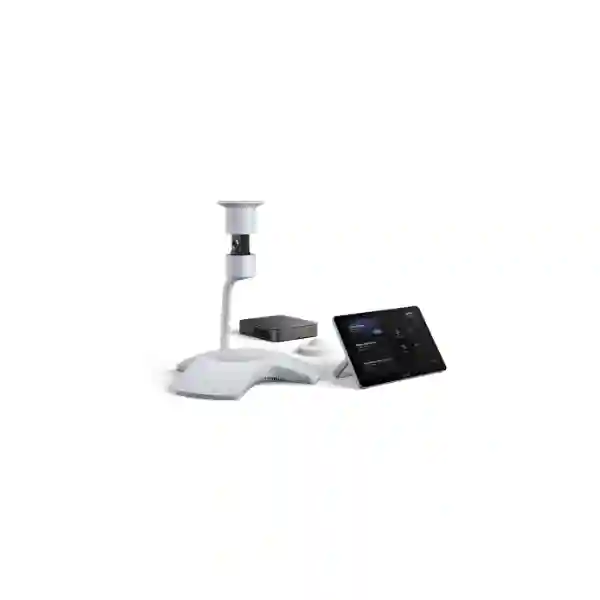
The Yealink MVC S60 is a dedicated Microsoft Teams Rooms system built around the SmartVision 60 360-degree intelligent audio-video device, MCore Pro mini-PC and MTouch Plus touch console. It is designed for organisations that want a permanent meeting-room experience instead of relying on a user laptop, loose USB peripherals and repeated manual setup.
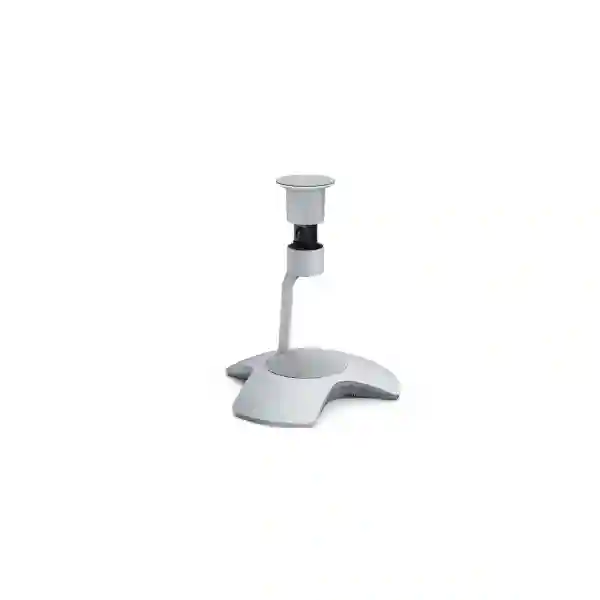
SmartVision 60
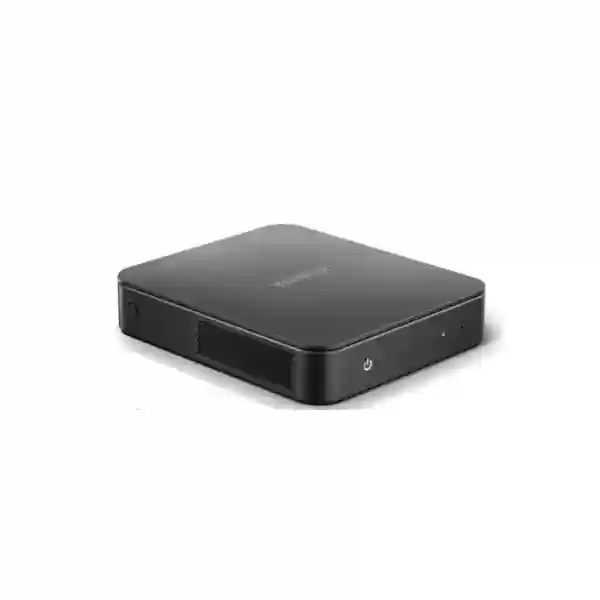
MCore Pro
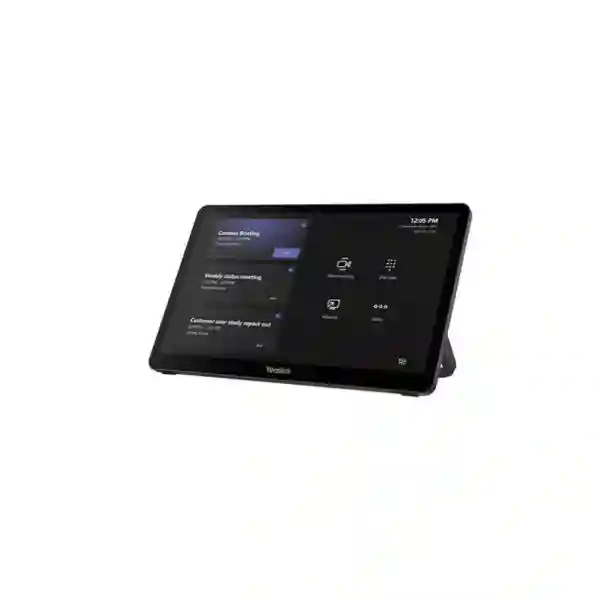
MTouch Plus
Quick answer
Choose the MVC S60 when you need a dedicated Windows-based Microsoft Teams Room for a collaborative table layout where wide participant visibility, simple room control and managed meeting-room hardware matter. Confirm room dimensions, seating positions, display count, Microsoft Teams Rooms licensing, network quality and installation requirements before ordering.
What is the Yealink MVC S60?
The Yealink MVC S60 is an integrated Microsoft Teams Rooms system for Windows. Yealink’s current product material positions the system for small-to-medium and high-end mid-sized meeting rooms. The core kit combines three principal elements: the SmartVision 60 all-in-one intelligent camera and room audio device, the MCore Pro Gen-3 mini-PC and the MTouch Plus Gen-3 touch panel. The design is intended to give the meeting space a permanent Teams Rooms identity so users can enter the room, view scheduled meetings, join calls, control the session and share content without rebuilding the room around a personal laptop each time.
The SmartVision 60 is the most distinctive part of the solution. It uses a 10K panoramic camera with a 360-degree horizontal field of view and integrated microphone array coverage around the table. Yealink also documents intelligent multi-speaker tracking and Microsoft Teams-oriented capabilities such as participant-focused views, transcription-related functions and participant identification where supported by the Teams environment. For many customers, the practical value is not the headline resolution by itself but the centre-of-table perspective: people seated around the table can be captured from a position designed to reduce the hidden-seat problem that can occur with a conventional front-of-room camera.
Verified system components and technical highlights
SmartVision 60
All-in-one audio and video device with a 10K 360-degree panoramic camera, 360-degree room pickup concept, six-MEMS microphone array architecture, integrated speaker, camera and microphone mute controls, and intelligent multi-speaker tracking support.
MCore Pro Gen-3
Yealink’s Gen-3 mini-PC platform for the room system. The published MVC S60 datasheet lists an 11th Gen Intel Core i5 processor, 8 GB memory, 128 GB SSD storage, three HDMI video outputs, Gigabit Ethernet, Wi-Fi and Bluetooth connectivity.
MTouch Plus
11.6-inch narrow-bezel IPS touch panel with 1920 × 1080 resolution. It provides the room user interface for joining and controlling Teams meetings and supports content-sharing workflows, with placement options for tabletop, fixed desktop or wall-mounted deployment.
Deployment architecture
Yealink documents a single CAT5e connection between the TV-side area and conference-table area for the system’s room connection design, reducing cable complexity. Final cabling, routing, power and mounting should still be checked against the exact room and current Yealink installation guide.
Why businesses consider the MVC S60 for hybrid meetings
A dedicated meeting room should reduce friction. Employees should not need to decide which cable to connect, which webcam to select, which microphone is active or who will sacrifice a laptop for the duration of a call. The MVC S60 addresses that workflow by combining purpose-built room hardware with the Microsoft Teams Rooms experience. This can be particularly useful for executive meeting rooms, project rooms, customer meeting spaces, departmental collaboration rooms and training areas that host frequent Teams calls.
The 360-degree centre-of-table approach is especially relevant where participants sit around a round, square or compact rectangular table. A conventional camera positioned above the display looks into the room from one direction. That can work well, but participants farther from the lens may appear smaller and people can block one another. SmartVision 60 captures the room from the centre and can use intelligent views to present people in a more meeting-equitable way. This makes the physical seating layout an important part of the product decision.
The room should still be designed as a complete system. Video quality depends on lighting and camera placement. Audio intelligibility depends on participant distance, hard surfaces, background noise and HVAC conditions. Teams performance depends on reliable internet, LAN quality, DNS and firewall policy. Display experience depends on screen size and viewing distance. A strong deployment therefore combines the MVC S60 with correct room planning rather than treating it as an isolated box.
Microsoft Teams Rooms planning before purchase
Room account and licensing
The hardware is only one part of the room. The organisation should confirm the appropriate Microsoft Teams Rooms account, licensing model, identity policies, calendar integration and administrative ownership for the room before commissioning.
Display strategy
Confirm whether the room needs one or two displays, the screen size, wall construction, mounting height, HDMI routing and whether content and remote participants should appear simultaneously in the preferred meeting workflow.
Network readiness
Use stable business networking with suitable bandwidth, firewall policy, DNS, time services and Quality of Service where required by the wider design. Avoid assuming that strong Wi-Fi signal alone guarantees reliable Teams media.
Physical installation
Check table position, cable routes, floor boxes, electrical outlets, display mounts, device security, mini-PC mounting location and access for maintenance. Plan the room before furniture is fixed whenever possible.
Related FourTeck Tanzania solutions
The MVC S60 is most effective when the surrounding room and network are ready for it. FourTeck Tanzania’s business technology overview explains how collaboration, networking, security and workplace infrastructure fit together. Customers comparing multiple equipment categories can use the FourTeck Tanzania technology shop to consider related displays, network switches, wireless access points and supporting infrastructure.
For broader planning, the FourTeck Tanzania services page covers video conferencing, audio conferencing, networking and lifecycle support. Organisations with projects spanning neighbouring markets can also review FourTeck Kenya and FourTeck Uganda for regional technology requirements. These links provide context for related solution planning and do not imply stock or delivery commitments for the MVC S60.
Regional buying and deployment guidance
The following regional sections are written for procurement and deployment planning. They do not claim local stock, offices, delivery times or engineer coverage. Availability, commercial terms and project scope should be confirmed in the quotation.
Yealink MVC S60 Teams Rooms System Tanzania
For organisations evaluating the Yealink MVC S60 in Tanzania, the most important step is to define the meeting room before finalising the bill of materials. A company may know that it wants Microsoft Teams Rooms, but the room still needs to be assessed for seating layout, participant count, display viewing distance, camera position, cable routes, lighting, background noise and network quality. The MVC S60 is particularly relevant when a permanent Teams room is preferred over a portable USB video bar or laptop-led meeting setup. Its SmartVision 60 centre-of-table design suits collaborative spaces where people sit around the table and should remain visible to remote participants without constant camera adjustment.
Tanzania buyers should also plan the supporting infrastructure. The MCore Pro requires a suitable network path and display connection, while the MTouch Plus should be positioned where users can comfortably join meetings and control the room. Power stability, UPS protection for key components, secure cable routing and adequate ventilation around installed equipment should be considered in offices where power disturbances or warm equipment spaces can affect reliability. Internet capacity must be assessed as part of the complete site load rather than by looking at the meeting room alone, because cloud backup, large file transfers, Wi-Fi traffic and other applications may compete with Teams media during busy periods.
For procurement, request a quotation that states the exact MVC S60 kit, included components, optional accessories, display scope, mounting, cabling, installation, configuration and any Microsoft licensing assumptions. If multiple rooms are planned, define room profiles such as executive room, standard medium room and training room so the same hardware is not forced into every space. A consistent room standard can simplify user training and support, while still allowing different display sizes or mounting arrangements. FourTeck Tanzania can use the room count, floor plans, platform standard and existing network details to prepare a more complete requirement discussion before commercial confirmation.
Yealink MVC S60 Teams Rooms System Dar es Salaam
Dar es Salaam organisations often run collaboration rooms in head offices, professional-service firms, financial environments, logistics businesses, hospitality groups, educational organisations and regional management offices. In these settings, the MVC S60 can be considered for rooms where Microsoft Teams is already a standard business platform and where a dedicated room system would reduce the inconsistency of employees connecting different laptops and USB devices. The centre-of-table SmartVision 60 is especially relevant for meeting rooms where several decision makers sit around one table and remote colleagues need a balanced view of the discussion.
A Dar es Salaam deployment should be planned around room acoustics and connectivity as much as around the hardware. Glass partitions, hard tables, air-conditioning systems and open office noise can affect perceived audio quality. Before installation, check whether the room has excessive echo, whether doors allow corridor noise to enter, and whether the display wall gives the camera and controller a practical cable route. Where the room is part of a busy office network, confirm switching, firewall and internet headroom during peak periods. A dedicated wired network connection to the room system is generally easier to monitor and troubleshoot than an environment that depends solely on congested wireless connectivity.
Procurement teams in Dar es Salaam can improve quotation accuracy by providing the room dimensions, table shape, seat count, number of displays, wall type, floor-box availability, preferred mounting style and whether the room must support wired or optional wireless presentation workflows. If the project includes new displays, confirm the required screen size and whether single-screen or dual-screen Teams layouts are preferred. If the business has several branches, decide whether room naming, accounts, network addressing and support documentation should follow a common standard. These details allow the MVC S60 to be evaluated as part of a usable meeting environment instead of as a stand-alone product purchase.
Yealink MVC S60 Teams Rooms System Mwanza
Businesses and institutions considering the Yealink MVC S60 in Mwanza may be connecting local management teams with colleagues, suppliers, customers or headquarters in other cities and countries. A dedicated Microsoft Teams Room can be useful where hybrid meetings are frequent enough that setup time and inconsistent device selection become operational problems. The MVC S60 provides a fixed room architecture: users interact with MTouch Plus, the MCore Pro runs the Teams Rooms environment, and SmartVision 60 handles the room-facing video and audio experience.
For Mwanza projects, network resilience deserves particular attention. Teams Rooms is cloud dependent, so the room experience is influenced by the stability of the site internet path. If the organisation has important management or customer meetings, consider whether the wider network has a practical backup connectivity strategy and whether the firewall, switching and wireless infrastructure are documented. The room itself should ideally use a stable wired LAN connection. Where power interruptions are a concern, include appropriate UPS planning for the conferencing system, displays and network path so that a short disturbance does not immediately end the meeting even if the internet circuit remains available.
Room geometry also matters. SmartVision 60 is designed for 360-degree table coverage, which can work well in collaborative rooms but should not be assumed to suit every long classroom or auditorium layout. Measure participant distance from the centre device and confirm how the camera view will behave with the actual furniture arrangement. If the room is large, unusually shaped or acoustically difficult, a different Yealink room architecture may be more appropriate. A quotation request should therefore include photographs or a simple room sketch, seat count, table dimensions and desired display setup. This allows product selection to follow the real meeting pattern instead of relying only on the model’s general room-size category.
Yealink MVC S60 Teams Rooms System Arusha
Arusha has organisations that coordinate regional operations, hospitality activities, tourism services, NGOs, professional teams, education and conference-related work. For a business that already uses Microsoft Teams, the MVC S60 can turn a meeting room into a predictable collaboration resource rather than a collection of peripherals that must be assembled for every call. The system is most compelling when the room hosts repeat meetings with mixed in-room and remote participants, especially where management wants a consistent one-touch room experience and centralised device administration.
When planning an MVC S60 room in Arusha, start with the experience of remote participants. Check whether people around the table are evenly lit, whether strong windows create backlighting, whether the room produces echo and whether the table position supports a central SmartVision 60 placement. A visually impressive room can still perform poorly if microphones pick up air-conditioning noise or if participants are silhouetted against bright windows. Simple changes to lighting, blinds, soft furnishings and device placement can improve meeting quality without changing the conferencing hardware.
Procurement should also distinguish between the core MVC S60 kit and the complete room solution. Displays, brackets, HDMI infrastructure, network cabling, power conditioning, optional content-sharing accessories and installation services may be separate line items. Microsoft Teams Rooms licensing is also part of the overall operating requirement rather than a hardware feature to assume. If the organisation operates guest meeting rooms or executive boardrooms, define whether external visitors need to present from their own devices and whether the workflow should support wired sharing, approved optional wireless sharing or another controlled method. Clear requirements at quotation stage reduce later changes and make handover easier for both users and IT administrators.
Yealink MVC S60 Teams Rooms System Dodoma
Organisations in Dodoma considering the Yealink MVC S60 may include government-related offices, professional services, education, corporate branches and project teams that depend on regular Microsoft Teams collaboration. A dedicated Teams Room can help standardise how meetings start and how the room is controlled, particularly when many different employees use the same space. Instead of expecting each user to understand the room’s camera, microphone and display connections, the MTouch Plus provides a consistent control point linked to the MCore Pro Teams Rooms system.
For formal meeting environments, consider privacy and operational ownership. SmartVision 60 includes physical privacy-oriented controls and camera/microphone mute functions, but the organisation should still define who manages the room account, who applies updates, who can change Teams Rooms settings and how meeting-room devices are monitored. Yealink documents remote device-management support, which can be valuable for IT teams supporting several rooms. The management approach should be aligned with the organisation’s endpoint, network and Microsoft 365 administration policies rather than handled as a separate unmanaged appliance.
Installation planning in Dodoma should include reliable power, UPS strategy, Ethernet connectivity, display placement, cable security and a clear handover checklist. For procurement, ask whether the quote includes the MVC S60 kit only or a complete installed room. Confirm mounting accessories, cables, screen quantity, screen size, optional presentation devices, commissioning and user orientation. Where internal procurement requires model-level traceability, record the exact kit designation and included components in the bill of materials so substitutions are visible before approval. The goal should be a room that staff can operate confidently and IT can support systematically over its lifecycle.
Yealink MVC S60 Teams Rooms System UAE
UAE buyers often evaluate the MVC S60 for corporate meeting rooms where Microsoft Teams is already part of Microsoft 365 and where room consistency matters across multiple offices. The system’s centre-of-table SmartVision 60 architecture can suit executive and collaborative rooms with compact seating arrangements, while MTouch Plus gives users a dedicated controller. For a business that operates in Dubai, Abu Dhabi, Sharjah or other Emirates, the technical decision should still be made room by room rather than assuming the same kit is ideal everywhere.
Many UAE offices use glass-walled rooms, polished surfaces and open-plan layouts. These can create reflections, strong backlighting and acoustic reverberation. A room survey should therefore review blinds, display brightness, speaker levels, background noise and table position. Where meeting rooms are integrated with corporate AV, check whether existing matrix switching, room automation or display control needs to coexist with the Teams Rooms system. The MVC S60’s native room design should be kept simple where possible, but enterprise environments may have existing standards that need to be documented before integration.
For multinational organisations, the UAE may serve as a regional procurement or management hub. If several rooms are being standardised across countries, define a core reference design that covers the Teams Rooms account structure, naming conventions, network requirements, display strategy, update ownership and support documentation. Allow local variations for room size and electrical or installation conditions. Commercial availability, delivery terms and warranty should be confirmed in the project quotation rather than assumed from third-party reseller pages. FourTeck’s regional network can be used to discuss cross-market requirements, but each country’s scope should be documented separately so responsibilities remain clear.
Yealink MVC S60 Teams Rooms System Uganda
Uganda organisations can consider the MVC S60 when they need a fixed Microsoft Teams Rooms environment for a medium collaboration space and want an inclusive table view. The system is particularly relevant for teams that hold frequent cross-border meetings, management reviews, project coordination sessions and customer discussions. SmartVision 60’s 360-degree design can reduce dependence on a single front-facing camera angle, while the dedicated MTouch Plus controller gives room users a predictable interface.
Before procurement, assess network reliability across the full path used by the room. A Teams call can be affected by internet congestion, firewall inspection, poor LAN switching, unstable Wi-Fi or local DNS issues. A wired connection to the room system, sensible Quality of Service policy where needed and a documented backup internet approach can improve resilience for important meetings. The room’s displays and core network equipment may also benefit from UPS support if short power interruptions are common enough to disrupt sessions.
The quotation should identify the exact MVC S60 components and separate optional items. Confirm whether the RoomSensor, wireless presentation accessories, displays, mounting hardware and installation are part of the offered bundle. Also confirm who is responsible for Microsoft Teams Rooms licensing and room-account creation. For organisations with several Ugandan sites, use a standard room checklist covering dimensions, seat count, display count, cable route, LAN port, internet capacity, power, acoustic conditions and administrator ownership. This makes it easier to compare rooms consistently and avoid purchasing a system that fits one location but not another.
Yealink MVC S60 Teams Rooms System Kampala
In Kampala, the MVC S60 can be suitable for corporate offices, financial services, NGOs, professional firms, education environments and regional teams that use Microsoft Teams for regular collaboration. The product should be evaluated where a dedicated room endpoint is preferable to a bring-your-own-device setup. Users can enter the room, interact with MTouch Plus, join a scheduled Teams meeting and use the room’s SmartVision 60 audio-video system without depending on a personal webcam or speakerphone.
Kampala meeting rooms vary widely in size and acoustic quality, so the hardware should follow the room rather than the other way around. Centre-of-table 360-degree coverage works best when the seating arrangement supports it. For very long boardroom tables, classrooms or rooms where people sit mostly facing one direction, a front-of-room PTZ architecture may sometimes be a better fit. The procurement process should therefore include room measurements and a basic drawing or photographs showing the table, display wall, windows and door positions.
IT teams should also decide how the room will be managed. Yealink documents remote management for the MVC solution, but operational responsibility still needs to be assigned. Define who applies firmware and Teams Rooms updates, who monitors device health, who owns the room account and what happens when a display, cable or network component fails. For multi-room projects, standard naming, IP planning and handover documentation can significantly reduce support time. A commercial proposal should state the exact hardware, accessories, installation scope and exclusions so the project can be compared fairly with alternative Teams Rooms designs.
Yealink MVC S60 Teams Rooms System Arua
For organisations in Arua, a dedicated Microsoft Teams Room can support communication with headquarters, remote project teams, suppliers and partner organisations without requiring each meeting to start from a personal laptop. The MVC S60 combines the computer, touch controller and 360-degree room audio-video device into a defined room solution. This can be valuable where the meeting space is shared by many users and the organisation wants a consistent interface that reduces setup time.
Connectivity planning is especially important for any cloud meeting room. Before investing in premium room hardware, confirm the quality and resilience of the site’s internet link, internal LAN and power. A backup internet option may be appropriate for mission-critical meetings, but failover design should be tested so sessions recover predictably. The meeting-room system, switches, firewall and displays may also need UPS support depending on local operating conditions. If the office shares bandwidth with large downloads, backups or surveillance video, the network should be reviewed to prevent those workloads from degrading live Teams media.
Arua buyers should ask for clear scope boundaries in the quotation. The MVC S60 hardware is not the same as a finished meeting room. Displays, wall mounts, electrical work, LAN points, cable concealment, optional presentation accessories, room-account licensing and commissioning may all sit outside the base kit. Providing room dimensions, participant count and photographs can help determine whether the MVC S60 is appropriate or whether another room system would be better. This avoids overspending on capability that the room cannot use or, conversely, installing a compact-room system in a space that needs a more distributed camera and microphone design.
Yealink MVC S60 Teams Rooms System Mbarara
Mbarara businesses, education institutions and regional offices considering the MVC S60 should begin by confirming how often the room is used for Microsoft Teams and how many people normally sit around the table. A permanent Teams Room is easiest to justify where meetings are frequent, different users share the room and consistent join/control behaviour has operational value. SmartVision 60 gives a 360-degree table view and integrated audio coverage, while the MTouch Plus gives the room a dedicated interface.
The physical environment influences the result. A small room with hard walls and strong air-conditioning noise may need acoustic attention even though it is technically within the product’s room-size range. A large room with participants far from the table centre may need a different audio or camera strategy. Before ordering, check table dimensions, camera-to-participant distance, display size, lighting direction, window glare and where the mini-PC can be mounted securely. Also ensure that maintenance access remains possible after furniture and displays are installed.
For IT operations, document the room as an endpoint within the broader network. Record switch port, VLAN if used, IP addressing approach, firewall dependencies, Teams Rooms account and administrator responsibilities. Where remote management is enabled, align it with the organisation’s security and change-control processes. If the business expects to replicate the room at other locations, create a simple standard that identifies core kit, optional accessories, display size, cabling and configuration. This makes future deployments more predictable and gives procurement a repeatable basis for comparing quotations.
Yealink MVC S60 Teams Rooms System Gulu
Gulu organisations that rely on hybrid work can use a dedicated Teams Room to make recurring meetings less dependent on whichever employee arrives first with a laptop. The MVC S60’s architecture supports that objective by creating a fixed Microsoft Teams Rooms endpoint with a room controller and integrated 360-degree audio-video device. This is useful for management meetings, project coordination, training discussions and cross-site collaboration where a predictable start process matters.
Because Teams Rooms depends on cloud connectivity, Gulu deployments should consider resilience beyond the room itself. Confirm whether the office internet link is sufficiently stable during working hours, whether the firewall has suitable policies for Microsoft 365 traffic and whether network equipment is protected from power interruptions. If backup connectivity exists, test it with real-time conferencing rather than assuming failover will be seamless. The room should ideally use wired Ethernet, and its network path should be documented for troubleshooting.
The buying decision should also account for lifecycle administration. Hardware should be updated, monitored and supported over time, while the Microsoft room account and licence need ongoing ownership. Identify who is responsible before handover. If local staff are expected to resolve basic issues, include simple operating guidance covering meeting join, content sharing, mute controls, restart procedure and support escalation. Procurement teams should request an itemised quote showing the core MVC S60 kit separately from displays, optional accessories, cabling, installation and services. This creates a clearer comparison and avoids ambiguity about what will actually be delivered.
Yealink MVC S60 Teams Rooms System Kenya
Kenyan organisations often evaluate Microsoft Teams Rooms for headquarters, branch offices, meeting centres, customer rooms and regional operations. The MVC S60 can fit environments where the room uses a compact collaborative table and where 360-degree participant visibility is more valuable than a conventional front-facing camera. For businesses already standardised on Teams, a dedicated room system reduces the variability of personal devices and gives users a repeatable join and control experience.
In Nairobi and other Kenyan business centres, many meeting rooms are built with glass, hard surfaces and modern open-office layouts. These spaces can look excellent but may need acoustic treatment or careful audio placement to prevent echo. Evaluate lighting as well: windows behind participants can reduce facial detail even when the camera itself is capable. The SmartVision 60 should be positioned so it has a clear view around the table, while MTouch Plus should remain easy to reach without interfering with notebooks or documents.
For procurement, define whether the requirement is hardware-only supply or a complete deployed Teams Room. A full scope may include displays, brackets, cabling, LAN work, electrical changes, optional content-sharing devices, Teams Rooms configuration, testing and handover. Multi-office customers should establish a standard room template with approved variations for small, medium and large rooms. Commercial availability and warranty terms should be confirmed when quoting, because third-party listings can vary by country and by bundle. Regional buyers can use FourTeck Kenya as a related planning reference while maintaining a clearly documented project scope for each site.
Yealink MVC S60 Teams Rooms System Kuwait
Kuwait businesses evaluating the MVC S60 are often looking for a professional Microsoft Teams Room that can be used repeatedly by different departments without reconfiguring a laptop-based setup. The combination of MCore Pro, MTouch Plus and SmartVision 60 provides a dedicated room architecture that can support executive meetings, project reviews, customer discussions and hybrid collaboration. The centre-of-table 360-degree view is especially relevant for rooms where participants sit around a compact boardroom table.
Room design should consider environmental conditions and building standards. Air-conditioning noise, hard stone or glass surfaces, long cable routes and display mounting all influence the final experience. Verify where the mini-PC can be installed with adequate access and ventilation, how the CAT5e and display connections will be routed and whether the touch console will sit on the table or use a fixed mount. If the room is part of a larger AV standard, document any control-system or display-switching integration before equipment is ordered.
IT and procurement teams should confirm Microsoft Teams Rooms licensing, room-account ownership, network requirements, update management and cybersecurity policy as part of the project. If external visitors frequently present in the room, define the approved sharing workflow and whether optional wireless content sharing is required. Ask suppliers to separate core hardware from options and services so quotations remain comparable. Do not assume local stock, warranty duration or delivery timing based on an unrelated market listing; those details should be confirmed in the current commercial offer.
Yealink MVC S60 Teams Rooms System Ghana
For organisations in Ghana, the MVC S60 can support a permanent Microsoft Teams meeting space where consistent user experience and inclusive table coverage are priorities. Companies with cross-border teams, banks, professional services, educational organisations and project offices may benefit from a dedicated room endpoint when meetings are frequent and users should not have to bring their own camera, microphone and speaker setup. The SmartVision 60’s panoramic perspective can make around-the-table discussions more natural for remote participants.
A Ghana deployment should review the complete infrastructure. The room requires stable network access to Microsoft Teams, suitable displays, secure power and correct cabling. If the site experiences power disturbances, consider UPS support for the conferencing system, network edge and displays. If the office uses shared internet heavily, test real-world bandwidth and latency during business hours. A meeting room can have premium hardware and still perform poorly if the internet or firewall path is unstable.
Procurement should verify the exact kit and avoid mixing specifications from different Yealink generations. The MVC S60 described here is the Gen-3 MCore Pro/MTouch Plus/SmartVision 60 architecture. Confirm any RoomSensor or content-sharing accessories separately. The room-account licence and Microsoft 365 configuration should also be planned by the organisation or included explicitly in the service scope. When multiple rooms are involved, standard documentation covering room name, account, network port, display type, software ownership and escalation contacts can make ongoing support much easier.
Yealink MVC S60 Teams Rooms System Nigeria
Nigeria has many organisations with distributed teams across cities and countries, making dedicated meeting rooms important for regular management, customer and project collaboration. The MVC S60 is relevant where Microsoft Teams is the standard platform and where a medium room needs a fixed Windows-based Teams Room rather than a portable USB device. SmartVision 60 provides the panoramic table view, MTouch Plus serves as the room control point and MCore Pro hosts the room’s Teams environment.
Connectivity and power planning deserve special attention for important rooms. A robust Teams Room should be supported by dependable internet, a suitable firewall path and stable LAN switching. Where organisations use dual internet circuits, the failover design should be tested for real-time media behaviour. UPS coverage can help protect the room system, network edge and displays against short interruptions. These infrastructure choices may be more important to perceived reliability than adding optional conferencing features.
For meeting spaces in Lagos, Abuja or other business locations, room acoustics and lighting can vary significantly. Glass walls, tiled floors and strong window light may need treatment or layout adjustments. The centre-of-table camera must have a practical location that does not conflict with documents, microphones from other systems or power outlets. Before ordering, provide room dimensions, table layout, participant count, display requirements and photographs. Ask for an itemised commercial proposal that separates the Yealink kit, optional accessories, screens, mounts, cabling and services. This makes comparison more transparent and reduces the chance that installation dependencies appear only after purchase.
Yealink MVC S60 Teams Rooms System Seychelles
Seychelles organisations may use Microsoft Teams Rooms to connect island-based teams, hospitality operations, government or professional services with regional and international participants. In these environments, a dedicated room system can provide a more polished experience than repeatedly setting up laptop cameras and portable speakerphones. The MVC S60’s compact integrated architecture can be attractive where the meeting room is designed around a central table and where users value a straightforward room controller.
Because island deployments can place a premium on careful procurement and maintenance planning, the room should be specified completely before equipment is shipped. Confirm the exact MVC S60 kit, displays, brackets, cable lengths, power accessories, network ports and any optional wireless presentation hardware. Small missing components can create disproportionate delays when replacements are not immediately available. It is also sensible to document serial numbers, software ownership, update procedures and remote-support access during handover.
Environmental factors should also be considered. Meeting rooms with large windows can have strong daylight and reflections, while coastal conditions make good equipment-room ventilation and clean installation practices important. The room network should be stable and preferably wired. If internet connectivity has variable performance, test Teams meetings under real operating conditions before final acceptance. A project quotation should clearly separate hardware from installation and support, and should avoid assumptions about local stock, delivery times or warranty conditions until they are confirmed. This disciplined approach helps ensure the MVC S60 is deployed as a reliable collaboration room rather than simply delivered as hardware.
Selection checklist: is the MVC S60 right for your room?
Microsoft Teams is the primary room platform, participants sit around a central table, the organisation wants a fixed Windows Teams Room, and a 360-degree participant view adds value.
The room is very large, seating is auditorium-style, the table is unusually long, the project requires complex ProAV integration, or another collaboration platform is primary.
Room size, exact kit, displays, licence, optional sharing accessories, mounting, cable routes, LAN, internet, power, installation scope and support responsibilities.
Frequently asked questions
Is the Yealink MVC S60 a Microsoft Teams Rooms system?
Yes. The MVC S60 is a Windows-based Microsoft Teams Rooms solution. It combines the MCore Pro mini-PC, MTouch Plus touch controller and SmartVision 60 audio-video device. The organisation must still provide and manage the appropriate Microsoft Teams Rooms account and licensing.
What room size is the MVC S60 designed for?
Yealink currently positions it for small-to-medium rooms and also describes it as suitable for high-end mid-sized meeting rooms. The exact fit depends on room geometry, table shape, participant distance, acoustics and display design, so room planning is preferable to selecting by seat count alone.
What is SmartVision 60?
SmartVision 60 is Yealink’s 360-degree all-in-one room audio-video device used in the MVC S60. Yealink publishes a 10K panoramic camera, 360-degree horizontal field of view, microphone array and intelligent multi-speaker tracking among its key features.
Can the MVC S60 support content sharing?
Yes. MTouch Plus supports wired content input, and Yealink documents optional wireless content sharing with the WPP30. The exact sharing workflow and accessory bundle should be confirmed against the current kit and software version before purchase.
Does the MVC S60 include displays?
The core MVC S60 system is described around the MCore Pro, MTouch Plus and SmartVision 60, with kit-specific inclusions such as RoomSensor documented for certain configurations. Displays should be treated as separate unless the quotation explicitly includes them.
Can IT manage the system remotely?
Yealink states that the solution supports Yealink device-management tools for remote monitoring, configuration, updates and diagnostics. The organisation should align remote-management access with its own security, account and change-control policies.
What should I send for an MVC S60 quotation?
Send the country and city, room dimensions, table shape, number of seats, quantity of rooms, existing display details, preferred screen count, network availability, Microsoft Teams standard, installation requirement and any content-sharing preference. Photographs or a simple floor plan can improve accuracy.
Quotation checklist
✓ Exact MVC S60 kit designation and quantity
✓ Room dimensions, table layout and seat count
✓ Single or dual-display requirement
✓ Display size, brackets and cable routes
✓ LAN, internet and firewall readiness
✓ Power and UPS requirements
✓ Microsoft Teams Rooms account/licence ownership
✓ Optional wireless presentation requirement
✓ Installation, configuration and testing scope
✓ Handover, admin training and support responsibility
Decision recap
The Yealink MVC S60 is best understood as a complete Microsoft Teams Room architecture rather than simply a camera. It combines a Windows room PC, dedicated touch controller and intelligent 360-degree table device to create a repeatable meeting experience. Its strongest use case is a collaborative small-to-medium or premium mid-sized room where people sit around a table and where meeting equity, simplified control and centralised management matter.
The final buying decision should be based on the room. Confirm geometry, participant distance, acoustics, displays, cabling, network capacity, power, Microsoft licensing and administration. If those elements are planned together, the MVC S60 can become a dependable shared resource instead of another device that users must troubleshoot before every call.
Plan your MVC S60 room before you buy
Share your room dimensions, seating layout, display requirement, quantity, Microsoft Teams environment and installation needs. FourTeck Tanzania can use this information to help structure a quotation discussion around the actual meeting-room requirement rather than a model number alone. Commercial availability, lead time, warranty, optional accessories and service scope should be confirmed in the current quotation.




Reviews
There are no reviews yet.