
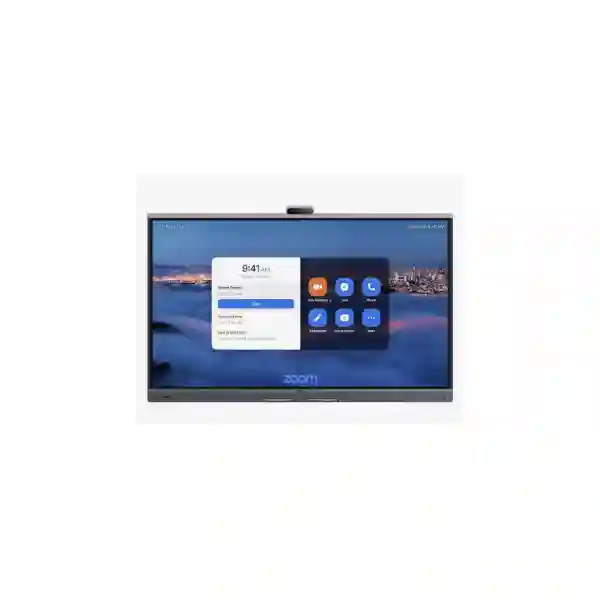
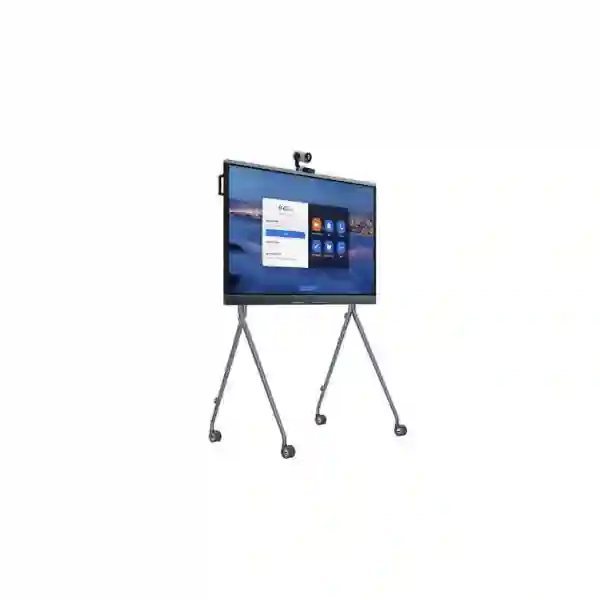
Yealink MeetingBoard Pro 86 Zoom Rooms System
The Yealink MeetingBoard Pro 86 Zoom Rooms System brings video conferencing, interactive whiteboarding, room display, content sharing and intelligent audio/video functions into one large-format collaboration board. Yealink positions the 86-inch MeetingBoard Pro for large meeting rooms, with an 86-inch 4K multi-touch display, a built-in triple 50MP camera system, AI-assisted views such as IntelliFocus and Video Fence, 16-MEMS microphones, 36W stereo speakers and full-duplex audio coverage rated by Yealink at up to 12 metres. For organizations in Tanzania planning a boardroom refresh, executive collaboration room, training environment or hybrid meeting space, the value is the consolidation of several meeting-room components into a single integrated platform.
FourTeck Tanzania can assist buyers in translating room requirements into a practical bill of materials. The purchasing conversation should include room dimensions, seating layout, viewing distance, mounting preference, Zoom Rooms licensing, network readiness, power provision, cable routing, any requirement for extended microphones or cameras, and whether users also need bring-your-own-device workflows. This page focuses on the MeetingBoard Pro 86 Zoom Rooms configuration and practical procurement guidance rather than making assumptions about local stock, delivery dates or licensing entitlement.
3840 × 2160 resolution, anti-glare panel, 20-point infrared touch and a wide 178° viewing angle support large-room presentation and collaborative whiteboarding.
A built-in three-camera architecture with AI framing functions is designed to keep remote participants focused on speakers and people inside the meeting area.
The integrated 16-MEMS microphone array and stereo speaker system reduce dependence on separate table microphones in suitable room layouts.
The MeetingBoard Pro supports native Zoom operation and Zoom Device Management alongside general collaboration modes, giving IT teams a manageable room endpoint.
What the Yealink MeetingBoard Pro 86 solves
Traditional meeting rooms can accumulate a display, camera, speakerphone, tabletop controller, mini-PC, whiteboard and multiple cable paths. The MeetingBoard Pro approach is intended to simplify that room architecture. Its integrated display, camera, microphones, speakers and touch interface provide a single focal point at the front of the room. This can simplify planning for a new meeting space and can also help organizations standardize room experiences across branches where users expect a predictable Zoom Rooms workflow.
The 86-inch format is particularly relevant where participants sit farther from the display or where shared documents, dashboards, engineering drawings, presentations and video feeds must remain legible across a larger table. Yealink identifies the 86 Pro as the large-room option in the MeetingBoard Pro family, with guidance for approximately 12–20 participants. That is not a substitute for room design: seating geometry, camera sight lines, lighting, acoustic reflections and mounting height should still be reviewed before procurement.
Verified technical highlights
| Area | MeetingBoard Pro 86 specification / capability |
|---|---|
| Display | 86-inch anti-glare LCD, 3840 × 2160 resolution, 60 Hz refresh rate, 400 cd/m² brightness, 178° horizontal/vertical viewing angle. |
| Touch | Infrared touch, 20 touch points, ±1 mm stated touch accuracy and stylus support. |
| Camera | Built-in triple 50MP camera system, up to 4K video output, 8× digital zoom, electronic pan/tilt, autofocus and electric privacy shutter. |
| AI video | Auto Framing, Speaker Tracking, picture-in-picture, IntelliFocus and Video Fence. |
| Audio | 16-MEMS microphone array, AI-enhanced audio, noise cancellation and full-duplex coverage stated up to 12 m by Yealink; integrated stereo speakers. |
| Wireless | Wi-Fi 6 dual-band 2.4/5 GHz with 2×2 MIMO and Bluetooth 5.1. |
| Management | Device configuration through web/device/touch methods and management support including Yealink Management Cloud Service and Zoom Device Management. |
| Mounting | Wall-mount and floor-stand deployment options are supported; compatible accessories should be confirmed as separate line items. |
Planning a Zoom Rooms deployment
A successful Zoom Rooms deployment is more than choosing a screen size. First, validate the intended room role. A boardroom used for formal executive meetings has different needs from a training room where presenters move around, a project room used for whiteboarding, or a customer briefing room that frequently hosts external guests. The MeetingBoard Pro 86 can act as the principal front-of-room system, but the final accessory and network plan should be tied to the way the room will actually be used.
Second, separate hardware procurement from software entitlement. Zoom Rooms functionality depends on an appropriate Zoom Rooms subscription and tenant configuration. Hardware capability does not automatically include every cloud feature, license or service. IT administrators should confirm licensing, account ownership, room naming conventions, calendar integration, security policy and administrative roles before deployment day. This prevents the common situation where the hardware is physically installed but cannot be fully commissioned because the required account, room license or calendar resource is not ready.
Third, review the network. The MeetingBoard Pro supports wired networking as well as Wi-Fi 6, but fixed meeting rooms generally benefit from deliberate network design. Confirm Ethernet availability, VLAN and QoS requirements, firewall policy, DNS, DHCP or static addressing rules, internet capacity and access to required Zoom services. If your security architecture uses inspection or restrictive egress controls, validate Zoom’s current network requirements with your security team rather than opening broad rules unnecessarily.
Useful FourTeck regional resources
FourTeck UgandaUseful for organizations coordinating Zoom Rooms standards and purchasing requirements across Uganda and Tanzania.
FourTeck KenyaRelevant to regional groups aligning collaboration-room hardware and deployment policies across East Africa.
FourTeck GhanaSupports multi-country planning when the same meeting-room standards are being evaluated for West African operations.
FourTeck NigeriaA regional reference for enterprises extending unified collaboration-room standards into Nigerian offices.
Yealink MeetingBoard Pro 86 Zoom Rooms System Tanzania
For buyers in Tanzania, the strongest reason to consider the Yealink MeetingBoard Pro 86 is not simply the size of the display; it is the opportunity to standardize a large meeting space around one integrated Zoom Rooms endpoint. Enterprises, financial institutions, universities, NGOs, professional-services firms, hospitality groups, manufacturers and public-sector organizations commonly need rooms that support both local discussion and frequent remote participation. In that setting, an 86-inch 4K screen can improve visibility for participants seated deeper in the room, while the triple 50MP camera system and AI-assisted framing are designed to keep remote attendees engaged with the people who are actively speaking. The integrated whiteboard also makes the platform relevant to teams that brainstorm, annotate designs, review plans or conduct training rather than simply join scheduled calls.
Tanzania procurement teams should begin by documenting the room rather than by requesting only a model price. Record room length and width, table dimensions, ceiling height, number and position of seats, wall construction, available power points, Ethernet availability, Wi-Fi coverage and the likely mounting surface. Confirm whether the board will be wall mounted or placed on a compatible mobile/floor stand, because mounting hardware affects installation planning, floor loading, movement, cable routing and final height. At 86 inches, the unit is substantial, so access routes, doorways, lifts and installation handling should be considered before delivery to the room.
Organizations operating multiple Tanzanian sites can also use the project to define a repeatable room standard. A practical standard might specify Zoom Rooms licensing, naming conventions, calendar-resource configuration, wired network preference, firmware governance, administrator access, support escalation and approved accessories. Standardization helps reduce user confusion: staff should be able to enter a room in Dar es Salaam, Mwanza, Arusha or Dodoma and encounter a familiar meeting experience. A quotation request should therefore include the number of rooms, intended user capacity, preferred deployment dates, mounting requirements, any requirement for optional microphones or cameras, and whether installation and commissioning assistance is needed.
Yealink MeetingBoard Pro 86 Zoom Rooms System Dar es Salaam
In Dar es Salaam, the Yealink MeetingBoard Pro 86 is a strong candidate for corporate headquarters, regional offices, customer briefing centres, larger boardrooms and training spaces where hybrid meetings are part of daily work. The key buying question is whether the room benefits from a single integrated collaboration surface rather than a collection of separate devices. For organizations that host frequent video calls with branches, international partners, vendors or remote staff, consolidating camera, microphones, speakers, touch display and whiteboarding can reduce visible room clutter and simplify the user experience. The 86-inch panel also gives presenters more usable visual area when sharing detailed spreadsheets, technical drawings, dashboards or multi-participant gallery views.
A Dar es Salaam deployment should include environmental planning. Large glazed rooms can create glare and difficult camera lighting, while hard surfaces can introduce reverberation that affects any conferencing system. The MeetingBoard Pro includes an anti-glare display and AI audio functions, but good room design still matters. Where possible, position the display to avoid strong backlighting behind participants, manage direct sunlight with blinds or shades, and consider basic acoustic treatment if the room has pronounced echo. Before installation, test network performance from the exact room location. Wired Ethernet is usually the most predictable choice for a fixed Zoom Room, while Wi-Fi 6 can be useful where cabling constraints exist.
Procurement teams in Dar es Salaam should also clarify what is included in a quotation. Request separate line items for the MeetingBoard Pro 86, mounting solution, optional room controller if required, any extended audio or optical camera accessories, installation hardware, configuration services and software licensing. Avoid assuming that an optional accessory shown in vendor diagrams ships in every package. If the room is intended for executive meetings, ask whether a dedicated touch controller, room scheduling panel or additional camera angle would improve the workflow. If the room is used for training, confirm whether the board’s whiteboarding, content-sharing method and participant framing suit instructors who move around the room. A detailed scope reduces procurement ambiguity and makes competing quotations easier to compare on equivalent terms.
Yealink MeetingBoard Pro 86 Zoom Rooms System Mwanza
For organizations in Mwanza, the MeetingBoard Pro 86 can support regional management meetings, distributed project teams, education, healthcare administration, manufacturing coordination and customer-facing collaboration with colleagues elsewhere in Tanzania or abroad. Its all-in-one design is particularly useful when the goal is to create a professional room without building a complicated rack of separate conferencing components. The display, cameras, audio system and touch collaboration surface operate as a coordinated platform, while Zoom Rooms provides the scheduled meeting experience. This can be valuable where local staff need a room that is easy to use consistently without reconnecting laptops and peripheral devices for every call.
Mwanza buyers should put network resilience high on the planning checklist. Video meetings are sensitive to packet loss, latency and unstable upstream capacity, so the room should not be treated as just another wireless client. Confirm the quality of the office LAN, access-switch capacity, VLAN design, internet link and failover arrangements where business continuity is important. The MeetingBoard Pro supports Ethernet and Wi-Fi 6; for a permanent room, organizations may prefer wired connectivity to reduce variability. If the site uses multiple internet links, network administrators should verify how real-time media traffic behaves during failover rather than discovering the behaviour during an important meeting.
Physical planning is equally important. Before ordering an 86-inch collaboration board, check wall strength, mounting position, seating distance and the safe path by which the equipment will enter the building. If a floor stand is preferred, verify that the selected stand is compatible with the 86 Pro and that the room has enough clear space for movement and cable management. For training and project rooms, consider whether users need the board to move between spaces; for formal boardrooms, a fixed wall installation may provide a cleaner layout. When requesting a quotation for Mwanza, provide room photos, dimensions and intended occupancy, along with details of the current Zoom environment. This enables a supplier to recommend the core system and accessories without over-specifying items the room does not need.
Yealink MeetingBoard Pro 86 Zoom Rooms System Arusha
Arusha organizations frequently work across offices, field locations, hospitality operations, international partners and development programmes, making reliable hybrid collaboration strategically useful. The Yealink MeetingBoard Pro 86 offers a large shared visual surface for those conversations while integrating video, audio and whiteboarding into one unit. In a larger conference space, the 86-inch 4K panel can keep shared material readable for people seated around a long table, and the built-in triple camera system is intended to improve remote visibility of participants without relying on a single conventional webcam perspective. AI functions such as IntelliFocus, Speaker Tracking and Video Fence can help direct attention toward active speakers and the defined meeting area.
For Arusha conference and hospitality environments, consider the room’s flexibility. Some spaces alternate between internal meetings, guest presentations, workshops and remote events. In such cases, confirm whether the standard native Zoom Rooms workflow covers most use, and document any requirement for users to connect their own laptops or use another collaboration platform. Yealink supports native Zoom as well as general collaboration modes, but the desired user experience should be tested and explained to staff. If the board will be installed in a divisible or reconfigurable room, carefully consider viewing angles, seating positions and whether a fixed mounting point remains suitable in every layout.
Arusha procurement should also address operations after installation. Decide who will administer the Zoom Room, manage firmware, receive alerts and coordinate support. Yealink supports Zoom Device Management and its own management services, which can assist IT teams with endpoint visibility. Establishing ownership is more important than simply enabling a management portal. Record room credentials, admin roles, support contacts, configuration standards and change procedures. When asking for a quote, include whether your organization needs installation, commissioning, user orientation or ongoing support. A clear request allows the commercial proposal to separate hardware from services and subscriptions, which is essential for accurate budgeting and later renewals.
Yealink MeetingBoard Pro 86 Zoom Rooms System Dodoma
In Dodoma, the Yealink MeetingBoard Pro 86 can suit institutional meeting rooms, national or regional coordination offices, training facilities, professional firms and enterprises that need a consistent large-room Zoom experience. The system’s integrated architecture can be attractive where IT teams want fewer independent devices to install and maintain. A single collaboration board provides the front-of-room display, camera system, microphones, speakers and interactive touch surface, reducing the need to design a conferencing system from unrelated components. For users, this can make joining scheduled meetings and sharing information more straightforward, particularly when the room has a defined operating standard.
Public-sector and regulated organizations in Dodoma should incorporate security and governance review early in the project. The MeetingBoard Pro supports enterprise networking and security capabilities including HTTPS management, VLANs, 802.1X and encrypted media/signalling mechanisms described by Yealink. However, these hardware capabilities need to be implemented within the organization’s actual security architecture. Confirm network segmentation, identity requirements, allowed management paths, administrator permissions and Zoom tenant policy. If the institution restricts cloud communication or uses controlled internet egress, validate Zoom’s current service endpoints and required traffic with the network-security team before installation.
Procurement documentation should be precise enough that all bidders respond to the same need. State that the requirement is for the Yealink MeetingBoard Pro 86 Zoom Rooms System, then list the room use case, expected occupancy, mounting method, required accessories, installation location, Zoom licensing status and any commissioning requirement. If wall mounting is planned, make the installer aware of the wall type and cable path. If a mobile stand is required, include it explicitly rather than assuming it is bundled. If an extended camera or microphone is being considered for a long or acoustically difficult room, request a design justification. This approach helps Dodoma buyers compare proposals on technical fit and lifecycle support rather than only on the headline hardware price.
Yealink MeetingBoard Pro 86 Zoom Rooms System UAE
For organizations with operations in the UAE and Tanzania, the MeetingBoard Pro 86 can be evaluated as part of a common meeting-room standard across geographically separated offices. Multinational teams benefit when users see the same interface, camera behaviour, content-sharing process and support model at both ends of a call. The 86-inch MeetingBoard Pro is intended for larger rooms and combines its 4K touch display with integrated cameras and audio, making it well suited to boardrooms and collaboration spaces where a clean front-of-room installation is preferred. Standardizing the model can also simplify administrator training and documentation, provided each site’s room dimensions and network conditions are individually assessed.
UAE deployments often involve high-specification meeting spaces with strong expectations around aesthetics, cable concealment and integrated room controls. The all-in-one nature of the MeetingBoard Pro can reduce visible device count, but proper planning still matters. Confirm wall construction, cable containment, display height, power location and whether architectural finishes require specialist mounting. If the room includes lighting control, booking panels or other automation, define how those elements will coexist with the Zoom Room rather than assuming integration. Optional Yealink accessories can extend audio/video or control functions, but the accessory list should be tied to a validated room design.
For procurement across UAE and Tanzania, separate global standardization from local commercial terms. Hardware model, configuration baseline and support procedure can be standardized, while pricing, tax, import, installation and service conditions may differ by market and supplier. Ask each quotation to state exactly what is included, including mounts, optional controllers, microphones, cameras, installation, configuration and licensing. Also document responsibility for tenant-side Zoom configuration and calendar integration. This helps the organization maintain a consistent technical standard without assuming that commercial packaging is identical in every country. Regional buyers can use FourTeck’s UAE and Tanzania teams/sites as reference points when coordinating a multi-country collaboration strategy.
Yealink MeetingBoard Pro 86 Zoom Rooms System Uganda
In Uganda, the Yealink MeetingBoard Pro 86 is relevant to enterprises and institutions looking for a large-room collaboration system that can align with the same standard used in Tanzania. The integrated 86-inch 4K touch display gives users a clear surface for presentations and whiteboarding, while the built-in triple 50MP cameras and AI framing functions support hybrid meetings where remote attendees need a more natural view of people in the room. Rather than building a conference room from a separate camera, soundbar, microphone system and interactive display, organizations can start from one coordinated platform and add accessories only where the room design requires them.
Uganda procurement teams should define room capacity and workflow before selecting accessories. Yealink positions the 86 Pro for large rooms, but a long narrow boardroom, classroom-style training space and open collaboration zone may all need different mounting and audio/video extensions even when the headcount is similar. Measure the actual room, map seat positions and consider where presenters stand. If users frequently annotate shared material, allow enough clear space around the board for touch interaction. If meetings are mostly seated, ensure the chosen mounting height keeps the primary content within a comfortable viewing angle for the nearest and farthest participants.
Cross-border organizations can benefit from matching support and configuration documentation. Use a common checklist for Zoom Room naming, licensing, network segmentation, firmware, management ownership and escalation contacts across Uganda and Tanzania. The MeetingBoard Pro supports Zoom Device Management, which can help central IT teams monitor room endpoints, but operational processes should still specify who responds to alerts and who authorizes changes. When requesting a Uganda quotation, include whether you need only hardware or a complete room service including installation, configuration and user handover. Clear scope reduces hidden dependencies and makes it easier to compare the total deployment cost rather than just the cost of the board itself.
Yealink MeetingBoard Pro 86 Zoom Rooms System Kampala
Kampala offices often act as headquarters or regional coordination centres, making them natural locations for higher-capacity Zoom Rooms. The Yealink MeetingBoard Pro 86 is designed for that role with a large 4K interactive display and integrated audio/video. For executive teams, the triple-camera system can provide a more engaging remote experience than a basic single-camera setup, while functions such as Speaker Tracking and IntelliFocus help emphasize active participants. For project teams, the touchscreen and whiteboard capability support collaborative sessions where participants need to sketch, annotate or develop ideas together rather than simply watch slides.
A Kampala deployment should start with a room-readiness survey. Confirm network outlet location, available bandwidth, switching infrastructure, power, cable path, wall structure and lighting. Evaluate acoustic conditions by speaking from several seats and listening for obvious echo or HVAC noise. Integrated AI audio can mitigate common meeting-room challenges, but it cannot correct every environmental problem. Where the room is especially long or reverberant, discuss whether compatible external audio options are appropriate. Similarly, the built-in cameras are capable, but organizations with complex seating layouts or a need to capture presenters at distance may benefit from an optional optical camera module after a proper assessment.
Kampala IT teams should also decide how the room fits into broader collaboration governance. Confirm who owns the Zoom Rooms licenses, how meeting-room calendars are created, whether single sign-on or other identity controls apply, and how device administrators are assigned. Develop a short user guide covering joining, sharing content, whiteboarding, ending a meeting and reporting a fault. The most successful room is not the one with the longest equipment list; it is the one staff can use confidently. For quotations, provide the planned number of rooms, installation addresses, mounting preference and any rollout schedule so procurement can evaluate not just unit price but deployment consistency and support requirements.
Yealink MeetingBoard Pro 86 Zoom Rooms System Arua
For organizations in Arua, a large integrated Zoom Rooms system can reduce the friction of connecting regional teams to headquarters, partners and specialists in other locations. The Yealink MeetingBoard Pro 86 combines the visual impact of an 86-inch 4K panel with camera, microphone, speaker and interactive collaboration functions. This makes it suitable for larger management rooms, training environments or project spaces where participants need to both communicate and work with shared content. In locations where local IT resources are limited, an integrated platform can also simplify the support conversation because the main meeting functions are part of one vendor ecosystem.
Connectivity planning deserves particular attention. A room system should be tested against the site’s real internet service rather than an assumed bandwidth figure. Measure performance during typical busy periods, check upstream stability and understand how the network handles failover if a secondary link exists. Use wired Ethernet where practical for predictable performance, and place the room on an appropriate managed network segment according to organizational policy. Confirm DNS, DHCP, firewall and time synchronization settings before commissioning. These basic steps are often more important to meeting reliability than adding extra hardware.
Arua buyers should request a quotation that distinguishes mandatory components from optional enhancements. The MeetingBoard Pro 86 itself already contains the display, cameras and audio system, so optional items should solve a defined room requirement. A floor stand may be needed where permanent wall mounting is impractical; an additional optical camera may help if the room layout demands longer-distance capture; additional audio may be appropriate for a challenging room. The quotation should also identify installation and configuration services separately. If equipment will be deployed as part of a wider Uganda rollout, use the same acceptance checklist across sites: verify physical installation, network registration, Zoom Room activation, camera framing, microphone pickup, speaker output, content sharing, whiteboarding and administrator visibility before sign-off.
Yealink MeetingBoard Pro 86 Zoom Rooms System Mbarara
Mbarara organizations that coordinate with branches, head offices, customers, educational partners or healthcare teams can use the MeetingBoard Pro 86 to create a purpose-built hybrid meeting room rather than relying on temporary laptop setups. The large interactive screen can serve as the main presentation and collaboration surface, while integrated cameras and audio reduce the number of separate devices users have to understand. This matters in shared meeting rooms: when every meeting starts with a different adapter, webcam or speakerphone configuration, valuable time is lost. A dedicated Zoom Room can provide a repeatable start-to-finish workflow.
Room size should still determine the final design. The 86 Pro is the large format in the MeetingBoard Pro range and Yealink’s guidance associates it with larger groups, but total occupancy alone does not guarantee fit. A broad room with semicircular seating may challenge a different aspect of the camera system than a long boardroom. Whiteboard-heavy teams need enough space in front of the display for people to stand and interact. Training rooms may require sight lines over multiple rows. By documenting these factors before purchasing, Mbarara buyers can avoid both under-sizing and unnecessary accessory spending.
Operational readiness should be included in the rollout plan. Establish the Zoom Rooms subscription and resource-calendar configuration, assign device administrators and determine how firmware and settings will be managed. The system supports Zoom Device Management, enabling centralized visibility, but organizations should also have a local first-response process for issues such as network loss, account sign-out or damaged cabling. For procurement, ask the supplier to state whether installation, wall bracket or floor stand, commissioning, training and support are included. If the system is being purchased for a site with limited technical staff, request a clear handover document that records network settings, device identifiers, administrator roles and support contacts without exposing sensitive credentials.
Yealink MeetingBoard Pro 86 Zoom Rooms System Gulu
In Gulu, the MeetingBoard Pro 86 can serve institutions and businesses that need a reliable visual collaboration hub for distributed operations. Large-room video conferencing is most useful when remote participants can see both the people speaking and the shared information under discussion. The Yealink system addresses those needs with its large 4K touchscreen, integrated triple camera array, AI viewing modes and room-scale audio. The whiteboard capability also supports planning, teaching and problem-solving sessions that would be awkward on a conventional television plus webcam setup. For teams that regularly work with Kampala, other Ugandan cities or regional offices in Tanzania and Kenya, a standardized Zoom Room can make collaboration more predictable.
Gulu deployment planning should consider infrastructure resilience and maintainability. A fixed room should have stable power, a clear shutdown/restart procedure and reliable network connectivity. Where organizations use backup power systems, confirm that the meeting room and associated network equipment are included in the relevant power plan. Verify that the Ethernet switch and internet connection remain available during expected backup scenarios; keeping the display powered while the router or upstream link is offline does not preserve meeting continuity. Documenting these dependencies helps facilities and IT teams troubleshoot quickly.
When requesting pricing, avoid an underspecified request such as “MeetingBoard 86 price.” State the exact requirement for the Yealink MeetingBoard Pro 86 Zoom Rooms System and describe the room. Include seating capacity, dimensions, mounting preference, network readiness, Zoom licensing status and desired services. If the site requires a floor stand, controller, room-scheduling panel or additional audio/video device, list that requirement explicitly or ask the supplier to recommend it based on the room data. A well-structured quotation should make optional accessories visibly separate from the core unit so decision-makers can understand which items are essential for commissioning and which are enhancements that can be added later.
Yealink MeetingBoard Pro 86 Zoom Rooms System Kenya
Kenyan enterprises with Tanzanian operations can use the Yealink MeetingBoard Pro 86 as part of a common East African collaboration-room standard. The value of standardization is operational: identical room hardware can reduce training variation, simplify support documentation and make it easier for central IT teams to manage endpoints. The 86-inch model is suitable for larger meeting spaces, combining its 4K touch display with integrated cameras, microphones, speakers and whiteboarding. When both sides of a cross-border meeting use purpose-built room systems, participants can focus more on the discussion and less on ad-hoc laptop setup.
For Kenya procurement, room assessment remains essential even if the model has already been selected for another country. Office layouts differ, and a boardroom in Nairobi may have a different table length, lighting design, acoustic treatment or wall construction than a room in Dar es Salaam. Validate the exact mounting solution, user capacity and any need for camera or microphone extension. If the organization is creating a new office, coordinate installation requirements with fit-out contractors early enough to place power, data and cable pathways correctly. Retrofitting these items after finishes are completed can add unnecessary cost and disruption.
A multi-country request for quotation should separate global technical standards from country-specific commercial terms. Define the standard hardware model, Zoom configuration, network requirements, management policy and acceptance test centrally. Then request local commercial proposals that clearly show hardware, optional accessories, installation, licensing and support. Avoid assuming identical tax, logistics or service conditions across Kenya and Tanzania. If central IT plans to monitor rooms through Zoom Device Management, define administrator roles and escalation paths before rollout. FourTeck Kenya can be used as a regional reference alongside FourTeck Tanzania when an organization wants coordinated guidance for East African meeting-room projects without implying that stock or service conditions are identical in every market.
Yealink MeetingBoard Pro 86 Zoom Rooms System Kuwait
For organizations connecting Kuwait offices with teams in Tanzania or elsewhere in Africa, the Yealink MeetingBoard Pro 86 can provide a consistent large-room Zoom experience. The integrated 86-inch touch display, triple camera system and intelligent audio are designed to make hybrid meetings feel more structured than a temporary laptop-and-TV arrangement. This is especially useful for executive boardrooms, project offices and customer presentation spaces where meetings need to start quickly and present a professional interface. The large panel can also support detailed content such as financial reports, project dashboards and engineering visuals while leaving enough screen area for participant video.
Kuwait room design should account for the physical scale of the system and the expectations of premium meeting environments. Plan the mounting height against actual seating sight lines, confirm wall strength, conceal power and data cables appropriately and avoid positioning the display where reflections or strong backlighting reduce visibility. Where interiors use glass or stone, review room acoustics rather than relying exclusively on software noise processing. The MeetingBoard Pro’s 16-MEMS array and AI audio are capable, but a highly reflective room may still benefit from acoustic treatment or additional audio planning.
Cross-regional procurement should document software and operational ownership as clearly as hardware. Confirm which Zoom tenant each room belongs to, who supplies and renews Zoom Rooms licensing, how room calendars are integrated and who can change device settings. If the Kuwait and Tanzania rooms are managed centrally, use a uniform naming scheme and configuration baseline so support staff can identify rooms quickly. When comparing quotations, insist that suppliers distinguish between the core MeetingBoard Pro 86, optional mount or floor stand, accessories, deployment services and recurring licenses. This prevents a lower headline number from masking omitted components and makes lifecycle budgeting more accurate for multinational organizations.
Yealink MeetingBoard Pro 86 Zoom Rooms System Ghana
In Ghana, enterprises extending the same collaboration environment used in Tanzania can consider the MeetingBoard Pro 86 for large conference spaces and senior management rooms. Its integrated design reduces the number of visible components at the front of the room while providing a substantial 4K touchscreen, triple 50MP cameras, AI framing functions, integrated microphones and speakers, and whiteboarding. For organizations with regional offices, a consistent platform can support common user training and support methods while still allowing each site to choose accessories based on room geometry and acoustic needs.
Ghana buyers should assess how the room will be used during a typical week. An executive boardroom may prioritize camera framing, aesthetics and scheduled Zoom meetings. A project room may prioritize whiteboarding and content sharing. A training room may need presenter movement, clear audio across a wider area and simple guest participation. Mapping these workflows makes it easier to decide whether the built-in capabilities are sufficient or whether optional controls, microphones or camera extensions should be included. Avoid adding accessories simply because they appear in a vendor ecosystem diagram; every additional device should solve a documented need.
Network and management planning should be performed before deployment. Confirm wired Ethernet where possible, firewall policy, quality-of-service strategy and the availability of sufficient internet capacity for the organization’s normal meeting patterns. Decide how Zoom Device Management will be used, who receives alerts and how firmware changes are approved. If the Ghana system is part of a wider African rollout, create one acceptance test that all sites use: check sign-in, room calendar, call joining, microphone pickup, speaker output, camera framing, screen sharing, touch/whiteboard operation and device-management visibility. Request quotations that state hardware, accessories, services and licenses separately so costs remain understandable across countries and over the full lifecycle of the room.
Yealink MeetingBoard Pro 86 Zoom Rooms System Nigeria
Nigerian organizations with high meeting volumes, multiple branches or regional responsibilities can use the Yealink MeetingBoard Pro 86 to create a dedicated large-room collaboration environment. The system is attractive where the organization wants to reduce the complexity of separate displays, cameras and table audio devices while providing an interactive surface for presentations and whiteboarding. Its triple 50MP camera architecture and AI video modes are intended to make remote participants more aware of active speakers, while the 86-inch 4K display gives in-room participants a large canvas for shared content and gallery views.
Nigeria deployments should pay close attention to connectivity and power continuity. A room system is only as dependable as the infrastructure supporting it, so confirm LAN quality, ISP performance, backup connectivity where needed, and whether the network switches and routers are included in backup-power arrangements. Test failover scenarios if uninterrupted executive communication is important. Stable wired Ethernet is generally preferable for a fixed room, although the MeetingBoard Pro also supports Wi-Fi 6. Network-security teams should review VLAN, authentication, firewall and management-access requirements rather than placing the room on an unrestricted general network.
For procurement, build the request around outcomes and room details. Specify the expected occupancy, room dimensions, table layout, mounting method and desired Zoom workflow. Identify whether users require only native Zoom Rooms or also frequent BYOD use for other meeting platforms. Confirm optional accessory needs only after this workflow is understood. If the organization is standardizing rooms across Lagos, Abuja or other locations as well as Tanzania, use a central equipment and configuration standard but allow local proposals to reflect site conditions. FourTeck Nigeria and FourTeck Tanzania can be referenced when coordinating requirements, while final availability, price, installation and support scope should be confirmed in the quotation rather than assumed from regional website presence.
Yealink MeetingBoard Pro 86 Zoom Rooms System Seychelles
For organizations in Seychelles, particularly hospitality groups, government entities, professional firms and regional businesses, a dedicated large-room Zoom platform can improve collaboration with offices and partners outside the islands. The Yealink MeetingBoard Pro 86 combines a large interactive display with cameras, microphones, speakers and whiteboarding, reducing the number of separate room components that need to be installed and supported. The 86-inch 4K screen is useful when remote participants and shared content must remain clearly visible across a larger room, while the triple-camera system and AI framing functions are intended to improve remote engagement.
Seychelles deployments should emphasize logistics and room readiness before equipment is ordered. Because large-format collaboration hardware is physically substantial, verify the access path to the final room, including lifts, stairways, door widths and any restricted delivery zones. Confirm the mounting solution and wall construction or specify a compatible floor stand where a permanent mount is unsuitable. Plan power and Ethernet at the intended display location so visible extension cables are minimized. If the room is in a hospitality environment, schedule installation and testing to avoid disruption to guests or events.
Connectivity planning is also important for island operations that depend heavily on external links. Test the room’s actual network performance and ensure that the organization understands its internet resilience strategy. For critical executive or operational meetings, document what happens if the primary connection fails and whether a backup path is available to the meeting-room VLAN. On the software side, confirm Zoom Rooms licensing, calendar integration and administrator access before the hardware arrives. A Seychelles quotation should show the core board, mounting or stand, optional accessories, logistics, installation, commissioning and licensing as distinct items. This gives decision-makers a transparent total project view and avoids assuming that services or accessories are bundled when they may be separate.
Selection, sizing and accessory guidance
The MeetingBoard Pro family includes 65-, 75- and 86-inch models, and Yealink positions the 86-inch version for larger rooms. The decision should still be based on viewing distance and room geometry rather than headcount alone. The nearest participants should not feel overwhelmed by the display, while the farthest participants should be able to read normal presentation text. Camera sight lines should include every occupied seat, and microphones should pick up normal speech without requiring participants to lean forward or raise their voices.
Optional accessories can extend the system. Yealink identifies compatible floor stands and wall mounts, the CTP25 controller, MB-12X Pro optical camera module and additional audio devices including CS10, CM20 and VCM36-W. These should not automatically appear in every bill of materials. A 12× optical camera can be valuable for longer rooms or presenter capture, while external microphones or speakers may be relevant when the room exceeds the practical performance of the integrated audio system. A room controller may improve the executive-room experience when users prefer controls at the table rather than at the front display. The right configuration is the smallest set of components that fully supports the room’s operational requirements.
Quotation checklist for the MeetingBoard Pro 86
Room dimensions, seating count, table shape, display wall, lighting, acoustics and photos.
Wall mount or compatible floor stand, including any structural or mobility requirement.
Existing or planned Zoom Rooms subscription, tenant ownership and calendar integration.
Ethernet/Wi-Fi, VLAN, firewall, ISP capacity, addressing and management policy.
Controller, extra camera, microphone, speaker or scheduling device only where justified.
Delivery scope, installation, commissioning, testing, user orientation and support expectations.
Frequently asked questions
Is the Yealink MeetingBoard Pro 86 designed for Zoom Rooms?
Yes. Yealink lists the MeetingBoard Pro as supporting native Zoom operation and provides a Zoom Rooms Appliances configuration. Licensing and tenant configuration should be confirmed separately because hardware support does not replace the required Zoom Rooms subscription.
What size room is the 86-inch model intended for?
Yealink positions the MeetingBoard 86 Pro as the large-room option and indicates approximately 12–20 people in its product guidance. Actual suitability depends on room length, seating layout, viewing distance, acoustics and camera sight lines.
Does it include cameras, microphones and speakers?
Yes. The system integrates a triple 50MP camera architecture, a 16-MEMS microphone array and integrated stereo speakers. Optional compatible cameras and audio devices are available when the room needs extension beyond the integrated capability.
Can it be wall mounted or placed on a stand?
Yealink supports wall and floor-stand deployment options. The compatible mounting accessory should be confirmed as a separate quotation line item and matched to the 86-inch model.
Does the MeetingBoard Pro 86 support whiteboarding?
Yes. Interactive whiteboarding is a core part of the MeetingBoard Pro design. The display supports multi-touch operation and stylus use, enabling brainstorming, annotation and collaborative visual work.
Can IT teams manage it remotely?
Yealink lists management support including Zoom Device Management and Yealink management platforms. Organizations should still define administrator roles, security policy and change-control procedures before deployment.
What should be included in a quote?
Request the core MeetingBoard Pro 86, the selected mount or stand, any justified accessories, installation and commissioning services, and clarify Zoom Rooms licensing separately. This makes the proposal easier to compare and reduces missing-cost surprises.
Decision recap
Choose the Yealink MeetingBoard Pro 86 when the room genuinely benefits from a large 86-inch interactive 4K surface and an integrated Zoom Rooms experience. Its main strengths are consolidation, built-in triple-camera intelligence, room-scale audio, interactive whiteboarding, flexible mounting and centralized management capability. The best buying process starts with room measurements and workflow requirements, then validates network, licensing and accessories. Avoid treating optional accessories as mandatory unless they solve a specific design need, and avoid comparing quotations that do not include the same scope.
Talk to FourTeck about your meeting room
For a useful quotation, share the city, room dimensions, approximate seating capacity, preferred wall or floor-stand installation, current Zoom licensing status, network environment and any requirement for extended cameras, microphones, room controls or installation services. FourTeck can then structure the conversation around the actual room rather than a generic equipment list. Availability, commercial terms, delivery, installation and support scope should be confirmed in the formal quotation for your location.




Reviews
There are no reviews yet.