
Zoom Rooms collaboration for small spaces
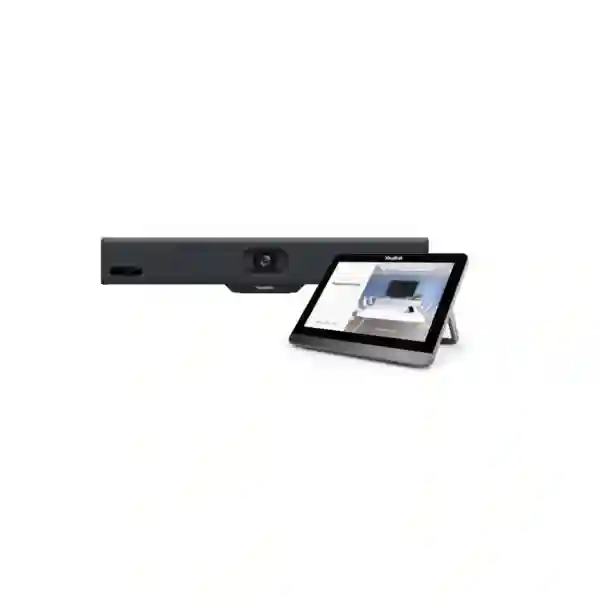
Yealink MeetingBar A10 Zoom Rooms System
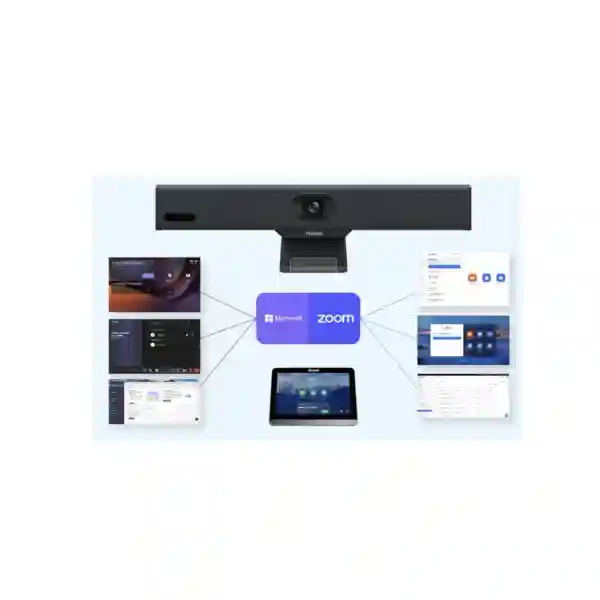
The Yealink MeetingBar A10 is a compact all-in-one Android video collaboration bar built for home offices, focus rooms, huddle rooms and small meeting spaces. It integrates the room compute platform, a 4K camera, eight MEMS microphones, speaker, Wi-Fi and Bluetooth into one device, reducing the number of separate components required around a meeting-room display. For organizations using Zoom Rooms, the A10 combines certified room functionality with AI-assisted framing, practical content sharing and centrally manageable deployment.
Quick answer
Choose the A10 when the requirement is a compact Zoom Rooms appliance for a small room where simple installation, wide-angle video, integrated audio, privacy control and centralized management matter more than the expansion needs of a large boardroom.
What the Yealink MeetingBar A10 is designed to solve
Small meeting rooms often become harder to use than they should be because the room is assembled from a webcam, a laptop, a USB speakerphone, loose power adapters and ad-hoc cables. The MeetingBar A10 takes a different approach. Yealink positions it as an all-in-one video collaboration bar for small spaces, with the core camera, microphone, speaker and computing functions integrated in a compact enclosure. That architecture is useful for organizations that want a repeatable room standard rather than a different improvised arrangement in every office.
For Zoom Rooms deployments, the operational advantage is consistency. Staff can enter a room that is already configured for meetings instead of rebuilding a personal-device setup every time. The A10 supports a native Zoom experience and can also work in Device Mode when a laptop-led workflow is required. This gives IT teams a practical path for rooms that need a dedicated Zoom Rooms identity while retaining flexibility for selected BYOD scenarios.
FourTeck Tanzania can help buyers evaluate the A10 in the wider context of room dimensions, seating layout, display size, mounting position, network quality, acoustic conditions and preferred meeting workflow. The objective is not simply to buy a video bar; it is to create a room that staff can use predictably and that remote participants can see and hear clearly.
4K camera
A 4K camera with a 120° diagonal field of view helps capture participants seated relatively close to the display in compact rooms.
Eight MEMS microphones
The integrated eight-microphone array supports voice pickup across small meeting spaces, with beamforming and full-duplex audio processing.
AI video features
Auto Framing, Speaker Tracking and Zoom-focused Smart Gallery features help reduce the need for manual camera adjustment during meetings.
Privacy by design
An electric privacy shutter gives users a visible hardware-level indication when the camera is closed between meetings.
Verified Yealink MeetingBar A10 specifications
| Area | Verified specification |
|---|---|
| Camera | 4K camera; 120° diagonal field of view; 105° horizontal field of view; 4x e-PTZ; 1080p30 and 720p30 output modes. |
| Video intelligence | Auto Framing, Speaker Tracking, Multi-Focus framing and Smart Gallery for Zoom deployments. |
| Microphones | Built-in eight MEMS microphone array with up to 4.5 m specified pickup range and 3.5 m high-quality pickup distance. |
| Speaker | Integrated 5 W high-fidelity speaker with forward-facing sound emission. |
| Connectivity | Dual-band 2.4/5 GHz Wi-Fi, Bluetooth 4.2 and Gigabit Ethernet. |
| Ports | HDMI output with CEC, USB-A, USB-C for content sharing, Gigabit Ethernet, Yealink VCH port, power, security lock and reset slot. |
| Security and network | IPv4/IPv6, TLS 1.2/1.3, AES 256-bit encryption, VLAN, LLDP, QoS and IEEE 802.1X support. |
| Management | Yealink web and device-management platforms plus Zoom Device Management for remote monitoring, configuration, updates and diagnostics. |
Why the A10 fits small Zoom Rooms
The A10 is strongest when the room itself is compact. A 120° field of view helps when the camera is relatively close to participants, as commonly happens in huddle rooms, phone rooms, manager offices and small collaboration spaces. Wide-angle coverage reduces the pressure to place the camera far away from the table, while Auto Framing can adjust the view according to participant position. Speaker Tracking adds a more focused view of the person speaking, and Smart Gallery in Zoom can present active participants in a format designed to improve remote engagement.
Audio design is equally important. Yealink integrates eight MEMS microphones, echo cancellation, noise-reduction processing and a built-in loudspeaker. This does not remove the need to assess room acoustics: hard glass, open doors, strong HVAC noise or seating outside the intended pickup area can still affect the experience. However, the integrated audio architecture means there are fewer separate USB peripherals to configure and troubleshoot.
For IT teams, a standardized appliance can also simplify support. When room hardware follows the same model, documentation, network policy, mounting approach and management workflow can be repeated across multiple sites. That can be more efficient than maintaining different combinations of laptops, webcams and consumer speakerphones.
Deployment and integration checklist
Room geometry
Measure room depth and width, confirm where participants sit, and place the display and camera where faces remain visible without forcing extreme angles. Small rooms benefit from the A10’s wide field of view, but the camera still needs an unobstructed line of sight.
Network readiness
Confirm reliable Ethernet or properly engineered Wi-Fi, sufficient internet capacity, DNS reachability, firewall policy and any VLAN or 802.1X requirements before commissioning the room.
Display planning
Select a display appropriate to viewing distance and seating position. The A10 provides HDMI output with CEC support, but actual power-control behaviour should be tested with the selected display model.
Platform administration
Plan the Zoom Rooms account, room naming, sign-in method, admin ownership, update policy and monitoring responsibility before rollout so the device becomes part of an orderly fleet rather than an isolated endpoint.
Related FourTeck resources
For Tanzania projects where the MeetingBar A10 is one part of a wider office upgrade, review FourTeck Tanzania business technology solutions for meeting-room, networking, Wi-Fi, display and infrastructure planning. Regional buyers can also reference FourTeck Africa for broader Africa-focused technology context.
For requirements linked to East African multi-site environments, FourTeck Kenya and FourTeck Uganda provide regional paths for adjacent deployments. Organizations coordinating procurement through the Gulf can review FourTeck UAE for the wider regional network.
These links are useful when a Zoom Rooms project crosses borders or needs to be planned alongside networking, switching, displays, security and general workplace technology rather than treated as a standalone camera purchase.
Yealink MeetingBar A10 Zoom Rooms System Tanzania
For organizations in Tanzania, the Yealink MeetingBar A10 is particularly relevant to small meeting spaces that need a dedicated Zoom Rooms experience without a separate room PC, webcam and speakerphone arrangement. Businesses in professional services, finance, education, healthcare administration, hospitality, NGOs, logistics and distributed operations often have many small spaces rather than one large boardroom. Standardizing these rooms around a compact appliance can simplify the user experience and make support easier to document.
A Tanzania deployment should begin with the room rather than the product box. Measure the seating distance, identify where the display will be mounted, check whether the meeting bar has a clear view of participants, and note acoustic challenges such as tile floors, hard glass and air-conditioning noise. The A10’s 120° diagonal field of view is useful for compact rooms, while its eight-microphone array is designed for small-space pickup. The published pickup range should be treated as a design reference, not a substitute for testing the actual room.
Network planning also matters. Zoom Rooms quality depends on stable connectivity, DNS, firewall access and sufficient internet performance. Where businesses use managed networks, IT teams may also want VLAN, QoS and 802.1X policies to align the room with corporate standards. The A10 supports Ethernet, dual-band Wi-Fi and a set of enterprise network controls, making it practical for centrally administered sites.
When requesting a quotation in Tanzania, specify the number of rooms, room dimensions, required displays, mounting preference, Zoom licensing status, whether wired or wireless content sharing is needed, and whether users must connect laptops in Device Mode. This produces a more accurate solution scope than asking only for “one Yealink A10,” because the final room can also require cabling, brackets, network configuration, power protection and display integration.
Yealink MeetingBar A10 Zoom Rooms System Dar es Salaam
Dar es Salaam organizations often manage hybrid meetings across headquarters, branch offices, regional partners and international teams. In this environment, small meeting rooms can become heavily used for client calls, internal reviews and project discussions. The A10 is well suited to these compact spaces because its all-in-one design reduces the amount of equipment around the display and creates a consistent room endpoint for Zoom Rooms.
For offices in multi-tenant commercial buildings, practical installation questions include display mounting, available power outlets, concealed cabling, Ethernet availability and Wi-Fi congestion. A room can have excellent conferencing hardware and still perform poorly if the network path is unstable or if wireless channels are heavily loaded. Where structured cabling is available, Gigabit Ethernet can provide a predictable connection. Where Wi-Fi is preferred, the access point design and signal quality should be validated at the actual mounting position.
The camera’s wide field of view can be valuable in short rooms where participants sit close to the screen. Auto Framing can help present the group without constant manual camera control, and Speaker Tracking can shift attention toward the active speaker. In executive offices, the electric privacy shutter also provides a clear visual privacy mechanism when the room is not in a call.
Dar es Salaam buyers should include room count, display requirements, seating capacity, cabling constraints and Zoom Rooms licensing status in the enquiry. For a multi-room project, it is also useful to define a standard naming convention, network segment and device-management process so every A10 can be administered consistently after deployment.
Yealink MeetingBar A10 Zoom Rooms System Mwanza
Mwanza businesses that collaborate with teams in Dar es Salaam, East Africa or international offices can use small Zoom Rooms to reduce the friction of recurring remote meetings. The MeetingBar A10 is a practical fit when the organization wants a dedicated room endpoint rather than asking staff to connect and configure personal laptops for every call. Its compact form is useful in meeting areas where table space and wall space are limited.
The first design question is whether the room is genuinely a small-space use case. The A10 is intended for home offices, focus rooms and huddle rooms. If the room is long, seats a larger group or requires microphones well beyond the normal pickup zone, a larger room system may be a better choice. This sizing step is important because a high-quality device can still disappoint when installed outside its intended room scale.
For Mwanza deployments, network resilience and power planning should also be considered. A dedicated meeting-room device depends on the local network, display and internet path. Managed switching, correct VLAN policies and stable upstream connectivity can help keep the room predictable. Where power interruptions are a concern, suitable UPS protection for networking and display equipment may be part of the broader room design, depending on the customer’s infrastructure.
A quotation request should identify whether the A10 will be used only as a native Zoom Rooms appliance or also as a USB device for laptop-driven meetings. It should also describe the screen size, mounting surface, room dimensions and cable route. These details help determine whether the requirement is a straightforward product supply or a complete room deployment that includes mounting, configuration and integration.
Yealink MeetingBar A10 Zoom Rooms System Arusha
Arusha has a strong mix of hospitality, tourism, development, NGO, professional and regional coordination activities, creating frequent demand for reliable video meetings in compact offices. The Yealink MeetingBar A10 can support these use cases when the room is small and the preferred collaboration platform is Zoom. Its integrated camera, microphones, speaker and compute platform make it suitable for spaces where simple operation is more important than a highly customized AV design.
In hospitality or shared-office environments, user turnover can be high. A dedicated room system can be easier to explain than a pile of adapters and personal devices. Users can enter the room and work from a standardized Zoom Rooms interface, while IT administrators retain the ability to manage devices remotely. For organizations with several properties or offices, consistent configuration can reduce the support burden because each room follows the same hardware and workflow.
Room acoustics deserve attention. Hard walls, large windows and sparsely furnished spaces can create reverberation that no microphone algorithm completely eliminates. The A10 includes AI-based noise reduction and echo-cancellation functions, but the room itself still influences perceived clarity. Soft furnishings, sensible speaker volume and positioning the bar close to the participant area can improve results.
Arusha procurement teams should define whether the room requires one or multiple displays, what type of mounting is permitted, and whether content will be shared primarily from Zoom applications or from local laptops. If the room is part of a new office build, coordinating the A10 with data points, display power, furniture and cable routes before installation can produce a cleaner final result.
Yealink MeetingBar A10 Zoom Rooms System Dodoma
In Dodoma, government-related organizations, professional services, project offices, education institutions and businesses may need dependable video rooms for coordination with teams in other Tanzanian cities and abroad. The MeetingBar A10 provides a compact way to equip small rooms with a dedicated Zoom Rooms endpoint. Its all-in-one architecture reduces the number of room components, while AI framing features help keep participants visible without asking a user to operate a camera manually.
Security-conscious environments should evaluate the A10 as part of the overall network policy. Yealink lists support for TLS 1.2/1.3, AES 256-bit encryption, VLAN, LLDP, QoS and IEEE 802.1X. These capabilities can help an IT team place the room system on a managed network with appropriate authentication and segmentation. Actual configuration should follow the organization’s security architecture and Zoom administration policies rather than relying on default settings.
The electrical and physical installation should also be planned. Confirm display height, camera placement, cable access and power availability before mounting. The camera should be positioned close enough to eye level to create a natural remote view. In a small room, a wide 120° lens helps include people near the screen, but seats placed far to the side or behind obstructions should still be avoided.
For a Dodoma quotation, list the intended users, room dimensions, number of seats, display model if already selected, Zoom Rooms subscription status and any corporate network requirements. This information allows the room to be scoped as a system rather than just a single hardware item.
Yealink MeetingBar A10 Zoom Rooms System UAE
UAE organizations often standardize collaboration rooms across multiple offices, branches and free-zone locations. The MeetingBar A10 can serve as a small-room standard where Zoom Rooms is the chosen platform and the goal is to minimize separate hardware. A compact video bar can be particularly useful in focus rooms, manager offices and huddle spaces that need a professional meeting experience without the complexity of a larger AV rack.
For multi-site UAE deployments, consistency becomes a major buying criterion. IT teams can define a repeatable configuration covering room naming, device enrolment, firmware policy, Zoom account assignment, network VLAN and display pairing. The A10 supports remote management through Zoom Device Management and Yealink management platforms, so administrators can include it in a centralized operational process rather than treating every room as an independent appliance.
The A10 also supports Device Mode, which can matter in organizations where a room is primarily Zoom-based but occasionally needs to join another collaboration platform from a user’s laptop. That flexibility should be planned at procurement time because content-sharing accessories, USB cabling and user instructions may differ depending on the chosen workflow.
UAE procurement teams comparing small-room systems should consider the total deployment package rather than headline camera resolution alone. Room controller options, display compatibility, cabling, mounting, management, user training and lifecycle support all influence the real operating experience. The A10 is most appropriate when the room is small and the integrated eight-microphone, single-bar architecture matches the seating footprint.
Yealink MeetingBar A10 Zoom Rooms System Uganda
Uganda organizations with distributed branches or regional partners can use the MeetingBar A10 to create repeatable small Zoom Rooms without dedicating a full PC and separate AV peripherals to every space. This can be useful for businesses, NGOs, education, healthcare administration and project teams that conduct frequent cross-border meetings but do not need a large-room camera and microphone architecture.
A successful deployment starts with connectivity. The A10 offers Gigabit Ethernet and dual-band Wi-Fi, but the decision between them should be based on the site. Wired Ethernet is typically easier to make predictable in a permanent meeting room, while Wi-Fi can simplify installations where cabling is difficult. Regardless of transport, the upstream internet connection, DNS and firewall rules still determine the reliability of Zoom traffic.
IT teams should also check whether the meeting room is acoustically suitable. The device’s noise cancellation and full-duplex audio processing are designed to improve conversation, but rooms with very high reverberation or strong background noise may need environmental treatment or a different room design. Keeping participants within the intended microphone pickup area is important.
For procurement, define whether each location will use identical displays and mounting methods. Standardization can reduce spare-part variation, simplify staff training and make remote troubleshooting easier. Buyers should request pricing based on exact quantities and deployment scope rather than assuming that product supply automatically includes installation, licensing or accessories.
Yealink MeetingBar A10 Zoom Rooms System Kampala
Kampala offices frequently need compact meeting rooms for coordination with regional headquarters, clients and international partners. The MeetingBar A10 offers a professional alternative to laptop-and-webcam setups by giving the room its own integrated Zoom-capable collaboration device. For users, this can mean fewer cables and a more predictable meeting experience; for administrators, it creates a dedicated endpoint that can be configured and monitored.
The room layout should guide the purchase. If participants sit close to the display, the 120° diagonal field of view can help capture the group without placing the camera far back. If the room is deep or seats people well beyond the normal pickup range, the A10 may not be the correct model. In those cases, buyers should consider a larger room system rather than trying to solve a sizing mismatch through software settings.
For Kampala corporate networks, features such as VLAN, QoS, IPv6, 802.1X and TLS support can be relevant where conferencing devices must follow enterprise network policy. These capabilities still require deliberate configuration, and organizations should document admin credentials, room ownership, firmware policy and the process for replacing or resetting devices.
A complete quotation request should identify the desired number of rooms, expected seats per room, display availability, mounting requirements and the Zoom Rooms licensing plan. If laptop-driven meetings are also needed, mention Device Mode and content-sharing requirements so the accessories and cabling can be scoped correctly.
Yealink MeetingBar A10 Zoom Rooms System Arua
Arua organizations that coordinate with national offices, humanitarian partners, project teams and cross-border stakeholders may benefit from a dedicated small-room video system when remote meetings are frequent. The Yealink MeetingBar A10 brings camera, microphones, speaker and Android-based room computing into one compact unit, making it easier to create a purpose-built Zoom Rooms space than relying on an employee’s laptop each time.
In locations where connectivity can vary, the room design should account for the complete network path rather than only the endpoint. The A10 can connect through Ethernet or Wi-Fi, but video-conferencing stability still depends on local LAN quality and internet service. It is useful to test latency, packet loss and wireless conditions before commissioning the room, especially if the same connection also serves many users or bandwidth-heavy applications.
The device’s 4K camera and wide-angle lens help produce a clear room view, while Zoom-focused Smart Gallery and AI framing can improve presentation of participants. However, camera quality cannot compensate for poor lighting. Position seats so faces are not strongly backlit by windows, and use even room lighting where possible. Simple changes in lighting can materially improve perceived video quality.
For Arua procurement, include installation constraints such as wall type, available power, display location and network connection. If a project includes several rooms or sites, request a standardized deployment plan that documents naming, account assignment, network configuration and remote management responsibilities.
Yealink MeetingBar A10 Zoom Rooms System Mbarara
Mbarara businesses and institutions can use the A10 in compact meeting spaces that support management reviews, supplier calls, training discussions and remote collaboration with Kampala or international teams. A dedicated Zoom Rooms appliance is useful where the room should remain ready for meetings regardless of which employee enters it. The hardware belongs to the room, so users do not need to recreate the audio and camera setup from their personal computer.
The integrated eight-microphone array and speaker are designed for small spaces. During planning, keep the furthest seat within a sensible distance and avoid placing the device behind objects or decorative panels. If the room requires coverage beyond the A10’s intended scale, selecting a larger solution is generally better than depending on maximum published pickup distance as a target.
The A10 supports remote administration, which can help IT teams that manage devices across multiple offices. Central monitoring, updates and diagnostics are particularly useful when local staff should not need to access device settings. A clear support process should define who owns Zoom administration, who manages the network and who handles physical room issues such as cables, displays or mounting.
Mbarara buyers should request a quote that separates core hardware, optional accessories, installation, display supply and any licensing requirements. This makes commercial comparisons clearer and avoids assuming that every room bundle includes the same controller, sharing accessory or service scope.
Yealink MeetingBar A10 Zoom Rooms System Gulu
Gulu organizations running distributed operations can use small video rooms to connect local teams with decision-makers and partners elsewhere. The MeetingBar A10 is designed for this type of compact collaboration environment, combining a wide-angle camera, integrated audio and native meeting-room software in a single bar. The result is a cleaner endpoint than a collection of temporary peripherals.
For facilities teams, the compact form can simplify mounting around a single display. Before installation, confirm the screen position, eye line, cable path and whether the mounting surface can support the required bracket. The bar should have a clear view of participants, and the display should be large enough for people at the rear of the room to read shared content comfortably.
For IT teams, network and account setup should be documented from the start. Assign room names consistently, record device ownership and admin access, and define how firmware and Zoom application updates will be handled. Where the corporate network uses authentication or segmentation, configure the A10 according to those policies rather than placing it on an unmanaged network.
When requesting pricing in Gulu, include the number of rooms and whether each location has existing screens and network points. State whether the requirement is supply-only or includes installation and configuration. This reduces ambiguity and helps determine whether additional switching, Wi-Fi, UPS protection or cabling is part of the meeting-room project.
Yealink MeetingBar A10 Zoom Rooms System Kenya
Kenya businesses with offices in Nairobi and other commercial centres often deploy multiple small collaboration rooms alongside larger boardrooms. The MeetingBar A10 can fill the small-room role where the organization wants Zoom Rooms, a single integrated video bar and centralized administration. Because the computing platform is built into the device, the room can operate as a dedicated endpoint rather than depending on a user-supplied PC.
For multi-office deployments, a useful procurement strategy is to define room tiers. The A10 can be assigned to focus rooms and huddle spaces, while larger Yealink systems can serve medium and large rooms. This avoids over-specifying every room and also avoids installing a small-room device where the microphone pickup or camera composition will not meet the seating layout.
The A10’s networking features make it suitable for managed corporate LANs, but deployment standards should include more than an IP address. Define VLAN assignment, DNS, internet access, QoS policy where applicable, device naming and remote management. If wireless is used, confirm signal quality and capacity at each room rather than assuming that office Wi-Fi is automatically suitable for continuous conferencing.
Kenya procurement teams should compare the total room cost, including screen, mount, cabling, sharing options, controller requirements and installation. For cross-border organizations, standardizing the same room kit in Tanzania and Kenya can simplify training and support, provided each site has equivalent infrastructure and licensing.
Yealink MeetingBar A10 Zoom Rooms System Kuwait
Kuwait organizations looking for compact Zoom Rooms can consider the MeetingBar A10 for manager offices, small project rooms, huddle spaces and private meeting rooms. Its integrated design is valuable where the customer wants fewer separate components around the display and a room that can remain configured between meetings. Native Zoom operation can reduce the need for users to connect a laptop simply to start routine calls.
In modern offices with dense wireless use, the network decision should be made deliberately. The A10 includes dual-band Wi-Fi, but permanent rooms may benefit from wired Ethernet when structured cabling is available. Whichever method is chosen, network security rules, internet access and Zoom service reachability should be validated during commissioning.
The camera’s 120° field of view is useful in small rooms with participants close to the screen. Auto Framing and Speaker Tracking can improve the remote view, while the electric privacy shutter addresses a common concern in private offices. For customer-facing rooms, lighting and background design should be considered because the camera can only capture what the physical room presents.
Kuwait buyers should confirm the exact room package before ordering. A complete solution may involve the A10 endpoint, display, control interface, sharing accessories, mounts, cabling and Zoom Rooms licensing. Requesting a line-item quotation makes it easier to compare alternatives and understand what is included versus optional.
Yealink MeetingBar A10 Zoom Rooms System Ghana
Ghana organizations coordinating teams across Accra, regional offices and international partners can deploy the MeetingBar A10 in small collaboration rooms where Zoom is a primary platform. The all-in-one form helps create a permanent room identity, which is useful when meetings are frequent and users should not need to connect and troubleshoot personal peripherals each time.
A small-room video project should evaluate both room acoustics and camera geometry. The A10 provides an eight-microphone array with noise reduction and full-duplex processing, plus a wide-angle 4K camera. These features work best when participants remain within the intended seating area, room noise is controlled and faces are lit evenly. Strong backlighting and reflective surfaces can still reduce meeting quality even when the endpoint itself is capable.
For larger Ghana deployments, centralized management can be an important reason to choose a room appliance. Zoom Device Management and Yealink management tools can support monitoring and updates, but businesses should still define internal responsibilities for licensing, device configuration and network support. A room should have a documented owner rather than becoming an unmanaged shared asset.
Procurement requests should state whether the customer needs hardware only or a complete room deployment. Include room dimensions, display availability, number of users, desired mounting, sharing workflow and any enterprise network requirements. These details help determine whether the A10 is the correct fit and whether additional infrastructure is required.
Yealink MeetingBar A10 Zoom Rooms System Nigeria
Nigeria enterprises frequently operate across several cities and may need a repeatable meeting-room standard for branch collaboration. The A10 can serve small rooms where a dedicated Zoom Rooms endpoint is preferred. Its compact architecture reduces the number of separate devices IT must install, while remote management can help teams maintain consistent configuration across multiple sites.
The A10 should be selected according to room scale. It is not a substitute for a boardroom system with distributed microphones and long-range camera requirements. In a huddle room, however, the 120° diagonal field of view can capture a group seated close to the display, and the integrated microphone array can cover the intended small-space seating zone. Correct model sizing is one of the most important decisions in any conferencing project.
Power and network resilience can also influence the user experience. The meeting bar, display, switch, access point and internet gateway all form part of the meeting path. Businesses that require greater continuity may evaluate UPS protection and redundant connectivity as part of the site infrastructure, but the appropriate design depends on the organization’s risk profile and existing environment.
Nigeria procurement teams should ask for a solution description that separates device capabilities from project services. Confirm what is included in the hardware package, which accessories are optional, how Zoom licensing will be handled, whether installation is required and who will manage the system after handover. Clear scope makes multi-site rollouts easier to budget and support.
Yealink MeetingBar A10 Zoom Rooms System Seychelles
Seychelles organizations in hospitality, professional services, tourism operations, government-related work and regional business can use small Zoom Rooms for frequent international coordination. The MeetingBar A10 is suitable when the room is compact and the customer prefers an appliance-based experience rather than asking users to assemble a laptop, camera and speakerphone for each call.
For hospitality environments, visual presentation and ease of use can be especially important. A compact video bar mounted neatly with the display reduces visible clutter, while a dedicated room workflow can be easier for staff to support. The electric privacy shutter is also valuable in executive offices or multipurpose spaces where users want an obvious camera-closed state when meetings are not in progress.
Island connectivity conditions vary by site, so network testing should form part of commissioning. The A10 can use wired Ethernet or dual-band Wi-Fi, but reliable conferencing ultimately depends on upstream internet quality. IT teams should test the room at realistic times of day and make sure the conferencing endpoint is not competing with poorly controlled guest or high-volume traffic on the same network segment.
When requesting a Seychelles quotation, provide the room dimensions, number of seats, display status, mounting preferences and expected meeting workflow. If the system will be installed in a guest-facing or premium meeting facility, also define cable-concealment and aesthetic requirements so the installation is planned as part of the room design rather than added after furniture and finishes are complete.
Buying guidance: when to choose the A10 and when to step up
The strongest reason to choose the MeetingBar A10 is fit. It is built for small rooms. If participants sit close to the screen, the wide field of view and integrated microphones can create a clean room design without a separate camera and distributed microphone system. If the room is deeper, seats a larger group, needs dual displays, requires complex audio reinforcement or must capture participants at significant distance, a larger MeetingBar or modular room solution should be evaluated instead.
Buyers should also decide whether the room will be Zoom-first or platform-flexible. The A10 supports native Zoom operation and Device Mode, but the actual user workflow matters. A room used primarily for scheduled Zoom calls can be optimized around the Zoom Rooms experience. A room where visitors frequently bring laptops and join different platforms may need clearer BYOD instructions and appropriate sharing connections.
Finally, compare total room lifecycle effort, not only initial hardware cost. Central management, standardized mounting, predictable cabling, documented network settings and a repeatable user interface can reduce support friction over time. For organizations deploying several small rooms, that operational consistency can be as important as the camera specification.
Quotation checklist for Yealink MeetingBar A10
Dimensions, seating count, table position, wall type, lighting and acoustic conditions.
Existing or required screen size, mounting arrangement and HDMI cable route.
Zoom Rooms licensing status, room account plan and device-management ownership.
Ethernet or Wi-Fi preference, VLAN, 802.1X, firewall, DNS and internet constraints.
Native content sharing, laptop Device Mode and any wireless presentation requirement.
Hardware only, installation, configuration, testing, user handover and ongoing support expectations.
Yealink MeetingBar A10 FAQs
Is the Yealink MeetingBar A10 certified for Zoom Rooms?
Yes. Yealink lists the MeetingBar A10 as certified for Zoom, and Zoom’s hardware directory identifies the A10 as a certified product for Zoom Rooms.
What size room is the A10 designed for?
Yealink positions the A10 for home offices, focus rooms, huddle rooms and small meeting rooms. Room dimensions, seating layout and pickup distance should be reviewed before selection.
Does the A10 include a camera, microphones and speaker?
Yes. It integrates a 4K camera, eight MEMS microphones and a built-in speaker, along with the Android-based compute platform, Wi-Fi and Bluetooth.
Can the A10 be centrally managed?
Yes. Yealink documents support for Zoom Device Management as well as Yealink web and cloud/device-management tools for administration, monitoring, configuration, updates and diagnostics.
Does the A10 support laptop-based meetings?
The A10 supports Device Mode, allowing it to operate as a USB device in compatible workflows. Buyers should confirm the intended connection and accessories for their room design.
Does it have a privacy shutter?
Yes. The A10 includes an electric privacy shutter, giving users a visible camera-closed state.
What should I send for an accurate quotation?
Send the quantity, room dimensions, seating count, display requirement, Zoom Rooms licensing status, network constraints, mounting preference and whether you need supply only or complete installation and configuration.
Decision recap
The Yealink MeetingBar A10 is a focused small-room collaboration appliance rather than a universal conference-room system. Its 4K wide-angle camera, eight-microphone array, integrated speaker, Zoom certification, AI framing features, privacy shutter and remote-management options make it a strong candidate for huddle rooms and compact meeting spaces where simple operation and standardized deployment are priorities.
Before purchase, confirm that the room size matches the A10’s intended use, the network can support reliable Zoom traffic, the display and mounting design are known, and any controller or sharing accessories are included in the quoted scope. FourTeck can use these inputs to help define a room solution that is easier to deploy, manage and support.
Plan your Yealink A10 Zoom Room
Share your room size, number of seats, display requirement, Zoom Rooms licensing status, preferred network connection and quantity. This allows the discussion to focus on compatibility, room fit, accessories and deployment scope rather than a generic product price alone.




Reviews
There are no reviews yet.