
YEALINK MEETING ROOM ACCESSORY
Yealink MB-Remote Tanzania
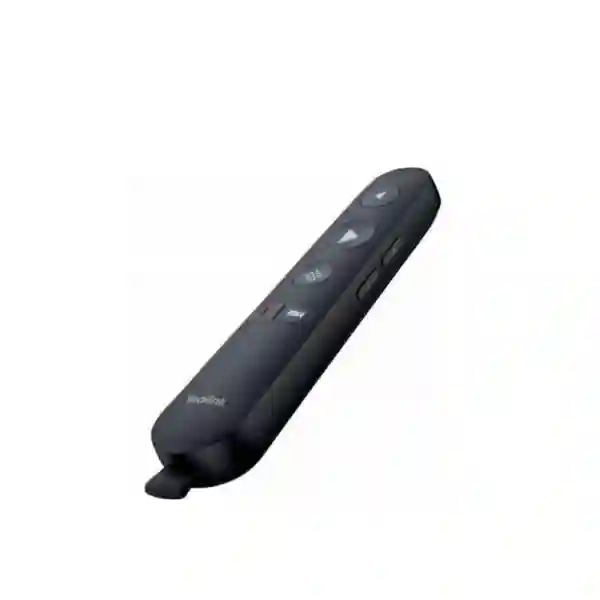
A dedicated presentation remote for Yealink MeetingBoard and MeetingBoard Pro environments, designed to make page navigation, pointer control and supported meeting actions easier from anywhere in the room. For Tanzanian organisations building modern boardrooms, training rooms and hybrid collaboration spaces, MB-Remote adds a practical handheld control layer without requiring the presenter to remain beside the display.
Verified product facts
Yealink identifies MB-Remote as a remote controller for MeetingBoard and MeetingBoard Pro. Official documentation describes multimedia page turning, an air-mouse presentation key, volume controls, supported mute/camera controls, a pre-paired receiver and USB-A connectivity. Package information published by Yealink lists the remote, USB dongle, protective velvet bag, quick-start guide and two AAA batteries.
What is the Yealink MB-Remote?
The Yealink MB-Remote is a handheld controller created for Yealink collaboration displays in the MeetingBoard family. It is intended to give presenters a more natural way to move through shared material and control supported meeting functions without repeatedly walking back to the screen. Yealink’s official product information highlights multimedia page turning, air-mouse operation and meeting-control functions. The receiver and remote are pre-paired at the factory, and the receiver connects through a USB-A port on a compatible endpoint or computer.
For business buyers, the important consideration is compatibility rather than treating MB-Remote as a universal television-style handset. Certain controls depend on the endpoint, platform and operating mode. Yealink’s compatibility documentation, for example, notes that when MB-Remote is used with some MCore OPS-T deployments, the remote can operate as a mouse while microphone-mute and camera-off buttons do not control the Microsoft Teams Room. That distinction is why Fourteck recommends confirming the intended MeetingBoard model, room platform and content-sharing workflow before procurement.
Page navigation
Move to previous or next presentation pages while remaining engaged with people in the room.
Air-mouse control
Use the presentation key for airborne mouse movement and pointer-style interaction where supported.
Meeting controls
Volume and supported mute/camera actions provide convenient handheld access during meetings.
USB-A receiver
The supplied receiver is designed for straightforward connection to compatible Yealink endpoints or computers.
Where MB-Remote fits in a meeting-room design
A collaboration room works best when interaction feels predictable. A large display or interactive board may be positioned several metres from the presenter, and forcing the presenter to return to the front of the room for every slide change interrupts the flow of a discussion. MB-Remote is useful where staff frequently deliver presentations, training sessions, internal reviews or customer briefings from a Yealink MeetingBoard environment. It gives the presenter freedom to stand beside participants, move around a classroom-style space or remain at the meeting table while still controlling content.
Fourteck Tanzania can also help place the remote in the broader room context. A useful deployment review may include the MeetingBoard model, content-sharing method, Microsoft Teams or Zoom workflow, network quality, display position, camera framing, microphone coverage, wireless presentation requirements and user training. Buyers planning a complete collaboration environment can review Fourteck Tanzania’s technology services, business technology shop guidance, and quotation and product-guidance contact page when the requirement includes more than the remote alone.
Buying and compatibility checklist
| Check | Why it matters | What to confirm |
|---|---|---|
| MeetingBoard generation | Remote functions can depend on the host platform. | Exact MeetingBoard or MeetingBoard Pro model. |
| Room platform | Teams, Zoom and BYOD modes may expose different controls. | Primary collaboration platform and room mode. |
| USB receiver location | The receiver needs a suitable USB-A connection. | Available USB-A port and intended host device. |
| Required buttons | Not every control is available in every configuration. | Page, pointer, volume, mute and camera requirements. |
Yealink MB-Remote Tanzania
Organisations searching for Yealink MB-Remote Tanzania are commonly trying to complete or improve a MeetingBoard-based collaboration room rather than purchase an isolated accessory. The remote is particularly relevant when a MeetingBoard is used for presentations, executive meetings, training, hybrid collaboration or shared-content reviews. In these situations, the presenter benefits from being able to move through pages and interact with content from a more natural position in the room. Tanzanian buyers should begin by confirming the exact MeetingBoard model and the way staff actually use the room: native Teams or Zoom meetings, BYOD sessions, laptop presentations, interactive whiteboarding or a mixture of these workflows.
Procurement teams in Tanzania also need to separate product capability from the surrounding room design. A remote controller cannot compensate for weak Wi-Fi, poor camera placement, inadequate microphone pickup, unsuitable display height or confusing source switching. Where MeetingBoard is part of a larger upgrade, the bill of materials may also include mounts, stands, content-sharing accessories, network switching, UPS protection or room-control components. Fourteck can help evaluate those dependencies before quotation so a small accessory purchase does not expose a larger compatibility problem later in the project.
For multi-site Tanzanian businesses, standardising presentation controls can make training easier. If boardrooms in Dar es Salaam, Mwanza, Arusha and Dodoma use similar Yealink room architectures, staff can move between locations with less relearning. The useful procurement question is therefore not only “is MB-Remote available?” but “does MB-Remote provide the controls required in our exact MeetingBoard deployment?” A quotation request should include the current MeetingBoard model, room operating mode, number of rooms, intended presenter workflow and whether the remote is being added to an existing installation or specified with a new collaboration system.
Yealink MB-Remote Dar es Salaam
Dar es Salaam businesses often operate meeting rooms that support regional management, customer demonstrations, project reviews and hybrid collaboration between offices. In that context, Yealink MB-Remote can be a useful accessory for organisations already using or planning MeetingBoard systems. A presenter can stand away from the display, progress through presentation pages and use the air-mouse function instead of returning to the board for each interaction. That helps preserve eye contact and keeps attention on the meeting rather than on operating the room equipment.
For a Dar es Salaam boardroom, the procurement process should start with a simple room-use profile. Document the display or MeetingBoard model, seating arrangement, meeting platform, content-sharing method and the controls users expect from the remote. If the room regularly switches between native Microsoft Teams sessions and laptop-driven BYOD presentations, test the expected buttons in each workflow. Official Yealink compatibility information shows why this step matters: some deployment combinations support mouse control while particular mute or camera actions may not control the room platform in the same way.
A practical quotation can include quantity, exact MeetingBoard model, whether the USB receiver will remain installed in the endpoint, and whether spare remotes are required for multiple rooms. Organisations standardising conference rooms across headquarters and branches may also want consistent naming, quick user instructions and an accessory inventory. Fourteck’s Tanzania solution approach explains the importance of treating collaboration equipment as part of the wider technology environment. That is relevant because an apparently simple remote becomes much more valuable when the complete room—network, camera, audio, display and user workflow—has already been designed for predictable daily use.
Yealink MB-Remote Mwanza
For organisations in Mwanza, collaboration rooms can connect local teams with head offices, suppliers, customers and regional operations without requiring every discussion to involve travel. Where a Yealink MeetingBoard is central to that workflow, MB-Remote can improve the presenter experience by providing handheld page movement and pointer control. This is useful in meeting rooms where the person speaking needs to move between a table, whiteboard area and display while keeping the presentation flowing smoothly.
Before ordering Yealink MB-Remote in Mwanza, buyers should verify that the remote will be used with a compatible MeetingBoard setup and identify whether the USB-A receiver will connect directly to the board, an endpoint or a computer. A project team should also define whether staff mainly present PowerPoint-style content, demonstrate browser applications, share drawings or control hybrid meetings. These usage details influence which functions matter most and help confirm whether the remote is sufficient or whether another control surface is required.
In branch environments, room simplicity has measurable operational value. Local users should not need an engineer to start every meeting. Consistent room configurations, clear labels and a small number of familiar controls reduce support calls and help staff trust the technology. If Mwanza is one location in a wider Tanzanian rollout, organisations can standardise the MeetingBoard accessory set while still adapting camera, microphone and display choices to each room size. A useful quotation request therefore includes the number of rooms, platform preference, MeetingBoard model, presenter distance from the display and any existing accessories. This gives the supplier enough context to validate MB-Remote fit rather than quoting a part number without understanding how it will be used.
Yealink MB-Remote Arusha
Arusha organisations in hospitality, education, professional services, NGOs, tourism, project management and corporate administration may use meeting rooms for both internal collaboration and external presentations. Yealink MB-Remote suits rooms where the MeetingBoard is already the focal point and presenters want to advance content without staying within arm’s reach of the display. The combination of page navigation and air-mouse operation can be especially helpful during workshops, guest briefings and training sessions where the presenter moves around the room.
An Arusha buyer should confirm the exact collaboration workflow before treating MB-Remote as a universal meeting controller. Yealink documents dedicated controls for previous and next page, presentation/air-mouse behaviour, volume, mute/unmute and camera enable/disable, but the support of particular functions can depend on the host and room mode. Procurement should therefore record the MeetingBoard generation and any MCore OPS component, plus whether the system runs a native Teams or Zoom experience or often operates in BYOD mode.
For training rooms, consider how far the presenter stands from the board and whether the USB receiver can remain permanently installed. For executive rooms, consider whether users expect one-touch meeting control from a separate touch console in addition to the handheld remote. MB-Remote can complement a room-control design, but it should not be assumed to replace every controller or touch interface. Fourteck can use this information to prepare a quotation that reflects actual room behaviour. When the wider project includes video collaboration architecture, buyers can also consult Fourteck’s video conferencing and technology service guidance to frame requirements around users, room geometry, audio quality and network readiness.
Yealink MB-Remote Dodoma
Dodoma organisations planning modern meeting rooms may use Yealink MeetingBoard systems for executive reviews, government or institutional meetings, training, project coordination and remote collaboration. MB-Remote adds a simple handheld control option for presentation-led sessions. Its value is strongest when a presenter needs to move through slides, indicate items on screen or make supported meeting adjustments without interrupting the discussion to walk back to the board.
When specifying Yealink MB-Remote in Dodoma, the requirement should be written in operational terms. State whether the remote is for an existing MeetingBoard, a new MeetingBoard Pro room or a spare-accessory pool. Identify the meeting platform and whether users connect personal laptops. If reverse control or page-turning from shared laptop content is important, confirm the chosen BYOD sharing method supports the required function. Yealink’s own documentation explains that reverse-control behaviour depends on supported BYOD workflows, so this should be validated instead of assumed.
Organisations with several rooms may also benefit from standardising small accessories because remotes are easy to move between spaces. Assign each remote to a room, label receivers where appropriate, keep battery replacement simple and document pairing steps for support teams. These are minor operational choices, but they reduce confusion after deployment. Buyers should also include site and room information in the quotation request: room count, seating capacity, MeetingBoard size/model, current platform and any additional camera or microphone components. This allows MB-Remote to be evaluated as part of the room system rather than in isolation and supports a cleaner handover to users once the collaboration environment is operational.
Yealink MB-Remote UAE
UAE organisations commonly deploy standardised collaboration rooms across headquarters, branches, executive suites, training facilities and customer-facing meeting spaces. For Yealink MeetingBoard and MeetingBoard Pro deployments, MB-Remote can support a more flexible presentation experience with page navigation, air-mouse control and supported meeting actions. The remote is particularly relevant when the display is large or wall-mounted and the presenter needs to operate from the meeting table or another position in the room.
For UAE procurement, compatibility confirmation should precede quantity. A multi-room rollout may include different MeetingBoard generations, MCore components or operating modes, and a remote function available in one design may behave differently in another. Buyers should create a room matrix listing hardware model, platform, BYOD use and required remote actions. This is more reliable than assuming that every room with the Yealink logo has identical accessory behaviour.
Businesses coordinating projects between Tanzania and the Emirates can use a common room standard while adapting local procurement and installation requirements. Fourteck’s UAE technology site at Fourteck UAE provides a regional path for broader solution discussions, while the Tanzania page remains the appropriate contact point for Tanzanian requirements. For quotation preparation, include quantity, exact MeetingBoard models, meeting platform, need for spare units and any requirement for room-control training. This lets the accessory decision support a repeatable collaboration experience instead of becoming an unplanned add-on after installation.
Yealink MB-Remote Uganda
Ugandan organisations using Yealink MeetingBoard solutions can use MB-Remote to make presentation-led meetings more comfortable, especially where the speaker needs freedom to move around the room. Page-turning controls reduce reliance on a laptop keyboard, while the presentation key can support air-mouse interaction. In practical terms, this can help during customer demonstrations, internal reviews, training sessions and hybrid meetings where the presenter wants to stay focused on participants rather than the equipment.
Before procurement, confirm whether the room is based on MeetingBoard, MeetingBoard Pro or a specific MCore configuration. Also document whether the primary workflow is native Teams, Zoom or BYOD. The reason is simple: remote-control support is linked to the endpoint and mode. Yealink publishes compatibility notes for its room accessories, so buyers should validate required mute, camera and pointer behaviour against the exact environment instead of assuming all buttons operate identically everywhere.
For organisations operating in both Tanzania and Uganda, accessory standardisation can simplify user onboarding. The same presentation habits can be taught across branches, while local room sizes and connectivity can still vary. Fourteck’s regional Uganda site at Fourteck Uganda can support Uganda-focused technology discussions. A well-prepared MB-Remote enquiry should state quantity, installed MeetingBoard models, room types and the controls that users consider essential. This provides a clearer basis for compatibility checking and avoids ordering a remote simply because the model name appears in a generic accessory list.
Yealink MB-Remote Kampala
Kampala offices frequently use hybrid meeting rooms to connect local teams with regional colleagues, customers and international stakeholders. If the room uses Yealink MeetingBoard, MB-Remote provides a handheld way to operate presentations and supported meeting functions from a comfortable position. This can be valuable in boardrooms where the display is installed at the front wall while most discussion takes place around a long table.
A Kampala procurement team should review room behaviour before selecting quantities. Identify who presents, how often laptops are connected, whether users share content wirelessly or by cable, and whether they expect the remote to control only slides and pointer movement or also microphone and camera states. If a specific key function is critical, confirm it against the exact Yealink room configuration. This prevents a small accessory mismatch from becoming a recurring user complaint.
In larger offices, MB-Remote can be included in a room standard alongside MeetingBoard mounts or stands, network connectivity, content-sharing accessories and any required touch controller. Standard room documentation should identify which remote belongs to which room, where replacement batteries are stored and how the USB receiver is connected. These operational details are useful when facilities and IT teams jointly support the room. For a quote, provide the room count, MeetingBoard model and desired workflow. The result should be a purchasing decision based on compatibility and user experience, not simply on accessory availability.
Yealink MB-Remote Arua
Arua organisations that rely on remote collaboration can benefit from meeting technology that is easy for local staff to operate without specialist intervention. In a Yealink MeetingBoard room, MB-Remote provides straightforward presentation navigation and pointer-style control through its supplied receiver. This can make formal reviews, remote training and project coordination more fluid when presenters need to move around the room or remain with participants rather than beside the display.
For Arua deployments, simplicity and repeatability are important purchasing criteria. A remote should be assessed alongside the actual MeetingBoard platform, content-sharing method and expected support model. If the room is maintained by a central IT team in another city, clear configuration records become especially valuable. Document the MeetingBoard model, firmware policy, connected accessories and whether MB-Remote is paired to a receiver that should remain permanently in place.
Buyers should also distinguish between presentation control and complete meeting control. MB-Remote can provide several useful functions, but it does not eliminate the need to understand the room platform, touch interface or meeting-join process. If staff mainly use BYOD laptops, validate reverse control and page-turning in that exact sharing workflow. A quotation request that includes intended use, quantity and current equipment gives the supplier enough information to confirm fit and recommend any additional accessories required. This approach is particularly useful for remote or branch sites where returning incompatible accessories would cause unnecessary disruption.
Yealink MB-Remote Mbarara
Mbarara businesses, institutions and branch offices may use video collaboration to connect with teams elsewhere in Uganda and the wider region. Where a MeetingBoard is the primary collaboration display, Yealink MB-Remote adds a convenient control method for speakers who want to navigate presentation content without remaining at the front of the room. The remote’s air-mouse behaviour can also support interactive pointing and selection during demonstrations where supported by the connected environment.
For procurement teams, the strongest buying process begins with compatibility validation. Record the exact MeetingBoard model, meeting platform and receiver connection point. If users need microphone mute and camera control from the handset, identify that requirement explicitly because key support can vary by room configuration. This is especially relevant in mixed estates where an older MeetingBoard and a newer MeetingBoard Pro may coexist.
A good rollout also considers user behaviour. The remote should be stored in a consistent place, batteries should be easy to replace and staff should know the few core buttons they need. Overcomplicated instructions defeat the purpose of a simple handheld accessory. If Mbarara is part of a multi-site project, standard documentation and accessory labels can reduce support effort. Include those deployment expectations in the quotation, together with quantity and room model information, so the proposal can distinguish between straightforward accessory supply and a broader room-standardisation requirement.
Yealink MB-Remote Gulu
Gulu organisations planning hybrid meeting or training spaces can use Yealink MB-Remote as a focused accessory for compatible MeetingBoard deployments. During presentations, the ability to advance or reverse pages and use air-mouse movement allows speakers to engage more naturally with attendees. This is useful in training rooms, project coordination sessions and executive meetings where the display is visible to everyone but not physically close to the presenter.
When equipment is installed outside a main headquarters, remote support considerations become more important. A branch IT contact should know where the USB receiver is connected, how to replace batteries and how to identify whether a problem is related to the remote, receiver or room software. Keeping these details in the handover document makes troubleshooting more efficient and avoids unnecessary replacement purchases.
Compatibility remains the key commercial question. Confirm the MeetingBoard family and meeting mode before ordering. If the Gulu site uses BYOD for most calls, verify the page-control workflow with the intended laptop-sharing method. If the site uses a dedicated native room experience, specify which meeting controls users expect. A useful quotation includes the room type, quantity, platform and installed accessories, helping the supplier validate MB-Remote against the complete environment. The objective is a room that staff can operate confidently, not merely a list of devices that are technically related.
Yealink MB-Remote Kenya
Kenyan companies with MeetingBoard-based boardrooms can use MB-Remote to give presenters more freedom while navigating content and handling supported room controls. In Nairobi headquarters, branch offices, training centres and customer briefing rooms, the remote can help keep the flow of a presentation natural. The presenter does not have to stand beside the collaboration board or repeatedly reach for a laptop keyboard when moving through slides.
Multi-country organisations often want a common room design across Kenya, Tanzania and Uganda. MB-Remote can be part of that standard, but the standard should specify the complete supported hardware set. A room template might record MeetingBoard model, mounting approach, camera accessories, microphone options, content-sharing method, network requirements and remote-control functions. This avoids ambiguity when different branches procure equipment at different times.
Fourteck’s Kenya technology site provides a regional path for Kenya-focused enquiries. For procurement, include the exact Yealink model, quantity, existing room platform and whether MB-Remote is a new-room accessory or a retrofit. Organisations should also state whether they need only presentation navigation or expect mute and camera actions to work in a particular meeting mode. A clear requirement makes comparison easier and reduces the chance that a low-cost accessory becomes a source of user frustration.
Yealink MB-Remote Kuwait
Kuwait businesses deploying Yealink collaboration technology may use MB-Remote in boardrooms, executive meeting suites and training spaces where presentation mobility matters. With page controls and air-mouse functionality, the presenter can operate shared content without remaining fixed to the front of the room. This is especially useful where large displays or MeetingBoards are integrated into a formal meeting-room layout.
For Kuwait procurement, the accessory should be specified against the room system rather than purchased from the model name alone. Check the MeetingBoard generation, operating mode, USB receiver host and expected meeting-control buttons. If the estate includes multiple room types, create a simple compatibility table before placing a bulk order. This enables facilities, IT and procurement teams to agree which rooms need MB-Remote and which may rely on another controller.
Fourteck’s Kuwait regional site can support Kuwait-focused technology requirements. For cross-border projects involving Tanzania and Kuwait, a shared meeting-room standard can improve support while keeping procurement local to each region. The quotation should state quantities, MeetingBoard models, primary meeting platform and whether spare units are required. If the remote is being introduced after users have already adopted the room, include a short test plan covering page navigation, pointer movement, volume and any critical mute/camera functions before standardising it across all rooms.
Yealink MB-Remote Ghana
Ghanaian organisations using Yealink MeetingBoard environments can add MB-Remote where presenters need easier control of slides and on-screen interaction. It can be useful in boardrooms, learning spaces and hybrid collaboration rooms where speakers move around rather than sit beside the laptop or touchscreen. The value is not simply the number of buttons; it is the ability to keep the meeting flow smooth while still retaining control of shared material.
Before purchasing, identify the exact MeetingBoard model and how content is normally shared. If staff rely heavily on BYOD, the organisation should validate reverse-control behaviour with the chosen sharing method. If native meeting applications are used, check which remote actions are supported in that room architecture. Yealink’s official documentation is the correct source for those compatibility questions and should take precedence over assumptions based on generic remote-control behaviour.
For organisations managing multiple West and East African offices, consistency in collaboration spaces can reduce training and support costs. A documented accessory bundle that includes MB-Remote where appropriate makes new-room deployment more repeatable. Ghana-focused requirements can be discussed through Fourteck Ghana. In the quotation, include quantity, room type, MeetingBoard generation and essential controls. This lets the procurement discussion focus on verified fit and room usability rather than treating the remote as an interchangeable commodity.
Yealink MB-Remote Nigeria
Nigerian enterprises frequently support distributed teams, customer meetings and training programmes across multiple offices. In a MeetingBoard-based room, Yealink MB-Remote can improve presenter mobility by providing page-turning and air-mouse functions through a dedicated handheld device. This can reduce dependence on someone sitting at a laptop to control slides and help the speaker maintain attention on people in the room.
The procurement decision should still be anchored in technical compatibility. Large organisations may have rooms installed at different times with different Yealink hardware or room modes. A bulk accessory order should therefore be preceded by an inventory of MeetingBoard models and operating platforms. If microphone and camera buttons are important to users, validate those functions for each configuration rather than assuming identical support. Where MB-Remote is used mainly for presentation control, document that scope clearly so user expectations remain realistic.
Nigeria-focused technology requirements can be directed through Fourteck Nigeria. For regional organisations that also operate in Tanzania, a common room template can standardise user experience while allowing each location to size connectivity, audio and display requirements independently. A complete enquiry should include quantities, exact model references, room count, platform and expected controls. That information helps determine whether MB-Remote is the right accessory in every room or only in spaces with presentation-heavy workflows.
Yealink MB-Remote Seychelles
Seychelles organisations in hospitality, government, professional services and distributed corporate operations may depend on video meetings to reduce travel between islands and international offices. Where Yealink MeetingBoard is deployed, MB-Remote can make presentation sessions easier by allowing page navigation and pointer-style interaction from a convenient position in the room. This supports more natural customer briefings, management reviews and staff training.
For island deployments, accurate procurement can be particularly important because replacing or exchanging incompatible accessories adds unnecessary logistics. Buyers should therefore confirm the exact MeetingBoard platform, USB receiver connection point and required remote actions before ordering. If the system is configured for BYOD, test the content-sharing path. If it is a dedicated Teams or Zoom room, document the meeting mode and any additional controller already installed.
The remote can also be included in a support checklist covering batteries, receiver placement, pairing and room labelling. This makes first-line troubleshooting easier for local staff. For organisations coordinating Seychelles rooms with Tanzania or other African offices, standardising presentation controls can create a familiar experience for travelling staff. The quotation request should include room count, quantity, MeetingBoard models and expected workflow. A verified accessory decision is preferable to choosing a remote from a generic compatibility assumption, especially when shipment lead times and replacement logistics matter.
Related collaboration planning
MB-Remote is one part of a complete collaboration environment. If your requirement extends beyond the handset, review the Fourteck Tanzania integrated technology overview for video conferencing, audio, networking and workplace infrastructure. The technology shopping guide explains how Fourteck approaches product selection through compatibility and lifecycle requirements, while the Tanzania contact page is the correct place to provide your MeetingBoard model, quantity and room details for a quotation.
For broader regional coordination, the Fourteck network includes specialist country sites in Kenya, Uganda, Ghana, Nigeria and Kuwait, together with Fourteck UAE. These links are useful for organisations that want a consistent collaboration standard across several markets while keeping each procurement discussion aligned to the local project scope.
Frequently asked questions
Is Yealink MB-Remote compatible with MeetingBoard Pro?
Yes. Yealink lists MB-Remote as a dedicated remote controller for MeetingBoard and MeetingBoard Pro. Exact button behaviour should still be checked against the specific model, platform and room mode.
How does MB-Remote connect?
Yealink supplies a USB receiver. Official documentation states that the receiver and MB-Remote are pre-paired at the factory and that the receiver connects to a USB-A port on a compatible endpoint or computer.
What controls are available?
Published Yealink quick-start information shows previous/next page buttons, presentation/air-mouse operation, volume increase/decrease, mute/unmute and camera enable/disable controls. Support for individual functions can depend on the connected system.
Can MB-Remote control a connected computer presentation?
Yealink documents reverse-control behaviour for supported BYOD sharing methods. The exact content-sharing workflow should therefore be confirmed before purchase if laptop page turning is a key requirement.
What is included in the package?
Yealink’s published package list includes one MB-Remote, one USB dongle, a protective velvet bag, a quick-start guide and two AAA batteries.
What should I send for a quotation?
Provide the quantity, exact MeetingBoard or MeetingBoard Pro model, meeting platform, room count, current accessories and the controls you expect to use. For retrofit projects, mention how laptops and content are currently connected.
Quotation checklist
Decision recap
Choose Yealink MB-Remote when you have a compatible MeetingBoard environment and want presenters to control pages, pointer movement and supported meeting functions from a handheld device. The strongest buying decision is based on the exact MeetingBoard model and operating mode, not on the remote name alone. Confirm compatibility first, then standardise quantity and room procedures. This approach gives procurement, IT and end users a clearer expectation of what the accessory will do in daily meetings.
Talk to Fourteck Tanzania about Yealink MB-Remote
Send the MeetingBoard model, quantity, room type and expected controls through the Fourteck Tanzania contact page. For an existing installation, include the current collaboration platform and sharing method. For a new room, include seating capacity and whether you are planning a complete MeetingBoard solution or only the MB-Remote accessory.




Reviews
There are no reviews yet.