
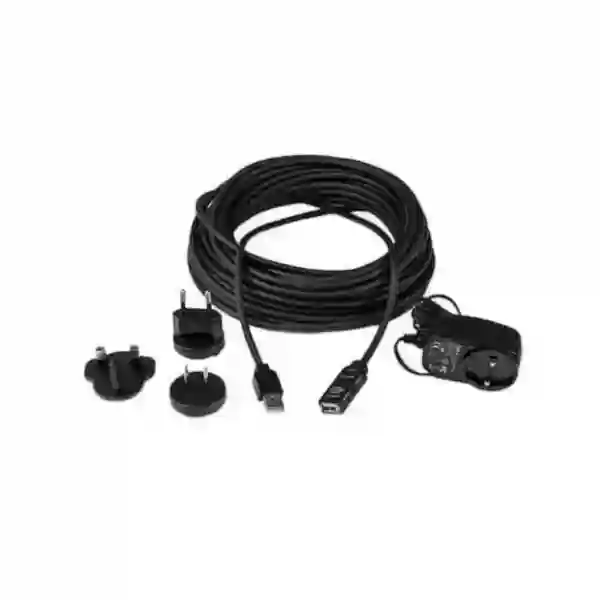
Yealink USB2-EXT-10M Cable Tanzania
The Yealink USB2-EXT-10M Cable is a 10-metre USB 2.0 Type-A extension cable for professional collaboration-room installations that need more physical separation between a supported USB peripheral and the host system. Yealink lists USB2-EXT-10M among its room-system accessories and describes it as a 10 m USB 2.0 Type-A extension cable. Yealink support guidance also identifies the 10 m model as a USB extension cable with power supply, making it relevant when room layouts require longer cable routing than a standard short USB lead can provide.
For Tanzanian businesses, the important purchasing question is not simply whether a cable is ten metres long. The buyer should confirm the exact Yealink camera, room system or supported USB peripheral, the route from device to host, the power arrangement, the installation environment, and whether the project is better served by a fixed 10 m USB extension or a different Yealink extension method. Fourteck Tanzania can help procurement teams document these details before a quotation is prepared.
Verified length
10 metres, as identified by Yealink for USB2-EXT-10M.
Interface family
USB 2.0 Type-A extension format for room-system accessory use.
Deployment focus
Meeting rooms, boardrooms and collaboration spaces with longer cable paths.
What the Yealink USB2-EXT-10M Cable solves
A meeting-room camera, touch interface or USB peripheral is not always installed beside the PC or room-system core. Large tables, wall-mounted displays, equipment cabinets, cable trays and architectural constraints can create a longer physical path. In those cases, a purpose-selected USB extension can simplify routing while preserving a clean room layout. The USB2-EXT-10M is designed for this practical installation problem: extending a USB 2.0 Type-A connection over a fixed 10 m run.
Yealink’s accessory documentation should be treated as the primary reference for compatibility. A buyer should not assume that every USB product, third-party camera or arbitrary peripheral will behave identically over a long extension. Before ordering, record the Yealink model on each end of the connection, check the planned path, and confirm whether the project uses a Microsoft Teams Rooms, Zoom Rooms or another supported Yealink room architecture.
If the required route is materially longer than 10 metres, Yealink also documents other extension approaches, including its USB-to-Cat5e extender family for longer-distance transmission. This makes selection a design decision rather than a simple cable-length decision. Fourteck can help compare the fixed USB2-EXT-10M approach with alternative extension methods based on room size and equipment placement.
Key verified product facts
| Item | Verified guidance |
|---|---|
| Model | USB2-EXT-10M |
| Product type | USB 2.0 extension cable |
| Length | 10 m |
| Connector family | USB 2.0 Type-A extension format |
| Power guidance | Yealink support describes the 10 m extension model as supplied with power support; confirm package details for the quoted part. |
Compatibility and installation guidance
The safest procurement process starts with the exact Yealink room system and peripheral. Yealink states that different UVC products support different extension distances, so the endpoint model matters. A UVC camera, touch device or room accessory may have a supported distance that differs from another product. The USB2-EXT-10M should therefore be selected as part of a documented room design, not as a generic extension purchased without reference to the attached hardware.
Installation teams should map the cable route before ordering. A ten-metre cable does not create ten metres of usable straight-line distance once the path includes vertical drops, furniture, service loops, wall transitions or routing around equipment. Good practice is to measure the actual path and retain sensible slack at service points without leaving large coils that make maintenance difficult.
Power should also be planned. If the quoted USB2-EXT-10M package uses the powered configuration described in Yealink support material, identify a suitable and accessible power point. Avoid hiding adapters where they cannot be serviced. Label both ends of the cable, keep the USB run separated from mechanical stress, and document the connected devices so future support staff understand the room topology.
Related Fourteck Tanzania resources
Business technology shopBrowse product families and buying guidance for conferencing and supporting infrastructure.
Technology servicesReview planning, installation, integration and support capabilities around business technology.
About Fourteck TanzaniaUnderstand the solution-led approach to connected IT and collaboration deployments.
Contact and quotationSend the model, quantity, room type and connected Yealink equipment for quotation guidance.
Yealink USB2-EXT-10M Cable Tanzania
In Tanzania, the Yealink USB2-EXT-10M Cable is most relevant to organisations building or upgrading professional meeting rooms where the camera or other supported USB peripheral cannot sit close to the room computer or collaboration core. Corporate offices, institutions, hotels, training centres and distributed enterprises often place computing equipment in cabinets, behind displays or at controlled service points while cameras are mounted on a wall or display structure. A ten-metre extension can provide the physical reach needed to connect those points without changing the visible room layout. The important task is to confirm the target Yealink endpoint and the real cable path before procurement. A drawing showing the display wall, table, camera position, room-system core and nearest power point can make quotation preparation much more accurate.
Tanzania buyers should treat the USB2-EXT-10M as one component in the wider collaboration design. The room may also depend on displays, microphones, speakers, controllers, network switching, Wi-Fi, internet bandwidth and reliable power. If the meeting platform is Microsoft Teams Rooms or Zoom Rooms, the complete system architecture should be documented so that the cable is used in the intended connection path. When there is uncertainty, supply the Yealink model numbers already installed and a photo or sketch of the room. That makes compatibility checking more meaningful than ordering by length alone.
Procurement teams should also ask for the exact quoted manufacturer part description and included accessories. Yealink’s current accessory material identifies USB2-EXT-10M as a 10 m USB 2.0 Type-A extension cable, and its support guidance describes the 10 m extension as a powered option. Fourteck should confirm the package being quoted rather than assuming every market bundle is identical. For projects across several Tanzanian sites, standardising the same verified room topology can reduce installation variation and simplify future support.
Yealink USB2-EXT-10M Cable Dar es Salaam
Dar es Salaam businesses commonly operate from commercial offices, hotels, professional-service environments, education facilities and multi-floor corporate buildings where meeting-room technology needs to fit existing interiors. The Yealink USB2-EXT-10M Cable can be useful when the room computer or collaboration core is located in a cabinet or behind the display while the USB camera or supported peripheral is mounted farther away. In these environments, the cable route may pass through furniture, containment, wall cavities or a ceiling service zone. Measuring the real installed path is therefore more reliable than estimating room dimensions. Ten metres of cable may be sufficient in a modest room but can become tight when the route includes vertical drops and service loops.
For a Dar es Salaam quotation, include the exact Yealink model, quantity of rooms, preferred platform, display arrangement and a simple room sketch. If an existing Yealink MVC, UVC or room solution is already deployed, provide the current device names so compatibility can be checked against Yealink guidance. This is especially important because Yealink documents different maximum extension behaviour for different UVC models. The objective is to ensure the accessory is selected for the intended endpoint rather than treated as a universal USB cable.
Installation planning should also consider accessible power, cable protection and maintenance. Powered extension accessories should not be placed where adapters are inaccessible above fixed ceilings or trapped inside furniture without service access. Label the cable at both ends and document the route in the room handover notes. Organisations rolling out several rooms in Dar es Salaam can use one approved template for device positioning, cable routing and power to improve consistency. Fourteck Tanzania’s technology services page provides broader context for planning and integrating collaboration infrastructure.
Yealink USB2-EXT-10M Cable Mwanza
In Mwanza, organisations sourcing the Yealink USB2-EXT-10M Cable may be setting up executive meeting rooms, training spaces, branch offices or hybrid collaboration areas where the USB camera and the host system are separated by furniture or room architecture. The cable is most useful when a fixed ten-metre route matches the physical design and Yealink compatibility guidance supports the intended device. Before procurement, record the distance along the actual path rather than the direct distance across the room. A display installed on one wall with the core device hidden in a side cabinet can require more cable than expected once bends and service access are included.
A good Mwanza purchasing brief should state whether the project is a new room or an extension of an existing Yealink deployment. For an existing room, include the camera model, room-system model and current cabling. For a new room, identify the meeting platform, number of displays, camera location, table position and cable containment. The USB2-EXT-10M is a specific accessory; it should not be used to compensate for an undocumented design. If the run is likely to exceed ten metres, discuss an alternative Yealink extension architecture before installation starts.
Environmental and operational planning matter as much as connector type. Cable paths should avoid sharp bends, repeated movement, crushing under furniture and accidental disconnection during room cleaning or reconfiguration. Where power support is part of the quoted bundle, use an accessible socket and mark the adapter as part of the conferencing system. For multi-room projects, keep a simple schedule listing room name, Yealink endpoints, cable type and installed length. This helps support teams trace faults and order matching spares. Buyers can also review the Fourteck Tanzania shop for broader business-technology purchasing guidance.
Yealink USB2-EXT-10M Cable Arusha
Arusha organisations may use professional video collaboration for corporate meetings, hospitality operations, training, tourism management, education and regional coordination. In rooms where a Yealink camera or supported USB peripheral is mounted away from the host system, the USB2-EXT-10M provides a fixed 10 m USB 2.0 extension option. The value is practical: it can help preserve clean device placement without requiring the room computer to be mounted beside the camera. The suitability of the cable still depends on the attached Yealink equipment, so the exact endpoint should be checked before the accessory is specified.
For Arusha projects, installers should walk the room and mark the route before ordering. Note whether the cable passes behind a display, through a floor box, under a conference table or inside trunking. Allow enough service slack to disconnect equipment for maintenance, but avoid unnecessary coils. If the camera is moved during a future room redesign, the cable route may need to change; documenting the original topology helps the next technician understand what was intended.
Procurement teams can improve quotation accuracy by providing quantity, endpoint model, room dimensions, mounting location and expected completion schedule. If several rooms use different Yealink devices, list them individually rather than assuming one accessory configuration applies to every room. Powered accessories should be included in the room power plan, ideally on the same managed and protected electrical strategy as the wider collaboration system where appropriate. Fourteck Tanzania can use this information to help identify whether USB2-EXT-10M is the appropriate accessory or whether a longer-distance Yealink extension method should be considered. The Tanzania contact page is the most direct place to send the room and model details.
Yealink USB2-EXT-10M Cable Dodoma
In Dodoma, the Yealink USB2-EXT-10M Cable can support meeting-room projects for offices, institutions, training facilities and organisations that need dependable hybrid collaboration. A common design places the camera near the main display while the processing unit or room computer sits in a protected cabinet or service area. A 10 m USB 2.0 extension can bridge that distance when the Yealink system supports the configuration. The buyer should first identify the exact device pair and compare the required route with Yealink’s accessory guidance.
Dodoma procurement teams may be working with formal bills of quantity, project specifications or phased site deployments. In those situations, list USB2-EXT-10M by exact model and describe its function in the room topology. Avoid generic wording such as “10 m USB cable” if the design specifically requires the Yealink accessory, because procurement substitutions can change power support or compatibility. Also identify whether the accessory is required per room, per camera or only in selected spaces with longer routing.
During installation, test the completed USB path with the actual Yealink room system before closing ceilings, furniture panels or cable covers. Confirm that the connected peripheral is recognised consistently, that the powered accessory is correctly connected where applicable, and that the cable is strain-relieved. A clean handover should include the room name, connected Yealink models and installed cable path. This is particularly useful when facilities and IT teams are separate. Organisations can use Fourteck Tanzania’s solution-led planning approach to coordinate the accessory with displays, networking, power and room layout rather than treating it as an isolated purchase.
Yealink USB2-EXT-10M Cable UAE
UAE meeting-room projects often combine structured fit-out, wall-mounted displays, equipment racks and integrated collaboration systems. In that context, the Yealink USB2-EXT-10M Cable can be useful when a supported Yealink USB peripheral needs a ten-metre connection to the host equipment. Because room layouts in offices, hotels, training centres and boardrooms can involve hidden cable pathways, the installer should measure the designed route and verify endpoint compatibility before procurement. The accessory should be specified as part of the room-system bill of materials rather than added at the end of the fit-out.
For UAE projects, coordination with the fit-out contractor is especially valuable. Cable containment, floor boxes, display recesses and equipment cabinets should be sized before walls and furniture are completed. If a route will be longer than ten metres, raise the issue during design rather than attempting to stretch the fixed cable path later. Yealink offers other extension methods for longer distances, so the correct architecture depends on the room and supported devices.
Procurement teams can improve the quote by supplying room counts, camera models, collaboration platform, rack or cabinet location and required installation date. Do not assume stock or lead time until the supplier confirms the exact part. For regional buyers coordinating Tanzania and UAE standards, using the same documented Yealink topology where practical can make support easier across sites. Fourteck’s UAE technology site provides regional context for integrated IT and telecom projects, while Fourteck Tanzania can remain the reference point for Tanzania-side requirements.
Yealink USB2-EXT-10M Cable Uganda
Ugandan businesses and institutions deploying Yealink collaboration rooms may need the USB2-EXT-10M where a supported USB camera or peripheral is physically separated from the room-system host. The 10 m length suits many medium and larger meeting-room layouts when the cable route is planned correctly. The key design task is to confirm the exact Yealink endpoint, because Yealink’s support documentation shows that extension allowances can differ by UVC model. A project team should therefore record the room-system components rather than specifying a long USB cable generically.
For procurement across Uganda, a simple room schedule can prevent mistakes. List the site, room name, Yealink system, camera model, required extension length and power point. This is particularly useful for organisations with branches because one room may need the extension while another can use the standard cable supplied with the device. Standardising only where the physical design is truly similar avoids unnecessary accessories and keeps the bill of materials clear.
During installation, protect the cable from foot traffic, movable furniture and tight bends. If the cable passes through floor boxes or trunking, verify that connectors can be pulled and serviced without damage. Test the room after all routing is complete and again after any furniture changes. For cross-border technology teams, the Fourteck Uganda site provides local technology context, while the Tanzania team can coordinate Tanzania-side requirements. Buyers should ask for confirmed compatibility and quotation details rather than assuming that every USB 2.0 peripheral is supported over the same distance.
Yealink USB2-EXT-10M Cable Kampala
Kampala offices frequently combine meeting rooms with compact equipment closets, wall-mounted displays and controlled cabling. The Yealink USB2-EXT-10M Cable can help when a supported Yealink camera or USB accessory is installed farther from the room computer than a short standard cable permits. The ten-metre run is useful only when it matches the actual installed path and the endpoint combination is supported, so room survey information should be part of the purchasing process.
A practical Kampala design review starts at the camera and traces the intended route to the host system. Measure through the same floor boxes, furniture channels and wall routes that the installer will use. Check where the powered accessory will be connected if the quoted USB2-EXT-10M package includes power support. Avoid locating power adapters in inaccessible voids. If the planned route exceeds the cable length, select a suitable alternative rather than introducing undocumented couplers or multiple extension stages.
For businesses standardising several Kampala rooms, create a small room template showing camera height, display location, core-device position and cable labeling convention. This makes future moves and support easier. Procurement can then request USB2-EXT-10M only for rooms that need it. Quote requests should include the exact Yealink model and quantity because the accessory must be checked against the connected equipment. Organisations with operations in both Uganda and Tanzania can align room standards while still allowing for site-specific differences in furniture, cable pathways and power. The goal is a reliable, serviceable collaboration room rather than simply the longest possible USB connection.
Yealink USB2-EXT-10M Cable Arua
In Arua, the Yealink USB2-EXT-10M Cable may be relevant for branch offices, institutional meeting rooms, training spaces and coordination facilities that use Yealink conferencing equipment. Smaller locations often value straightforward installation and easily serviceable systems. A fixed 10 m USB 2.0 extension can be a practical choice when the host and peripheral are separated by a known cable path, but the endpoint model should be verified before purchase.
Arua project teams can reduce installation risk by documenting the room before equipment is shipped. Take a clear measurement from the proposed camera or peripheral position to the host, following the route the cable will actually take. Note wall transitions, furniture and any points where the cable could be exposed. If local installers will complete the work, provide a simple diagram showing which end connects to which device and where power is required. This makes handover clearer and avoids improvisation on site.
Where several accessories are being sourced together, distinguish the USB2-EXT-10M from shorter Yealink USB extension options and from longer-distance USB-over-network solutions. The model name matters because different products solve different distance problems. Procurement should request confirmation of the exact included components rather than relying on a generic cable description. After installation, test the full meeting workflow: device detection, camera operation, audio-video call stability and room controls. Retain the model and cable information in the site inventory. This disciplined approach is especially useful for remote branches where future support may be coordinated from another city.
Yealink USB2-EXT-10M Cable Mbarara
Mbarara organisations planning modern meeting rooms can use the Yealink USB2-EXT-10M Cable when a supported Yealink USB device needs to be positioned up to a practical ten-metre cable run from its host. The most common reason is room layout: cameras are installed close to displays and eye level, while computing or control hardware may be located in a side cabinet or behind furniture. The extension can preserve this layout if Yealink supports the endpoint combination.
For procurement, the room type should be stated alongside the part number. A boardroom, classroom and small conference room may have very different routing even when they use similar Yealink products. Measure each room separately and do not assume that the same cable length is required everywhere. If the cable passes under tables or through floor systems, protect the connectors from tension and allow a service loop near the equipment. Where power support is included in the accessory bundle, confirm the nearest usable outlet and avoid shared extension arrangements that make troubleshooting difficult.
Buyers should also consider future room changes. Moving the display or camera can change the required route. A labeled and documented installation is easier to adapt because support staff know which cable is part of the Yealink room system. If the planned distance is longer than the product’s fixed length, evaluate Yealink’s longer-distance extension solutions instead of chaining cables. A clean design reduces the number of unknowns and makes fault isolation easier when the room is in daily use.
Yealink USB2-EXT-10M Cable Gulu
Gulu businesses, education organisations and institutions that rely on hybrid meetings can consider the Yealink USB2-EXT-10M Cable for rooms where the supported camera or USB peripheral is not located close to the room computer. A ten-metre extension can simplify installations in which equipment is distributed around a long table or wall-mounted display. The product should still be matched to the exact Yealink system because the manufacturer’s guidance varies by endpoint family.
Before ordering for Gulu, create an installation note with the device models and intended path. Include the vertical distance from floor to display, any ceiling or wall routing and the service slack required at each end. This is more reliable than using the room’s length as the cable requirement. If the project includes a powered extension configuration, ensure the power point is accessible for maintenance and clearly associated with the conferencing equipment.
For branch deployments, a standard checklist can help local technicians commission the room consistently: verify the model labels, connect the approved extension, secure the cable, power the accessory where required, confirm USB device recognition and place a test call. Photograph the finished connection points for support records. Procurement should avoid substituting a visually similar cable without checking whether it provides the same powered extension function. Where the design exceeds ten metres, a purpose-built Yealink extender architecture should be considered. This approach keeps the installation supportable and reduces uncertainty during future troubleshooting.
Yealink USB2-EXT-10M Cable Kenya
Kenyan organisations deploying Yealink meeting-room systems can use the USB2-EXT-10M where the room layout requires a ten-metre USB 2.0 Type-A extension between supported equipment. In offices, training facilities and boardrooms, cameras are often mounted with the display while the room computer sits in a secure cabinet. The cable helps bridge that physical separation, but procurement should confirm the endpoint models because a long USB connection is part of the room architecture, not an interchangeable commodity.
A Kenya project brief should show the system model, camera model, meeting platform, number of rooms and actual cable route. This allows the supplier and installer to determine whether the 10 m option is appropriate or whether another Yealink extension method is better. If the same organisation operates several sites, document one approved topology and then identify exceptions rather than assuming all rooms are identical.
Fit-out coordination is also important. Cable routes should be ready before displays and furniture are fixed in place. Powered accessories need accessible electrical provision, and connector points should not be trapped behind structures that cannot be serviced. Label each end and test the completed room before handover. Cross-border buyers can review the Fourteck Kenya site for Kenyan IT-solution context while coordinating Tanzania procurement separately. For any quote, request the exact Yealink part, confirm quantity and avoid assuming current price or availability until formally provided.
Yealink USB2-EXT-10M Cable Kuwait
Kuwait meeting-room projects often use structured cabling, wall-mounted displays and dedicated equipment spaces, making cable planning an important part of the design. The Yealink USB2-EXT-10M Cable can provide a 10 m USB 2.0 extension for a supported Yealink room-system connection when the camera or peripheral is positioned away from the host. The accessory should be specified during design so that cable containment, power and service access are ready before the room fit-out is completed.
For Kuwait procurement, describe the room type and connected Yealink models in the request for quotation. If the design uses multiple room configurations, separate them by type rather than listing one generic accessory quantity. Confirm whether the planned path is within the ten-metre fixed length once routing and service slack are included. If a longer path is required, discuss the appropriate Yealink extender family instead of relying on couplers or chained USB extensions.
Installation should provide easy access to any power adapter and should keep the USB cable protected from repeated movement or sharp bends. Test the system under normal meeting conditions after the final furniture and displays are in place. For regional sourcing context, the Fourteck Kuwait site includes Yealink and business IT categories. Organisations operating across Kuwait and Tanzania can use comparable room documentation to simplify support, while still confirming local procurement, power and site conditions for each project.
Yealink USB2-EXT-10M Cable Ghana
Ghanaian businesses and institutions investing in hybrid collaboration may need the Yealink USB2-EXT-10M Cable when a supported USB camera or room peripheral is located at a distance from the host system. A fixed ten-metre run can suit boardrooms, training rooms and larger meeting spaces where equipment is intentionally distributed for cleaner installation. The product should be matched to Yealink compatibility guidance and the actual room path before it is ordered.
Procurement teams should request the exact model name USB2-EXT-10M and identify the attached Yealink equipment. This helps distinguish the accessory from shorter extension cables and from Yealink’s USB-over-Cat5e solutions intended for longer distances. The room survey should include display location, camera position, host location, route length and available power. If several rooms are being deployed, note which rooms actually need the extension.
A professional installation should protect the cable, secure connectors against accidental pull, keep power components accessible and label the finished connection. After installation, verify that the USB peripheral is detected consistently and that the room can complete normal video meetings without intermittent reconnection. Where an organisation has sites in both Ghana and Tanzania, standardised documentation can simplify remote support. The Fourteck Ghana site provides broader Ghana technology context, while the Tanzania site can handle Tanzania-focused requirements and quotations.
Yealink USB2-EXT-10M Cable Nigeria
Nigeria has a wide range of corporate, education, professional-service and multi-site environments where Yealink collaboration rooms may need longer USB routing. The USB2-EXT-10M can be considered when a supported Yealink peripheral must connect over a ten-metre USB 2.0 Type-A extension path. The accessory is particularly relevant where the camera is mounted near the display but the host system is protected in a cabinet or equipment area.
Before procurement, the project team should identify the exact Yealink room system, camera and intended connection. This prevents assumptions about compatibility and avoids substituting generic cables that may not provide the same powered extension behaviour. Measure the real route through the room and note any floor boxes, wall conduits or furniture channels. If the route is longer than the fixed cable length, redesign the extension method before installation.
For multi-site Nigerian projects, maintain a room schedule and approve one or more standard designs. A standard can include device model, cable part number, connection diagram and commissioning checklist. This is more useful than simply standardising on the accessory because not every room will need the same length. Where support teams manage sites remotely, photos and labeling reduce troubleshooting time. Price, stock and delivery should be confirmed at quotation because these are commercial conditions rather than fixed technical specifications. Cross-border organisations can coordinate with the wider Fourteck network while retaining a Tanzania-specific procurement process for Tanzanian rooms.
Yealink USB2-EXT-10M Cable Seychelles
Seychelles organisations such as hotels, professional offices, institutions and distributed service businesses may use Yealink conferencing to connect island-based teams with regional and international participants. The USB2-EXT-10M can support rooms where a compatible Yealink USB device needs a ten-metre connection to the host system. Because meeting rooms may be integrated into carefully finished hospitality or executive spaces, cable planning can be important for maintaining a clean visual result.
The project team should map the route before equipment is ordered. A cable concealed behind display panels, under a boardroom table or through furniture may need more length than the direct distance suggests. Confirm the exact Yealink endpoint and whether the powered extension arrangement described by Yealink is part of the quoted package. Make sure an accessible power point is available and avoid inaccessible adapter placement.
For procurement, provide the model, room count and intended installation date, but treat availability and delivery as quote-specific rather than guaranteed. If the organisation maintains multiple meeting rooms, keep a record of which rooms use the 10 m extension and which use standard cabling. This helps future maintenance and avoids unnecessary purchases. For longer routes, evaluate Yealink’s alternative extender products rather than improvising with chained cables. A well-documented room system is easier to service and provides a more predictable user experience.
Buying and quotation checklist
Before requesting a quote, prepare the following information so compatibility and scope can be checked efficiently:
- Exact Yealink room-system and USB peripheral models.
- Quantity of USB2-EXT-10M cables required.
- Actual cable route and approximate installed distance.
- Meeting platform, such as Microsoft Teams Rooms or Zoom Rooms, where relevant.
- Whether the project is new, an upgrade or a replacement.
- Power-point availability near the intended powered extension connection.
- Any requirement for a longer-distance Yealink USB extension method.
- Site, room name and target installation schedule.
Frequently asked questions
How long is the Yealink USB2-EXT-10M Cable?
Yealink identifies USB2-EXT-10M as a 10 m USB 2.0 extension cable.
Is the USB2-EXT-10M powered?
Yealink support guidance describes the 10 m USB extension option as supplied with power support. Confirm the exact package contents on the quotation.
Can I use it with any USB device?
Do not assume universal compatibility. Confirm the exact Yealink endpoint and intended room-system connection against current Yealink documentation.
What if my cable route is longer than 10 metres?
Yealink documents other extension approaches for longer distances, including USB-over-Cat5e solutions. The appropriate option depends on the supported devices and room topology.
What should I send for a quotation?
Send the exact Yealink models, quantity, room type, route length, project location and any power or installation constraints. This gives the supplier enough context to check the accessory against the planned deployment.
Decision recap
Choose the Yealink USB2-EXT-10M when the room design requires a fixed ten-metre USB 2.0 Type-A extension and the connected Yealink equipment supports that arrangement. Confirm the endpoint model, installed cable route and powered accessory requirements before purchasing. For longer distances, evaluate an alternative Yealink extender design rather than adding unverified extension stages.
For multi-room projects, standardise the room topology and documentation first, then purchase the cable only where the physical route requires it.
Consult Fourteck Tanzania
Fourteck Tanzania supports conferencing requirements as part of a broader business-technology environment. A useful enquiry should include the exact Yealink model, room dimensions, camera location, host-system location and number of rooms. This allows the discussion to cover compatibility, cable routing, power and any related meeting-room infrastructure.
Use the Fourteck Tanzania contact page to request a quotation or confirm the most appropriate Yealink accessory for the deployment.
Regional Fourteck references: UAE technology solutions, Kenya IT solutions, Uganda IT solutions, Kuwait IT solutions, and Ghana IT solutions.




Reviews
There are no reviews yet.