
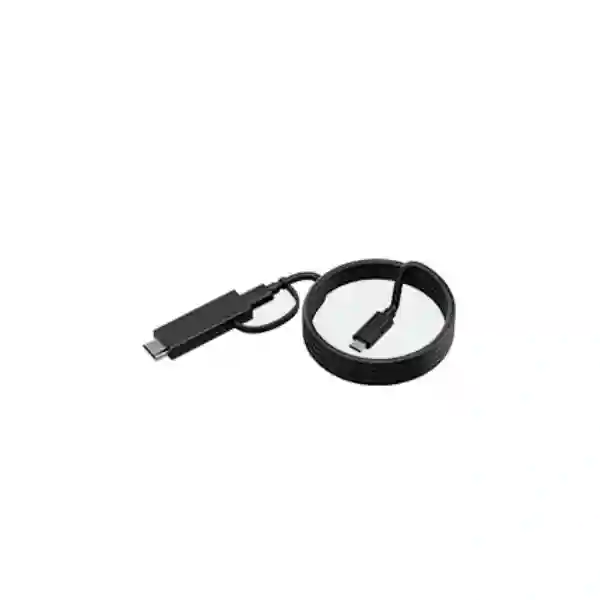
Yealink CB-MTOUCH-USBC Cable
The Yealink CB-MTOUCH-USBC is a compact 1.2 m USB-C content-sharing cable supplied with an HDMI adapter for compatible Yealink room-control environments. Yealink officially lists the accessory for MTouch Plus and MTouch E2, making it relevant when a meeting room needs a predictable wired connection for presenting content from a user device.
Direct answer
Choose the CB-MTOUCH-USBC when the room specification calls for Yealink’s 1.2 m USB-C content-sharing cable with HDMI adapter for MTouch Plus or MTouch E2. Confirm the exact room system, user-device ports, cable route and presentation workflow before procurement.
CB-MTOUCH-USBC is listed by Yealink among room-system cables and accessories.
Yealink specifies a cable length of 1.2 metres, suitable for short table-side or console-side connections.
Official Yealink listings identify MTouch Plus and MTouch E2 as compatible endpoints for this accessory.
Treat the cable as a room-system component and verify the complete presentation path before ordering multiple units.
What the Yealink CB-MTOUCH-USBC Cable does
In a modern meeting room, content sharing is not merely a matter of finding any cable with connectors that appear to fit. Room controllers, displays, compute units and user laptops form a signal chain, and each part of that chain needs to match the intended workflow. The CB-MTOUCH-USBC provides a Yealink-specific accessory option for wired content sharing in compatible MTouch Plus and MTouch E2 deployments. Its purpose is straightforward: give users a defined 1.2 m USB-C connection with an HDMI adapter available at the room-control position so presentation content can be introduced into the meeting experience using the supported Yealink design.
That predictability is useful for organizations that want meeting rooms to operate consistently. In a shared boardroom or huddle space, users may arrive with different laptops and different expectations. A permanently planned presentation cable helps reduce the number of loose adapters kept in drawers, minimizes last-minute searching for the correct lead, and gives the IT team a known accessory to document as part of the room bill of materials. The important step is to confirm that the room controller and source devices match the supported workflow rather than assuming that connector shape alone guarantees compatibility.
FourTeck Tanzania can help place the accessory in the wider context of a conferencing room: controller, display, camera, audio, compute, network quality, furniture routing and user instructions. If the requirement is for an entire collaboration room rather than only one cable, review our business technology services and technology shop to frame the accessory within the complete design.
Verified product facts
| Brand | Yealink |
| Model | CB-MTOUCH-USBC |
| Accessory type | USB-C content-sharing cable with HDMI adapter |
| Cable length | 1.2 m |
| Officially listed compatibility | Yealink MTouch Plus and MTouch E2 |
| Typical role | Wired content-sharing accessory in compatible meeting-room environments |
Compatibility should be checked against the complete room-system design and current Yealink documentation. This page does not claim that the cable works with every USB-C or HDMI device simply because those interfaces are present.
Why cable choice matters in a meeting room
A meeting room is a shared workplace system, not a personal desk. Accessories are handled repeatedly, connected by people with different levels of technical experience, moved across tables and sometimes routed through grommets or cable-management trays. A generic cable that works temporarily in one test may create uncertainty when deployed across several rooms. Standardizing on the specified accessory for a supported Yealink controller helps IT teams document the installation, keep spares that actually match the room, and provide simple user guidance.
The 1.2 m length is also part of the design decision. It can be practical where the controller or presentation point is near the user’s laptop position, but it is not intended to solve every long-distance routing requirement. Before purchase, measure the practical path from the room controller to the place where users will set down laptops. Consider table depth, cable entry points, strain relief and whether users need to move the laptop while presenting. If the physical distance is greater, treat that as a room-design issue rather than casually chaining unrelated adapters.
Yealink’s own support guidance for MTouch-family presentation connections emphasizes that cable behavior and physical interface requirements can matter. For procurement teams, the safe approach is to identify the exact controller model, firmware environment and presentation workflow, then obtain the accessory specified for that architecture. This avoids assuming that every visually similar cable is interchangeable.
For IT teams
Standardize room accessories, label them clearly, record the compatible controller and keep an appropriate spare strategy for meeting spaces that cannot tolerate presentation downtime.
For procurement
Request the exact model CB-MTOUCH-USBC, quantity, room location and controller type so quotations are compared on the same accessory rather than on broadly described USB-C cables.
For users
A clearly positioned wired presentation cable gives staff and guests an obvious way to share content without relying on a drawer of unlabelled adapters.
Compatibility and deployment planning
Start with the controller. Yealink currently identifies MTouch Plus and MTouch E2 for the CB-MTOUCH-USBC. Confirm the exact model in the room before ordering, because names within the MTouch family can be similar and third-party listings sometimes broaden compatibility beyond what appears in the current official accessory list. A procurement request should therefore state the exact installed or planned controller, the meeting platform, the room-system model and the number of rooms.
Next, check the source device. Many modern business laptops have USB-C, but USB-C describes the connector rather than guaranteeing identical capabilities on every port. Organizations should confirm the presentation workflow supported by their laptops and room system. Where HDMI is required, note that this accessory is supplied with an HDMI adapter as part of the design. Testing with representative laptops from the organization’s device fleet is sensible before a large rollout, especially if employees use a mix of Windows notebooks, Mac systems, docking stations or managed endpoint configurations.
Finally, consider the physical room. Cable placement should avoid trip hazards, excessive bending and tension. Where the controller sits in a table mount or room-console position, route the lead so the connector is accessible without placing stress on the device. For a broader room review, FourTeck Tanzania’s integrated IT and collaboration overview explains how conferencing depends on displays, audio, networking and supporting infrastructure as one system.
Buying checklist before requesting a quote
Provide the exact controller model, number of rooms, required cable quantity, presentation-device types, preferred meeting platform, table or console layout, and whether this is a new installation or a replacement accessory. If an existing cable is being replaced, share the current Yealink part number or a clear photo of the installed setup so the requirement can be cross-checked.
Do not base the decision solely on connector appearance. Confirm the supported Yealink architecture and source-device requirements first. For product-selection assistance, use the FourTeck Tanzania contact page and describe the room rather than only writing “USB-C cable”.
Yealink CB-MTOUCH-USBC Cable Tanzania
For organizations buying the Yealink CB-MTOUCH-USBC Cable in Tanzania, the most useful procurement approach is to treat it as a controlled meeting-room component rather than a commodity cable. The accessory is specifically identified by Yealink as a 1.2 m USB-C content-sharing cable with HDMI adapter for MTouch Plus and MTouch E2. That makes the model relevant to companies, government offices, universities, financial institutions, professional-service firms, hospitality groups and other organizations standardizing Yealink collaboration rooms. A quotation request should state how many rooms are involved, which MTouch controller is installed in each room and whether the cable is for a new deployment, spare inventory or replacement of a damaged accessory.
Tanzania deployments can vary significantly in room design. One organization may have compact meeting spaces where the controller sits directly beside a laptop position, while another may have boardroom tables with integrated cable boxes and under-table routing. Because the cable length is 1.2 m, physical planning matters. Measure the real path, not only the straight-line distance. The route may need to pass through a table grommet, around a controller mount or across a recessed connection box. Keeping the supported Yealink accessory accessible and properly routed can make everyday meetings easier while reducing stress on connectors.
Business buyers should also think about endpoint standardization. If a company uses several laptop models, test the intended content-sharing workflow on representative devices before purchasing a larger batch. USB-C capabilities can differ by device and port, and meeting-room success depends on the complete signal path. Document which port users should connect, where the HDMI adapter is used, and any organization-specific meeting instructions. A small laminated guide at the table can often prevent support calls caused by users connecting to the wrong laptop port or expecting an unsupported workflow.
FourTeck Tanzania can support product selection as part of a wider meeting-room requirement. The company’s Tanzania business profile describes an integrated technology approach covering conferencing, networking and supporting IT infrastructure. When requesting a quotation, include the exact model name CB-MTOUCH-USBC, quantity, site, controller and any broader room-system needs so the accessory can be checked in context.
Yealink CB-MTOUCH-USBC Cable Dar es Salaam
Dar es Salaam organizations often operate busy offices where meeting rooms are shared by multiple departments, visiting partners and remote teams. In such environments, the value of the Yealink CB-MTOUCH-USBC is not its complexity but its ability to become a known, documented part of a compatible Yealink room. A user entering a meeting space should be able to identify the presentation lead quickly, connect a supported laptop and begin sharing content without assembling a chain of adapters. For IT teams managing several conference rooms, standardizing the same accessory model also makes spare management and room documentation easier.
When planning the cable for offices in Dar es Salaam, assess the room furniture and controller position carefully. A 1.2 m cable can be appropriate for a tabletop controller positioned close to the presenter, but the practical path can become longer when routed through integrated furniture. Avoid excessive tension or tight bends. If the room table has cable cubbies, check whether the HDMI adapter and USB-C connector can be stored and retrieved without snagging. A clean installation is especially useful in client-facing boardrooms where loose cabling quickly makes an otherwise professional collaboration space look improvised.
Procurement teams should specify the exact room controller rather than relying on a generic request such as “Yealink Type-C cable”. Yealink’s official accessory list names MTouch Plus and MTouch E2 for this product. If rooms use different generations of controllers, create a room-by-room inventory before ordering. That inventory should include the room name, controller, conferencing platform, display arrangement, laptop-sharing method and existing accessories. Doing so reduces the risk of ordering identical-looking parts for incompatible environments.
For a larger collaboration project in Dar es Salaam, consider camera framing, microphone coverage, display visibility and network reliability alongside the cable. The FourTeck Tanzania site positions video conferencing as a complete meeting-room discipline rather than an isolated device purchase. Use the contact channel to request a compatibility review and quote based on the number of rooms, not just the quantity of cables.
Yealink CB-MTOUCH-USBC Cable Mwanza
For businesses and institutions in Mwanza, a reliable collaboration room can help connect local teams with colleagues, suppliers and customers in other cities or countries. Small accessories can become disproportionately important when a meeting starts and users discover that the expected presentation lead is missing, damaged or incompatible. The Yealink CB-MTOUCH-USBC gives organizations using MTouch Plus or MTouch E2 a defined accessory model to include in their room bill of materials and spare plan.
A practical Mwanza procurement request should identify whether the cable is intended for a newly commissioned room or an existing room that already works correctly. For a replacement, record the model label on the current accessory and check the controller type. For a new room, confirm the complete system design before treating the cable as a standalone purchase. The accessory’s 1.2 m length is most useful when the laptop presentation position is close to the controller; longer or concealed routes may need a different architectural approach rather than improvised extension.
Organizations with limited local IT resources can reduce support effort by documenting the room. Label the cable with the room name or function, keep it physically secured without damaging the connector, and record the exact replacement part number. If several meeting rooms have different Yealink hardware, avoid putting all spare cables into one unlabeled box. A simple asset list makes it easier for administrators to restore a room quickly after an accessory is misplaced.
Users should also be given a clear instruction for content sharing. Explain which laptop port to use and what to expect on the room display. If an organization uses managed laptops or docking stations, test the workflow in advance. These practical checks are more useful than assuming every USB-C port behaves identically. For broader meeting-room modernization, FourTeck can assess the accessory together with controllers, displays, audio, cameras and network connectivity.
Yealink CB-MTOUCH-USBC Cable Arusha
Arusha businesses in tourism, professional services, education, development work and regional administration frequently need dependable hybrid meetings with participants joining from multiple locations. A room that is easy for guests to use has a practical advantage: people spend less time troubleshooting and more time discussing the agenda. The Yealink CB-MTOUCH-USBC can support that goal in compatible MTouch Plus and MTouch E2 rooms by giving presenters a clearly defined wired content-sharing accessory.
For guest-heavy meeting spaces, physical presentation design deserves special attention. Place the cable where visitors can reach it without moving the room controller or crawling under the table. Use cable management that prevents the lead from falling into a grommet while still allowing enough movement to connect a laptop comfortably. Because the cable is 1.2 m long, the controller-to-laptop distance should be checked during room planning. If the user position is farther away, reconsider the furniture arrangement or supported sharing approach rather than placing repeated strain on the connectors.
IT staff should verify the room controller before purchasing. Yealink officially associates CB-MTOUCH-USBC with MTouch Plus and MTouch E2. If an Arusha site has older room equipment or mixed generations, make an inventory first. Include room names, controller models, platform accounts, displays and sharing accessories. This inventory helps procurement purchase the correct part and allows support teams to understand why two rooms that look similar might use different cables.
A good quotation request should include quantity, controller model, room count and whether installation or room review is needed. Avoid assuming availability or delivery time until these are confirmed in the quotation. FourTeck Tanzania’s contact page can be used to submit the precise requirement, while the wider services page can help frame additional conferencing needs.
Yealink CB-MTOUCH-USBC Cable Dodoma
In Dodoma, government, education, enterprise and project teams may rely on meeting rooms for coordination between departments and geographically distributed participants. The CB-MTOUCH-USBC is a small accessory, but procurement discipline around such items helps maintain predictable meeting-room operation. When a room has a Yealink MTouch Plus or MTouch E2 controller and the documented workflow calls for this 1.2 m USB-C content-sharing cable with HDMI adapter, purchasing the exact model avoids ambiguity about what should be installed.
For formal meeting spaces, cable management should be planned as part of the room furniture. The lead should be easy to reach without being left stretched across a walkway. If the controller is fixed in a table mount, confirm that the route allows the cable to move enough for different laptop sizes without pulling on the controller connector. If users commonly present from a podium or a seat distant from the console, the 1.2 m length may not match the workflow and the room design should be revisited before purchasing.
Procurement documentation is especially useful when several rooms are maintained by different teams. Record the manufacturer, model, intended controller and room. Keep one approved specification so replacement requests do not devolve into descriptions such as “black USB cable with adapter”. This is also helpful when equipment is transferred between buildings or rooms. The accessory should stay with the compatible room system unless compatibility has been rechecked.
Before issuing a purchase order, confirm quantity and compatibility, then request current commercial terms. Price, stock, warranty and delivery conditions can change and should be established in the quotation rather than copied from unrelated international reseller listings. FourTeck Tanzania can use the exact room information to prepare a more meaningful response.
Yealink CB-MTOUCH-USBC Cable UAE
UAE organizations often standardize meeting-room technology across offices in Dubai, Abu Dhabi, Sharjah and other business locations. For a standardized Yealink estate, the CB-MTOUCH-USBC can be treated as a documented room accessory rather than an ad hoc peripheral. The official product description identifies a 1.2 m USB-C content-sharing cable with HDMI adapter for MTouch Plus and MTouch E2, giving procurement teams a precise model reference for compatible installations.
Multi-room deployments benefit from consistent accessory mapping. Build a room schedule that lists controller model, conferencing platform, display configuration, sharing cable, camera and audio device. This allows support teams to move quickly when a user reports a presentation problem, because they know exactly which cable belongs in each room. In high-use boardrooms, keeping a correctly identified spare can reduce downtime, but the spare should be matched to the controller rather than chosen only by connector type.
The physical installation should also respect the 1.2 m length. Modern UAE offices often use integrated boardroom tables with cable cubbies, pop-up boxes or under-table trays. Measure the full routed path through those components. If the cable must bend sharply or stay permanently under tension, adjust the routing before deployment. A clean cable path protects the accessory and makes the room easier for users to understand.
For UAE-wide technology requirements, buyers can also reference FourTeck UAE for regional IT and collaboration planning. Commercial availability, local delivery and warranty terms should always be confirmed in the current quotation rather than assumed from another market.
Yealink CB-MTOUCH-USBC Cable Uganda
Uganda organizations deploying Yealink meeting rooms can use the CB-MTOUCH-USBC as a defined content-sharing accessory where MTouch Plus or MTouch E2 forms part of the design. The key procurement benefit is specificity: instead of requesting a generic USB-C cable, teams can reference the exact model and its 1.2 m length, helping reduce confusion during quotation and installation.
For organizations with sites in more than one Ugandan city, standardization can simplify support. Create a small room-equipment register and record the cable model next to the controller. If a room is upgraded later, update the register rather than assuming the old accessory remains suitable. This is especially important when controllers or room systems change generation while furniture and displays remain the same.
Users may bring laptops with different USB-C implementations, so testing is recommended before a broad rollout. Verify the intended presentation workflow with representative company devices and guest-use scenarios. Place the cable where users can access it comfortably, avoid tight bends, and make sure the room’s quick-start instructions indicate the correct connection point.
For Uganda-focused infrastructure and communication projects, FourTeck Uganda provides a regional reference point. When requesting the CB-MTOUCH-USBC, include the controller model, room quantity and any related conferencing requirements so compatibility can be considered before commercial terms are finalized.
Yealink CB-MTOUCH-USBC Cable Kampala
Kampala offices often host internal meetings, customer sessions, training and regional calls in rooms used by many different people. A consistent wired sharing accessory can improve the user experience because the presenter does not need to hunt for an adapter before a meeting. In rooms based on Yealink MTouch Plus or MTouch E2, CB-MTOUCH-USBC offers an exact accessory reference that IT and procurement teams can document.
When deploying across several meeting rooms, label each cable at the room end and record the model in the asset list. If one room has a different controller, keep its accessories separate. The objective is to avoid accidental swaps that produce inconsistent behavior and create unnecessary troubleshooting. A small amount of labeling can save time when facilities teams clean or reconfigure meeting spaces.
Cable placement should follow how people actually use the room. For a compact four-person room, 1.2 m may comfortably reach the presenter’s laptop position. For a long boardroom table, the controller may need to be positioned closer to likely presenters. If the route passes through furniture, measure the concealed path and preserve sufficient slack. Do not build a deployment around stretching the cable to its limit.
Kampala buyers should request a quote using the exact model CB-MTOUCH-USBC and identify whether the requirement is replacement, spare or new-room deployment. This allows the supplier to discuss compatibility and quantity without assuming that any USB-C accessory will work in the same way.
Yealink CB-MTOUCH-USBC Cable Arua
For organizations in Arua, dependable remote collaboration can be particularly valuable when teams need to connect with colleagues or decision-makers located elsewhere. Meeting-room accessories should therefore be selected for reliability and clarity rather than treated as incidental items. Where a Yealink room uses MTouch Plus or MTouch E2, the CB-MTOUCH-USBC can be specified as the documented 1.2 m USB-C content-sharing cable with HDMI adapter.
A practical procurement approach is to create a complete room bill of materials even if only the cable is being purchased now. Record the display, controller, camera, audio device, compute unit and sharing accessory. This gives future support teams a reference when components are replaced. If the cable is lost or damaged, the correct model can then be reordered without guessing from photographs or connector shape.
Physical planning should account for furniture and user behavior. Keep the cable accessible, avoid placing it where chairs or table mechanisms can pinch it, and do not route it through a path that requires permanent tension. If users often present from positions beyond 1.2 m from the controller, the room workflow needs review. A cable is most reliable when used within the intended physical arrangement, not as a workaround for an unsuitable layout.
When seeking a quotation for Arua, include the controller type, quantity and room-use description. Commercial details such as delivery and warranty should be confirmed for the specific order. If the project covers additional networking or conferencing components, state those requirements together so dependencies can be assessed rather than purchased independently.
Yealink CB-MTOUCH-USBC Cable Mbarara
Mbarara businesses, education institutions and service organizations can benefit from standardized meeting-room setups that are simple enough for users to operate without technical assistance. The Yealink CB-MTOUCH-USBC is relevant when MTouch Plus or MTouch E2 is already part of the room design and a wired content-sharing path is required. Its specification as a 1.2 m USB-C cable with HDMI adapter gives procurement teams an exact model to include in room documentation.
Standardization becomes more valuable as the number of rooms grows. If every compatible room uses the same documented accessory, support teams know what belongs at the table and what spare to keep. However, do not standardize blindly across rooms with different controller generations. Verify each controller first, then group rooms by compatible architecture. This prevents a spare intended for one room from being used in another merely because the connectors look familiar.
Users should have a simple presentation instruction. Mark the cable clearly, explain which laptop connection is expected, and test with common device models used by the organization. If a user frequently relies on a dock or adapter, test that exact arrangement. A meeting room should be validated around real usage patterns rather than only around an engineer’s test laptop.
For procurement in Mbarara, request current pricing and availability rather than relying on foreign reseller listings. Those listings can be useful for identifying the model, but they do not establish local commercial conditions. Share the exact quantity and site requirement so a current quotation can be prepared.
Yealink CB-MTOUCH-USBC Cable Gulu
In Gulu, organizations using hybrid meetings for administration, education, health, projects or commercial operations can reduce avoidable meeting disruption by treating presentation accessories as managed room components. The CB-MTOUCH-USBC is not a universal promise for every USB-C device; it is a Yealink accessory officially listed for MTouch Plus and MTouch E2. That distinction should remain clear in purchase specifications.
The cable’s 1.2 m length should be matched to the room. A small meeting room with the controller placed beside the presenter may be an excellent fit. A large room where presenters stand at a distant lectern may need a different supported design. Measure the routed path and account for table openings and cable management. Keeping connectors free from strain can prolong practical service life and improve reliability during repeated use.
For sites with limited on-site technical staffing, documentation is particularly helpful. Store the product model in the room asset record, label the cable and keep quick instructions visible. If a replacement is needed, staff can communicate the exact part number rather than describing the cable verbally. This speeds up quotation and reduces the chance of receiving a visually similar but unsuitable accessory.
If the Gulu requirement is part of a broader office build, include display, camera, audio and network needs in the same discussion. A content-sharing cable works best when the complete room has been planned for stable collaboration and simple user operation.
Yealink CB-MTOUCH-USBC Cable Kenya
Kenyan businesses deploying standardized collaboration spaces can include the Yealink CB-MTOUCH-USBC as a controlled accessory for compatible MTouch Plus and MTouch E2 rooms. The cable’s official 1.2 m length and HDMI adapter should be considered during room planning, especially where controllers are integrated into boardroom furniture. Precise model naming helps procurement compare equivalent quotations and reduces the risk of receiving a generic cable that has not been checked against the supported room architecture.
For multi-site organizations in Nairobi, Mombasa or other locations, create a standard room template. The template can list the controller, room system, camera, audio, displays and the CB-MTOUCH-USBC where applicable. When a new room is deployed, procurement can use the template as a checklist while still confirming current vendor compatibility. This provides repeatability without assuming that product generations never change.
The user experience should be tested with the organization’s common laptops. USB-C port capabilities and corporate endpoint configurations can differ. Validate how users start content sharing, what appears on the room display and whether the HDMI adapter is needed in the expected workflow. Document these steps in simple language. Meeting-room technology is successful when a visiting manager or customer can use it without learning the architecture behind it.
For a Kenya-specific project, FourTeck Kenya provides regional information about business IT and video conferencing solutions. Confirm current price, stock and delivery terms directly for the intended order.
Yealink CB-MTOUCH-USBC Cable Kuwait
Kuwait organizations that use Yealink collaboration systems in executive rooms, training spaces or departmental meeting rooms can specify the CB-MTOUCH-USBC by exact model when the controller is MTouch Plus or MTouch E2. The accessory provides a defined 1.2 m USB-C content-sharing cable with HDMI adapter, which makes it easier for IT teams to standardize room bills of materials and for procurement teams to request comparable quotations.
Room furniture can strongly affect cable suitability. Integrated conference tables may route leads through thick tops, grommets or under-table trays. Measure the actual route and make sure the cable remains easy to reach without being stretched. Where presentation positions are farther from the controller, review the supported room design instead of adding random extensions that may create uncertain results.
A spare strategy is useful for heavily booked rooms. However, the spare should be labeled with the compatible controller family and kept with the room technology inventory. Organizations with several generations of Yealink hardware should not place all accessories in one generic storage bin. Precise labeling reduces recovery time if a cable is damaged just before an important meeting.
For Kuwait regional enquiries, FourTeck Kuwait can be referenced for broader IT requirements. The CB-MTOUCH-USBC quotation should still identify quantity, controller model and required delivery location, and all commercial conditions should be confirmed at the time of order.
Yealink CB-MTOUCH-USBC Cable Ghana
Ghanaian organizations planning Yealink meeting rooms can reduce accessory confusion by specifying CB-MTOUCH-USBC exactly where MTouch Plus or MTouch E2 is used. The product is defined by Yealink as a 1.2 m USB-C content-sharing cable with HDMI adapter, and that exact wording is more useful in procurement documents than a broad description such as “Type-C to HDMI cable”.
For offices with multiple rooms, map each accessory to the room. A simple spreadsheet can contain room name, controller, conferencing platform, display count, camera, audio and content-sharing lead. This makes maintenance easier and gives procurement a reliable reference when a replacement is needed. If a room is upgraded, update the record and recheck compatibility instead of assuming the existing cable remains part of the new supported design.
User-device testing is also important. Employees may use a mix of laptops with different USB-C capabilities. Validate presentation behavior on common models and publish a short room guide. Keep the cable placed close enough to the presenter that users do not pull it across the table. The 1.2 m length should inform controller position and furniture routing from the beginning.
For Ghana-focused technology projects, FourTeck Ghana provides a regional route for wider IT requirements. Availability and commercial terms for this exact Yealink accessory should be requested for the current project rather than inferred from overseas online stores.
Yealink CB-MTOUCH-USBC Cable Nigeria
Nigeria has many organizations operating across multiple branches, making room standardization a useful way to reduce support complexity. If compatible Yealink rooms use MTouch Plus or MTouch E2, the CB-MTOUCH-USBC can be documented as the specified wired content-sharing accessory. Its 1.2 m length and HDMI adapter should be included in the room design rather than discovered after furniture installation.
For branch rollouts, create a repeatable commissioning checklist. Confirm controller model, cable placement, laptop presentation workflow and quick-start instructions in every room. Test with representative user laptops before sign-off. A standardized cable does not eliminate every variable, but it gives support staff one known element when diagnosing a content-sharing issue.
Procurement teams should request the exact model and avoid substituting generic USB-C or HDMI accessories without technical review. The outward appearance of a connector does not prove functional equivalence. If a substitute is proposed, it should be validated against the actual room system and vendor guidance before broad deployment. This is particularly important when many branches will replicate the same design.
For regional planning, FourTeck Nigeria provides a local FourTeck network reference. Current pricing, stock, warranty and delivery must be confirmed specifically for the project and should not be assumed from listings in other countries.
Yealink CB-MTOUCH-USBC Cable Seychelles
Seychelles organizations in hospitality, government, professional services and other sectors may use collaboration rooms to connect island-based teams with regional or international participants. In these environments, a missing or unsuitable presentation accessory can be inconvenient because replacement options may not be immediately available. Where the room uses Yealink MTouch Plus or MTouch E2, documenting CB-MTOUCH-USBC as the intended 1.2 m content-sharing cable can make spare planning more disciplined.
Before purchasing, verify the controller and room layout. Measure the distance from the controller to the laptop position and account for any concealed route through furniture. Keep the cable accessible and protected from pinching. If the room is frequently used by hotel guests or external visitors, label the presentation lead clearly so they can identify it without disturbing other room connections.
For island locations, it can be sensible to think about critical spares, but quantities should be based on the number of rooms and operational importance rather than arbitrary duplication. A heavily booked executive room may justify a nearby spare while a rarely used space may not. Whatever the policy, store the exact model information and compatibility note with the spare.
Commercial terms for Seychelles should be confirmed through a current quotation. Include quantity, controller model and final destination so logistics can be assessed accurately. If the project includes cameras, displays, audio or network upgrades, provide those details at the same time so the cable can be considered as one part of the full collaboration environment.
Related FourTeck resources
Frequently asked questions
What is the Yealink CB-MTOUCH-USBC?
It is a Yealink room-system accessory described by the manufacturer as a 1.2 m USB-C content-sharing cable with HDMI adapter for MTouch Plus and MTouch E2.
How long is the CB-MTOUCH-USBC cable?
The official Yealink accessory listing specifies 1.2 metres. Measure the full routed path through any table grommets or cable trays before ordering.
Which Yealink controllers are officially listed for this cable?
Yealink’s current room-accessory listing identifies MTouch Plus and MTouch E2. If your room uses another MTouch generation, confirm current vendor compatibility before purchase.
Can I replace it with any USB-C cable?
Do not assume so. USB-C describes a connector family, but supported presentation behavior depends on cable capability, device ports and the room architecture. Use the accessory specified for the compatible Yealink system or validate any alternative carefully.
Does the product include an HDMI adapter?
Yes. Yealink describes CB-MTOUCH-USBC as a USB-C content-sharing cable with HDMI adapter.
What should I send for a quotation?
Provide the exact product model, quantity, location, controller model, number of rooms, whether it is a replacement or new deployment, and any related conferencing equipment that also needs to be supplied or checked.
Is the cable suitable for every laptop with USB-C?
Do not make that assumption. USB-C ports can support different capabilities. Test the intended content-sharing workflow with representative laptops and the actual Yealink room system.
Should we keep spare cables?
For heavily used meeting rooms, an identified spare can be useful. The quantity should reflect room count, operational importance and how quickly replacements can be sourced. Keep spares labeled with the compatible controller family.
Quotation checklist
To receive a more precise quotation, include the following information in one enquiry:
Decision recap
The Yealink CB-MTOUCH-USBC is a focused accessory for organizations that need the manufacturer-listed 1.2 m USB-C content-sharing cable with HDMI adapter for MTouch Plus and MTouch E2. Its value comes from fitting a supported meeting-room workflow, not from being a universal cable for every USB-C device. Verify the controller, user-device path and physical room layout before purchase.
For Tanzania and regional projects, request a current quotation with the exact model and quantity. Keep commercial details such as price, stock, warranty and delivery separate from technical compatibility until they are confirmed for the specific order.
Consult FourTeck Tanzania about your Yealink meeting room
If you are unsure whether CB-MTOUCH-USBC is the correct accessory, send the controller model, room-system details and a short description of how users need to share content. FourTeck can review the requirement in the context of the meeting room rather than treating the cable as an isolated part.
For complex projects, also mention displays, cameras, microphones, room size, meeting platform and network conditions. This makes it easier to identify whether the request is simply for a replacement cable or part of a broader collaboration-room requirement.




Reviews
There are no reviews yet.