
Yealink Meeting Room Accessory • Tanzania
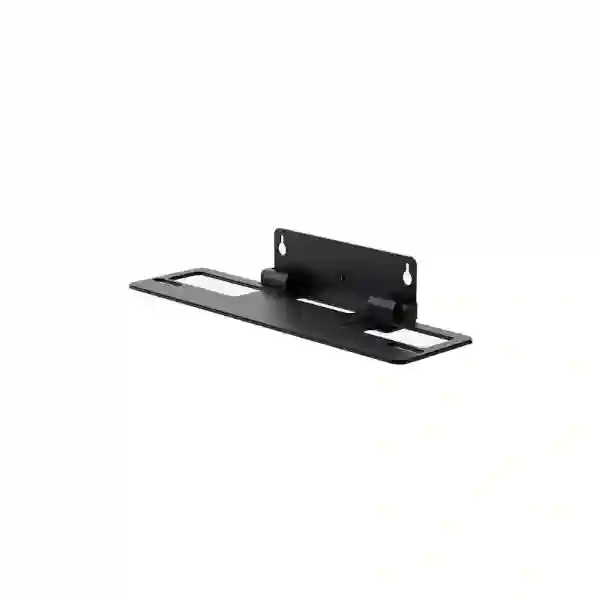
Yealink VB-WallMount-02
The Yealink VB-WallMount-02 is a purpose-built wall-mount bracket for the Yealink MeetingBar A50. Yealink specifies it for A50 wall installation and highlights its robust construction, cable-routing openings, bottom fixing screws and straightforward installation approach. For meeting rooms where a clean camera position and organized cabling matter, the bracket provides the correct manufacturer-designed mounting path rather than relying on a generic shelf or improvised support.
Quick answer
Choose VB-WallMount-02 when you are deploying a Yealink MeetingBar A50 directly on a suitable wall and want an installation that follows Yealink’s intended mounting method. Confirm the exact A50 model, wall construction, display height, camera sightline and cable path before fixing the bracket.
What is the Yealink VB-WallMount-02?
VB-WallMount-02 is Yealink’s wall-mount bracket for the MeetingBar A50. Official Yealink product information describes the bracket as being designed exclusively for A50, with cable holes intended to keep the A50’s connections organized and a robust support structure secured with bottom screws for added stability. That model-specific positioning is important for procurement: this is not presented as a universal video-bar bracket, so the first buying check should always be that the room system is a MeetingBar A50.
A wall-mounted video bar can create a cleaner meeting-room layout because the camera and audio device can be positioned in a repeatable relationship to the display, while table surfaces remain clear. However, mounting hardware is only one part of the result. A professional deployment still needs a suitable wall substrate, correct fixing method, practical service access, sensible camera height and a cable route that does not force HDMI, network or power leads into sharp bends. The bracket’s cabling openings help organize this work, but final installation quality depends on the room and the installer.
Dedicated A50 fit
Yealink identifies VB-WallMount-02 specifically for MeetingBar A50, helping buyers avoid uncertainty around generic mounting compatibility.
Cable organization
Integrated cable-routing openings support a tidier installation when power, network and display connections are planned before the bracket is fixed.
Stable mounting
Yealink describes a robust structure with bottom screws that enhance stability once the MeetingBar A50 is mounted correctly.
Room-ready finish
A planned wall installation can reduce desktop clutter and create a more consistent visual line between display and video bar.
Verified product facts
| Manufacturer | Yealink |
| Model | VB-WallMount-02 |
| Product type | Wall-mount bracket |
| Official compatibility | Yealink MeetingBar A50 |
| Yealink part number | 33131120 |
| Highlighted design points | Sturdy structure, easy installation, cabling holes and bottom screws for stability. |
Planning a MeetingBar A50 wall installation
A correct wall-mount decision starts with the complete room, not with the bracket alone. The MeetingBar A50 needs to work together with the room display, seating plan, table position, power, Ethernet and any touch controller or related accessory. Determine the visual centerline of the room, the expected camera eye line, whether participants sit close to or far from the display and whether the chosen mounting height allows the lens to capture seated users naturally. Mounting too high can create a top-down perspective, while mounting too low can be obstructed by furniture, laptops or people walking near the front of the room.
Cable preparation should happen before drilling. Identify where the A50 will receive power, network connectivity and display connections, and make sure service loops remain accessible. If cabling is concealed in a wall or trunking, the route should comply with local electrical and building practices and should keep power and low-voltage data cabling managed appropriately. The VB-WallMount-02’s cable openings are useful only when connectors and routes have been planned around them.
For broader meeting-room design guidance, FourTeck Tanzania’s video conferencing and integrated technology overview explains the relationship between room size, camera framing, audio, displays, networking and installation. The Tanzania services page is also useful when the requirement extends beyond the bracket to installation, configuration or broader IT infrastructure planning.
Yealink VB-WallMount-02 Tanzania
For organizations sourcing the Yealink VB-WallMount-02 in Tanzania, the most useful starting point is to confirm that the target device is the MeetingBar A50 and that wall mounting is the chosen installation method. Corporate boardrooms, executive meeting rooms, training spaces, hybrid classrooms and customer-facing collaboration rooms often benefit from a fixed installation because equipment remains consistently positioned instead of being moved between meetings. A dedicated bracket is particularly relevant when a business wants a standardized A50 deployment across multiple rooms and needs the video bar aligned consistently with displays and seating.
Tanzania buyers should include room information with the quotation request rather than asking only for a bracket price. State the quantity of VB-WallMount-02 units, confirm the number of A50 systems, indicate whether the MeetingBar is already on site or part of a new purchase, and provide the basic wall type if known. Concrete, masonry, partition walls and specialist acoustic finishes can require different anchoring approaches. The bracket is manufacturer-designed, but the fastener strategy must still suit the actual construction. Where cabling is not yet in place, identify whether the power and data outlets will be behind the display, below the bar or routed through surface trunking.
A procurement team may also need to coordinate mounting with the display supplier, furniture contractor or fit-out team. Camera height should be decided before final wall finishes are completed, and cable exits should not be hidden behind a point where the bracket prevents access. For multi-room projects, create one approved room standard covering display size, display centerline, A50 position, cable route and service access. This reduces variation and makes future support easier.
FourTeck Tanzania can use the Tanzania quotation and product-guidance page to receive model, quantity and room details. If your project also covers East African branches, the FourTeck Kenya technology site and FourTeck Uganda technology site can provide regional context without assuming that stock or service terms are identical across countries.
Yealink VB-WallMount-02 Dar es Salaam
Dar es Salaam has a large concentration of corporate offices, professional-services firms, hospitality businesses, logistics companies, regional headquarters and institutions that rely on hybrid meetings with colleagues, suppliers and customers outside Tanzania. For these environments, a MeetingBar A50 installation is often part of a larger room refresh that includes a commercial display, network connection, power, room-control positioning and cable management. The VB-WallMount-02 fits that project when the design calls for the A50 to be fixed securely on the wall.
Before ordering for a Dar es Salaam office, confirm whether the meeting room is new construction, a fit-out in progress or an existing room being upgraded. In a new fit-out, the wall bracket position can be coordinated with electrical and data outlets before painting and final finishes. In an existing room, installers may need to work around existing trunking, decorative panels or older display mounts. The key is to preserve a clean sightline while ensuring technicians can still access connectors after the A50 is installed.
For executive boardrooms and customer-facing meeting spaces, appearance can matter almost as much as technical function. Concealed or neatly routed cables, consistent alignment and a fixed mounting point reduce the improvised appearance that can come from loose equipment on tables. For operational rooms where meetings happen throughout the day, a fixed bracket can also reduce the chance of users moving the video bar and changing the camera angle. This is particularly useful where the room is shared by many departments and no single user owns the setup.
A strong quotation request should therefore include the exact Yealink model, bracket quantity, display arrangement, approximate room dimensions, wall type, existing cable locations and whether installation support is needed. FourTeck’s Tanzania contact process specifically encourages buyers to include the room type, quantity, existing equipment and desired outcome so compatibility and scope can be assessed before a quotation is finalized.
Yealink VB-WallMount-02 Mwanza
Organizations in Mwanza may use hybrid meeting rooms to connect management, branch offices, field operations, customers and teams in other Tanzanian cities. When a Yealink MeetingBar A50 is selected for a fixed room, the VB-WallMount-02 gives the deployment a manufacturer-specific wall mounting option. It is useful for rooms where the table needs to remain clear, where devices should not be moved between calls, or where the organization wants a consistent installation standard that can be repeated at more than one site.
The mounting conversation should include the physical wall and cable path. If the room uses masonry construction, suitable anchors and drilling practices need to be selected for that material. If the display is already installed, measure the available space and decide whether the A50 should sit in the planned position relative to the screen without blocking sightlines or interfering with display service access. A professional installation should leave enough flexibility to disconnect cables during maintenance without dismantling unrelated room equipment.
Mwanza buyers planning more than one room should consider standardization. If each room uses the same display centerline, MeetingBar position, cable labeling and outlet scheme, internal IT teams can troubleshoot faster and users experience the same layout wherever they meet. The VB-WallMount-02 supports this repeatability because it is a defined accessory rather than a custom fabricated bracket whose dimensions and service behavior may vary between sites.
When requesting a quotation, state whether you need the bracket only or a broader MeetingBar A50 room solution. The second case may involve network readiness, display mounting, room-control location, power resilience and commissioning. Separating the accessory requirement from the complete installation scope helps suppliers quote accurately and helps procurement compare like with like.
Yealink VB-WallMount-02 Arusha
Arusha businesses, hospitality operators, NGOs, training organizations and regional institutions often require reliable meeting spaces for local and international collaboration. Where a Yealink MeetingBar A50 is used, the VB-WallMount-02 can support a fixed wall installation that keeps the bar consistently positioned from one session to the next. This is valuable in rooms used by rotating teams, visiting staff or event participants because nobody needs to reposition the video bar before each meeting.
The best mounting height depends on the display and seating arrangement rather than a universal number. A room with a long conference table may need a different sightline from a compact training room or executive office. Installers should review how people are seated, where the display is mounted and whether decorative wall features create restrictions. The wall should be assessed for secure fixing, and the planned cable route should avoid visible loops where possible while still allowing future maintenance.
For hospitality or customer-facing spaces, installation aesthetics can be especially important. The VB-WallMount-02 includes cable-management openings intended to help keep the A50’s connections organized. That feature can contribute to a clean front-of-room presentation when combined with properly located outlets and disciplined cable lengths. It does not eliminate the need for planning; long excess cables or badly positioned wall outlets can still create clutter even when the bracket itself has routing provisions.
Arusha procurement teams should ask for the exact model and part identification on the quote, confirm the relationship to MeetingBar A50 and describe any installation expectations. For projects spanning Tanzania and West Africa, regional FourTeck sites such as FourTeck Ghana and FourTeck Nigeria can provide market-specific technology context, while commercial terms should always be confirmed for the destination country.
Yealink VB-WallMount-02 Dodoma
In Dodoma, government-related organizations, enterprises, education bodies and professional teams may use video conferencing to connect decision makers across Tanzania and with external partners. A permanently installed MeetingBar A50 can help make a shared meeting room easier to use because the camera and audio unit stays aligned with the display. The Yealink VB-WallMount-02 is relevant when the organization chooses wall mounting instead of placing the A50 on furniture or using another supported mounting approach.
For a refurbishment project, check what is already behind the display wall. Power cables, conduit, data outlets, reinforcement, wall cavities and decorative treatments can affect the final fixing point. The bracket’s cable holes can support a neat routing plan, but the installer still needs sufficient clearance for connectors. If the A50 or display may need to be serviced later, do not position cable exits where every maintenance task requires removing large wall panels or unrelated equipment.
Organizations working under formal procurement processes should specify the exact Yealink product name, MeetingBar A50 compatibility requirement and quantity. Avoid generic wording such as “video bar wall bracket” if the goal is to receive this exact accessory, because generic requests can lead to substitutions that require separate compatibility verification. The official Yealink part number can be included as an additional reference while the model name remains the primary identifier.
For larger deployments, request a room-by-room bill of materials that distinguishes the MeetingBar, bracket, display, cables and other accessories. This makes it easier to audit deliveries and to maintain spares. If installation services are included, ask that bracket fixing, cable routing, alignment and post-installation checks be clearly separated from hardware supply so the project scope is transparent.
Yealink VB-WallMount-02 UAE
UAE organizations frequently standardize video conferencing rooms across offices, branches and customer facilities, making mounting consistency an important part of rollout design. The Yealink VB-WallMount-02 is suitable for MeetingBar A50 projects where the specification requires a fixed wall position. A standardized wall bracket can support consistent camera placement, a cleaner front-of-room installation and repeatable documentation for IT support teams across multiple rooms.
Commercial interiors in the UAE often use gypsum partitions, feature walls, stone finishes, joinery or integrated AV panels. The finished surface can look substantial while the load-bearing structure is behind it, so installers should identify the correct substrate and choose a fixing method appropriate to the wall. The bracket itself should not be treated as proof that every wall surface can safely accept the load without preparation. Coordination with the fit-out contractor can be important when reinforcement or concealed cable channels need to be installed before closure.
For large meeting-room programs, create an installation drawing that shows display height, MeetingBar position, bracket fixing zone, cable outlet location and service clearances. Then apply the same drawing wherever the same room type is repeated. This approach is more efficient than allowing every installer to interpret the room independently. It also simplifies acceptance testing because each completed room can be checked against the same standard.
Procurement should verify the required quantity, shipping destination, installation scope and whether other A50 accessories are needed. Because commercial terms and product availability can change, buyers should request current confirmation rather than relying on an old quotation or assumption about stock. The key technical check remains straightforward: VB-WallMount-02 is intended for Yealink MeetingBar A50 wall mounting.
Yealink VB-WallMount-02 Uganda
Uganda-based organizations using Yealink MeetingBar A50 can specify VB-WallMount-02 when a fixed wall installation is preferred. This may suit headquarters, branch offices, training rooms and shared boardrooms where equipment should stay in one calibrated position. A wall-mounted approach can also make room furniture more flexible because the video bar does not consume table or cabinet space.
Before purchase, verify the complete room configuration. The display position affects where the A50 should be located, and the wall type affects how the bracket should be anchored. If a room has surface-mounted trunking, decide whether cables will enter the bracket from the side, above or below and ensure bends are not too tight for the connector types in use. If cables run inside the wall, allow access points that can be serviced without unnecessary damage to finishes.
Uganda projects with several branches should document the installed model and bracket in the asset register. When the same room standard is used across Kampala and regional sites, future replacement or relocation work becomes simpler because technicians know what mounting hardware to expect. It also helps procurement avoid mixing visually similar accessories intended for different Yealink video bars.
A quotation request should include the exact model name, quantity, destination and whether you require bracket-only supply or a complete A50 deployment. If installation is required, add room photos or wall details where possible. This allows the supplier to identify issues early rather than discovering during installation that reinforcement, cable relocation or additional accessories are necessary.
Yealink VB-WallMount-02 Kampala
Kampala offices often combine local teams with regional and international meetings, so conference-room reliability and appearance can influence everyday productivity. For a MeetingBar A50 deployment, VB-WallMount-02 provides a dedicated wall-mounting path that can keep the front of the room organized. It is especially useful where the room is heavily shared and where staff should not need to adjust hardware before joining a meeting.
In commercial buildings, wall conditions vary. A boardroom may have a masonry wall, a lightweight partition or decorative cladding. Confirm the structure behind the final finish and make sure fixing points are secure. If the display is on an articulated mount, also check that its movement will not collide with the A50 or its cables. If the display is fixed, position the video bar so it remains visually centered and has an unobstructed field toward participants.
Cable management should be treated as part of the design. Yealink highlights cabling holes in the VB-WallMount-02, but the final appearance depends on where network and power outlets are located and how excess cable is managed. For a premium boardroom, shorter correctly routed cables and concealed pathways may be appropriate. For a practical operations room, surface trunking can still look professional when it is aligned, labeled and sized for future service.
Kampala buyers comparing quotes should confirm that each supplier is pricing the same accessory and not a generic substitute. Ask for the model to appear on the quotation, identify the MeetingBar A50 as the target device and separate any installation labor or additional hardware. That makes the commercial comparison clearer and keeps technical compatibility central to the purchase decision.
Yealink VB-WallMount-02 Arua
For organizations in Arua that need dependable links with headquarters, partners or remote teams, a fixed meeting-room system can reduce setup time and user error. When MeetingBar A50 is the selected platform, VB-WallMount-02 allows the bar to be installed on the wall instead of occupying a table or shelf. That can be helpful in compact rooms where every surface is needed for laptops, documents or training materials.
The installation should account for maintainability. In smaller regional sites, technical support may not be available in the room every day, so cable labels, accessible connectors and clear documentation can save time later. The bracket should be mounted in a position that does not require complex disassembly simply to check a network cable or power connection. The wall itself should be evaluated so the fixing method is secure for the local construction.
If the room depends on stable cloud collaboration, network quality and power resilience may deserve as much attention as the physical mount. A well-installed bracket cannot solve unreliable connectivity, but it can make the room hardware more orderly and repeatable. For branch standardization, combine the mounting specification with a checklist for display settings, network connection, cable labeling and basic user instructions.
Arua procurement requests should state whether the VB-WallMount-02 is being added to an existing A50 or purchased for a new room project. Include quantity and delivery destination, then ask for current commercial terms. If an installer will travel to the site, clarify travel and installation scope separately so the hardware price is not confused with project-service costs.
Yealink VB-WallMount-02 Mbarara
Businesses and institutions in Mbarara may deploy Yealink collaboration systems to connect management, training teams, healthcare administration, education groups and commercial branches. A MeetingBar A50 that is permanently wall-mounted can create a more predictable room experience because the camera and audio bar remain in the intended position. VB-WallMount-02 is the model-specific bracket designed for that use.
Wall mounting should be planned around the screen and room geometry. If the conference table is long, verify that participants at the near and far ends remain within the intended camera view. If the display is unusually high or low, do not automatically position the bar at a visually convenient point without considering how the resulting camera perspective will look to remote participants. A simple room test before drilling can prevent the need to reposition the bracket later.
Cable pathways can be prepared with trunking, in-wall conduit or a furniture-integrated route depending on the building. The bracket’s openings support tidy cable management, but installers should avoid crushing connectors or trapping cables between the bracket and wall. Leave enough slack for service while keeping excess cable contained and labeled. Where power quality is a concern, the broader room design may also include suitable protection for displays, network equipment and collaboration devices.
For procurement, request the exact Yealink VB-WallMount-02, identify MeetingBar A50 compatibility and specify the number of rooms. If several rooms are being deployed, ask for a repeatable installation standard and an itemized bill of materials. That approach improves acceptance testing and makes it easier for internal IT teams to know which accessories belong to each room.
Yealink VB-WallMount-02 Gulu
Gulu organizations that rely on video meetings for management, education, development programs or distributed operations can benefit from a room system that remains ready between sessions. Where MeetingBar A50 is installed, the VB-WallMount-02 provides a dedicated way to fix the bar securely on the wall and keep cabling organized. It can be especially useful in multi-purpose rooms where tables are moved or reconfigured, because the collaboration device stays in a permanent location.
The wall and mounting zone should be inspected before installation. Check for hidden electrical services, determine whether the surface is masonry or a partition and select appropriate fixings for the structure. Align the bracket with the display and seating rather than choosing a height based only on available wall space. If the room uses a projector or unusual display arrangement, the A50’s position may require additional consideration to keep the camera centered on participants.
For remote sites, documentation is particularly valuable. Record the bracket model, A50 serial information, cable labels, network connection and basic room configuration. If support is later provided remotely, a technician can use this information to guide local staff without guessing how the system was installed. Standardized mounting also makes it easier to compare one room with another when troubleshooting.
When seeking a quote for Gulu, provide destination, quantity, room type and whether you already own MeetingBar A50. Ask separately about hardware, logistics and installation so each part of the requirement is clear. Availability and lead time should be confirmed at the time of order rather than assumed from older listings.
Yealink VB-WallMount-02 Kenya
Kenyan enterprises often run hybrid meeting environments across headquarters, branches and regional operations. If Yealink MeetingBar A50 is part of the collaboration standard, specifying VB-WallMount-02 for wall-mounted rooms can help keep deployments consistent. The bracket gives project teams a defined accessory that can be written into bills of materials and room standards rather than leaving each site to source a different generic solution.
For new office fit-outs, AV mounting should be coordinated early with electrical, network and interior design teams. The display and MeetingBar positions affect wall reinforcement, outlet placement and cable pathway design. If the bracket is installed after all finishes are complete, teams may need visible trunking or additional drilling that could have been avoided. Early coordination also makes it easier to maintain a clean relationship between the display, video bar and any room controller.
Multi-site programs should define acceptance criteria. After installation, verify that the bar is secure, aligned, cables are strain-relieved, connectors can be serviced and the camera view matches the seating layout. The bracket’s purpose is physical support, while the meeting experience also depends on network quality, display configuration, room acoustics and platform setup. Treating those elements as a single room solution generally produces better results than buying each component independently.
Kenya buyers should request current pricing and availability for the exact model, then confirm delivery location and installation scope. If you are standardizing rooms across Kenya and Tanzania, keep country-specific quotations separate while using the same technical room standard where appropriate. This preserves consistency without assuming logistics or commercial terms are identical.
Yealink VB-WallMount-02 Kuwait
In Kuwait, corporate offices, government environments, education and hospitality organizations may deploy MeetingBar A50 in rooms that require a clean and permanent front-of-room installation. VB-WallMount-02 provides the official model-specific wall bracket option for that deployment. It is useful when the project calls for a stable camera position, minimal tabletop hardware and a consistent look across multiple conference spaces.
Interior finishes should be considered before drilling. Meeting rooms may include gypsum board, decorative cladding, millwork or integrated display walls. Installers should locate suitable structural fixing points and avoid relying only on the visible finish. Cable routes also need to be planned around the bracket. If the room is being built, install conduit and outlets at the correct location in advance. If the room is existing, choose a tidy surface route that remains serviceable.
For executive rooms, sightline and aesthetics are important. The A50 should visually align with the display and camera framing should suit the seating plan. For training or operational rooms, durability and service access may be the higher priority. In either case, the bracket supports the physical mount, but the overall result depends on installation workmanship and room design.
Kuwait procurement teams should specify the exact VB-WallMount-02 model and state that it is for MeetingBar A50. Where a project includes several room types, separate A50 rooms from other Yealink devices so accessories are not mixed. Confirm commercial terms, logistics and lead time at the time of quotation and avoid assuming that an accessory listed online is currently available locally.
Yealink VB-WallMount-02 Ghana
Ghanaian businesses and institutions using MeetingBar A50 can select VB-WallMount-02 when wall installation is the preferred room design. A fixed bracket is useful in shared conference rooms because it removes the need to position the video bar for every call and can help maintain a consistent camera angle. It also frees table space and can make the front of the room look more organized when cables are planned properly.
Before installation, identify the wall construction, display mount and planned cable exit. If power and data points are hidden behind the display, make sure cables can reach the A50 without crossing moving display brackets or creating tight bends. If the wall is a partition, confirm that the correct support or reinforcement exists. The accessory is built to support the A50, but the building structure still determines the safe fixing method.
For branch rollouts, consider creating a simple room standard that includes photos or drawings of the installed position. IT teams can then verify that future rooms match the same approach. This helps with troubleshooting, improves visual consistency and reduces the chance of an installer using a substitute bracket intended for another Yealink device.
Ghana procurement requests should include model, quantity, destination and whether a full A50 solution is needed. If the requirement includes installation, describe the wall and room in enough detail to identify potential preparation work. Ask for current availability rather than relying on historical web listings, and make sure the quotation clearly distinguishes hardware from project services.
Yealink VB-WallMount-02 Nigeria
Nigeria has a wide range of enterprise, financial, professional-services, education, energy and public-sector environments where hybrid meeting rooms are part of daily operations. For sites standardizing on MeetingBar A50, the Yealink VB-WallMount-02 can provide a repeatable wall-mounting approach. This is particularly relevant for multi-floor or multi-branch programs where IT teams want every room to have consistent hardware placement.
Installation quality should be treated as a project requirement. The mounting wall needs suitable structure, the camera needs a clear view of participants and cables must be routed without strain. If a display is mounted on a movable arm, verify that its motion will not affect the MeetingBar. If the display is recessed or surrounded by decorative panels, confirm that the bracket and A50 can be installed without blocking ventilation, access or future maintenance.
In larger organizations, include the bracket in asset and room documentation. Record which rooms use MeetingBar A50, which mount is fitted and how cables are labeled. When equipment is moved between sites, this prevents a situation where the video bar arrives without the correct mounting hardware. Standardized documentation also helps procurement forecast spares for future room expansions.
Nigeria buyers should request a current quote for the exact VB-WallMount-02 and confirm the delivery destination, quantity and required service scope. If procurement requires alternatives, compare them only after confirming compatibility and installation implications. A lower-cost generic bracket may not provide the same manufacturer-defined fit, so technical validation should remain part of the purchasing decision.
Yealink VB-WallMount-02 Seychelles
Seychelles businesses, hospitality groups, government bodies and service organizations may use hybrid meeting rooms to connect island locations with regional and international teams. A fixed MeetingBar A50 installation can help create a reliable room that is ready for frequent calls. VB-WallMount-02 supports that approach by providing the Yealink-designed wall bracket for the A50.
Where replacement parts or technical visits may involve additional logistics, careful installation and documentation become especially useful. Choose the mounting position once the display, table and seating are finalized. Confirm the wall can accept the required fixing method and that cabling can be serviced without removing major interior finishes. Use the bracket’s cable-management openings as part of a planned route rather than trying to force cables into place after installation.
Hotels and customer-facing facilities may place extra emphasis on aesthetics, while offices may prioritize standardization and easy maintenance. Both goals are compatible when the installation is designed early. Short, correctly routed cables, aligned hardware and documented connections make the room look more professional and reduce troubleshooting time.
When requesting a Seychelles quotation, provide the exact model, quantity and destination, and state whether you need bracket-only supply or a complete MeetingBar A50 room. Because freight, availability and service arrangements can vary by destination, confirm these details specifically for the project rather than inferring them from another country or older quote.
Compatibility and buying guidance
The most important compatibility fact is simple: Yealink positions VB-WallMount-02 for MeetingBar A50. Do not select it purely because another video bar looks physically similar. If your project uses A40, A30, A20, SmartVision or another Yealink collaboration device, check the manufacturer compatibility list for the correct accessory. Model-specific mounting protects the project from avoidable fit and service issues.
If an A50 needs a different physical deployment, Yealink also lists other mounting approaches for that device, including a tabletop mount and TV-mount option. That does not make one method universally better. Wall mounting is appropriate when the wall is suitable, the camera position is known and a permanent room installation is desired. Tabletop mounting can be useful where drilling is not acceptable or the room layout may change. A display-related mount may be considered where mounting architecture calls for it. The selection should follow the room design.
Quotation checklist
✓ Confirm Yealink MeetingBar A50 is the target device.
✓ State the required VB-WallMount-02 quantity.
✓ Include delivery city and country.
✓ State whether A50 units are already owned or also required.
✓ Describe wall type where known.
✓ Note display size and mounting arrangement.
✓ Identify existing power/network points.
✓ Clarify whether installation and cable management are required.
Frequently asked questions
What does the Yealink VB-WallMount-02 fit?
Yealink specifies the VB-WallMount-02 as the wall-mount bracket for MeetingBar A50. Confirm the exact MeetingBar model before ordering because Yealink uses different mounting accessories across its collaboration portfolio.
Does the bracket help with cable management?
Yes. Yealink describes cabling holes in the bracket that help keep A50 cables organized. The final result still depends on outlet placement, cable length and the chosen routing method.
What is the Yealink part number?
Yealink’s official VB-WallMount-02 product page lists part number 33131120.
Should I order the bracket without checking the room?
Confirm the room first. The bracket is model-specific, but the safe fixing method, camera height, cable route and display relationship depend on the actual wall and room layout.
How do I request a Yealink VB-WallMount-02 quotation in Tanzania?
Send the model name, quantity, destination and whether you need bracket-only supply or a complete MeetingBar A50 installation through the FourTeck Tanzania contact page. Adding room dimensions, wall type and display details can help when installation guidance is required.
Decision recap
Choose Yealink VB-WallMount-02 when your project uses MeetingBar A50 and requires a dedicated wall installation. The official product is designed around secure support, simple installation and organized cable routing. For the best result, combine the correct bracket with a verified wall substrate, sensible camera height, planned cable exits and enough service access for future maintenance.
For a quotation, include the exact model, quantity, location and whether you need installation support. FourTeck Tanzania can then discuss the accessory in the context of the complete meeting-room requirement rather than treating the bracket as an isolated component.
Consultation panel
Need help deciding whether wall mounting is right for your MeetingBar A50? Share the room size, display arrangement, wall type and preferred installation outcome. This information helps determine whether VB-WallMount-02 is the correct accessory and whether additional room, cabling or installation items should be included in the quotation.




Reviews
There are no reviews yet.