
Yealink RoomPanel Plus Mount Kit Tanzania
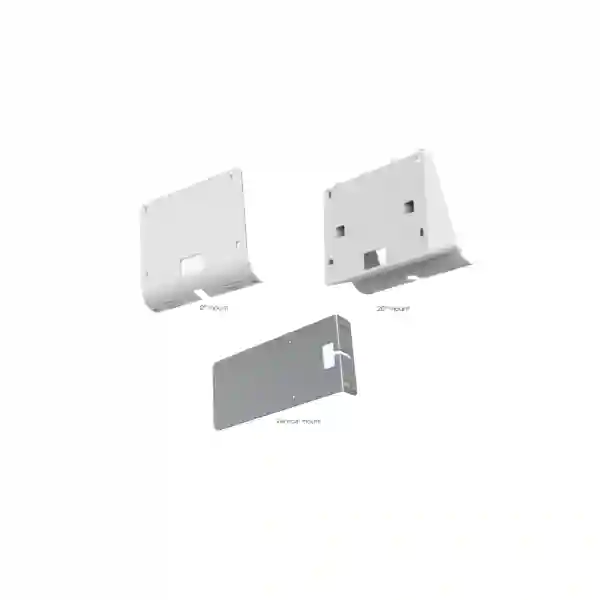
The Yealink RoomPanel Plus Mount Kit is a purpose-built deployment accessory for organizations that want a clean, accessible and professionally positioned Yealink room-booking panel at meeting-room entrances. Official Yealink documentation identifies three mounting approaches within the RoomPanel Plus Mount Kits family: a 0° mounting bracket for vertical wall installation, a 20° mounting bracket for an angled wall position, and a mullion mounting bracket for vertical installation on a door frame. The mounting kits are documented for Yealink RoomPanel Plus and RoomPanel Plus E2, giving facilities, IT and AV teams a choice of physical placement without changing the scheduling panel itself.
0° Wall Mount
Designed to position the RoomPanel Plus vertically on a wall when a straight-on, flush-style viewing orientation best matches the entrance and surrounding architecture.
20° Angled Mount
Provides a 20-degree wall angle that can improve visibility or access where users approach the scheduling panel from a side corridor or offset position.
Mullion Mount
Supports vertical installation on a door frame or suitable mullion, which is useful when a conventional wall location is impractical or when the entrance layout favors frame mounting.
Verified Yealink Mounting Specifications
Yealink lists part number 3311062 for the RoomPanel Plus Mount Kits. The documented dimensions are 136 × 116 × 22 mm for the 0° mounting bracket, 136 × 116 × 62 mm for the 20° mounting bracket and 200 × 93 × 28.5 mm for the mullion mounting bracket. Yealink identifies the supported devices as RoomPanel Plus and RoomPanel Plus E2. These dimensions are useful during site preparation because they help project teams consider available wall or frame space before installation.
| Bracket | Installation approach | Documented dimensions |
|---|---|---|
| 0° Mounting Bracket | Vertical wall mounting | 136 × 116 × 22 mm |
| 20° Mounting Bracket | Angled wall mounting | 136 × 116 × 62 mm |
| Mullion Mount Bracket | Vertical door-frame / mullion mounting | 200 × 93 × 28.5 mm |
Why the Correct Mount Matters
A room-scheduling panel works best when users can see and reach it naturally as they approach a meeting room. Mount selection therefore affects more than appearance. A straight wall installation can suit entrances where the panel faces the corridor directly, while an angled bracket can make the screen easier to notice where foot traffic approaches from one side. Door-frame or mullion mounting can solve practical placement problems around glass partitions, narrow walls and modern meeting-room fronts. By selecting the physical mount during room planning rather than after the panel arrives, organizations can reduce last-minute installation compromises and produce a cleaner result.
Procurement teams should confirm the exact RoomPanel model, intended entrance location and mounting surface before ordering. The mount kit should be treated as a deployment component of the complete room-booking solution, not as a generic bracket. Where an installation includes multiple meeting rooms, consistency of mounting height, orientation and approach can also improve the user experience across the workplace.
Compatibility and Deployment Planning
The official Yealink compatibility information for the RoomPanel Plus Mount Kits lists RoomPanel Plus and RoomPanel Plus E2. That compatibility point should be checked before procurement because Yealink also offers mounting accessories for other room panels and meeting devices. Matching the accessory family to the exact panel reduces the risk of purchasing a bracket intended for a different enclosure, footprint or deployment method.
For a practical site survey, note the doorway construction, nearby glass, wall finish, cable route, user approach direction and required screen orientation. The 0° mount is generally the logical choice for a flat, direct-facing location. The 20° option is useful when the screen should present itself more toward the corridor. The mullion bracket is designed for frame-oriented mounting. Final fastening method and substrate preparation should follow site conditions and the relevant Yealink deployment guidance.
FourTeck can help buyers frame a quotation around the RoomPanel Plus hardware, mounting requirement and broader meeting-room environment. For wider collaboration infrastructure, explore FourTeck Tanzania technology solutions and use the project context to align mounting accessories with the rest of the room deployment.
Yealink RoomPanel Plus Mount Kit Tanzania
For organizations in Tanzania, the Yealink RoomPanel Plus Mount Kit is relevant when a meeting-room scheduling deployment needs a defined physical mounting method rather than an improvised bracket. Corporate offices, professional-services firms, hotels, universities, government environments and shared workspaces may have very different room entrances, yet each needs the panel to remain visible, reachable and visually integrated with the doorway. A wall-mounted panel can work well in conventional office corridors, while the mullion option becomes particularly useful around glass-fronted meeting rooms and partition systems where solid wall space is limited.
When preparing a Tanzania quotation, buyers should state whether the panel is RoomPanel Plus or RoomPanel Plus E2 and indicate the likely mounting environment. This avoids treating the accessory as a one-size-fits-all item. A site photo or simple doorway sketch can help clarify whether a 0° wall presentation, a 20° viewing angle or a door-frame position best matches the room. Projects covering several rooms can also standardize a mounting approach by room type, improving consistency for users who move between meeting spaces.
Tanzania deployments should also consider the relationship between room booking, conferencing and network infrastructure. The mount does not replace the need to plan the RoomPanel itself, the network path, power approach and the collaboration platform. It is one physical layer within that solution. Buyers evaluating broader communications infrastructure can review FourTeck enterprise collaboration solutions for related planning context.
A good procurement process separates verified hardware compatibility from assumptions about local stock, delivery or installation coverage. For that reason, availability and project support should be confirmed at quotation stage. The result is a clearer bill of materials and a room-panel deployment that is planned around the real entrance geometry instead of forcing a mounting decision after equipment arrives.
Yealink RoomPanel Plus Mount Kit Dar es Salaam
In Dar es Salaam, modern offices often mix conventional walls, glazed meeting rooms and partitioned collaboration spaces. That makes physical placement an important part of a RoomPanel Plus project. The 0° bracket can suit rooms where the scheduling panel faces a corridor directly and the wall offers a clear mounting surface. The 20° bracket can help present the panel toward approaching users when the doorway is offset from the traffic flow. Where glass partitions dominate, the mullion bracket provides a Yealink-designed approach for vertical door-frame mounting.
For multi-floor offices, consistency is particularly valuable. Facilities and IT teams can define a standard mounting rule for common room types while reserving the alternative brackets for exceptional entrances. This makes wayfinding and room booking feel more predictable. It also gives installers a repeatable reference for panel placement rather than deciding independently room by room.
Before requesting a quote, record the number of rooms, panel model, preferred bracket type and whether entrances are solid wall, glass-fronted or frame-constrained. If the project also includes video conferencing endpoints, displays or room control equipment, include those elements in the same scope so cabling and panel position can be coordinated. Procurement questions should focus on exact compatibility and project requirements rather than assuming that every Yealink room accessory fits every Yealink panel.
Dar es Salaam buyers can use the mount kit as part of a structured room-booking rollout in headquarters, branches, training facilities or customer-facing meeting areas. A correctly selected mounting method improves the physical finish of the scheduling point and supports a more deliberate user journey from corridor to booked room.
Yealink RoomPanel Plus Mount Kit Mwanza
Organizations planning meeting-room scheduling in Mwanza can use the Yealink RoomPanel Plus Mount Kit to match panel placement to the actual doorway design. In offices with straightforward solid-wall entrances, the 0° bracket offers a vertical presentation. In corridors where users approach from an angle, the 20° bracket can make the panel more naturally visible. For meeting rooms defined by glass partitions or narrow structural elements, the mullion mounting approach can provide a cleaner alternative to improvised installation methods.
A useful procurement workflow is to survey each entrance before finalizing quantities. Group rooms by entrance type, identify the RoomPanel model in use, then select the bracket option that best fits each group. This is especially helpful for campuses, hospitality environments, larger businesses and educational facilities where rooms may have been built or renovated at different times and therefore do not share identical wall conditions.
The mount kit should be planned alongside the room panel itself rather than as an afterthought. Device placement influences how naturally staff interact with the scheduling interface, while cable routing and available mounting surfaces affect installation quality. The physical accessory is simple, but its role is important because it determines how the RoomPanel Plus is presented to users every day.
For a Mwanza quotation, provide the desired bracket arrangement, number of rooms and any constraints such as glass doors, narrow frames or side-approach corridors. FourTeck can then use the request to align the accessory requirement with the wider Yealink room deployment without making unsupported assumptions about on-hand inventory or delivery timing.
Yealink RoomPanel Plus Mount Kit Arusha
Arusha businesses, hotels, conference facilities and offices often need meeting spaces to be simple for both regular staff and visitors to navigate. A well-positioned RoomPanel Plus can support that experience, and the correct mount is the foundation for placing the panel where it is visible without obstructing the entrance. Yealink’s 0° bracket supports a conventional vertical wall position, the 20° bracket supports an angled wall presentation, and the mullion bracket supports vertical installation on a suitable door frame.
For hospitality and conference use, visibility can matter as much as compactness. Guests approaching a meeting room from a long corridor may benefit from a panel that is oriented toward the flow of traffic, while internal office users may prefer a flush look that aligns with signage and access-control hardware. The bracket choice should therefore be made with the room’s traffic pattern, not just the available wall space, in mind.
Procurement teams can improve quote accuracy by identifying the panel model and bracket requirement for each doorway. If the same project includes multiple Yealink room systems, distinguish the RoomPanel Plus mounting accessory from mounts intended for cameras, displays, meeting boards or other touch consoles. This keeps the bill of materials clear and makes installation planning easier to review.
A site survey does not need to be complicated: confirm the surface, available width, preferred viewing orientation, cable approach and whether the doorway has a usable mullion. Those details create a practical basis for selecting the mount and help Arusha organizations produce a consistent, professional meeting-room entrance experience.
Yealink RoomPanel Plus Mount Kit Dodoma
In Dodoma, administrative offices, institutions, enterprises and project facilities considering digital room scheduling can use the Yealink RoomPanel Plus Mount Kit to align hardware placement with the building environment. Meeting-room entrances vary widely, so having more than one mounting orientation helps avoid a compromise where a panel is technically installed but poorly positioned for everyday use.
The 0° bracket is suited to a direct wall-facing layout. The 20° bracket changes the viewing orientation for locations where users approach from the side. The mullion bracket addresses door-frame mounting, an option that can be valuable in renovated offices or glass-partitioned spaces with limited conventional wall area. The official compatibility listing covers RoomPanel Plus and RoomPanel Plus E2, so buyers should verify the exact panel family before placing the accessory order.
For structured procurement, document room names, entrance types and bracket preferences in a simple schedule. This gives decision-makers a clearer way to review quantities and helps reduce accidental over-ordering of one bracket type for rooms that need another. It also provides installers with a more predictable deployment plan once equipment reaches site.
If the project is part of a wider communications or meeting-room modernization program, include network, conferencing and display requirements in the same discussion. The mount kit is only one component, but resolving physical placement early can prevent downstream design changes and supports a cleaner final installation.
Yealink RoomPanel Plus Mount Kit UAE
For UAE projects, the Yealink RoomPanel Plus Mount Kit can support workplace designs that use glass partitions, premium meeting spaces and high-density room layouts. The choice between 0°, 20° and mullion mounting allows planners to coordinate the scheduling panel with architectural finishes and user movement. An angled panel may be more noticeable along a corridor, while a vertical wall installation can suit a minimalist entrance. Mullion mounting is relevant when the door frame provides the most practical fixing location.
Enterprise buyers should confirm whether the installed panel is RoomPanel Plus or RoomPanel Plus E2 and keep the mount accessory tied to that device record. This is useful in organizations with several generations of meeting-room hardware, because similar product names can otherwise lead to mistakes during replacement or expansion.
For broader UAE collaboration requirements, FourTeck UAE provides a regional technology reference point. A complete room project may involve scheduling panels, video collaboration systems, displays, networking and installation planning; treating these as coordinated components usually produces a cleaner result than sourcing physical accessories without reference to the room design.
When requesting a quote for a UAE project, specify room count, panel model and desired mount approach. Where the room construction is unusual, include photos or dimensions so the physical placement can be discussed before procurement. This improves clarity and avoids relying on unverified assumptions about site conditions.
Yealink RoomPanel Plus Mount Kit Uganda
Uganda organizations deploying RoomPanel Plus can use the dedicated mounting kit to solve practical entrance-placement requirements across offices, institutions and shared facilities. The three documented mounting styles support different architectural conditions, allowing the same RoomPanel family to be presented vertically on a wall, at a 20° angle or vertically on a door frame. This flexibility is particularly useful where a rollout spans several buildings with mixed construction styles.
The best approach is to map the mounting requirement room by room before ordering. A spreadsheet or room schedule can record the entrance surface, approach direction and preferred bracket. That simple process reduces ambiguity for procurement teams and gives installers a reference when several panel locations are being handled at once.
Compatibility remains central: Yealink lists RoomPanel Plus and RoomPanel Plus E2 for these mount kits. Buyers should not assume that a mount designed for one RoomPanel family automatically fits another Yealink room device. If the deployment also includes meeting bars, touch consoles or displays, list each accessory against its intended device to keep the equipment schedule accurate.
Uganda customers planning a wider solution can review FourTeck Uganda for related regional technology context. Availability, delivery arrangements and project support should be confirmed during quotation rather than inferred from product compatibility alone.
Yealink RoomPanel Plus Mount Kit Kampala
Kampala offices and commercial facilities increasingly use mixed meeting-space designs, from enclosed executive rooms to glass-fronted collaboration zones. The Yealink RoomPanel Plus Mount Kit helps the scheduling panel fit those varied environments without relying on a generic mounting solution. A direct vertical wall setup can suit conventional rooms, an angled wall setup can improve presentation along corridors, and mullion mounting can work where the door frame is the most usable structural location.
In a headquarters or multi-tenant environment, panel visibility and consistency affect how quickly users understand the room-booking process. Keeping similar rooms mounted in a similar way makes the workplace easier to navigate. Where one floor uses glass partitions and another uses block or stud walls, the bracket choice can vary while the RoomPanel user experience stays consistent.
Kampala procurement teams should document the exact RoomPanel variant and verify that the selected mounting kit matches it. The official Yealink data supports RoomPanel Plus and RoomPanel Plus E2. A physical inspection of doorway width, frame construction and nearby fixtures can then guide the final bracket choice.
A quotation request is more useful when it includes quantity, device model and a brief description of the installation environment. This lets the accessory requirement be discussed in relation to the complete room solution instead of treating the bracket as an isolated item.
Yealink RoomPanel Plus Mount Kit Arua
For Arua deployments, the RoomPanel Plus Mount Kit provides a structured way to plan panel placement in meeting spaces where entrance geometry can differ from room to room. Organizations do not need to force every panel into the same physical position; instead, the bracket can be selected according to wall orientation, corridor approach and door-frame availability.
A 0° vertical installation is suitable when the panel can face users directly. The 20° option is useful when the panel benefits from being turned toward approaching traffic. The mullion option addresses frame mounting when the wall area beside the door is narrow, glazed or otherwise unsuitable. These choices can be important in renovated buildings where room entrances were not originally designed around digital scheduling panels.
Before purchase, verify that the room scheduling device is a Yealink RoomPanel Plus or RoomPanel Plus E2. For multi-room projects, count bracket needs by entrance type rather than ordering accessories based only on the number of panels. This creates a clearer equipment schedule and reduces uncertainty during installation.
Arua buyers can also plan for future consistency by documenting the final mounting standard used for each room type. When additional rooms are fitted later, that record provides a useful reference for orientation and appearance without assuming that every new doorway will have the same construction.
Yealink RoomPanel Plus Mount Kit Mbarara
Mbarara organizations can use the Yealink RoomPanel Plus Mount Kit as part of a practical room-scheduling deployment in offices, educational sites, healthcare administration areas and hospitality environments. The main value of the kit is physical flexibility: it gives project teams several documented mounting approaches so the RoomPanel Plus can be positioned according to the actual entrance rather than an idealized floor plan.
For corridors with a clear front-facing wall, 0° mounting provides a straightforward vertical presentation. When the panel sits to one side of the natural walking path, a 20° angle may make the screen easier to notice. Door-frame or mullion mounting can be useful where wall space is constrained. The choice should be driven by usability and substrate suitability rather than visual preference alone.
The official compatibility listing should be part of the procurement check. RoomPanel Plus and RoomPanel Plus E2 are supported by these mount kits. If an organization uses other Yealink scheduling or meeting devices, their accessories should be reviewed separately. Accurate model matching is especially important when expanding an existing installation that may contain more than one hardware generation.
For a Mbarara quote, state the intended quantities and mounting conditions. This gives the supplier a better foundation for discussion and keeps the focus on a verified, device-specific mounting solution instead of generic bracket assumptions.
Yealink RoomPanel Plus Mount Kit Gulu
In Gulu, meeting-room technology projects can benefit from resolving physical installation details early. The Yealink RoomPanel Plus Mount Kit makes that easier by supporting three distinct positions for compatible RoomPanel Plus hardware. The 0° wall bracket suits a direct presentation, the 20° bracket changes the viewing angle, and the mullion bracket supports frame-oriented mounting.
This choice is useful in facilities where rooms were built for different purposes or renovated at different times. A training room may have a conventional wall beside the entrance, while a newer executive meeting room may use glass partitions. Using a compatible Yealink mounting accessory for each scenario helps preserve a consistent panel experience while respecting the physical differences between rooms.
A practical project record should capture panel model, room name, doorway type and bracket selection. That information supports procurement review and gives technicians a clearer deployment plan. It can also simplify future maintenance or expansion because the organization retains a reference showing which mounting approach was chosen for each location.
Gulu buyers should confirm commercial details such as availability, lead time and installation scope when requesting a quotation. Those factors are separate from the vendor-verified compatibility information and can vary by project, so they should not be assumed from a product page.
Yealink RoomPanel Plus Mount Kit Kenya
Kenya enterprises, hospitality groups and institutions using RoomPanel Plus can treat the mount kit as a key part of room entrance design. Modern offices often combine open-plan areas with enclosed rooms that use glass, aluminum frames and conventional walls. The availability of 0°, 20° and mullion mounting options gives planners a way to keep the scheduling panel aligned with those different surfaces.
In a large rollout, standardization should focus on the user experience rather than forcing one bracket everywhere. For example, all direct-facing solid-wall rooms can use the vertical 0° approach, while rooms along side corridors may use the 20° position and glazed rooms can use suitable frame mounting. This preserves a coherent deployment logic while still adapting to architecture.
Compatibility should be checked against the exact device inventory. Yealink identifies the mount kits for RoomPanel Plus and RoomPanel Plus E2. Organizations expanding existing sites should verify whether older or different scheduling panels are present before ordering accessories for the whole estate.
For regional planning and related technology solutions, buyers can visit FourTeck Kenya. A useful quote request should list room count, compatible panel model and intended mounting orientation so the accessory requirement is clear from the outset.
Yealink RoomPanel Plus Mount Kit Kuwait
Kuwait projects frequently place meeting technology in highly finished corporate, hospitality and institutional interiors. The Yealink RoomPanel Plus Mount Kit supports a more intentional installation by offering bracket choices that can complement the room entrance rather than forcing the scheduling panel into an awkward position. Straight wall, angled wall and mullion mounting each address a different physical scenario.
The 20° bracket is particularly useful where the scheduling display should face the direction from which users approach. A 0° mount can provide a neat vertical result when the panel is already directly in the user’s line of sight. The mullion bracket becomes relevant around framed or glazed room fronts where adjacent wall space is unavailable or undesirable for mounting.
Procurement should start with device verification: the official kit compatibility covers RoomPanel Plus and RoomPanel Plus E2. Next, teams can classify each doorway and select the bracket accordingly. Recording that selection room by room gives installers a simple reference and reduces the chance of incorrect assumptions during deployment.
Commercial questions such as price, availability and project delivery should be confirmed with the supplier at the time of quotation. The product page should be used to understand the mounting function and compatibility, while the quote captures current project-specific terms.
Yealink RoomPanel Plus Mount Kit Ghana
Ghana organizations planning digital room scheduling can use the Yealink RoomPanel Plus Mount Kit to create a cleaner, more deliberate entrance installation. Whether a meeting room has a conventional wall, a side-approach corridor or a framed glass front, the mount selection can be aligned to the environment. This is especially useful in mixed estates where older offices and newly renovated spaces coexist.
The 0° bracket supports a direct vertical position. The 20° bracket changes the viewing orientation to make the panel more visible from an angle. The mullion bracket supports vertical mounting on the door frame. The goal is not simply to attach the panel, but to place it where room users can identify and interact with it naturally.
For larger procurement programs, create an entrance survey before ordering. Map each room to the panel model and proposed bracket, then validate that the RoomPanel Plus or RoomPanel Plus E2 is the device being mounted. This makes the bill of materials easier to audit and provides clarity for installation teams.
Regional buyers can also review FourTeck Ghana for related technology planning. Stock status and installation scope should be checked during quotation because those commercial details are separate from the technical compatibility of the mount kit.
Yealink RoomPanel Plus Mount Kit Nigeria
Nigeria enterprises with multiple offices or substantial meeting-room estates can benefit from treating RoomPanel mounting as a standardized deployment task. The Yealink RoomPanel Plus Mount Kit gives project teams three documented bracket styles, allowing them to match the hardware to different doorway layouts while maintaining the same scheduling panel family.
In headquarters and large campuses, room entrances may range from solid walls to glass partitions. A single generic mounting approach can create inconsistency or poor visibility. Instead, facilities teams can establish rules: use the 0° bracket for direct wall locations, the 20° bracket for side-approach positions and the mullion bracket when frame mounting is more appropriate. That approach supports repeatable installation without ignoring the architecture of each space.
The supported device check remains essential. Yealink lists RoomPanel Plus and RoomPanel Plus E2 for these mounting kits. Expansion projects should audit the existing room-panel models before finalizing accessory quantities, especially when different offices may have been fitted at different times.
A request for quotation should include device models, room quantities and mounting preferences, with commercial terms confirmed for the specific project. This creates a more reliable basis for procurement than assuming stock, price or delivery from international listings.
Yealink RoomPanel Plus Mount Kit Seychelles
Seychelles hotels, offices, resorts and professional facilities that use RoomPanel Plus can use the mount kit to position scheduling panels in a way that respects both visibility and interior design. Guest-facing environments may place particular emphasis on neat installation, and the choice of bracket can help the panel sit naturally beside a meeting, conference or function room entrance.
A flush-looking 0° wall orientation can suit a clean, front-facing wall position. A 20° angle can make the display more noticeable from the direction users walk through the corridor. Door-frame or mullion mounting can be practical where glass partitions limit wall placement. These are physical deployment options rather than changes to the RoomPanel’s software function, so the decision can be made according to the architecture of the site.
Because island projects may involve careful procurement coordination, defining the exact accessory requirement before ordering is valuable. Confirm the RoomPanel model, identify bracket type by room and consolidate the requirement into one equipment schedule. This helps avoid the need to correct mounting choices after shipment.
Availability, logistics and project assistance should be discussed at quotation stage. The official product information verifies compatibility and bracket forms, but it does not establish local inventory or delivery terms for a specific Seychelles project.
Buying and Quotation Checklist
For a clear quotation, provide the exact device model, the number of rooms, the preferred bracket style where known, and a short description of each entrance. Photos can be helpful for glass-fronted rooms, narrow door frames or unusual corridor angles. If the project includes new RoomPanel hardware as well as mounts, state that separately so the equipment list can distinguish scheduling devices from accessories.
- Confirm RoomPanel Plus or RoomPanel Plus E2 compatibility.
- Count rooms by 0°, 20° or mullion mounting requirement.
- Check wall, glass and frame conditions before finalizing bracket choice.
- Coordinate cable and network planning with the panel location.
- Request current commercial terms rather than relying on external prices or stock claims.
Frequently Asked Questions
Which devices are compatible with the Yealink RoomPanel Plus Mount Kits?
Yealink’s official mount-kit datasheet lists RoomPanel Plus and RoomPanel Plus E2 as supported devices. Buyers should still confirm the exact panel model on their project equipment list before ordering.
What mounting positions are available?
The documented options are a 0° bracket for vertical wall mounting, a 20° bracket for angled wall mounting and a mullion bracket for vertical mounting on a door frame.
What is the Yealink part number?
Yealink identifies the RoomPanel Plus Mount Kits with part number 3311062 on its current product information.
How should I choose between 0° and 20° mounting?
Choose according to the approach direction and desired visibility at the room entrance. A direct-facing wall often suits 0°, while an offset corridor or side approach may benefit from 20°. The final choice should also consider the mounting surface and site layout.
Can I assume local stock or delivery time?
No. Compatibility and technical information do not establish local inventory, lead time or delivery terms. Request a current quotation for Tanzania or the required destination.
Decision Recap
Choose the Yealink RoomPanel Plus Mount Kit when your deployment uses RoomPanel Plus or RoomPanel Plus E2 and you need an official mounting approach for a wall, angled wall position or suitable door frame. Select the bracket according to real entrance geometry, user approach and available mounting surface. For larger projects, record the bracket decision room by room and keep accessory compatibility tied to the exact device model.
The product is a small part of the overall meeting-room solution, but it has a visible impact on how the scheduling panel is presented and used. Planning it early helps create a more orderly installation and a better day-to-day experience.
Plan Your Yealink RoomPanel Plus Installation
Share your RoomPanel model, room quantity and mounting environment with FourTeck so the quotation can reflect the right accessory requirement. For Tanzania project enquiries, use the verified FourTeck Tanzania contact route and include any relevant site photos or entrance details.




Reviews
There are no reviews yet.