
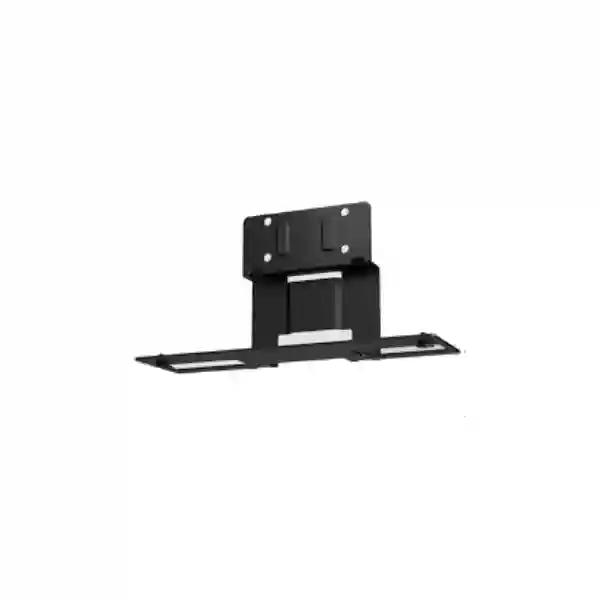
Yealink MD-AVBracket-L Tanzania
The Yealink MD-AVBracket-L is a purpose-built bracket for supported Yealink MeetingDisplay installations where a compatible front-of-room video system needs to be mounted neatly with the display. Yealink’s current documentation identifies the bracket as an optional accessory for MeetingDisplay 75 and MeetingDisplay 86 and shows it in supported configurations with MeetingBar A50 and S50-class systems. For Tanzania buyers, the practical value is not simply the metal bracket itself: it is the ability to plan a cleaner, more coherent meeting-room installation around the correct display, video bar, mounting method, cable path and room layout.
A dedicated Yealink AV mounting bracket intended for supported MeetingDisplay installations.
Yealink documentation identifies compatibility with MeetingDisplay 75 and MeetingDisplay 86.
Used in supported MeetingBar A50 and S50-related room designs to position the device with the display.
Confirm exact display, endpoint, quantity and mounting arrangement before purchase.
Yealink MD-AVBracket-L Product Overview
Meeting-room accessories are easy to underestimate because the main attention usually goes to the camera, video bar, room controller and display. In practice, the mounting method can affect sightlines, appearance, cable routing, service access and the amount of on-site work required. The MD-AVBracket-L is designed to solve a specific installation requirement inside the Yealink ecosystem: supporting compatible equipment under a MeetingDisplay 75 or 86 in an integrated room arrangement.
Yealink’s quick-start information shows the MD-AVBracket-L securing a MeetingBar A50 under a MeetingDisplay 75. The documented package includes one bracket, a quick-start guide, six 1/4-inch × 12 mm screws and a 1.5-metre USB 2.0 A-to-B cable. This should be treated as model-specific vendor information rather than a promise that every regional bundle is identical, so procurement teams should still confirm the quoted package before ordering.
For a broader room project, buyers can review FourTeck Tanzania’s business technology solutions, the technology shop and buying guidance, and the integration and lifecycle services. These pages are relevant because a bracket purchase often sits inside a larger requirement involving the display, conferencing platform, cabling, room layout and installation planning.
Direct Answer: Who Should Buy the MD-AVBracket-L?
Buyers should consider the Yealink MD-AVBracket-L when they are planning a supported Yealink MeetingDisplay 75 or 86 room and need the compatible A50/S50-class video system positioned with the display using Yealink’s intended accessory path. It is not a generic universal television bracket and should not be purchased only because the model name looks similar to another Yealink mount. Confirming the exact MeetingDisplay model and the exact conferencing endpoint before purchase is the most important compatibility step.
Verified Product Details and Package Information
| Item | Verified guidance | Buyer note |
|---|---|---|
| Product | Yealink MD-AVBracket-L | Confirm the exact model on quotation. |
| Product type | MeetingDisplay AV mounting bracket | Designed for supported Yealink room deployments, not universal use. |
| MeetingDisplay compatibility | MeetingDisplay 75 / 86 | Verify display generation and complete room bill of materials. |
| Endpoint context | MeetingBar A50 / S50-class supported configurations | Do not assume compatibility with smaller MD-AVBracket-S applications. |
| Package content shown by Yealink | Bracket ×1; quick-start guide ×1; six 1/4-inch × 12 mm screws; 1.5 m USB 2.0 A-to-B cable | Regional packaging can change; confirm supply scope before order. |
Why the Correct Bracket Matters in a Meeting Room
A conferencing room is a visual and acoustic system, not just a list of devices. The camera position should give remote participants a natural view of people at the table. The display should be at a useful viewing height. Cables should be protected and serviceable. The bar should not obstruct the screen or sit so low that the camera looks sharply upward. A purpose-built mounting approach helps keep those relationships predictable.
For procurement teams, the bracket also helps turn a vague room request into a more complete bill of materials. If the project includes a MeetingDisplay 75 or 86, a compatible Yealink video system, wall mounting or a mobile stand, the installation accessories should be reviewed at the same time. Waiting until the installer arrives to identify the correct bracket can delay commissioning even when all the expensive electronics are already on site.
FourTeck Tanzania’s contact and quotation page is the best place to send the exact display model, endpoint model, room quantity and preferred mounting method. If the room includes wider technology requirements, the FourTeck Tanzania company overview explains the integrated approach across collaboration, networking, security and workplace infrastructure.
Compatibility and Installation Planning
1. Confirm the display
Verify that the project uses a supported MeetingDisplay 75 or MeetingDisplay 86. Similar screen sizes from other vendors should not be assumed to accept the same accessory.
2. Confirm the room endpoint
Check whether the room is based on MeetingBar A50, S50-related architecture or another Yealink solution. The MD-AVBracket-L and MD-AVBracket-S serve different compatibility sets.
3. Confirm the support structure
The display may be wall mounted or used on a stand. The complete structure, screen weight, wall type, clearances and cable routes should be reviewed before installation.
4. Confirm service access
Allow enough access for cables, connectors, removal and future maintenance so the neat appearance does not make service work unnecessarily difficult.
Procurement Note
Do not order the MD-AVBracket-L based only on screen size. A 75-inch or 86-inch display from another product family is not automatically compatible. Procurement should capture the exact Yealink MeetingDisplay model, exact room-system model, quantity, mounting method and any related wall-mount or stand accessories. This reduces the risk of receiving a correct Yealink part that is still wrong for the actual room design.
Yealink MD-AVBracket-L Tanzania
For organizations sourcing the Yealink MD-AVBracket-L in Tanzania, the most useful starting point is the complete room requirement rather than the bracket in isolation. A buyer may already have a MeetingDisplay 75 or 86 and be adding a compatible A50/S50-class video system, or the bracket may be one line item in a new boardroom rollout. In either case, the quotation should identify the display, room endpoint, quantity and intended mounting arrangement so compatibility can be checked before equipment is dispatched or installation begins.
Tanzania deployments can range from a single executive room to standardized rooms across several offices. Standardization is valuable because it makes installation, user training, spares and support more predictable. If the organization uses the same display and video-system combination in multiple rooms, documenting the correct bracket, cable route, display height and camera position helps each room behave consistently. This is especially useful for corporate groups, financial institutions, professional services firms, education organizations, healthcare administration teams and project offices that depend on frequent hybrid meetings.
The bracket should be considered together with wall strength, stand selection, power outlet position, cable containment and network connectivity. A clean front-of-room appearance depends on preparation behind the display. Where the room uses cloud collaboration, network stability also matters: correct DNS, internet capacity, wireless design where applicable and secure access can affect the meeting experience even though they are not part of the bracket itself. FourTeck Tanzania can discuss the meeting-room requirement as one system instead of separating hardware, mounting and connectivity into unrelated decisions.
For a Tanzania quotation, provide the Yealink model names, display size, number of rooms, photos or drawings where available and the desired installation approach. This lets the discussion focus on confirmed compatibility, appropriate accessories and practical deployment. Buyers can also review FourTeck’s Africa IT solutions network when coordinating requirements across more than one African market.
Yealink MD-AVBracket-L Dar es Salaam
Dar es Salaam buyers often need meeting technology for head offices, regional management teams, customer-facing conference rooms, consulting practices, financial organizations, logistics businesses and expanding companies with distributed staff. In these environments, the Yealink MD-AVBracket-L is relevant when the selected front-of-room architecture combines a compatible MeetingDisplay 75/86 with MeetingBar A50 or an S50-related solution. The bracket becomes part of a professional installation where appearance, camera alignment and access to the equipment all matter.
A practical Dar es Salaam deployment begins with room measurements. The screen should be visible from the farthest seats without forcing people to look upward for long periods, while the camera should be positioned so remote participants see faces rather than a ceiling-heavy angle. Table length, seating orientation and room depth should be checked before hardware is mounted. In glass-walled offices or rooms with hard surfaces, audio reflections may also influence the overall conferencing design, even though the bracket itself has no audio function.
Cable planning is another important step. Power, network and USB connections should be routed before final mounting so cables are protected and the room stays easy to service. If a MeetingDisplay is wall mounted, the wall construction and chosen wall-mount system should be reviewed together with the accessory bracket. If a mobile or floor-standing arrangement is used, stability, movement path and connector strain should be considered. Procurement should avoid assuming that the bracket alone completes the mechanical installation.
When requesting a quote in Dar es Salaam, include the exact MeetingDisplay model, the endpoint model, room count, installation photos and whether the equipment is new or being added to an existing room. The verified FourTeck Tanzania sales enquiry page can be used to provide these details and request a compatibility-led quotation.
Yealink MD-AVBracket-L Mwanza
Organizations in Mwanza considering the Yealink MD-AVBracket-L may be planning collaboration rooms for branch management, training, project coordination, sales discussions or communication with teams in other cities and countries. The product is best understood as a mounting component within a supported Yealink MeetingDisplay deployment, not as a universal AV bracket. That distinction matters when a procurement team is building a bill of materials from several suppliers or reusing displays already installed in the room.
For an existing room, the first check is whether the display is specifically a compatible Yealink MeetingDisplay 75 or 86. The second is whether the conferencing system is one of the supported A50/S50-class combinations. If either side is different, the correct mount may be another Yealink accessory or a different installation approach entirely. Verifying these facts before shipment is less costly than discovering the mismatch during installation.
Mwanza projects can also benefit from documenting installation standards when multiple rooms or branches are involved. Record the screen height, camera/bar position, cable route, network outlet location and mounting accessory model. When future rooms are added, the same documented pattern can be reviewed rather than redesigned from memory. For support teams, this creates a clearer reference when troubleshooting or replacing components later.
A quotation request should therefore include more than quantity. Share room dimensions, endpoint and display models, mounting preference, whether a wall mount or stand is already available, and any deadline linked to an office opening or meeting-room upgrade. FourTeck Tanzania’s technology services overview is relevant for buyers who want product selection considered alongside installation, networking and lifecycle planning.
Yealink MD-AVBracket-L Arusha
Arusha businesses, NGOs, hospitality groups, education teams, professional firms and regional project offices may use hybrid meeting rooms to communicate with partners across Tanzania and internationally. When the room design uses a compatible Yealink MeetingDisplay 75 or 86 with the appropriate A50/S50-class endpoint, the MD-AVBracket-L provides the vendor-defined mounting path that helps position the conferencing device with the display.
In a hospitality or executive environment, visual finish can be especially important. A well-planned installation keeps the front wall uncluttered, protects cables and maintains a deliberate relationship between the screen and camera. The mount should be installed only after the display location is finalized, because changing screen height later may change the camera angle and cable route. If furniture will be rearranged for different meeting styles, the installer should also check whether the fixed camera position continues to provide a useful view.
For rooms used by external guests, ease of operation is as important as appearance. The bracket does not change the meeting software, but a stable, correctly mounted front-of-room system contributes to a room that feels permanent and ready rather than improvised. Buyers should still confirm platform, controller, audio coverage and content-sharing requirements separately. The mechanical accessory should be one part of a documented room standard that IT staff can support.
Arusha procurement teams should request confirmation of the exact bracket model and complete supply scope before placing an order. Include the MeetingDisplay model, video endpoint, quantity and installation context. The FourTeck Tanzania shop guidance can help structure these compatibility and accessory checks, while the contact page can be used for a project-specific quotation.
Yealink MD-AVBracket-L Dodoma
Dodoma meeting-room projects may support government administration, education, professional services, corporate branches, project teams and organizations that need reliable collaboration between locations. For a Yealink-based room, the MD-AVBracket-L should be selected only when the display and room-system combination matches Yealink’s documented compatibility. The model is intended for MeetingDisplay 75/86 configurations and is associated with supported A50/S50-class deployments.
Before procurement, confirm whether the room is new or an upgrade. A new room allows the display position, power, network points and cable containment to be designed together. An upgrade requires more careful inspection because existing brackets, wall reinforcements, conduit and furniture may constrain the new equipment. Photographs of the current installation can help identify likely issues before the installer arrives. When a display is already on the wall, clearance behind and below it should be checked for the intended accessory.
For multi-room projects, approval documentation should list every mechanical accessory. It is common for purchase orders to focus on the high-value endpoint and display while treating mounts and cables as minor extras. Yet a missing bracket can stop commissioning completely. A room-by-room bill of materials with quantities, accessory codes and installation notes makes procurement more reliable and gives the receiving team a checklist when goods arrive.
Dodoma buyers can use the verified FourTeck Tanzania contact page to request pricing and compatibility guidance. Send the exact Yealink models, room count, desired mounting method and target deployment schedule so the quotation discussion can focus on the actual project rather than a generic accessory request.
Yealink MD-AVBracket-L UAE
For UAE projects, the Yealink MD-AVBracket-L fits the same core procurement logic: confirm the supported MeetingDisplay 75/86 and the intended A50/S50-class room system before ordering. The UAE market includes a wide range of corporate boardrooms, customer briefing rooms, training centers, hospitality offices and multi-site enterprises, so accessory planning should be tied to a repeatable room standard rather than a one-off hardware list.
Large organizations often standardize meeting rooms by size or use case. A medium or large room profile might specify display size, conferencing endpoint, controller, microphones, mounting arrangement, network requirements and cable standard. The MD-AVBracket-L can be recorded in that template when it is the verified mount for the selected Yealink display and endpoint combination. This makes future rollouts faster and helps procurement compare quotations on a like-for-like basis.
Installation should still account for wall construction, screen height, viewing distance, service clearance and cable paths. In premium meeting spaces, the visual finish is especially important, but hiding every cable completely should not make maintenance impossible. Access to connectors and mounting points can reduce downtime if the room endpoint needs to be removed or replaced later. A balanced design gives both a clean appearance and a practical service path.
UAE buyers coordinating a local room project can review FourTeck UAE technology solutions and the specialist Yealink meeting-room material available on that regional site. For cross-border organizations, keeping the same documented room standard where practical can simplify training and support while still allowing country-specific logistics and supply arrangements to be confirmed separately.
Yealink MD-AVBracket-L Uganda
Uganda buyers planning a Yealink collaboration room should treat the MD-AVBracket-L as a compatibility-specific accessory. Yealink identifies it for MeetingDisplay 75 and 86 and supported A50/S50-class room configurations. This makes it relevant to organizations that want a consistent, integrated front-of-room installation rather than a video bar placed on furniture or mounted with an unrelated universal bracket.
A good procurement request states whether the bracket is for a completely new room or for equipment already owned. If the organization already has the display, provide its exact model label. If it already has the conferencing endpoint, provide that exact model as well. This simple step prevents assumptions based on product family names. It also helps identify whether additional mounting components, cables or stand accessories are required for the final arrangement.
Uganda projects may involve offices in Kampala and branches in other regions. When multiple sites use similar rooms, a standard installation drawing or photo set can help the deployment team repeat camera height, cable routing and display placement. The standard should also record network and power requirements because a neatly mounted room system still depends on reliable connectivity and power to perform consistently.
Organizations managing technology in Uganda can review FourTeck Uganda for regional IT and communication solutions. Where the procurement is being coordinated from Tanzania, include destination, quantity and project context so regional logistics can be discussed separately from technical compatibility.
Yealink MD-AVBracket-L Kampala
Kampala organizations frequently operate hybrid meetings between head offices, branches, clients and international partners. A permanent conference room benefits from hardware that is installed as a coherent system. The Yealink MD-AVBracket-L supports that goal when used with the correct MeetingDisplay 75/86 and compatible A50/S50-class endpoint, placing the conferencing device in a planned relationship to the screen.
Room geometry should drive the installation. A deep boardroom needs a camera position that keeps people at the far end useful on screen, while a short, wide room may prioritize a broader view. The bracket determines where the endpoint sits relative to the display, so the screen itself should not be mounted until the room sightlines have been considered. Lighting behind participants, reflections from windows and the location of ceiling lights can also affect the final video result.
Procurement teams should ask for a complete mounting bill rather than the bracket alone. Confirm the display mount or stand, the MD-AVBracket-L, any supplied screws and cables, and any additional cable-management materials required by the site. If several rooms are included, list each room separately to avoid mixing accessories between different display sizes or conferencing systems.
For Kampala deployments connected to a wider East African project, regional standardization can make support easier. A common room template can specify Yealink models, controller workflow, mounting method and network configuration while local teams confirm site-specific wall conditions and power. FourTeck Uganda’s regional site provides a useful contact path for communication and infrastructure requirements, while Tanzania-based procurement can coordinate its own quotation through the Tanzania contact channel.
Yealink MD-AVBracket-L Arua
For an Arua office, branch, education facility, project organization or service operation, a dedicated conferencing room can reduce reliance on improvised laptop setups when regular remote collaboration is required. If the selected solution uses a compatible Yealink MeetingDisplay 75 or 86 with the supported A50/S50-class room endpoint, the MD-AVBracket-L provides the accessory path documented by Yealink for this type of integrated installation.
Remote or branch-site projects benefit from extra preparation because an overlooked accessory can cause more disruption when replacement parts are not immediately nearby. Before shipment, verify each model and count the required brackets against the number of rooms. Review the quick-start package information, but also confirm the actual quoted bundle because supply scope can change. Include any wall mounts, stand accessories and cable-management items in the same shipment plan where possible.
The installation team should receive a simple drawing or set of instructions showing display position, bracket orientation, cable route and service clearance. This reduces the chance that a technically correct component is installed at an awkward height or with insufficient access. If local wall conditions differ from the original plan, mounting safety takes priority and the support structure should be reassessed rather than forcing the design.
Arua buyers should provide site type, display and endpoint models, room quantity and preferred installation date when requesting a quote. The goal is to turn a small accessory purchase into a complete, verified deployment plan that reduces avoidable return shipments and installation delays.
Yealink MD-AVBracket-L Mbarara
Mbarara organizations planning business collaboration rooms can use the Yealink MD-AVBracket-L where the room design specifically matches Yealink’s supported MeetingDisplay 75/86 and A50/S50-class configuration. The accessory is particularly relevant when the visual goal is a clean, integrated front-of-room system where the conferencing endpoint appears intentionally installed with the display rather than added as a separate afterthought.
The mechanical plan should be reviewed alongside user workflow. Consider where participants sit, where presenters stand, whether content is shown on one or two displays and whether the camera position is appropriate for both seated and standing users. Although the bracket itself is simple, its placement can influence the camera view and the finished appearance. This is why a room photo or basic floor plan can be useful during quotation and installation planning.
For businesses with a limited local IT team, documentation is valuable. Record the bracket part number, the display model, endpoint model and any associated mounting or cable accessories. If a future repair or room move is required, the organization can identify what was originally installed without removing hardware just to find labels. A short handover document can also include network port, power point and room controller details.
When requesting Yealink MD-AVBracket-L pricing for Mbarara, specify destination and quantity and ask for compatibility confirmation against the rest of the room system. This is more useful than comparing bracket price alone because the cost of an incorrect accessory includes delay, additional freight and installer rework.
Yealink MD-AVBracket-L Gulu
Gulu buyers may need meeting-room technology for education, healthcare administration, NGOs, regional operations, professional offices and organizations coordinating with teams in Kampala or outside Uganda. When a supported Yealink MeetingDisplay 75/86 and compatible A50/S50-class room system are selected, the MD-AVBracket-L can form part of a structured installation that keeps the endpoint aligned with the display.
The main procurement risk is assuming that all Yealink brackets are interchangeable. The MD-AVBracket-S appears in the same accessory family but serves a different set of supported devices. Therefore, the exact part number should be checked on the purchase order and receiving checklist. If the room design changes after procurement—for example, a different display size or endpoint is selected—the accessory list should be reviewed again rather than carried forward automatically.
Installation planning should consider how technicians will access connectors after the display is mounted. A cable that is easy to connect on a workbench can be difficult to reach once the screen is close to the wall. Service loops, cable labels and protected routing can make future maintenance easier. Power and network stability should also be planned because conferencing rooms depend on the wider IT environment even when the mounting hardware is correct.
For Gulu deployments, send the full list of Yealink models, room dimensions if available, number of rooms and preferred mounting method with the quotation request. Multi-site buyers can use the same documentation template across branches while still validating each wall, room and local installation condition separately.
Yealink MD-AVBracket-L Kenya
Kenya organizations looking for the Yealink MD-AVBracket-L should begin by confirming that the room uses a supported MeetingDisplay 75 or 86 and the intended A50/S50-class endpoint. This accessory-level check is particularly important in projects where conferencing equipment is procured centrally and installed across Nairobi, Mombasa or branch offices, because small differences in display or room-system models can change the required mounting kit.
For enterprise rollouts, define a standard room profile before ordering. The profile can list the display, conferencing system, bracket, controller, microphones where required, cables, network port, power outlets and preferred mounting height. When installers receive the same profile, the resulting rooms are easier to support and users encounter a more consistent meeting experience. Variations can then be documented explicitly for rooms with unusual layouts rather than emerging accidentally during installation.
The physical environment still needs inspection. Wall construction, furniture, screen viewing distance, window glare and cable routes differ from room to room. A bracket may be compatible with the equipment but the installation still needs safe structural support. If a mobile stand is used, the entire assembly should be stable and cables protected from movement. These details should be included in installation planning rather than treated as last-minute site work.
Kenya buyers can review FourTeck Kenya, which includes business communication and video conferencing among its regional technology solutions. For cross-border procurement, state the destination country and quantity clearly so technical compatibility and logistics can be handled as separate, explicit parts of the quotation.
Yealink MD-AVBracket-L Kuwait
Kuwait buyers planning Yealink meeting rooms can use the MD-AVBracket-L when the selected MeetingDisplay and room endpoint match the supported combination. The product is especially relevant to corporate conference rooms, management suites, training rooms and customer meeting areas where the display and video bar are intended to look like one coordinated front-of-room system.
Procurement should verify compatibility at model level, not by brand alone. Confirm MeetingDisplay 75 or 86, the A50/S50-class endpoint and any additional mounting hardware required for the display itself. If a consultant or AV integrator has issued drawings, the accessory should be cross-checked against those drawings before the purchase order is finalized. This avoids the common situation where the main electronics match the design but a mount or cable was selected from an older equipment list.
Kuwait meeting rooms may have premium interior finishes, so cable concealment and mounting appearance can be significant. The installer should coordinate with interior works early enough to place power, data and conduit correctly. However, aesthetics should not eliminate service access. The room system may need inspection, cable replacement or future upgrade, so removable panels and accessible connectors can preserve the quality of the finished room over its lifecycle.
For regional sourcing, buyers can visit FourTeck Kuwait, which provides local technology and Yealink pathways. Provide the complete room bill of materials when requesting a quote so the MD-AVBracket-L can be assessed within the actual deployment rather than priced as an isolated part.
Yealink MD-AVBracket-L Ghana
Ghana businesses, institutions and regional offices may use Yealink room systems to connect teams, customers and partners without relying on personal laptops for every meeting. Where the room design is based on MeetingDisplay 75/86 and the compatible A50/S50-class endpoint, the MD-AVBracket-L is the relevant vendor accessory to consider for mounting the conferencing device with the display.
A branch or multi-site deployment should focus on repeatability. Create a room standard that records the exact product codes and installation notes. This is particularly helpful when procurement, installation and support are handled by different teams. The purchasing team knows what to order, the installer knows how to position it and the support team knows what is present when a ticket is raised. The bracket may be a small part of the room, but recording it prevents confusion between similar Yealink accessories.
For sites where freight lead time is important, check every accessory before the shipment is released. Confirm bracket quantity against room quantity, inspect the planned display mount and include any approved cable-management parts. If an installation cannot be completed because one accessory is missing, the cost of a second shipment can exceed the value of the part itself. A receiving checklist should therefore include mounts and cables as seriously as the main room endpoint.
When requesting Ghana pricing, provide the exact Yealink MeetingDisplay and conferencing models plus destination, quantity and timing. If the organization operates in several African markets, FourTeck Africa can also serve as a regional reference point for broader IT infrastructure discussions.
Yealink MD-AVBracket-L Nigeria
Nigeria organizations sourcing Yealink collaboration equipment may be supporting headquarters, branch networks, project offices, training centers or executive meeting spaces. The MD-AVBracket-L should be included only when the room’s display and conferencing endpoint match Yealink’s documented compatibility for MeetingDisplay 75/86 and the relevant A50/S50-class configuration.
For large projects, build the bill of materials around room types. A standard boardroom may use one display configuration, while a training space may need a different camera or audio architecture. Do not copy the same bracket into every room type automatically. Instead, validate each room template and then multiply the quantities. This approach helps prevent accessory mismatches when different Yealink endpoints are used within the same organization.
Installation teams should check the wall, stand and cable path before unpacking every room kit. The bracket does not replace the structural support required for the display. It also does not define the ideal screen height by itself. Those decisions depend on viewing distance, furniture and room geometry. Once the display position is confirmed, the endpoint can be aligned using the supported accessory so the completed room looks deliberate and provides a practical camera perspective.
Nigeria buyers should request a quote that identifies model, quantity, destination and whether installation planning is required. Where procurement covers multiple countries, keeping a documented model list helps separate genuine regional differences from accidental variation and gives IT teams a clearer long-term support standard.
Yealink MD-AVBracket-L Seychelles
Seychelles organizations in hospitality, professional services, government administration, education and regional operations may rely heavily on video meetings to connect with teams and partners outside the islands. A permanent collaboration room can provide a more consistent experience than a portable setup. If that room uses a supported Yealink MeetingDisplay 75 or 86 with the appropriate A50/S50-class endpoint, the MD-AVBracket-L is the accessory to consider for an integrated front-of-room installation.
Because replacement shipments can take time, pre-deployment verification is particularly important. Confirm the exact model names, quantities and mounting plan before dispatch. Check whether the room uses a wall mount or stand, whether the required cables are included in the quoted package and whether any site-specific fixings or cable-management materials must be sourced locally. A complete packing and receiving checklist can reduce avoidable delays.
The installation should also consider environmental and maintenance factors. Equipment should remain accessible for inspection, and cable connections should not be placed under unnecessary strain. In hospitality or client-facing spaces, neat routing matters visually, but service access matters operationally. Documenting the room setup with photos after installation can help remote support teams understand the environment later.
For a Seychelles quotation, provide the Yealink display and endpoint models, room quantity, destination and target deployment window. Buyers managing projects across several islands or countries should also identify which rooms share the same standard. This enables the accessory list to be checked once per room type while preserving site-specific installation notes.
Related Room Components to Review Before Ordering
Confirm the exact 75-inch or 86-inch Yealink MeetingDisplay and the display mounting method.
Confirm the exact A50/S50-class endpoint and whether the selected room architecture supports this bracket.
The MD-AVBracket-L does not replace the primary structural mounting solution for the display itself.
Plan outlet positions, network connectivity and cable routes before final mounting and finishing work.
Quotation Checklist for Yealink MD-AVBracket-L
Frequently Asked Questions
What is the Yealink MD-AVBracket-L?
It is a Yealink MeetingDisplay AV mounting bracket used in supported room configurations. Yealink documentation identifies it with MeetingDisplay 75/86 and compatible A50/S50-class installations.
Is MD-AVBracket-L compatible with MeetingDisplay 55 or 65?
Yealink’s compatibility material marks the MD-AVBracket-L for MeetingDisplay 75 and 86, not for MeetingDisplay 55 or 65. Do not substitute based only on physical appearance.
What comes with the MD-AVBracket-L?
Yealink’s quick-start guide lists one bracket, one quick-start guide, six 1/4-inch × 12 mm screws and a 1.5 m USB 2.0 A-to-B cable. Confirm the actual quoted regional package before purchase.
Can I use it with any 75-inch or 86-inch display?
No assumption should be made that it is universal. The verified vendor guidance refers specifically to compatible Yealink MeetingDisplay models. Confirm the exact display model before ordering.
Is MD-AVBracket-L the same as MD-AVBracket-S?
No. Yealink lists them as separate accessories with different compatibility sets. Procurement teams should use the exact model required by the selected display and conferencing endpoint.
How do I request a Tanzania quotation?
Send the exact MeetingDisplay model, endpoint model, quantity, city, room count and mounting approach through the FourTeck Tanzania contact page. Adding room photos or drawings can help with installation planning.
Decision Recap
Choose the Yealink MD-AVBracket-L when your project specifically uses a supported Yealink MeetingDisplay 75 or 86 and the compatible A50/S50-class room architecture that calls for this larger AV bracket. Do not choose it based solely on display size or brand family. Verify the complete room bill of materials first.
For Tanzania projects, the strongest purchasing process is to combine product confirmation with room planning: exact models, mounting method, cable path, screen height, network readiness, quantity and deployment location. This turns the bracket from a last-minute accessory into a planned component of a dependable meeting room.
Consultation Panel: Build the Room Around Compatibility
If you already know that you need the Yealink MD-AVBracket-L, send the exact quantity and destination. If you are still designing the room, send the display model, conferencing platform, room dimensions and seating layout so the bracket can be checked as part of the complete solution. FourTeck Tanzania can discuss conferencing hardware together with displays, networking, installation and related infrastructure rather than treating each item as an isolated purchase.
For regional projects, the verified FourTeck network includes FourTeck UAE, FourTeck Kenya, FourTeck Uganda, FourTeck Africa and FourTeck Kuwait. These links support organizations coordinating collaboration and IT requirements across several markets.




Reviews
There are no reviews yet.