
FOURTECK TANZANIA • COMPACT BUSINESS SWITCHING
Power and connect a small business network with a clear plan
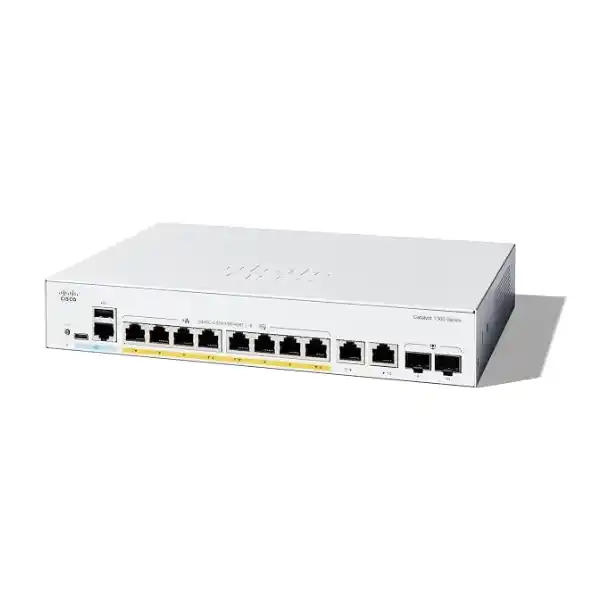
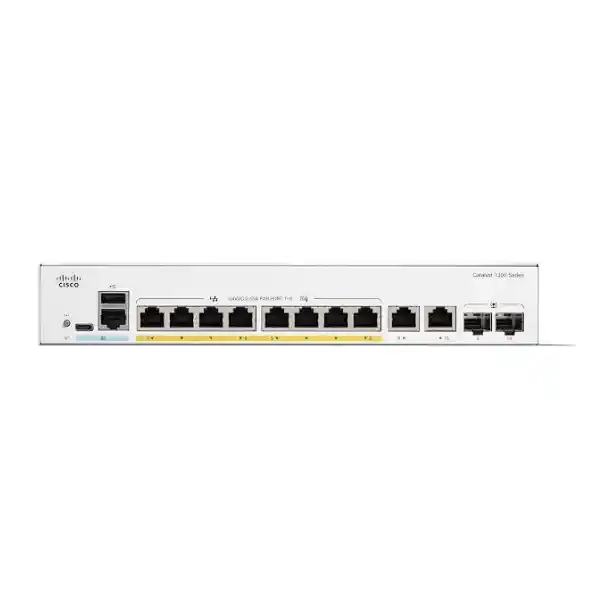
The Cisco Catalyst C1200-8FP-2G Network Switch suits organizations that need a compact Gigabit access switch for a small group of wired users, IP phones, compatible wireless access points or surveillance cameras. Its eight PoE+ access ports provide data and power over suitable Ethernet cabling, while two copper/SFP combo uplinks offer a choice of copper or supported fiber connectivity. For a Tanzania purchase, start with your endpoint list and request a quotation that checks power demand, uplink media and the accessories needed for your installation.
Key specifications at a glance
| Access connections | 8 × 10/100/1000BASE-T RJ-45 PoE+ ports |
|---|---|
| Additional connections | 2 × Gigabit copper/SFP combo ports; one medium active per combo port |
| PoE standards | IEEE 802.3af PoE and IEEE 802.3at PoE+ |
| Power limits | Up to 30W per PoE port at the switch, within a 120W aggregate budget |
| Switching capacity | 20 Gbps |
| Forwarding rate | 14.88 million packets per second with 64-byte packets |
| Cooling and power | Fanless; internal power supply |
| Installation format | Rack-mountable; confirm mounting hardware and power cord in the quotation |
| Network functions | VLANs, QoS, ACLs and IPv4/IPv6 static routing |
| Uplink speed | 1 Gigabit Ethernet; this model does not provide 10G SFP+ uplinks |
Choose it for a defined access requirement
A good purchase begins with the equipment that must connect, rather than with the largest number printed on a switch specification. This model is worth considering when a small office, reception area, meeting space or branch needs a manageable access layer and a limited number of powered devices. List each connection separately, including printers and workstations that do not use PoE. A spare Ethernet socket is useful only when the remaining power, upstream capacity and physical cabling also support the device you intend to add.
Define what successful operation looks like for the business. A reception phone may need to remain available during a short power interruption. A meeting room may need stable communication between several peripherals. A camera may need access to a recorder while being separated from staff computers. These requirements lead to different configuration and backup-power decisions even when the same switch is suitable. Share the intended workload before selecting the rest of the equipment.
Consider the next planned expansion as well as the opening-day installation. If several additional cameras or access points are already budgeted, compare a larger switch now. If the requirement is stable and compact, keeping the installation simple may be more useful than buying capacity that has no defined purpose.
Understand what the combo uplinks provide
Each combo connection pairs a copper Ethernet interface with an SFP slot, but the two physical connectors represent one logical port. You select the appropriate medium for that connection; using the fiber side does not create an extra independent copper port. The practical total is eight access ports plus two combo connections. This distinction matters when producing a patching schedule or comparing quotations that describe the unit as an eight-port switch.
A copper uplink can be convenient when the upstream firewall, router or switch is nearby and has a suitable Ethernet interface. Fiber may be appropriate when an existing structured fiber route connects the cabinet to another part of the site. The SFP choice must match supported modules, the fiber type, connector arrangement, optical wavelength and the equipment at the opposite end. Confirm the complete link before ordering an optical module.
Do not treat the SFP slots as 10G upgrade sockets. Their Gigabit role should be included in the capacity plan. If the business expects a much faster connection to servers or an aggregation switch, choose a platform with that uplink capability from the start. Also ask whether optical modules and fiber patch leads are separate quotation items.
Plan PoE from an endpoint power schedule
The most important power question is the combined demand of all connected devices. The 30W per-port ceiling does not mean eight devices can each receive 30W simultaneously. Eight allocations of that size would total 240W, which exceeds the 120W shared allowance. Count both the available powered sockets and the total power needed at the switch. Use the endpoint manufacturer’s requirements and the switch’s allocation behavior rather than assuming that an idle reading represents the maximum.
Create a schedule with one row for each proposed endpoint. Record the exact model, required PoE standard, maximum power requirement, cable route and business priority. Check whether a device changes its requirements when optional features are enabled. An access point operating in a reduced-power mode may appear to work while leaving radios or other functions restricted. A camera can behave differently when illumination or accessories become active.
Keep an operating allowance instead of designing to an exact arithmetic boundary. Cable losses, negotiated classifications and future changes need consideration. If a device requires a higher power class than this switch supports, a spare port alone will not solve the mismatch. Select an appropriate alternative power source or a different switch after checking the endpoint documentation.
Illustrative power calculation
Suppose a proposed installation reserves 10W at the switch for each of four phones and 25W for each of two access points. The planning total is (4 × 10W) + (2 × 25W) = 90W. That leaves 30W against the stated 120W budget and uses six access ports. These are example allocations, not specifications for any particular phone or access point. Replace them with verified requirements and confirm actual allocation before accepting the design.
A different plan with five endpoints each needing a 30W allocation would require 150W, so it would exceed the shared budget even though five is fewer than eight. This is why a port-count-only quotation can produce an unsuitable result. Check both constraints together and leave room for the equipment you genuinely expect to add.
Build a practical small-office port map
For an office deployment, map wall outlets to the patch panel and then to the intended switch ports. Record the desk, room or device name in a way that someone else can understand later. Include shared printers, access points, phones, management connections and any local appliance. Mark which connections require power and which carry data only. A simple port map makes it easier to review whether the switch fits before equipment arrives.
Decide how an IP phone with a computer connected behind it should be handled. That arrangement depends on the phone’s own Ethernet ports and configuration; it should not be assumed for every handset. Verify both the voice and computer data path during acceptance. Where a desk requires separate physical links, reserve both connections in the plan instead of counting one device name as one cable.
Include ordinary administrative needs such as a safe way to reach the management interface and an identifiable upstream cable. A neatly labeled uplink reduces the chance of accidental disconnection during a desk move. If every access port will be occupied immediately, consider whether a slightly larger model would avoid adding another switch after the first staffing change.
Check wireless access point fit before purchase
A powered Ethernet port can simplify placement of a compatible access point by removing the need for a nearby mains adapter. Compatibility still has two separate parts: the access point’s power requirement and its wired data requirement. Verify the exact AP model, operating mode and maximum demand. Do not infer suitability from the wireless generation or from a general statement that an AP supports PoE.
This switch provides Gigabit access connectivity. An AP with a faster Ethernet interface may negotiate a lower speed, but the resulting link must be acceptable for the intended workload and supported by the endpoint. High client density, local transfers and multiple active radios can change the capacity requirement. Wireless headline rates should not be used as a direct prediction of traffic through one wired switch port.
Plan SSID-to-VLAN mapping with the upstream network and test both staff and guest access. A working radio connection does not prove that isolation or addressing is correct. For a broader discussion of AP selection, review FourTeck Tanzania’s Cisco wireless access point guidance, then verify the specific AP against this switch’s interface and power limits.
Separate camera connectivity from recording design
For surveillance projects, this model can be considered for compatible powered cameras where the number of links and combined power demand fit. The switch carries traffic; camera management, recording storage, retention and analytics belong elsewhere in the solution. A switch quotation should therefore be checked alongside the camera and recorder schedules. Include cameras that will be added later only if their requirements have been defined.
Identify where video travels during recording and live viewing. If a recorder sits on another switch, the uplink may carry several camera streams at once. If staff also view recordings across that path, the busy-period workload can be larger than the camera stream total alone. Estimate the intended traffic and test with the configured resolution, frame rate and recording profile rather than a generic camera count.
Review physical exposure along every cable route. A switch intended for a protected business environment should not be assumed suitable for an outdoor enclosure, corrosive conditions or a hot roof space. Outdoor runs and links between buildings need their own cabling and protection assessment. Keep camera networks documented and restrict access according to the organization’s security policy.
Support voice with coordinated network settings
For IP telephony, PoE helps consolidate power delivery while VLAN and QoS functions provide tools for organizing traffic. Those tools must be aligned with the phones, call platform and upstream network. A voice VLAN does not establish the entire calling service, and local packet priority does not control every internet or provider link. Confirm the actual call path before assigning responsibility for a voice-quality problem.
Test a handset from startup through registration, an internal call and an external call where the calling service is available. Include transfer, hold and any business-critical function that the organization uses. If a computer shares the phone’s cable, test its connectivity at the same time. Document the expected VLAN behavior so that a later handset replacement does not become a trial-and-error configuration exercise.
Size backup power around the complete service path. Keeping the switch and handset powered will not preserve external calling if the firewall, internet terminal or calling platform loses power. Decide which equipment must remain active together and test the intended outage scenario. Include the business owner in defining an acceptable interruption rather than assuming that every desk has the same continuity requirement.
Use VLANs as part of a complete separation plan
VLAN support allows different traffic groups to share the switching infrastructure while remaining separate at Layer 2. A small site might define staff, voice, cameras, guests and management as distinct groups, but the right number depends on the actual network. Start with the communications that each group needs. Then decide where routing and policy enforcement should occur and who will administer those rules.
An access port and a tagged uplink have different jobs. Record the expected untagged and tagged traffic on every connection before configuring them. A mismatch between the switch and upstream equipment can produce symptoms that look like a faulty endpoint: no address, access to the wrong subnet or only partial connectivity. Check both ends of a link when troubleshooting.
Separation also needs verification. A guest should reach the services intended for guests while being unable to reach restricted business systems. A camera should reach the recorder and any approved supporting services. A management workstation should reach administration interfaces only through the approved path. Use these plain-language outcomes to create acceptance checks that a business representative can understand.
Keep static routing and firewall roles distinct
The platform supports IPv4 and IPv6 static routing, which can be useful when a small, deliberately designed network needs defined paths between subnets. Whether routing should happen on this switch depends on security policy, topology and operational ownership. A feature being available does not mean it should be enabled by default. In some installations, sending inter-VLAN traffic through the firewall provides a clearer place to enforce and inspect policy.
Write down the intended gateway for every subnet and the return path for traffic. A new route can create an unexpected path around a control point or leave replies unable to return. Include DHCP, DNS and any application dependency in the design review. These supporting services often determine whether an otherwise correct network feels usable to staff.
If the requirement includes advanced routing, large-scale policy or an enterprise campus design, compare the relevant platform and software capabilities directly. The Catalyst name alone does not establish equivalence across product families. Buyers considering a different scale of access network can review the Tanzania Catalyst 9200 planning page as a separate platform discussion, then request a model-specific comparison.
Size upstream traffic around real applications
The published 20 Gbps switching capacity and 14.88 Mpps forwarding figure describe switch performance under specified conditions. They do not turn a single Gigabit uplink into a 20 Gbps connection. Separate the capacity of the switching fabric from the speed and workload of each physical link when comparing products. A local file transfer, camera stream and internet session may use different paths through the installation.
List the applications that overlap during the busiest period. Include backups, large uploads, software distribution, live video and cloud services. Ask whether traffic stays between local ports or leaves through an uplink. A quiet daytime measurement can miss a scheduled overnight backup, while an average reading can hide short periods that affect interactive work. Base sizing on meaningful peaks and the business’s tolerance for delay.
When multiple uplinks are proposed, confirm the topology and configuration supported at both ends. Simply connecting extra cables is not a capacity plan and can create a network loop. Link aggregation, where appropriately designed, also does not mean that every individual traffic flow can use the sum of all member speeds. Agree on the intended outcome before adding physical connections.
Manage the switch with clear ownership
The Catalyst 1200 family offers a web-based management interface and Cisco Business management options. Choose an administration approach that fits the team responsible for the network. For a small installation, the most useful outcome is often a reachable, documented interface with a known owner, a current configuration backup and a straightforward way to identify connected devices. Additional management components should have a defined purpose.
Assign a recognizable hostname and record the switch’s physical location, management address and support owner. Keep credentials in the organization’s approved password system. Decide how administrative access will be recovered if the primary administrator is absent. Shared knowledge should not depend on a handwritten password attached to the cabinet or on one employee’s personal account.
Before purchase, check any dashboard deployment, discovery, account or software requirements that matter to your chosen approach. Do not assume that a switch will automatically join an unrelated Cisco management service. Document which interface the organization will use day to day and which recovery method is available when normal network access is interrupted.
Protect administration and configuration backups
Restrict management access to the people and networks that need it. Prefer encrypted administration methods and review any unused management services. Access profiles, authentication and certificate settings should be configured with the current software documentation and the organization’s policy in mind. A small switch can still provide a valuable entry point into a business network if its administration interface is broadly exposed.
Keep a recovery path available when changing access restrictions. A rule intended to protect the management interface can also lock out the administrator if the source network or permitted method is entered incorrectly. Make changes in a maintenance window where appropriate and verify access from the approved workstation before ending the session. Record the reason for a rule so it can be reviewed later.
Treat exported configuration files as sensitive. They can reveal addressing, device names, network structure and authentication information. Store backups in a controlled location and apply an appropriate retention policy. When asking for technical assistance, share only the necessary information through an approved channel. Establish responsibility for removing obsolete access when an employee, contractor or service arrangement changes.
Check placement, ventilation and power continuity
The fanless design makes this model worth considering where fan noise would be unwelcome, while its internal power supply avoids a separate external power brick. Those attributes do not remove the need to check installation conditions. Measure the available cabinet space, plan cable bends and ensure that ventilation openings remain clear. Confirm the exact mounting arrangement and included hardware before preparing the rack.
Use the current installation requirements for temperature, clearances and electrical connection. Consider the enclosure’s conditions when the room is occupied, when equipment is under load and when any building cooling is reduced. A neat cabinet can still become unsuitable if it traps heat. Avoid placing unrelated equipment on the switch or using it as a shelf.
For continuity, select backup power using the full connected load and required runtime. The PoE output allowance is not the same as the total AC input needed by the installation. Include switch overhead and any router, firewall, optical equipment or recorder that must remain operational. Confirm the relevant figures with the proposed equipment and UPS specifications rather than estimating runtime from the PoE budget alone.
Commission the network in controlled steps
Begin with an approved port map, addressing plan and list of intended services. Check the received model against the quotation before installing it. Record the serial number in the asset register and confirm accessories separately. Prepare an appropriate firmware plan by reviewing the release documentation for the actual device; do not schedule an upgrade solely because a newer version number exists.
Configure the management connection and verify access before moving production endpoints. Add VLANs and upstream settings in a sequence that preserves a recovery path. Connect a representative device from each planned group and check its addressing, expected services and separation. Keep the original network arrangement documented until the new configuration has passed the agreed acceptance checks.
After configuration changes, ensure that the intended settings are saved for restart according to the device’s procedures. Back up the accepted configuration and record the software version. Test a controlled restart where the maintenance plan permits it, then confirm that the management path and essential endpoints return as expected. A successful configuration session is only part of a reliable handover.
Monitor symptoms before replacing hardware
When an endpoint is unavailable, separate power, physical link, addressing and application behavior. Check whether the port reports a link, whether power is allocated and whether the endpoint has an appropriate address. Then test the service it is expected to use. Replacing a switch before identifying which layer failed can leave the original problem in place.
Use port statistics and available PoE information to establish a baseline after commissioning. Repeated link changes, interface errors or denied power can guide investigation, but each symptom needs context. Compare the affected cable, endpoint and configuration with a known working connection. Make one controlled change at a time and record the result so that a temporary improvement is not mistaken for a confirmed diagnosis.
Keep logs and operational notes with the asset record. An incident that follows a scheduled restart, a power event or a recent configuration change may be easier to explain when timestamps are consistent. Periodically review who receives alerts and who can act on them. Monitoring provides value when an identified person owns the next step.
Decide when another switch is a better fit
Compare alternatives against a written requirement. If the combined PoE allowance is too small, choose a model with enough shared power rather than hoping endpoints will remain below their specified demand. If the access-port count is too low, compare a larger unit and its cabinet implications. If uplink speed is the constraint, select suitable faster interfaces instead of treating fiber alone as a speed upgrade.
The C1200-8P-E-2G is another eight-port PoE+ option in the family, but Cisco lists a smaller 67W power budget. The C1200-16P-2G provides more access ports with a listed 120W PoE allowance. These examples show why a larger port count does not automatically mean a larger power budget. Verify each alternative’s complete specifications before making a substitution.
Escalate requirements such as specialized redundancy, enterprise management integration or more demanding routing into a platform review. Record which functions are essential and which are preferences. This prevents a procurement comparison from becoming a list of unrelated feature counts and makes the reason for the final selection easier to explain to finance and operations.
Prepare a complete Tanzania quotation request
Request the exact Cisco model and describe the site requirement in practical terms. Include the endpoint inventory, intended uplink medium, available cabinet space and expected expansion. Ask for separate confirmation of the switch, optical modules if needed, patch leads, mounting items and the applicable power cord. A clear bill of materials helps avoid comparing a bare chassis price with a more complete installation package.
Ask for current commercial details in the quotation, including price, taxes where applicable, lead time, stock position and the terms relevant to the offered unit. These details can change and should be tied to the actual offer. Any delivery or installation scope should be stated explicitly for the intended site. Do not infer it from a general product page.
Include acceptance responsibilities: who supplies the VLAN plan, who configures upstream equipment, who labels cables and who signs off testing. If an existing network is being modified, provide its current topology and planned maintenance window. The goal is a purchase that can be installed and supported with clear responsibilities, rather than a box whose wider requirements are discovered after delivery.
Agree on a useful handover record
Request a concise handover that another administrator can use. It should identify the switch, physical location, management method, upstream connection and port assignments. Include the approved VLAN plan and a reference to where the configuration backup is stored. Keep passwords and other secrets in the proper credential system, with the document describing how authorized staff obtain access.
Attach the results of meaningful acceptance checks. These might include a representative phone call, staff and guest wireless behavior, camera-to-recorder access and a controlled power-restoration test. Select checks from the business requirement rather than running a long list of unrelated features. Where a result depends on another system, name that dependency and the person responsible for it.
Finally, define how changes will be recorded. A new access point, moved camera or changed uplink can alter both power and traffic assumptions. Updating the port map and endpoint schedule after each material change keeps the original design useful. A modest amount of disciplined documentation can save considerable time when the network needs attention during a busy working day.
Buyer questions answered
Can all eight ports supply 30W at the same time?
No. Each powered port supports up to 30W at the switch, but all powered devices share the 120W total. Eight 30W allocations would require 240W. Build the endpoint schedule from verified power requirements and allow room for changes. A device’s consumption at one moment does not necessarily represent the power the switch must reserve for it.
Are the copper and fiber uplink connectors separate ports?
Each combo pair provides one connection using either its copper interface or its SFP interface. The two pairs add two logical connections to the eight access ports. Choose the medium for each uplink in the design and confirm the supported optical module and opposite-end interface if using fiber.
Does this model provide 10 Gigabit Ethernet?
No. This model uses Gigabit Ethernet access and combo uplink connections. An SFP slot does not automatically indicate 10G capability. Where the intended workload requires faster uplinks or faster access ports, specify those speeds explicitly and compare an appropriate alternative before buying.
Will it power any IP camera, phone or access point?
Compatibility depends on the exact endpoint’s PoE standard, power demand and network requirements. Verify the device model and intended operating mode, then check both the per-port limit and aggregate budget. Equipment requiring a different power standard, passive injection arrangement or higher power must be assessed separately.
Can it connect to a firewall or existing managed switch?
It can be considered where interface speeds, cabling and network configuration match. Define which device handles gateways, DHCP and security policy, and align any tagged VLANs across the link. Test a representative endpoint from every intended traffic group instead of assuming that a physical link light proves the complete network is correct.
Is it suitable for a meeting room?
It may fit a room with compatible Gigabit endpoints and a power requirement within the stated limits. For specialized audio or video systems, follow the endpoint vendor’s deployment guidance for multicast, QoS and energy-saving behavior. Cisco’s collaboration guidance calls for specific settings in those environments; an ordinary office configuration should not be assumed sufficient for every media system.
Is it a router, wireless controller or camera recorder?
Plan the broader solution around the role of each device. Static routing capabilities do not establish a complete internet security service. Wireless management and video recording have their own platform, capacity and compatibility requirements. Include those systems in the design so that the switch’s connectivity role is clearly defined.
What should be confirmed before requesting a price?
Provide the exact model name, number and type of endpoints, verified PoE requirements, uplink medium and installation conditions. Ask which accessories are included and which are separate. Confirm the current commercial offer, applicable support arrangements and any implementation scope in writing. This makes the quotation easier to assess against a real deployment requirement.
How should a replacement installation be planned?
Record the existing port assignments, uplinks, VLANs, gateway roles and critical services before disconnecting equipment. Establish a rollback arrangement and an appropriate maintenance window. Recreate and verify the required behavior on the replacement rather than assuming that a previous switch’s configuration can be transferred unchanged.
Request a Cisco switch quotation for your Tanzania project
Share your endpoint list, required PoE allocations and copper or fiber uplink preference with FourTeck Tanzania. Request the C1200-8FP-2G by its exact model name and ask for confirmation of the complete bill of materials, current commercial terms and any required configuration scope. A requirements-based quotation helps establish whether this compact switch fits your installation or whether a different power budget, port count or uplink speed would serve it better.
Next step: prepare the device and power schedule, then request a model-specific quotation.




Reviews
There are no reviews yet.