
FOURTECK TANZANIA · COMPACT LAN SWITCHING
Cisco Catalyst C1200-8T-D Network Switch
Build a small wired work area around a clearly defined connection plan. This desktop switch is a candidate when you need managed copper connectivity, a quiet enclosure and a limited number of ports. Check endpoint power and the upstream connection before ordering.
Next step: Request a quotation with your equipment list, quantity and preferred power arrangement.
A good fit to assess
A small copper LAN with independently powered endpoints, a suitable upstream connection and an administrator responsible for configuration. Count all cables, including the uplink, before choosing the port density.
Choose another model when needed
Specify a different switch if you need PoE power for endpoints, direct fiber uplinks or more physical connections. Those requirements change the hardware choice and should be included in the quotation.
Choose a compact managed switch for a small wired network
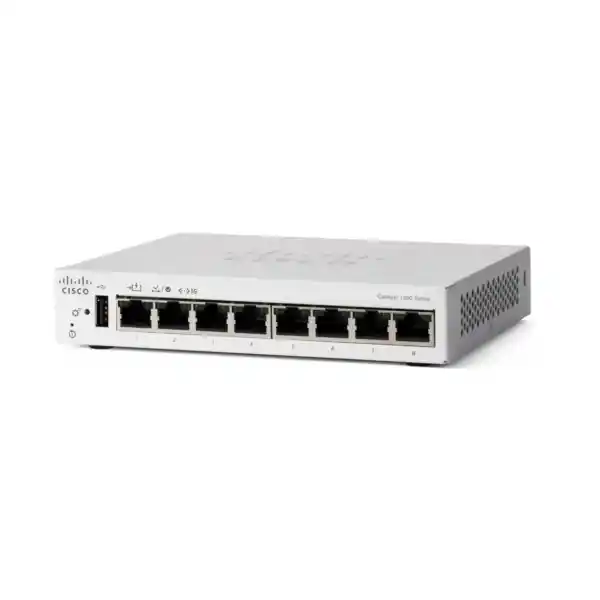
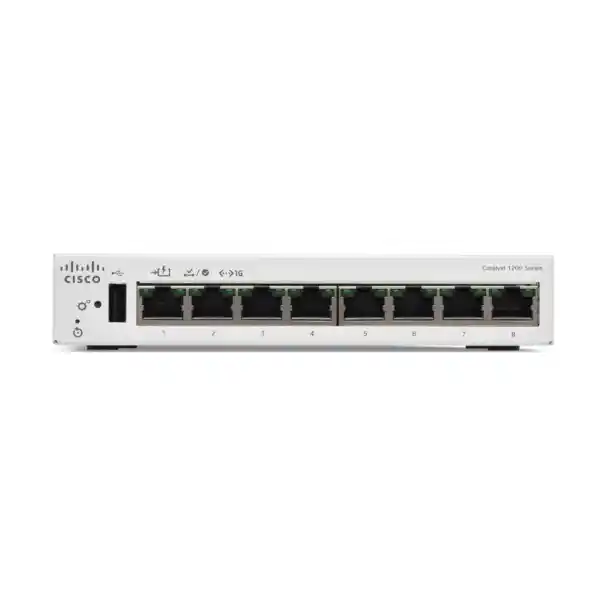
The Cisco Catalyst C1200-8T-D Network Switch suits a small office or work area that needs managed Ethernet connections without a full-size access switch. It combines eight Gigabit copper ports with a fanless desktop enclosure, making it a practical candidate for connecting computers, printers and other independently powered network equipment. For Tanzania buyers, the first decision is whether this compact data-switching role matches the intended installation.
Its most important buying distinction concerns power. Port 1 can receive standards-based PoE power from compatible upstream equipment, but the switch does not supply PoE power to phones, cameras or access points. A project that needs to power those endpoints should consider a PoE-output model instead. Likewise, a project needing direct fiber connectivity requires a different port arrangement.
Request a quotation from FourTeck Tanzania with the exact model, quantity, endpoint list and upstream connection details. Identify whether the switch will use its external power adapter or a compatible PoE source. These details help establish a useful requirement before ordering hardware, accessories or implementation work.
The model at a glance
| Item | C1200-8T-D |
|---|---|
| Access ports | 8 × 10/100/1000 Mbps RJ-45 |
| Dedicated SFP / SFP+ slots | None |
| Switching capacity | 16 Gbps |
| Forwarding rate | 11.90 Mpps at 64-byte packets |
| Power input | External AC adapter or 802.3af PoE on port 1 |
| PoE output | Not supported |
| Cooling and format | Fanless desktop |
| Dimensions and weight | 160 × 128 × 30 mm; 0.54 kg |
| Operating environment | 0–50°C; 10–90% RH, noncondensing |
The published operating range is 0–50°C, with 10–90% relative humidity under noncondensing conditions. Its external AC power arrangement accepts 100–240 V at 50–60 Hz; alternatively, port 1 supports an IEEE 802.3af PoE input. Check the supplied adapter and plug arrangement for the exact quotation.
These figures describe the hardware, not a promise about application speed or service continuity. Performance still depends on the upstream connection, endpoint capabilities and network design. Installation conditions also matter: a small enclosure should remain accessible, ventilated and protected from spills or accidental cable removal.
Plan the eight ports around the actual connection list
Start with a simple inventory of every cable that will terminate at the switch. Include desktop computers, printers, storage equipment, meeting-room devices and the connection back to the router or main LAN. Count physical connections rather than employees, because a shared printer or separate appliance can occupy a port without adding a user.
One practical example is five computers, one printer and one upstream connection. That arrangement uses seven ports and leaves one spare. Adding a second printer then consumes the remaining capacity. This is a planning example, not a recommended configuration for every office; the useful point is to include the upstream cable before deciding whether eight ports are enough.
Where a phone provides a supported Ethernet pass-through connection for a computer, the physical count may differ. Confirm the phone’s capabilities and power arrangement before relying on that approach. Reserve capacity according to planned equipment changes, and avoid designing a new installation that requires an additional small switch as soon as the next device arrives.
Ask for a larger model when the connection list already approaches the limit. A clear port schedule can be more useful than a broad request for a small business switch.
Understand PoE input before ordering
PoE input and PoE output serve different purposes. Input allows the switch itself to receive electrical power through an Ethernet cable. Output allows a switch to supply power to an attached device. This model offers the former on port 1; it is not a PoE distribution switch for an endpoint estate.
If an existing upstream switch will provide power, identify that equipment and the intended port in the project requirement. Confirm standards compatibility, available power and the cabling path with the installer. A normal data-only router port does not become a power source simply because it has an RJ-45 connector.
Consider what happens when the upstream equipment loses power or is taken out of service. A remote switch receiving its power from that equipment shares part of the same dependency. An upstream UPS may help support the design, but the required runtime and all connected loads need their own assessment.
The external adapter provides another installation option. Decide which power arrangement will be used before locating the switch, then label the connection clearly. Do not assume a powered uplink lets this unit pass power onward to other ports.
Copper uplinks and realistic bandwidth expectations
The upstream network connection uses one of the eight copper ports. There is no separate fiber uplink socket to add to the port count. A fiber module cannot be inserted into an RJ-45 port, and a model elsewhere in the Catalyst 1200 family having optical interfaces does not give this model the same capability.
Think about the traffic that crosses the upstream connection. Several users accessing a remote file server, internet services or a shared storage system may depend on the same link. The switch’s aggregate switching figure should not be interpreted as the speed available through a single cable.
A useful assessment separates local traffic from upstream traffic. Devices exchanging information within the work area have a different path from users reaching a server elsewhere. Ask which applications are busiest, where their servers sit and when transfers overlap. This helps explain whether the proposed topology is suitable without promising a particular download rate.
Choose a different model if the requirement includes optical uplinks or a faster individual uplink. For a short copper connection to existing Gigabit infrastructure, confirm the cable route, termination quality and available upstream port before approving the installation.
Use VLANs to organize access deliberately
VLAN management lets an administrator assign ports and handle tagged traffic according to the network’s design. This can help organize staff equipment, shared devices and other groups when the router, firewall and connected infrastructure are configured consistently. The switch must participate in an agreed design rather than create isolated settings that the upstream network does not understand.
For example, a small work area may need staff devices on one network and a separate category of equipment on another. Record which ports belong to each group and which VLANs must cross the uplink. Treat any example VLAN numbers as site design choices, not settings to copy from an unrelated installation.
A VLAN alone does not define every access permission. Decide where communication between networks is allowed and which device enforces that decision. Confirm access to necessary services, such as printing and name resolution, without opening unnecessary paths.
Before changing VLAN membership remotely, preserve a working management path. Test the intended configuration with representative devices, record the result and save the approved settings. The benefit comes from a consistent end-to-end arrangement, supported by clear port labels and an accurate network record.
Match routing to the security policy
The platform includes static routing capabilities, which can be relevant when a small LAN needs defined paths between networks. The purchasing decision should still begin with the desired traffic policy. Identify which networks must communicate, which must stay separated and where those decisions should be enforced.
If the firewall is intended to inspect communication between groups, confirm that the design continues to send that traffic through the firewall. Moving a gateway to a switch without reviewing the resulting path can change where controls apply. A hardware feature is useful only when its role is understood by the team maintaining the site.
Prepare an addressing plan that identifies subnets, gateways and any required return paths. Keep the configuration proportionate to the network. A simple access-layer role may be easier to operate than placing additional routing responsibilities on a small work-area switch.
For procurement, state whether the requirement is ordinary switched access or an explicitly designed routing function. If a specific protocol, scale or integration is mandatory, ask for confirmation against the intended software release before choosing this model. Do not assume that every feature associated with larger Catalyst platforms is available here.
Prioritize sensitive traffic where it matters
Quality of Service can prioritize selected traffic when links become congested. Cisco’s administration guide describes basic and advanced QoS modes, traffic classification and queue controls. For a buyer, the practical question is which applications need preferential treatment and where congestion actually occurs.
Voice calls and interactive meetings often have different needs from a background file transfer. Decide how such traffic will be identified, whether existing markings are trusted and how upstream equipment will handle the same classes. A policy applied only to one small part of the path may not produce the intended outcome.
Evaluate changes under representative load. A useful check combines an ordinary call or meeting with the transfers that normally happen during a busy period. Record the conditions and observed behavior rather than treating an idle-network test as proof of performance during peak demand.
QoS cannot create additional link capacity or repair an unreliable external connection. If congestion is persistent, review bandwidth, server behavior and the wider topology as well. Specify the application requirement when requesting configuration work, and avoid an undefined request to prioritize all business traffic equally.
Keep switch administration under control
The switch provides a browser-based management interface, with CLI management also available. Select an administration method that the responsible IT team can maintain consistently. Ease of initial access matters, but ownership, credentials and change control determine whether the installation remains manageable after handover.
Use an approved management address and record how authorized administrators reach it. Prefer protected management methods, restrict access from ordinary user networks where appropriate and avoid exposing the management interface directly to the public internet. Remote support should use the organization’s established secure access arrangement.
Name the device according to its location or role and keep a record of connected equipment. When several small switches are deployed across an organization, consistent names and port descriptions make troubleshooting easier than relying on visual identification alone.
Treat configuration changes as operational work. Capture the previous settings, identify the expected result and retain a recovery path before applying a change that could interrupt access. Ask for a handover that includes management ownership and configuration records, rather than accepting a successful link light as the whole completion criterion.
Apply access controls according to endpoint needs
Cisco documents port security, 802.1X authentication and access-control features for this platform. These provide options for controlling access, but they require appropriate configuration and supporting infrastructure. They should be selected according to the devices and people using the network.
Start by distinguishing managed staff computers from printers, shared appliances and temporary equipment. An authentication approach suitable for a managed computer may need a different treatment for a device that lacks the same client capabilities. Identify exceptions before enforcement so that necessary business equipment remains usable.
For port-security planning, consider legitimate device changes. Replacing a printer, moving a workstation or connecting equipment through a supported intermediary can affect what the switch observes. Document how authorized changes are handled so that routine maintenance does not become an unexplained outage.
The switch also needs physical protection. A desktop position is convenient, but unattended access to patch leads can undermine the intended arrangement. Place equipment where authorized staff can reach it for maintenance while reducing accidental or unauthorized changes. Effective control combines configuration, endpoint management and practical installation choices.
Test access rules against real business tasks
Access-control lists can permit or restrict selected traffic, but a rule set should reflect a written requirement. Begin with ordinary tasks: users need to reach applications, printers need to receive jobs, and administrators need an approved maintenance path. Then identify the paths that should be denied.
Use a small test matrix when commissioning the network. For each device group, list the destination, required service and expected result. Include allowed and blocked examples. This makes the acceptance check more useful than a general statement that the network is secure.
Remember supporting services. An application may depend on addressing, name resolution, time synchronization or another system outside its main server. A narrow test that checks only one connection can miss these dependencies.
Keep rules understandable to the next administrator. Describe why a rule exists and review whether an old exception is still necessary after equipment changes. If the organization already enforces policy centrally, decide which switch-level controls add value and which would duplicate responsibilities without a clear operational benefit.
Prevent accidental loops and unplanned connections
Spanning Tree Protocol helps control Layer 2 loops by placing selected links into a standby state when the topology requires it. This matters even in a small network: an extra cable between switches can create a second path that was never part of the design.
Plan the uplink clearly and label both ends. If there is a genuine requirement for redundant paths, have the responsible engineer design and test that behavior. Adding another cable without reviewing the topology is not a substitute for a redundancy plan.
An installer should confirm how the switch joins the existing network and which equipment is expected to control spanning-tree decisions. Endpoint-facing ports and connections to other switches have different roles, so their configuration should reflect the intended use.
Include a simple connection diagram in the handover and keep spare patch leads organized. When someone needs an additional connection later, the approved path should be obvious. This reduces the temptation to connect equipment arbitrarily and helps the support team distinguish a planned change from an unexpected topology event.
Place the desktop unit for access and cooling
A fanless design removes the need for a cooling fan inside this unit, but it still needs suitable installation conditions. Choose a stable indoor position with clear ventilation and room to route cables without pulling on the connectors. Leave sufficient access to identify ports and reach the power connection safely.
Consider how the space is used throughout the day. A switch placed behind office equipment may become covered by paperwork or pushed against a wall. A unit beneath a desk may be exposed to cleaning activities or accidental disconnection. The best position balances convenience with protection and maintainability.
Assess the temperature at the actual equipment position, especially inside furniture or an enclosed cabinet. Room temperature measured elsewhere may not represent the air around the switch and adapter. Keep liquids, excessive dust and sources of heat away from the installation.
If the project requires a conventional rack installation, confirm an appropriate mounting arrangement or choose a model designed for that role. Do not assume that accessories for a different eight-port Catalyst model fit this desktop enclosure. Ask for the physical installation approach to be identified in the quotation.
Prepare cabling and power as part of the project
Check existing copper cabling before treating a switch replacement as the solution to every connectivity issue. Damaged patch leads, poor terminations and incorrectly documented outlets can produce symptoms that appear to be equipment faults. Label the wall outlet, patch lead and switch port consistently wherever practical.
Cisco’s installation guidance calls for Category 5e or better cabling for these Gigabit connections. Assess the full channel, including patch panels and leads, rather than checking only the printed category on a single cable. For a PoE-powered installation, the power path should be reviewed together with the data path.
Identify the equipment that needs to keep operating during a power interruption. Protecting only the work-area switch may not help if the upstream router, main switch or required server loses power. Any UPS proposal should consider the actual connected load, required runtime and maintenance arrangements.
For Tanzania procurement, ask for the adapter, plug or cord arrangement to be confirmed for the exact supplied unit. A broad AC-input range does not establish the contents of a particular shipment. Include any required power accessories explicitly so that installation does not depend on an assumption about the box.
Commission the switch before ordinary use
Prepare the switch with an authorized administrator before moving all production equipment onto it. Record the hardware identity and software version, establish management access and apply the approved network settings. Keep an independent copy of the intended configuration and identify who will maintain it.
Connect representative devices first. Verify that a workstation receives the expected network settings, reaches required applications and prints successfully where relevant. If the installation includes separate network groups, check their permitted communication paths and confirm that unwanted paths remain blocked.
Test the upstream connection and any PoE-input arrangement as part of commissioning. Confirm that the source equipment and cable match the design. A short bench test is useful, but acceptance should also cover the final installation position and actual cabling.
Agree on the completion criteria before cutover. They might include application access, documented port assignments, a saved configuration, administrative handover and a successful recovery check during an approved maintenance window. These checks turn a hardware delivery into a usable installation without promising a particular service outcome.
Monitor changes rather than waiting for a complete outage
The management interface provides status and statistics that can help an administrator investigate the network. Use a baseline after commissioning so later observations have context. Record the expected link status, connected devices and normal operating pattern for the work area.
If a user reports slow access, identify whether the problem affects one endpoint, all devices on this switch or users elsewhere as well. Check the physical connection and negotiated link before changing unrelated configuration. A repeatable description of the symptom is more useful than a broad complaint that the network is slow.
Compare busy periods with the baseline and retain the details of recent changes. A newly added storage task, a replacement endpoint or a moved cable can explain behavior that initially looks like a switch fault. Where a monitoring system is used, define who reviews alerts and what response is expected.
Keep monitoring proportionate to the site. A small office may need a simple documented review, while a distributed estate may need centralized visibility. The important procurement question is whether the operating model is supported by staff, access and records after deployment.
Keep configurations and maintenance records usable
A small switch still needs an owner. Record the team responsible for software review, backups and approved changes, along with the process for obtaining authorized access. Store credentials using the organization’s approved method rather than including them in an openly shared installation document.
Maintain a configuration copy after commissioning and after material changes. Give the record a clear date, device identity and brief description of its purpose. A file that cannot be matched to a particular switch or installation is much less useful during recovery.
Review software changes through the current Cisco documentation for the intended model and release. Plan an appropriate maintenance window, capture the existing state and identify the recovery approach before proceeding. Avoid making a production upgrade solely because a different site is using a newer version.
For several branches, standardize the parts that should be consistent while retaining site-specific addressing and port assignments. This makes a replacement or handover easier without encouraging blind duplication. Include configuration ownership and maintenance expectations when comparing project proposals, because these responsibilities continue beyond hardware installation.
Where this switch fits in everyday deployments
A small professional office can use a compact managed switch to organize a limited set of wired workstations and shared equipment. The main sizing checks are the upstream connection, spare ports and whether any attached device requires power from the network.
A reception or administration area may benefit from a quiet desktop unit where a full equipment rack is impractical. Consider physical access carefully, especially when shared printers or customer-facing equipment sit nearby. Keep the switch and its patch leads away from casual handling.
A meeting or training area may need several wired connections for fixed equipment. Count the actual devices and consider whether portable equipment will need temporary ports. If a wireless access point is involved, define its separate power source and required uplink speed before including it in the design.
These are examples of possible roles, not assurances that every installation is suitable. A site with significant growth, mandatory fiber links or an estate of PoE-powered endpoints should be sized around those requirements. The compact model is most useful when its connection and power limits align with the actual work area.
Compare alternatives by the requirement that changes
Choose by the function you need rather than by the similarity of model names. Within a switching family, port count, uplink interfaces, power delivery and enclosure design can change substantially. An eight-port model with extra uplinks is a different physical and network proposition from this desktop unit.
If the missing requirement is endpoint power, compare a PoE-output model and calculate the total demand of the proposed devices. If the missing requirement is fiber, compare models with the required optical interfaces and confirm suitable transceivers. If the issue is growth, evaluate a larger port count before adding multiple small switches.
For a broader access-network project, FourTeck Tanzania’s verified Catalyst 9200 planning guide provides a separate starting point for that product family. The hardware, software and operating model require their own assessment; the product names should not be treated as interchangeable.
Compare the complete proposal: hardware, accessories, installation, configuration and the support arrangement being offered. A lower unit price is difficult to assess when one quotation includes necessary work and another leaves it unspecified.
Prepare a clear Tanzania quotation request
Send FourTeck Tanzania a requirement that includes the exact model name, quantity and intended role. Add the endpoint list, current upstream equipment and preferred power arrangement. Explain whether this is a new work area, an expansion or a replacement so the proposal can address the actual starting point.
Provide the site location for quotation planning without assuming a particular delivery or service commitment. State the desired schedule and any access restrictions. Ask for availability, lead time, delivery charges and installation scope to be confirmed in the written offer.
Request clear commercial details, including the applicable currency, tax treatment and payment terms. If a quotation is issued in Tanzanian shillings, use that confirmed figure for comparison rather than applying an informal conversion to a price from another market.
Confirm exactly what is included with the hardware, and ask how warranty and support will be handled for the supplied offer. Keep procurement records, serial information and acceptance documents together. These steps help the buyer compare complete offers without assuming stock, authorization status, delivery dates or service levels that have not been confirmed.
Buyer questions answered
Does this switch power IP phones or access points? No. Its PoE function is an input for powering the switch itself. Phones, cameras and wireless equipment need their own appropriate power arrangement, or a different switch with suitable PoE output.
How many devices can I connect? There are eight network ports in total. In a typical arrangement, one is used for the upstream connection, leaving seven for other wired connections. The actual plan depends on the topology, and any additional interconnection also occupies a port.
Can I connect fiber directly? This model has no SFP slots. Choose hardware with the appropriate optical interfaces when the project requires a direct fiber uplink. Do not order a transceiver on the assumption that all Catalyst 1200 models have the same connectors.
Can it replace my router? It should be selected for its intended LAN role. Define internet access, firewall policy, addressing and routing responsibilities separately. The presence of static routing capabilities does not establish that it meets every requirement of an internet gateway.
Is it appropriate beside staff desks? Its compact fanless design makes it a candidate for work-area placement, provided the site conditions and physical protection are suitable. Keep access for maintenance and avoid locations where cables or ventilation will be disturbed.
What should I ask about support? Request the applicable warranty handling, support contact, configuration responsibility and any separately quoted services. Confirm these for the actual supply arrangement rather than assuming that a general manufacturer statement describes the seller’s entire service offer.
What price and delivery time should I budget? Obtain a current written quotation for the required quantity and destination. Pricing, stock and delivery commitments are not established by the model specification and need confirmation for the individual order.
Request a quote for your compact wired network
Share your equipment count, uplink details and power preference with FourTeck Tanzania to request a quotation for the C1200-8T-D. Include planned additions so the proposal can address spare capacity as well as the connections needed immediately.
Before accepting an offer, check that the selected hardware provides the required port arrangement and that endpoint power has been handled separately. Ask for accessories, commercial terms and any configuration or installation work to be clearly identified. A complete requirement makes it easier to choose a switch that fits the work area and to prepare the installation with fewer unresolved details.




Reviews
There are no reviews yet.