
FOURTECK TANZANIA · MANAGED ACCESS SWITCHING
Cisco Catalyst C1300X-48NGU-4X Network Switch
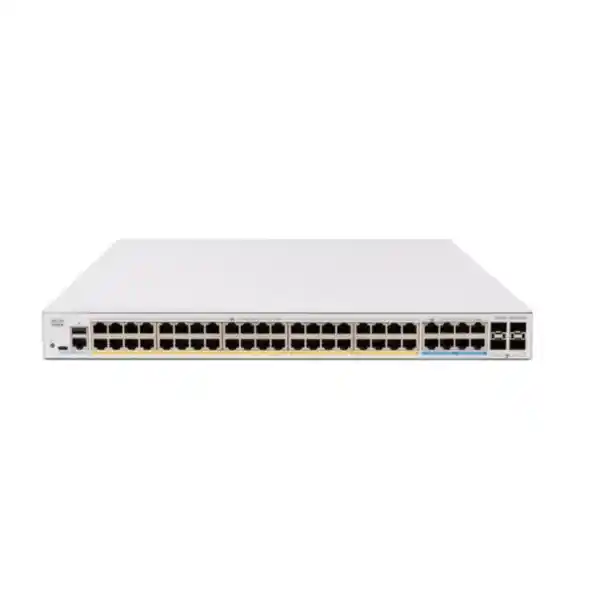
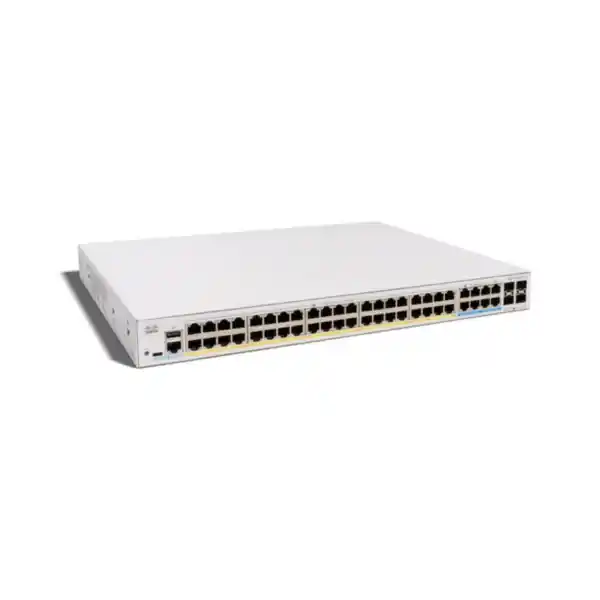
A busy office floor often needs two different things from its access network: plenty of ordinary wired connections and a smaller number of ports for more demanding devices. The Cisco Catalyst C1300X-48NGU-4X brings those requirements together with 40 Gigabit PoE+ connections, eight 5G multigigabit PoE++ connections and a shared 740W PoE budget. Its four SFP28 interfaces operate as 10G uplinks, with 25G reserved for stacking. It is a practical candidate when the endpoint inventory calls for that particular balance.
For Tanzania buyers, the useful starting point is a device schedule rather than a port count alone. List the phones, cameras, access points, computers and other equipment expected to use the cabinet. Mark the connections that need more than Gigabit speed and the devices that require higher-power PoE. Then request a quotation from FourTeck Tanzania against the resulting specification, including the uplink accessories and any stacking components.
The selection guidance below explains how to turn those requirements into a complete purchase and deployment plan. Example workloads and calculations are illustrative planning tools; they do not establish compatibility with an unnamed device or represent measured results from a particular installation.
Technical snapshot for purchase planning
Use this model-specific summary to align the quotation with the endpoint schedule. Port capabilities and aggregate resources must be assessed together; the figures below do not establish compatibility with a particular endpoint or accessory.
| Planning item | Specified capability |
|---|---|
| Copper access ports | 40 × Gigabit Ethernet; 8 × 5G multigigabit Ethernet |
| PoE on Gigabit ports | 40 ports with 30W PoE+ capability |
| PoE on 5G ports | 8 ports with up to 60W PoE++ capability |
| Shared PoE budget | 740W across connected powered devices |
| Uplink interfaces | 4 × SFP28; 10G ordinary uplink operation |
| 25G operation | Available for stacking only |
| Switching capacity | 240 Gbps |
| Forwarding rate | 178.57 mpps for 64-byte packets |
| Enclosure dimensions | 444.3 × 340 × 43.94 mm |
| Unit weight and cooling | 5.15 kg; two fans |
| AC input | 100–240V, 50–60 Hz, internal power supply |
The most important buying checks
- Count the endpoints that need multigigabit speed separately from the total number of wired connections.
- Check the power standard and planned allocation for every powered device.
- Separate ordinary uplink requirements from the interfaces assigned to stacking.
- Include compatible media, electrical continuity and configuration work in the project scope.
Read the port arrangement before choosing the switch
The distinction between the two copper port groups is central to this model. Most connections are Gigabit, while eight provide the higher-speed access option. Assign those eight connections deliberately. An access point with a compatible multigigabit wired interface may deserve one; an ordinary office printer normally will not. A port schedule helps preserve the faster group for the equipment that can use it.
Higher data speed and higher PoE capability are separate requirements, even when they appear on the same interface. A device might need extra power without generating much traffic, or it might need a faster connection while using a separate power supply. Record both requirements independently so that one label such as “advanced access point” does not conceal an important mismatch.
Reserve capacity in each group for likely changes. A cabinet can have many free sockets and still have no suitable port left for the next high-power wireless installation. Review spare Gigabit ports, spare multigigabit ports, remaining PoE allocation and unused uplink interfaces as four separate resources. That makes expansion decisions easier to explain to procurement and avoids treating all available sockets as interchangeable.
Match PoE standards as well as watts
PoE delivers electrical power through the network connection to a compatible powered device. The exact standard matters: a wattage figure alone is not enough to approve a device. Obtain the endpoint manufacturer’s power requirements, including any different power modes and the features enabled in each mode. Use those requirements when deciding which copper port group should serve that endpoint.
For this switch, Cisco specifies 30W PoE+ capability on the 40 Gigabit ports and up to 60W PoE++ on the eight 5G ports. Those are switch-side capabilities rather than a promise that an endpoint receives the same wattage after cable losses. Do not assume support for a device that requires more than the port can supply, or for a proprietary passive-power arrangement.
Check the power requirement for the actual configuration being bought. Additional radios, USB peripherals, heaters, illuminators or attached accessories can change an endpoint’s needs. Where a manufacturer documents a reduced-function mode at lower power, decide whether that mode meets the project requirement before accepting it. A powered-on device is not by itself evidence that every intended feature will be available in normal service.
Build a shared-power worksheet
The total power allowance must cover the proposed endpoint mix. Create a worksheet with one row for each device type, its quantity, the planned switch-side allocation and the intended port group. Add the allocations, then compare the result with the available budget. Leave deliberate room for devices that may be added later and for differences between an initial estimate and the final negotiated allocation.
For an illustrative calculation, eight devices allocated 45W each require 360W. Twenty further devices allocated 12W each add 240W, making 600W in total and leaving 140W against a 740W allowance. This is arithmetic for planning, not a certified device combination. The eight higher-power devices would still need the correct standards, port assignments and cabling, and every remaining powered endpoint must also be counted.
A second check exposes the limit of maximum-per-port thinking: eight allocations of 60W would already consume 480W, leaving 260W for the other powered connections. Do not multiply every port’s maximum and treat the result as power the switch can deliver simultaneously. Keep the approved worksheet with the quotation and update it whenever the equipment schedule changes.
Use power monitoring to validate the design
Cisco’s port-management documentation describes PoE controls for priorities, administrative allocations and operating status. Its status pages also expose available and allocated power. These tools make it possible to compare the installation with the planning worksheet after devices are connected. Review actual allocation as well as a momentary consumption reading; a quiet device may draw less than it requires during a busy operating period.
Assign priorities according to business needs before the cabinet approaches its power limit. Decide which endpoints should retain preference if allocations become constrained, and document the reasoning. A reception phone, an access point serving an operational area and a nonessential display may have different priorities. The appropriate order depends on the organization’s own service requirements.
Treat unexplained power denial or repeated endpoint restarting as a fault to investigate. Review the port’s configured limit, the endpoint’s standard, cable condition and aggregate allocation before changing settings. Avoid raising limits simply to hide a symptom. Record the final allocation and relevant status information during acceptance so a later technician can distinguish a genuine change from the behavior observed at commissioning.
Plan wireless access points against their wired requirements
Wireless upgrades are a common reason to select this port mix, but the wireless generation alone does not determine compatibility. Start with the exact access point model, its Ethernet interface and its required power mode. An access point can advertise impressive radio capabilities while the installation still depends on suitable wired capacity, controller or cloud management, and the correct software and licensing elsewhere.
Use the multigigabit ports where the access point and workload justify them. Check cabling and upstream capacity at the same time. A faster access connection cannot remove an internet bottleneck or improve an overloaded wireless channel, so define the performance problem before using switch speed as the solution. Keep the wireless survey and the switching plan connected through a shared access point inventory.
For broader model selection, review FourTeck Tanzania’s Cisco wireless access point planning guidance. Use it to frame the wireless discussion, then confirm exact power and interface compatibility for the proposed equipment. Do not treat the presence of a Cisco brand on both devices as sufficient evidence that every feature and operating mode will work together.
Design 10G uplinks around the traffic path
An uplink carries traffic from the access switch towards the rest of the network. Its usefulness depends on where users and devices send their data. A floor that mainly reaches cloud applications has a different traffic pattern from one sending continuous video to a local recorder or moving large files to nearby servers. Sketch those paths before deciding the uplink arrangement.
Choose the connection media with the receiving device in mind. Identify the remote switch, available interface, distance, installed fiber type and required connector arrangement. For a short connection within a cabinet, ask whether an approved direct-attach option is appropriate; for a longer run, specify suitable optics and fiber as a matched design. Confirm exact accessory compatibility before adding part numbers to the purchase.
Keep a record of which interfaces remain available after other uses are assigned. Front-panel ports used for stacking cannot simultaneously be counted as ordinary uplinks. Also avoid assuming that several physical uplinks automatically produce one faster connection. Any aggregation or resilient topology requires a supported configuration at both ends and testing against the intended traffic and failure cases.
Understand the 25G stacking distinction
SFP28 describes the interface form factor, but it does not establish that every operating mode supports the same data rate. On this model, Cisco identifies the normal uplink role as 10G and reserves 25G for stacking. Buyers seeking a general-purpose 25G connection to a server or aggregation switch should have that requirement assessed separately before ordering.
The 1300X family supports front-panel stacking for up to eight switches, with management as a single unit. A proposed stack still needs an approved member combination, software alignment, appropriate connection media and an explicit topology. Confirm those details for the exact equipment list rather than assuming that another switch can join because it carries a similar family name.
Draw the stack before deciding quantities of cables or uplink accessories. Show each member, its assigned interfaces, the inter-switch connections and the external network paths. Then consider maintenance: how a member will be identified, replaced and brought back into service. Shared administration can reduce operational repetition, but resilience depends on the full architecture and should be demonstrated through agreed tests rather than inferred from the word “stack.”
Check cabling before expecting multigigabit performance
The cable channel includes more than the horizontal run behind the wall. Patch leads, patch panels, termination quality, couplers and the route through the cabinet can all affect a connection. When reusing an existing installation, obtain its records and arrange testing appropriate to the target application. Do not approve faster operation purely because a cable jacket carries a familiar category marking.
Document the intended endpoint location and the complete path to its switch port. For connections carrying higher power, include an assessment of the installation conditions and the endpoint manufacturer’s requirements. Have the cabling design reviewed where bundles, crowded pathways or difficult environmental conditions could affect the project. Replacing only a short patch lead may not resolve a problem elsewhere in the channel.
During commissioning, record the negotiated speed and check for interface errors under a useful workload. A link light proves that communication is possible, but it does not prove that the channel meets the planned performance. Keep test results alongside the port schedule so future troubleshooting starts from measured evidence. Where the existing channel cannot support the requirement reliably, include remediation in the project budget.
Separate users, guests and operational devices
Cisco documents VLAN management on the 1300X platform. VLANs can give an access-layer design a clearer structure by assigning different groups of endpoints to separate logical networks. Begin with the organization’s communication requirements: identify which devices need to reach business applications, management services, recording systems or only the internet. Use those requirements to decide the segmentation plan.
Build a simple matrix of permitted traffic between groups. For example, a guest device may need internet access while a camera may need access to a recorder and approved management services. These are design examples, not automatic settings delivered by the switch. The equipment enforcing access between networks must be configured to match the agreed policy.
Check tagged and untagged membership across every uplink and endpoint connection. A mismatch can prevent a device reaching the intended service or place traffic in the wrong network. Label the relevant VLAN and port mode in the installation schedule, and include both allowed and disallowed communication in acceptance testing. Logical separation is useful only when the complete path and access controls support the intended result.
Decide where routing should take place
The 1300X platform includes Layer 3 functionality, and Cisco documents OSPFv2 for IPv4 and OSPFv3 for IPv6. That creates options for a network design, but it does not mean that every installation should route between departments on the access switch. Decide where routing belongs by considering security inspection, operating responsibility and the existing architecture.
If an organization expects a firewall to inspect communication between sensitive networks, have the engineer review how local routing would affect that policy. A shorter forwarding path is not automatically the correct security design. Conversely, a straightforward internal routing requirement may suit a different arrangement. Define the intended traffic flow before enabling additional protocols.
For an OSPF design, agree addressing, router identification, areas, neighbor relationships and route advertisements with the administrator of the adjacent network. Cisco’s web-interface guidance covers basic setup and notes that advanced functions may require the CLI. Validate the exact release and feature requirements, and test both normal routing and recovery from a link failure. The product’s routing support should form part of an engineered design rather than substitute for one.
Prepare management access and administrative ownership
Cisco provides web-interface and command-line management options for the platform. Choose the methods that the operating team can support consistently, then define who is responsible for access, configuration changes and fault handling. Decide how administrators will reach the switch when a production connection is unavailable, including the equipment and information required for local console access.
Establish a management addressing plan before installation. Record the switch name, management network, authorized administrators and the location of configuration backups. Keep sensitive credentials in the organization’s approved credential system rather than in a general equipment spreadsheet. A handover document should tell the next administrator where approved information is held without exposing secrets.
Create a change process suitable for the size of the business. Even a small office benefits from recording who changed a port, why the change was made and how it was checked. Use descriptive interface labels that correspond to physical cable labels. These simple operating practices can save time when a fault occurs long after the original installer has left the project.
Protect access without making rollout harder to recover
Cisco documents 802.1X support on the 1300X platform. Where network admission control is required, treat it as a project involving endpoint configuration and an authentication service as well as the switch. First identify which devices can authenticate in the intended way and how equipment without that capability will be handled under the organization’s policy.
Pilot access controls with representative equipment before extending them to every user. Include a phone, a workstation, a printer and any operational endpoint that has unusual behavior. Agree what happens if the authentication service becomes unreachable and how an administrator can recover a connection without weakening the policy across the whole site.
Physical security also matters. Restrict cabinet access, label patching clearly and decide how unused connections will be managed. An access switch does not replace a firewall, endpoint protection or application access controls. Treat it as one part of the security architecture, with responsibilities defined across the network. During acceptance, demonstrate that an authorized user can work and that the agreed restrictions actually apply.
Keep voice and video requirements measurable
A mixed access network may carry telephone calls, online meetings, camera streams and ordinary file transfers. Ask stakeholders which activities are time-sensitive and what an acceptable experience looks like. A complaint such as “video is slow” should be translated into a reproducible test so that switching, wireless, internet and application causes can be investigated separately.
Where traffic prioritization is part of the proposed configuration, have the engineer verify the supported controls and their operation across the complete path. A policy applied on one device does not establish how the next device or service provider handles that traffic. Keep the scope explicit so the purchase does not imply an end-to-end call-quality guarantee.
Test representative services while other traffic is present, rather than checking them only on an idle network. For cameras, include the recorder and storage path; for telephony, include call control and the external calling path where applicable. Record observed behavior and any unresolved dependency. This approach produces evidence that relates to everyday work instead of relying on a successful ping as the only acceptance measure.
Review rack space, cooling and electrical supply
Cisco lists this model as rack-mountable, measuring 444.3 × 340 × 43.94 mm and weighing 5.15 kg. Use those dimensions as the start of a cabinet review, then allow room for connectors, cable routing and safe access. Check the mounting arrangement against the manufacturer’s installation instructions and verify that the rack can accommodate the full installation.
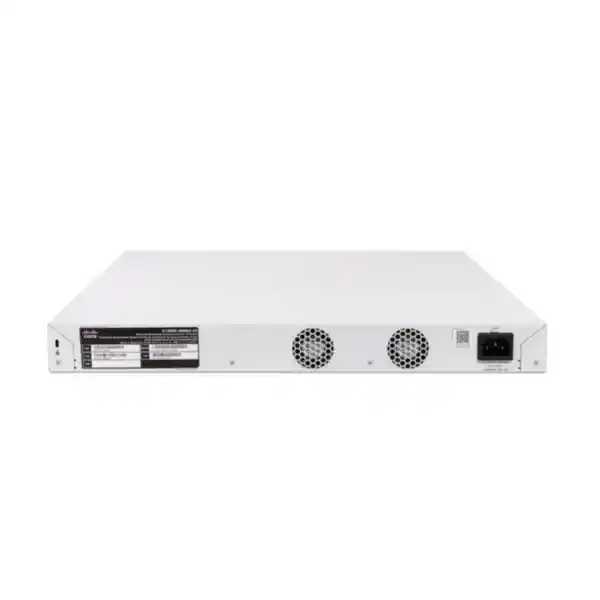
This exact model is actively cooled; the datasheet lists two fans. Position it with the working environment in mind and follow the specified ventilation clearances. Cisco’s installation guidance calls for at least 7.6 cm around ventilation openings. A crowded cupboard or an occupied room where fan noise would be disruptive deserves review before equipment arrives.
The specified AC input is 100–240V at 50–60 Hz. Have the site’s electrical arrangement and protective equipment assessed for the planned load. Keep installation within the documented environmental limits and avoid assuming outdoor or industrial suitability. Verify the supplied power-cord configuration, mounting hardware and all order-specific accessories in the quotation rather than discovering an unsuitable item during the installation window.
Size backup power for the complete service
The PoE allowance describes power available to endpoints; it is not a complete statement of the AC load used for UPS selection. Ask the designer to include switch consumption, powered devices, conversion losses and every other item sharing the backup supply. Then choose a runtime objective that matches the organization’s actual need during a supply interruption.
Consider which dependencies must remain powered for the service to be useful. Keeping an access point or telephone alive may have limited value if the router, firewall, controller or internet termination loses power. For camera systems, include the recording and storage equipment where continuity is required. Write down those dependencies so the backup design is reviewed as one service.
Agree what should happen during a longer outage and when supply returns. Include controlled shutdown requirements for dependent equipment and a practical restoration test. Treat UPS runtime as a result to calculate and verify under an appropriate load. Do not assume that the switch’s PoE capacity establishes how long a particular battery system will operate or that backup power removes every possible interruption.
Choose the model by requirement, then compare alternatives
This configuration deserves consideration when many standard wired endpoints share a cabinet with a smaller number of devices needing faster access or higher-power PoE. An office floor with mixed desk connections and selected demanding wireless locations is one possible design. A hospitality or education site may have a different mix, so use its actual endpoint schedule rather than transferring assumptions from another building.
A different switch may fit better if nearly every access connection needs multigigabit speed, if the endpoint requirement exceeds this model’s per-port power, or if ordinary 25G uplinks are mandatory. Equally, a project with only basic Gigabit devices may not need this particular combination. Comparing against a clear requirement helps explain both additional cost and any compromise.
For an existing network refresh, list the features and operating practices that must be preserved. Do not assume that a shared Catalyst name makes software, commands, stack membership or accessories interchangeable across product families. Request a comparison of the final bill of materials, management requirements and migration work. The most useful comparison is the cost of meeting the complete requirement, including accessories and implementation.
Plan migration without losing the existing port map
Before replacing an installed switch, export or record its relevant configuration and map every active connection. Identify uplinks, access points, telephones, cameras, servers and any special-purpose equipment. Capture current addressing and segmentation requirements with the responsible administrators. Photographs and cable labels can help, but they should support a written schedule rather than replace one.
Build and review the proposed configuration before the change window. Arrange access to the upstream equipment and to the applications needed for verification. Decide what evidence would cause the team to pause or return to the previous arrangement, and keep the necessary original equipment and records available for that decision.
During the move, reconnect devices in an order that makes faults easier to isolate. Confirm management access and upstream connectivity before treating endpoint failures as isolated device problems. Complete checks with the people who use the services, then save the final configuration and update the schedule. A migration is complete when essential services and documentation match the accepted design, not simply when every patch lead has been moved.
Specify a quotation that procurement can compare
Request the exact model together with a clear description of the intended deployment. Include the quantity of switches, the endpoint schedule, projected power allocations, uplink destinations, required media and any stacking plan. State whether the project is a new installation or a replacement, and identify existing equipment that must remain in service.
Ask the quotation to separate the base switch from optics, cables, mounting accessories and any optional services or support. Confirm which items are included and which are separately priced. Also request the applicable commercial warranty and support terms for the offered configuration. Manufacturer documentation should not be treated as a promise of a particular local replacement time or service entitlement.
For Tanzania procurement, have FourTeck Tanzania confirm availability, lead time, delivery arrangements and the final commercial amount in the quotation. Specify any installation, configuration or handover assistance you require so its scope can be confirmed. These details depend on the actual offer; they should be agreed explicitly rather than inferred from a general product description or a similar listing elsewhere.
Acceptance checks for the installation
Agree a short acceptance schedule before equipment is ordered. For physical installation, inspect mounting, ventilation, labeling and power connections. For each representative endpoint, confirm the intended port assignment, operating speed, power behavior and access to required services. Include every special device type rather than testing only a convenient workstation.
For the network path, verify the intended uplink operation, segmentation and routing arrangement. Where resilience is in scope, conduct the agreed controlled failure tests and record recovery behavior. Check that monitoring and configuration backup procedures work for the operating team. Any feature that is important enough to justify the purchase should have a practical way to demonstrate that it meets the requirement.
Finish with a handover containing the accepted port schedule, equipment inventory, accessory details, configuration location, access arrangements and outstanding actions. Distinguish a completed test from an assumption that still needs validation. That makes the sign-off useful to both procurement and the administrator, and provides a reliable starting point for later expansion or support work.
Buyer questions about this switch
Are all 48 copper ports multigigabit?
No. This model combines 40 Gigabit Ethernet ports with eight 5G multigigabit ports. Allocate the faster group to compatible endpoints that need it. If the project needs multigigabit connectivity on most or all copper connections, have that requirement compared with another configuration before purchase.
Can every powered port supply its maximum at once?
The aggregate allocation must stay within the shared 740W PoE budget. Individual port capability does not establish that every port can deliver its maximum simultaneously. Prepare a device-by-device power schedule, including existing endpoints and planned additions, and validate it with the final equipment list.
Do the SFP28 interfaces provide general-purpose 25G uplinks?
Cisco specifies 10G for ordinary uplinks on these interfaces and reserves 25G for stacking. If the requirement is a 25G server or aggregation connection, state that explicitly in the design review. Do not select the switch based on the SFP28 form factor alone.
Will it power a particular Wi-Fi access point?
Check the exact access point model, supported PoE standard, required wattage and any reduced-function power modes. Then confirm the assigned switch port and total power schedule. Wireless generation or manufacturer name alone is insufficient to establish compatibility, and access point licensing or management requirements remain separate.
Can this replace a different Cisco Catalyst switch directly?
A replacement needs a configuration and architecture review. Compare port roles, power requirements, uplinks, routing, stack design, management and accessories. Preserve the original configuration and agree a migration and recovery plan. Similar product names do not establish interchangeable software or a drop-in replacement.
Are optics, stacking cables and services included?
Have the quotation identify every included and separately priced item. Accessory choice depends on distance, connection media, the receiving device and the approved topology. Request confirmation of installation or configuration services if needed, together with the commercial support terms, before approving the order.
How do I request the Tanzania price?
Provide FourTeck Tanzania with the switch quantity, endpoint list, uplink requirements, stacking proposal and project location. Ask for a current quotation confirming the exact configuration, accessories, availability and commercial terms. There is no fixed price or stock commitment stated on this page.
Request a configuration-based quotation
Ask FourTeck Tanzania for a quotation for the Cisco C1300X-48NGU-4X, supported by your endpoint quantities, power worksheet and uplink plan. Include any requirement for stacking, accessories, migration assistance or documented handover so the offered scope can be reviewed before purchase.
For a single cabinet, identify the receiving network equipment and the expected growth. For a larger project, provide a cabinet-by-cabinet schedule and the proposed connections between them. Request written confirmation of the exact order configuration, compatibility, availability, delivery arrangements and applicable commercial support terms.
Next step: send your equipment schedule and project requirements to FourTeck Tanzania for a tailored quote.




Reviews
There are no reviews yet.