
FOURTECK TANZANIA · ENTERPRISE ACCESS
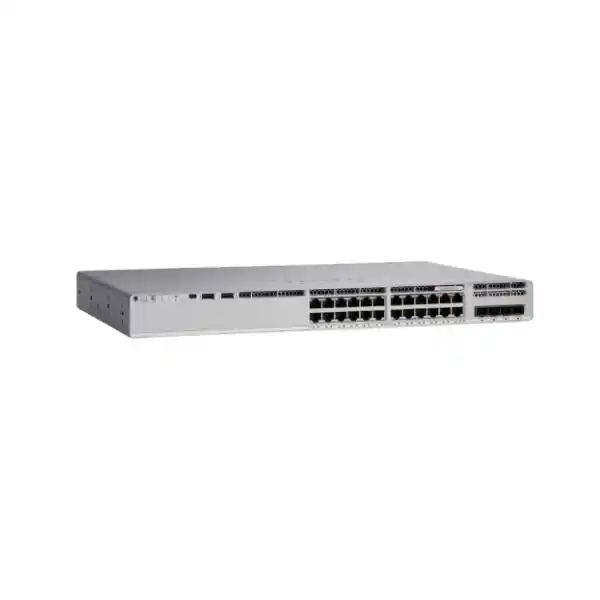
Cisco Catalyst C9200-24PB Network Switch
Select the switch around your powered endpoints, uplink path and network separation requirements. This guide focuses on the PB variant and the decisions needed to turn a model reference into a complete access layer configuration.
A managed access switch for powered business endpoints
For an organisation planning a controlled wired network in Tanzania, the Cisco Catalyst C9200-24PB Network Switch is worth considering when the requirement combines Gigabit access, powered endpoints and more demanding network separation. It provides 24 Gigabit Ethernet PoE+ access ports in a modular uplink platform. The important buying distinction is the PB variant: Cisco lists the orderable C9200-24PB-A with Network Advantage and enhanced VRF capability. Ask FourTeck Tanzania for a configuration review using your endpoint list, uplink requirements and segmentation design before placing an order.
This product is best evaluated as part of a complete access layer. The chassis choice alone does not settle the power supply configuration, uplink module, optical transceivers, stacking accessories, software subscription or support entitlement. A useful quotation should make each of those items explicit. That approach helps an IT manager compare offers on the network they will actually deploy, rather than on a short model name that leaves essential components unspecified.
Start with three practical questions: which devices must connect, how much power do they need, and which groups must remain separate? Answers to those questions establish whether this enhanced segmentation model is appropriate and which accessories belong in the proposal. If your priority is a simpler office network, the same exercise also helps avoid buying capabilities that your design will not use.
Confirm the exact model before comparing quotations
The name C9200-24PB identifies the hardware model, while C9200-24PB-A is the complete switch ordering identifier shown in Cisco’s ordering guide. These identifiers should appear consistently in the technical proposal and purchase documentation. The A suffix identifies Network Advantage in this ordering context. Do not accept an offer for a standard 24P model as an equivalent PB configuration without reviewing the difference against the intended design.
Ask the supplier to identify hardware, software and service items separately. A clear bill of materials should describe the switch, selected power supplies, uplink module, transceivers and any stack components. It should also identify the subscription type and term, the account that will hold entitlements, and the support arrangement being offered. Separate line items make later expansion and asset reconciliation easier.
The manufacturer ordering identifier should also be kept separate from a seller’s internal SKU. A procurement system may assign its own stock reference, and that reference does not change Cisco’s model identity. When your organisation requires a particular asset naming convention, agree it before delivery. This is especially useful when several similar access switches are being purchased for different cabinets or projects.
Technical essentials at a glance
Use the following specification summary to establish the platform’s basic fit. The final quotation must confirm the actual supplied configuration; optional hardware and software services should not be inferred from a feature supported by the platform.
| Item | What to confirm |
|---|---|
| Access interfaces | 24 × 1G Ethernet PoE+ ports |
| Manufacturer ordering reference | C9200-24PB-A; Network Advantage; enhanced VRF |
| Routing separation | 32 VRFs, subject to the supported design and software configuration |
| Uplink selection | Modular; verify selected 1G or 10G module and compatible optics |
| Power supply arrangement | Two slots; verify the supplied units and required endpoint power budget |
| Serviceability | Two field-replaceable fans |
| Stacking | StackWise-160; PB membership restrictions apply |
| Commercial configuration | Confirm modules, transceivers, software subscriptions and support in the quotation |
Use the specification table as a starting point for a conversation with your network designer. Keep a separate record of the final selected parts and the reasons for selecting them. If a proposed substitution changes a module, power supply, software entitlement or supported topology, review the affected requirement again before accepting it. This helps preserve the intended result when a quotation is revised during procurement.
Build the port plan around devices and growth
Count physical connections by location and function before deciding that 24 ports are sufficient. Include user workstations, IP phones, wireless access points, printers, cameras and any building devices that need Ethernet. Record spare outlets separately from endpoints that will be connected immediately. A cabinet that has enough sockets today may become difficult to expand if every access port is allocated on the first day.
Record shared desk arrangements carefully. A phone with a downstream computer connection may use a different physical port plan from separate phone and computer cabling. Check the exact phone’s capabilities and your security policy before relying on that arrangement. Likewise, a wireless access point is one cable connection but may carry traffic from many users. Physical port count and traffic demand answer different questions.
Reserve capacity according to the organisation’s expansion plans rather than a universal percentage. A small administration office, a training room and a camera cabinet can all have different growth patterns. Note planned devices, possible relocations and any requirement to keep spare ports available during troubleshooting. A written port schedule becomes useful during installation, support and future moves because it connects the purchase decision to identifiable business requirements.
PoE planning: calculate the whole load
PoE+ allows compatible endpoints to receive network connectivity and electrical power through their Ethernet connection. However, powered port count and total available power are separate limits. Cisco lists 370W of available PoE power for this model with one PWR-C6-600WAC supply and 740W with an additional matching supply. Select the power configuration against the complete endpoint requirement, including the operating state you need to preserve if a supply is unavailable.
An illustrative design worksheet might contain ten endpoints budgeted at 10W each, six at 20W each and four at 25W each. That arithmetic totals 320W across twenty devices. These figures are planning assumptions, not measured consumption or compatibility claims for any endpoint. Replace them with the manufacturers’ power requirements, allow for the way power is allocated, and review the remaining allowance before adding more devices.
Consider startup conditions and planned expansion as well as steady operation. A device may have different power requirements when all of its features are enabled. Record which endpoints are essential to business operations and which can tolerate interruption. The purpose is to produce an intentional power plan, with an agreed response to a supply fault, rather than discover the limitation after the cabinet has been populated.
Match wireless access points to speed and power
For wireless projects, check the access point model before assuming that any PoE switch will provide its full operating mode. The AP’s required Ethernet speed and power class are independent specifications. This switch’s access interfaces are Gigabit ports. A deployment designed around a multigigabit AP connection or a higher power requirement needs a different port capability or a specifically validated alternative design.
Review what happens if an AP receives less power than its preferred allocation. Depending on the AP, some radios or peripheral functions may be restricted; the correct answer comes from that AP’s documentation. Ask the designer to state the expected operating mode instead of relying on a general claim that the access point will power on. Your acceptance check should verify the mode that the wireless design actually requires.
Also consider the path beyond the AP port. Busy wireless areas can concentrate many clients onto the switch uplinks. Establish whether the uplink design fits expected application traffic and where routing or inspection occurs. For broader AP selection questions, FourTeck Tanzania’s wireless access point guidance provides a useful starting point, while the exact AP and switch pairing still requires a model-specific compatibility check.
Choose the uplink module and optics together
The modular uplink slot gives the buyer a configuration choice rather than a promise that a particular set of uplink ports is included. Cisco’s hardware guide identifies C9200-NM-4G for four 1G SFP connections and C9200-NM-4X for four ports supporting 1G or 10G connections on the relevant C9200 models. Specify the selected module explicitly and confirm that the quote includes the required transceivers.
Describe the complete link at both ends: destination switch, port speed, fibre type, connector, distance and any existing patch panels. Two transceivers with a similar speed label are not enough to establish a working optical link. The selected optics need to suit the fibre plant, the remote port and Cisco’s compatibility guidance for the intended software and hardware combination.
Do not transfer uplink claims from another member of the Catalyst 9200 family to this model. Family pages can cover several hardware types with different module support. If a project needs a capability outside the confirmed module choices, have the proposal checked against the exact platform. This is also the right time to define link aggregation or redundant paths, so that module quantities and remote port availability match the network drawing.
Understand why enhanced VRF capability matters
A virtual routing and forwarding instance creates a separate routing context. This can help a network design keep different sets of routes apart while sharing physical switching infrastructure. Cisco’s Multi-VRF documentation lists support for 32 VRFs on the C9200-24PB. That capacity is a reason to examine this model when an organisation needs more routing separation than its current access platform provides.
Begin with a policy map, not with a target number of routing instances. List the groups that must communicate, those that must remain isolated and the services that each group needs. Shared services such as name resolution, authentication and application access need deliberate paths. The responsible network designer should decide where routes are exchanged and where security inspection takes place.
More routing contexts do not automatically create a secure network. Misplaced interfaces or an overly broad shared services policy can defeat the intended separation. Ask for a design that names the owner of each segment, documents permitted traffic and includes a test of blocked paths as well as allowed paths. The value of the enhanced model lies in supporting a considered architecture, rather than simply displaying a larger scale figure on a specification sheet.
Keep VLANs, VRFs and security policy distinct
VLANs and VRFs solve related but different design problems. A VLAN separates a Layer 2 broadcast domain; a VRF separates a routing table. Inter-VLAN communication requires routing, and the policy applied along that path determines which services are reachable. Treat the VLAN plan, routing plan and firewall or access policy as connected parts of the same design.
For example, an organisation might keep office users, guest access and building devices in separate network groups. That is an illustrative architecture, not a configuration recommendation for every site. Define whether any group needs access to internal servers, how management reaches each device and where internet access is provided. Then assign VLANs and routing contexts to support those decisions.
Keep the documentation understandable for the team that will operate the network. A table showing group, subnet, VLAN, routing context, gateway and permitted destinations is often more useful than an unexplained diagram. Use clear names and record changes when endpoints move. Good documentation also makes a later fault easier to localise because the technician can distinguish an addressing problem from an intended restriction.
Stacking requires the correct PB compatibility check
The platform supports StackWise-160, but stack compatibility must be checked for the actual models being combined. Cisco specifically states that the enhanced 32-virtual-network PB models cannot be stacked with the standard C9200 models that support four virtual networks. An existing switch carrying a similar family name is therefore not sufficient evidence that it can join the proposed stack.
List every proposed member by complete model, software release and relevant license tier before ordering stack parts. Ask the designer to confirm supported membership, physical arrangement and cable requirements. A stacking proposal should also show how uplinks and powered endpoints are distributed. The objective is a topology whose behaviour during maintenance or a component failure can be explained and tested.
Distinguish a supported stacking feature from accessories included in a commercial offer. Confirm the adapters and cables in the bill of materials instead of assuming they come with every quotation. If an existing cabinet is being extended, allow space and cable reach for the new member. Plan the change window around the live network and agree how the team will restore the previous arrangement if commissioning does not meet the acceptance criteria.
Plan power continuity as a system
The chassis has two power supply slots and field-replaceable cooling components, allowing a serviceability plan appropriate to a managed access network. Those hardware provisions do not by themselves establish uninterrupted service. The resulting behaviour depends on the installed parts, endpoint load, upstream power arrangement and the rest of the network path.
Decide which fault the business expects the design to tolerate. Loss of a single power supply, loss of a cabinet feed and loss of an upstream network path are different events. Document the expected result for each one. If a proposed design relies on power from two sources, the electrical arrangement needs to be checked by the responsible site specialist rather than inferred from two connected power cords.
Size backup power from the complete cabinet load and required runtime. Include the switch’s own consumption, powered endpoints and any related equipment needed to keep the service useful. A powered phone is of limited value if the call platform or internet path is unavailable. Likewise, powered cameras need a reachable recording destination. Agree the service objective first, then validate the power and network arrangement against it.
Practical deployment scenarios
Consider a business office that is consolidating several small unmanaged switches. The main requirements may be labelled connections, predictable endpoint power and a documented separation between user and building systems. Begin by mapping each existing cable and service. A new managed switch can support a more organised access layer, but the migration still needs addressing, policy and endpoint checks before the older equipment is removed.
In a training or education environment, different user groups may require different access rules. Write those rules in plain language first: which resources are available to staff, which are available to learners and which are reachable from visitor devices? Use that information to decide whether enhanced routing separation is justified. The example does not imply any particular regulatory status or a complete campus design.
A branch or shared premises project may have a stronger need to keep administrative domains separate. Here the review should identify who manages each group, which services are shared and how faults will be investigated. These scenarios illustrate buying questions rather than guaranteed outcomes. The appropriate architecture depends on the full network, operating team and applications, including equipment outside the access cabinet.
Prepare the cabinet before installation
Inspect the intended cabinet before equipment arrives. Check mounting space, access to the front and rear, power cord routing and the working room needed for patch leads and fibre. Cisco’s installation guidance calls for unrestricted airflow and sufficient clearance for cabling and service access. A switch that physically fits can still be awkward to maintain if its connectors are blocked by adjacent equipment.
Record the local conditions at the cabinet rather than relying on the general room description. Heat inside an enclosure, accumulated dust and crowded cabling can create operational problems. Have the installer review the manufacturer’s environmental limits for the exact configuration. This page does not establish that a particular site or enclosure meets those requirements.
Plan labels at the same time as patching. Identify cabinet, panel, outlet and switch port in a consistent format. Leave room for fibre bend requirements and future maintenance, and keep the cable route understandable. These details reduce the time spent tracing a fault after installation. For sites where access is restricted, agree who can open the cabinet and who must be contacted before any physical change.
Document the management and support arrangement
Agree who will administer the switch and how the operations team will reach it. A purchase should produce a manageable asset with a named owner, current documentation and an agreed escalation path. Avoid depending on a single person’s laptop or an undocumented account for routine administration. Define how authorised administrators gain access and how that access is removed when responsibilities change.
Record the approved software release, management addressing and backup location as part of the handover. Establish a routine for reviewing vendor advisories and planning updates, rather than selecting software solely because it is the newest release. The suitable version depends on required features, supported hardware and the organisation’s operating policy. Release selection should be verified against current Cisco guidance at deployment.
Specify what monitoring is expected to detect and who responds to it. Useful operational questions include whether an uplink is down, an endpoint has lost power or the cabinet is approaching a planned capacity limit. Choose management tools that fit the existing environment and verify any licensing dependencies separately. A feature in a management platform should not be treated as included simply because the switch family can integrate with that platform.
Make software and entitlement costs visible
Cisco’s ordering process distinguishes the network license tier from software subscription selections. For this PB variant, the ordering guide identifies Network Advantage. The commercial proposal should also name the subscription offered, its term and any associated management or service components. Avoid treating every software name in the Catalyst portfolio as an entitlement supplied with this product.
Ask for the customer account and entitlement assignment process to be explained before purchase. Your organisation should know where records will be held, who is responsible for renewals and which features depend on which entitlement. For an existing Cisco estate, check how the proposed order fits current account administration and operating procedures. Keep those commercial records with the asset documentation.
Compare total project costs across an agreed period. Hardware, optics, spare components, subscriptions, support and implementation can all affect the result. Request a written scope for any installation or configuration work included in the offer. This content does not state a local price, included service contract, delivery commitment or renewal cost; those details require a current quotation for the actual configuration.
Compare alternatives using the requirement
A useful comparison begins with the reason for considering the PB model. If the requirement includes enhanced routing separation, evaluate that capability explicitly. If the project mainly needs powered access ports for a straightforward network, ask the designer whether the additional segmentation capacity is necessary. Similar front panels can hide differences that matter to the proposed architecture.
Review fixed and modular uplink designs against the expected lifetime of the cabinet. The decision should reflect available remote ports, fibre infrastructure and the likelihood of uplink changes. A modular option is valuable only when its supported choices fit the plan and the required parts are included. Do not compare a populated configuration with a bare chassis and assume the price difference reflects the switch alone.
For an upgrade from older equipment, reuse should be assessed item by item. Optics, stack cables, power supplies, configuration commands and management arrangements may have platform dependencies. FourTeck Tanzania’s Catalyst 2960-X replacement guidance can help frame an older access layer migration, but it does not establish this PB model as a universal replacement. Choose the destination configuration from the requirements and verify each reused component.
A controlled migration from the existing network
Before a change window, capture the existing port map, addressing, VLAN assignments and the services that depend on the cabinet. Identify any devices with fixed settings or unusual connection requirements. Compare the intended configuration with what is actually connected. This reduces the risk of carrying undocumented assumptions from the old network into the new one.
Prepare the new configuration away from production where practical. Check representative endpoint types, intended uplinks and the management path before moving every connection. Define the order of migration around business priorities. A reception phone, a shared printer and a camera recorder can have different owners and acceptance checks, so involve the appropriate people in deciding when each service is ready.
Write a rollback plan that includes the trigger for using it, the person authorised to decide and the steps needed to restore the previous connections. Keep labels and the original configuration available during the work. A clear stopping point is more useful than an open-ended promise to finish during the window. Agree the expected interruption with the organisation responsible for the site.
Acceptance checks that demonstrate the result
Define acceptance in terms of observable services. Confirm that the intended endpoints connect, obtain the correct addressing and reach their authorised applications. For powered devices, check the operating mode and power allocation under the planned load. For uplinks, confirm the negotiated speed and inspect for errors. These checks should follow the design rather than a generic list of features.
Test isolation as well as connectivity. A guest device reaching the internet does not show that it is prevented from reaching internal systems. A building device reaching its server does not show that unrelated groups are separated. Include both permitted and prohibited paths in the test record so that the policy has evidence behind it.
Where resilience is part of the purchased scope, agree a controlled test procedure and expected outcome before simulating a fault. Record which services remain available and how recovery is observed. Do not assume a redundancy result from the presence of extra hardware. Finish by saving the approved configuration, checking administrative access and handing over the final port map and equipment inventory.
What a complete quotation should identify
Send a requirements summary that separates mandatory needs from preferences. Include connected devices, their power requirements, planned uplinks, any existing stack members and the intended segmentation. Provide the remote switch model and fibre information where available. A small network drawing can resolve ambiguities that are difficult to express through a product name alone.
The returned proposal should identify the exact ordering model and every configuration-dependent item. Ask for quantities and descriptions for power supplies, uplink hardware, optics and stacking parts where required. Software and service items should state their scope and term. Any assumptions about existing infrastructure should be written down so that your team can confirm them.
Commercial details also need explicit confirmation. Request the offered condition of the equipment, current availability, applicable warranty terms, support arrangements, delivery scope and any implementation work. None of these should be inferred from a manufacturer feature list or a general supplier page. Compare proposals against the same approved requirements so that purchasing decisions reflect a complete deliverable.
Questions buyers ask about this model
Is C9200-24PB the same as C9200-24P? No. The PB designation identifies the enhanced segmentation variant. Compare the complete ordering identifiers and required routing scale before accepting a substitution. Port count alone is not sufficient to establish equivalent fit for a network design.
Does every port being PoE+ mean every device can draw its maximum at once? The total endpoint load must fit the installed power configuration. Build a worksheet from the exact connected devices and their operating requirements. Check the intended behaviour after a supply fault as well as during normal operation.
Can it be connected to any wireless access point? Verify the AP’s Ethernet interface, power requirement and expected operating mode. A connection that brings the AP online may still fall short of the wireless design. For APs that need a faster wired connection or more power, evaluate a suitable alternative.
Are fibre transceivers included? Inclusion is a commercial configuration question. The proposal should identify the uplink module and each transceiver separately, with the fibre type and destination interface checked. Do not assume optics are supplied because optical uplinks are supported.
Does the switch provide internet access on its own? It forms part of the local network. Internet service, gateway functions, security inspection and any required wide area connectivity need their own design and equipment decisions. Confirm the complete path to the services users need.
Can existing accessories be reused? Review each part number against the new platform and software. An accessory working in another Cisco switch is not proof of support here. Reuse should be documented in the proposal with the relevant compatibility check.
What information is needed for a Tanzania quotation? Provide the device list, desired uplink speed, power budget, segmentation needs and any existing equipment to be retained. Add the delivery location and requested service scope so that commercial terms can be confirmed for the actual project.
What is the current price and warranty? Request a written quotation for the selected configuration. The final offer should state applicable pricing, availability, warranty and support terms. This product description does not establish those commercial conditions.
Request a configuration review from FourTeck Tanzania
Bring your access layer requirements to FourTeck Tanzania with the C9200-24PB model reference and the intended use. Include a port schedule, powered device list, uplink destination and any segmentation or stack requirement. If the design is still being developed, identify the decisions that remain open so that the proposal can address them explicitly.
Ask for a written configuration that connects the hardware selection to the business requirement. The useful result is a clear bill of materials, identified software and service terms, and a deployment scope your team can review. Confirm commercial details and compatibility before authorising the purchase. That gives procurement and IT a shared basis for evaluating the offered solution and planning a successful handover.




Reviews
There are no reviews yet.