
FOURTECK TANZANIA · ENTERPRISE ACCESS SWITCHING
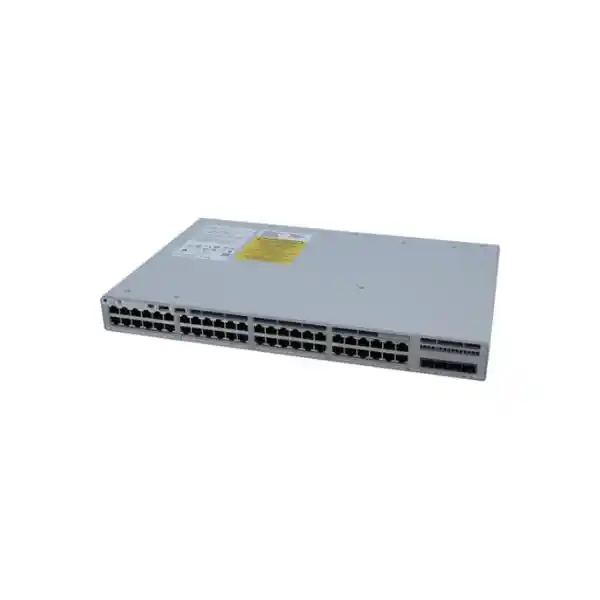
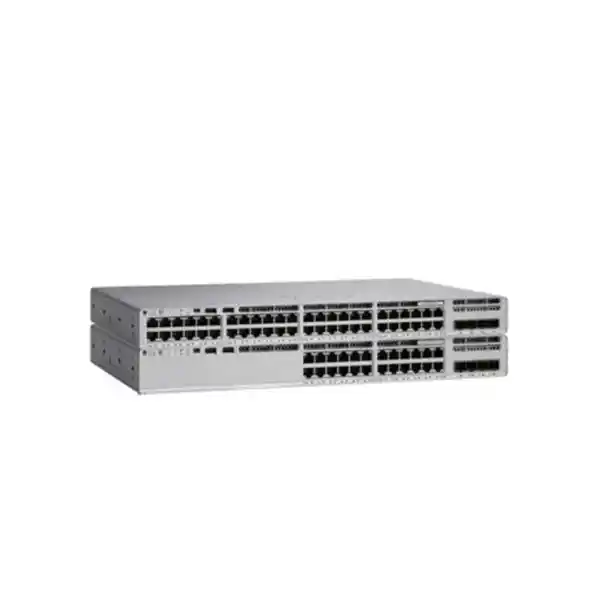
Cisco Catalyst C9200L-48PXG-2Y Network Switch in Tanzania
- 48 PoE+ access ports
- 8 multigigabit ports
- 2 × 25G uplinks
Connect a mixed office or campus access network with a switch designed for both everyday wired devices and selected high-bandwidth endpoints. The Cisco Catalyst C9200L-48PXG-2Y combines 48 PoE+ access ports with eight multigigabit connections and two fixed 25G uplinks. It is a practical candidate when your organisation needs to power phones, cameras and compatible wireless access points while providing a faster path back to the distribution network.
For a Tanzania deployment, start with the endpoint list and the upstream switch rather than choosing by port count alone. Check how many devices need more than Gigabit Ethernet, their required power standard, the fibre path and the software features your team will use. Request a configuration-based quotation from FourTeck Tanzania with those requirements so the hardware, licensing and accessories can be reviewed together.
The exact hardware configuration
| Access interfaces | 40 Gigabit Ethernet copper ports plus 8 multigigabit copper ports supporting speeds up to 10G. |
|---|---|
| Uplink interfaces | 2 fixed SFP28 uplink ports; Cisco specifies 1/10/25G uplink options, subject to supported transceiver and software combinations. |
| Power delivery | IEEE 802.3at PoE+, up to 30W per access port, within the installed aggregate power budget. |
| AC power configuration | PWR-C5-1KWAC: 740W available PoE with one supply; up to 1440W with the supported second supply. |
| Stacking | StackWise-80 support; validate stack members, software and accessories for the proposed design. |
| Published performance | 340 Gbps standalone switching capacity and 252.97 Mpps standalone forwarding rate; manufacturer platform figures, not an application throughput guarantee. |
The model name supplied here does not identify the final software tier or everything included in a quotation. Confirm the complete orderable part number, power-supply quantity, transceivers and stacking equipment before placing an order. A chassis capability should not be interpreted as proof that every related accessory is included.
Allocate the faster ports where they make a difference
The main buying question is whether the distribution of access speeds matches your endpoint mix. Assign the multigigabit connections to devices that can actually use them, such as compatible wireless access points or suitably equipped workstations. Ordinary office endpoints can use the Gigabit connections, leaving the faster interfaces available for the equipment that justifies them.
Prepare a port schedule before installation. For each connection, record the room or outlet, endpoint model, required network segment, expected link speed and power requirement. Include planned equipment as well as devices already installed. A free physical socket is useful only when the remaining speed and power capacity also meet the next device’s needs.
Check the complete copper channel rather than relying on the category printed on one patch lead. Permanent cabling, patch panels, connectors and both patch leads affect the result. Where a higher link speed is required, ask for cable test evidence appropriate to that speed and length. Do not assume an existing building channel will sustain the endpoint’s maximum interface rate.
Label the intended assignments on the patching plan so a later move does not accidentally place a demanding endpoint on an unsuitable connection. This is particularly helpful when different departments share a cabinet. A documented allocation policy makes growth more predictable and allows support staff to distinguish a configuration issue from a physical cabling limitation.
Plan wireless access point connections by model
Wireless projects are a strong reason to evaluate this switch, but the access point specification must lead the design. Check each AP’s Ethernet interface and its required power for the intended operating mode. Faster copper connectivity can remove a wired bottleneck only when the AP, channel and upstream path all support the planned service.
Power deserves a separate compatibility check. Some access points need a higher power standard than PoE+ to enable their full feature set. A connection that establishes a data link is not sufficient evidence that every radio, accessory or operating mode is available. Obtain the manufacturer’s requirements for the exact AP revision and verify them against the proposed switch configuration.
Plan the number of APs per cabinet from the wireless design and actual cable routes. Do not allocate all faster interfaces to the first phase if an agreed expansion will need some of them later. Equally, do not buy this model solely because a wireless generation is mentioned in a proposal; the relevant details are the AP’s wired rate and power demand.
Review wireless and wired requirements together using the FourTeck Tanzania wireless access point guidance. For the final quotation, provide the AP model list and intended operating modes. This lets the network review address the access layer, power and uplink requirements as one project.
Calculate PoE capacity before filling the cabinet
PoE planning has two limits: the requirement of each powered device and the total load across the switch. The per-port rating cannot be multiplied by every socket and assumed to be available from any supplied power configuration. Use the manufacturer’s published available PoE budget for the actual installed supply arrangement.
As an illustrative budget exercise, 20 endpoints allocated 15W each require 300W, while another eight allocated 25W require 200W. The combined allocation is 500W before adding other devices or design headroom. These are example planning values, not measured consumption or a compatibility statement for any particular phone, camera or AP.
Work from verified maximum requirements or the allocation method agreed by the engineer rather than a single idle reading. Cameras may behave differently when additional functions are active, and wireless equipment can have mode-dependent requirements. Keep the calculation with the project records and update it whenever endpoints are added or replaced.
An additional supply can increase the available budget, but using that extra capacity changes the failure scenario. If the total planned endpoint load exceeds the budget available after losing one supply, preserving all powered services cannot simply be assumed. Decide which devices are critical and assess the remaining power capacity under the intended failure condition.
Also size the external power system. A UPS must support the switch’s own consumption and the load it delivers to endpoints for the required runtime. Include the upstream equipment needed to keep those services useful. Powering a camera while its recording path is unavailable, or a phone while its call platform is offline, may not achieve the operational goal.
Design the uplinks around the complete path
The two uplink interfaces are valuable when the distribution layer and physical link can support the intended speed. Confirm the remote switch port type, supported optics or direct-attach cable, fibre type, connector arrangement, distance and software compatibility. Treat both ends of the connection as part of the same bill of materials.
Two physical uplinks can serve different design objectives. Your engineer may prioritise additional aggregate capacity, an alternative path, or a combination supported by the upstream topology. Define the objective first, then choose the configuration. Simply connecting a second cable does not establish a validated resilience design.
Estimate traffic from the applications that share the upstream path. A floor with many locally quiet endpoints can have a different demand profile from a cabinet serving wireless clients, video streams and frequent large file transfers. Review busy periods and simultaneous activity rather than comparing only the sum of interface labels.
Keep the two-port limit in mind when planning growth. If the cabinet needs several independent upstream connections, this fixed-uplink arrangement may be less suitable than a different model or topology. Conversely, two correctly specified links may fit a straightforward access-layer deployment well. Choose against the actual network diagram.
Include patch leads, fibre termination work and test results in the project scope where needed. A quotation containing only the chassis and two optics can still leave the link incomplete. Document the supported operating speed and acceptance test for each uplink so installation teams have a clear target.
Use stacking with a defined resilience objective
StackWise-80 allows compatible Catalyst 9200L switches to be operated as a stack, with Cisco documenting support for up to eight members in an appropriate ring design. This can simplify administration across a larger access block. It does not remove the need to plan power, uplinks, software maintenance and recovery.
Before selecting stack members, check the exact hardware and software combinations in current Cisco documentation. Do not infer compatibility merely because two products share the Catalyst name. Specify the required stacking kits, cables and lengths against the physical rack layout, and confirm what is supplied in the order.
Describe the failure you want the design to tolerate. A failed inter-switch connection, lost power feed and failed upstream device are different events. The placement of critical endpoints and uplinks matters, and a single logical management view does not automatically provide every application with an independent network path.
Leave room to connect and service the stack cables without straining them or blocking access to power modules. Record member identities and interface assignments in the handover documentation. This reduces confusion when an engineer replaces hardware or traces a connection during an incident.
Agree on a maintenance procedure for the whole stack. Identify who approves software changes, how the configuration is backed up and which services must be tested afterwards. Validate the intended failure behaviour during an approved window instead of treating the stacking feature name as evidence of a specific recovery time.
Choose licensing from the required network functions
Cisco lists C9200L-48PXG-2Y-E with Network Essentials and C9200L-48PXG-2Y-A with Network Advantage. The base model name in this request leaves that choice open. Ask for the full part number and a written breakdown of the network software tier and any subscription included in the proposed order.
Create a feature checklist before comparing prices. State whether the switch will mainly provide access connectivity or whether the design requires specific routing, segmentation or management functions. Have the supplier map each required capability to the exact platform, license and intended software release rather than relying on a broad family description.
Cisco’s current ordering guide describes Catalyst or DNA term subscription options alongside IOS XE and the Network Stack. The commercial quote should identify the selected subscription, term and applicable entitlements. Confirm account ownership and license administration responsibilities before ordering so software access does not become a handover problem.
Separate the purchase decision from assumptions about a management platform. If your organisation requires a particular dashboard or controller, ask for explicit confirmation of the supported workflow, software, licensing and onboarding requirements for this exact unit. A related product’s management story is not enough to establish the deployment you will receive.
Include the intended operating model in the review: who changes configurations, who maintains software and who receives alerts. A feature-rich license has limited practical value when no team has responsibility for using it. Select the combination that supports the documented design and an operating process your organisation can maintain.
Prepare segmentation and endpoint admission
Group endpoints by the access they need. Staff devices, guest connectivity, cameras and building equipment often have different destinations and support owners. Write down the intended communication rules before configuring network segments. This turns a list of VLAN names into a design that can be reviewed by the people responsible for the applications.
IEEE 802.1X port-based authentication is documented for Catalyst 9200 software, with configuration dependencies and restrictions. If your project uses it, confirm the intended release and authentication infrastructure, then test representative devices. Printers, phones and specialist equipment may require different onboarding decisions from managed computers.
Define what happens when an authentication service is unavailable. Business continuity and access control requirements should be agreed together, including which endpoints may continue operating and who can authorise an exception. Avoid introducing a site-wide admission policy before the support team knows how to diagnose rejected connections.
DHCP snooping is another documented feature that requires an intentional trust design. Identify legitimate address-assignment paths and test the configuration on the relevant network segments. A security control applied without understanding the topology can interfere with ordinary endpoint startup.
Maintain a small pilot group and a clear rollback route for access-policy changes. Verify both permitted and prohibited communication using the actual applications. The purchase of a managed switch is an opportunity to improve access control, but the useful outcome depends on a tested policy and accountable administration.
Manage shared traffic with realistic expectations
Phones, wireless clients, cameras and desktop applications can compete for the same uplinks. Before deciding that more bandwidth alone will solve a problem, determine where contention occurs and which traffic is affected. A healthy access link does not rule out congestion elsewhere in the network.
Catalyst 9200 IOS XE documentation includes quality-of-service classification and policy mechanisms, including DSCP and class-of-service handling. Select the policy against the intended release and traffic design. Agree which endpoints may supply trusted markings and where markings should be checked or changed.
Prioritisation is most useful when it reflects a business requirement and is applied consistently along the path. Record the treatment expected for voice or other time-sensitive traffic, then test during representative load. Configuration at one switch cannot compensate for every downstream or external bottleneck.
Collect a baseline before and after migration. Include interface use, errors, drops and an application test that users recognise. This gives the support team evidence for later troubleshooting and makes it easier to distinguish a cabling fault, congestion event or application issue without guessing from the switch’s published capacity.
Check cabinet conditions and power continuity
This model has two power-supply slots and fixed fans. Plan for an equipment cabinet with suitable ventilation, accessible connections and a serviceable power arrangement. Avoid treating it as a silent desktop appliance or assuming its cooling arrangement is the same as every other Catalyst variant.
Check available rack depth with the actual power cords, fibre connections and stacking cables in place. Allow access for routine inspection and component servicing. A cabinet that accepts the bare chassis may still be awkward to operate once patching is installed, particularly where several switches share a dense cable-management area.
Follow Cisco’s installation requirements for airflow and inlet conditions. Measure conditions where the equipment takes in air rather than judging only the temperature near the room door. Review the effect of other equipment in the enclosure and any planned expansion that will add heat.
Have a qualified person assess the power circuit, earthing and UPS arrangement for the site. Specify suitable cords and connectors in the order and label power feeds clearly. Where two supplies are proposed for resilience, review the external power paths as well; two cables connected to one unprotected source can retain a shared failure point.
Record the expected response to a building power interruption. Decide which network services must remain available, for how long and what other equipment they depend on. This produces a practical continuity requirement against which the switch power design and external backup system can be assessed.
Match the switch to your Tanzania deployment
Office access with selective high-speed demand
Consider this model when an office has many ordinary wired connections and a smaller set of endpoints needing faster Ethernet. Start with a floor-by-floor port inventory and the location of the communications cabinets. Review which business services need continuity and which connections can be restored during normal support hours. Reserve capacity against a named expansion plan, rather than leaving an arbitrary number of ports unused without checking their required speed and power.
A wireless upgrade alongside existing wired devices
For a wireless refresh, compare the AP requirements with the intended wired topology before ordering switches. The cabling survey, access point placement and uplink plan should describe the same project. Check whether an AP requires more power than this model can supply per port in its desired mode. Ask for any alternative powering arrangement or switch recommendation to be documented and validated for that exact AP, rather than accepting an unspecified promise of compatibility.
Shared access for cameras and business endpoints
When cameras and office devices share access infrastructure, review operational ownership as carefully as port counts. Identify who approves camera changes, who monitors the network and who receives an alert when an endpoint loses power. Include the recording destination and its traffic path in the capacity review. Segmentation, access rules and a tested power budget help turn a shared cabinet into a supportable design, but the right implementation depends on the site’s actual systems.
These are planning scenarios, not promises of performance or service availability. Provide the installation location and the proposed scope when requesting a Tanzania quotation. Stock, delivery arrangements, installation responsibilities and support terms need to be confirmed for the specific offer.
Build a migration plan around existing services
Begin by recording the old switch connections and the services behind them. Preserve a current configuration backup, a port-to-outlet map and the relevant upstream settings. Check for undocumented dependencies such as a phone connected ahead of a computer, an unlabelled access point or a device using an unusual address arrangement.
Compare the old and proposed configuration by function. Identify access segments, uplinks, management access, authentication requirements and any application-specific exceptions. Treat a hardware replacement as a controlled configuration change; do not assume an older configuration can be copied without review onto a different platform or software release.
Stage the proposed switch before the cutover where practical. Confirm management access, the intended software, licensing visibility and the initial port profiles. Test a representative powered endpoint and an uplink connection using the planned accessories. Discovering a missing optic or unsuitable power allocation during staging is easier to manage than during a live outage.
Choose the migration sequence around business dependencies. Move a small, agreed group first and verify its applications before continuing. Have the people responsible for important services available during the maintenance window. Record an explicit decision point for proceeding or returning to the previous arrangement.
Keep the rollback plan concrete. Identify the old connections, required configuration state and the time needed to restore service. Retain the original equipment until the agreed acceptance checks are complete. For a broader replacement programme, FourTeck Tanzania’s Catalyst migration guidance can help frame the inventory and design review.
Compare nearby options by the requirement they solve
| Your main requirement | What to compare before choosing |
|---|---|
| More faster copper endpoints | Count endpoints above Gigabit speed. This model has a limited allocation of multigigabit interfaces; evaluate another design if the projected need exceeds it. |
| Several independent uplink connections | Compare uplink quantity and topology. Two higher-rate interfaces and four lower-rate interfaces serve different physical connectivity requirements. |
| Higher power per endpoint | Check the required PoE standard and operating mode. A larger aggregate budget does not increase this model’s per-port PoE+ rating. |
| A smaller access cabinet | Compare actual port demand, power needs, growth and operating costs against an appropriately sized alternative. |
| A modular uplink design | Evaluate a platform with supported modular uplinks if future interface changes are a firm requirement; this model uses fixed uplinks. |
A comparison should state the cost of completing the design, including optics, supplies, licenses and installation materials. The least expensive chassis may require a different set of accessories or fail an important endpoint requirement. Conversely, paying for unused capabilities does not necessarily improve the service delivered to users.
Ask for a short explanation of why the recommended configuration fits your inventory. A useful recommendation connects each important requirement to a supported capability or identifies a limitation requiring a change. This provides a clearer purchasing basis than comparing family names or selecting solely by the highest number in a specification.
What to include in your quotation request
Send FourTeck Tanzania a requirement list that describes the intended deployment rather than only a model name. Include the number of switches, installation location, endpoint quantities and models, expected link speeds and maximum power requirements. State whether the order is for a standalone unit, an additional compatible stack member or a wider access-layer replacement.
Provide the upstream equipment model, proposed connection speed, link distance and available fibre information. If you plan to reuse optics, identify their exact part numbers and ask for compatibility to be checked. If the fibre route has not been surveyed, make that an open item in the proposal instead of treating the uplink as complete.
Describe the software functions and management workflow you require. Ask the quotation to name the full switch part number, license tier, any subscription and its term. Also request an itemised list of power supplies, stack accessories, uplink components, mounting materials and power cords as applicable.
Confirm the commercial details in writing before purchasing: price and applicable currency, taxes, availability, delivery arrangements, hardware condition, support scope and warranty terms for the offered equipment. None of those details can be inferred from the manufacturer model number or the specifications on this page.
Keep responsibility clear for cabling tests, configuration, migration and acceptance. A hardware-only offer and a deployment proposal can contain the same switch while covering very different work. An agreed scope makes offers easier to compare and reduces the chance that a missing task emerges during installation.
Set acceptance checks before installation starts
Agree on the evidence needed to accept the installation while the design is still being reviewed. Begin with an inventory check: confirm delivered part numbers, supplied accessories and the configured license tier against the approved quotation. Record the installed software and the administrative owner so future support starts from a known state.
Verify each planned connection against the port schedule. Check the negotiated link speed, expected network segment and endpoint power status. For faster links, retain the relevant cabling and transceiver verification results. Investigate errors and unstable links rather than accepting a brief successful connection as the complete test.
Test business services from representative endpoints. Include normal user access, wireless connectivity, phone operation or camera recording where they are part of the project. Validate the intended restrictions as well as the permitted paths. The acceptance record should describe what was tested and the result rather than simply saying that the switch is operational.
If resilience is part of the scope, test the agreed scenarios during an authorised window with a recovery plan. Observe which services remain available and whether the remaining power capacity supports the intended devices. Record measured behaviour without converting one test into a blanket promise about every future incident.
Finish with a configuration backup, labelled connections, an updated diagram and an outstanding-items list. Confirm that the customer’s responsible team can access the device and knows where the documentation is held. A well-documented handover is part of making the deployment supportable after the installation team leaves.
Keep the deployment useful as requirements change
Assign an owner for reviewing switch health, configuration changes and capacity. An access switch can remain physically unchanged while the equipment it powers grows significantly. New cameras, replacement access points or departmental moves should trigger a review of the port schedule and power calculation.
Track uplink utilisation over representative business periods. A busy interval can reveal a shared-path constraint that a quiet-hour test misses. Retain enough context to relate an alert to recent changes, such as a new application, an added camera group or an endpoint moved between cabinets.
Plan software maintenance using current Cisco guidance for the selected platform and release. Review release notes, known issues and compatibility with the functions your organisation uses before scheduling a change. The appropriate maintenance decision depends on your environment; a newly available release should not be adopted solely because its version number is higher.
Maintain configuration backups and access records under your organisation’s normal controls. Remove obsolete administrative access when responsibilities change, and keep recovery procedures available to the authorised support team. Include the switch in the same service-management process as the applications that depend on it.
Review the design before adding a large block of devices. Confirm remaining interface types, aggregate power, uplink demand and cabinet conditions together. This avoids treating spare sockets as the only measure of capacity and helps identify when another switch, another power arrangement or a different access design is appropriate.
Questions buyers ask before ordering
Are all 48 access ports multigigabit?
No. This configuration combines eight multigigabit connections with forty Gigabit connections. Plan the allocation before installation and reserve the faster connections for compatible endpoints that need them. If your projected requirement includes more faster endpoints than this allocation permits, review another model or a revised access-layer design before ordering.
Will it provide 30W to every endpoint with one power supply?
Do not assume that from the per-port rating. The aggregate available PoE budget is a separate limit. Calculate the total allocation for the actual endpoint mix and installed power configuration, then review the requirement under any intended supply-failure scenario. The final design must satisfy both individual port limits and the available overall budget.
Can I reuse the existing fibre and optics?
Possibly, but reuse needs verification. Supply the optic part numbers, fibre type, connection distance and the remote equipment model for review. Confirm support for both ends and the intended operating speed. A matching connector or an existing working link on another switch is not enough to establish compatibility with the proposed configuration.
Does the base model name include Network Advantage?
The name supplied here does not resolve the license tier. Cisco distinguishes Essentials and Advantage orderable variants with the relevant suffixes. Ask for the full quoted part number and the license and subscription breakdown. Map the chosen option to the functions your network actually needs before comparing offers.
Are stacking equipment and a second supply included?
Confirm the quotation line by line. Support for stacking or two power supplies describes what the platform can accommodate; it does not prove the shipment contains every component. Request quantities and part numbers for the required supplies, stacking equipment, cables and uplink accessories, including any items intended for reuse.
Is it suitable for every newer wireless access point?
Compatibility depends on the exact access point and its required operating mode. Check both Ethernet speed and power standard, including any restrictions when the AP receives less than its preferred power. If full functionality requires a higher per-port power capability, have the powering solution or alternative switch selection verified before purchase.
Can it replace an existing switch without changing the design?
A direct replacement may be possible, but it requires a functional comparison. Review uplinks, endpoint power, network segments, management, licensing and any existing stack dependencies. Document the configuration and test a representative set of devices before the cutover. Keep a rollback plan until the agreed services have passed acceptance.
What is the Tanzania price and delivery time?
Request a current quotation for the complete configuration and installation location. The final amount and delivery arrangement depend on the specific offered equipment, licensing and accessories, along with the applicable commercial terms. Provide your required date and deployment scope so these details can be confirmed for the proposal.
Request a configuration-based quotation
Send FourTeck Tanzania your endpoint list, power requirements, uplink details, preferred management approach and installation location. Ask for the Cisco Catalyst C9200L-48PXG-2Y configuration to be checked against that brief, with the exact license variant and accessories itemised.
Before ordering, confirm the current price, availability, delivery arrangements and support terms for the proposed offer. A complete requirement list makes it easier to review whether this switch fits your network and what else is needed for a usable deployment.




Reviews
There are no reviews yet.