
Cisco UPOE+
StackWise-1T
Modular Uplinks up to 100G
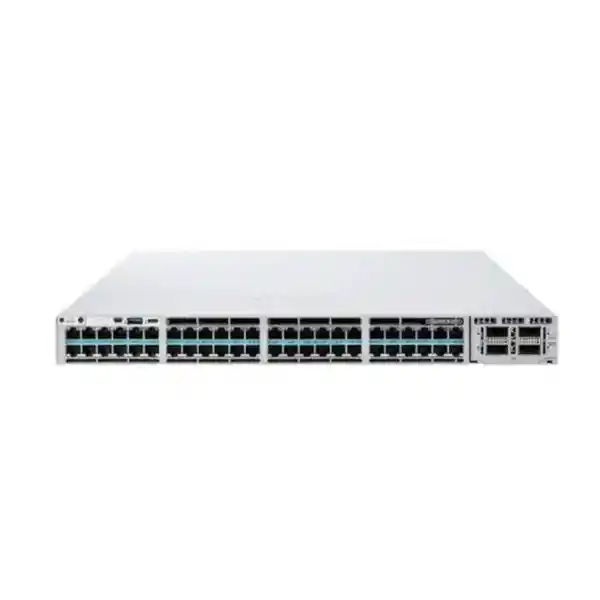
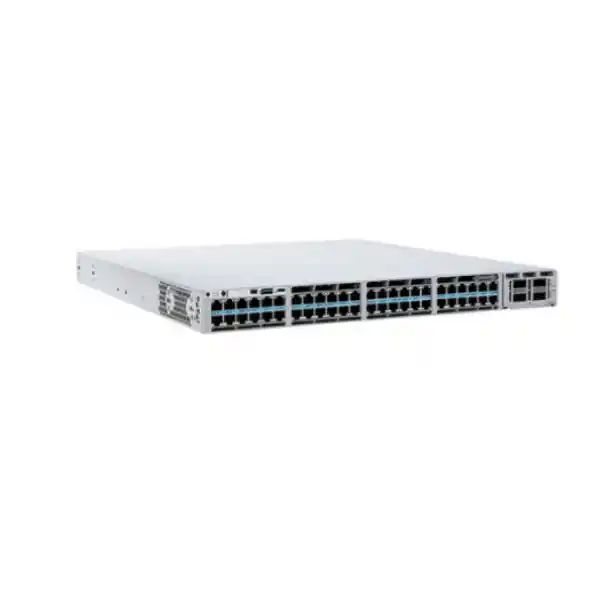
Cisco Catalyst C9300X-48HX Network Switch
For Tanzanian organizations building high-capacity campus and enterprise access networks, the Cisco Catalyst C9300X-48HX combines 48 multigigabit RJ-45 access ports, high-power Cisco UPOE+, resilient stacking, and modular uplink choices in a 1U platform. It is designed for dense wired and wireless environments where access-layer bottlenecks, PoE headroom, uplink growth, and operational resilience all matter.
The most important buying decision is not simply whether the chassis has 48 ports. Buyers should confirm the required software tier, uplink module, optics or cables, power-supply arrangement, stacking accessories, and support plan for the intended deployment. The bare C9300X-48HX model family supports several orderable software configurations, so the final bill of materials should match the network design rather than rely on assumptions about what is included.
Quick specification summary
The C9300X-48HX sits at the high-performance end of Cisco’s stackable campus access portfolio. Its value is strongest when the network really needs multigigabit copper on many ports, high PoE capability, and uplink bandwidth that can grow beyond traditional 10G designs. If most endpoints are simple 1G devices with modest PoE demand, a lower-density or lower-speed Catalyst model may be more economical; if the access layer must support fast wireless, rich media, high-resolution video, power-hungry endpoints, or local high-throughput systems, the C9300X-48HX becomes much easier to justify.
Performance figures should be read as platform capabilities, not as a promise that every application will see those numbers. Cisco’s current data sheet lists 1,760 Gbps switching capacity and 1,309 Mpps forwarding for the C9300X-48HX, increasing when stacking is considered. Real deployment throughput depends on traffic patterns, configuration, uplink design, software features, endpoint capabilities, cabling, optics, and the broader network architecture.
| Capability | C9300X-48HX detail | Why it matters |
|---|---|---|
| Access ports | 48 × RJ-45, 100M/1G/2.5G/5G/10G | Supports mixed endpoint generations without giving up 10G capability at the edge. |
| Power over Ethernet | Cisco UPOE+ on access ports | Useful for high-power APs, cameras, collaboration and building devices when the total power budget is engineered correctly. |
| Stacking | StackWise-1T | Allows multiple switches to operate as a resilient logical system with high stack bandwidth. |
| Uplinks | Optional modular 10G, 25G, 40G and 100G choices | Lets the access layer scale toward higher-speed distribution or core connectivity. |
| Performance | 1,760 Gbps switching; 1,309 Mpps forwarding | Provides the platform capacity needed for dense multigigabit access designs. |
| Memory | 16 GB DRAM; 16 GB flash | Supports the Catalyst 9300X software and operational feature set. |
Who should consider the C9300X-48HX in Tanzania?
The switch is aimed at organizations that are refreshing the access layer for several years of growth rather than solving only today’s 1G port requirement. A Tanzanian bank branch hub, university building, hotel, hospital, government facility, industrial office, corporate headquarters, media environment, or large professional campus may have a mixture of laptops, IP phones, access points, cameras, digital signage, building-control devices, servers, and specialized appliances. The useful question is how many of those devices will need more than 1G, how many require substantial PoE, and how quickly the uplink can become the bottleneck.
For wireless-led designs, the multigigabit access ports are particularly relevant. Modern access points can exceed 1G aggregate traffic and may also need more power than legacy PoE designs anticipated. A switch that can negotiate 2.5G, 5G, or 10G on the same copper access infrastructure gives the network team more room to match actual endpoint capabilities. That does not remove the need to validate cable category, run length, termination quality, access-point requirements, and controller or management design, but it reduces the risk that the switch itself becomes the limiting access component.
The model is also a strong fit where network consolidation matters. Rather than deploying separate switches for high-speed endpoints and high-power devices, a well-sized C9300X-48HX design can serve a broad mix from one managed access platform. The commercial case is strongest when that consolidation reduces rack complexity, uplink count, operational variation, and future replacement pressure. Buyers should still compare the cost of the full configuration—including power, software, uplinks, optics, stacking, and support—against simpler alternatives.
48 multigigabit ports: what the port speeds mean
Each of the 48 copper access ports supports 100 Mbps, 1 Gbps, 2.5 Gbps, 5 Gbps, and 10 Gbps Ethernet rates. This makes the platform useful in mixed environments because an older 1G endpoint and a newer multigigabit endpoint can live on the same access switch without forcing every connected device to operate at a single speed. The negotiated rate depends on both ends of the link and on the installed cabling. Buying a 10G-capable access switch does not automatically make every existing cable run or endpoint capable of 10G.
For practical design work, classify endpoints before ordering. Put access points, high-performance workstations, local content systems, imaging devices, media endpoints, and other bandwidth-heavy equipment in one group; put phones, printers, standard desktops, cameras, sensors, and building devices in another. This helps determine how many ports truly need multigigabit rates and whether 48 full 10G-capable copper ports are a sensible investment. It also reveals where future growth is likely, which is important because access switches often remain in service through multiple endpoint refresh cycles.
Cabling is part of the performance path. Existing structured cabling should be assessed for category, installation quality, patch-panel condition, patch leads, distance, electromagnetic environment, and certification results before assuming a particular multigigabit rate across every run. In many buildings the switch upgrade is only one element of a broader access-layer modernization. Designing the physical layer and switch together is more reliable than specifying port speed in isolation.
Cisco UPOE+ and PoE budgeting
The C9300X-48HX provides Cisco UPOE+ on its access ports and is positioned by Cisco for 90W PoE use cases. High per-port power capability is valuable for devices such as advanced wireless access points, pan-tilt-zoom cameras, collaboration endpoints, lighting or building systems, and other equipment that may exceed traditional PoE budgets. However, per-port capability and total chassis PoE budget are different concepts. The power supply configuration determines how much power can be delivered across all connected powered devices at the same time.
With the default PWR-C1-1100WAC-P power supply, Cisco lists 590W of available PoE power for the C9300X-48HX. Cisco also documents higher available PoE budgets with a 1900W primary supply and with supported secondary power-supply combinations. This means a deployment with dozens of high-power devices should be calculated from endpoint maximum draw and redundancy objectives, not from the assumption that every port can deliver its maximum simultaneously under the default power configuration.
A useful procurement worksheet should record each powered-device type, quantity, maximum expected power, desired headroom, and whether redundant power is required. Add margin for future devices and configuration changes. Then select the power-supply combination that meets the total without overpromising. If business continuity is important, the design should also consider the upstream electrical supply, UPS capacity, generator behavior where applicable, rack power distribution, grounding, heat output, and the effect of losing one power supply. PoE resilience is only as strong as the entire power chain.
Modular uplinks: choose for the distribution layer you actually have
The C9300X-48HX does not include a fixed uplink profile. Cisco supports optional network modules, and the modular approach is one of the platform’s main advantages. Current Cisco documentation lists C9300X-NM-8M for eight 10G/1G multigigabit uplinks, C9300X-NM-8Y for eight 25G/10G/1G uplinks, C9300X-NM-2C for two 100G/40G uplinks, and C9300X-NM-4C for four 100G/40G uplinks. The 4C module is specifically listed as compatible with the C9300X-48HX among selected 9300X models.
Because the network module is not part of the default switch configuration, it should appear as a deliberate line item in the bill of materials. The right module depends on the distribution or core switch, fiber plant, optics strategy, required redundancy, expected oversubscription, and growth plan. For example, a site whose distribution layer is currently 10G may prefer an 8M design, while a new campus backbone might select 25G or 100G uplinks to avoid replacing the access uplink architecture again during the life of the switch.
Uplink optics and cabling must also be matched end to end. Verify transceiver support, fiber type, connector type, link distance, the far-end interface, software compatibility, and any required breakouts before purchase. Do not treat a 100G-capable module as proof that an existing backbone is ready for 100G. A high-speed module provides capability; the optical path and opposite network device still have to support the same design.
StackWise-1T: scale and resilience without treating every switch as an island
Cisco lists StackWise-1T for Catalyst 9300X, providing up to 1 Tbps of local stacking bandwidth. Stacking can simplify a large access deployment by allowing multiple compatible switches to operate as one logical system for management and forwarding decisions. It can also improve resiliency when links, power, uplinks, and stack topology are designed correctly. Cisco states that the C9300X family can support dense multigigabit stacking, making the platform suitable for wiring closets where several 48-port units are required.
The design value of stacking is not simply a larger port count. A stack can reduce the number of independently managed devices, support cross-stack uplink designs, and provide a cleaner operational model for maintenance and failure handling. Yet stacking introduces its own hardware requirements. Stack cables must be included, cable lengths must suit rack placement, stack topology must be planned, and software compatibility should be checked. The physical order of equipment in the rack matters because poorly planned stack cabling can complicate service work.
Mixed-model stacking rules should be verified for the exact intended members and software release. Cisco’s current documentation contains compatibility conditions and exclusions across Catalyst 9300 variants. Therefore, a buyer who intends to add the C9300X-48HX to an existing stack should validate the existing model numbers, current software, desired stack bandwidth, and operational migration sequence before assuming compatibility. A new homogeneous stack is simpler to specify; an expansion into an established stack needs closer review.
Performance and scale for demanding access networks
Cisco’s current data sheet lists 1,760 Gbps switching capacity and 1,309 Mpps forwarding rate for the standalone C9300X-48HX. With stacking, Cisco lists higher aggregate values. The 48-port 10G multigigabit model also receives a 32 MB packet buffer in Cisco’s performance table, alongside 16 GB DRAM and 16 GB flash for the 9300X modular-uplink family. These specifications help explain why the platform can sit in demanding campus access roles rather than functioning as a basic edge switch.
For buyers, raw capacity figures are most useful when tied to traffic patterns. A floor with normal office browsing and cloud applications behaves differently from a media-production environment, a high-density wireless hall, a surveillance network, or a research site moving large local datasets. East-west traffic, uplink oversubscription, bursts, multicast, quality-of-service policies, routed access, encryption, and telemetry can all shape the real design. The switch should be selected as part of a topology, not by one headline number.
The platform also supports a large feature set for segmentation, policy, visibility, routing, quality of service, security, and automation, but the exact functions available depend on software and license tier. When a project requires specific advanced capabilities, list those requirements explicitly and map each one to the correct Cisco license and release. That approach avoids buying hardware that is physically capable but commercially or operationally configured for a narrower feature set.
Security architecture and encrypted traffic capability
Catalyst 9300X models use Cisco’s UADP 2.0sec ASIC. Cisco highlights line-rate crypto support and hardware-based IPsec capability up to 100G for the 9300X family, with the required security entitlement or key where applicable. The platform also supports MACsec capabilities within the Catalyst 9300 portfolio. These features can be relevant where organizations want stronger protection for traffic crossing campus links or need policy-driven segmentation at the access layer.
Security value still depends on architecture and configuration. A switch with encryption-capable silicon is not automatically providing encrypted links on every port. Network teams must define trust boundaries, authentication methods, identity sources, segmentation policy, management access, logging, key handling, software maintenance, and incident-response processes. Where MACsec or IPsec is required, validate the exact interface, license, key, peer-device, throughput, and software-release requirements before procurement.
For Tanzanian organizations with multiple buildings, sensitive business systems, regulated workloads, or public-facing environments, this capability can form part of a broader defense-in-depth approach. It should complement, not replace, endpoint security, firewalls, secure wireless design, identity services, patching, backup, monitoring, and physical security. The strongest buying specification describes the security outcomes the network must support rather than simply listing feature names.
Software and licensing: Essentials, Advantage, and Meraki-mode choices
Cisco offers C9300X-48HX ordering variants associated with different management and software positions. Current ordering information includes C9300X-48HX-E with Network Essentials, C9300X-48HX-A with Network Advantage, and C9300X-48HX-M for Meraki-oriented management options. Because the user-facing model name C9300X-48HX does not identify one of these suffixes, the exact orderable part number must be confirmed when quoting.
Network Essentials is intended for foundational Layer 2 and Layer 3 switching, visibility, automation, and security capabilities, while Network Advantage adds more advanced routing, segmentation, multicast, scale, and security features. Cisco’s licensing framework has evolved over time, and current subscriptions and management entitlements can depend on software release and chosen management platform. Buyers should therefore specify required features—such as advanced routing, policy segmentation, assurance, or cloud management—then select the license tier that supports those requirements.
This distinction matters commercially. Two physically similar switches can have different software rights, subscription requirements, and management experiences. Procurement teams should ask for a quote that clearly identifies the chassis part number, perpetual network tier where applicable, subscription term and tier, support coverage, management platform assumptions, and any add-on licenses. The safest comparison is a complete configured solution over the intended operating period, not a chassis-only price.
Power, cooling, rack depth, and physical planning
The C9300X-48HX is a 1U rack-mount switch, but its depth deserves attention in real cabinets. Cisco lists the chassis-only dimensions as approximately 1.73 × 17.5 × 19 inches, or 4.4 × 44.5 × 48.3 cm. With the documented 1100W power supply installed, the depth extends to about 22.03 inches, or 56.0 cm. Cable bend radius, rear clearance, power connectors, airflow, and service access can require additional cabinet depth beyond the chassis dimension.
Cisco supplies three field-replaceable fans and documents N+1 fan redundancy for the family. A high-density multigigabit PoE switch can contribute meaningful heat to a wiring closet, especially when powering many endpoints. Rack design should therefore include ventilation, ambient-temperature management, clean airflow paths, and enough cooling for the full equipment load. In warm environments or small communications rooms, cooling should be assessed as part of the network project rather than after commissioning.
Electrical planning should include stable input power, correctly rated circuits, surge protection appropriate to the facility design, UPS runtime objectives, grounding and bonding, and generator interaction if backup generation is present. If a second switch power supply is installed for resilience, ensure the upstream power paths are genuinely independent where required; plugging both supplies into the same unprotected source adds limited resilience. The goal is to protect both switch operation and the PoE devices that depend on it.
Where this model fits in a campus architecture
The C9300X-48HX is primarily an access-layer platform, but it can participate in routed or policy-driven campus designs depending on licensing and topology. At the edge, it connects users, access points, phones, cameras, sensors, AV endpoints, and specialized systems. Upstream, the modular uplink slot allows the switch to connect to distribution or core platforms at rates that can scale well beyond the traditional pair of 10G uplinks common in older campus designs.
A sensible architecture starts with traffic demand and failure domains. If 48 ports can each negotiate up to 10G, simply attaching them to a low-capacity uplink may create a concentrated bottleneck during busy periods. Not every access port will transmit at line rate simultaneously, but high-density wireless and local high-bandwidth devices can raise aggregate demand quickly. Uplink choice should therefore reflect measured or forecast traffic, application criticality, redundancy, and the capacity of the distribution layer.
For multi-building sites, fiber is normally the preferred medium for inter-building or backbone connections because of distance, bandwidth, and electrical-isolation considerations, but the exact optical design depends on the site. Survey available fiber strands, fiber type, termination, path diversity, distance, and existing optics. If a new 25G or 100G uplink is planned, verify the complete optical path before ordering the switch module. Campus modernization works best when access and backbone upgrades are coordinated.
Wi-Fi 6, Wi-Fi 6E, and high-density wireless access
Cisco specifically positions the C9300X-48HX for secure Wi-Fi 6 and Wi-Fi 6E high-speed access and beyond. The logic is straightforward: newer access points can require both more bandwidth and more power than older generations. A 1G access port can become the constraint even when the wireless radio side is capable of higher aggregate throughput, while a limited PoE budget can restrict radio operation or attached features.
Using multigigabit Ethernet allows compatible access points to connect at 2.5G, 5G, or 10G without forcing an immediate transition to fiber at every wireless location. UPOE+ gives power headroom for higher-demand devices, subject to the total chassis budget. The switch therefore supports a cleaner access architecture for dense offices, lecture spaces, hospitality areas, healthcare environments, public venues, and other locations where wireless performance is central to the user experience.
The switch alone does not determine wireless quality. Radio planning, channel design, spectrum conditions, access-point placement, antenna choices, client capability, controller or cloud architecture, authentication, DHCP/DNS performance, internet capacity, and application behavior still matter. For procurement, pair the switch design with the wireless design: count APs per closet, record each AP’s Ethernet and power requirements, calculate the PoE budget, select uplink capacity, and include growth.
Smart building, surveillance, collaboration, and IoT considerations
High-power PoE and dense copper connectivity make the C9300X-48HX attractive for more than user PCs. Modern campuses may use Ethernet for cameras, room systems, access-control components, digital signage, sensors, lighting controllers, building gateways, clocks, wireless devices, and collaboration endpoints. Consolidating these systems onto a managed network can improve visibility and reduce separate cabling and power complexity, but it also increases the importance of segmentation, availability, and PoE planning.
Different device classes should not automatically share the same security policy. Cameras, building systems, guest wireless infrastructure, corporate users, voice endpoints, and operational technology may require separate VLANs, virtual networks, access controls, authentication methods, quality-of-service rules, and monitoring. The Catalyst platform provides tools that can support segmentation and policy, but exact design choices depend on the organization’s security architecture and software entitlements.
Power restoration behavior is another practical issue. After an outage, dozens of powered endpoints may restart simultaneously, creating a large power and network demand. Confirm UPS sizing, switch PoE budget, endpoint boot requirements, and any critical-device priority policy. For surveillance or physical-security systems, determine which endpoints must remain powered during an outage and size the backup electrical system accordingly. Network resilience should be defined in minutes or hours of required service, not only in redundant hardware labels.
Tanzania deployment checklist before ordering
A strong Tanzania deployment starts with site facts. Confirm the number of active ports today, realistic growth over the expected life of the switch, endpoint speed requirements, per-device PoE draw, and closet locations. Record the distribution or core interfaces available at each site and the fiber or copper paths between them. If the network spans multiple floors or buildings, document both primary and backup uplink routes. This turns a broad request for a 48-port switch into a bill of materials tied to the real environment.
Power quality and continuity should be assessed carefully. Determine the available mains circuits, UPS design, grounding, generator behavior, and desired runtime. Because PoE can make the access switch responsible for powering wireless, voice, cameras, and building devices, an access-layer outage may affect much more than wired data. Size UPS and electrical capacity from the configured switch and expected PoE load, not from a generic switch rating.
Finally, plan operations. Decide who will manage Cisco IOS XE or the chosen cloud-management experience, how configuration backups are handled, where logs and telemetry go, how firmware changes are tested, what support process applies, and what spare strategy is appropriate. A capable switch can reduce operational friction only when the team has a clear management model. Include training, documentation, labeling, rack diagrams, IP addressing, monitoring, and change control in the deployment scope.
How to build the bill of materials correctly
Start with the exact base orderable variant rather than the generic model label. The buyer may need Network Essentials, Network Advantage, or a Meraki-mode option, and these are represented by different Cisco product numbers. Next choose the uplink network module. Then choose the optics or direct-attach cabling required to connect that module to the upstream switch. If stacking is required, add the correct StackWise cables and confirm physical cable lengths.
After connectivity comes power. Calculate the total expected PoE requirement, decide whether power-supply redundancy is mandatory, and select supported power supplies that meet both load and resilience targets. Include compatible power cords for the installation environment as part of the commercial check. If the rack or UPS cannot support the resulting load, fix that before deployment. High-power switching should not be added to a closet whose electrical and cooling design was built for low-power legacy equipment without verification.
Finally add the software subscription or entitlement, support service, any required security or feature licenses, rack accessories, console or management requirements, spare optics or cables where justified, and documentation for the chosen configuration. The quote should identify every major line item rather than presenting the chassis as a complete solution. This makes vendor comparisons fairer and reduces last-minute surprises during installation.
Choosing between C9300X-48HX and nearby Catalyst alternatives
The C9300X-48HX is compelling when all 48 access ports may need the full 10G multigigabit range and high-power UPOE+. If the network needs 10G copper but no PoE, Cisco’s C9300X-48TX is the closer data-only alternative. If only part of the port population needs 10G while the rest can operate at lower multigigabit speeds, other Catalyst 9300X variants may provide a better cost-to-capability balance. If the requirement is predominantly 1G access, a different Catalyst model may be more appropriate.
Port count is only one comparison dimension. Evaluate switching capacity, PoE type and total budget, uplink flexibility, stack bandwidth, physical depth, power draw, licensing, management model, and the distribution-layer roadmap. A lower-cost switch can become expensive if it forces an early replacement when wireless or endpoint bandwidth grows. Conversely, paying for 48 ports of 10G capability provides little value if the building’s cabling and endpoint roadmap will remain at 1G for the expected service life.
The best choice comes from a requirements table. List the must-have features, expected three-to-five-year growth, desired support life, uplink target, PoE requirement, stack size, network-management approach, and security functions. Then compare models against that table. This keeps the decision anchored to outcomes and avoids selecting equipment only because it is the highest-specification option.
Operational planning after installation
Day-two operations deserve the same attention as the initial rack installation. Establish a standard configuration baseline for management access, AAA, NTP, DNS, SNMP or telemetry, syslog, spanning-tree or routed-access design, VLANs, QoS, port security, and backup procedures. Document interface descriptions so technicians can identify connected devices without tracing every cable. Use consistent naming across switches, stacks, closets, and uplinks.
Software maintenance should follow a controlled lifecycle. Track the Cisco software release in use, review security advisories and recommended releases, test upgrades against critical features, and maintain rollback or recovery procedures. Stack upgrades and high-availability behavior should be understood before maintenance windows. If the switch supports essential voice, wireless, security cameras, or building systems, coordinate network changes with those service owners.
Monitoring should focus on conditions that predict user impact: uplink utilization, port errors, PoE consumption, temperature, fan or power-supply status, stack health, authentication failures, latency or loss where measured, and unusual traffic patterns. Capacity trends are particularly useful on a switch designed for multigigabit access. They show whether expensive high-speed ports and uplinks are being used as expected and help justify future expansion.
Procurement questions to ask before accepting a quote
Ask the supplier to state the exact Cisco part number, not only “C9300X-48HX.” The suffix matters because it indicates the associated software or management configuration. Request the uplink module part number and confirm whether it is included in the quoted total. Request the power-supply model or models, the resulting available PoE budget, and whether the quote is designed for power redundancy. Ask which stack cables, optics, and transceivers are included.
Ask for the software and subscription terms in plain language: license tier, subscription tier, term length, management platform, and any features that require additional entitlements. If advanced routing, segmentation, encryption, assurance, or cloud management is a project requirement, have the supplier map that requirement to the exact quoted license. This is more useful than relying on a broad statement that the switch “supports” a feature.
Also confirm commercial items that cannot be inferred from the model specification: lead time, local or regional fulfillment route, warranty or support coverage, return terms, installation scope, configuration services, and after-sales escalation. These details vary by seller and project, so they should appear in the formal quote rather than in generic product copy. For a Tanzanian buyer, the final landed commercial proposal should clearly distinguish hardware, software, services, logistics, and taxes or duties as applicable to the transaction.
Key technical specifications
The table below summarizes verified platform characteristics that are especially useful for solution design. It intentionally avoids presenting unverified pricing, stock, warranty, or Tanzania-specific availability. Exact feature support can vary with software release and licensing, and final procurement should use the specific Cisco orderable part number.
| Manufacturer | Cisco |
|---|---|
| Model | Catalyst C9300X-48HX |
| Form factor | 1U rack-mount |
| Access interfaces | 48 × RJ-45 multigigabit Ethernet ports |
| Supported access rates | 100M / 1G / 2.5G / 5G / 10G |
| PoE | Cisco UPOE+; platform positioned for up to 90W PoE endpoints |
| Default PSU listed by Cisco | PWR-C1-1100WAC-P |
| Available PoE with default PSU | 590W |
| Uplink architecture | Optional field-replaceable network module; 10G, 25G, 40G and 100G options supported |
| Stacking | Cisco StackWise-1T |
| Switching capacity | 1,760 Gbps standalone; 2,760 Gbps with stacking listed by Cisco |
| Forwarding rate | 1,309 Mpps standalone; 2,232 Mpps with stacking listed by Cisco |
| DRAM / Flash | 16 GB / 16 GB for Catalyst 9300X modular-uplink family |
| Packet buffer | 32 MB for the 48-port 10G multigigabit model class |
| Chassis dimensions | Approx. 4.4 × 44.5 × 48.3 cm chassis only; depth increases with power supply |
| Software family | Cisco IOS XE / supported Cisco management options depending on orderable variant and licensing |
Frequently asked questions
Does the C9300X-48HX have 48 ports that can all support 10G?
Yes. Cisco documents 48 RJ-45 multigigabit access ports supporting 100M, 1G, 2.5G, 5G, and 10G. The actual negotiated speed depends on the connected endpoint and cabling.
Does every port provide up to 90W PoE at the same time?
The ports support Cisco UPOE+ capability, but simultaneous power delivery is constrained by the total available PoE budget. With the default 1100W AC power supply Cisco lists 590W available PoE, so high-power deployments need an explicit power-budget calculation and may require a different or additional power supply.
Are the uplink ports built into the base chassis?
The C9300X-48HX uses optional network modules. Cisco lists modules for 10G, 25G, 40G, and 100G uplink choices. The required module, optics, and cables should be selected and quoted separately unless the seller explicitly includes them.
Can the switch be stacked?
Yes. Cisco lists StackWise-1T support for the Catalyst 9300X family. Exact mixed-model compatibility and software requirements should be checked for the intended stack members before purchase.
Which software license should I choose?
Choose from the exact capabilities required. Cisco offers Network Essentials and Network Advantage variants and also supports Meraki-oriented orderable options for this model family. Advanced routing, segmentation, assurance, management, or security requirements should be mapped to the correct current license and subscription.
Is the C9300X-48HX suitable for Wi-Fi 6 or Wi-Fi 6E access points?
Yes, Cisco specifically positions the model for high-speed Wi-Fi 6/6E access. Its multigigabit Ethernet and UPOE+ are useful for compatible APs, but the AP model, cable run, PoE budget, uplink capacity, and wireless design still need validation.
What should be checked in an existing rack?
Check usable rack depth, airflow, rear clearance, power circuits, UPS capacity, grounding, heat load, patching, fiber availability, and room cooling. The chassis is 1U, but the installed power supply increases total depth beyond the chassis-only measurement.
Can I use 100G uplinks?
Yes, supported C9300X network modules include 100G/40G options, including a four-port 100G/40G module that Cisco lists as compatible with the C9300X-48HX. The far-end switch, optics, fiber plant, and software must also support the chosen link.
Is pricing or stock shown on this page?
No. Pricing, stock, lead time, warranty, taxes, duties, and services are commercial variables that should be confirmed in a current Tanzania quotation for the exact configured part number.
What information should I provide when requesting a quote?
Provide the number of switches, desired software tier, uplink speed and quantity, upstream switch model, fiber type and distance, expected PoE device count and power, stacking requirement, redundancy objective, and support needs. This enables a more accurate bill of materials.
Request a configured C9300X-48HX quotation for Tanzania
For an accurate proposal, specify your required license tier, uplink speed, stacking plan, PoE endpoint load, redundancy target, and support requirement. A complete quotation should identify the exact Cisco orderable part number and all necessary modules, optics, power supplies, stacking accessories, software subscriptions, and services.
Next step: request a solution review and bill of materials for your site. No stock, price, delivery, warranty, or local authorization claim is made here; these should be confirmed in the current commercial offer.




Reviews
There are no reviews yet.