
Higher-scale / deep-buffer model
StackWise-480
Modular uplinks
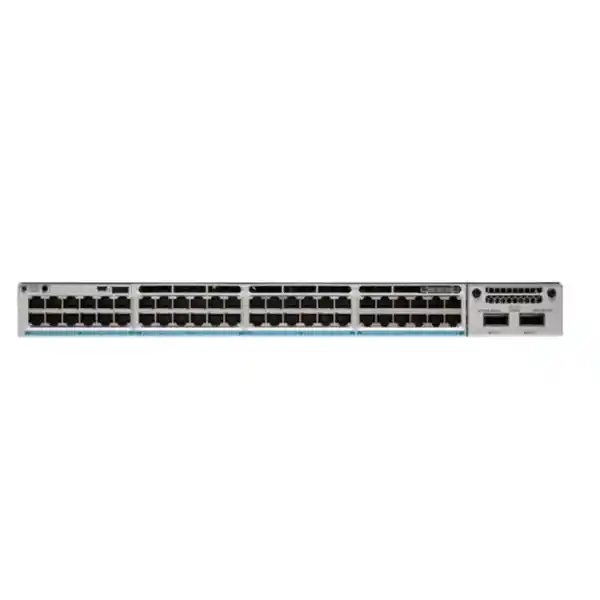
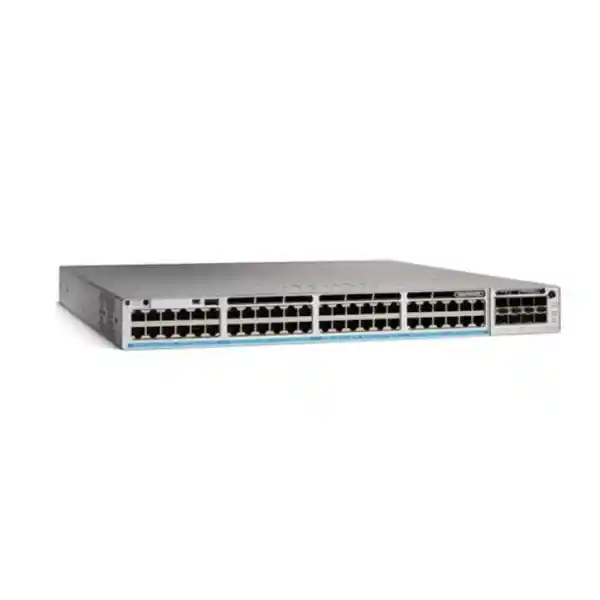
Cisco Catalyst C9300-48UB: high-scale access switching with UPOE and deeper buffers
The Cisco Catalyst C9300-48UB is designed for enterprise access networks that need more than basic 48-port Gigabit Ethernet connectivity. It combines 48 copper 10/100/1000 Mbps access ports with Cisco Universal Power over Ethernet, modular uplink flexibility, StackWise-480 stacking and the higher-scale forwarding profile that distinguishes Cisco’s C9300 “B” models. The deeper packet buffer is especially useful where traffic arrives in bursts, where many edge devices converge on faster uplinks, or where congestion can appear because access and uplink speeds do not match.
For buyers in Tanzania, the practical question is whether the network requires dense powered access, enterprise resiliency and larger tables without moving every endpoint to multigigabit copper. If most edge devices still connect at 1G but the design must support high-power wireless access points, IP phones, cameras, collaboration devices, building systems or other powered endpoints, the C9300-48UB can be a strong fit. The final bill of materials should still be based on the required software license, uplink module, optics, stacking accessories, PoE load and power-redundancy plan rather than on the chassis name alone.
Fast buying summary
Access ports
48 × 10/100/1000BASE-T copper ports with Cisco UPOE. Cisco UPOE supports powered-device requirements up to 60W per port when the total system power budget is sized accordingly.
PoE budget
With the default 1100W power supply, Cisco specifies an available PoE budget of 822W. Additional supported power capacity is required for larger high-power endpoint populations.
Performance
256 Gbps switching capacity and 190.48 Mpps forwarding in standalone operation, rising to 736 Gbps and 547.62 Mpps when Cisco’s published stacking figures are included.
Higher-scale design
64,000 MAC addresses, up to 112,000 IPv4 routes, 56,000 IPv6 routing entries, 18,000 ACL scale entries and a 32 MB packet buffer according to Cisco’s current platform data.
Who should choose the C9300-48UB?
This model is most compelling when a conventional 48-port enterprise access switch is almost sufficient, but the network needs greater buffer depth and scale. The “UB” model remains a 1 Gigabit copper access switch, so it is not the right choice simply because a buyer wants faster-than-gigabit edge ports. Instead, it is intended for environments where 1G to the endpoint is appropriate but traffic concentration, route scale, policy scale, telemetry or burst handling justify the higher-scale platform.
Typical examples include large office floors, university or training environments, healthcare and hospitality networks, operations sites, surveillance-heavy facilities, public-sector buildings, branch aggregation designs and enterprise campuses where a large number of powered devices share uplinks. A camera deployment can create sustained and bursty upstream traffic; a wireless deployment can concentrate many client flows into a smaller set of access points; collaboration endpoints may generate latency-sensitive traffic; and a busy user access layer can experience microbursts when multiple 1G ports transmit toward the same uplink. A deeper buffer does not replace sound capacity planning, but it gives the platform more room to absorb transient congestion than standard-scale 1G Catalyst 9300 models.
The C9300-48UB is less suitable when the requirement is primarily multigigabit copper for Wi-Fi 6E or Wi-Fi 7 access points, when 90W UPOE+ is required, or when a fixed-uplink switch is preferred for a simpler bill of materials. In those cases, another Catalyst 9300 family member may be a better architectural match. Selecting the exact platform should follow endpoint speed, power draw, uplink bandwidth, license functions, redundancy goals and growth plans.
Verified hardware and scale specifications
| Base model | Cisco Catalyst C9300-48UB |
|---|---|
| Access interfaces | 48 × 10/100/1000 Mbps copper Cisco UPOE ports |
| Uplink architecture | Modular uplink slot; network module selected separately according to the design |
| Default power supply | 1100W AC |
| Available PoE budget with default PSU | 822W |
| Stacking | StackWise-480; up to eight members in the C9300 modular-uplink stacking architecture, subject to higher-scale model compatibility |
| Switching capacity | 256 Gbps standalone; 736 Gbps including stacking |
| Forwarding rate | 190.48 Mpps standalone; 547.62 Mpps including stacking |
| Packet buffer | 32 MB on the higher-scale 48-port Gigabit Ethernet model |
| MAC address scale | 64,000 |
| IPv4 / IPv6 route scale | 112,000 IPv4 routes; 56,000 IPv6 routing entries |
| ACL / QoS scale entries | 18,000 ACL scale entries; 18,000 QoS scale entries |
| Memory | 8 GB DRAM and 16 GB flash |
| Approx. dimensions with default 1100W PSU | 1.73 × 17.5 × 19.2 inches (H × W × D) |
| Approx. weight with default PSU | 17.03 lb / 7.72 kg |
Figures above describe the C9300-48UB hardware class and published platform scale. Effective feature availability and table allocation can depend on Cisco IOS XE release, SDM template and software licensing, so final design validation should use the intended software release and configuration.
Why the deep buffer matters
A packet buffer is temporary memory that a switch uses when traffic cannot be transmitted immediately. Congestion can occur even when average utilization looks reasonable because Ethernet traffic often arrives in short bursts. Consider several desktop systems sending large transfers at the same time, many cameras producing I-frames, or multiple wireless access points forwarding bursts from active clients toward one upstream path. If several ingress ports collectively send faster than an egress port can drain, packets queue. If the queue fills, packets are dropped and higher-layer protocols must recover.
Cisco positions the C9300-48UB, together with the C9300-24UB and C9300-24UXB, as a large-buffer option within the Catalyst 9300 family. Cisco’s current data sheet lists a 32 MB packet buffer for higher-scale 24- and 48-port Gigabit Ethernet models, compared with 16 MB for standard C9300 Gigabit Ethernet models. Cisco’s QoS documentation also explains that these large-buffer models are designed to improve handling of microburst traffic and congestion caused by speed mismatch.
That does not mean a deep buffer can correct an undersized uplink indefinitely. Persistent oversubscription still requires more bandwidth, traffic engineering, QoS or architectural changes. The value is in absorbing temporary bursts while preserving a higher-scale access platform. For network teams planning dense surveillance, campus access, multimedia, collaboration or mixed enterprise traffic, that distinction can be more important than a superficial comparison based only on port count.
Cisco UPOE power: plan the endpoint load, not just the port count
All 48 copper access ports are Cisco UPOE-capable. Cisco UPOE extends the power available beyond classic PoE and PoE+, supporting powered-device requirements up to 60W per port and IEEE 802.3bt Type 3 operation. This is useful for devices that need more power than a conventional phone or simple sensor, including higher-power wireless access points, video endpoints, compact access devices, building gateways and selected surveillance equipment. The switch can also power lower-demand IEEE PoE and PoE+ devices, so a single access layer can support a mixed endpoint population.
The critical sizing figure is the total PoE budget. With one default 1100W power supply, Cisco publishes 822W available PoE for the C9300-48UB. That total is shared across powered ports. For example, a network with many low-power phones may remain well inside the budget, while a design dominated by 45W or 60W endpoints can exhaust available power long before all 48 ports are occupied. Cisco’s power tables show that two supported 1100W supplies are used where a 48-port UPOE design must provide up to 60W on as many as 30 ports, with the platform’s maximum total PoE allocation reaching 1800W under the applicable supported configuration.
A quote should therefore be based on an endpoint power worksheet. Record the maximum negotiated PoE class or worst-case draw for each device, add design headroom, then decide whether a second power supply is needed for capacity, redundancy or both. Redundant-power planning is not identical to maximum-power planning: if the design must survive a PSU failure without dropping critical powered devices, the remaining supply capacity must be sufficient for the protected load. The same logic applies to UPS sizing in the equipment room.
For Tanzania sites where grid events or generator/UPS transitions are part of the facilities plan, coordinate network power with the electrical and backup-power design. The switch’s supported 1100W platinum AC supply operates across Cisco’s published 115–240 VAC, 47–63 Hz input range. Actual site power protection, earthing, circuit rating and UPS autonomy should be specified by qualified local personnel for the installation rather than inferred from the switch name.
Modular uplinks: choose bandwidth and media to suit the design
Unlike fixed-uplink access switches, the C9300-48UB uses a modular uplink architecture. This gives the designer flexibility to select an uplink module that matches the distribution layer, available fiber plant, transceiver strategy and required oversubscription ratio. Cisco lists C9300 network modules that include four 1G SFP slots, eight 10G/1G SFP+ slots, two 40G QSFP+ slots, two 25G SFP28 slots, and four multigigabit copper interfaces. The module is a design choice, not something that should be assumed from the base C9300-48UB chassis description.
For a typical 48-port access layer, 10G fiber uplinks are often a practical baseline because they give substantially more aggregation headroom than 1G uplinks while fitting established enterprise distribution designs. A pair of uplinks can be used for redundancy or port-channel designs when supported by the target architecture. Higher-speed 25G or 40G options may be appropriate when the upstream network and traffic model justify them. Conversely, a site with modest traffic and an existing 1G optical distribution layer may not benefit from paying for unnecessary uplink bandwidth.
The exact network module, optics and fiber type must be validated together. Connector type, reach, wavelength, fiber grade, transceiver support and software release all matter. A correct switch model with the wrong optical module is still an unusable design. When requesting a quote, provide the required uplink speed, number of uplinks, estimated distance, fiber type if known, upstream switch model and whether spare optics or redundant paths are required.
StackWise-480 and the higher-scale stacking rule
The C9300-48UB supports Cisco StackWise-480, which allows compatible Catalyst 9300 switches to operate as a logical stack with a published 480 Gbps stacking bandwidth. Cisco’s platform data lists support for up to eight members for C9300 modular-uplink stacks. Stacking can simplify operations by presenting multiple physical switches as one managed system, providing cross-stack forwarding options and supporting resilient access-layer designs.
There is an important compatibility constraint: the C9300-48UB is a higher-scale C9300 model. Cisco states that higher-scale C9300 models C9300-24UB, C9300-24UXB and C9300-48UB must be stacked with other higher-scale models. Do not assume it can simply be added to an existing stack of standard C9300-48P, C9300-48U or unrelated C9300 models. Cisco also distinguishes modular-uplink C9300 stacking from C9300L fixed-uplink stacking. License-level compatibility and the intended software release should be checked as part of the final stack design.
This constraint matters during both new deployment and future expansion. If a site expects to grow from one switch to several, select the first switch with the future stack family in mind. If an existing rack already contains Catalyst 9300 switches, capture the exact part numbers and license levels before purchasing a C9300-48UB. That simple inventory step can avoid buying a chassis that cannot join the planned stack.
Stacking also has a relationship with the large-buffer configuration on this platform. Cisco’s QoS documentation describes stacking and non-stacking operating modes for the C9300-24UB and C9300-48UB, managed through the platform’s buffer configuration and requiring a reload when changing the mode. This is a technical deployment consideration for experienced network teams; it should be planned during implementation rather than treated as a post-installation detail.
Higher scale for larger enterprise access networks
The “higher-scale” designation is measurable. Cisco’s current Catalyst 9300 data lists 64,000 MAC addresses for higher-scale models compared with 32,000 for standard modular-uplink C9300 models. It lists up to 112,000 IPv4 routes, comprising direct and indirect route capacity, and 56,000 IPv6 routing entries. The platform class also increases multicast routing, QoS and access-control scale, with 16,000 multicast routing entries plus 18,000 QoS and 18,000 ACL scale entries in Cisco’s published table.
These figures matter most in designs that push substantial policy and forwarding state into the access layer. A straightforward Layer 2 branch with a few VLANs may never approach them. A large campus, routed-access design, segmentation project, feature-rich enterprise edge or environment with broad telemetry and policy requirements can have a different profile. The value of C9300-48UB is therefore not that every installation needs maximum scale, but that the platform provides more headroom where the access layer is expected to carry a larger operational role.
The hardware includes 8 GB of DRAM and 16 GB of flash. Cisco also supports an external USB 3.0 SSD option on the Catalyst 9300 platform for use cases that require supported local storage functions. Feature behavior still depends on Cisco IOS XE release, license tier and template selection. Buyers should avoid treating headline table numbers as a guarantee that all maximums can be used simultaneously in every configuration. Network scale is normally a multidimensional planning exercise, and Cisco’s SDM templates allocate hardware resources according to the required feature mix.
A useful procurement practice is to provide expected VLAN count, routed interfaces, approximate endpoint count, route scale, access-control requirements, multicast usage, telemetry needs and growth horizon. That lets the implementation team confirm whether the higher-scale hardware is justified and whether the intended software template aligns with the design.
Software licensing: Network Essentials or Network Advantage
The base name C9300-48UB identifies the hardware family, but Cisco’s orderable switch variants include C9300-48UB-E with Network Essentials and C9300-48UB-A with Network Advantage. The hardware description is therefore not enough to produce a complete commercial configuration. The software tier should be chosen from the required routing, segmentation, automation and advanced enterprise functions, and it should align with the architecture used elsewhere in the network.
Network Essentials is generally the lower feature tier, while Network Advantage enables a broader set of capabilities. The exact feature list is release-dependent, and Cisco can change packaging over the commercial life of the platform. Rather than copying an old feature matrix into a purchase decision, validate the target Cisco IOS XE release and current license entitlement at the time of quotation. This is especially important for advanced routing, policy, segmentation or controller-integrated designs.
If the switch will join an existing stack, include the license level of the existing members in the planning data. Cisco’s current stacking guidance ties supported stack membership to compatible model and license combinations. A quote request should therefore identify whether the switch is a standalone replacement, a new stack member or part of a completely new stack. That information affects not only software selection but potentially stacking cables, power design and uplink modules.
Practical deployment scenarios in Tanzania
Enterprise office floors
Use dense 1G UPOE access for phones, desktop connectivity, wireless access points and meeting-room devices while keeping modular fiber uplinks toward the distribution layer.
Surveillance-heavy sites
The deeper buffer can be valuable where many camera streams and bursts converge toward fewer uplinks. PoE sizing must still be based on each camera’s worst-case draw, especially for PTZ, heater or IR-equipped models.
Campus and education access
Higher route, MAC and policy scale can suit larger user populations, multiple VLANs and routed-access designs where a standard-scale access switch offers less growth headroom.
Hospitality and shared facilities
A mix of phones, access points, cameras, controllers and building devices can be consolidated on centrally managed powered access, provided network segmentation and PoE budgets are engineered for the site.
Branch aggregation and resilient access
StackWise-480 and modular uplinks can support resilient access-layer layouts where maintenance simplicity and uplink redundancy are important, subject to the higher-scale stacking compatibility rule.
Multimedia and collaboration
QoS capability, larger buffers and enterprise switching features can support converged voice, video and data networks, but application performance still depends on end-to-end QoS, WAN capacity and wireless design.
C9300-48UB versus nearby Catalyst 9300 choices
Model selection is easier when the requirement is expressed in terms of edge speed, PoE level and scale. The C9300-48UB is the higher-scale, deep-buffer choice for 48 ports of 1G UPOE. Other Catalyst 9300 models address different needs. The following comparison is intended as a buying guide, not as a substitute for a current Cisco configuration check.
| Model family | Best fit | Key distinction |
|---|---|---|
| C9300-48UB | 48-port 1G UPOE with higher scale | 32 MB buffer and higher-scale forwarding tables |
| C9300-48U | 48-port 1G UPOE where standard C9300 scale is sufficient | Standard-scale architecture with a smaller 16 MB buffer on the 1G model |
| C9300-48P | 48-port 1G access where PoE+ power levels are sufficient | PoE+ rather than Cisco UPOE |
| C9300-48UN | Access networks needing multigigabit copper | Up to 5G multigigabit access ports rather than 1G-only access |
| C9300-48H | High-power access for supported endpoints | UPOE+ platform option where up to 90W per port is required |
If the reason for considering the C9300-48UB is simply “48 ports with PoE,” it may be over-specified. If the requirement includes high-power UPOE, larger tables, deeper buffering and enterprise stacking, it becomes much easier to justify. Conversely, if access points or workstations require 2.5G, 5G or 10G copper at the edge, a multigigabit model should be evaluated even if the C9300-48UB offers attractive scale.
Important design limits and procurement checks
1G access speed: The C9300-48UB has Gigabit Ethernet copper access ports. UPOE increases available electrical power; it does not turn those ports into multigigabit Ethernet. Check the wired speed required by modern wireless access points and other high-throughput devices before standardizing on this model.
Uplink module is a separate decision: “Modular uplinks” means the uplink personality is selected through a compatible C9300 network module. Confirm module type, transceiver form factor, optical reach, fiber type and upstream interface compatibility.
PoE budget is finite: The default 1100W supply does not provide 60W simultaneously to all 48 access ports. Cisco publishes an 822W available PoE budget with the default supply. Larger powered loads need additional supported power capacity and careful redundancy planning.
Higher-scale stacking restrictions apply: The C9300-48UB should be planned with compatible higher-scale Catalyst 9300 members rather than assumed to mix with any C9300 model. Validate the exact existing stack before expansion.
License tier matters: C9300-48UB-E and C9300-48UB-A represent Network Essentials and Network Advantage orderable variants. Required software functions should determine the tier.
Heat, depth and power need rack planning: With the default 1100W supply, the chassis depth is approximately 19.2 inches. Leave suitable rack clearance for power leads, airflow, stacking cables and uplink fibers. High PoE loads also increase electrical and thermal demand, so cabinet ventilation and UPS sizing should be part of the deployment design.
How to size a C9300-48UB deployment before requesting a quote
A complete switch order is usually more than one chassis. The quickest way to avoid rework is to collect the design inputs below before the quote is finalized. These inputs allow the seller or network integrator to distinguish mandatory components from optional growth items and to identify technical mismatches early.
- Count active copper ports and expected growth. Include user devices, phones, access points, cameras, printers, controllers and building systems. Reserve capacity for moves and additions rather than filling all 48 ports on day one.
- Record PoE power requirements. Capture the maximum power class or device specification for every powered endpoint. Separate essential devices from nonessential loads if the design must keep key services running after a PSU failure.
- Define uplink requirements. State 1G, 10G, 25G or 40G expectations, number of links, upstream switch model, fiber type, approximate distance and connector environment. This drives the network module and optics selection.
- Decide standalone versus stack. If stacking is planned, list all existing or proposed member models, license levels and desired stack-cable lengths. Remember that the C9300-48UB belongs to the higher-scale stack group.
- Choose the software tier from features. Do not select Network Advantage only because it sounds “better.” Identify the routing, segmentation, policy, automation and management functions the network actually requires.
- Plan power redundancy and UPS capacity. A second PSU may be required for higher PoE capacity, resilience, or both. UPS autonomy should be calculated from the real switch and endpoint load rather than the PSU nameplate alone.
- Check rack and environmental conditions. Confirm rack depth, airflow direction, ambient temperature, cable management and clearances. Cisco’s published normal operating envelope varies with altitude and power-supply family.
- Set an IOS XE lifecycle plan. Use a currently supported release appropriate to the organization, review relevant Cisco field notices and security advisories, and establish maintenance procedures before the device becomes production-critical.
Operations, resilience and lifecycle considerations
Enterprise access switching is an operational platform, not only a port-density purchase. The C9300-48UB runs Cisco IOS XE and participates in the broader Catalyst 9000 management, telemetry, security and automation ecosystem according to the software release and licenses deployed. The advantage of choosing a mainstream enterprise platform is the availability of documented upgrade procedures, field notices, security advisories, configuration guidance and supported management workflows.
Operational resilience starts with physical design. Use redundant uplinks where the architecture requires them, protect power with appropriate UPS and distribution, document stack cabling, keep compatible spares for critical sites, and avoid routing all services through a single unprotected upstream device. For PoE-heavy installations, identify which powered endpoints are operationally critical so power-budget changes do not unexpectedly affect phones, cameras or wireless infrastructure.
Software maintenance is equally important. Cisco continues to publish IOS XE releases and field notices for Catalyst 9300 platforms. A production network should use an organization-approved release train, maintain configuration backups, review advisories and test upgrades against required features. The fact that the hardware supports a feature does not remove the need to verify the specific release, license and configuration.
When replacing older access switches, plan migration details such as VLANs, trunks, spanning-tree roles, authentication, voice VLAN behavior, DHCP snooping, access control, QoS, routing adjacencies, monitoring and PoE behavior. A successful migration should preserve service intent while taking advantage of the new platform, rather than simply copying an old configuration without review.
Frequently asked questions
Is the Cisco C9300-48UB a PoE+ or UPOE switch?
It is a Cisco UPOE model. Its access ports support lower-power PoE and PoE+ devices as well as Cisco UPOE / IEEE 802.3bt Type 3 power requirements up to 60W per port, subject to the total available PoE budget and supported power-supply configuration.
How much PoE power is available with the standard power supply?
Cisco specifies an 822W PoE budget for the C9300-48UB with its default 1100W power supply. That budget is shared by all powered access ports. If the endpoint plan exceeds it, additional supported power capacity is required.
Can every port provide 60W at the same time?
No. Forty-eight ports at 60W would exceed the platform’s total PoE allocation. Cisco’s power guidance for 48-port UPOE models shows two 1100W power supplies for configurations providing up to 60W on as many as 30 ports. Design from total power budget and endpoint requirements, not from per-port maximum alone.
What is special about the “B” in C9300-48UB?
Cisco categorizes the C9300-48UB as a higher-scale model with deeper buffering. Cisco’s current data lists a 32 MB packet buffer and higher MAC, route, multicast, QoS and ACL scale than standard C9300 Gigabit Ethernet models. This can benefit larger or more burst-sensitive enterprise designs.
Can the C9300-48UB join any Catalyst 9300 stack?
No. Cisco states that the higher-scale C9300-24UB, C9300-24UXB and C9300-48UB models need to be stacked with other higher-scale models. Check exact member models, software and license compatibility before adding one to an existing deployment.
Does the switch include 10G uplinks?
The platform has modular uplinks rather than one fixed uplink layout. A compatible C9300 network module must be selected. Cisco offers module options for 1G, 10G, 25G, 40G and multigigabit connectivity. The final choice depends on the upstream architecture and media.
Is the C9300-48UB suitable for Wi-Fi 6 or Wi-Fi 7 access points?
It can power compatible access points, but its access data ports are limited to 1 Gigabit Ethernet. If an access point requires or would materially benefit from 2.5G, 5G or 10G wired throughput, evaluate a multigigabit Catalyst model instead. Power compatibility and data-rate requirements should be checked separately.
What is the difference between C9300-48UB-E and C9300-48UB-A?
Both are orderable variants of the same higher-scale 48-port UPOE hardware family. The “-E” variant is associated with Network Essentials, while the “-A” variant is associated with Network Advantage. Choose according to the required software features and current Cisco licensing guidance.
Why would I choose C9300-48UB instead of C9300-48U?
Both provide 48 1G UPOE access ports, but the UB model is the higher-scale, deeper-buffer option. The decision is justified when traffic patterns, forwarding scale, policy scale or growth plans benefit from that additional headroom. For a simpler network that does not need those characteristics, the standard C9300-48U may be sufficient.
What information should I provide for a Tanzania quote?
Provide the required license tier if known, port and PoE endpoint counts, approximate power draw, uplink speeds and media, stacking requirement, existing switch models, redundancy preference and optics or fiber details. This allows the final bill of materials to be built around the actual deployment rather than only the base chassis.
Request a C9300-48UB configuration for your network
Use the Cisco Catalyst C9300-48UB when you need 48 ports of 1G UPOE access together with deeper buffering, higher forwarding scale, modular uplinks and enterprise stacking. Before ordering, confirm the license tier, uplink module, optics, number of stack members, stacking cables, expected PoE load, second-power-supply requirement and rack/UPS design.
For an accurate Tanzania quotation, share your endpoint count, powered-device requirements, uplink design and whether this switch will operate standalone or join a compatible higher-scale Catalyst 9300 stack. The result should be a complete, deployment-ready bill of materials rather than an incomplete chassis-only selection.




Reviews
There are no reviews yet.