
Enterprise access switching for Tanzania
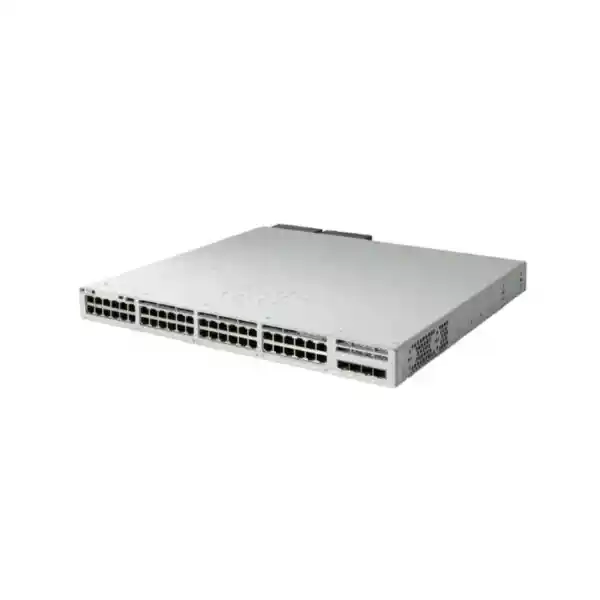
Cisco Catalyst C9300L-48T-4G Network Switch
The Cisco Catalyst C9300L-48T-4G is designed for organizations that need forty-eight reliable Gigabit Ethernet access ports, fixed fiber uplinks, enterprise switching features and the option to scale through stacking, but do not need Power over Ethernet on the access ports. It is a strong fit for office floors, campus access layers, server and appliance connectivity, education environments, branch aggregation and other wired networks where endpoint power is provided separately.
4 × fixed 1G SFP uplinks
StackWise-320 ready
Data only — no PoE
Before ordering, confirm two decisions: whether four 1G uplinks are sufficient for your expected northbound traffic, and which Cisco license tier your network design requires. If you need 10G uplinks, the C9300L-48T-4X is the closer alternative. If you need to power access points, IP phones or cameras directly from the switch, choose an appropriate C9300L PoE model instead.
Quick decision summary
Choose it when
You need 48 copper Gigabit access ports, separate endpoint power, fixed 1G fiber uplinks and an enterprise switching platform that can grow through StackWise-320.
Reconsider it when
Your access layer will aggregate substantial wireless, video, storage or server traffic and needs 10G uplinks, or your endpoints rely on PoE from the switch.
Plan licensing
Cisco offers orderable C9300L-48T-4G configurations with Network Essentials or Network Advantage. Confirm the exact software entitlement required before quotation and purchase.
Plan optics separately
The four uplink interfaces are SFP slots. Select transceivers and fiber or copper media according to the actual link distance, cabling plant and peer-device compatibility.
What the C9300L-48T-4G is built to do
The C9300L-48T-4G belongs to Cisco’s Catalyst 9300L fixed-uplink family. Its core role is the enterprise access layer: connecting user devices and infrastructure endpoints to a managed campus or business LAN while supporting policy, segmentation, monitoring, resiliency and Layer 2/Layer 3 functions according to the selected software license. The model provides 48 10/100/1000 Mbps RJ-45 data interfaces. These are conventional data ports rather than PoE ports, so attached devices must have their own power source or use a separate power solution.
Northbound connectivity is provided by four fixed 1 Gigabit Ethernet SFP uplink interfaces. “Fixed” is important: unlike Catalyst 9300 models with modular uplink network modules, this 9300L configuration does not let you replace the uplink module later with a different module. That makes the switch simple and predictable to design around, but it also makes uplink capacity a decision that should be made before purchase. If the network may soon require 10G uplinks, the C9300L-48T-4X can be a more future-ready fit because it uses four fixed 10G/1G SFP+ uplinks.
For many standard office and institutional networks, 1G uplinks remain useful where user traffic is moderate, applications are primarily cloud and productivity focused, and uplink utilization has been measured rather than assumed. For denser wireless networks, media-heavy environments, backup traffic, large on-premises applications or many simultaneously active Gigabit users, the uplink design deserves closer attention. A 48-port access switch can have far more aggregate edge capacity than four 1G uplinks, so oversubscription is normal, but the acceptable ratio depends on actual workload.
Verified technical specifications
| Model | Cisco Catalyst C9300L-48T-4G |
|---|---|
| Access ports | 48 × 10/100/1000 Mbps Ethernet data ports |
| PoE | No PoE on this T model |
| Uplinks | 4 × fixed 1G SFP |
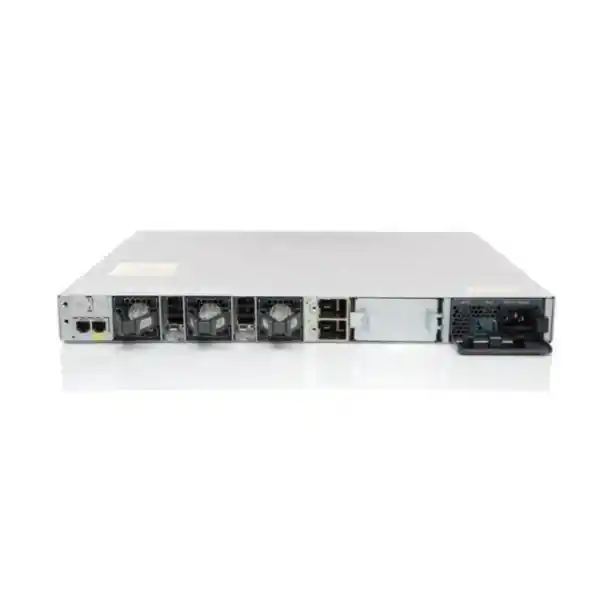
| Default power supply | 350W AC, PWR-C1-350WAC-P |
| Standalone switching capacity | 104 Gbps |
| Standalone forwarding rate | 77.38 Mpps |
| With stacking | 424 Gbps switching capacity and 315.48 Mpps forwarding rate |
| Stacking technology | StackWise-320, optional stack kit |
| Maximum stack members | Up to 8 compatible C9300L/9300LM switches, subject to Cisco stacking compatibility rules |
| DRAM / flash | 8 GB DRAM / 16 GB flash for Catalyst 9300L/LM fixed-uplink models |
| MAC addresses | Up to 32,000 for Catalyst 9300L/LM fixed-uplink models |
| IPv4 / IPv6 scale | Up to 32,000 IPv4 routes and 16,000 IPv6 routing entries for the fixed-uplink family |
| VLAN IDs | 4094 |
| Jumbo frames | Up to 9198 bytes |
| Software platform | Cisco IOS XE; features depend on release and license entitlement |
Performance figures above are Cisco platform specifications. Real application performance depends on design, configuration, traffic characteristics, software release, optics, cabling and peer-device capabilities.
Why this switch can make sense for Tanzania deployments
A good enterprise switch choice is not only about the highest available interface speed. It is about matching port density, uplink demand, power design, operational tooling and expansion plans to the site. The C9300L-48T-4G is especially relevant where a business wants a Cisco enterprise access platform but the connected devices are primarily desktop computers, printers, workstations, controllers, servers or appliances that already have independent power supplies.
For an office floor with dozens of wired users, a 48-port model can reduce the number of standalone access switches compared with deploying multiple 24-port units. That can simplify rack layout, configuration standards and spare planning. In a school, training facility or administrative building, it can serve computer laboratories and staff areas where endpoint power is local rather than delivered over Ethernet. In a branch or operations site, it can provide a standardized access platform that aligns with a wider Cisco campus design.
The four 1G SFP uplinks are useful when the distribution layer is reached over fiber, when electrical separation is preferred between areas, or when structured cabling distances exceed practical copper Ethernet limits. The actual optics should be chosen only after confirming fiber type, connector type, distance, optical budget and the interfaces available on the upstream switch. A single-mode transceiver should not be selected simply because the site uses fiber, and a multimode transceiver should not be assumed suitable without checking the installed cable plant.
Power continuity also deserves planning in any business-critical network. This switch uses a 350W AC power supply as the default configuration, but the network rack should still be designed around the total load of the switch, any secondary supply that may be ordered, routers, firewalls, servers and other rack devices. Where continuity during mains interruptions is a requirement, size the UPS according to measured or specified equipment loads and the required runtime rather than using a generic estimate.
The most important local procurement point is to avoid treating the model name alone as a complete bill of materials. The switch hardware, license tier, support arrangement, SFP optics, stacking kit, power redundancy choice and compatible cabling should be confirmed together. FourTeck Tanzania can use those design inputs to prepare a quotation without assuming stock, price or entitlement that has not been verified for the requested configuration.
Uplink planning: the most important design check for the 4G model
The “4G” in C9300L-48T-4G identifies the fixed uplink arrangement: four 1G SFP interfaces. That can be entirely adequate for many access-layer deployments, but it should be validated against expected traffic patterns. Forty-eight edge ports do not all transmit at line rate continuously in a typical office. Most endpoints are bursty, and many user applications spend more time waiting for remote services or user input than saturating a link. For this reason, access networks are commonly designed with some oversubscription between edge ports and uplinks.
The correct oversubscription level is workload-dependent. A floor dominated by office applications, web browsing, messaging and moderate cloud use may behave very differently from a floor with high-resolution media editing, surveillance recording, large file transfers, virtual desktop traffic or local backup jobs. If the network carries a large number of wireless access points through downstream switches, the aggregate traffic can also rise quickly. Measure existing utilization where possible and model expected growth before choosing the 1G-uplink version.
Multiple uplinks can be used for redundancy and aggregation where the upstream design and software configuration support it. Link aggregation should be planned consistently on both ends, and the physical diversity of the fiber paths matters if resilience is a goal. Two logical links that share one cable route, one patch panel failure point or one upstream chassis may not provide the level of availability expected by the business.
If traffic projections suggest that several Gigabits per second may need to leave the access switch at once, the C9300L-48T-4X deserves consideration. It keeps the same 48-port data-only access concept but changes the fixed uplink set to four 10G/1G SFP+ interfaces. That gives the design significantly more northbound headroom without moving away from the Catalyst 9300L family. Choosing 4X at the beginning can also avoid replacing the entire fixed-uplink switch later simply to increase uplink speed.
Conversely, buying 10G uplinks where the network has a stable, modest workload can add cost in optics, upstream ports and associated infrastructure without delivering a practical user benefit. The right approach is to match the uplink to measured demand, growth, redundancy policy and the capabilities of the distribution layer.
StackWise-320 for growth and operational consistency
Cisco’s Catalyst 9300L fixed-uplink models support StackWise-320. With the required stack kit and dedicated stack cabling, compatible switches can be combined into a stack with 320 Gbps of stacking bandwidth. Cisco documents support for up to eight members in a C9300L/9300LM StackWise-320 design, subject to platform and license compatibility rules. This can be valuable when a site grows beyond the 48 access ports of one switch or when operations teams prefer to manage a group of access switches as a coordinated system.
Stacking is not simply a way to “add ports.” A well-designed stack can simplify configuration, enable cross-stack EtherChannel designs and improve resiliency by allowing links to be distributed across stack members. It also reduces the number of separately managed logical devices at an access location. These benefits can be especially useful in wiring closets serving multiple departments or floors where the access layer may expand over time.
The stack kit is optional and should be included explicitly when stacking is required. Cisco lists C9300L stack kits that include adapters and a stack cable, with different cable lengths available. The physical rack layout therefore matters. Switches should be positioned so that the selected stack cables can be routed cleanly without strain, and the design should consider how a failed member can be removed or replaced without creating unnecessary disruption to neighboring equipment.
Compatibility needs attention as well. Fixed-uplink C9300L models are not treated as interchangeable stack members with modular-uplink C9300 models. Cisco’s current documentation describes stacking compatibility within the appropriate Catalyst 9300L and 9300LM group and with matching license considerations. If a customer already owns Catalyst switches, the exact existing models and license levels should be recorded before proposing a new member for the same stack.
The C9300L family does not support Cisco StackPower in the same way as the modular-uplink C9300 and C9300X platforms. Therefore, do not assume that power can be pooled across an access stack. Each switch’s power architecture should be designed separately, including any desired secondary supply and upstream UPS strategy. This distinction is important because “stacked switches” can refer to a common data stack while power behavior remains model-specific.
For a single small deployment, stacking may not be necessary on day one. The advantage is that the capability is available if the site later needs more ports or a more resilient architecture. If stacking is part of the roadmap, reserve rack space, power capacity and cable paths early so expansion does not require redesigning the cabinet.
Enterprise visibility, segmentation and security foundations
Catalyst 9300 Series switches are positioned as enterprise platforms rather than unmanaged connectivity devices. The value is therefore not limited to port count. The platform supports Cisco IOS XE and a broad set of Layer 2, Layer 3, policy, telemetry and automation functions, with the exact feature set determined by software release and licensing. This matters for organizations that need repeatable network standards, controlled segmentation, troubleshooting visibility and integration with a wider Cisco operational model.
At the hardware and software trust level, Cisco documents features such as cryptographically signed images, Secure Boot and a Cisco Trust Anchor component for the Catalyst 9300 Series. These mechanisms are designed to help verify software integrity and hardware authenticity during the platform boot process. They do not replace network security policy, but they strengthen the foundation on which segmentation, authentication and access controls are implemented.
The Catalyst 9300L fixed-uplink family supports substantial forwarding and policy scale for an access switch, including up to 32,000 MAC addresses, 32,000 IPv4 routes, 16,000 IPv6 routing entries, 5,120 ACL scale entries and 5,120 QoS scale entries in Cisco’s published platform table. It also supports Flexible NetFlow scale appropriate to the family. These numbers are not goals that every deployment should try to reach; they indicate that the platform is intended for managed enterprise environments where visibility and policy can extend well beyond basic VLAN switching.
For network teams, this can support a more disciplined operating model. Departments, device types or security zones can be separated logically rather than placed in a flat LAN. Quality-of-service policy can prioritize business-critical traffic where justified. Flow telemetry can help with capacity planning and incident investigation. Layer 3 capabilities can be used at the access or distribution boundary when the network architecture and license support them.
Cisco also supports broader management and automation options across the Catalyst 9300 family, including Cisco Catalyst Center workflows and, for supported use cases and software, cloud-management paths. These capabilities can be valuable in multisite environments, but they should not be assumed to be included with every hardware quote. Subscription, license tier, software version and management architecture determine what is available. A procurement request should therefore describe the operational outcome required, not merely ask for “all Cisco features.”
Security design should also include the surrounding environment: AAA services, identity systems, logging, time synchronization, configuration backup, patch management, secure management-plane access, VLAN and routing policy, endpoint security and upstream firewalling. The switch is a critical control point, but it is only one part of the end-to-end security architecture.
Performance and scale in practical terms
Cisco specifies 104 Gbps of switching capacity and 77.38 million packets per second of forwarding performance for the C9300L-48T-4G in standalone operation. With stacking included in the published calculation, the figures rise to 424 Gbps switching capacity and 315.48 Mpps forwarding. Cisco also states that the family is designed for wire-speed, nonblocking IPv4 and IPv6 forwarding under the conditions used for its published specifications.
Those figures should be interpreted correctly. Switching capacity is not the same as available internet bandwidth, and stacking bandwidth is not the same as uplink bandwidth. A site can have an access switch capable of forwarding traffic internally at high speed while the path to servers, WAN, internet or another floor remains constrained by 1G uplinks or other network components. Capacity planning therefore follows the entire traffic path, not one headline number.
The Catalyst 9300L/9300LM fixed-uplink platform table lists 8 GB of DRAM and 16 GB of flash, with support for up to 4094 VLAN IDs and jumbo frames up to 9198 bytes. It also lists up to 1000 switched virtual interfaces for the family. These resources provide room for enterprise configurations, but engineers should still validate specific feature scale against the exact Cisco IOS XE release and the chosen forwarding template where applicable.
In most real deployments, reliability comes from keeping the configuration simpler than the absolute scale limits. A well-structured VLAN plan, summarized routing, controlled spanning-tree design, deliberate trunking and predictable QoS are easier to operate than an access layer pushed to maximum theoretical values. The switch’s scale provides flexibility, but operational discipline determines whether that flexibility becomes an advantage.
When replacing older Catalyst access switches, performance planning should also account for the new environment’s application mix. Migrating from a legacy 100 Mbps access layer to 1G edge ports can shift the bottleneck upstream. The correct migration may therefore include uplink changes, distribution upgrades or revised traffic engineering rather than only a one-for-one access-switch replacement.
Licensing: Network Essentials, Network Advantage and current subscription choices
The base hardware designation C9300L-48T-4G does not by itself tell the buyer which software tier is being quoted. Cisco documents orderable versions such as C9300L-48T-4G-E for Network Essentials and C9300L-48T-4G-A for Network Advantage. Network Essentials covers foundational enterprise switching capabilities, while Network Advantage adds more advanced routing, segmentation, multicast, scale and security functions.
Cisco’s licensing model has evolved over time. Current Cisco documentation describes both traditional Cisco DNA licensing relationships and newer unified Cisco Switching Essentials and Switching Advantage subscription options on supported software releases. This means a buyer should not copy an old bill of materials from another project and assume it still represents the correct current commercial configuration. The quote should match the intended software release, management model, feature requirements and subscription term.
A practical requirements discussion starts with features, not abbreviations. Does the network require only standard access switching and basic Layer 3 functions, or does it require advanced routing? Will the site be integrated into a policy-based campus fabric? Is advanced assurance or automation required? Are there existing Cisco subscriptions that the new switch must align with? Will operations be performed locally, centrally or through an approved cloud-management design? The answers help determine whether Essentials or Advantage is appropriate.
License planning also matters for stacking. Cisco documents same-license-level considerations for C9300L StackWise-320 compatibility. When adding this switch to an existing stack, record the exact model and license level of the current members before purchase. A technically similar switch can still be the wrong expansion unit if software entitlement and platform compatibility are not aligned.
Because licensing and subscriptions can change, the final commercial proposal should name the exact orderable product code and associated software entitlement rather than using only “C9300L-48T-4G.” This product page intentionally does not state that a particular license or subscription is included unless it is specified in the final quote.
Common deployment scenarios
Corporate office access
Connect desktops, printers, docking stations and independently powered business devices on a floor where 48 Gigabit ports reduce the need for multiple smaller switches.
Education and training labs
Provide dense wired connectivity for computer labs, teaching spaces and administrative users when endpoints receive power locally and the uplink design remains within 1G SFP requirements.
Branch and operations sites
Standardize a branch LAN on the Catalyst 9300 platform, using VLANs, policy, monitoring and optional stacking while keeping device power separate from network switching.
Appliance and server-edge connectivity
Attach firewalls, controllers, appliances or 1G server interfaces where high port density is useful, while checking that northbound uplink throughput matches the expected east-west and north-south traffic.
Growing wiring closets
Start with one switch and preserve a path to StackWise-320 expansion when additional compatible C9300L or C9300LM members, rack space and stack accessories are planned correctly.
Legacy access refresh
Replace older 10/100 or earlier-generation Gigabit access equipment with an IOS XE-based enterprise platform, while reviewing uplinks, optics, licenses and configuration migration rather than assuming a direct swap.
Deployment and migration checklist
A successful switch purchase begins with a bill of requirements. The following points help prevent a technically correct switch from becoming a poor fit after installation.
1. Count ports by device type
List current wired endpoints and expected growth. Separate ordinary data devices from equipment that requires PoE. If many phones, cameras or access points depend on switch-delivered power, this T model is not the appropriate choice unless separate injectors or power systems are intentionally part of the design.
2. Validate uplink bandwidth
Record typical and peak traffic on the existing access layer. Consider internet-bound traffic, local server access, backups, voice, video, wireless aggregation and east-west flows. If 1G uplinks are likely to become a bottleneck, consider the 4X version before purchasing optics and deployment accessories.
3. Survey the fiber plant
Identify whether each uplink uses multimode or single-mode fiber, connector type, patching arrangement, distance and upstream interface. Select SFP optics only after these details are known. Include spare optics where the support strategy requires them.
4. Confirm the license tier
Translate required routing, segmentation, automation, analytics and management capabilities into an Essentials or Advantage requirement. If the switch joins an existing stack, confirm the license level already in use across the intended members.
5. Decide on stacking at design time
If StackWise-320 is required now, include the correct stack kit and cable lengths in the bill of materials. If stacking is only a future possibility, preserve rack space, power capacity and physical access for additional members.
6. Plan power and UPS capacity
The default unit uses a 350W AC supply. Size rack power distribution and UPS runtime for the full rack load, not only the switch nameplate. If power redundancy is required, confirm the supported secondary power-supply option in the final bill of materials.
7. Prepare the configuration migration
Audit VLANs, trunks, STP settings, EtherChannels, routing, DHCP relay, ACLs, QoS, management addressing, AAA, SNMP or telemetry, syslog, NTP and monitoring. Clean obsolete settings rather than copying an old configuration line for line. Confirm feature syntax and support on the target Cisco IOS XE release.
How it compares with nearby Catalyst 9300L choices
| Model | Access ports | PoE | Fixed uplinks | Best fit |
|---|---|---|---|---|
| C9300L-48T-4G | 48 × 1G data | No | 4 × 1G SFP | Dense data-only access with moderate uplink demand |
| C9300L-48T-4X | 48 × 1G data | No | 4 × 10G/1G SFP+ | Data-only access needing more aggregation headroom |
| C9300L-48P-4G | 48 × 1G PoE+ | Yes | 4 × 1G SFP | Access points, phones, cameras and other PoE devices with 1G uplinks |
The comparison is intentionally focused on the nearest design choices. If the project requires multigigabit edge ports, higher-power PoE, 10G or faster uplinks, deep buffers, or a different stacking architecture, other Catalyst 9300 family models may be more appropriate. Selecting the family member by workload prevents paying for unused capability or creating a constraint that is expensive to correct later.
Important limitations and buying considerations
No Power over Ethernet: The C9300L-48T-4G is a data-only model. It will not power phones, wireless access points, IP cameras or other PoE-powered devices through its RJ-45 access ports.
Fixed 1G uplinks: The four SFP uplink ports are fixed at the model level. You cannot swap a modular uplink network module later. Choose the 4X variant if 10G/1G SFP+ uplinks are required.
Optics are a design item: An SFP slot does not define the fiber distance or media. The transceiver, fiber type and upstream interface must be compatible.
Stacking needs accessories: StackWise-320 is supported, but the stack kit and dedicated cables are separate design components. Compatibility with existing stack members must be checked.
License tier matters: Network Essentials and Network Advantage provide different feature sets. Subscription and management choices also depend on the software release and commercial model.
No implied local commercial terms: Product price, stock, delivery timing, warranty handling, installation scope and support entitlement must be confirmed in the actual FourTeck Tanzania quotation. They are not inferred from the hardware model name.
Procurement checklist for an accurate quotation
To quote the correct C9300L-48T-4G configuration, provide enough information to resolve the surrounding components as well as the chassis. A useful request includes the required quantity, whether the project is a new deployment or expansion, the current Cisco switch models if stacking is planned, the required license tier if already known, the uplink media and distances, and whether secondary power supplies are needed.
For fiber links, include the number of uplinks per switch, fiber type, connector presentation and approximate distance to the distribution or core switch. If the existing network already uses specific Cisco optics, record their exact part numbers rather than assuming they are automatically suitable for the new switch. Compatibility should be verified against the peer interfaces and current Cisco guidance.
For software, describe required outcomes: basic access switching, static or dynamic routing, advanced segmentation, automation, assurance, policy-based fabric integration or centralized management. This allows the commercial configuration to be built around the correct Essentials or Advantage entitlement instead of guessing from a previous project.
For migration projects, share the approximate number of VLANs, key trunk and EtherChannel relationships, routing role and any critical services connected to the existing switch. A change window is safer when dependencies are known before hardware arrives. If business continuity is important, define whether a parallel build, staged migration or rollback path is required.
Finally, identify what should be included beyond the switch itself: rack mounting, stack kits, SFP transceivers, fiber patch cords, console access, secondary power supplies, UPS capacity, software subscriptions, support and configuration services. A complete bill of materials reduces the risk of a deployment being delayed by a small missing accessory.
Frequently asked questions
Does the Cisco C9300L-48T-4G provide PoE?
No. Cisco identifies the C9300L-48T-4G as a 48-port data-only model, and the published power table lists no available PoE power for this switch. If the deployment needs to power IP phones, wireless access points, cameras or other powered devices through Ethernet, choose a suitable PoE-capable Catalyst model such as a C9300L “P” variant after confirming the required PoE budget.
How many uplink ports does it have?
It has four fixed 1 Gigabit Ethernet SFP uplink ports. These are intended for compatible SFP transceivers. The correct optic depends on the link medium, fiber type, distance and peer interface. If the design requires 10G uplinks, review the C9300L-48T-4X instead of assuming the 4G model can be upgraded with a different uplink module.
Can the C9300L-48T-4G be stacked?
Yes. Cisco lists Catalyst 9300L fixed-uplink models with StackWise-320 support. Up to eight compatible C9300L/9300LM switches can participate in the documented stack design, subject to Cisco’s model and license compatibility rules. An appropriate stack kit and stack cables are required and should be included in the bill of materials.
What is the switching capacity?
Cisco specifies 104 Gbps of standalone switching capacity for the C9300L-48T-4G and 424 Gbps in its published with-stacking figure. The listed forwarding rates are 77.38 Mpps standalone and 315.48 Mpps with stacking. These are platform metrics and should not be confused with the capacity of the four 1G uplink interfaces.
Is Network Essentials or Network Advantage included?
The generic hardware name does not specify the final entitlement. Cisco lists C9300L-48T-4G-E as the Network Essentials orderable version and C9300L-48T-4G-A as the Network Advantage version. The quotation should state the exact orderable configuration and any associated subscription so the software capabilities are clear before purchase.
Is this switch suitable for wireless access points?
It can carry network traffic associated with wireless infrastructure, but its 48 access ports do not provide PoE. Most enterprise access points depend on PoE unless powered by an alternative source, so a PoE-capable Catalyst access switch is normally a better direct-connect choice. Also consider uplink capacity carefully when aggregating substantial wireless traffic.
Can I use it as a Layer 3 switch?
The Catalyst 9300 platform supports Layer 3 capabilities, but the exact routing functions and scale available to your deployment depend on the license tier, software release and configuration. Define the required routing protocols and topology during design so the correct Essentials or Advantage entitlement can be selected rather than relying on a generic “Layer 3” label.
What memory does the platform have?
Cisco’s performance table lists 8 GB of DRAM and 16 GB of flash for Catalyst 9300L/9300LM fixed-uplink models. The family also supports enterprise-scale forwarding tables, VLANs, SVIs and telemetry functions. Feature-specific scale should still be checked against the intended Cisco IOS XE release and network design.
When should I choose the C9300L-48T-4X instead?
Choose the 4X variant when the access switch needs more uplink headroom, when the distribution layer already uses 10G SFP+ interfaces, or when expected traffic growth makes four 1G uplinks a likely constraint. Both are data-only 48-port concepts, but the uplink capability is materially different and cannot be changed by swapping a network module on these fixed-uplink models.
What information should I provide to request a quote in Tanzania?
Provide the required quantity, deployment type, preferred license tier if known, whether stacking is required, existing switch models if this is an expansion, uplink speed and media requirements, fiber distances, optic requirements, power-redundancy needs and any requested support or configuration services. This allows the quote to identify the exact orderable configuration rather than assuming accessories or software that may not match the project.
Request a Cisco C9300L-48T-4G quotation
For an accurate Tanzania quotation, specify the switch quantity, required software tier, uplink optics, stacking requirements and power-redundancy needs. If you are replacing an existing Cisco access switch, include the current model and a short description of the connected devices and upstream links.
FourTeck Tanzania can then prepare the requested configuration for review without assuming unverified stock, pricing, delivery, warranty or licensing terms.




Reviews
There are no reviews yet.