
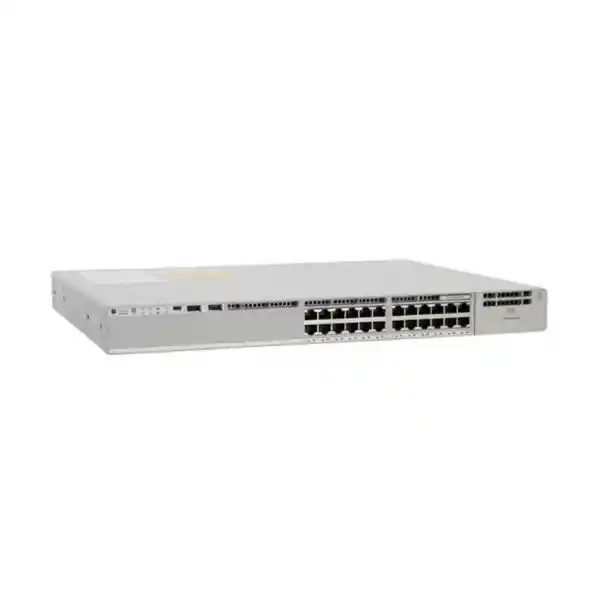
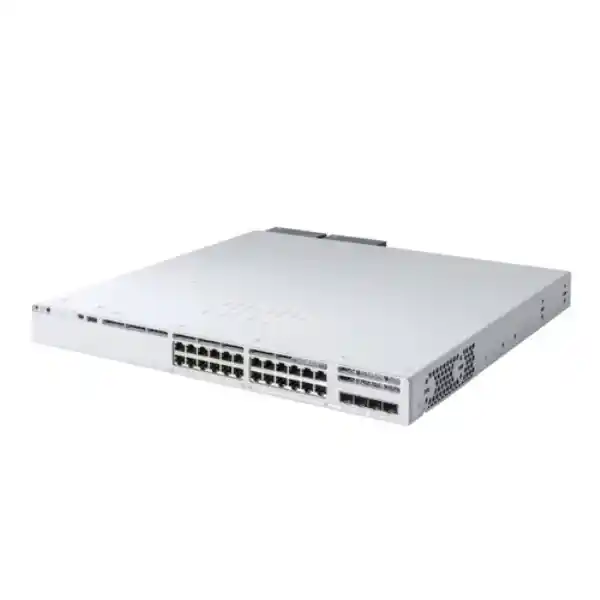
4 × 10G/1G SFP+ uplinks
505W PoE budget with default PSU
StackWise-320 ready
Cisco Catalyst C9300L-24P-4X Network Switch
The Cisco Catalyst C9300L-24P-4X is built for enterprise access networks that need dependable Gigabit Ethernet at the edge, Power over Ethernet Plus for connected devices, and multiple 10 Gigabit fiber uplinks toward the distribution or core layer. It combines 24 10/100/1000 Mbps PoE+ access ports with four fixed 10G/1G SFP+ uplink ports in a 1RU switch, giving network teams a practical balance of access density, uplink capacity, power delivery, and stackability.
For a Tanzanian office, campus building, branch, hospitality property, school, healthcare facility, surveillance environment, or other professionally managed network, the main buying question is not simply whether the switch has 24 ports. The more important checks are the number and type of powered endpoints, the total PoE requirement, the fiber uplink design, the desired software license level, the need for stacking, and the resilience expected from the power and switching architecture. This page explains those decisions so a buyer can specify the right configuration before requesting a quotation.
At a glance
| Model | Cisco Catalyst C9300L-24P-4X |
|---|---|
| Access ports | 24 × 10/100/1000 Mbps copper PoE+ ports |
| Fixed uplinks | 4 × 10G/1G SFP+ ports |
| Default power supply | 715W AC |
| Available PoE with default PSU | 505W |
| Switching capacity | 128 Gbps standalone; 448 Gbps with stacking bandwidth included |
| Forwarding rate | 95.23 Mpps standalone; 333.33 Mpps with stacking bandwidth included |
| Stacking | Cisco StackWise-320, up to 8 supported stack members |
| Dimensions | 1.73 × 17.5 × 19.2 in. maximum with installed fan FRUs and default power supply (4.4 × 44.5 × 48.8 cm) |
| Weight | 14.99 lb (6.81 kg) with default power supply |
The specifications above describe the C9300L-24P-4X hardware platform. Orderable Cisco variants can differ by software license level, so the final quotation should identify the exact Cisco part number and license combination rather than relying only on the shortened hardware model name.
Who should consider the C9300L-24P-4X?
This model is best suited to networks that need a managed enterprise access switch rather than a basic unmanaged or lightly managed edge device. A typical deployment has users, IP phones, wireless access points, cameras, printers, building systems, or other Ethernet endpoints connected at 1 Gigabit, while traffic is aggregated through one or more 10 Gigabit fiber links. The four SFP+ uplinks are particularly useful when the access layer needs more than a single uplink path, when separate uplinks are planned for redundancy, or when a switch needs high-capacity connections to distribution switches, servers, or other network infrastructure.
The C9300L-24P-4X also makes sense where a 24-port form factor is preferable to a 48-port switch. That can be important in a branch or building floor where there are fewer endpoints, where rack space and cable organization favor smaller access blocks, or where planners want to preserve a clean growth model by adding another switch later. Because the platform supports StackWise-320, multiple compatible Catalyst 9300L or 9300LM switches of the same license level can be managed as a stack, subject to Cisco’s stacking compatibility requirements.
It is not automatically the right choice for every PoE deployment. If the project requires Multigigabit access speeds above 1 Gbps on copper, UPOE rather than PoE+, a larger default PoE budget, more than 24 access ports in one unit, or different uplink speeds, another Catalyst 9300 family model may fit better. Buyers should therefore treat this model as a specific combination of 24 × 1G PoE+ and 4 × 10G/1G SFP+ rather than as a generic “9300” switch.
24 Gigabit PoE+ ports: plan by power budget, not only port count
The 24 access interfaces provide 10/100/1000 Mbps Ethernet and PoE+. This allows a single Ethernet cable to carry both network traffic and electrical power to compatible powered devices. In practical deployments, that can simplify endpoint placement because an access point, IP phone, or camera does not necessarily need a separate local power adapter at the device position. The switch, however, still has a finite overall power budget, so a correct design needs to consider both the per-device requirement and the sum of all powered devices.
With the default 715W AC power supply, Cisco specifies 505W of available PoE power for the C9300L-24P-4X. That number is the useful planning figure for the standard configuration. Twenty-four endpoints do not all have to draw the same amount of power, and many real devices consume less than their maximum classification, but the design should be based on realistic worst-case requirements rather than an optimistic average. A network with a mixture of phones and low-power sensors may have plenty of margin, while a design dominated by higher-power wireless access points or cameras can approach the PoE budget much faster.
A good bill of materials therefore lists each powered endpoint, its expected PoE standard and maximum draw, the number of units, and a reserve for future additions. It is also useful to decide whether every powered endpoint must stay online during a power-supply fault or maintenance event. The default power supply and the maximum port-level PoE capability are related but not identical design considerations. Cisco documents higher aggregate PoE availability when a suitable secondary power supply is installed, while the 24-port hardware still places a practical ceiling on total deliverable PoE based on the port count and port ratings.
Four fixed 10G/1G SFP+ uplinks
The “4X” portion of the model indicates four fixed 10 Gigabit/1 Gigabit SFP+ uplink interfaces. For buyers comparing similar Catalyst 9300L models, this is one of the most important differences. The C9300L-24P-4G uses four 1G fixed uplinks, while the C9300L-24P-4X provides four uplink slots capable of 10G or 1G operation with supported optics or cabling. That additional uplink headroom is valuable where a 1G uplink could become a bottleneck once traffic from many access ports, wireless clients, IP cameras, or other endpoints is aggregated.
The uplinks are fixed rather than modular. This simplifies the model choice but also means that buyers should confirm the required uplink architecture before purchase. If a network standard calls for a different modular uplink option or future speeds beyond the fixed interfaces, a different Catalyst 9300 variant may be preferable. For the C9300L-24P-4X, the key design task is selecting the correct supported SFP/SFP+ transceivers or direct-attach options for the link type, distance, fiber plant, connector type, and equipment at the far end.
In Tanzania, fiber paths can vary significantly between a single equipment room, a multi-floor building, separate buildings on one site, and geographically separated facilities. The switch model alone does not determine the correct optic. Confirm whether the link is copper or fiber, multimode or single-mode, the approximate distance, the patching standard, and the interface supported by the connected distribution or core switch. Avoid choosing optics only by speed; wavelength, fiber type, connector, reach, and Cisco compatibility also matter.
The four-uplink design also enables more flexible redundancy and aggregation strategies than a single-uplink access switch. Depending on the intended topology and software configuration, ports can be assigned to separate upstream paths or combined where supported. The final design should be validated against the network’s spanning-tree, EtherChannel, routing, or stack architecture rather than assuming that four physical uplinks automatically create four active redundant paths.
StackWise-320 for growth and operational simplicity
Cisco documents StackWise-320 support for the Catalyst 9300L family. The stacking fabric provides up to 320 Gbps of stacking bandwidth and supports up to eight stack members. In a correctly designed stack, multiple physical switches operate with a unified management and control approach, which can simplify administration compared with managing each access switch independently. Stacking can also make it easier to grow port density while maintaining a consistent operational model.
Stacking requires the appropriate stacking hardware and careful compatibility checks. Cisco lists C9300L stack kits for these fixed-uplink models, and stack members must meet Cisco’s license-level and software compatibility requirements. A stack should not be assembled by assuming that every Catalyst 9300-branded model can be mixed freely. The current Cisco documentation distinguishes C9300L and C9300LM stacking behavior from the modular-uplink C9300 and C9300X platforms, and buyers should validate the exact intended member models before procurement.
For a new deployment, decide whether the switch will run standalone on day one but may be stacked later, or whether stacking is part of the initial design. If stacking is planned later, include rack layout, rear clearance, cable access, software standardization, license consistency, and stack-kit availability in the original design. Retrofitting can be straightforward, but it is better to reserve the space and operational window in advance than to discover that the rear of the rack is crowded or that intended stack members are on incompatible configurations.
Stacking is not a replacement for every form of network redundancy. It addresses switch aggregation and management, but the overall solution still depends on upstream diversity, power design, UPS runtime, cable paths, software configuration, endpoint architecture, and maintenance procedures. For critical networks, assess the complete failure domain instead of treating a stack as a single checkbox for high availability.
Performance and scale
Cisco specifies 128 Gbps of switching capacity and 95.23 million packets per second of forwarding performance for the C9300L-24P-4X in standalone operation. When Cisco presents capacity figures with stacking bandwidth included, the corresponding values are higher because the StackWise fabric is counted separately. For most access-layer buying decisions, it is useful to understand which number is being quoted so that comparisons are made on the same basis.
Beyond raw port speed, the Catalyst 9300L platform is designed with enterprise switching scale. Cisco’s current family data lists up to 32,000 MAC addresses for the fixed-uplink C9300L/LM class, along with IPv4 and IPv6 routing scale and hardware resources for quality-of-service and access-control entries. Exact practical scale depends on feature configuration and software, so these figures should be viewed as platform planning limits rather than a guarantee that every maximum can be reached simultaneously in every template or feature combination.
The important buyer question is whether the intended access layer needs simple Layer 2 switching only or whether the design relies on Layer 3 routing, policy, segmentation, advanced telemetry, security features, or other capabilities. That decision influences software licensing and configuration as much as hardware selection. Two buyers can purchase the same physical C9300L-24P-4X platform but require different orderable license variants because their operational needs differ.
For networks replacing an older access platform, do not compare only port counts. Review uplink speed, PoE headroom, stack bandwidth, route scale, optics, management workflow, software requirements, rack depth, power feeds, and the migration plan. A switch upgrade often affects several dependencies at once, especially when existing uplinks are 1G and the new design moves to 10G.
Network Essentials or Network Advantage: verify the exact orderable variant
Cisco offers C9300L-24P-4X orderable variants associated with different network license levels. Current Cisco documentation lists a Network Essentials variant and a Network Advantage variant for this hardware platform, and Cisco also documents a Meraki-managed orderable variant in the family. Because the user-facing hardware name “C9300L-24P-4X” does not by itself identify the final license selection, a quotation should state the complete part number and license combination.
The correct license should be chosen from the features the network actually requires. Buyers should document routing, segmentation, policy, automation, telemetry, security, management, and integration requirements before choosing a license level. Avoid purchasing solely on the assumption that a higher tier is always necessary, but also avoid choosing a lower tier without confirming that all required features are included for the intended Cisco IOS XE release and management model.
Software entitlements and subscription requirements can change over a product’s commercial life, so the final bill of materials should be validated against current Cisco ordering and licensing information at the time of purchase. This page intentionally does not attach a specific license suffix to the base model because the requested product name identifies the hardware family configuration, not the buyer’s final software entitlement.
Define the routing and policy features you need, then map them to the current Cisco license matrix.
Confirm that intended stack members use compatible software and the same required license level.
Verify subscription and support details against the exact purchased entitlement rather than the shortened hardware model.
Power resilience, cooling, and rack planning
The C9300L-24P-4X ships in a standard 1RU-class chassis and Cisco lists a maximum installed depth of 19.2 inches for this model with fan FRUs and the default power supply. The documented weight with the default supply is 14.99 pounds, or 6.81 kilograms. These values matter when planning cabinet depth, rail or shelf arrangements, rear service access, cable bend radius, and rack loading. Always reserve additional space behind the switch for power, uplink fiber, stacking connections, and airflow rather than designing to the chassis dimension alone.
Cisco uses field-replaceable fan modules in this platform and documents front-to-rear and side-to-rear airflow behavior. The switch is designed to operate with redundant fan capacity, but a failed fan should still be replaced promptly. In a closed or lightly ventilated cabinet, the network design must consider not just the switch’s environmental rating but the heat generated by all rack equipment, UPS systems, patching density, and the room itself.
Cisco’s hardware documentation gives a normal switch operating range down to -5°C and up to 45°C under stated conditions, with a 0°C minimum ambient temperature for cold start, plus humidity and altitude limits. Those are product limits, not targets for an equipment room. In warm environments, operating with sensible cooling margin can improve maintainability and reduce the risk created by blocked vents, dust buildup, fan faults, or temporary room-temperature increases.
Power quality should be part of the deployment plan. For Tanzania sites where mains interruptions, generator transfer, or other power events may be relevant, size the UPS from measured or engineered load rather than from the PSU nameplate alone. Include the switch, powered endpoints whose energy is supplied through PoE, upstream network equipment, and any other devices that must remain operational. Confirm grounding and surge protection according to the site’s electrical design and applicable requirements.
If power-supply redundancy is required, specify that requirement explicitly in the bill of materials. A second compatible supply changes the power-resilience design and can affect the available PoE budget, but it should not be assumed to be present unless the exact configuration includes it. The final quote should therefore identify the supplied PSU configuration and any secondary PSU separately.
Typical deployment scenarios
Office access layer
Use the 24 PoE+ ports for IP phones, wireless access points, work-area devices, and other Ethernet endpoints while using 10G fiber uplinks toward the distribution layer. This works well where one floor or department fits naturally within a 24-port access block.
Wireless access aggregation
Power compatible access points from the switch and aggregate client traffic over 10G uplinks. Check each access point’s Ethernet speed and power requirement first, because this model provides 1G copper access ports and PoE+ rather than Multigigabit access and UPOE.
IP surveillance network
Connect PoE cameras where their individual and aggregate power needs fit the budget, then use high-speed fiber uplinks to recording or core infrastructure. Camera bitrate, retention architecture, uplink oversubscription, and power reserve should all be calculated before deployment.
Branch or campus building
Deploy the switch as a standalone access node or as part of a compatible StackWise-320 stack. A stack can simplify growth when a building later requires more than 24 ports, while the fixed 10G uplinks provide capacity for upstream connectivity.
These scenarios describe technical fit rather than guaranteed suitability. The final architecture should consider traffic patterns, endpoint count, power demand, redundancy, cabling standards, security policy, software features, physical environment, and maintenance procedures. In critical environments, validate the design as a system rather than evaluating the switch independently.
How it compares with nearby C9300L choices
| Model type | Access | Uplinks | When to consider |
|---|---|---|---|
| C9300L-24P-4X | 24 × 1G PoE+ | 4 × 10G/1G | You need PoE+ and 10G fixed uplinks in a 24-port access switch. |
| 24-port data-only 4X variant | 24 × 1G data | 4 × 10G/1G | Endpoint power is not required and 10G uplinks are still needed. |
| 24-port PoE+ 4G variant | 24 × 1G PoE+ | 4 × 1G | PoE+ is required but the design does not call for 10G uplinks. |
| 48-port PoE+ 4X variant | 48 × 1G PoE+ | 4 × 10G/1G | A single switch needs substantially more access-port density while retaining 10G fixed uplinks. |
This comparison is intentionally centered on buying intent rather than every feature difference. If Multigigabit copper access, UPOE, 25G or 40G uplinks, larger PoE budgets, or modular uplink flexibility is a requirement, expand the comparison to other Catalyst 9300, 9300L, 9300LM, or 9300X models rather than choosing only among the four examples above.
Tanzania deployment checklist
A technically correct switch can still be a poor deployment if the surrounding infrastructure is underspecified. For projects in Tanzania, use the following checklist to turn the model selection into a complete implementation plan. These are engineering checks, not claims about any particular local service provider or site.
- Count active endpoints and growth: document every current copper connection, expected additions, spare ports, and whether a 24-port access block will remain practical over the planned lifecycle.
- Calculate PoE load: list maximum power demand for each access point, phone, camera, controller, sensor, or other powered device. Compare the aggregate to the available PoE budget and keep an engineering reserve.
- Define uplink media: confirm fiber type, connector, distance, required speed, redundancy, and the interface available on the upstream equipment before selecting SFP or SFP+ modules.
- Choose the license deliberately: map required network features to the current Cisco license level and ensure intended stack members use compatible licensing.
- Plan power continuity: determine whether the switch and its PoE endpoints must ride through mains interruptions, generator transitions, or maintenance, then size UPS and power architecture accordingly.
- Check rack depth and airflow: allow for the chassis, connectors, fiber bend radius, stack cabling, power cords, ventilation, and service access.
- Decide on stacking early: if additional access switches may be added, include the stack kit, rear access, compatible models, and software standard in the design.
- Prepare the configuration standard: define VLANs, trunks, IP addressing, routing, access controls, QoS, management, logging, monitoring, time synchronization, authentication, and backup procedures before cutover.
- Document environmental conditions: confirm equipment-room cooling, dust control, humidity, grounding, surge protection, and operating conditions rather than relying only on the switch’s maximum ratings.
- Validate the final bill of materials: check the exact Cisco orderable part number, license, power supplies, stack hardware, optics, patch leads, rack accessories, and support requirements together.
Designing the PoE layer in more detail
PoE design is frequently where access-switch projects are underestimated. A port count tells you how many devices can physically connect, but it does not tell you whether the switch can power all of them under the intended operating condition. Start with the endpoint datasheet rather than a generic device category. Two access points that look similar may have different power requirements, and the same is true for cameras with heaters, infrared illumination, pan-tilt-zoom motors, or other features.
For each endpoint class, record the maximum expected draw and multiply it by quantity. Add a reserve for growth and replacement models. If the total is close to 505W, review whether the design should use an additional compatible power supply, distribute devices across more switches, or select a model with a larger intended power budget. This decision is easier to make before installation than after a new group of devices is connected and the switch must begin denying power to ports because the total budget has been reached.
Also consider the operational effect of losing a power supply or an upstream electrical feed. In some networks, losing a subset of phones or cameras is acceptable during a rare power event. In others, the design goal is to maintain all critical PoE devices. Redundancy needs should therefore be expressed as a service requirement: which devices must remain powered, for how long, and after which failures? That requirement then informs secondary PSU, UPS, generator, and circuit design.
Finally, remember that PoE load becomes part of the rack’s electrical and thermal environment. A switch delivering hundreds of watts to endpoints may draw substantially more input power than the same switch forwarding traffic with little PoE load. UPS sizing, PDU capacity, circuit load, heat planning, and runtime calculations should reflect realistic endpoint power rather than only a lightly loaded switch.
Planning 10G uplinks without creating new bottlenecks
Moving from 1G to 10G at the uplink is often one of the biggest reasons to choose the 4X model. A 10G uplink provides substantially more aggregate headroom for a group of 1G access ports, but the real benefit depends on traffic patterns and the rest of the path. If the upstream switch, firewall, server connection, or WAN edge remains constrained to a lower rate, simply installing a 10G optic at the access layer does not remove that downstream bottleneck.
Map the traffic path from endpoint to application. A surveillance deployment may send sustained traffic from many cameras to recording servers. An office may be burstier, with traffic split among local applications, internet access, voice, and cloud services. A wireless-heavy network can concentrate many clients behind a smaller number of access points. These different traffic patterns influence whether one 10G uplink is sufficient, whether multiple uplinks should be aggregated, and whether redundant paths are needed.
Fiber design also deserves attention. The four SFP+ uplink slots do not include a universal transceiver for every link. Select optics based on supported Cisco options and the installed cabling. A building with short multimode fiber runs has different requirements from a campus link over single-mode fiber. If the existing plant is undocumented, inspect and test it before procurement rather than choosing optics from assumptions about connector color or previous equipment.
For resilient designs, decide where redundancy should terminate. Two physical uplinks to the same upstream device address a different risk from links to separate upstream devices. A stack changes the available design options again because links can be distributed across stack members. The correct arrangement depends on the broader topology, so the quotation stage should include a simple logical diagram wherever redundancy is important.
Operations, monitoring, and lifecycle planning
An enterprise switch is not only a set of ports; it becomes part of an operating system for the network. Before deployment, define how administrators will authenticate, how configuration changes will be controlled, where logs will be sent, how configuration backups will be maintained, how software images will be standardized, and which monitoring platform will watch interface health, PoE consumption, temperatures, stack status, and resource utilization.
The Catalyst 9300 family runs Cisco IOS XE, and available features depend on software release, license level, and architecture. Treat the production software version as a managed standard. When multiple switches are stacked or deployed across branches, uncontrolled version drift can complicate support and maintenance. Plan upgrade windows, configuration validation, rollback procedures, and image storage as part of the operational design rather than only when a software change becomes urgent.
Monitoring should include power as well as packets. PoE utilization can change as devices are added, replaced, or reconfigured. An access point upgrade can raise power demand; a new camera type can do the same. Tracking the switch’s available PoE headroom helps network teams detect when the original design reserve is being consumed. Interface error counters, uplink utilization, fan status, temperature, and power-supply state are similarly valuable for preventive maintenance.
Keep the as-built documentation with the switch configuration. Record the exact Cisco PID, serial information in the asset system, license entitlement, optics by port, stack-member numbering, uplink destinations, power feeds, rack position, management address, and support details. Accurate records reduce troubleshooting time and make future expansion much easier than rediscovering the installation years later.
Security and segmentation considerations
Access switches sit close to users and devices, so they are an important enforcement point in network security. The correct C9300L-24P-4X configuration should be planned around the organization’s identity, segmentation, access-control, and monitoring requirements. That may include separating voice, corporate devices, guests, cameras, building systems, or other device classes into different VLANs and applying policy appropriate to each group.
The hardware platform supports enterprise switching and security capabilities, but the exact feature set available to a buyer depends on Cisco software and licensing. For this reason, avoid using a generic feature checklist copied from the broader Catalyst 9300 family as proof that every feature is included in every C9300L-24P-4X orderable variant. Start with the required control: for example, secure device onboarding, access lists, routing, encrypted link protection, telemetry, or centralized policy. Then validate that control against the current Cisco feature and license documentation for the intended release.
Physical security matters as well. Restrict access to the communications room, protect console and management interfaces, document spare ports, and disable or control unused access ports according to policy. If switches serve public or semi-public spaces through exposed wall ports, the configuration should assume that an unknown device may be connected and should enforce the required authentication or access restrictions.
For security-sensitive environments, include logging and time synchronization in the initial build so events can be correlated across switches, firewalls, identity systems, wireless infrastructure, and servers. A powerful switch is most useful when its events and status are visible to the team responsible for operations and incident response.
Installation and migration approach
A well-planned migration reduces downtime and avoids discovering missing accessories during the cutover. Begin by documenting the current switch: every connected port, VLAN, trunk, uplink, IP address, routing function, port description, PoE device, and any special configuration. Identify old optics or copper modules that may not be appropriate for the new switch and confirm supported replacements before the installation window.
Build and test the target configuration before moving production cables wherever practical. Confirm management access, time, logging, authentication, VLANs, trunks, uplinks, routing, spanning-tree behavior, QoS, access controls, and monitoring. If stacking is used, validate member numbering, stack-ring health, software versions, and failure behavior. If redundancy is important, test the actual failover path rather than assuming that a configuration line guarantees the expected result.
During cutover, move cables according to a port map and verify endpoints in logical groups. PoE endpoints may take time to boot after power is applied, and wireless access points or cameras may need additional time to rejoin their controllers or applications. Monitoring should be active during the migration so link errors, VLAN mistakes, uplink saturation, or power-budget issues can be detected quickly.
After the migration, save the final configuration, update diagrams and asset records, label the switch and uplinks, record optic types, and capture a baseline of interface utilization, temperatures, power status, and PoE usage. A short post-installation baseline gives future troubleshooting a known-good reference.
Key limitations to understand before buying
- Access speed is 1 Gigabit on the 24 copper ports. If endpoints require 2.5G, 5G, or 10G over copper, consider a Multigigabit model instead.
- PoE type is PoE+ for this model. Devices that require higher-power Cisco UPOE or UPOE+ capability need a different switch model or a different powering design.
- The four uplinks are fixed SFP+ interfaces. They provide 10G/1G flexibility, but not the modular uplink choices found on other Catalyst 9300 variants.
- Default available PoE is 505W. Physical port count does not mean every port can simultaneously consume the maximum PoE+ allocation under the default power configuration.
- Stacking needs additional planning and hardware. Confirm stack kits, software compatibility, license consistency, and supported member combinations.
- The base hardware name does not specify the complete software entitlement. The final orderable part number must identify the intended license variant and any required subscriptions or support items.
Frequently asked questions
Does the C9300L-24P-4X provide PoE on all 24 access ports?
The model has 24 PoE+ access ports. However, the total power that can be delivered at one time is governed by the available PoE budget. With the default 715W AC supply, Cisco specifies 505W of available PoE. Plan the combined endpoint draw rather than assuming that all 24 ports can simultaneously deliver their maximum PoE+ power under the default configuration.
How many 10G uplink ports does it have?
It has four fixed SFP+ uplink ports that support 10G or 1G operation with compatible optics or cabling. The required transceiver depends on the fiber or copper medium, distance, connector, and device at the other end of the link.
Can the C9300L-24P-4X be stacked?
Yes. Cisco documents StackWise-320 support for Catalyst 9300L fixed-uplink models, with up to eight supported stack members. Stacking requires the appropriate stack hardware, and member compatibility, license level, and software versions must be checked before deployment.
What is the difference between C9300L-24P-4X-E and C9300L-24P-4X-A?
Cisco documentation identifies the “-E” orderable variant with Network Essentials and the “-A” variant with Network Advantage. The physical port arrangement is the same core C9300L-24P-4X hardware configuration, but the license level differs. Select the variant only after mapping required software features to the current Cisco licensing documentation.
Is this a Multigigabit access switch?
No. The 24 copper access ports on this model are 10/100/1000 Mbps. The 10 Gigabit capability is on the four SFP+ uplink ports. If access points or other endpoints need 2.5G, 5G, or 10G over copper, evaluate a Catalyst model that explicitly provides Multigigabit access ports.
What PoE budget should I use for planning?
Use 505W for the standard configuration with the default 715W AC power supply. If a secondary power supply or different power-resilience design is being considered, validate the resulting supported PoE budget and hardware combination against current Cisco documentation before ordering.
Does the switch include the SFP+ optics?
Do not assume that the required optics are included. The final bill of materials should list the exact supported transceivers or cables needed for each uplink. Selection depends on speed, medium, distance, wavelength, connector type, and the far-end interface.
Is it suitable for IP phones and IP cameras?
It can be suitable for compatible PoE-powered phones and cameras because it provides PoE+ access ports. The design still needs to confirm each endpoint’s Ethernet and power requirements, the total 505W default PoE budget, expected traffic, VLAN and security policy, and any requirement to keep devices powered during electrical or PSU failures.
What should a Tanzania buyer specify when requesting a quote?
Specify the C9300L-24P-4X hardware requirement, desired Cisco license level, number and type of 10G or 1G uplinks, fiber type and distance, stacking requirement, secondary power-supply requirement, approximate PoE device count and wattage, rack environment, and any support or software requirements. This information allows the final configuration to be checked as a complete system rather than as a chassis alone.
Request a configuration-based quote
For the Cisco Catalyst C9300L-24P-4X, request a quote based on the exact deployment rather than only the base switch name. Include the intended license level, number and type of uplinks, required optics, PoE endpoint list, stacking plan, power redundancy requirement, and any accessories needed for the rack.
The exact target-listing SKU, local price, stock status, delivery time, warranty terms, and service scope should be confirmed on the final quotation because they are not asserted on this page. A configuration review before ordering helps ensure that the switch, license, power supplies, stack hardware, and uplink components match the network design.




Reviews
There are no reviews yet.