
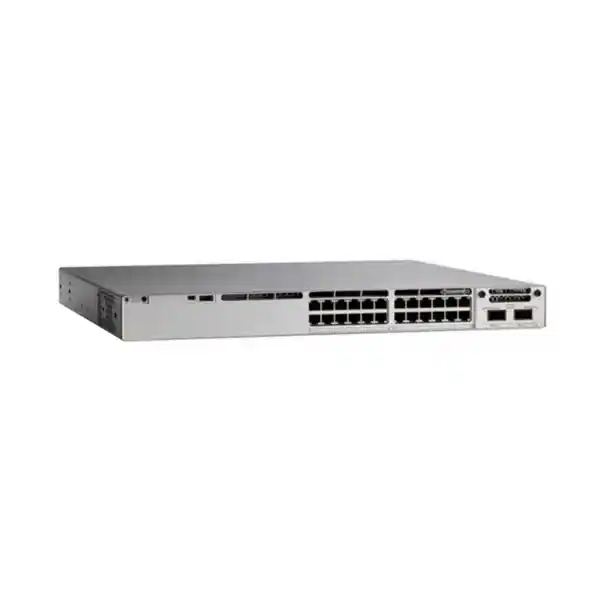
8 × multigigabit up to 10G
2 × 40G QSFP+ uplinks
Cisco UPOE
StackWise-320
Cisco Catalyst C9300L-24UXG-2Q: multigigabit access with dual 40G uplinks
The Cisco Catalyst C9300L-24UXG-2Q is designed for enterprise access networks that need more than conventional 1 Gigabit switching at the edge but do not require every endpoint to run at multigigabit speed. Its 24 copper downlinks combine eight multigigabit ports, capable of negotiating 100 Mbps, 1, 2.5, 5 or 10 Gbps, with sixteen 10/100/1000 Mbps ports. That mix is useful when a small number of devices such as high-performance wireless access points, engineering workstations, servers, storage appliances or other bandwidth-heavy endpoints need faster copper connectivity while the rest of the floor still uses standard Gigabit Ethernet.
The “2Q” design is the main differentiator from the four-10G-uplink C9300L-24UXG-4X. This model provides two fixed 40 Gigabit Ethernet QSFP+ uplink ports, giving architects a straightforward route to high-capacity aggregation or core connectivity. Cisco specifies 352 Gbps switching capacity and 261.90 Mpps forwarding performance for the standalone switch, with higher figures when stacking is included in Cisco’s published platform calculation. The switch also supports StackWise-320, allowing compatible Catalyst 9300L and 9300LM units with the required stack kit to operate as a single logical stack.
For buyers in Tanzania, the practical question is not simply whether this is a “24-port Cisco switch.” It is whether the site needs the specific combination of multigigabit copper, 60W-class Cisco UPOE capability, dual 40G uplinks, enterprise IOS XE features, and stackable access-layer resiliency. Before ordering, confirm your upstream optics and interfaces, endpoint PoE requirements, cabling category and length, power budget, rack power, software license tier and the exact Cisco orderable PID.
Key specifications at a glance
| Model | Cisco Catalyst C9300L-24UXG-2Q |
|---|---|
| Access ports | 24 copper Cisco UPOE-capable ports: 8 multigigabit + 16 Gigabit Ethernet |
| Multigigabit speeds | 100M / 1G / 2.5G / 5G / 10G on 8 ports |
| Standard copper speeds | 10M / 100M / 1G on 16 ports |
| Fixed uplinks | 2 × 40G QSFP+ |
| Default power supply | 1100W AC |
| Available PoE with default PSU | 722W |
| Stacking | StackWise-320; optional stack kit; up to 8 compatible members |
| Switching capacity | 352 Gbps standalone; Cisco lists 672 Gbps with stacking bandwidth included |
| Forwarding rate | 261.90 Mpps standalone; Cisco lists 500.00 Mpps with stacking calculation |
| Memory / flash | 8 GB DRAM / 16 GB flash for Catalyst 9300L/LM platform |
| Form factor | 1RU class chassis; 4.4 × 44.5 × 48.8 cm with the 1100W power supply |
| Weight | Approximately 7.26 kg with default power supply |
Licensing is orderable as Network Essentials or Network Advantage. Because the user-facing base model name does not identify the suffix, confirm whether the intended orderable PID ends in -E or -A before purchase.
Who should choose this switch?
The C9300L-24UXG-2Q makes the most sense when access-layer traffic is becoming uneven. Many business devices still operate comfortably at 1 Gbps, while selected endpoints need multiple gigabits of throughput or more power than a basic PoE+ switch provides. Instead of paying for 10G copper on every port, the switch concentrates multigigabit capability into eight ports and retains sixteen familiar Gigabit ports for general users, phones, printers, cameras, controllers and other standard Ethernet devices.
A common design driver is high-performance Wi-Fi. Modern wireless access points can aggregate enough client traffic that a 1G Ethernet uplink becomes the bottleneck, and many models also benefit from higher-power PoE. The eight multigigabit ports provide a path to 2.5G, 5G or 10G over copper where supported by the endpoint and cabling. The same ports can be assigned to other demanding devices, such as local servers, video production systems, CAD workstations, network appliances or edge compute nodes. The remaining sixteen Gigabit ports preserve a practical port count without forcing every attached device into a premium interface class.
The dual 40G uplinks also make this model more suitable for networks where the access switch must push significant aggregate traffic upstream. Two QSFP+ interfaces can be used for redundant links or high-capacity connectivity, subject to the topology and transceiver support. That can be valuable in a campus distribution design, a converged office network carrying voice, video, wireless and data, or a branch where a single access stack feeds a high-speed aggregation layer.
It is less appropriate when the upstream network is limited to 1G or 10G and there is no near-term plan to adopt 40G, when all endpoints are simple 1G clients, or when you require modular uplink choices rather than fixed uplinks. In those cases, another Catalyst 9300L configuration may match the budget and cabling plan more closely. Product selection should be based on the actual endpoint speed map, power draw, uplink architecture and software requirements rather than the model family name alone.
Access-port design: eight multigigabit ports plus sixteen Gigabit ports
The access-side architecture is the feature that gives the C9300L-24UXG-2Q its practical flexibility. Eight ports support 100 Mbps, 1 Gbps, 2.5 Gbps, 5 Gbps and 10 Gbps. These are 10GBASE-T-capable multigigabit interfaces, so a connected device can negotiate an appropriate supported speed rather than requiring every link to operate at 10G. The remaining sixteen access ports support 10/100/1000 Mbps Ethernet. Together they create a 24-port switch that can serve a conventional office floor while reserving higher-speed copper for devices that can actually use it.
Multigigabit Ethernet is especially useful when an organization wants to increase edge bandwidth without immediately redesigning every connection around fiber. The exact achievable speed still depends on the endpoint, cable category, installed cable quality, distance, patch panels and electromagnetic environment. A switch port that supports 5G or 10G does not guarantee that an existing copper run will sustain that speed. Before rollout, validate representative cable paths and check the cabling requirements of the attached device. This matters in older buildings where legacy horizontal cabling may be adequate for 1G but inconsistent at higher signaling rates.
Port planning is also important because there are only eight multigigabit interfaces. If the site has twelve or twenty-four devices that genuinely need greater than 1G access, the 24UXG model may not be the right density. Conversely, if only two or four endpoints need multigigabit bandwidth, this switch provides growth capacity without dedicating an entire 24-port block to high-speed copper. The ideal mapping is to identify current high-bandwidth endpoints, planned Wi-Fi access points, possible future upgrades and any critical devices that should be separated across physical switches for resiliency.
The switch is based on Cisco’s UADP 2.0 architecture used by the Catalyst 9300L family and runs Cisco IOS XE. That means it is not simply a collection of fast Ethernet ports: it is an enterprise access platform with Layer 2, routed access, visibility, policy and automation capabilities that vary with the selected software license. Buyers should therefore plan physical connectivity and software functionality together.
Why the two fixed 40G QSFP+ uplinks matter
The C9300L-24UXG-2Q uses two fixed 40 Gigabit Ethernet QSFP+ uplink ports. For a 24-port access switch with eight possible 10G copper downlinks, this high-speed uplink option helps reduce the chance that a busy access layer will be constrained by a narrow upstream connection. The model is particularly relevant when the aggregation or core layer already has 40G QSFP+ interfaces, or when the design calls for redundant 40G paths from an access switch or stack.
“Fixed” is an important purchasing detail. The uplink interfaces are built into the switch model rather than provided through the modular uplink architecture of the standard Catalyst 9300 series. This simplifies the bill of materials when two 40G ports are exactly what the network requires, but it also means that the uplink format is a fundamental model choice. If the deployment instead needs four independent 10G/1G SFP+ uplinks, the C9300L-24UXG-4X is the closer sibling. If it needs interchangeable network modules or different uplink speeds, a modular-uplink Catalyst 9300 model may be more suitable.
Do not order the switch in isolation and assume existing optics will fit. Confirm the upstream switch interface, supported QSFP+ transceiver or cable type, fiber mode, wavelength, connector type, distance and redundancy design. Also confirm whether the target topology expects native 40G links or another supported connectivity arrangement. Compatibility should be checked against Cisco’s current transceiver documentation for the exact software release and hardware combination.
For procurement in Tanzania, this is a useful place to separate “switch price” from “working link cost.” A functioning 40G path can require the correct optics or direct-attach cable, matching upstream ports, fiber patching and potentially changes to the distribution layer. These items should be part of the quote and design review so that the switch arrives as a usable component of the network rather than as an isolated chassis.
Cisco UPOE and PoE budget planning
Cisco lists the C9300L-24UXG-2Q as a 24-port Cisco UPOE model with 60W-class power capability. The distinction between per-port capability and total switch PoE budget is essential. With the default PWR-C1-1100WAC-P power supply, Cisco publishes 722W of available PoE power for this specific model. That budget is shared across powered devices; it is not 60W multiplied by 24 ports under the default power-supply configuration.
A simple planning exercise prevents surprises. List every powered device, its expected PoE class or maximum draw, and whether the switch must be able to support worst-case power simultaneously. Wireless access points, cameras with heaters or motors, access-control devices, video endpoints and specialized IoT equipment can have very different power profiles. Allow headroom for additions and for devices that draw more power during boot or feature activation. The aim is to size the switch for the real powered-device estate, not merely the number of occupied Ethernet ports.
Cisco’s power table shows that adding a secondary power supply can increase available PoE power. For this model, Cisco lists 1,072W with a 350W secondary supply and 1,440W with a 715W or 1100W secondary supply. A separate Cisco power-planning table for 24-port multigigabit UPOE models indicates that two 1100W power supplies are required for a design intended to provide 60W on all 24 ports. In practice, the correct supply combination depends on the required power budget and redundancy goal, so it should be selected as part of the configuration rather than treated as an afterthought.
Do not interpret “24-port UPOE” as proof that the default configuration can deliver maximum UPOE power to every port simultaneously. Size the PSU configuration from the total endpoint load and the desired redundancy policy.
The Catalyst 9300 Series also supports dual redundant power supplies. The switch ships with one power supply by default, while a second can be ordered or added later. For environments where continuity matters, this lets the design consider both PoE capacity and power-supply redundancy. However, the effect of a power-supply failure on the remaining PoE budget must be understood. A design that operates close to the combined power limit may need a deliberate priority policy for powered devices if one supply is lost.
Power planning should extend beyond the chassis. Check the rack PDU rating, branch circuit capacity, UPS sizing, plug and receptacle requirements and expected load at the site. The 1100W AC power supply supports a wide input range according to Cisco’s published specifications, but the installed electrical environment still needs to be designed safely and appropriately. Where uptime is important, coordinate switch redundancy, PSU redundancy, UPS runtime and generator or facility backup as one system.
Performance, scale and traffic handling
Cisco specifies 352 Gbps of switching capacity and 261.90 million packets per second of forwarding performance for the C9300L-24UXG-2Q in standalone terms. Cisco also publishes 672 Gbps switching capacity and 500.00 Mpps in its “with stacking” calculation. These figures help distinguish the model from lower-uplink C9300L configurations and confirm that the forwarding architecture is sized for a mix of Gigabit and multigigabit edge traffic with 40G upstream connectivity.
For the wider Catalyst 9300L/9300LM fixed-uplink platform, Cisco lists 32,000 MAC addresses, up to 32,000 IPv4 route entries in the stated platform scale, 16,000 IPv6 routing entries, 8,000 multicast routes, 5,120 QoS scale entries and 5,120 ACL scale entries. The platform provides 8 GB DRAM and 16 GB flash and supports VLAN IDs up to 4094. These values are platform scale indicators, not a reason to ignore software-license limits or feature-specific design guidance.
Real network performance depends on more than a headline switching number. Oversubscription, traffic patterns, packet size, QoS configuration, uplink utilization, routed versus switched traffic, telemetry, security features and stack topology can all influence design decisions. In a wireless-heavy environment, for example, the access switch may carry bursty north-south traffic from multiple APs at once. In a workstation-heavy environment, local east-west flows may matter more. The switch should therefore be sized as part of a traffic model, not simply from the sum of port line rates.
The platform supports jumbo frames up to the size published by Cisco for Catalyst 9300L/LM, but any non-default MTU design must be validated end to end. Storage, virtualization and specialized application traffic can fail or perform poorly when only one part of the path is configured for larger frames. Keep MTU, QoS, EtherChannel and routing policies consistent across the access, distribution and core layers.
StackWise-320 for scalable access-layer resilience
The C9300L family supports Cisco StackWise-320, providing 320 Gbps of stacking bandwidth. Cisco states that up to eight compatible Catalyst 9300L or 9300LM switches can participate in a StackWise-320 stack when the required optional stacking hardware is installed. For this switch class, the stack kit is not something to assume is present simply because the chassis is “stackable.” It should be included explicitly in the bill of materials when physical stacking is part of the design.
A stack can simplify operations by allowing multiple physical switches to be managed as one logical system. It can also improve access-layer resiliency when links and endpoints are distributed carefully across members. In a multi-switch floor or equipment room, stacking can reduce the operational burden of managing individual standalone units and can support designs where uplinks are spread across different members.
Compatibility boundaries matter. Cisco’s current data sheet distinguishes C9300L/9300LM StackWise-320 from the StackWise-480 used by modular-uplink C9300 models and StackWise-1T used by C9300X. Fixed-uplink C9300L switches are not simply mixed into a modular C9300 stack. The intended members must be checked against Cisco’s current stacking matrix, and Cisco notes license-level considerations for supported stacks.
Plan stack cables, physical switch order, rack spacing, member numbering, software versions, power redundancy and uplink placement before installation. A stack is most valuable when failure domains have been considered: connecting all critical devices and both upstream links to a single member can undermine the resilience that the stack was intended to create. Spread critical dependencies where the application and physical topology allow.
Cisco IOS XE, licensing, automation and security
The Catalyst 9300L platform runs Cisco IOS XE, which brings enterprise switching features together with modern programmability and telemetry. Cisco describes support across the family for model-driven interfaces and automation mechanisms such as YANG-based management, NETCONF, RESTCONF, streaming telemetry and on-box programmability. Exactly which features are available in a production deployment depends on the network license, subscription entitlements, software release and configuration, so the commercial software selection should be treated as part of the technical design.
Cisco lists two orderable variants for this hardware: C9300L-24UXG-2Q-E with Network Essentials and C9300L-24UXG-2Q-A with Network Advantage. The base name C9300L-24UXG-2Q does not by itself tell you which license level is being quoted. Network Essentials covers core switching and routed-access functions, while Network Advantage adds advanced capabilities including broader routing, segmentation and automation features. Cisco’s current licensing tables should be checked for the exact required function rather than assuming that every feature associated with the Catalyst 9300 family is present in every license.
Cisco’s published feature table places fundamental Layer 2 functions, selected routed-access functions, 802.1X, QoS, first-hop security, MACsec-128, model-driven telemetry and related capabilities in the base package. Network Advantage adds capabilities such as BGP, full OSPF functionality, EIGRP, IS-IS, VRF, VXLAN, LISP, Cisco TrustSec/SGT, MPLS, advanced programmability and MACsec-256. The exact fit depends on the architecture. A straightforward access switch may be well served by Essentials, while an SD-Access, advanced segmentation or more sophisticated routing design may need Advantage.
Security planning should start with access control and identity. IEEE 802.1X support can be used as part of a network access-control design, while first-hop security and segmentation features can help limit common access-layer risks. Cisco also describes hardware-anchored secure boot and Secure Unique Device Identification across the Catalyst 9300 platform. MACsec support can protect Ethernet links, with the available cipher capability tied to the license package. These capabilities are tools, not an automatic security outcome: successful deployment still requires certificate, identity, policy, logging and operational processes.
For operations teams, programmability can reduce repetitive configuration and improve consistency. Cisco IOS XE supports APIs and model-driven telemetry that can integrate with automation and monitoring platforms. Plug and Play and zero-touch approaches can also streamline rollout when they are designed into the environment. Organizations that use Cisco Catalyst Center can add centralized provisioning, assurance and policy workflows depending on the chosen licenses and architecture. If the network is managed primarily through traditional CLI and SNMP, the switch still supports those operational models, but buyers should avoid purchasing advanced software solely because the hardware is capable of it.
License lifecycle deserves attention at quotation time. Cisco requires specific software subscriptions alongside the perpetual network license for applicable orders. Subscription features and base network features have different lifecycle implications. Confirm term length, Smart Account readiness, renewal ownership and which team will manage entitlements. A technically correct switch can still create deployment delays if the licensing identity, account access or ordered tier is not aligned with the customer’s environment.
Finally, plan the intended Cisco IOS XE release based on the organization’s software policy, supported feature set and lifecycle requirements. Avoid choosing a release simply because it is newest. Validate hardware support, transceiver support, security advisories, feature requirements and interoperability with the rest of the network. Standardizing the access layer on a tested release train is usually more operationally sustainable than allowing individual switches to drift independently.
Deployment planning for Tanzania environments
For a Tanzania deployment, the most useful localization is practical rather than promotional. Confirm the actual building cabling, equipment-room cooling, electrical distribution, UPS design, grounding, rack depth and upstream fiber before placing the order. The C9300L-24UXG-2Q is a 1RU-class enterprise switch, but the chassis with the 1100W power supply extends to approximately 48.8 cm in depth. Leave additional space for front and rear cable bend radius, power cords, airflow and service access.
Cisco publishes normal operating temperature limits that vary with altitude. For the relevant Catalyst 9300 family power configuration, the published normal range includes up to 45°C at lower altitude, with lower maximum temperature at higher altitude. That should not be treated as permission to run the equipment room at the edge of its specification. Consistent cooling, clean airflow and environmental monitoring improve operational margin, particularly in racks containing high-power PoE switches and dense network equipment.
Power quality and continuity should be planned with the PoE load in mind. If the switch is powering wireless access points, phones, cameras or access-control systems, a power event can affect much more than data connectivity. UPS capacity should account for the switch plus the powered endpoints drawing through it, and redundancy should reflect business impact. Where a second switch PSU is specified, ensure the feeds are arranged so the second supply adds meaningful resilience rather than simply connecting both supplies to the same unprotected source.
For 40G uplinks, verify fiber type and distance rather than assuming that any existing multimode or single-mode run will suit the intended optic. Check patch-panel connectors and polarity, available upstream QSFP+ ports and the exact Cisco-supported transceiver or cable. For the eight multigigabit copper ports, sample-test the longest and most critical horizontal cable runs if the installed cabling is not already certified for the target speeds.
Commercial availability, lead time, local price, warranty handling and installation scope can vary and should be confirmed in the actual quote. This product page therefore does not claim a Tanzania stock level, delivery window or price. A quote request should include the number of switches, desired license tier, stack kits, redundant power supplies, 40G optics or cables, endpoint power requirements and any installation or configuration requirements.
How it compares with nearby Catalyst 9300L choices
| Model family choice | Main difference | Consider it when |
|---|---|---|
| C9300L-24UXG-2Q | 8 mGig + 16 1G; 2 × 40G QSFP+ uplinks | You need a 24-port mixed-speed UPOE edge with high-capacity 40G upstream links. |
| C9300L-24UXG-4X | Same basic 24-port mixed access profile; 4 × 10G/1G SFP+ uplinks | Your aggregation layer is built around multiple 10G links rather than 40G QSFP+. |
| C9300L-48UXG-2Q | 48 access ports with 12 mGig; 2 × 40G uplinks | You need higher copper port density while keeping dual 40G uplinks. |
| Modular-uplink C9300 | Different platform options and modular uplink architecture | Uplink flexibility or a different stacking/power architecture is a priority. |
The closest comparison is the C9300L-24UXG-4X. Both target a similar 24-port access use case with eight multigigabit ports, but their uplink strategy differs. The 4X model provides four 10G/1G SFP+ uplinks, while the 2Q model provides two 40G QSFP+ uplinks. Cisco also publishes a different default available PoE budget for the two models: 880W for the 24UXG-4X versus 722W for the 24UXG-2Q with the stated default 1100W supply. If your edge power demand is high and the upstream layer is 10G-based, the 4X model may deserve serious consideration; if upstream bandwidth and native 40G connectivity are the bigger drivers, the 2Q model is the more direct fit.
Moving to the 48UXG-2Q increases access-port density and the number of multigigabit ports, which may be more efficient where many users or devices share one wiring closet. However, a higher port count is not automatically better. Two 24-port switches can offer different failure-domain and rack-layout advantages from one 48-port unit, while a single 48-port chassis may reduce stack members and hardware count. Evaluate endpoint distribution, redundancy, cable paths and growth rather than simply dividing cost by port count.
If your design requires modular uplinks, StackPower or the StackWise-480 architecture of the modular Catalyst 9300 line, do not assume the fixed-uplink 9300L is interchangeable. The 9300L is intentionally a different configuration family. The best choice is the one that matches the entire topology, not the one with the highest individual specification.
Rack, power and lifecycle considerations
Cisco lists the C9300L-24UXG-2Q at approximately 7.26 kg with the default power supply. The chassis dimensions are roughly 4.4 cm high by 44.5 cm wide; depth is approximately 48.8 cm when configured with the 1100W supply. Confirm usable rack depth, rail or mounting arrangement, rear clearance and PDU placement before installation. Dense PoE switches can also generate significant heat under load, so rack airflow should not be obstructed by cable bundles or poorly placed blanking and power components.
The Catalyst 9300 Series supports field-replaceable power supplies and fans, which is valuable for serviceability. For operational planning, keep the exact spare part compatibility tied to the purchased hardware and current Cisco documentation. Do not assume that every power supply or fan from another Catalyst model is interchangeable simply because it looks similar.
Software lifecycle is equally important. Define how IOS XE releases will be selected, tested, backed up and upgraded. Keep configuration archives, document the license state and integrate the switch into monitoring and log collection from day one. A stack should have a clear software-upgrade procedure and maintenance policy. Where automation is used, keep templates version-controlled and validate changes in a controlled manner before broad deployment.
For long-term procurement, verify current Cisco ordering status, support entitlement options and the exact PID at the time of quotation. The base model is still referenced in current Cisco Catalyst 9300 documentation, but commercial lifecycle and service choices should always be checked on the date of purchase. The product page should not substitute for a current Cisco quote or support contract review.
Pre-order checklist
Use this checklist to turn the model selection into a complete, deployable bill of materials. It is especially useful when the switch is being purchased for a new Wi-Fi rollout, a campus refresh or a wiring-closet upgrade where optics, power and licenses can otherwise be missed.
Confirm C9300L-24UXG-2Q-E for Network Essentials or C9300L-24UXG-2Q-A for Network Advantage according to required features.
Identify which eight devices need 2.5G, 5G or 10G and which sixteen devices can remain at 1G.
Total the maximum or design power for all powered endpoints and include reasonable growth headroom.
Decide whether the deployment needs a second supply for higher PoE capacity, redundancy or both.
Select supported QSFP+ optics or cabling and confirm the matching interfaces on the upstream switch.
Verify fiber type, connector, distance, patching and polarity for each uplink.
Validate existing cable runs intended for multigigabit speeds, especially long or older links.
Include the appropriate C9300L stack kit and cables if StackWise-320 will be used.
Check usable rack depth, airflow, PDU capacity, UPS load and power-cord requirements.
Confirm IOS XE release policy, Smart Account/licensing ownership, monitoring, logging and configuration backup.
Spread uplinks and critical connections appropriately across stack members if multiple switches are deployed.
Ask the quote to separate chassis, licenses, PSUs, stacking accessories, optics/cables and any requested installation service.
Frequently asked questions
How many ports does the C9300L-24UXG-2Q have?
It has 24 copper access ports. Eight are multigigabit ports supporting 100M, 1G, 2.5G, 5G and 10G, while sixteen support 10M, 100M and 1G. In addition, the switch has two fixed 40G QSFP+ uplink ports. The 40G uplinks are separate from the 24 access ports.
Does every access port support 10 Gigabit Ethernet?
No. Eight access ports are multigigabit and can operate up to 10G over copper when the endpoint and cabling support it. The other sixteen access ports are Gigabit Ethernet ports with 10/100/1000 Mbps operation. This mixed design is one of the reasons the model suits sites that have a limited number of high-bandwidth endpoints rather than 24 devices requiring 10G.
What uplinks are included?
The C9300L-24UXG-2Q provides two fixed 40 Gigabit Ethernet QSFP+ uplink ports. Because they are fixed rather than modular, buyers should confirm that 40G QSFP+ matches the aggregation or core design before ordering. The related C9300L-24UXG-4X uses four 10G/1G SFP+ fixed uplinks instead.
How much PoE power is available with the default power supply?
Cisco publishes 722W of available PoE power for this model with the default 1100W AC power supply. The switch supports Cisco UPOE, but the total available budget must be shared across powered endpoints. A higher combined PoE budget is possible with an additional supported power supply. Design from the total endpoint load, not only the number of ports.
Can it provide 60W on all 24 ports at the same time?
Not with only the default supply and its 722W available PoE budget. Cisco’s power-planning guidance for 24-port multigigabit UPOE switches shows that a design targeting 60W per port across all 24 ports requires two 1100W power supplies. Always calculate the actual device load and desired redundancy before specifying power supplies.
Does the switch support stacking?
Yes. Catalyst 9300L models support StackWise-320. Cisco states that up to eight compatible Catalyst 9300L and 9300LM switches can be configured in a StackWise-320 stack, subject to the supported model and license combinations. The required stack hardware is optional, so include the correct stack kit and cables in the bill of materials.
What is the difference between Network Essentials and Network Advantage?
Network Essentials covers the fundamental enterprise switching and routed-access feature set, while Network Advantage adds advanced routing, segmentation, automation, high-availability and security capabilities listed by Cisco. The hardware is orderable as C9300L-24UXG-2Q-E for Essentials or C9300L-24UXG-2Q-A for Advantage. Match the tier to the required feature list rather than choosing only by price.
Is this a good switch for Wi-Fi access points?
It can be a strong fit when selected access points need more than 1G wired throughput and higher PoE capability. The eight multigigabit ports are the key resource. Confirm each AP’s Ethernet speed, PoE requirement and cabling, then ensure the total number of high-speed APs does not exceed the available multigigabit-port count unless other device types can use the standard Gigabit ports.
Can I use existing copper cabling for 2.5G, 5G or 10G?
Possibly, but the switch’s supported port speed does not guarantee that every installed cable run will sustain it. Cable category, quality, length, patching and installation conditions matter. For an existing site, test or certify the intended multigigabit links, especially the longest and most critical runs, before basing the design on a specific speed.
What should be included in a Tanzania quote?
A useful quote should identify the exact -E or -A product variant, software subscription term where applicable, power-supply configuration, StackWise-320 kit if required, compatible 40G QSFP+ optics or cables, and any requested installation or configuration work. It should also confirm current availability, lead time, warranty or support terms and pricing instead of relying on assumptions from a generic product page.
When should I choose the 4X version instead of the 2Q version?
Choose between them primarily by uplink architecture and power requirements. The 2Q model provides two 40G QSFP+ uplinks, while the 4X model provides four 10G/1G SFP+ uplinks. Cisco also publishes different default available PoE budgets for these specific variants. If your distribution layer is 10G-focused, the 4X may integrate more naturally; if native 40G is required, the 2Q is the direct match.
Request the correct C9300L-24UXG-2Q configuration
Before requesting a quote, note how many switches you need, whether the required software tier is Network Essentials or Network Advantage, how many ports need multigigabit speed, the maximum PoE load, whether a redundant power supply is required, whether the switches will be stacked, and what 40G optical or cable interface the upstream network uses.
Ask FourTeck Tanzania for a configuration-based quote for the Cisco Catalyst C9300L-24UXG-2Q rather than a chassis-only price. This makes it easier to validate the exact orderable PID, licenses, power supplies, stack accessories and uplink media together. Current price, stock, delivery lead time and support terms should be confirmed in the quotation for your specific deployment.




Reviews
There are no reviews yet.