
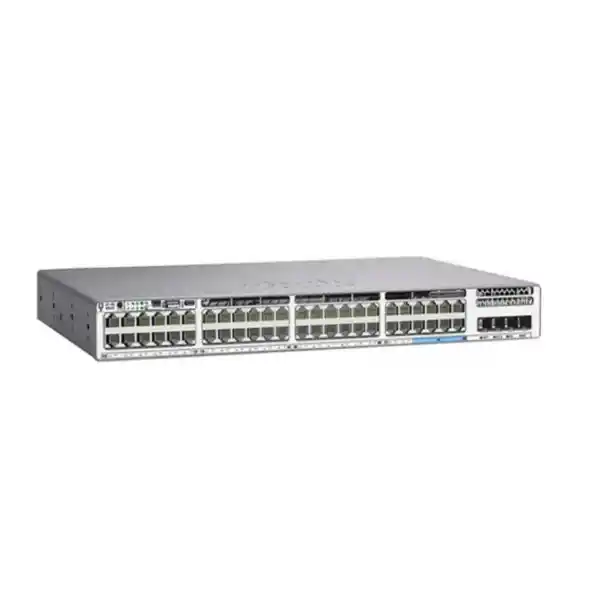
Cisco Catalyst C9300LM-48U-4Y Network Switch
The Cisco Catalyst C9300LM-48U-4Y is built for organizations that want a dense, resilient access layer in a shallow 1RU chassis. It combines 48 Gigabit Ethernet copper access ports with Cisco UPOE, four fixed 25 Gigabit SFP28 uplinks and StackWise-320, giving network teams a practical path to connect powered endpoints while maintaining high-speed links toward distribution or core switching.
4 × 25G SFP28 fixed uplinks
StackWise-320
790 W default PoE budget
A compact access switch for high-density powered devices
For a buyer evaluating a new access switch, the central question is not simply how many Ethernet ports are available. The more useful questions are whether the switch can power the connected endpoints, whether it has enough uplink capacity to avoid a bottleneck, whether it fits the available rack or cabinet, and whether the operating model matches the organization’s Cisco network design. The C9300LM-48U-4Y is aimed directly at that combination of requirements. Its 48 copper access ports operate at 10/100/1000 Mbps and support Cisco Universal Power over Ethernet, while four fixed SFP28 uplinks provide up to 25 Gigabit Ethernet per uplink. That makes it well suited to dense user floors, branch offices, healthcare or education buildings, hospitality networks, surveillance deployments and distributed enterprise sites where many endpoints may draw power from the access switch.
The “LM” platform is also important because it is a shallow-depth member of the Catalyst 9300 family. The C9300LM-48U-4Y measures approximately 4.4 cm high, 44.5 cm wide and 33.5 cm deep with its default components installed. In practical terms, this can simplify deployments in space-constrained network rooms compared with deeper enterprise switches. Cisco lists the unit at about 5.44 kg with the standard fan and power-supply configuration. The reduced depth does not turn it into a lightweight unmanaged switch: it remains an enterprise Catalyst access platform based on Cisco’s UADP 2.0 architecture, with stacking, Layer 2 and Layer 3 capabilities, programmable forwarding resources, security features and IOS XE operations.
Key specifications at a glance
| Access ports | 48 × 10/100/1000 Mbps copper ports with Cisco UPOE |
|---|---|
| Fixed uplinks | 4 × 25 Gigabit Ethernet SFP28 |
| Default power supply | 1000 W AC |
| Default available PoE power | 790 W |
| Stacking | Cisco StackWise-320 |
| Switching capacity | 296 Gbps standalone; 616 Gbps with stacking |
| Forwarding rate | 220.22 Mpps standalone; 458.30 Mpps with stacking |
| Memory / flash | 8 GB DRAM / 16 GB flash for Catalyst 9300L/LM fixed-uplink models |
| Packet buffer | 16 MB for 24- and 48-port Gigabit Ethernet Catalyst 9300L/LM models |
| Dimensions | Approx. 4.4 × 44.5 × 33.5 cm (H × W × D) |
| Weight | Approx. 5.44 kg with default components |
Why the 48 UPOE ports matter
The 48 downlink ports are designed for standard Gigabit Ethernet rather than multigigabit access. That distinction is useful when sizing a deployment. If the devices being connected are IP phones, desktop PCs, point-of-sale terminals, many cameras, printers, building controllers or access points whose wired interface requirement is 1 Gbps or less, the C9300LM-48U-4Y can provide a high port density without paying for multigigabit capability on every edge port. Cisco identifies the UPOE capability of the model as supporting up to 60 W PoE on compatible ports and endpoints, subject to the total power budget and the negotiated power class of each device.
The default 1000 W AC power supply gives the C9300LM-48U-4Y 790 W of available PoE power. That total matters more than the maximum power rating of any individual port. A network designer should build a simple endpoint power worksheet before ordering: list the number of wireless access points, phones, cameras and other powered devices, note their expected or maximum draw, add a reasonable operational margin, and compare the total with the switch power budget. Forty-eight low- or moderate-power endpoints may fit comfortably, while a design populated with many high-power devices can require additional power capacity, fewer endpoints per switch or a different model. Cisco documents higher available PoE totals when supported secondary power supplies are added, but the actual design should be validated against the exact power-supply combination selected for the order.
This makes the switch useful for converged access networks. A single access layer can carry user data, voice, wireless backhaul traffic and video-surveillance traffic while supplying power to many edge devices. Consolidating endpoint power at the switch can also make backup-power planning more predictable, because the access switch and its connected PoE devices can be tied into the same UPS strategy. The switch itself does not eliminate the need for UPS sizing, power distribution planning or endpoint power calculations, but it gives network teams a central point from which to control and monitor powered-device connectivity.
Four 25G uplinks: design the access layer without a narrow exit
A 48-port access switch can aggregate a large amount of traffic even when each user-facing port is only Gigabit Ethernet. The C9300LM-48U-4Y therefore uses four fixed 25G SFP28 uplink ports rather than relying on low-speed copper uplinks. These ports can be used to connect the access switch toward a distribution or core layer using supported optics and cabling. The correct transceiver, fiber type, connector, distance and peer-interface configuration should always be confirmed before procurement, because the presence of SFP28 slots does not mean every optical module or cable is interchangeable.
From a design perspective, the four-uplink layout gives architects room to choose between capacity and resilience. A deployment might use redundant uplinks to two upstream switches, a port-channel where supported by the topology, dedicated links for particular design requirements, or a combination that matches the organization’s high-availability model. The key advantage is that the access switch is not forced into a single low-speed uplink path. For environments gradually modernizing distribution switching, 25G-capable uplinks can also reduce the chance that a newly purchased access layer must be replaced simply because the aggregation layer is upgraded later.
The uplinks are fixed rather than supplied through an interchangeable network-module bay. That is one of the tradeoffs of the C9300LM form factor. Buyers get a shallow chassis and a clearly defined uplink configuration, but they should confirm that four 25G SFP28 interfaces match the expected lifecycle of the network. If a project requires a different uplink mix, more modularity or higher-speed interfaces such as 40G or 100G in a particular architecture, another Catalyst 9300 family member may be more appropriate.
StackWise-320 for a simpler operational domain
The C9300LM-48U-4Y supports Cisco StackWise-320. In a supported stack design, multiple switches can operate as a single logical system with a common management and control plane. Cisco positions the Catalyst 9300 family for stacking at the access layer so that teams can expand port density while avoiding the operational overhead of managing every switch as an unrelated standalone device. This is useful in larger wiring closets where 48 ports are not enough, or where the design calls for access-switch redundancy across multiple physical units.
Stacking should be planned rather than treated as an afterthought. Confirm the required stack kit and cables for the C9300LM platform, physical placement in the rack, cable routing, software compatibility and the intended failure behavior. A stack can simplify operations, but it also creates a shared system whose upgrades and maintenance should be approached with appropriate change control. Cisco lists 320 Gbps of StackWise bandwidth for the 9300LM family. For the C9300LM-48U-4Y specifically, Cisco publishes 296 Gbps of switching capacity and 220.22 Mpps forwarding performance as a standalone system, increasing to 616 Gbps and 458.30 Mpps respectively when stacking is included in the platform calculation.
For a procurement team, the practical question is whether the project needs a single 48-port switch or a resilient, scalable access block. A branch with fewer than 48 wired devices may use one unit. A campus floor with a large number of phones, cameras and access points may benefit from a pair or a larger stack. The hardware decision should therefore be tied to a rack-level port plan, endpoint count, spare-port target, uplink design and maintenance strategy.
Performance and scale for enterprise access
The value of an enterprise switch is also reflected in the scale of its forwarding tables and the resources available for segmentation, routing and policy. Cisco groups the fixed-uplink Catalyst 9300L and 9300LM models together for several platform-scale figures. The family supports up to 32,000 MAC addresses, up to 32,000 IPv4 route entries in the stated platform profile, up to 16,000 IPv6 routing entries, 8,000 multicast routing entries, 5,120 QoS entries and 5,120 ACL entries. Cisco also lists 4,094 VLAN IDs, up to 1,000 switched virtual interfaces and jumbo frames up to 9,198 bytes.
These numbers are not a recommendation to design every network at its maximum published scale. Real deployments should leave operational margin and consider which forwarding templates, software features and license level are enabled. They do show that the C9300LM platform is intended for managed enterprise access rather than basic unmanaged connectivity. Network teams can use VLANs and Layer 3 boundaries to separate users, voice, surveillance, building systems and guest or operational technology segments according to their architecture, while QoS and access-control features provide tools for prioritization and policy enforcement.
The platform includes 8 GB of DRAM and 16 GB of flash for the Catalyst 9300L/LM fixed-uplink family, and the 1G 24- and 48-port models use a 16 MB packet buffer. Those hardware resources sit behind Cisco IOS XE and the UADP 2.0 forwarding architecture. For buyers, the practical implication is a mature enterprise switching platform with room for routing, segmentation, telemetry and policy functions, rather than a device selected only by port count.
Security features for a controlled wired edge
Access switches sit at a sensitive boundary: they connect end users and edge devices to the rest of the organization. The Catalyst 9300 family includes hardware and software capabilities intended to support a more controlled access layer. Cisco documents AES-256 MACsec support across the Catalyst 9300 Series, along with hardware-anchored Secure Boot and Secure Unique Device Identification. These capabilities can help form part of a broader strategy for validating platform integrity and protecting supported Ethernet links, although the actual security design depends on peer support, software configuration, licensing and the organization’s authentication and key-management architecture.
The switch also provides the policy building blocks expected in enterprise access switching, including access control lists, QoS resources, VLAN segmentation and Layer 3 capabilities according to the selected software level. In practice, a secure deployment should pair switch configuration with an identity and access policy, protected management access, centralized logging, time synchronization, configuration backups, secure software lifecycle practices and a clear method for onboarding or removing edge devices. The switch can enforce technical controls, but it does not replace the need for an operational security process.
Network Essentials and Network Advantage should not be treated as interchangeable labels. Cisco offers the C9300LM-48U-4Y in both -E and -A hardware order variants. The required level depends on the routing, automation and advanced network functions the deployment needs. Before a purchase order is finalized, the project team should confirm the specific features required and map them to the current Cisco licensing matrix rather than selecting a tier solely on price.
Licensing and software: confirm this before ordering
Cisco’s current ordering model couples the hardware with a perpetual Network Stack level and a term-based Cisco Catalyst or Cisco DNA software subscription. For this switch, the published hardware variants include C9300LM-48U-4Y-E with Network Essentials and C9300LM-48U-4Y-A with Network Advantage. Cisco’s ordering guidance also describes term subscription choices, commonly in three-, five- or seven-year periods for the Catalyst and Cisco DNA options. The exact subscription, term and account requirements should be confirmed against the final bill of materials at the time of purchase.
This matters because a product page that says only “C9300LM-48U-4Y” does not, by itself, tell the buyer which Network Stack license is included. Two switches can look identical from the front panel while being ordered with different software entitlements. A quotation should therefore identify the complete orderable SKU, the software subscription tier and term, any support service, power supplies, optics and stacking accessories. That approach reduces surprises during deployment and makes it easier for the technical team to verify that the intended feature set is licensed.
Cisco Smart Account requirements are also part of the purchasing and licensing process for Catalyst 9000 platforms. Organizations that already operate Cisco infrastructure should involve the person or team responsible for Smart Licensing early in the order process. New Cisco customers should ensure that licensing administration is assigned to an internal owner so that entitlements are visible and managed after installation.
Power, cooling and hardware resilience
The C9300LM-48U-4Y uses a 1000 W AC power supply by default. Cisco’s documentation for the platform shows support for a second power supply, and the product family is designed around dual power-supply bays. Adding a supported secondary supply can increase available PoE capacity and can also support a more resilient power design when the switch is connected to appropriately planned power feeds. The chosen arrangement should be validated against the exact Cisco power-supply options and the site’s electrical and UPS design.
Cooling is also designed with serviceability in mind. Cisco documents three internal hot-swappable fan modules for the C9300LM-48U-4Y. The switch can continue operating with two functioning fans if one fan fails, but Cisco advises replacing a failed fan promptly to avoid an outage if another fan is lost. Airflow planning remains important: do not crowd the chassis into a cabinet that cannot exhaust heat, and make sure patch leads, power cords and adjacent equipment do not obstruct the intake or exhaust path.
For Tanzania deployments, power quality and continuity should be included in the site survey rather than assumed. The switch’s PoE role means that an outage at the access layer can also remove power from connected phones, cameras and wireless access points. UPS sizing should therefore account for the switch, the expected PoE load and the desired runtime. Where redundant power is part of the design, the two feeds should be planned so that they do not share a single avoidable point of failure.
Where the C9300LM-48U-4Y fits well
Enterprise user floors
A single switch can serve up to 48 copper endpoints while providing PoE for phones, wireless access points and other powered devices. The 25G uplinks give the access layer a stronger path toward aggregation than a typical small-business switch.
IP surveillance networks
Camera-heavy deployments benefit from a substantial PoE budget, centralized switching and high-speed fiber uplinks. Designers should still calculate camera power draw and video traffic rather than assuming all 48 cameras will fit every workload.
Wireless access-layer refresh
The switch can power compatible access points over its 1G UPOE ports. It is best where 1G wired access is sufficient; projects that need multigigabit links to high-throughput access points should compare the 48UX model.
Space-constrained branches
The shallow chassis can be attractive for branches and distributed facilities where rack depth is limited but enterprise switching, stacking and high-capacity uplinks are still required.
When another Catalyst 9300LM model may be a better fit
The strongest product choice is the one that matches the endpoint and uplink requirement, not necessarily the model with the highest headline specification. Cisco offers several C9300LM variants with the same general shallow-depth philosophy but different access-port and power characteristics. Comparing them before purchase can avoid unnecessary cost or an under-sized design.
| Model | Access ports | Uplinks | Default PoE position | Best fit |
|---|---|---|---|---|
| C9300LM-48U-4Y | 48 × 1G UPOE | 4 × 25G SFP28 | 790 W with default 1000 W AC PSU | Dense 1G powered access |
| C9300LM-24U-4Y | 24 × 1G UPOE | 4 × 25G SFP28 | Lower-density powered access | Smaller wiring closets |
| C9300LM-48T-4Y | 48 × 1G data | 4 × 25G SFP28 | No PoE | Data-only endpoints |
| C9300LM-48UX-4Y | 40 × 1G + 8 × up to 10G multigigabit UPOE | 4 × 25G SFP28 | 790 W with default 1000 W AC PSU | Powered access needing selected mGig ports |
Choose the 48U when the requirement is straightforward: many 1G copper endpoints, meaningful PoE demand and high-speed fiber uplinks. Choose the 48T when PoE is unnecessary. Consider the 48UX when some access devices genuinely require 2.5G, 5G or 10G copper connectivity. Consider the 24U when 48 ports would create excessive unused capacity. This model-level comparison is especially useful during wireless refreshes, because newer access points may have different wired interface requirements even when their power needs are similar.
Important limitation: these are 1G access ports
The C9300LM-48U-4Y does not provide multigigabit speeds on its 48 copper access ports. They are 10/100/1000 Mbps interfaces. This is not a weakness when the connected devices are designed for 1G or lower; it can be exactly the right way to keep a deployment simple and cost-effective. It becomes a constraint when a project expects individual edge devices to exceed 1 Gbps over copper.
Before selecting the switch for a Wi-Fi 6, Wi-Fi 6E or newer wireless rollout, check the Ethernet interface of the exact access-point model. Some access points can benefit from 2.5G, 5G or higher wired links, while others will operate within 1G. If multigigabit access is a requirement, the C9300LM-48UX-4Y is the closer sibling to evaluate because it includes eight multigigabit copper ports in addition to its 1G ports.
Tanzania deployment planning
For organizations in Tanzania, the hardware specification should be translated into a site-level deployment plan before an order is placed. Start with the number of endpoints per location and separate them by type: users, IP phones, access points, surveillance cameras, printers, access-control devices and other operational systems. Estimate both port demand and power demand. A design with 40 phones may consume far less PoE power than a design with 40 high-power wireless or camera devices even though the port count is identical.
Next, review the physical network room. Confirm rack width and depth, airflow, ambient conditions, grounding, power distribution, UPS capacity and cable-management space. The shallow C9300LM chassis is helpful in constrained environments, but it still needs proper front-to-rear and side-to-rear airflow and service access. If the building experiences power interruptions, calculate the UPS runtime required not only for the switch electronics but also for the PoE load that the switch is supplying to edge devices.
Then review the fiber path to the upstream network. The switch provides four SFP28 uplink positions, but the transceiver choice depends on the distance and installed fiber plant. Confirm whether the site uses single-mode or multimode fiber, the connector and patching method, the supported optic on the C9300LM side, and the interface capability of the peer switch. A 25G-capable access switch does not automatically make an existing fiber path 25G-ready; both optics, cabling and the upstream interface must support the intended link.
Finally, confirm software and operations. Decide whether Network Essentials is sufficient or Network Advantage is required, identify the subscription and support term, confirm Smart Account ownership, define the IOS XE release standard, and document how switches will be configured, monitored and backed up. These steps turn a hardware purchase into a supportable network service rather than a collection of boxes in the rack.
Pre-order checklist
- Complete orderable SKU: confirm whether the required hardware is the Network Essentials
-Eor Network Advantage-Avariant. - Software subscription: confirm the current Cisco Catalyst or Cisco DNA tier and term required for the order.
- PoE budget: calculate the expected wattage of all powered endpoints and leave operating margin.
- Secondary power supply: decide whether additional PoE capacity or power resiliency is required.
- Uplink optics: specify supported SFP28 optics or cables for the actual fiber type, distance and upstream switch.
- Stacking: include the correct C9300LM stacking accessories and cable lengths if multiple switches will operate as a stack.
- Rack fit: verify the shallow chassis dimensions, ventilation and service clearance.
- UPS capacity: size backup power for both the switch and the intended PoE load.
- Management: define Smart Account ownership, software standards, monitoring, backup and change-control procedures.
- Endpoint speed: confirm that 1G access ports are sufficient for every device that will connect to this switch.
Operational considerations after installation
A reliable deployment starts with a repeatable configuration standard. Define management addressing, device naming, NTP, DNS where appropriate, authentication, role-based administration, syslog, SNMP or streaming telemetry, backup methods, VLAN and trunk conventions, spanning-tree policy, routing boundaries and software-update processes. If the switches are stacked, document the member numbering, cable topology and replacement procedure. If the environment uses redundant uplinks, document the Layer 2 or Layer 3 convergence behavior and test it during commissioning.
PoE should be monitored as an operational resource. A switch that starts with ample power headroom can become constrained as new cameras or access points are added. Keeping a record of actual endpoint draw, available budget and the expected impact of future devices helps prevent last-minute surprises. Likewise, monitor uplink utilization over time. Four 25G interfaces provide substantial headroom, but traffic patterns can change as wireless density, video usage and cloud applications grow.
Hardware health deserves the same attention. The C9300LM-48U-4Y has field-serviceable fan modules and power-supply options, so alarms relating to fans, power or temperature should be integrated into the monitoring workflow. Replace failed fans promptly and verify power-supply status rather than waiting for a second fault. Keep configuration backups and an inventory of key spare parts appropriate to the organization’s service requirements.
Frequently asked questions
Does the C9300LM-48U-4Y support PoE?
Yes. Cisco specifies 48 1G copper access ports with Cisco UPOE. The model is positioned for powered endpoints and has a 790 W available PoE budget with its default 1000 W AC power supply. The power available to each connected device depends on its negotiated requirement and the overall switch power budget.
How many 25G uplinks are included?
The switch has four fixed 25 Gigabit Ethernet SFP28 uplink ports. Optics or supported direct-attach connectivity should be selected separately according to the distance, fiber type and peer equipment in the network design.
Is this a multigigabit access switch?
Not on the 48 user-facing copper ports. Those ports support 10/100/1000 Mbps. If selected endpoints require 2.5G, 5G or 10G copper access, compare the C9300LM-48UX-4Y, which adds eight multigigabit access ports.
Can the C9300LM-48U-4Y be stacked?
Yes. Cisco lists StackWise-320 support for the C9300LM family. Stacking accessories, cable lengths, software compatibility and the intended topology should be confirmed as part of the bill of materials.
What is the difference between C9300LM-48U-4Y-E and C9300LM-48U-4Y-A?
The -E orderable variant uses Network Essentials, while the -A variant uses Network Advantage. The correct choice depends on the network functions and feature set required. Cisco also requires an applicable software subscription selection when ordering, so the complete license configuration should be shown on the quotation.
How much switching performance does the model provide?
Cisco publishes 296 Gbps switching capacity and 220.22 Mpps forwarding rate for the standalone C9300LM-48U-4Y. Cisco also publishes 616 Gbps switching capacity and 458.30 Mpps forwarding performance when stacking is included in the platform figures.
Is the chassis suitable for a shallow rack?
It is specifically a shallow-depth Catalyst 9300LM model. Cisco lists dimensions of approximately 4.4 cm high, 44.5 cm wide and 33.5 cm deep with default components installed. The rack still needs sufficient clearance for cabling, airflow, power and servicing.
Does the switch support redundant power?
The Catalyst 9300 platform is designed with dual power-supply bays and supports a secondary supply. The exact C9300LM power-supply combination should be selected using current Cisco ordering information, especially when the goal is additional PoE capacity or a resilient power architecture.
A strong choice when 1G UPOE density and 25G uplinks are the priority
The Cisco Catalyst C9300LM-48U-4Y is most compelling when the network needs a large number of 1G powered access ports in a compact enterprise chassis. Forty-eight UPOE ports support a wide mix of powered edge devices, four 25G uplinks provide a modern connection toward aggregation, and StackWise-320 gives larger sites a path to build a unified access-switching block. Its shallow depth is especially useful where rack space is a constraint, while the Catalyst 9300 architecture brings the operational, security and management characteristics expected in a Cisco enterprise access design.
The most important buying decision is to validate the complete configuration rather than stopping at the base model name. Confirm the -E or -A license variant, subscription term, power supplies, PoE demand, uplink optics, stack accessories and support requirement. Also confirm that 1G is sufficient on the downlink ports; if selected endpoints require multigigabit access, compare the 48UX variant before finalizing the design.
Request a Cisco C9300LM-48U-4Y quotation
Ask for a configuration review that matches the switch to your endpoint count, PoE load, uplink fiber, rack environment, stacking plan and required Cisco software tier. A complete quotation should identify the exact orderable switch variant and the required licensing, power, optics and accessories rather than quoting only the base chassis name.
Provide your site count, expected powered devices and preferred uplink design so the bill of materials can be checked before purchase.




Reviews
There are no reviews yet.