
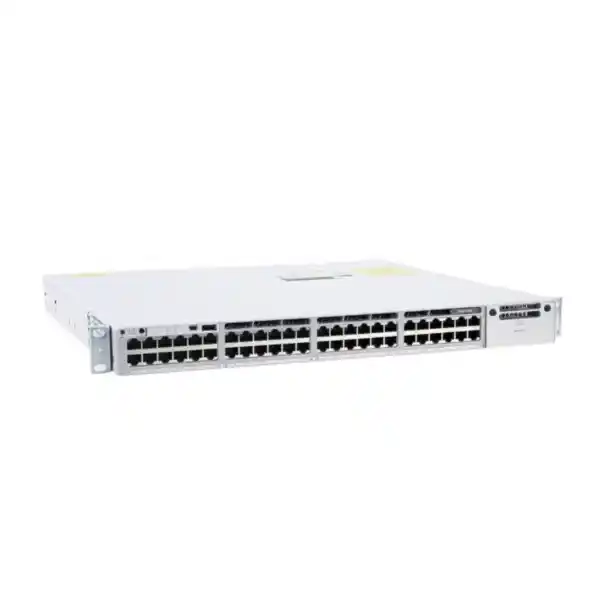
Enterprise wired access • 48-port 1G • Data-only
Cisco C9350-48T Smart Switch
The Cisco C9350-48T is built for organisations that need a dense, resilient and manageable 1 Gigabit Ethernet access layer without Power over Ethernet. It provides 48 copper RJ-45 downlink ports for standard wired devices, supports Cisco StackWise-1.6T for scale and resiliency, and uses modular uplinks so the aggregation connection can be selected to match the network design rather than fixed at purchase.
No PoE
StackWise-1.6T
Up to 200G modular uplinks
Best fit: office floors, campuses, institutions, branch networks, wired-user zones, printers, workstations, servers or appliances that already have independent power. Important: the C9350-48T is a data-only model, and the base switch does not include the uplink network module. Confirm the license tier, uplink module, optics, stacking accessories and power design as part of the final configuration.
Cisco C9350-48T at a glance
| Downlink ports | 48 × RJ-45 ports supporting 10/100/1000 Mbps |
|---|---|
| PoE | No. This is a data-only model. |
| Switching bandwidth specification | 496 Gbps |
| Forwarding rate | 369.024 Mpps |
| Stacking | Cisco StackWise-1.6T, up to eight C9350 members with the same license level |
| Uplinks | Field-replaceable network module; this model supports configurations up to 200 Gbps total uplink bandwidth |
| Operating system | Cisco IOS XE; minimum software requirement for C9350-48T is IOS XE 17.18.1 |
| Default power supply | PWR-C2-500WAC-I |
| Chassis format | 1RU-class fixed switch; chassis 4.4 × 44.5 × 38.3 cm, approximately 6.26 kg with default power supply |
| Management and licensing | Cisco Switching Essentials or Advantage options, with management choices that can include Cisco Catalyst Center or the Cisco Meraki dashboard depending on the chosen licensing model and deployment |
Who should choose the C9350-48T?
Choose the C9350-48T when the access layer needs many standard Gigabit Ethernet ports but the connected endpoints do not need the switch to supply electrical power. That distinction is important. Many enterprise switches are purchased with PoE because they must power IP phones, access points, cameras or sensors. The C9350-48T is deliberately different: its 48 downlink ports carry data only. For workstations, desktop PCs, printers, fixed servers, storage appliances, building controllers with separate power, specialist terminals or other equipment that already has its own adapter or mains connection, paying for a PoE-capable model may not be necessary.
The model is also useful when an organisation wants to standardise on the current C9350 smart-switch platform while keeping a clear separation between data-only access closets and PoE access closets. A campus could, for example, use data-only C9350-48T switches for user and device areas that have no powered endpoints, then use C9350-48P or C9350-48U models in areas that need PoE. Cisco supports C9350 family stacking with the same license level, which gives network architects more flexibility than treating each access closet as an isolated appliance.
It is less suitable when the network must directly power Wi-Fi access points, IP telephones, CCTV cameras or other PoE devices. In those cases, assess the C9350-48P or C9350-48U instead of adding external injectors simply to compensate for a data-only switch. It is also not the right downlink choice for users who require multigigabit copper access above 1 Gbps on each endpoint; the C9350-48TX is the data-only C9350 model intended for multigigabit copper access up to 10G. Selecting the correct member of the family at the start avoids unnecessary adapters, power injectors and redesign later.
48-port Gigabit access built around a modern switching platform
At the edge of the network, the C9350-48T provides 48 copper Ethernet downlinks, each supporting 10 Mbps, 100 Mbps and 1 Gbps operation. This makes the switch practical for mixed estates where some legacy equipment still negotiates at Fast Ethernet while mainstream user devices operate at Gigabit Ethernet. The physical interface is familiar RJ-45 copper, so deployment planning can focus on structured cabling quality, patch-panel organisation, cable lengths and port mapping rather than a wholesale change of endpoint media.
Cisco uses a Silicon One A100/L ASIC for the C9350-48T. For the buyer, the more useful point is not the component name by itself but what it enables: hardware-based forwarding designed for enterprise access, a large feature set under Cisco IOS XE, and a platform that can combine Layer 2 switching, Layer 3 routing, policy controls, QoS, telemetry and automation. The C9350 family is therefore intended to do more than provide unmanaged port density. It is an enterprise access platform for networks that need operational visibility, policy enforcement and structured lifecycle management.
Cisco lists a bandwidth specification of 496 Gbps and a forwarding rate of 369.024 Mpps for the C9350-48T. These figures help when comparing platform headroom, but design decisions should still be based on the real traffic pattern, oversubscription target, chosen uplink module, application behaviour and expected growth. Forty-eight 1G access ports do not automatically mean that every attached device will transmit at line rate at the same moment. A well-designed access layer balances realistic endpoint demand against the uplink capacity and resilience required by the distribution or core layer.
Modular uplinks: choose the connection to the aggregation layer
One of the most important procurement details is that the base C9350 switch does not include an uplink network module. The uplink module must be selected to match the network architecture. On the C9350-48T, Cisco documents support for modular uplink configurations that can provide up to 200 Gbps of total uplink bandwidth. This gives the switch a different buying model from access switches with fixed SFP or SFP+ uplinks: the network team decides which uplink format and capacity are appropriate for the intended aggregation layer.
C9350-NM-2C
Two 100G/40G QSFP28 uplink ports, providing up to 200 Gbps aggregate uplink bandwidth. Useful when the design calls for a small number of very high-speed fiber links.
C9350-NM-8Y
Eight 25G/10G/1G or four 50G-capable positions depending on configuration, with up to 200 Gbps aggregate bandwidth. Useful where several uplinks or mixed fiber speeds are required.
C9350-NM-8M
Eight multigigabit RJ-45 uplink ports with up to 80 Gbps aggregate bandwidth. This can be useful where copper uplink connectivity is a deliberate design requirement.
The correct module depends on the media and transceivers used upstream, the number of distribution switches, the required redundancy model and the expected traffic load. A two-link design to a redundant distribution pair has different requirements from a design that needs several lower-speed fiber links across a building. Optics and cabling also need to be matched to the selected module, fiber type, distance and upstream interface. Those components should be specified as part of the bill of materials rather than assumed to be included with the switch.
For Tanzania deployments, this modularity is especially useful when the access switch must fit an existing campus fiber plant. The practical task is to verify the installed fiber type, connector standard, route distance, available strands, patching arrangement and the capabilities of the aggregation equipment before choosing optics. Where the existing backbone is being upgraded, the network team can also plan a staged migration instead of replacing access switching and distribution connectivity blindly at the same time.
StackWise-1.6T for scale and operational resilience
The C9350 Series supports Cisco StackWise-1.6T. Cisco describes this as a 1.6 Tbps stacking architecture using dedicated rear connectors and high-speed stack cables, with support for up to eight switches in a stack. Multiple members operate as a unified system with a common control plane and distributed forwarding. For a network team, this can simplify management compared with operating each access switch as a completely separate island, while also providing a path to higher port density and redundancy.
A stack of eight 48-port C9350 models can scale to 384 access ports. That does not mean every environment should build the largest possible stack. The right stack size depends on failure-domain policy, rack layout, power design, maintenance practice and how many users or services should be affected by a single logical access system. Smaller stacks may offer easier physical separation; larger stacks can reduce the number of separately managed access systems. The key benefit is that the platform gives the architect a choice.
Stack cables are selected separately and come in supported C9350-specific lengths. Cisco explicitly states that C9350 switches use the StackWise-1.6T and StackPower cables designed for this platform and are not compatible with stacking or StackPower cables from Catalyst 9300 or earlier generations. This matters in refresh projects: existing Catalyst 9300 stack cables should not be counted as reusable C9350 accessories. Include the correct cable type and length in the upgrade bill of materials.
Cisco also supports StackPower+ on the C9350 platform for sharing power resources among connected switches. Even though the C9350-48T itself does not provide PoE, power redundancy can still be a valuable availability consideration for the access layer. Power architecture should be designed alongside UPS capacity, rack power distribution and separate electrical feeds where available. Do not treat the switch stack as resilient if every member ultimately depends on the same unprotected mains source.
Layer 2, Layer 3, QoS and visibility under Cisco IOS XE
The C9350-48T runs Cisco IOS XE. Cisco lists Layer 2 switching, IP routing, IP multicast routing, IPv6 routing, IPv6 multicast routing, enterprise QoS, enterprise security, Flexible NetFlow, programmability and out-of-band management among the C9350 feature set. Software-Defined Access is also listed for the platform. Exact feature entitlement and behaviour can depend on the selected license tier and the installed IOS XE release, so a design that depends on a specific protocol or automation feature should be checked against Cisco’s current feature matrix before ordering.
For conventional campus access, Layer 2 capabilities allow the switch to participate in VLAN-based segmentation, spanning-tree designs and access-edge policy. Layer 3 support gives architects the option to route at the access layer where that design is appropriate, rather than sending every VLAN to a central device. QoS is useful when a site must prioritise latency-sensitive business applications or control congestion during busy periods. Flexible NetFlow and streaming or model-driven telemetry can improve visibility into traffic behaviour and device state, supporting troubleshooting and capacity planning.
The platform also supports modern programmability approaches. Cisco IOS XE can expose model-driven interfaces such as YANG-based workflows, NETCONF and RESTCONF, and it supports automation practices that reduce dependence on one-off manual CLI changes. This is particularly relevant for organisations with many branches or campus switches where configuration drift becomes an operational risk. Automation should still be introduced with version control, testing, role separation and change governance; the presence of an API does not by itself create a safe automation programme.
Cisco lists IOS XE 17.18.1 as the minimum software requirement for the original C9350-48T. Later software releases can add features, fixes and platform capabilities. Before deployment, confirm the recommended release for the chosen feature set and the organisation’s software lifecycle policy. In production networks, standardising on a tested release train is usually more important than installing a newer image only because it is available.
Management flexibility and licensing decisions
Cisco positions the C9350 as part of its smart switching platform with flexible management choices. Under the Cisco Networking Subscription model, a per-device license can provide management through Cisco Catalyst Center or the Cisco Meraki dashboard, depending on the deployment and selected licensing approach. Cisco also documents support for Meraki Classic Licensing on the C9350 family. The important buying point is that the hardware and management model should be specified together rather than treating software licensing as an afterthought.
For the 48-port C9350 class, Cisco offers Switching Essentials and Switching Advantage license tiers in the large access tier. The correct tier depends on the required software capabilities and operational model. If the intended design uses advanced routing, segmentation, automation, assurance or management features, verify that those features are included in the chosen tier before the purchase order is finalised. Cisco’s current licensing documentation and feature matrix should be the authority for that decision because entitlements and release dependencies can evolve.
Cisco’s ordering guide states that new unified switching subscriptions require a minimum term of 36 months. Subscription duration therefore affects budgeting as well as technical entitlement. Buyers should plan the acquisition as a combined hardware, software and support decision, not only compare the chassis price. For an organisation refreshing many access switches, licensing term, renewal date alignment, Smart Account ownership and administrative responsibility can become significant parts of the rollout plan.
A clean deployment process should identify who owns the Cisco Smart Account or Meraki organisation, who will claim the devices and licenses, and how access will be handed over to the operational team. This avoids a common project problem in which the switch is physically installed but the licensing and management assets remain associated with the wrong account or project contact. Ask for the final quote to state the exact license tier, duration and management approach alongside the hardware configuration.
Security, segmentation and policy at the access edge
An enterprise access switch sits close to users and devices, so security should be considered part of the access design rather than added only at the internet firewall. Cisco lists enterprise security, hardware-based encryption, ACL capability and Software-Defined Access support across the C9350 platform. Combined with IOS XE policy features and identity-aware architectures, the switch can participate in a layered control model that restricts unnecessary communication between users, systems and device classes.
The design should start with business requirements: which devices may communicate, which networks require separation, how administrators access the switch, how credentials are managed, and how configuration changes are audited. VLANs alone are not a complete security strategy, but they are useful building blocks. ACLs, authentication, central policy, logging, secure management protocols and monitoring can add stronger control. The chosen license tier and surrounding systems such as Cisco ISE or management platforms may affect which workflows are practical.
Cisco’s C9350 architecture also includes a hardware trust foundation and current platform documentation describes post-quantum cryptography capabilities as software-release dependent. This should be understood as a platform roadmap and security capability, not as a reason to skip ordinary controls. Asset inventory, secure configuration, software maintenance, credential hygiene, management-plane restrictions and tested backup procedures remain essential. Where a project has formal compliance requirements, map the required controls to the exact IOS XE release and license rather than relying on broad marketing labels.
For Tanzania organisations connecting branch offices, campuses or operational sites, a practical security review should also include how remote administration reaches each switch. Avoid exposing switch management directly to the public internet. Use a protected management path, restrict administrative source networks, apply role-based access and keep logs centrally where possible. The switch provides capabilities, but the security outcome depends on how those capabilities are configured and governed.
Power, physical installation and environmental planning
Cisco lists the PWR-C2-500WAC-I as the default power supply for the C9350-48T. The C9350 chassis family provides three power-supply bays with at least one supply required, allowing additional power-supply options to be selected for redundancy according to the ordering configuration. The switch is data-only, so its power design does not need to budget PoE delivery to endpoints; however, resilience still depends on how the switch itself is powered.
The chassis is approximately 4.4 cm high, 44.5 cm wide and 38.3 cm deep before the power-supply extension, and Cisco lists the C9350-48T at about 6.26 kg with its default supply. Standard ordering includes brackets for a 19-inch rack. These dimensions make rack planning straightforward, but installers should still allow room for rear stack cables, power leads, airflow and service access. Patch-cord routing should not block fan paths or create excessive bend stress on fiber uplinks.
Cisco specifies AC input from 100V to 230V for the chassis power options described in the data sheet. Power-cable selection is a separate ordering item and should match the electrical environment at the installation site. For a production access layer, especially in locations where power quality or outage risk is a concern, connect switching equipment through appropriately sized UPS infrastructure and verify that the UPS runtime supports the organisation’s continuity objective. A switch with redundant internal PSUs still loses service if all supplies are connected to the same failed upstream power source.
Environmental limits also matter. Cisco lists an operating range up to 45°C at lower altitude and up to 40°C at higher altitude, with 10% to 95% non-condensing relative humidity. The exact allowable temperature depends on altitude and configuration. In a warm network room, do not design to the theoretical maximum as normal operating practice. Provide ventilation, monitor rack temperature, remove accumulated dust, maintain clear airflow paths and size room cooling for the heat produced by all active equipment, not just the access switch.
Before installation, verify rack depth, grounding practice, cable-management space, available power outlets, UPS loading, patch-panel capacity and the route to the distribution layer. These physical checks often prevent more deployment delays than another round of logical configuration review. A technically correct switch model can still be difficult to install if rack, power or fiber details were left unresolved.
Tanzania deployment considerations
For a Tanzania network project, the correct switch is only one part of the deployment. Start with the site requirement: number of active wired endpoints, expected growth, PoE needs, uplink media, rack location, power protection, management method and support process. The C9350-48T is strongest where most endpoints are wired and independently powered. If an office floor mixes PCs with access points, phones and cameras, it may be more practical to combine data-only and PoE-capable switches rather than force one model to serve every endpoint type.
Structured cabling should be tested and documented. Gigabit Ethernet over copper depends on all required wire pairs being correctly terminated, so old cabling that previously carried only 100 Mbps can reveal faults when devices are moved to 1G. Label patch panels and switch ports, maintain a port schedule, and reserve capacity for growth. When replacing an existing switch, document the old VLAN, trunk, spanning-tree, routing, authentication and QoS configuration before migration so that physical replacement does not accidentally become a policy reset.
For uplinks, verify the actual fiber plant instead of selecting optics from distance alone. Multimode versus single-mode fiber, connector type, wavelength, link budget, patch panels and the upstream interface all matter. If the site has redundant distribution switches, design the uplinks and spanning or routed topology accordingly. If the location has only one upstream path, a high-capacity switch does not remove that single point of failure. Resilience needs to be considered end to end.
Power continuity should be reviewed at the site level. Network switches, routers, firewalls, wireless controllers, ISP termination equipment and management systems may all need backup power for the service to remain useful during an outage. UPS sizing should account for the full protected load and realistic battery runtime. Where a generator is part of the continuity plan, test the transition behaviour rather than assuming the network will remain stable through every power event.
Finally, define who will support the switch after commissioning. Record the management IP plan, credentials process, license ownership, software version, configuration backup location, uplink optics, serial information and rack position. A well-documented deployment is easier to troubleshoot, expand and hand over. Request the Tanzania quote only after the technical bill of materials is clear enough to include the switch, license, required uplink module, optics, stack accessories, power cables and any redundancy components.
Common business scenarios
Corporate office floors
Connect desktop PCs, printers, docking stations and fixed office devices that already have mains power. The 48-port density helps consolidate access connections while modular uplinks provide headroom toward the distribution layer.
Universities and training labs
Provide wired 1G connectivity for computer labs, administration systems and teaching spaces where endpoints are independently powered. Stacking can simplify larger blocks of access ports in a shared communications room.
Branch and regional offices
Use the same IOS XE access platform across multiple sites while sizing each location’s uplink and redundancy to local requirements. Centralised management and automation can reduce repetitive configuration work.
Operations and back-office networks
Connect terminals, controllers, monitoring stations or business appliances that use standard copper Ethernet and do not require switch-supplied power, while keeping enterprise policy and visibility at the edge.
Mixed C9350 campus designs
Deploy C9350-48T where data-only ports are appropriate and use PoE-capable C9350 members in closets that power phones, access points or cameras, maintaining a consistent platform family while matching hardware to endpoint needs.
Access refresh projects
Replace older data-only access switching with a current platform that supports high-speed modular uplinks, 1.6T stacking and modern management choices. Plan cable and license changes rather than assuming previous-generation accessories can be reused.
How the C9350-48T compares with nearby C9350 models
| Model | Downlinks | Power to endpoints | Choose it when |
|---|---|---|---|
| C9350-48T | 48 × 1G copper | None | You need dense standard wired access and endpoints have their own power. |
| C9350-48P | 48 × 1G copper | Up to 30W PoE+ per port | You need 1G access plus PoE for devices such as phones, cameras or suitable access points. |
| C9350-48U | 48 × 1G copper | Up to 60W UPOE per port | You need higher endpoint power than standard PoE+ while retaining 1G data access. |
| C9350-48TX | 48 × multigigabit copper up to 10G | None | You need data-only access above 1G on copper endpoints. |
This comparison highlights why the model suffix matters. The C9350-48T is not simply a cheaper version of a PoE model; it serves a different endpoint requirement. Likewise, the 48TX is not necessary when every user device only needs 1G. Matching port speed and power capability to the actual endpoint estate usually produces a cleaner bill of materials and avoids paying for capabilities that are not required.
Migration and refresh planning
Cisco’s platform mapping identifies the C9350-48T as the current data-only 48-port counterpart in migrations from older Catalyst 9300-48T and Catalyst 3850 48-port data-only designs. That mapping is helpful as a starting point, but it does not mean the new switch is a drop-in physical or operational replacement in every respect. The C9350 introduces different stacking hardware, a new licensing approach and a modular-uplink selection process that must be reviewed during the refresh.
Begin by exporting and reviewing the existing configuration. Identify VLANs, access and trunk ports, EtherChannels, spanning-tree settings, routing, first-hop redundancy, DHCP relay, ACLs, QoS, authentication, logging, SNMP or telemetry, NTP, AAA and management-plane restrictions. Remove obsolete configuration rather than automatically copying every legacy line. A hardware refresh is a good opportunity to reduce technical debt, but changes should be staged and documented so that troubleshooting remains straightforward.
Next, compare uplinks. Existing Catalyst 9300 network modules and stack cables should not be assumed to fit the C9350. Select a C9350-supported uplink module, confirm transceiver support, and verify the upstream ports. If the migration introduces 25G, 40G, 50G or 100G links, check the fiber plant and distribution-switch capability before the maintenance window. High-speed optics can require different fiber or connector arrangements from the links they replace.
Finally, define rollback. Record the old switch port map, preserve a tested configuration backup, label patch leads, schedule the change with user impact in mind, and make sure the old equipment can be restored if an unexpected dependency appears. After cutover, validate not only basic ping tests but also authentication, application access, voice or wireless dependencies on neighbouring switches, monitoring, redundancy and management visibility.
What to include in the final bill of materials
A complete C9350-48T purchase is more than the chassis name. Cisco’s current ordering model expects the buyer to select supporting components and licensing. A quote should therefore be checked line by line against the network design. If an item is not needed, remove it deliberately; if it is required, make sure it is explicitly included rather than assumed.
- Cisco C9350-48T switch quantity.
- Cisco Switching Essentials or Advantage license tier and subscription term appropriate to the intended features.
- Chosen C9350 uplink network module and the required supported transceivers or copper uplink media.
- StackWise-1.6T cables in the correct quantity and length if physical stacking is required.
- StackPower+ cables if that power-sharing design is required.
- Power cable appropriate to each selected power supply and installation environment.
- Additional power supply units if the availability design requires PSU redundancy.
- Optional SSD only if the deployment has a justified application-hosting or storage requirement.
- Rack, patch-panel, fiber and cable-management items not already present at the site.
- Implementation, migration, documentation and support scope where required by the project.
The FourTeck Tanzania product SKU, local price, stock status, delivery date and any project-specific warranty or installation commitment should only be stated on the commercial quote when they are confirmed for the exact order. This product page intentionally does not invent those details. The technical configuration can be prepared first, then commercial availability can be confirmed against the requested quantity and deployment schedule.
Key limitations to understand before buying
No PoE: the C9350-48T cannot directly power connected endpoints. If phones, cameras, access points or other powered devices are part of the port plan, choose a PoE-capable switch or redesign the endpoint power approach.
1G access ports: each downlink is designed for standard 10/100/1000 Mbps copper. Devices that require 2.5G, 5G or 10G copper access should be placed on an appropriate multigigabit model such as the C9350-48TX.
Uplink module selected separately: do not assume fixed SFP uplinks are built into the base switch. The network module and optics must be chosen for the topology, media and bandwidth requirement.
Licensing matters: feature access and management workflows depend on the software license and IOS XE release. Confirm exact entitlements before basing the design on an advanced feature.
Previous-generation stack accessories are not reusable: Cisco states that C9350 StackWise and StackPower cables are not compatible with Catalyst 9300 or earlier-generation stack cables. Include new platform-specific accessories in refresh budgets.
Frequently asked questions
Does the Cisco C9350-48T provide PoE?
No. The C9350-48T is a 48-port data-only model. It provides Ethernet connectivity but does not supply endpoint power. If your project needs PoE+, consider the C9350-48P; if it needs higher UPOE power, assess the C9350-48U or another suitable model.
How fast are the 48 access ports?
The 48 RJ-45 downlink ports support 10 Mbps, 100 Mbps and 1 Gbps. They are not multigigabit downlinks. If an endpoint requires 2.5G, 5G or 10G copper access, use a C9350 model designed for multigigabit downlinks.
Is an uplink module included with the base switch?
No. Cisco states that the base C9350 switch does not include an uplink network module. The module is selected separately so the uplink speed, media and port count can be matched to the distribution or core design.
What uplink bandwidth can the C9350-48T support?
Cisco documents up to 200 Gbps of modular uplink bandwidth for the C9350-48T with supported network-module choices. Actual usable topology depends on the selected module, transceivers, upstream equipment and port configuration.
Can multiple C9350 switches be stacked?
Yes. Cisco StackWise-1.6T supports up to eight C9350 members in a stack, using dedicated C9350 StackWise cables. Cisco specifies that stack members must use the same license level. Plan physical cable length and rack placement before ordering.
Can I reuse Catalyst 9300 stack cables?
No. Cisco states that C9350 switches are not compatible with stacking or StackPower cables from the Catalyst 9300 Series or previous generations. A migration bill of materials should include the correct C9350 stack accessories.
Which operating system does the switch use?
The C9350-48T runs Cisco IOS XE. Cisco lists IOS XE 17.18.1 as the minimum software requirement for this model. Feature availability can vary by release and license, so confirm the recommended software for the exact deployment.
Can the switch be managed from the cloud?
Cisco provides management options that can include the Meraki dashboard as well as Cisco Catalyst Center, depending on licensing and deployment choice. Confirm the intended management model and license before ordering so the operational workflow matches your network standards.
What power supply ships by default?
Cisco’s current ordering guide lists the PWR-C2-500WAC-I as the default power supply for the C9350-48T. Additional power-supply choices can be selected according to the required redundancy design and ordering configuration.
Is the C9350-48T suitable for a Tanzania office or campus?
It can be a strong fit where the requirement is high-density standard wired Gigabit access without PoE. Suitability still depends on endpoint count, power requirements, uplink design, cabling, rack environment, management platform, licensing and resilience goals. Those details should be confirmed during solution sizing.
Is price or stock confirmed on this page?
No. Pricing, stock, delivery schedule and the exact configured bill of materials should be confirmed for the requested Tanzania order. The final quote should state the hardware, license, uplink module, optics, cables and redundancy components required for the project.
Request a Cisco C9350-48T configuration and quote
For a useful quote, provide the required switch quantity, number and type of wired endpoints, whether any endpoints need PoE, the existing or planned uplink speeds, fiber or copper media, stack size, redundancy requirement, preferred management platform and expected deployment timeframe.
FourTeck Tanzania can then prepare the requested configuration for review with the appropriate C9350-48T hardware, licensing and accessory choices. Commercial availability, local pricing, delivery and project services should be confirmed against the exact order before purchase.




Reviews
There are no reviews yet.