
Cisco enterprise wireless • Wi-Fi 7 • Indoor access point
Modern Wi-Fi 7 for branches, retail, clinics and other right-sized enterprise spaces
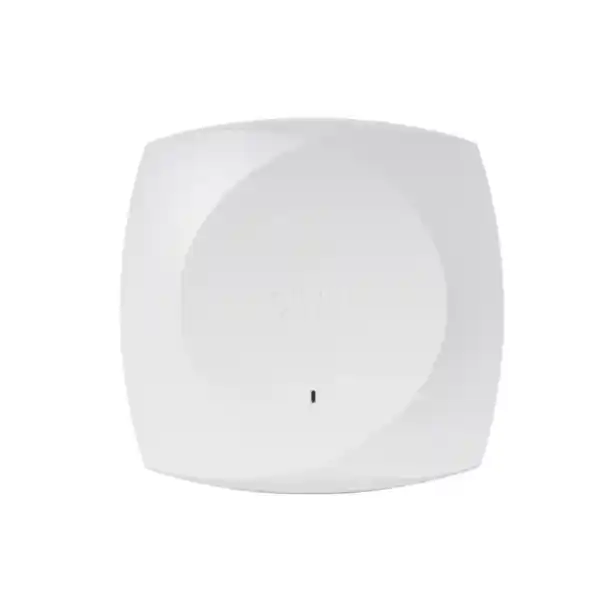
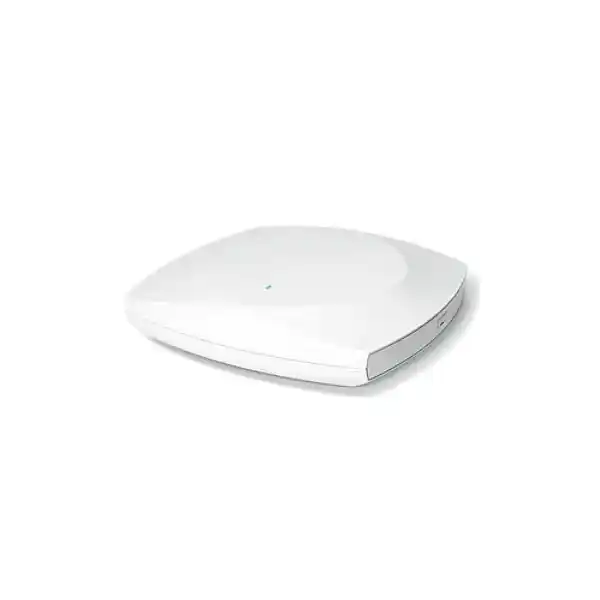
The Cisco Wireless CW9171I Wi-Fi 7 Access Point is built for organizations that want to move to the latest enterprise wireless generation without deploying a high-density platform where it is not needed. Cisco positions the 9171 Series for low-to-moderate-density environments such as distributed offices, retail locations, healthcare clinics, hospitality spaces, student accommodation and similar sites. The CW9171I brings Wi-Fi 7 radio features, a multigigabit wired uplink, integrated IoT capabilities and flexible management choices into a compact indoor design with internal omnidirectional antennas.
For a Tanzania deployment, the practical value is not simply the Wi-Fi 7 label. A successful design also depends on power, switching, cabling, controller or cloud strategy, software version, subscription licensing and the radio bands permitted for the deployment location. The CW9171I can operate 2.4 GHz together with either 5 GHz or 6 GHz; it does not serve all three client bands concurrently. Cisco also states that 6 GHz is disabled in countries where the band is not allowed or where current software support is unavailable. That makes pre-deployment validation important before treating 6 GHz as an available capacity layer.
Who should consider the CW9171I?
The CW9171I is a sensible fit when an organization needs enterprise Wi-Fi 7 features but the site does not justify a larger, higher-radio-count access point. Typical examples include branch offices, small corporate floors, reception and customer-service areas, retail outlets, clinics, training rooms, classrooms, boutique hospitality areas, logistics offices and managed remote-work hubs. In these spaces, users usually care about stable collaboration, cloud applications, secure business access, voice and video, point-of-sale connectivity, mobile devices, laptops and a growing set of operational or IoT endpoints.
It is also relevant to organizations standardizing on Cisco infrastructure across many smaller sites. The unified hardware concept is useful when the business wants a consistent access-point platform while retaining the option to use Cisco Catalyst 9800 controller-based management or the Meraki cloud stack. This can simplify hardware planning compared with maintaining separate hardware variants for every management model, but software, licensing and onboarding requirements still need to be designed correctly.
The CW9171I should not be selected only because it is newer than an existing AP. Venue density, expected client count, application demand, available Ethernet switching, PoE budget, RF conditions and coverage objectives all matter. A high-density auditorium, stadium, very busy transport venue or demanding large-campus environment may call for a different access-point class. Conversely, an ordinary branch office may not benefit from paying for capacity it cannot use. The right choice is the access point that matches the site design, not the model with the largest headline specification.
Key capabilities at a glance
| Area | CW9171I capability | Why it matters |
|---|---|---|
| Wireless | Wi-Fi 7 / 802.11be, 2×2:2 | Adds current-generation efficiency and performance features for capable clients. |
| Bands | 2.4 GHz + 5 GHz or 2.4 GHz + 6 GHz | Lets the design choose a second client band according to deployment requirements and permitted spectrum. |
| Wi-Fi 7 features | 4K-QAM, Multi-Link Operation, preamble puncturing, OFDMA, up to 320 MHz channels on 6 GHz | Improves spectrum use and enables higher peak PHY rates when clients, channel plans and regulations support them. |
| Ethernet | 100M/1G/2.5G RJ-45 multigigabit uplink | Avoids limiting a modern AP to a 1 GbE uplink where switching and cabling support 2.5 GbE. |
| IoT and scanning | Dedicated scan/auxiliary radio plus integrated BLE/IoT radio | Supports monitoring and location/IoT use cases without relying only on client-serving radios. |
| Management | Catalyst 9800 or Meraki cloud-based deployment | Supports organizations that prefer controller-based architecture, cloud operations or a migration path between them. |
Understanding the Wi-Fi 7 radio design
Wi-Fi 7, technically IEEE 802.11be, is designed to increase throughput potential, improve spectrum efficiency and reduce the impact of interference or congestion when both the network and client devices support the relevant features. On the CW9171I, Cisco documents 2×2 operation with two spatial streams on the serving radios. The access point supports a fixed 2.4 GHz serving radio and a second serving radio that can be configured for 5 GHz or 6 GHz. This distinction matters during design: “tri-band capable” describes the frequencies the platform can use, while the client-serving arrangement remains dual-radio concurrent operation.
Key 802.11be capabilities include 4096-QAM, Multi-Link Operation, preamble puncturing, uplink and downlink OFDMA, Target Wake Time, BSS coloring and support for wider channel sizes. Cisco lists channel widths up to 320 MHz in 6 GHz, up to 160 MHz in 5 GHz and 20 MHz in 2.4 GHz for Wi-Fi 7 operation. These are protocol capabilities, not a guarantee that the widest channel should be configured in every network. Channel width must be balanced against the number of available channels, neighboring networks, regulatory limits, interference, client support and the number of access points sharing the RF environment.
Multi-Link Operation is one of the most discussed Wi-Fi 7 features because compatible clients can use multiple links in ways that can improve performance and resilience. In practice, benefits depend on client implementation, network configuration and the bands available at the site. Likewise, 4K-QAM can raise data density under strong signal conditions, but users farther from the AP or in noisier RF conditions may negotiate lower modulation levels. A good WLAN design therefore focuses on coverage quality, interference control, appropriate power levels and realistic client behavior rather than assuming peak specifications will apply everywhere.
The access point also supports previous Wi-Fi generations, which is important for mixed device estates. Businesses rarely replace every laptop, phone, handheld scanner, printer and IoT device at the same time. A migration to CW9171I can therefore introduce Wi-Fi 7 readiness while continuing to serve compatible legacy clients, subject to the selected radio band, WLAN security policy and network design.
Important Tanzania planning note: validate 6 GHz before relying on it
Cisco’s documentation explicitly states that where 6 GHz use is not allowed, or where current software support is unavailable, the 6 GHz radio is disabled. Because spectrum permissions and product approvals can vary by country and may change over time, a Tanzania deployment should be checked against the applicable regulatory situation and Cisco’s current product-approval information before 6 GHz is included in the design. This page does not assume or claim that 6 GHz operation is authorized for every Tanzania installation.
If 6 GHz is not available, the CW9171I can still be designed around 2.4 GHz and 5 GHz. If 6 GHz is available and enabled for the deployment, planners should also confirm that client devices support the band and that coverage expectations are realistic. Higher frequencies generally have different propagation behavior from 2.4 GHz, so a design that works well on one band should not simply be copied to another without RF validation.
Controller-based or cloud-managed: one hardware platform, different operating models
The CW9171I is part of Cisco’s global-use unified access-point approach. The same hardware platform can be used in a Cisco Catalyst controller environment or with the Meraki cloud stack, provided the deployment meets the relevant software, licensing and onboarding requirements. This gives IT teams more freedom to align wireless operations with the way the rest of the organization is managed.
Catalyst management mode
Organizations already operating Cisco Catalyst wireless can integrate the CW9171I with supported Catalyst 9800 Series Wireless Controllers. Cisco lists IOS XE 17.18.2 or later for CW9171I support. This model can suit teams that want centralized controller-based WLAN operations, policy integration and alignment with a broader Cisco campus architecture.
Meraki management mode
Organizations that favor cloud-based administration can operate the access point with the Meraki stack. This can be attractive for distributed estates where centralized cloud visibility and standardized remote operations are priorities. Internet reachability, claiming/onboarding and the appropriate subscription must be planned as part of deployment.
Cisco also documents a migration workflow between Catalyst and Meraki management modes. That can reduce the risk of making a hardware decision that permanently locks the organization into one operational model. It does not mean the two modes are identical or that a conversion should be performed casually. Configuration, policy, feature behavior, firmware and operational processes still need review before changing modes in a production network.
For procurement, identify the intended management model before ordering so the wireless subscription, switching, controller capacity, cloud account and implementation plan are aligned from the start. This reduces the chance of receiving hardware before the necessary software entitlement or management environment is ready.
Power and switching requirements: avoid unintentionally running in a reduced mode
Power design is one of the most important purchasing checks for the CW9171I. Cisco’s data sheet lists 802.3at PoE+ as the mode that supports 2×2 operation on the 2.4 GHz radio and 2×2 operation on the 5 GHz or 6 GHz radio, with the 2.5G uplink available. By contrast, 802.3af PoE provides a reduced capability profile. In other words, an older switch may be able to power the access point but still prevent it from operating at the feature level the buyer expects.
Cisco documents a maximum power requirement of 30 W for full functionality and provides more detailed usage figures for typical operation. The exact draw varies with traffic and features, so switch power budgeting should not be based only on an average consumption figure. When multiple APs are connected to one access switch, planners should calculate the total PoE budget and leave appropriate headroom for boot events, feature changes and other powered devices.
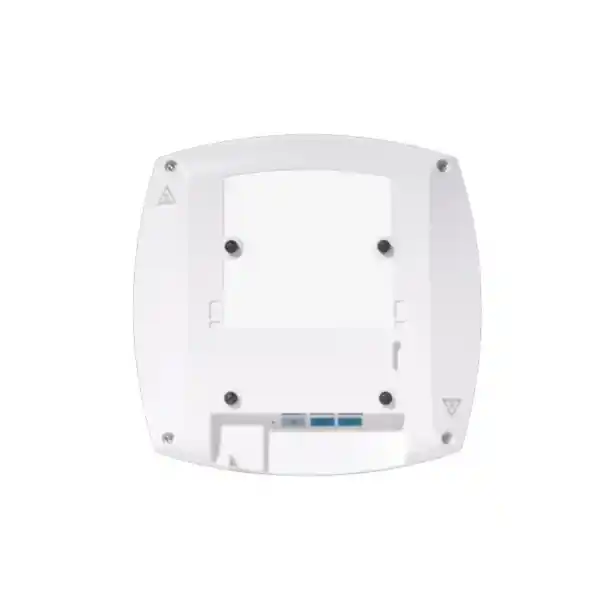
The wired interface is a 100M/1G/2.5G multigigabit RJ-45 port. A 2.5 GbE-capable switch port can give the AP more wired headroom than a traditional 1 GbE connection, which is useful when wireless aggregate traffic exceeds a gigabit. Cisco notes that Cat5e, Cat6 or Cat6A cabling is required for multigigabit operation. Existing structured cabling should therefore be tested rather than assumed to be suitable simply because it worked with an older 1 GbE access point.
Pre-installation power and LAN checklist
- Confirm the switch can supply the intended PoE class and has sufficient total PoE budget.
- Confirm the switch port supports 2.5 GbE if multigigabit uplink performance is required.
- Validate the horizontal cabling and patching path for multigigabit Ethernet operation.
- Enable appropriate power negotiation mechanisms such as LLDP/CDP according to the network design.
- Plan UPS or generator-backed power where business continuity requirements demand wireless availability during utility interruptions.
Integrated antennas, mounting and physical installation
CW9171I uses integrated internal omnidirectional antennas, so there are no external antenna connectors to select or position for ordinary deployment. Cisco lists peak antenna gain of 4 dBi at 2.4 GHz, 5.5 dBi at 5 GHz and 6 dBi at 6 GHz in the current data sheet. The enclosure measures approximately 20 × 20 × 5.3 cm without the mounting bracket and weighs about 874 g, making it suitable for typical indoor ceiling or wall installations where a clean integrated form factor is preferred.
Cisco identifies AIR-AP-BRACKET-1 and AIR-AP-BRACKET-2 as supported mounting brackets. Before replacing an older Cisco AP, check whether the existing bracket and mounting location are appropriate for the new unit rather than assuming every legacy mount can be reused without inspection. Ceiling material, building structure, cable access, heat, nearby metal surfaces and physical security can all affect the installation plan.
The published operating temperature range is 0°C to 50°C, with radio operation derated from 40°C to 50°C. That point deserves attention in warm indoor spaces, ceiling voids, unconditioned service areas or buildings where ambient temperature can remain high. The CW9171I is an indoor enterprise access point; outdoor or exposed installations should use hardware specifically designed for those environments.
A proper RF survey or predictive design should determine AP placement. Mounting an access point wherever an Ethernet outlet happens to exist can create inconsistent signal levels, sticky clients, excessive overlap or coverage gaps. Placement should reflect the shape of the area, wall materials, expected user concentration and the bands the WLAN intends to operate.
Built-in scanning and IoT capabilities
The CW9171I includes a dedicated scan or auxiliary radio in addition to the client-serving radios. A dedicated scanning resource can help the wireless system observe the RF environment without relying solely on radios that are busy serving users. Depending on management mode and enabled services, this can contribute to monitoring, optimization, troubleshooting and security-related workflows.
The platform also includes an integrated IoT radio. Cisco’s current documentation describes Bluetooth/BLE capabilities and support for IoT-related technologies, with some functions depending on software release. This is relevant for businesses considering location services, asset-related workflows, sensors or other smart-space initiatives. The presence of an IoT radio does not by itself guarantee compatibility with every third-party device or application; software support, application architecture, licensing and solution validation remain necessary.
A USB 2.0 interface is also provided, with Cisco listing 4.5 W output when enabled under the supported power profile. This can be useful for supported modules or application-hosting scenarios. If USB functionality is part of the requirement, confirm the intended accessory or workload, AP power source and management-mode support before specifying it as part of the final solution.
Security and network access considerations
The CW9171I supports WPA3 as part of its modern wireless security capabilities, but a secure WLAN is the result of more than the access point itself. Authentication design, identity services, segmentation, guest access, device onboarding, administrative controls, firmware policy and monitoring all contribute to the security posture. Organizations should decide whether corporate devices will use enterprise authentication, how guest or contractor access will be separated, and how older devices that do not support newer security methods will be handled.
In a Cisco enterprise environment, the access point can form part of a broader architecture that includes Catalyst controllers, identity and policy systems, assurance and monitoring tools. The exact features available depend on software releases, licenses and the selected management stack. Buyers should therefore compare the intended security policy with the current Cisco feature matrix rather than assuming every feature is enabled by default with the base hardware.
For branch and distributed sites, secure management connectivity also matters. Cloud-managed deployments need reliable internet access to the required services, while controller-based deployments need reachability and discovery paths to the supported controller environment. Firewall rules, DHCP/DNS design, VLANs and addressing should be prepared before APs arrive on site to reduce onboarding problems.
Cisco Networking Subscription and software planning
Cisco states that its Wi-Fi 7 access points, including the 9171 Series, require a Cisco Networking Subscription. For wireless, the relevant unified license tiers are Cisco Wireless Essentials or Cisco Wireless Advantage. Procurement should therefore account for both the physical access point and the subscription entitlement instead of treating the AP as a standalone one-time hardware purchase.
The appropriate tier depends on the features and operational capabilities the organization needs. Because Cisco can evolve subscription packaging and software entitlements, the license should be confirmed against the current ordering guide at the time of quotation. If the organization already has Cisco networking subscriptions, renewal alignment and entitlement reuse should be checked before creating a new purchasing structure.
Software compatibility also needs to be validated. Cisco lists IOS XE 17.18.2 or later for CW9171I in Catalyst controller deployments and identifies supported Catalyst 9800 controller platforms in its deployment documentation. In Meraki mode, the applicable Meraki software and onboarding requirements should be reviewed for the current release. A controller that is otherwise healthy may still be unable to adopt a newly introduced AP if its software is below the minimum supported release.
For a production upgrade, schedule controller or cloud-readiness work before replacing access points. This gives the team time to test firmware, templates, SSIDs, security policies, RF profiles and monitoring. A staged pilot at one representative site is usually more informative than replacing a large number of APs at once.
Performance expectations: what “up to” numbers really mean
Cisco lists an aggregate frame rate up to approximately 6.12 Gbps for the 9171 Series and PHY data rates up to 6.0 Gbps under the documented Wi-Fi 7 radio conditions. These figures describe protocol-level capabilities and are useful for comparing platforms, but they are not the same as application throughput delivered to one user. Real performance is affected by channel width, modulation, client radio capability, distance, interference, contention, encryption overhead, retransmissions, wired uplink capacity and the number of clients sharing airtime.
For most businesses, a better design question is whether the WLAN provides predictable performance for actual applications. Microsoft 365 or Google Workspace, video meetings, cloud ERP, VoIP, CRM, web applications, point-of-sale systems and file transfers have different traffic patterns. A well-designed WLAN should prioritize consistency, latency, roaming behavior and capacity across the area rather than chase a single speed-test result directly under the AP.
Client devices are another limiting factor. Many endpoints use 1×1 or 2×2 radios and may not support 6 GHz, 320 MHz channels or every Wi-Fi 7 feature. Even when the access point supports advanced functions, older phones, laptops and scanners connect according to their own capabilities. During an upgrade, inventory representative client types and test business-critical devices before finalizing aggressive WLAN settings.
The 2.5 GbE uplink helps prevent a 1 GbE bottleneck where traffic warrants it, but the rest of the LAN and internet path must also be sized appropriately. An AP cannot create internet bandwidth that the WAN circuit does not provide, and a cloud application will still be affected by upstream latency or congestion. Wireless modernization should therefore be planned as part of the whole access network.
Common deployment scenarios
Branch office refresh
Replace aging Wi-Fi 5 or early Wi-Fi 6 access points in smaller offices while retaining enterprise security, central operations and a path to newer clients. Check switching and PoE before assuming the old access layer can expose the full capability of the new AP.
Retail and customer areas
Support staff tablets, POS systems, inventory devices, guest access and customer-facing applications in stores where device density is meaningful but not comparable with a stadium or major public venue.
Clinic or professional practice
Provide modern wireless access for staff systems, collaboration tools, mobile endpoints and approved IoT use cases. Security segmentation and application requirements should be reviewed carefully where sensitive information is handled.
Hospitality or student spaces
Deploy compact indoor APs where many users expect stable internet access and modern device support. Site layout, wall construction and room density may require more APs at lower transmit power rather than fewer APs at maximum power.
Distributed logistics offices
Use cloud or centrally managed WLAN services in offices attached to warehouses or logistics sites. If coverage must extend into large industrial or outdoor areas, assess whether other AP models and antennas are more appropriate.
Managed remote workplace
Standardize wireless at remote offices or executive workspaces that need enterprise policy and monitoring rather than consumer-grade Wi-Fi. Confirm whether the operational overhead and subscription model are justified for very small sites.
Migration from older Cisco access points
Cisco describes the CW9171I as a migration path for customers using MR36 and Cisco Catalyst 9105 Series access points. That does not mean every installation is a direct one-for-one swap. Wi-Fi 7 changes the capability of the radio platform, and older sites may have been designed around different channel plans, transmit powers, cabling, controller versions and switch PoE budgets. A refresh is an opportunity to re-check those assumptions instead of reproducing the old design unchanged.
Before migration, document the current SSIDs, authentication methods, VLAN mapping, quality-of-service policies, guest workflows, RF profiles, switch configurations and monitoring dependencies. Identify client groups that are especially sensitive to roaming or authentication changes, such as voice handsets, handheld scanners or specialized business devices. A pilot should include those clients, not only modern laptops and phones.
If the organization is also changing from Catalyst management to Meraki cloud management, treat that as an operational migration as well as a hardware refresh. Teams may need new dashboards, alerting processes, configuration templates, administrator roles and escalation procedures. The ability to use unified hardware makes the transition more flexible, but good change management remains essential.
Where old brackets or cabling are reused, inspect their condition. Reuse can reduce installation effort, but only if the physical infrastructure remains suitable. Replacing the AP while leaving poor patching, overloaded switches or unsuitable mounting locations will not deliver the expected wireless improvement.
Technical specification summary
| Model | Cisco Wireless CW9171I |
|---|---|
| Environment | Indoor enterprise access point with internal omnidirectional antennas |
| Wireless standard | 802.11be Wi-Fi 7; backward support for earlier documented Wi-Fi standards |
| Serving radios | 2.4 GHz 2×2:2 plus configurable 5 GHz or 6 GHz 2×2:2 |
| Maximum documented PHY rate | Up to 6.0 Gbps under the specified Wi-Fi 7 radio configuration; real application throughput is lower and environment dependent |
| Wi-Fi 7 features | 4096-QAM, Multi-Link Operation, preamble puncturing, uplink/downlink OFDMA, Target Wake Time, BSS coloring and additional 802.11be capabilities |
| Ethernet | 1 × 100M/1G/2.5G multigigabit RJ-45 uplink |
| Other interfaces | RJ-45 management console, USB 2.0, 54 V DC power jack |
| PoE | 802.3at PoE+ for the documented full dual-radio profile; 802.3af operates with reduced capability |
| Dimensions | Approx. 20 × 20 × 5.3 cm without mounting bracket |
| Weight | Approx. 874 g |
| Operating temperature | 0°C to 50°C, with radio operation derated from 40°C to 50°C |
| Management | Supported Catalyst 9800 controller deployments or Meraki cloud stack |
| Licensing | Cisco Networking Subscription with Cisco Wireless Essentials or Wireless Advantage, according to required features |
Specifications and software requirements can change with product and software updates. Final design and ordering should be checked against current Cisco documentation and the intended deployment mode.
What to confirm before requesting a quote
A quote is more useful when it reflects the complete deployment rather than only the access-point quantity. Before requesting pricing, identify the number of sites, approximate floor area, expected concurrent users, important applications, existing switch models, available PoE budget, current controller or Meraki environment, internet connectivity, desired security approach and whether the project is a new installation or a replacement of existing Cisco APs.
Also confirm whether mounting brackets, power injectors, switch upgrades, patch leads, structured cabling work, licenses or professional installation are required. These supporting items can materially affect the project even when the AP hardware itself is straightforward. For multi-site deployments, note whether every location has the same switch and WAN design or whether there are older branches that require separate treatment.
The exact target-listing SKU was not verified from a public FourTeck Tanzania product page, so no retailer-specific SKU is asserted here. CW9171I is the Cisco product model/PID, not a substitute for a FourTeck listing SKU.
Frequently asked questions
Is the CW9171I a tri-band access point?
It is tri-band capable in the sense that the hardware supports 2.4 GHz, 5 GHz and 6 GHz, but its client-serving configuration is dual-radio concurrent operation: 2.4 GHz together with either 5 GHz or 6 GHz. It should not be specified as if it serves 2.4, 5 and 6 GHz client traffic simultaneously.
Does the CW9171I support 6 GHz in Tanzania?
The hardware is 6 GHz capable, but Cisco notes that 6 GHz is disabled where local use is not permitted or where current software support is unavailable. The applicable Tanzania regulatory and product-approval status should therefore be verified for the exact deployment before relying on 6 GHz.
Can it run from ordinary 802.3af PoE?
Yes, but with reduced capability. Cisco’s published power table shows the intended full 2×2 dual-radio profile and 2.5G uplink under 802.3at PoE+. A buyer upgrading from older PoE switches should check the power design before deployment.
Can the same AP be managed by Meraki or Catalyst?
Yes. Cisco’s unified hardware design supports deployment with the Meraki cloud stack or supported Catalyst 9800 controllers, subject to current software, licensing and onboarding requirements. Cisco also documents workflows for migration between management modes.
Does it require a Cisco subscription?
Yes. Cisco states that Wi-Fi 7 access points including the 9171 Series require a Cisco Networking Subscription. Wireless Essentials and Wireless Advantage are the relevant unified wireless license tiers, with the correct tier determined by the required functionality.
Is a 2.5 GbE switch mandatory?
The AP supports 100M, 1G and 2.5G Ethernet, so it can connect at lower link rates. However, a 2.5 GbE-capable switch is the better choice where the design expects more than 1 Gbps of aggregate wired throughput from the access point. Power capability must be checked separately from Ethernet speed.
Is CW9171I suitable for high-density venues?
Cisco positions the 9171 Series for low-to-moderate-density use. For very high client density, large public venues or unusually demanding RF environments, assess higher-capacity Cisco Wi-Fi 7 models and perform a proper RF design rather than relying on a one-model-fits-all approach.
What warranty does Cisco publish for the 9171 Series?
Cisco’s current 9171 Series data sheet states a limited lifetime hardware warranty for the original end user and describes advance replacement and software-media terms. Any purchase-specific warranty handling, local return process or service arrangement should be confirmed in the actual quotation and sales terms rather than assumed from the manufacturer summary alone.
Plan before you buy
Request a CW9171I solution quote for your Tanzania deployment
For the most accurate proposal, share the site type, expected user count, number of access points, existing Cisco controller or Meraki environment, switch model, PoE capability and whether the project is a new installation or an upgrade. This makes it easier to identify the access points, subscriptions, power requirements, mounting accessories and any LAN changes needed for a complete deployment.
A wireless refresh should be designed around the business applications and site conditions, not only the headline Wi-Fi generation. The CW9171I is a strong candidate for organizations that want compact enterprise Wi-Fi 7, flexible Cisco management options and multigigabit connectivity in low-to-moderate-density indoor environments.




Reviews
There are no reviews yet.