
Outdoor enterprise Wi‑Fi 6
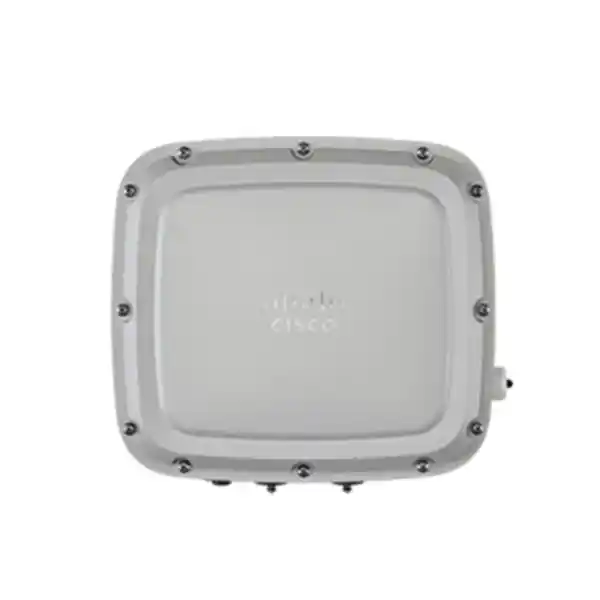
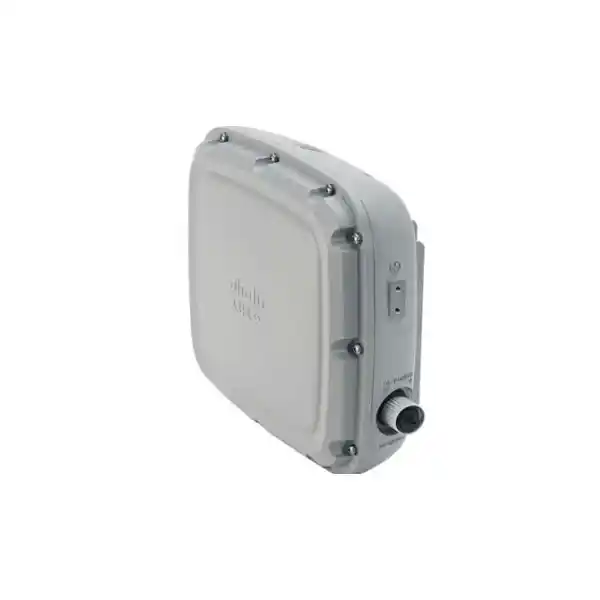
Cisco Catalyst C9124AXI Outdoor Access Point for Broad, Managed Wireless Coverage
The Cisco Catalyst C9124AXI is built for organizations that need enterprise wireless service outside the usual office ceiling. It combines Wi‑Fi 6 efficiency, integrated omnidirectional antennas, rugged environmental protection, multigigabit Ethernet and Cisco wireless management capabilities in a platform intended for outdoor deployments. For a Tanzania project, this makes it a strong candidate for campuses, hospitality grounds, education sites, logistics areas, industrial compounds and other locations where users or connected devices move through open spaces and the network must remain centrally managed.
The key buying decision is not simply whether the access point supports Wi‑Fi 6. It is whether the internal omnidirectional antenna pattern, required power budget, controller architecture, wired or fiber backhaul plan, mounting position and regulatory domain are correct for the intended site. The C9124AXI can deliver its most capable radio and uplink configuration only when it receives suitable power, so switch selection and power design should be considered at the same time as the access point itself.
4×4:4 operation is supported on both 2.4 GHz and 5 GHz when the access point is provided with the power needed for full functionality.
Internal 2.4 GHz and 5 GHz antennas have 7 dBi peak gain and are intended to provide surrounding coverage without external antenna selection.
Cisco specifies IP66/IP67 ingress protection, wide operating temperatures and resistance to demanding outdoor conditions.
A 100/1000/2500BASE‑T uplink and a Gigabit Ethernet SFP interface support copper or fiber-oriented deployment designs.
Who the C9124AXI is for
This model is best understood as the internal-omnidirectional member of the Cisco Catalyst 9124AX outdoor family. The “I” variant is useful when the access point is positioned so that clients need service around the installation point rather than primarily in one narrow direction. That can simplify many outdoor designs because there is no separate external antenna system to select, cable, weatherproof and align. It also creates an important design constraint: omnidirectional coverage is not automatically the best answer for every open-air site. Long corridors, perimeter links, distant yards and point-to-point paths may benefit from directional or external-antenna alternatives instead.
For buyers, the practical value of the C9124AXI is its combination of enterprise Wi‑Fi 6 radio features, centralized management options, ruggedization and multiple wired interfaces. It is not positioned as a simple stand-alone consumer outdoor router. A successful deployment normally involves RF planning, switching, VLANs, authentication, controller or supported embedded-controller architecture, suitable power, proper outdoor cabling, grounding and mounting. Organizations already using Cisco Catalyst switching and Catalyst 9800 wireless management may find the platform especially relevant because it fits that broader operational model.
Typical requirements include extending managed Wi‑Fi from buildings into courtyards, pedestrian areas, logistics yards, outdoor classrooms, accommodation grounds, loading areas, industrial compounds or other spaces where weather exposure makes an indoor access point inappropriate. The same hardware family also supports outdoor mesh use cases when the network design requires wireless backhaul. The exact radio channel plan, transmit power, regulatory domain and software release should be validated for the location before deployment.
Core technical specifications
| Product family | Cisco Catalyst 9124AX Series outdoor access points |
|---|---|
| Model type | C9124AXI — integrated internal omnidirectional antennas |
| Wireless generation | Wi‑Fi 6 / IEEE 802.11ax, with support for earlier listed 802.11 standards |
| Radio configuration | Up to 4×4:4 on 2.4 GHz and 5 GHz, subject to power mode |
| Internal antenna gain | 7 dBi peak at 2.4 GHz and 7 dBi peak at 5 GHz; omnidirectional, vertical polarization |
| IoT / location radio | Integrated Bluetooth Low Energy 5 radio; Cisco lists a 5 dBi internal BLE antenna for C9124AXI |
| Copper uplink | 1 × 100/1000/2500BASE‑T Ethernet uplink |
| Optical interface | 1 × Gigabit Ethernet SFP |
| Additional Ethernet | 1 × 10/100/1000BASE‑T downlink; PoE output is available only under supported higher-power input conditions |
| Power inputs | 802.3af, 802.3at, 802.3bt, Cisco UPOE, or auxiliary 24–56 V DC |
| Ingress protection | IEC 60529 IP66/IP67 |
| Operating temperature | −40°C to 65°C without solar loading; −40°C to 55°C with solar loading |
| Dimensions | 25.9 × 23.3 × 8.1 cm, excluding mounting brackets |
| Weight | Approximately 2.9 kg for C9124AXI |
Radio behavior, transmit power, available channels and some interface functions depend on the regulatory domain, software release and supplied power. Treat the table as a planning summary rather than a substitute for the final country-specific bill of materials.
Wi‑Fi 6 efficiency for busy outdoor client areas
Outdoor wireless performance is often limited less by a headline data rate than by how efficiently the access point serves many clients sharing airtime. The C9124AXI uses Wi‑Fi 6 mechanisms intended to improve efficiency and predictability in those multi-device environments. Uplink and downlink OFDMA can divide a channel into smaller resource units so multiple compatible clients can be scheduled more efficiently. Uplink and downlink MU‑MIMO allow multiple spatial streams to be used across clients, while BSS coloring helps compatible devices distinguish neighboring basic service sets and improve spatial reuse where several cells overlap.
Target Wake Time is another Wi‑Fi 6 feature that can reduce unnecessary client activity for supported battery-powered devices. This can matter in mixed outdoor networks where phones and laptops share infrastructure with sensors, handheld terminals or other devices that may spend long periods idle. The benefit depends on client support, configuration and traffic patterns, so it should not be treated as a guarantee of battery-life improvement for every endpoint.
Cisco specifies up to four spatial streams on both the 2.4 GHz and 5 GHz radios for the C9124AXI when the access point is operating with sufficient power. Cisco also lists theoretical 802.11ax PHY rates up to 5.38 Gbps under supported channel-width and radio conditions. That figure is a physical-layer maximum rather than an expected application throughput value. Real user throughput is affected by client capabilities, channel width, contention, RF noise, distance, regulatory limits, backhaul capacity, protocol overhead and the number of active devices.
For design work, the more useful question is therefore how many devices must be active at once, which applications they run, what roaming behavior is required, and whether the 2.4 GHz or 5 GHz band is expected to carry most client traffic. A professional site survey and capacity plan are more reliable than attempting to estimate coverage or throughput from a single maximum-speed specification.
Integrated omnidirectional antennas: when they are the right choice
The defining feature of the C9124AXI compared with other models in the 9124AX family is its internal omnidirectional antenna system. Cisco specifies 7 dBi peak gain for the integrated 2.4 GHz antenna and 7 dBi peak gain for the integrated 5 GHz antenna, with vertical polarization. This configuration reduces the need to choose and install external RF cables and antennas, and it can be well suited to a centrally positioned access point intended to serve clients around a pole, building edge, courtyard or open-area mounting point.
Omnidirectional does not mean equal signal in every three-dimensional direction, nor does it mean that one access point can cover any large outdoor site. Antenna pattern, mounting height, nearby structures, foliage, vehicles, terrain, client transmit power and interference all influence usable coverage. An access point mounted too high may create a large footprint but poor client uplink performance, while an access point positioned behind metal, reinforced concrete or dense vegetation can produce major coverage shadows. Cisco’s installation guidance recommends site surveying and careful placement rather than relying on a theoretical distance.
For long, narrow areas or sites where RF energy should be concentrated toward a particular zone, the C9124AXD directional model may be more appropriate. Where specialized external antennas are required, the C9124AXE is the relevant family member. Choosing among AXI, AXD and AXE should therefore start from the desired coverage geometry, not from the assumption that the model with the most flexible antenna arrangement is always preferable.
The internal-antenna design also makes the C9124AXI attractive where a cleaner physical installation is important. Fewer exposed RF connectors can simplify the visible assembly, but the deployment still needs proper weather-rated Ethernet or fiber accessories, grounding, drip loops, sealed unused ports and compatible mounting hardware.
Power planning is a critical part of the specification
The C9124AXI accepts several power methods, but they do not all provide the same feature set. This is one of the most important facts to check before procurement because an access point connected to an underpowered switch port may boot with reduced capabilities rather than operate as expected. Cisco lists 802.3af PoE, 802.3at PoE+, 802.3bt PoE++, Cisco UPOE and auxiliary 24–56 V DC as supported input options.
Cisco’s reduced-power matrix is therefore directly relevant to switch sizing. If a project expects 4×4 radio operation, 2.5G copper uplink, SFP use or PoE output from the access point, the upstream power source must be selected accordingly. An outdoor power injector can be used in some designs, but Cisco notes that certain 60 W outdoor injectors support only 10/100/1000BASE‑T and do not provide 2.5G mGig Ethernet. Power and throughput requirements should be reviewed together.
Copper, SFP and downstream Ethernet options
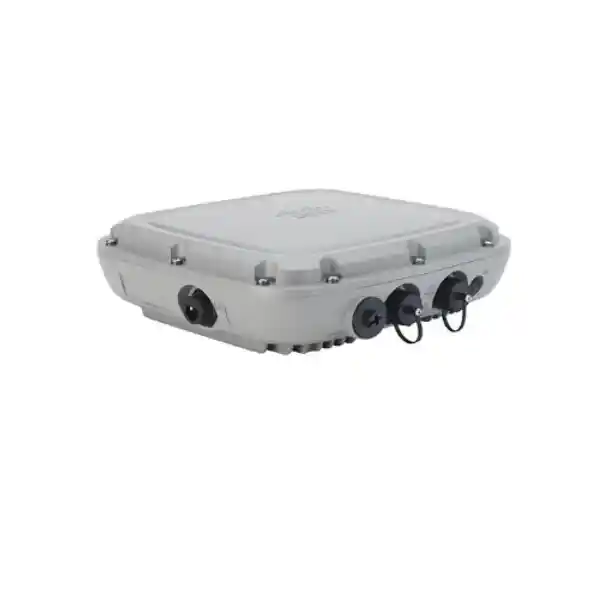
Outdoor access points are often installed where the nearest network cabinet is far away, where lightning exposure is a concern, or where existing cabling dictates the backhaul method. The C9124AXI addresses these scenarios with more than one wired interface. The primary copper uplink supports 100 Mbps, 1 Gbps and 2.5 Gbps. A separate Gigabit Ethernet SFP interface gives designers an optical option, which can be valuable when distance or electrical isolation makes fiber preferable. The access point also includes a 10/100/1000BASE‑T downlink that can provide 802.3af-compliant PoE output only when the C9124AX is itself powered from a supported high-power source.
The presence of multiple interfaces does not mean every interface is active in every power state. With 802.3at power, Cisco documents a reduced 1G operating mode and no SFP availability. With 802.3bt/UPOE or sufficient DC power, the full 2.5G uplink and SFP functions are available. This should be captured in the project bill of materials before cabling is installed.
Cable selection is also part of environmental reliability. Cisco’s installation documentation specifies shielded outdoor-rated Ethernet cabling and explains that the supplied CAT 5e gland is for CAT 5e cable; a separate accessory gland is needed when CAT 6 or CAT 6A cable is used. Unused ports must remain sealed with their plugs or caps. Grounding, cable routing and drip loops should be implemented according to the installation guide and applicable local requirements. These details are easy to overlook during purchasing, but they influence whether an outdoor installation remains dependable after exposure to rain, heat, dust and electrical events.
For fiber-backed installations, confirm the exact SFP module, power arrangement and enclosure or splice design before deployment. The product’s SFP interface is Gigabit Ethernet, not a 2.5G optical port, so a project that specifically requires more than 1 Gbps over fiber should account for that limitation in the network architecture.
Rugged outdoor construction and environmental limits
Cisco specifies the Catalyst 9124AX outdoor enclosure with IEC 60529 IP66/IP67 ingress protection. In practical terms, that is a significant design feature for sites exposed to dust and water, but the rating should not be interpreted as permission to ignore installation practice. The cable glands, caps, grounding hardware and mounting method are part of the finished outdoor system. A poorly sealed cable entry can undermine the value of a rugged enclosure.
The documented operating temperature range is −40°C to 65°C without solar loading and −40°C to 55°C with solar loading. Cisco also lists operation in condensing humidity and provides wind-resistance, corrosion, solar-radiation, icing and vibration test information for the series. These specifications make the platform appropriate for demanding external locations, but actual site design should still consider direct sun, enclosure orientation, local wind exposure, pole strength, corrosion conditions and maintenance access.
The C9124AXI is approximately 25.9 cm wide, 23.3 cm long and 8.1 cm high without the mounting bracket, with a stated weight of about 2.9 kg. Mounting is therefore a structural consideration, not simply an adhesive or lightweight bracket task. Cisco offers dedicated wall, pole, horizontal and strand mounting accessories for the 9124AX family. The appropriate kit depends on model and orientation, and mounting brackets are orderable accessories rather than something to assume is included in every purchase.
For projects in exposed outdoor areas, access to grounding and lightning-protection design is especially important. The package includes a ground lug and associated hardware, but the full grounding system, ground rod where required, surge protection and installation workmanship are site responsibilities. A deployment plan should identify these items before the access point arrives.
Cisco wireless management, controller support and software fit
Cisco lists the Catalyst 9800 Series Wireless Controllers as supported WLAN controllers for the Catalyst 9124AX family. This makes the C9124AXI suitable for organizations that want policy, RF management, security and operational visibility integrated into a Cisco enterprise wireless architecture. Controller compatibility should still be checked against the exact Cisco IOS XE release planned for the deployment, especially when upgrading an existing environment rather than building a new one.
Cisco also offers C9124AXI part-number variants with Embedded Wireless Controller capability. That is important because the model family can participate in controller architectures beyond a traditional dedicated appliance, but it does not mean every C9124AXI order code is identical. The exact ordering code, regulatory domain and required licensing should be confirmed on the quote. Buyers should avoid treating “C9124AXI” as a complete purchasable SKU because Cisco appends regulatory-domain and ordering information to the model.
For security, the data sheet lists WPA3 support, including WPA3-Enterprise 192, alongside 802.1X and enterprise EAP methods. The hardware also incorporates Cisco Trust Anchor technologies such as secure boot and image signing. Cisco’s RF ASIC supports spectrum and RF functions including CleanAir, wireless intrusion prevention capabilities, FastLocate and Dynamic Frequency Selection. The exact operational feature set can depend on controller software, licenses and configuration, so projects should validate required features against the current release matrix rather than assuming that every capability is enabled by hardware alone.
This distinction matters during upgrades. A replacement access point may be physically compatible with the same mounting location yet require a controller software update, new licensing or a changed country configuration. A pre-deployment compatibility review helps avoid discovering these dependencies during installation.
Outdoor mesh and bridging use cases
The Catalyst 9124AX family can be used in supported mesh designs in addition to conventional wired access-point deployments. Cisco documentation describes Root Access Point and Mesh Access Point roles, with a root access point connected to the wired network and mesh access points using wireless backhaul to reach the network through a parent. Cisco also documents point-to-point bridging, point-to-multipoint bridging and mesh connectivity for the series in supported software configurations.
Mesh can reduce the need to extend Ethernet to every outdoor location, but it should not be treated as free capacity. Wireless backhaul shares spectrum and is affected by path quality, interference, channel design, hop count and physical obstructions. Where high client throughput or low latency is important, wired or fiber backhaul may remain the preferred approach. Mesh is most useful when civil works or cable routes are difficult and the RF paths can be engineered carefully.
The omnidirectional antenna design of the C9124AXI can be useful for some mesh topologies, particularly where nodes or clients surround an installation point, but long dedicated links may be better served by a directional design. This is another reason to evaluate AXI against AXD or external-antenna AXE options at the network-planning stage.
A mesh deployment should document which access points are roots, which are mesh nodes, what happens if a parent fails, where wired entry points exist, what backhaul signal quality is required, and how client access and backhaul share available airtime. Controller and software support for the chosen topology should be verified before purchase.
Bluetooth, location and IoT considerations
The C9124AXI includes an integrated Bluetooth Low Energy 5 radio, and Cisco positions this capability for location-oriented use cases such as asset tracking, wayfinding and analytics. For organizations planning Wi‑Fi and IoT infrastructure together, an integrated BLE radio can reduce the need to treat every location service as a completely separate overlay.
The presence of BLE hardware does not itself create an asset-tracking solution. Tags, applications, location platforms, licensing, calibration and placement design may also be required. The usefulness of BLE is therefore highest when the project has a defined location or telemetry workflow rather than a vague expectation that the access point will automatically track devices. Cisco’s broader ecosystem can integrate wireless telemetry and location services, but exact compatibility should be checked against the intended application and controller software.
For mixed outdoor environments, it is also important to distinguish Wi‑Fi client coverage from low-energy radio coverage. They use different technologies and may have different range, antenna and application requirements. A site survey focused only on laptop Wi‑Fi performance may not be enough to validate a location-services design.
Tanzania deployment planning: what to confirm before ordering
For a Tanzania deployment, the most important commercial and technical step is to confirm the correct Cisco regulatory-domain ordering code for the location and software design. Cisco explicitly requires customers to verify country approval and the regulatory domain that corresponds to the country. Because available channels and transmit-power limits are regulatory matters, a generic overseas part number should not be assumed to be appropriate simply because the hardware name is C9124AXI.
The second check is power. If the project needs full 4×4 radios, 2.5G copper uplink, the SFP interface or PoE output, the access point should not be paired with a switch port that only provides basic PoE or standard PoE+ without understanding the resulting restrictions. Review the upstream switch model, PoE budget, cable length and any intermediate surge-protection or injector components. Where a power injector is used, verify whether it supports the intended Ethernet speed.
The third check is RF design. Outdoor installations can look simple because there are fewer walls, but they are frequently affected by trees, metal roofs, vehicles, elevation changes, neighboring wireless systems and highly variable client locations. Determine expected user density, applications, roaming paths and the positions where the AP can be mounted safely and maintained. The internal omni antenna is most effective when the desired service area matches that radiation pattern.
The fourth check is environmental installation. Use the correct mounting kit, outdoor-rated shielded cable, compatible cable gland, weather sealing, grounding and lightning or surge protection for the final design. Ensure unused interfaces remain properly sealed. For a site with long cable runs or electrical exposure, evaluate whether the SFP interface and fiber backhaul create a more robust architecture than copper.
Finally, confirm the controller platform, Cisco IOS XE release, network licensing, VLAN and authentication design, DHCP reachability and any mesh requirements before installation. These checks turn the access point from a hardware purchase into a deployable network component.
Common deployment scenarios
Campus outdoor areas
Extend centrally managed Wi‑Fi to paths, courtyards, gathering areas and spaces between buildings. Place APs according to roaming paths and client density rather than building boundaries alone.
Hospitality grounds
Provide managed outdoor connectivity around gardens, pool areas, walkways or event spaces where weather-resistant hardware is needed. Guest-network design and capacity should be planned separately from raw coverage.
Logistics and warehousing yards
Support handheld devices, mobile terminals and staff Wi‑Fi in open loading or storage areas. Account for moving vehicles, metal containers and changing obstruction patterns during the RF survey.
Industrial compounds
Connect outdoor work areas while maintaining enterprise authentication and management. Evaluate electromagnetic noise, mounting safety, fiber backhaul and power resilience as part of the design.
Education sites
Cover outdoor study spaces, sports-adjacent areas or walkways while using the same policy framework as the indoor network. Capacity should reflect class transitions and concentrated device usage.
Outdoor mesh extensions
Reach locations where wired Ethernet is difficult, using supported root and mesh AP roles. Backhaul quality, hop count and failover behavior should be engineered before deployment.
RF site survey and capacity planning
A useful outdoor survey begins with application requirements, not access-point count. Document the locations where users actually work or move, the minimum acceptable signal and performance, the types of clients in use, and whether voice, video, cloud applications, inventory systems or general internet access are the priority. Some client devices transmit at lower power than the access point, which can create a situation where the client hears the AP but cannot return a reliable signal. This is one reason oversized cells can perform poorly even when the access point has strong transmit capability.
Channel planning must also account for the local regulatory domain and neighboring RF activity. On 2.4 GHz, available non-overlapping capacity is limited compared with 5 GHz, so a dense deployment often benefits from steering capable clients toward 5 GHz where appropriate. On 5 GHz, channel width affects the trade-off between peak rate and the number of distinct channels available for reuse. Wider channels can raise headline PHY rates but may reduce planning flexibility in dense networks.
Mounting height is another important variable. Cisco’s installation guidance recommends careful survey and placement and notes that access points should not simply be installed as high as possible. A height that helps clear small obstructions can still be too high for balanced client uplink performance. Antenna pattern, client elevation and the physical environment should guide the final position.
Capacity planning should estimate concurrent clients and airtime demand during the busiest period. A guest area with hundreds of mostly idle phones behaves differently from a yard with fewer devices transferring images, voice traffic or inventory data continuously. If location services or BLE applications are also required, those should be surveyed and tested as separate service objectives.
After installation, validate roaming, channel utilization, retry rates, uplink quality and application behavior rather than judging success only by whether an SSID is visible. The operational data available through the Cisco wireless architecture can then be used to refine power, channels and placement.
C9124AXI vs C9124AXD vs C9124AXE
The three main 9124AX outdoor variants share the same broader platform but address different antenna requirements. The C9124AXI uses integrated omnidirectional antennas and is the natural choice when the installation needs broad surrounding coverage with minimal external RF components. The C9124AXD uses integrated directional antennas and is better suited to designs where RF energy should be concentrated toward a defined area. The C9124AXE uses external antenna connectors and provides the greatest antenna-selection flexibility for specialized coverage patterns.
| Model | Antenna approach | Best design fit |
|---|---|---|
| C9124AXI | Integrated omnidirectional | Broad area coverage around the mounting point with simplified antenna installation |
| C9124AXD | Integrated directional | Concentrated coverage toward a sector, yard or defined direction |
| C9124AXE | External antenna ports | Specialized antenna patterns, external-antenna engineering and more customized RF designs |
The right choice depends on geometry. If a pole in the middle of a service area can provide balanced coverage in several directions, AXI is usually easier to design and install. If clients are primarily on one side of the mounting point, a directional model may use RF energy more efficiently. External antennas add flexibility but also add connector, cable, weatherproofing and antenna-selection tasks.
Installation accessories and bill-of-materials checks
An outdoor access point should be quoted as part of a complete installation package. Cisco documents multiple mounting accessories for wall, pole, horizontal and strand installations, and the appropriate bracket is selected according to the physical layout. Do not assume that the required bracket is included with the base access point. The installation package does include items such as a ground lug and Ethernet port termination components, but project-specific cabling, mounting and surge-protection materials still need to be planned.
For copper installations, verify outdoor-rated shielded cable, connector type, cable gland compatibility and maximum channel length. CAT 6 or CAT 6A deployments require the corresponding Cisco cable-gland accessory rather than using the CAT 5e gland supplied for CAT 5e. Where lightning exposure is significant, consider the location of surge protection and bonding in the overall outdoor design. Any power injector should be selected for both required wattage and required Ethernet speed.
For fiber installations, confirm the chosen SFP, fiber type, termination method, weather protection and how power will be delivered separately. Fiber can reduce the electrical exposure associated with long outdoor copper runs, but it does not remove the need to power and ground the access point correctly.
The final bill of materials should therefore include the exact access-point regulatory domain, mounting kit, cable and glands, grounding hardware, surge protection where required, switch or injector, SFP and fiber components if used, controller or embedded-controller design, software and licensing requirements, and any spare weather-sealing consumables needed by the installer.
Security and operational visibility
Outdoor Wi‑Fi should be managed with the same security discipline as indoor enterprise wireless. The C9124AX family supports WPA3 and enterprise authentication mechanisms, enabling secure designs based on identity rather than shared passwords where the organization has the required authentication infrastructure. Cisco also lists WPA3-Enterprise 192 support for the platform. The exact security mode chosen should match client compatibility, policy requirements and the controller software release.
The hardware platform incorporates Cisco Trust Anchor technology, secure boot and signed images to help establish confidence in the software and hardware foundation. The RF ASIC can support functions such as spectrum analysis, Cisco CleanAir, wireless intrusion prevention, FastLocate and DFS. These capabilities can help network teams distinguish RF problems from ordinary client issues and can support more informed channel-management decisions.
Operational visibility is especially valuable outdoors because physical inspection is often slower. A rooftop, pole or yard-mounted AP may be difficult to reach compared with an indoor ceiling unit. Monitoring controller join status, radio utilization, client experience, mesh topology, power state and interface behavior can reduce unnecessary site visits and help identify whether a problem is caused by RF conditions, cabling, power or configuration.
For critical sites, document recovery procedures as part of commissioning. That includes how technicians will access the unit, how configuration is backed up, what spare hardware is held, which mounting or cabling components are reusable, and how software upgrades will be staged without interrupting a larger outdoor service area unexpectedly.
Important limitations and buyer checks
- Power changes capability. PoE+ can reduce C9124AXI radios to 2×2 and limit the wired feature set. Basic 802.3af is not an appropriate normal serving-radio power source for this model.
- 2.5G copper does not mean 2.5G fiber. The SFP interface is Gigabit Ethernet.
- Omnidirectional is not universal coverage. The antenna pattern must match the intended service area and mounting position.
- Regulatory domain matters. Order the country-appropriate Cisco part number only after domain and approval checks are complete.
- Mounting accessories should be planned. Required wall, pole, horizontal or strand mounting hardware may be separate from the base access point.
- Outdoor rating does not replace weatherproof installation. Cable glands, caps, grounding, drip loops and sealing remain essential.
- Maximum PHY rate is not application throughput. Real performance depends on RF design, client radios, channel plan, backhaul and airtime demand.
- Controller and software compatibility should be checked. Validate the exact Catalyst 9800 or supported embedded-controller architecture, IOS XE release and licensing before deployment.
Recommended pre-deployment checklist
- Define service areas, user density, applications, roaming paths and performance targets.
- Confirm whether omnidirectional AXI coverage is preferable to directional AXD or external-antenna AXE.
- Validate the Cisco regulatory-domain ordering code appropriate to the intended country of use.
- Perform RF survey and identify mounting height, obstructions, interference and likely cable routes.
- Choose wired copper, fiber, mesh, or a combination as the backhaul architecture.
- Size switch or injector power so the access point has the intended radio and interface capabilities.
- Specify mounting bracket, outdoor cable, glands, grounding and surge-protection components.
- Confirm Catalyst 9800 or supported EWC architecture, software release, licensing, VLANs and authentication.
- Commission the installation with channel, roaming, throughput, power-state and environmental checks.
- Document the final configuration and maintenance access procedure for future support.
Frequently asked questions
Is the Cisco C9124AXI an indoor or outdoor access point?
It is an outdoor access point. Cisco lists the Catalyst 9124AX Series for outdoor environments and specifies IP66/IP67 ingress protection for the series. It is designed for weather-exposed deployments when installed with the correct mounting, sealing, cabling and grounding practices.
What is special about the C9124AXI antenna design?
The C9124AXI has integrated omnidirectional antennas. Cisco specifies 7 dBi peak gain on both 2.4 GHz and 5 GHz. This makes it suitable for broad coverage around a mounting point and avoids a separate external antenna installation. If the site needs a directional pattern or specialized antenna, another 9124AX model may be more suitable.
Does the C9124AXI support Wi‑Fi 6?
Yes. It supports IEEE 802.11ax Wi‑Fi 6 features including uplink and downlink OFDMA, uplink and downlink MU‑MIMO, BSS coloring and Target Wake Time. It also supports earlier listed Wi‑Fi standards for client compatibility, subject to network configuration.
Does it operate as 4×4 on both 2.4 GHz and 5 GHz?
Yes, when it receives sufficient power for full operation. Cisco’s reduced-power matrix shows 4×4 operation on both serving radios with 802.3bt/UPOE or sufficient DC input. With 802.3at PoE+, the serving radios are reduced to 2×2.
Can I power it with ordinary 802.3af PoE?
The hardware can accept 802.3af, but Cisco documents that the 2.4 GHz and 5 GHz serving radios are disabled in that reduced-power state. For normal client-serving operation, plan for a suitable higher-power source. If full 4×4 radios and the full interface set are required, use an appropriate 802.3bt/UPOE or sufficient DC design.
Does the C9124AXI have a 2.5 Gigabit Ethernet port?
Yes. The copper uplink supports 100/1000/2500BASE‑T. The 2.5G mode is available with appropriate power. Cisco documents a reduced 1G mode under lower-power conditions, so the switch-port power class and Ethernet capability should be selected together.
Does it support fiber?
The access point includes a Gigabit Ethernet SFP interface. This can support fiber-oriented designs with a compatible SFP and installation plan. The interface is 1 Gigabit, so projects that need more than 1 Gbps of fiber backhaul should account for that limit.
Can it power another device?
The additional Gigabit Ethernet downlink can provide 802.3af-compliant PoE output when the C9124AX is itself powered from a supported higher-power source such as UPOE/802.3bt or sufficient DC input. PoE-out is not available in the lower-power modes documented by Cisco.
Which Cisco wireless controller supports it?
Cisco lists the Catalyst 9800 Series Wireless Controllers as supported for the Catalyst 9124AX family. The exact IOS XE software release and feature requirements should be verified before adding the AP to an existing wireless network.
Can it run with an Embedded Wireless Controller?
Cisco offers C9124AXI ordering variants with Embedded Wireless Controller capability and documents EWC support for the 9124AX family. Because order codes and software requirements differ, specify the exact controller architecture when requesting a quote rather than assuming every C9124AXI part number is the same.
Does the C9124AXI support outdoor mesh?
Yes, Cisco documents mesh support for the 9124AX family, including root and mesh access-point roles in supported software. Mesh design should be engineered for backhaul signal quality, channel use, parent relationships, hop count and failover rather than treated as a drop-in replacement for wired backhaul.
Does it support WPA3?
Yes. Cisco lists WPA3 and WPA3-Enterprise 192 among the supported security capabilities. Client compatibility, authentication infrastructure, controller configuration and software version still need to be considered when choosing a production security mode.
What temperature range does it support?
Cisco specifies operation from −40°C to 65°C without solar loading and from −40°C to 55°C with solar loading. Direct sun, airflow, mounting position and site conditions should still be evaluated because the lower limit under solar loading is relevant to exposed installations.
Is the mounting bracket included?
Do not assume so. Cisco identifies multiple orderable mounting kits for different wall, pole, horizontal or strand configurations. The required bracket should be specified in the bill of materials according to the chosen orientation and mounting structure.
Can I use CAT 6 or CAT 6A outdoor cable?
Yes, but Cisco’s installation guidance notes that the supplied CAT 5e gland is for CAT 5e cable. A separate CAT 6/6A connector and gland accessory is required when CAT 6 or CAT 6A cable is used. Cable diameter and outdoor rating should also match the installation requirements.
How far will one C9124AXI cover?
There is no single responsible coverage-distance figure for every site. Usable range depends on mounting height, client transmit power, antenna pattern, channel, regulatory limits, obstructions, interference and required performance. A site survey is the correct method for deciding AP spacing.
Is the 5.38 Gbps figure the real internet speed users will receive?
No. Cisco’s figure is a theoretical PHY rate under supported 802.11ax radio and channel conditions. Application throughput is lower because of protocol overhead, client capabilities, interference, contention, channel width, backhaul limits and other network factors. Capacity planning should be based on real applications and client mix.
What information should be provided when requesting a quote in Tanzania?
Provide the intended country of use, approximate deployment environment, number of access points, preferred controller architecture, switch or power source, copper or fiber backhaul preference, mounting type and whether mesh is required. This information helps identify the correct regulatory-domain order code and the accessories needed for a complete installation.
Plan the complete C9124AXI deployment
For the best result, specify the access point together with its regulatory domain, controller or EWC architecture, power source, mounting kit, cable or fiber backhaul, grounding and surge-protection approach. A project that verifies these dependencies before ordering is far less likely to encounter reduced-power operation, incompatible mounting hardware or an unexpected backhaul limitation during installation.
Request a project quote with your site requirements so the Cisco Catalyst C9124AXI configuration and installation components can be reviewed as one solution.




Reviews
There are no reviews yet.